From building drawings to network architecture

All-Optical Network Design with H3C

Compare point-to-point optical Ethernet, H3C multichannel Ethernet and PON. Plan the data links, electrical power and service capacity around your building.

H3C equipment · NexPro-Link design, selection & project supply

School networking application environment
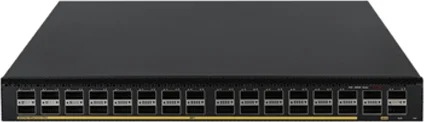
H3C S6550X-32Q-HI — official product photograph
H3C S6550X-32Q-HI · Official product source ↗

Three architectures · different operating models

Choose the optical architecture by the service.

H3C’s current all-optical portfolio includes Ethernet and PON approaches. Compare the specific equipment and service path; a generation label alone does not select the design.

01 / A dedicated link to each access device

Point-to-point optical Ethernet

Ethernet switch → matched optical modules → fiber → Ethernet access switch or optical AP.

Capacity: Each optical port has its own Ethernet link. Aggregation and WAN capacity still have to carry the combined demand.

Power: Local AC/DC or a separately designed compatible hybrid cable system. Ordinary fiber carries data only.

Useful when retaining Ethernet operations, mixing copper access with a fiber backbone, or assigning predictable link capacity to each zone.

Inspect the topology →
02 / Dedicated channels through a matched passive assembly

H3C multichannel optical Ethernet

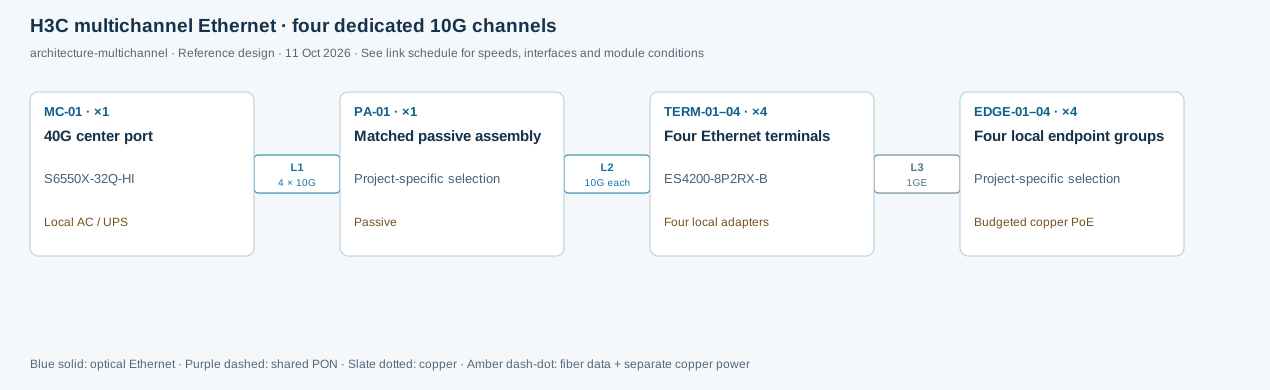
S6550X-32Q-HI QSFP+ → multichannel center optic → supported passive assembly → wavelength-matched terminal optics → Ethernet access devices.

Capacity: The illustrated 40G center interface exposes four independent 10G channels. The selected passive assembly and channel-to-port mapping are part of the design; it is not PON scheduling.

Power: Passive aggregation needs no local electrical supply. Every active access switch/AP still needs local power or a separately approved hybrid power path.

Useful for a campus seeking passive intermediate distribution while keeping Ethernet channels. Module generation, optical budget and the exact mapping must be confirmed together.

Inspect the topology →
03 / OLT, splitters and registered ONUs

PON / passive optical LAN

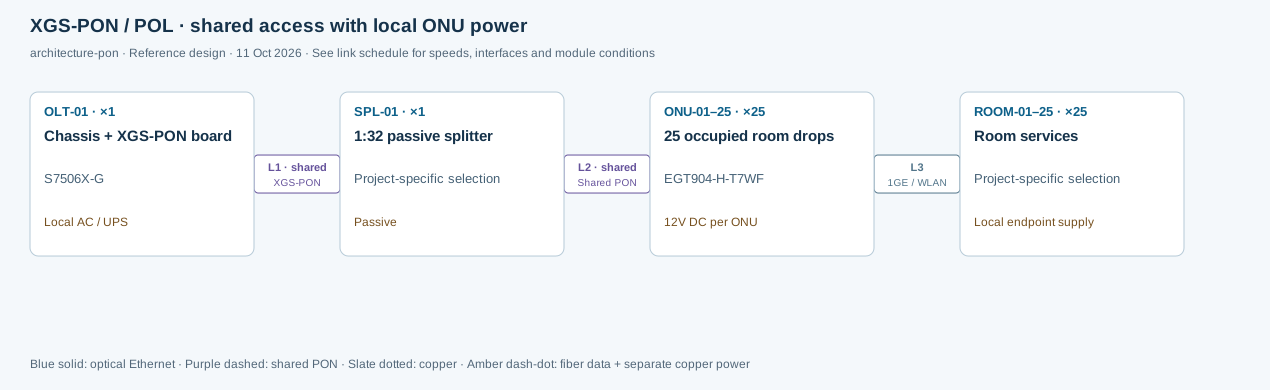
OLT PON service port → optical distribution and passive splitter → compatible ONU/ONT → room or zone endpoints.

Capacity: A PON port is shared by its ONUs. Split ratio, active users, service profiles and uplink contention determine usable service capacity.

Power: Splitters are passive. ONUs require local power; PoE-capable ONUs have both a per-port limit and a total output budget.

Useful for room-based or distributed access when shared capacity and centralized provisioning fit the operating model. Validate OLT/ONU protocol, optical class and software interoperability.

Inspect the topology →

Official architecture references: H3C all-optical portfolio ↗ · Adaptive Optical Network technical overview ↗. Exact model specifications and hardware guides take precedence for selection.

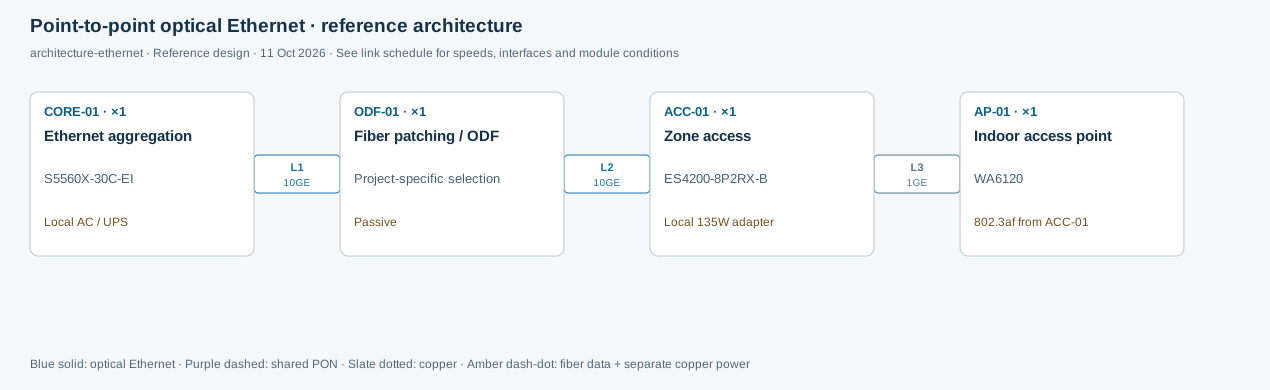
Point-to-point optical Ethernet · reference architecture

Physical connections
Point-to-point optical Ethernet · reference architectureReference design. Device IDs match the BOM. Connection IDs match the HTML link schedule. UPS → local AC adapter → ACC-01 → copper PoE → AP-01. The optical route carries no electrical power.Point-to-point optical Ethernet · reference architecturearchitecture-ethernet · Reference design · 11 Oct 2026 · See link schedule for speeds, interfaces and module conditionsL110GEL210GEL31GECORE-01 · ×1Ethernet aggregationS5560X-30C-EILocal AC / UPSODF-01 · ×1Fiber patching / ODFProject-specific selectionPassiveACC-01 · ×1Zone accessES4200-8P2RX-BLocal 135W adapterAP-01 · ×1Indoor access pointWA6120802.3af from ACC-01Blue solid: optical Ethernet · Purple dashed: shared PON · Slate dotted: copper · Amber dash-dot: fiber data + separate copper power
Reference design · architecture-ethernet · Device IDs match the BOM. Link IDs match the connection schedule below. Scroll horizontally or open the SVG for a larger view.

Logical services & boundaries

Separate management, staff, guest and security VLANs with explicitly permitted routes/ACLs. VLANs are logical segmentation, not physical isolation.

Electrical power path

UPS → local AC adapter → ACC-01 → copper PoE → AP-01. The optical route carries no electrical power.

Link schedule — interfaces, bandwidth and components
Link / endpointsSpeed / sharingPhysical path & interfacesModules / configuration conditions
L1
CORE-01 → ODF-01
10GE
Dedicated link / channels
Dedicated duplex single-mode Ethernet link; example 300m route.One matched 10G LR SFP+ at each active end; wavelength/connector and loss budget must match.
L2
ODF-01 → ACC-01
10GE
Dedicated link / channels
Continuation of L1 through patching, not a second independent uplink.ODF, duplex patch leads and splice allowance; no passive splitter.
L3
ACC-01 → AP-01
1GE
Dedicated link / channels
Cat6 channel within 100m including patch cords; data plus af power.No optical module on the AP copper link.

H3C multichannel Ethernet · four dedicated 10G channels

Physical connections
H3C multichannel Ethernet · four dedicated 10G channelsReference design. Device IDs match the BOM. Connection IDs match the HTML link schedule. The intermediate passive assembly has no power input. Every ES4200 uses its own adapter in this example. Hybrid powering is a different, separately validated deployment option.H3C multichannel Ethernet · four dedicated 10G channelsarchitecture-multichannel · Reference design · 11 Oct 2026 · See link schedule for speeds, interfaces and module conditionsL14 × 10GL210G eachL31GEMC-01 · ×140G center portS6550X-32Q-HILocal AC / UPSPA-01 · ×1Matched passive assemblyProject-specific selectionPassiveTERM-01–04 · ×4Four Ethernet terminalsES4200-8P2RX-BFour local adaptersEDGE-01–04 · ×4Four local endpoint groupsProject-specific selectionBudgeted copper PoEBlue solid: optical Ethernet · Purple dashed: shared PON · Slate dotted: copper · Amber dash-dot: fiber data + separate copper power
Reference design · architecture-multichannel · Device IDs match the BOM. Link IDs match the connection schedule below. Scroll horizontally or open the SVG for a larger view.

Logical services & boundaries

Ethernet VLAN/ACL/service design follows the active switches. Independent optical channels do not by themselves establish a government-approved physically isolated network.

Electrical power path

The intermediate passive assembly has no power input. Every ES4200 uses its own adapter in this example. Hybrid powering is a different, separately validated deployment option.

Link schedule — interfaces, bandwidth and components
Link / endpointsSpeed / sharingPhysical path & interfacesModules / configuration conditions
L1
MC-01 → PA-01
4 × 10G
Dedicated link / channels
Single-mode, single-fiber multichannel Ethernet trunk; 40G center interface. No PON OLT/ONU protocol.QSFP-40G-LR4-C-V2 with matching SFP-PLUS-M4-A-V2 terminal set; verify device/release compatibility and optical budget.
L2
PA-01 → TERM-01–04
10G each
Dedicated link / channels
Four dedicated channel drops, each mapped to one of four different terminal wavelengths.Four terminal SFP+ optics from the same approved set. Passive port mapping is confirmed before quotation.
L3
TERM-01–04 → EDGE-01–04
1GE
Dedicated link / channels
Independent copper access links; total eight ports and 115W with local adapter per ES4200.Cat6 within the designed channel length.

XGS-PON / POL · shared access with local ONU power

Physical connections
XGS-PON / POL · shared access with local ONU powerReference design. Device IDs match the BOM. Connection IDs match the HTML link schedule. OLT → equipment-room UPS. Each ONU → local 12V adapter/outlet. Room devices → separate local supply. Passive splitter and bare optical fiber supply no electrical power.XGS-PON / POL · shared access with local ONU powerarchitecture-pon · Reference design · 11 Oct 2026 · See link schedule for speeds, interfaces and module conditionsL1 · sharedXGS-PONL2 · sharedShared PONL31GE / WLANOLT-01 · ×1Chassis + XGS-PON boardS7506X-GLocal AC / UPSSPL-01 · ×11:32 passive splitterProject-specific selectionPassiveONU-01–25 · ×2525 occupied room dropsEGT904-H-T7WF12V DC per ONUROOM-01–25 · ×25Room servicesProject-specific selectionLocal endpoint supplyBlue solid: optical Ethernet · Purple dashed: shared PON · Slate dotted: copper · Amber dash-dot: fiber data + separate copper power
Reference design · architecture-pon · Device IDs match the BOM. Link IDs match the connection schedule below. Scroll horizontally or open the SVG for a larger view.

Logical services & boundaries

Use ONU service profiles, guest isolation, staff/security VLANs, multicast policy and management controls. A VLAN over a shared PON is not independent physical cabling.

Electrical power path

OLT → equipment-room UPS. Each ONU → local 12V adapter/outlet. Room devices → separate local supply. Passive splitter and bare optical fiber supply no electrical power.

Link schedule — interfaces, bandwidth and components
Link / endpointsSpeed / sharingPhysical path & interfacesModules / configuration conditions
L1
OLT-01 → SPL-01
XGS-PON
Shared PON branch
One nominal 10G-class symmetric PON service port, shared across the branch; payload is lower than line rate.Compatible OLT PON optic/optical class; OS2 distribution; connector type and polish matched.
L2
SPL-01 → ONU-01–25
Shared PON
Shared PON branch
25 separate single-fiber drops on one shared PON; ONU registration and service profile required.EGT904 XGS-PON mode, SC/UPC termination; reconcile splitter connectors without mating APC directly to UPC.
L3
ONU-01–25 → ROOM-01–25
1GE / WLAN
Dedicated link / channels
Individual GE endpoint links plus integrated WLAN; traffic upstream shares the PON branch.Copper patch leads; phone/TV power and voice/IPTV configuration supplied separately.

Data and electricity are separate paths

Hybrid cable power is a deployment option.

It can accompany a supported optical Ethernet deployment. It does not turn bare glass fiber into an electrical power conductor.

Data path

Optical source module → glass fiber → matched receiving optic → Ethernet access device. Confirm protocol, wavelengths, connectors, loss and configured speed.

Power path

Compatible source PSU/port → matched pigtail → hybrid cable copper conductors → supported receiving power input → budgeted local PoE loads. Calculate voltage drop, length, gauge and failure reserve.

A passive PON splitter cannot replace a matched multichannel Ethernet assembly. A standard optical module cannot be assumed compatible with a proprietary optical/electrical powered interface.
H3C S6550X-32Q-HI — official product photograph

Core / optical aggregation

S6550X-32Q-HI

Dedicated Ethernet channels for campus aggregation.

Budget the chassis, optics and modules; fiber alone supplies no power.

Model, source & quote selection →
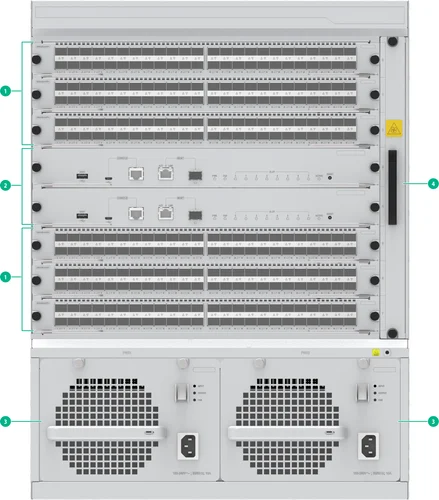
H3C S7506X-G — official hardware drawing

Modular campus core / OLT platform

S7506X-G

Larger converged campuses needing modular Ethernet and PON service boards.

13U chassis. Include MPUs, cards, optics, fans and supplies in power/UPS sizing.

Model, source & quote selection →
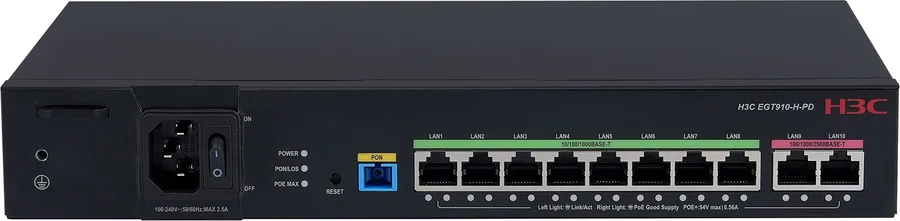
H3C EGT910-H-PD — official product photograph

Zone ONU with PoE+

EGT910-H-PD

Several APs, cameras or phones near a local power point.

120W total PoE output; device maximum consumption <150W.

Model, source & quote selection →

Six industry reference designs

See the architecture become a purchasing scope.

Each example includes assumptions, a physical topology, logical/power notes, exact H3C candidates, calculations and a downloadable BOM. These are reference designs, not completed installation claims.

Hotel application environment
Reference design · NPL-HOT-100-R1

100-room hotel · XGS-PON reference design

A room-based network with locally powered ONUs, a separate common-area PoE branch and an explicit bandwidth plan for guest, TV and operational services.

View topology, equipment & BOM →
Commercial / Office Building application environment
Reference design · NPL-BLD-024-R1

Office building · 24-zone fiber access

A six-floor office reference with 24 point-to-point fiber links, local access power and a measurable upgrade path from 2.5GE access to selected 10GE ports.

View topology, equipment & BOM →
Factory & Warehouse application environment
Reference design · NPL-FAC-004-R1

Factory · industrial zone and office network

Separate office access, warehouse mobility and production telemetry around four industrial network zones, with explicit PoE and environmental limits.

View topology, equipment & BOM →
Public Building application environment
Reference design · NPL-GOV-002-R1

Government building · two physically separate networks

An illustrative public-service network and restricted office network with independent switches, uplinks, fiber cables and management paths.

View topology, equipment & BOM →
Education application environment
Reference design · NPL-SCH-016-R1

School campus · 16-zone multichannel Ethernet

Four building groups with passive intermediate distribution and 16 dedicated 10G terminal channels, plus an explicit plan for local terminal power.

View topology, equipment & BOM →
Retail application environment
Reference design · NPL-MAL-016-R1

Shopping mall · fiber data and remote copper power

Sixteen retail/common-area zones fed by point-to-point optical Ethernet and a separately engineered hybrid cable DC path, with a 40W output limit at each terminal.

View topology, equipment & BOM →

Hotel starting points: 20 to 500 rooms

Use the property size to open a planning conversation. Room count alone does not determine AP, camera, switch or optical port quantity.

Read the hotel sizing guide

Engineering inputs that change selection

Check the limits before the model list is approved.

Calculations use project assumptions and current manufacturer documentation. Final designs need measured routes, actual endpoint loads and agreed acceptance criteria.

DecisionWhat must be checkedWhat it changes
Ports & capacityEndpoint quantity/speed; active vs spare ports; combo exclusivity; uplink ratio; video/client bursts.Access/core model, quantity, uplink rate and expansion.
Optical pathTx/Rx wavelengths, SMF/MMF, connector/polish; fiber + connector + splice + passive loss + maintenance margin.Matched module pair/set, ODF and achievable path—not distance alone.
PON serviceOLT board/protocol, ONU model/release, split ratio, class, branch loading, multicast and registration.Shared capacity, optics and provisioning; an OLT chassis alone is insufficient.
Electrical powerPoE class per endpoint; total output; device input; cable/conversion losses; PSU failure mode; UPS runtime.PSU, adapters, hybrid conductor gauge, number of powered endpoints and backup scope.
WLANWall materials, channels, country code, concurrent clients, roaming, interference and Ethernet bottlenecks.AP type/locations, controller/cloud and AP capacity licenses.
Resilience & operationsSingle failure domains, diverse routes, recovery protocol, port use, management access, spares and support.Backup devices/links, software and tested recovery procedure.

Optical budget method: route attenuation + connector losses + splice losses + splitter/passive insertion loss + agreed margin ≤ usable optical budget of the matched transmitting/receiving class. Verify receive overload at short distances too.

Partner equipment · coordinated supply

Specified by role. Quoted as a complete scope.

NexPro-Link works with H3C, IP-COM, Fanvil, TP-Link and Huawei as technology and equipment supply partners, with wholesale and project quotations.

H3CIP-COMFanvilTP-LinkHuawei

H3C is the manufacturer of the H3C equipment shown. NexPro-Link provides selection, project supply and agreed design support. Cross-brand protocol, software, optical and power compatibility must be confirmed for the exact models. CCTV manufacturing and OEM/ODM remain a separate NexPro-Link offering.

Selection & procurement questions

Practical answers before you specify.

What is the difference between optical Ethernet and PON?

Point-to-point optical Ethernet assigns an Ethernet link to each access device. H3C multichannel Ethernet can carry separate Ethernet channels through a matched passive assembly. PON instead uses an OLT, passive splitters and registered ONUs that share a PON port. Compare usable busy-hour bandwidth, optical loss, endpoint power, management, compatibility and migration effort—not just the amount of fiber.

Is an all-optical network suitable for every building?

No single architecture fits every site. Existing certified copper, available floor rooms, route distances, local power and maintenance skills may favor conventional Ethernet. Fiber may help long routes or distributed access, but APs, ONUs and switches still need electricity. Start with the retained assets and service requirements, then compare complete equipment, cabling, power and operating costs.

Can you design a network from architectural drawings?

Yes. Drawings help establish zones, routes, equipment rooms and proposed device positions. We also need intended use, client/device counts, existing systems and required services. The first deliverable can identify assumptions and missing inputs; RF coverage, actual cable condition, optical loss and installation constraints need site verification before a final construction or purchasing release.

Can we keep some existing switches and cabling?

Often, after checking model/release support, available ports, uplink capacity, PoE budgets, fiber measurements and copper test results. A migration schedule should label each item retain, replace or add, show temporary interconnections, define the outage and rollback plan, and test voice, video, authentication and management before the next zone is moved.

How do you select H3C models for a project?

We start with device roles and exact interfaces, then check capacity, environmental conditions, power input/output and required software. The full model suffix matters: FS5500V2-24UXS6Y-EI has base 2.5GE access and licensed upgrades on selected ports, while ES4200-8P2RX-B has different PoE budgets under local and remote power. The proposed model, accessories and unresolved configuration items are listed together.

Are transceivers and licenses included in the quotation?

They are included only when expressly listed. Ask for quantity and exact SKU of both optical ends, fiber/connector type, wavelengths, rated loss/distance, PSU/fan sets and feature/AP/security licenses. Multichannel optics must be a matched generation/set; PON needs the correct OLT board, optic class and ONU interoperability. A chassis price alone is not a complete network BOM.

How are APs and access devices powered?

Use a compatible PoE copper port, local AC/DC adapter, or an approved hybrid fiber/copper power system. Glass fiber carries data only. Hybrid cables use electrical conductors alongside fiber and need voltage-drop, gauge, length and receiver checks. Calculate each PSE port limit and total switch/ONU budget, including startup, losses, reserve and the required single-supply failure condition.

Can the network carry CCTV, IPTV and IP phones?

Yes, when interfaces and service requirements are compatible. CCTV adds sustained recording traffic and storage/retention demand; IPTV may require multicast with an IGMP querier and controlled replication; phones need the supported SIP/PBX platform, power and QoS. Define VLANs, routing/ACLs, DHCP/DNS, time synchronization, peak demand and backup power, then test the actual endpoint/software combination.

Can H3C equipment work with other brands?

Standards-based Ethernet and selected optical links can interoperate when speed, wavelength, connector, fiber and configuration match. That does not guarantee proprietary management, stacking, PON ONU registration or hybrid power compatibility. Give us the exact other-brand model and firmware so the common protocol path, unsupported functions and required bench tests can be identified.

Do you provide wholesale project pricing?

NexPro-Link supplies H3C and partner-brand equipment with wholesale and project quotations. Send models and quantities if you have a BOQ, or drawings if selection is still open. The offer confirms exact configuration, regional availability, accessories, licenses, warranty/support scope, payment and delivery terms. No fixed discount, stock position or lead time is implied by these reference pages.

What information is needed for a network BOQ?

Start with the country, building use, new-build/upgrade stage, drawings or current device list, and the services to connect. Useful follow-up inputs are port/client counts, distances, fiber/copper tests, power and UPS needs, security boundaries, availability targets and preferred brands. Use the downloadable checklist and leave unknown fields blank; uncertain quantities are identified before quotation.

Are the displayed projects actual installations or reference designs?

These six projects are reference designs prepared to explain architecture, model selection and BOM structure. They are not claims of completed customer installations. Each states its assumed scale, port/power calculations and outstanding site inputs. Official H3C product photographs or hardware drawings are identified separately from application imagery, and model sources are linked beside the specifications.


Your next step

Start with the information you have.

Send a short requirement, drawings, an existing BOQ or the exact H3C models you need. We will identify the selection and supply scope.

The page, architecture and reference equipment are included automatically. Your selected quote-list quantities can be edited before sending.

Add project details, if known

One attachment up to 3 MB, or a shared-file link. Unknown engineering fields can be confirmed later.

Send a quick inquiry

A short message is enough to get started.

Contact and inquiry details
I’m interested in
Page details included with your inquiry

Request: Network design from drawings · Architecture: Architecture comparison: optical Ethernet / multichannel Ethernet / PON

Add company details or a file (optional)

PDF, DWG, Excel, CSV, JPG, PNG or Word · up to 3 MB.

We use these details to respond to your inquiry. Privacy policy

Prefer a conversation? WhatsApp us or send an email.

Catalog Chat