
PoE network video recorders
PoE NVRs for 4, 8 and 16 IP Cameras
Compare camera capacity, incoming bandwidth and HDD bays. Build the recorder configuration around your project.
Download English datasheetsUp to 8MP camera input; recording up to 5MP.All three models: 2-channel simultaneous playback · H.265+ / H.265
Three sizes. The differences that matter.
Start with camera count, then check bitrate, recording settings and storage. More channels do not increase the simultaneous playback limit.
Compare all three columns. On smaller screens, scroll within the table.
| Choose your capacity | 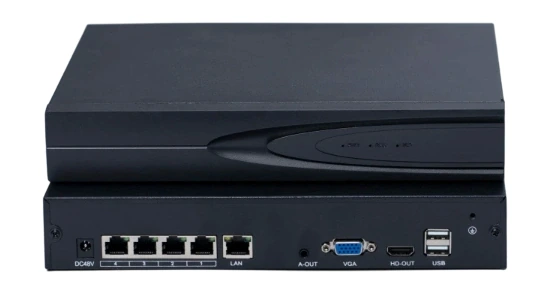 4CH PoE NVRView product image 4CH PoE NVRView product image | 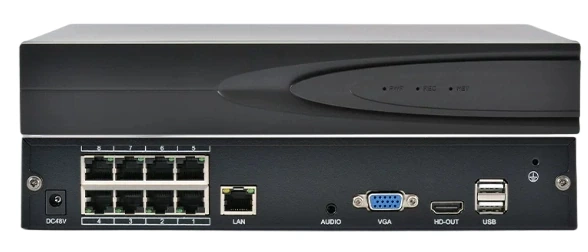 8CH PoE NVRView product image 8CH PoE NVRView product image | 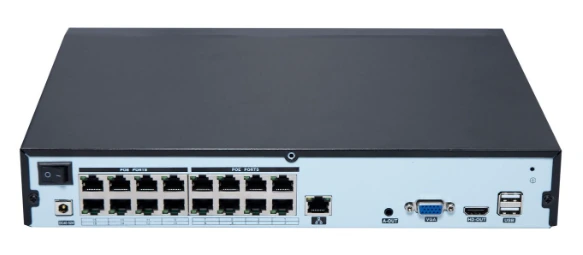 16CH PoE NVRView product image 16CH PoE NVRView product image |
|---|---|---|---|
| IP camera inputs | 4 channels | 8 channels | 16 channels |
| Built-in PoE ports | 4 × 10/100Mbps | 8 × 10/100Mbps | 16 × 10/100Mbps |
| Incoming bandwidth | 80Mbps | 160Mbps | 260Mbps |
| Camera input / recording | Up to 8MP / up to 5MP | Up to 8MP / up to 5MP | Up to 8MP / up to 5MP |
| SATA HDD bays | 1 bay | 1 bay | 2 bays |
| Maximum capacity per HDD | 14TB | 14TB | 14TB |
| Simultaneous playback | 2 channels | 2 channels | 2 channels |
| LAN connection | 1 × 10/100/1000Mbps RJ45 | 1 × 10/100/1000Mbps RJ45 | 1 × 10/100/1000Mbps RJ45 |
| Video outputs | 1 × HDMI + 1 × VGA | 1 × HDMI + 1 × VGA | 1 × HDMI + 1 × VGA |
| PoE power budget | Confirm the final PSU and camera load | Confirm the final PSU and camera load | Confirm the final PSU and camera load |
| Next step | Quote 4CHDatasheetEnglish · DOCX | Quote 8CHDatasheetEnglish · DOCX | Quote 16CHDatasheetEnglish · DOCX |
HDD inclusion and compatibility require confirmation. Two HDD bays do not establish RAID support or a guaranteed usable capacity. Review the power arrangement before ordering.
See the hardware before you specify it.
Each photograph comes from the corresponding product datasheet. Open an image to inspect it at its supplied resolution.
8CH PoE NVR
16CH PoE NVR
Read the connections
8CH reference rear panel. Markers identify the visible interfaces; the final hardware configuration remains subject to confirmation.
- 1PoE camera ports
- 8 × 10/100Mbps on this model. The 4CH and 16CH variants have 4 and 16 ports respectively.
- 2LAN
- 1 × 10/100/1000Mbps network port. The separate camera ports remain 10/100Mbps.
- 3VGA
- Local display connection. Confirm the required monitor mode.
- 4HDMI
- Local display connection. Simultaneous HDMI and VGA output is listed; a 4K output mode is not established.
- 5USB
- 2 × USB 2.0 interfaces.
Follow the camera, network and display paths.
Keep the camera PoE connections separate from the LAN and display outputs when preparing the equipment list.
IP cameras4 / 8 / 16 inputsExact models and power demand to be checked
Video data →← PoE powerEthernet camera cables
PoE NVRRecording up to 5MP1 or 2 SATA HDD bays, depending on the model
HDMI / VGA → displayLocal monitorLive view and 2-channel simultaneous playback
LAN ↔ network ↔ internetSeetong mobile / PC accessRemote live view and playback depend on network and configuration
Recorder supply → NVR → PoE camerasConfirm input supply, adapter / PSU, recorder and HDD load, per-port power and total PoE budget.
Plan the views your site needs.
Retail, restaurants and small warehouses can have very different camera and retention requirements. Use the coverage areas to start the discussion, then size the recorder.

Retail
Coverage to consider: Entrance, checkout and merchandise aisles.
Count the required views, check backlighting at the entrance and define the recording schedule. Confirm cable routes and each camera’s power demand.
Discuss retail requirements
Restaurant
Coverage to consider: Entrance, service counter and public circulation areas.
Plan coverage around opening hours and lighting changes. Confirm the permitted coverage areas, cable routes, camera count and retention needs.
Discuss restaurant requirements
Small warehouse
Coverage to consider: Receiving area, access doors and working aisles.
Check sightlines around racks, cable distances and lighting. Share the camera schedule, peak power demand and incident-review requirements.
Discuss warehouse requirementsSize the system beyond the channel count.
A recorder can have enough camera ports while the storage plan or power supply still needs work. Review these three checks together.
01
Bandwidth & recording
Add the incoming bitrates of the selected camera streams and compare them with the recorder’s 80 / 160 / 260Mbps limit. Confirm the recording profile separately.
- Send us
- Camera count, model, input stream, codec, bitrate and frame rate.
- Keep in view
- Recording: 5MP / 4MP / 3MP / 1080P / 960P / 720P. Playback: 2 channels at once.
02
HDDs & retention
Capacity alone does not establish how long video can be retained. Match the actual recording settings and schedule to the required retention period.
- Send us
- Retention days, continuous or event recording, hours per day, HDD model and capacity.
- Keep in view
- Up to 14TB per HDD. The supplied retention table lacks complete assumptions; its 18TB column does not confirm drive compatibility.
03
PoE & recorder supply
Check the maximum camera demand and the recorder / HDD load against the final power arrangement. Port count does not establish available power.
- Send us
- Camera peak power, cable routes, installation conditions, destination supply and plug requirements.
- Keep in view
- AC descriptions and the pictured DC inlet require configuration confirmation. The 16CH 150–200W reference is not a verified PoE rating.
- Camera scheduleViews + models + streams
- Recording planSettings + hours + retention
- Hardware reviewBandwidth + HDDs + power
- Confirmed configurationRecorder + accessories + quote
Detection and remote access, with the conditions clear.
Camera discovery and addition are listed in the datasheets. Verify the intended camera and firmware combination during configuration and sample checks.
Human / vehicle and perimeter events
The datasheets list human and vehicle detection, tripwire and region intrusion detection, NVR pop-up alarms and event playback.
Confirm: the camera model, firmware, detection rules and required alarm linkage. These functions are not guaranteed for every connected camera.
Seetong access and notifications
Mobile and PC clients are listed for remote live view and recorded-video playback, with app alarm notifications.
Confirm: client and account setup, network availability and push-notification settings. Use the approved network security configuration.
Explore the Seetong systemTurn a product choice into a confirmed order.
For distributors, installers, project teams and private-label buyers: use one configuration brief to align the recorder, accessories, documents and supply scope.
- 1
Share the requirement
Preferred recorder, quantity, destination, cameras and recording needs.
- 2
Review the configuration
Check interfaces, HDDs, PoE load, power supply and required documents.
- 3
Evaluate a sample
Agree sample terms and verify the intended camera, event and playback workflow.
- 4
Confirm quote & order
Approve the final configuration, package, branding, MOQ and delivery terms.
Agree what is actually in the package.
The photograph uses an 8-port chassis. It does not establish the contents supplied with every 4CH, 8CH or 16CH recorder.
- Recorder variant and whether HDDs are included
- Power adapter / PSU rating, AC cord and destination plug
- Mouse, Ethernet cable, fittings and quantities
- Branding, labels, packaging and document requirements
Customization scope, sample terms, MOQ, lead time and accessories follow the final quotation and approved configuration.
Discuss CCTV OEM requirementsDatasheets & configuration checklist
Download the supplied English documents for model review. The power and storage-reference qualifications above also apply when reading these files.
4CH PoE NVR datasheetEnglish · DOCX · 1.76 MB8CH PoE NVR datasheetEnglish · DOCX · 1.75 MB16CH PoE NVR datasheetEnglish · DOCX · 1.77 MB
Keep the open points with the quotation.
Use a simple checklist for camera settings, HDDs, power, accessories and delivery requirements.
Buyer questions, answered.
The checks that matter before sample evaluation and final configuration approval.
Contractor & integrator supportHow do I choose between 4, 8 and 16 channels?
Start with the required camera views and any planned additions. Then check the combined incoming bitrate against 80, 160 or 260Mbps, the recording settings and the HDD arrangement. A site type alone does not determine the right recorder.
Does 8MP camera input mean 8MP recording?
No. All three datasheets specify camera input up to 8MP and recording up to 5MP. Confirm the camera stream and recording configuration together. The HDMI connection does not establish a 4K display-output specification.
How many channels can I play back at the same time?
All three models specify 2-channel simultaneous playback. This is separate from the number of cameras the recorder can accept. Check this limit against your incident-review workflow.
How many HDDs can each recorder hold?
The 4CH and 8CH models each have one SATA HDD bay. The 16CH model has two. The specified maximum is 14TB per HDD. Confirm the selected HDD model and whether drives are included in the quotation. Two bays do not establish RAID support or 28TB of usable recording space.
Can you guarantee a recording retention period from HDD capacity alone?
No. Retention depends on the camera bitrate, frame rate, codec, recording hours, recording mode and usable disk capacity. The datasheets’ reference table does not provide all these assumptions or a 16-channel result. Share your planned settings and required days for a storage review.
How do I know whether the PoE power budget is sufficient?
Provide each camera’s model and maximum power demand, including any IR illumination or other peak load. Confirm the recorder’s total PoE budget, per-port rating, power supply and HDD load. The 48V PoE description alone does not establish an IEEE class or compatibility. The 16CH document’s 150–200W range is an unverified reference, not a rated PoE budget.
Will third-party cameras support all detection and event features?
That needs to be checked with the exact camera model, firmware and recorder configuration. The datasheets list human and vehicle detection, tripwire and region intrusion detection, and event playback. Confirm the required functions through a configuration review and sample evaluation; camera connection alone does not prove every feature works.
What is required for remote access?
The datasheets list Seetong mobile and PC access for live view and recorded-video playback. Confirm the intended client, account and network configuration. Remote access and alarm notifications depend on network availability and the configured camera and recorder functions. Use the project’s approved network and access-control settings.
Are all pictured accessories included?
No package contents should be inferred from the image. The reference shows an 8-port chassis, an adapter, AC cord, mouse, Ethernet cable and small accessory packs. Confirm the accessories, quantities, plug and power arrangement for your selected recorder in the final quotation.
What should I send for a sample, OEM discussion or quotation?
Start with the preferred recorder and a short requirement. Quantity, destination, camera models, recording plan, HDD needs, branding and packaging help the review. Sample terms, customization scope, MOQ, lead time and included accessories are confirmed in the quotation and final order configuration.
Your next step
Request a configuration quote.
Choose a recorder or ask us to help with selection. Add the details you already have; a complete specification is not required to start.
Add project details (optional)
Selected: Configuration review
Continue to InquiryYour selection carries into the inquiry. Only name, email and a short message are required there.