
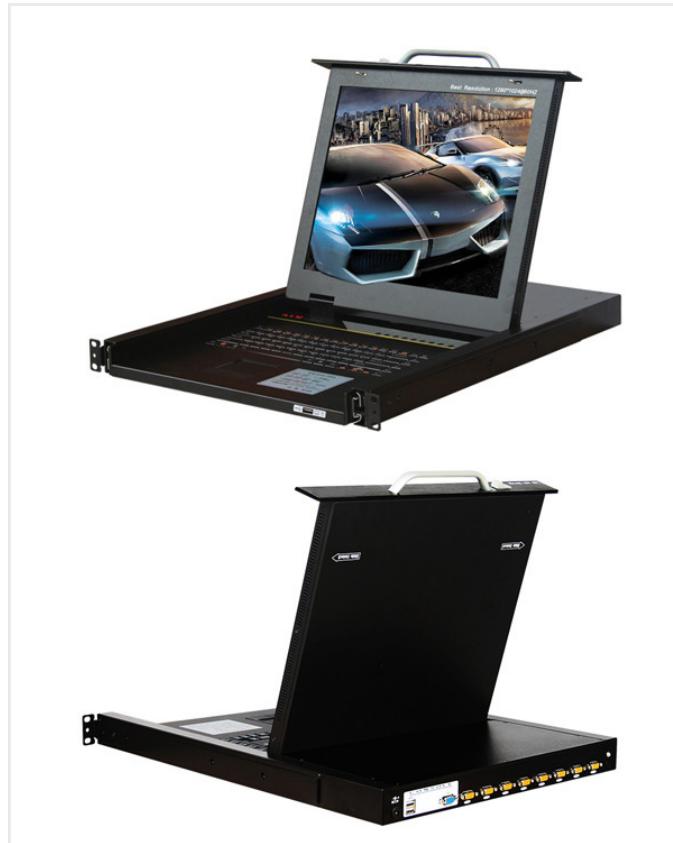
Local server-room operation
8-Port Local VGA Console
Small rack groups where operators need direct local console access and simple 1U installation.
- 8 server ports
- Local VGA workflow
- Rack-depth check
- Cable kit review
SP1708-BCompare SP8032, SP1708, 16-port IP and 32-port CAT5 KVM families by port count, local users, remote users, display resolution and access workflow.
KVM console range
Compare local, IP, digital and CAT5 KVM records with exact product images and diagrams kept on the correct model or configuration page.
Project-first selection
A KVM quote depends on the server count, local console requirement, remote user count, transmission method, resolution and rack installation plan.
Fastest way to start
Send server count, interface type, required local and remote users, preferred resolution, rack depth and whether the project needs IP or CAT5 access.
Confirm server count, growth reserve, interface type and whether cascade expansion is required.
Define local console users, remote IP users, permissions and maintenance workflow.
Match resolution, keyboard/mouse interface and supported operating systems to the server environment.
Choose local VGA, digital KVM, IP access or CAT5 extension based on rack layout and distance.
Check rack depth, 1U format, cable kits, power supply and installation access.
Confirm KVM unit, cables, adapters, labels, manuals, quantity and delivery schedule.
Image-led project packages
Each package starts from an operator workflow and links to a representative KVM model. Final user count, cable kit and adapter scope are confirmed during RFQ.
Local server-room operation
Small rack groups where operators need direct local console access and simple 1U installation.
SP1708-B
Multi-user digital rack management
Operations that need the same SP8032 hardware family compared by local and remote user options.
SP8032
Remote IP KVM access
Remote maintenance teams that need IP access, resolution confirmation and rack-depth planning.
SP5916
High-density CAT5 rack access
Higher-density rack groups where RJ45/CAT5 cabling and cascade assumptions need confirmation.
SP8732KVM console product catalog
Browse local, IP, digital and CAT5 KVM models with product images and diagrams kept on the correct model or configuration page.
All available products
7 products shown
SP8032SP1708-B SP1708-C
 SP5716SP5916SP8732
 SP8932
CAT5 KVM
Full inquiry scope
NexPro can review rack KVM switches, local consoles, IP access, CAT5 cabling, adapters and rack installation scope in one quotation.
Keep the approved KVM access plan attached to the project account
Preserve server count, user count, model, cable kit, adapters, resolution and rack-position notes so future expansions follow the same confirmed access architecture.
Download the product portfolio and find specifications for your selected model.
Product range, model specifications and application references.
Document language: English
SP8032 · SP1708-B · SP1708-C · SP5716 · SP5916 · SP8732 · SP8932
Model and category questions for system integrators, distributors and contractors preparing an RFQ.
Confirm server count, local or IP access, interface type, supported resolution, rack space, user count and any remote security or daisy-chain requirement.
Review network access, authentication, encryption, browser or client requirements, remote-user count and the exact server-interface modules supported by the model.
Yes. Send the equipment list, drawing or tender reference. The review can identify matching catalog models, related accessories and the model-level documents that are available for the selected scope.
List the required protocol, connector, voltage, software or system interface. Compatibility is checked against the selected model information and is recorded as a confirmation point before order approval.
Provide the target model, quantity, destination, logo position, label, manual language and packaging requirement. Available OEM scope and minimum quantity are confirmed per model in the quotation.
Commercial terms are confirmed for the exact model, quantity, destination and order stage. Use the issued quotation and order documents rather than a generic website statement.
Yes. Send the complete list and destination. Packing compatibility, carton grouping, document scope and the practical shipment method are reviewed before the order is confirmed.
Send the target market, tender clause and exact model list. Only documents that match the selected model and stated scope should be used for approval.
Need a model-specific answer? Send the product list for review.
Send your project requirements or BOM list. The team reviews the selected models, quantity, destination and customization scope, then confirms quotation timing.
Send your model list, quantity and destination for a reviewed quotation.
Start RFQExplore all models, compare specs and build your project equipment list.
View ProductsSend your preferred time and discussion scope for a technical call request.
Request Call