

The manual's account-count statement cannot establish simultaneous viewing capacity. Define active sessions, calculate their stream payload and test the actual transmission and decoding paths.
Section 01
Specify active sessions separately from saved users
The manual's statement of up to 38 users describes account administration within its documented family scope. It does not prove that 38 people can simultaneously view every camera at full resolution. Specify the active viewers, their open channels, selected streams and concurrent playback or download tasks, then calculate the video payload on each relevant link. Verify permissions before testing capacity, and distinguish recorder transmission from client decoding and local monitor output. A procurement requirement should identify the workload that must succeed on the selected model and firmware. Saved account count alone cannot establish network capacity, playback combinations or a usable viewing experience.
Sections 1.2 and 4.12.3 provide the account-management basis. Keep the 38-user statement attached to that manual scope; do not transfer it to an unidentified current commercial model. For procurement, maintain separate fields for registered users and active sessions.
A person with an account may be disconnected, watching a substream layout or replaying an incident. These states create different workloads. Ask what each simultaneous user actually needs to do before converting the user list into an equipment requirement.
Section 02
Establish which sessions are authorized
Section 4.12.3 separates local and network permissions, including preview, playback, settings and PTZ. Local recording backup is independently authorized. Define the manager's required tasks on the network path and test an allowed action and a prohibited action.
If remote playback is denied, resolve that authorization question before treating the failure as exhausted capacity. A successful local preview does not establish remote playback rights. Conversely, an authorized session that struggles only when the agreed workload is active needs a performance investigation.
Keep administrative maintenance outside the viewing test unless it is an explicit requirement. The manual's remote-upgrade row contains inconsistent descriptive text, so it cannot establish that permission's behavior by itself. A capacity test should have a clear, repeatable set of permitted video tasks.
Section 03
Calculate the streams crossing the selected uplink
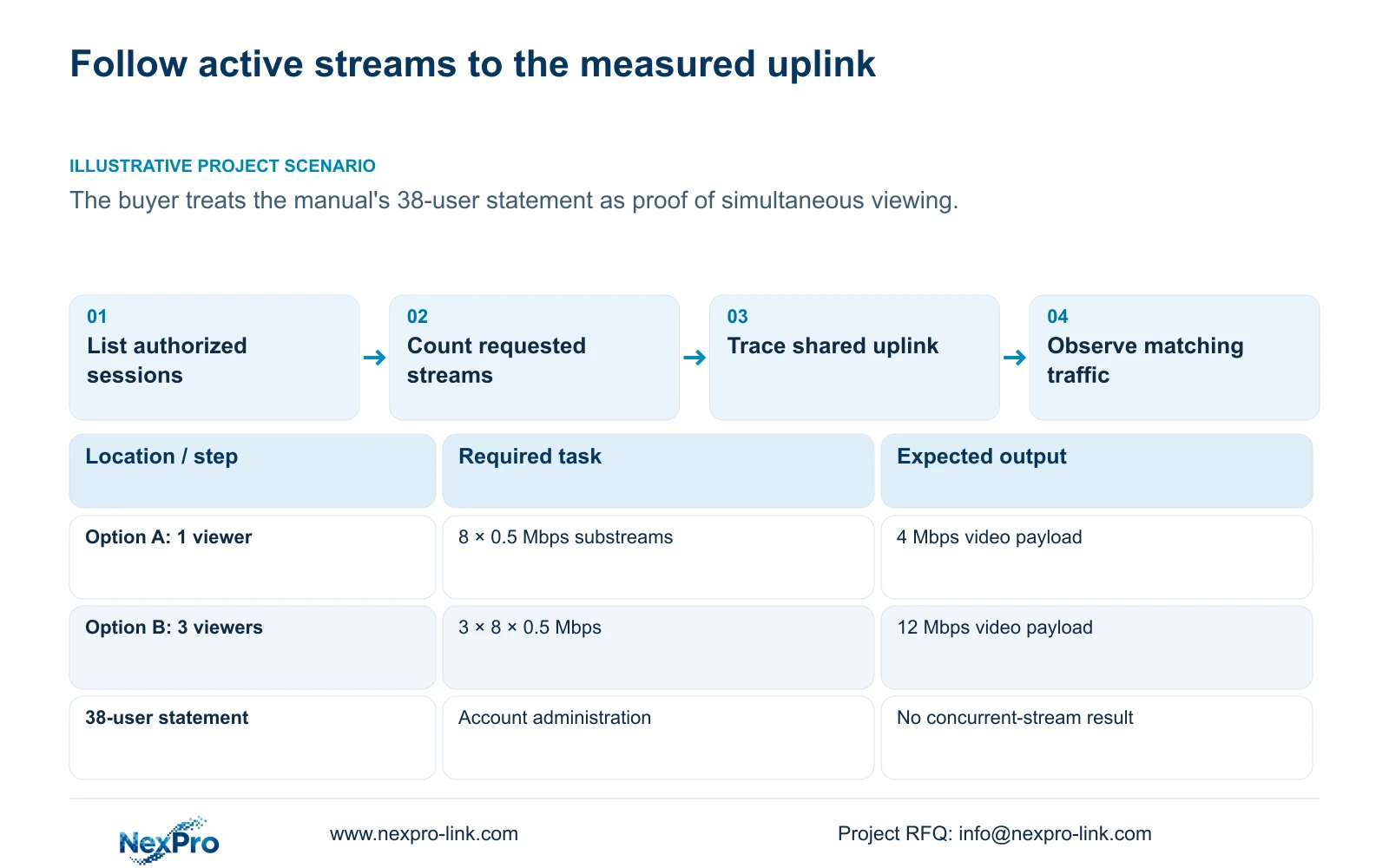
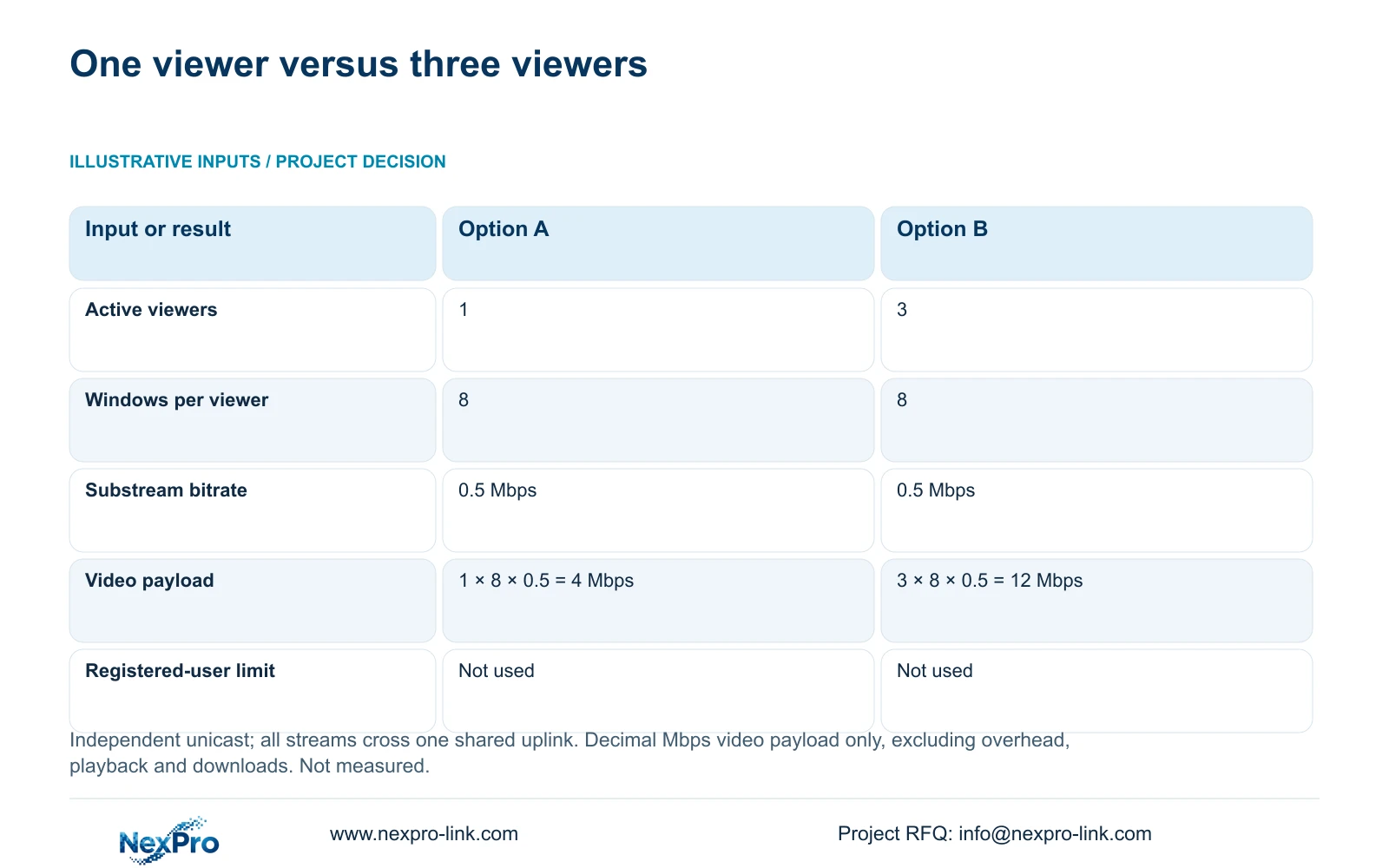
The supplied illustration uses 8 substreams per operator at 0.5 Mbps per stream. Option A has 1 active viewer and option B has 3. Each viewer receives independent unicast streams, and every stream crosses the same uplink being calculated. Units are decimal Mbps.
Uplink video payload (Mbps) = active viewers × windows per viewer × bitrate per stream (Mbps). Option A: 1 × 8 × 0.5 Mbps = 4 Mbps. Option B: 3 × 8 × 0.5 Mbps = 12 Mbps. The registered-user limit is not an input to either calculation.
The result describes compressed video payload for those stated sessions. It excludes protocol overhead and other network activity. If the deployment uses relay distribution, stream reuse or different links, determine which streams cross each link and revise the calculation accordingly.
If the actual arrangement matches the independent-unicast assumption, use 4 Mbps or 12 Mbps as the corresponding payload requirement before assessing available link capacity. Neither result proves that a recorder supports the proposed sessions. Add separately specified playback and downloads to the workload assessment rather than silently including them in the live-view figure.
| Input or result | Option A | Option B |
|---|---|---|
| Active viewers | 1 | 3 |
| Windows per viewer | 8 | 8 |
| Bitrate per substream | 0.5 Mbps | 0.5 Mbps |
| Arithmetic | 1 × 8 × 0.5 = 4 Mbps | 3 × 8 × 0.5 = 12 Mbps |
| Registered-user limit | Not used | Not used |
Section 04
Measure the path carrying the sessions
Section 4.3.3.3 presents interface transmit and receive traffic. Identify the interface and operating interval before interpreting its values. Camera recording input, remote live viewing, playback and downloads can follow different paths, so outgoing traffic need not equal incoming camera traffic.
Record a baseline with the normal recording workload, then observe the defined viewing arrangement. Keep the stream selection and concurrent tasks with the traffic record. Compare the planning calculation with measurements of matching scope; interface traffic may include overhead and activity outside the calculated video payload.
If the observed change differs from the illustration, check the selected stream bitrates and whether each viewer creates independent traffic on that link. Establish the actual relay or reuse behavior before concluding that the recorder or uplink is faulty.
An isolated screenshot without the session state cannot reproduce the requirement. Retain the model, firmware, relevant interface and workload conditions with each observation.
Section 05
Separate transmission from decoding and display
A recorder can receive camera streams while having a different limit for local preview or simultaneous playback. A remote client also needs to process the streams it receives. Check input channels, incoming bandwidth, local preview decoding, playback combinations and monitor output as separate requirements.
Section 5.2 lists TS8232C4 local playback as 1×4K OR 4×2MP OR 2×5MP. These are alternative modes. They cannot be added together or interpreted as four simultaneous 4K playback streams.
Other appendix examples differ: TS8108D7 lists 1×3MP; TS8116D7 lists 1×5MP OR 2×2MP. TS8836M/TS8436M lists 1×4K 30fps OR 2×5MP OR 4×4MP@20fps OR 4×2MP@25fps. Preserve those model identities and OR relationships.
None of those TS entries has an established mapping to NexPro-Link commercial SKUs. Nor do local playback entries establish remote session capacity. If a client struggles while recorder transmission remains within the observed requirement, investigate the client workload separately from the recorder's local display mode.
Section 06
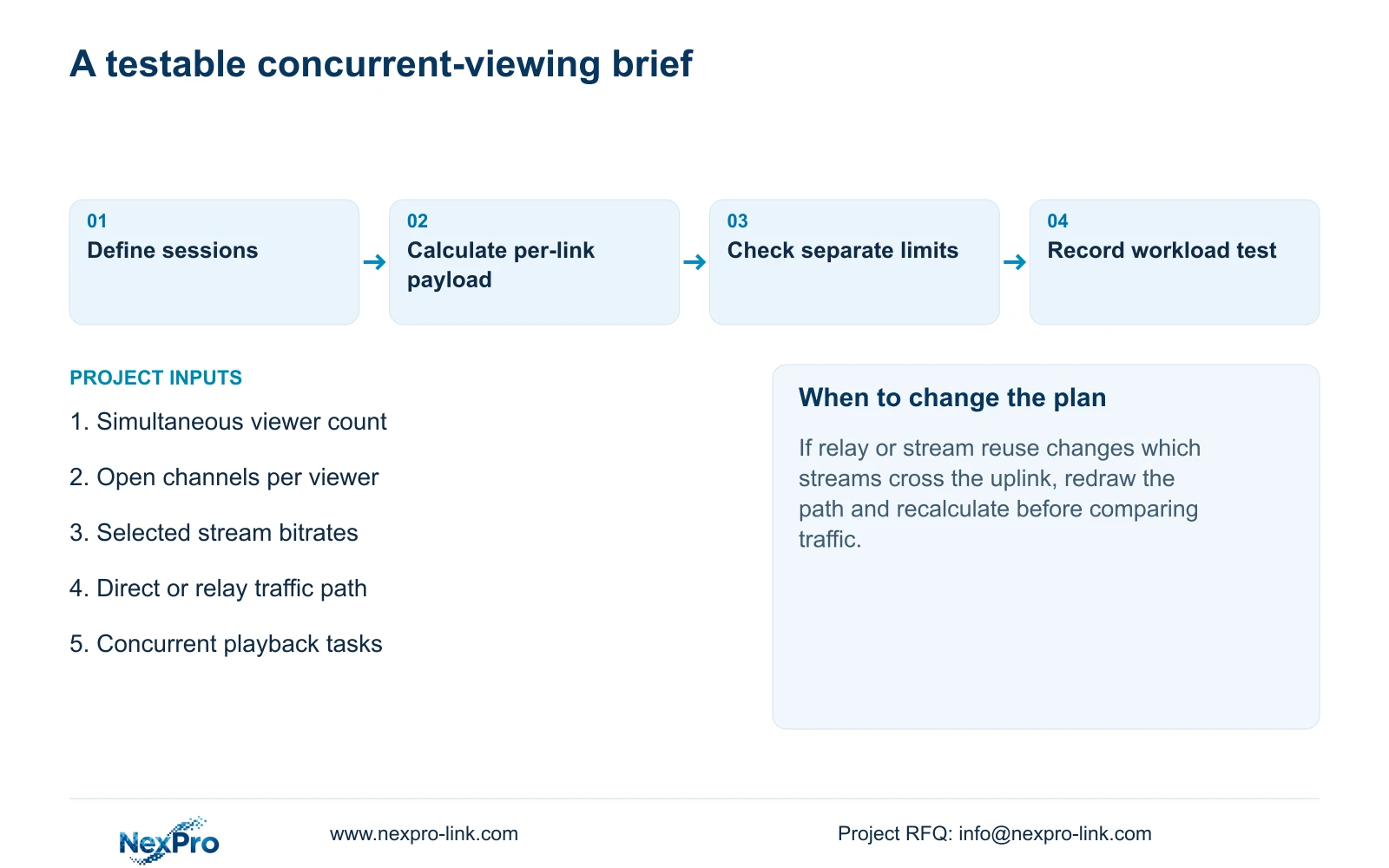
Replace the account-count promise with a testable brief
Illustrative project scenario: A procurement specification asks thirty managers to view all cameras simultaneously because the manual mentions 38 users. The requirement needs the actual camera selection, stream settings, access paths and simultaneous playback tasks before it can be assessed. The 1-viewer and 3-viewer illustration does not validate that thirty-manager arrangement.
Build the selection record from the required input channels and modes, total incoming bitrate, usable storage, interfaces, local playback combinations and remote sessions. Include the environment and client arrangement. Record the candidate's supported value and any unresolved difference beside each requirement.
The limited public NexPro-NVR4449-4K source lists 49 channels and 320 Mbps input bandwidth. Those fields may inform an input-capacity comparison, but they do not establish an outgoing session limit or prove the thirty-manager requirement. Obtain model-specific support for the actual remote workload.
Agree a representative operating test that retains recording while exercising the required authorized viewing and playback tasks. Document the conditions and failed stage if the requirement is not met. Compare qualified configurations before discussing price.
Section 07
Questions about viewer capacity
Does an account limit establish a concurrent-stream limit? No. Active sessions and their video tasks require separate specification and verification.
Does the 12 Mbps illustration include recording inputs? No. It calculates only the stated live-view payload crossing one uplink.
Can an input-bandwidth specification prove remote viewing capacity? No. Recording input, transmission and receiving-client processing are separate constraints.
Section 08
Provide the simultaneous-session requirement
This guide uses NVR4.0 user manual CH_V2.4.doc, with V2.2 in its body, sections 1.2, 4.12.3, 4.3.3.3 and 5.1 through 5.2. The uplink arithmetic is an illustrative calculation, not a measured product result.
Send NexPro-Link a session list showing simultaneous viewers, open channels, stream bitrates and required playback tasks at info@nexpro-link.com.
Engineering references
These sources support the general planning principles. Always use the selected product's current datasheet and applicable project standards for final design.


