Fixed network rooms and building entries can support an early infrastructure release. Camera positions inside an unfinished production hall need a separate approval gate.
Section 01
Release stable infrastructure first
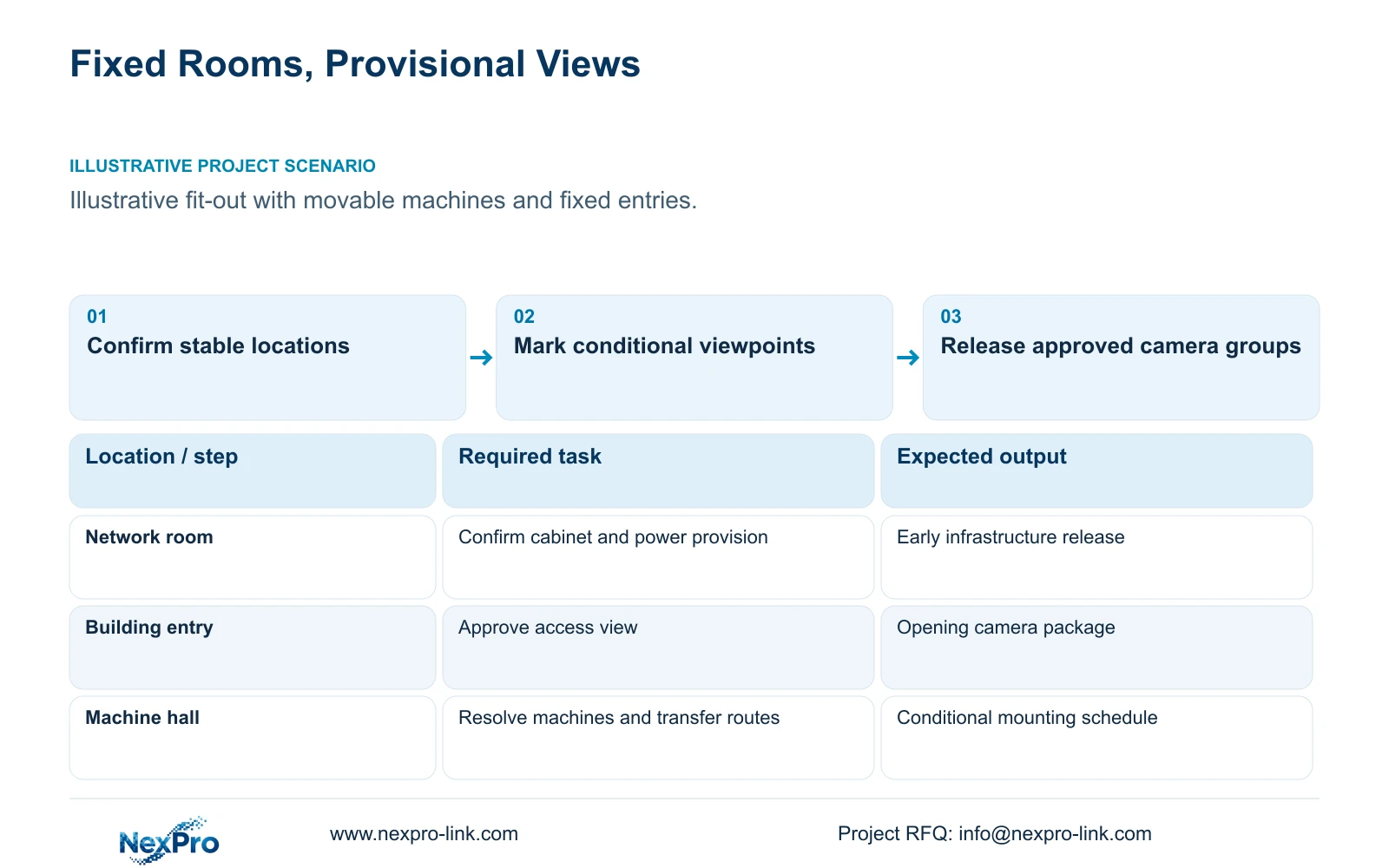
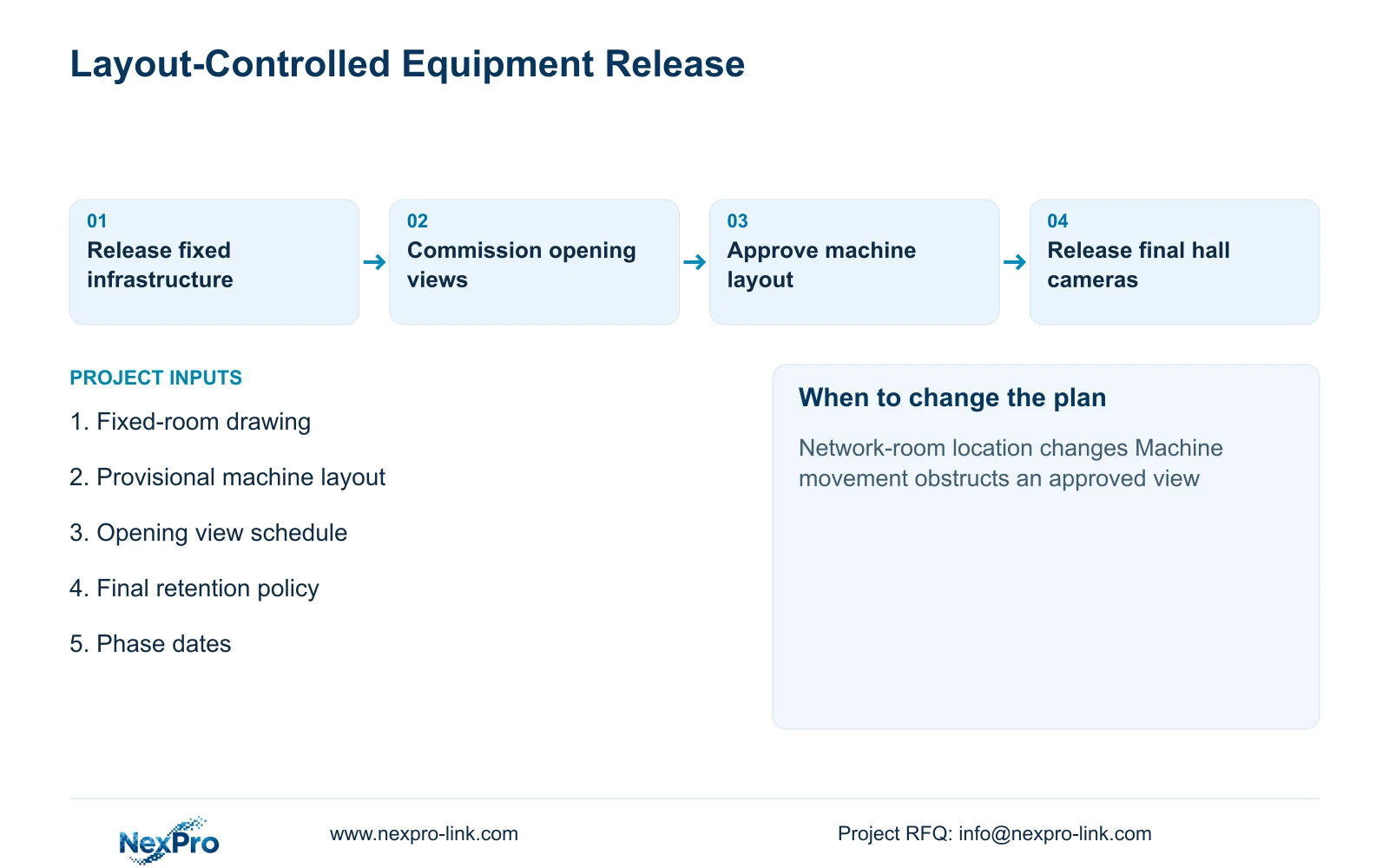
Release stable backbone and cabinet requirements first, while keeping unresolved camera mounts and lens decisions under a separate approval gate. A fixed network-room location gives the project a useful starting point, but it does not settle every route or viewpoint. Confirm the physical pathways, power provision and final resource target before committing shared infrastructure.
Illustrative project scenario: Machine positions may move during fit-out, but network-room and building entry locations are already fixed. Assume the owner needs a 16-camera opening package followed by a 32-camera final system, with the same recording policy in both phases. The opening views serve agreed access and transfer tasks; later production-hall views depend on the accepted machine layout. This is a hypothetical planning arrangement.
Classify each purchase as stable, conditional or required for opening. Cabinet location can be stable while cabinet contents remain partly conditional. Building-entry views may be ready for release while a hall mounting bracket is still unresolved. This classification lets procurement proceed without presenting uncertain details as approved construction information.
Section 02
Keep viewpoints adjustable
Record a provisional viewing position against its intended task, rather than approving it simply because a column is available. For a machine-hall transfer, show the expected movement corridor, likely obstruction envelope and accessible mounting area. Ask the process team to confirm these features when equipment positions change. A revised corridor can alter both the view direction and the endpoint of the cable route.
A motorized lens can help tune an accepted position, but it cannot see through a relocated machine. The supplied NexPro-BL2812M55-5MP-DIC-AI specification lists a 2.8–12mm motorized lens and a 5MP-family output including 2880×1620, with 25fps@5MP. Treat those as product fields; they do not establish the distance at which a particular transfer detail will be readable.
Keep flexibility where it remains useful: accessible routes, clearly identified future endpoints and mounting decisions tied to an approval drawing. Avoid buying a collection of adapters without knowing the eventual mounting surface. Once positions are settled, verify framing under the required lighting and movement conditions before treating lens adjustment as complete.
Section 03
Release cameras after layout decisions
Use a release record that states which layout revision supports each camera group. Gate cameras can proceed when entry geometry and retrieval tasks are agreed. Production-hall cameras should proceed after the relevant machine rows, transfer paths and maintenance access are confirmed. Procurement can request conditional pricing earlier, but an unresolved position should stay visibly conditional.
Assign the release decision to the project manager with input from the owner and engineer. The installer confirms access, route length and the mounting method; the supplier confirms the exact model and accessories in the released package. If the opening date arrives before the hall layout is stable, use only approved temporary views and record their limited purpose. Do not describe temporary coverage as final acceptance.
CASE01 provides a useful final-scope reference: its 32 ordinary-area positions cover gates, stores, permitted hall transfers, common routes, dispatch and equipment-room approaches. Its assumed continuous cable lengths run from 41 to 76 m. Those lengths cannot be transferred to an unfinished site without route confirmation, nor can its final quantities define which 16 views belong in this separate opening-phase example.
Section 04
Opening phase and final operating scope
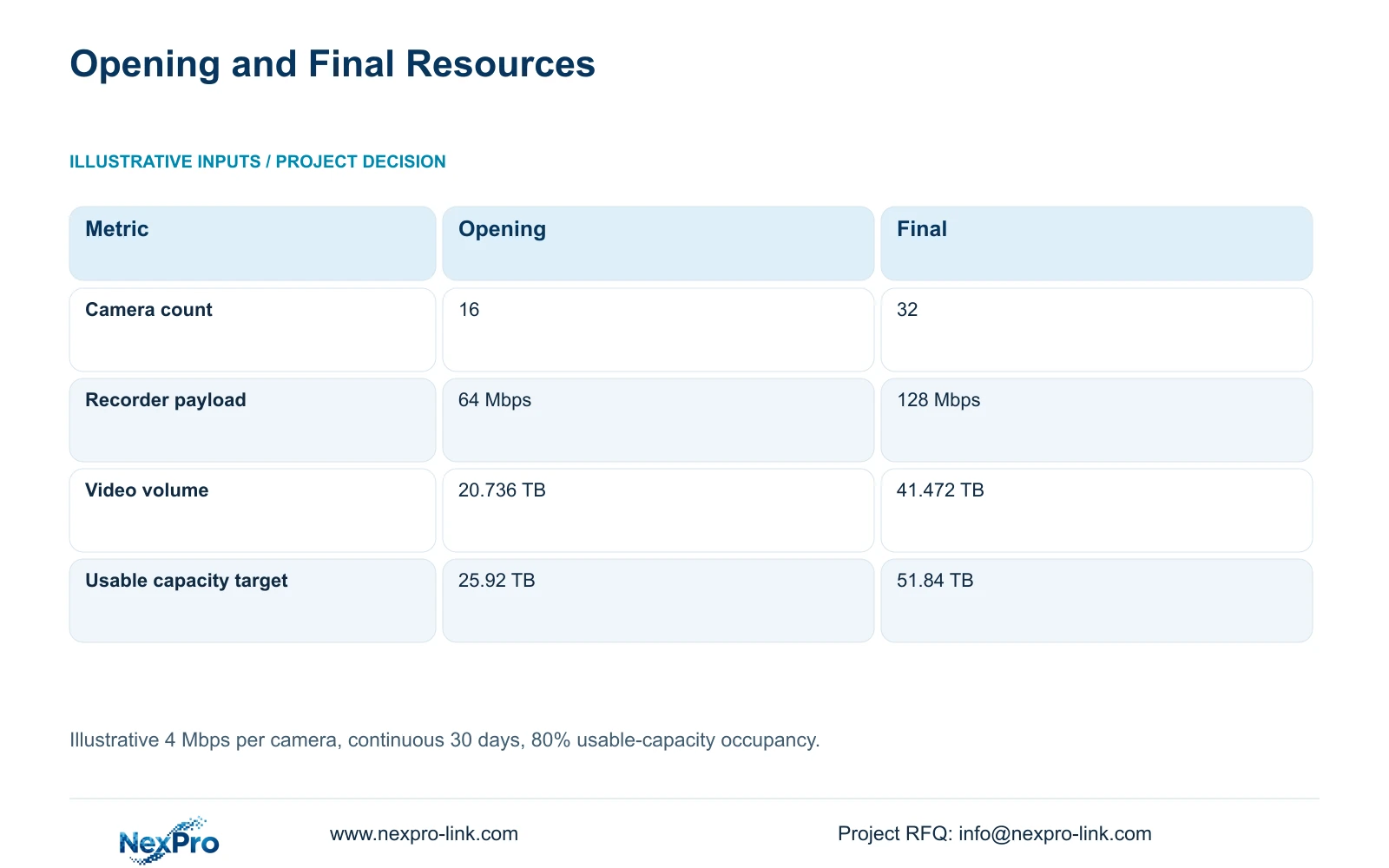
For the illustrative phase comparison, assume 4 Mbps average video per camera, continuous recording and 30 days of retention. Recorder payload is required_Mbps = 4 × n. Video volume is video_TB = 0.0108 × 4 × n × 30, using decimal TB. Required usable capacity at 80% occupancy is video_TB / 0.80. The coefficient converts one day of a 1 Mbps stream into decimal TB.
With 16 cameras, the results are 64 Mbps, 20.736 TB of video and a 25.92 TB usable-capacity target. With 32 cameras, they are 128 Mbps, 41.472 TB and 51.84 TB respectively. The decisive difference is that the opening system can carry half the illustrative recording demand, while difficult-to-expand shared infrastructure can be reserved against the final requirement. Cameras needed later do not have to be purchased to reserve that capacity.
CASE01 uses four 16 TB drives: 64 TB raw × 0.95 × 0.80 = 48.64 TB video budget. Compare its 41.472 TB video requirement directly with that budget, which already includes the formatting allowance and reserve. NexPro-NVR4449-4K offers four SATA bays and a published 320 Mbps input reference, but stream modes, compatible drives and playback demand still require matching. Four bays do not establish RAID.
| Metric | Opening phase | Final phase |
|---|---|---|
| Cameras | 16 | 32 |
| Recorder payload | 64 Mbps | 128 Mbps |
| 30-day video volume | 20.736 TB | 41.472 TB |
| Usable capacity at 80% occupancy | 25.92 TB | 51.84 TB |
Section 05
Choose a release sequence with controlled dependencies
Recommend early release of confirmed shared infrastructure and opening-critical views, followed by production-hall cameras after layout approval. This preserves useful opening coverage while reducing commitments to uncertain mounting details. Reserve final cabinet space, recorder resources and backbone requirements where later alterations would disrupt occupied areas, using the actual final design rather than a blanket allowance.
The opening package still needs every dependency used by its cameras. Access switching, recording disks, authorised playback and the specified protected-power path must be available when those views go live. Do not halve the complete-system UPS load simply because the camera count halves: recorder, network and operator loads do not necessarily scale in the same proportion. Prepare a separate opening load schedule.
A single full release becomes reasonable when the production layout is genuinely settled and the delivery sequence benefits from one coordinated package. Revisit phasing if a mandatory platform, changed retention period or relocated network room affects shared equipment. Compare supplier proposals on the same opening readiness and final capacity, including return visits and configuration work in the quoted scope.
Section 06
Prepare a phase-specific equipment inquiry
Split the equipment schedule into released now, reserved for expansion and conditional on layout approval. For every conditional line, state the missing decision and its latest required date. This allows the supplier to explain available preparation options without implying a confirmed delivery commitment before the scope is settled.
NexPro-Link can coordinate the selected cameras, recording equipment, related project items and BOQ documentation. Phase labels can distinguish opening cartons from later hall packages. Keep camera tags and configuration records consistent between batches, while recording any approved model change so the later supply does not silently depart from the accepted sample.
Close each phase with its own operating demonstration and updated location records. After the production layout is frozen, review temporary views, final cable endpoints and recording demand together. Retain any temporary equipment only where it serves an accepted permanent task; otherwise document removal or reassignment rather than leaving an ambiguous final inventory.
Section 07
Buyer questions
Can we buy the final recorder before all cameras are selected? Yes, if final stream requirements, drive needs and operator tasks are sufficiently defined for model matching. Reserve resources against those requirements, and keep unresolved camera modes as explicit selection conditions rather than assuming channel capacity covers them.
Can unused capacity substitute for a spare recorder? No. Spare channel or storage capacity supports expansion within the operating recorder. A recovery or failover requirement needs its own supported architecture and procurement scope.
Should the first batch use temporary camera names? Use stable project tags where locations are approved. For temporary views, mark both the tag and record as temporary, then document the final reassignment so operators can interpret older footage correctly.
Section 08
Separate early releases from layout-dependent items
Send your fixed-room and entry drawing, provisional production layout, opening and final view requirements, and phase dates to info@nexpro-link.com to discuss a phased NexPro-Link equipment schedule.
Engineering references
These sources support the general planning principles. Always use the selected product's current datasheet and applicable project standards for final design.