

A popup confirms an alarm response, not the expected recording. Compare the channel's recording plan and arming period, then test the trigger, recording linkage and playback search.
Section 01
Compare the event time with both schedules
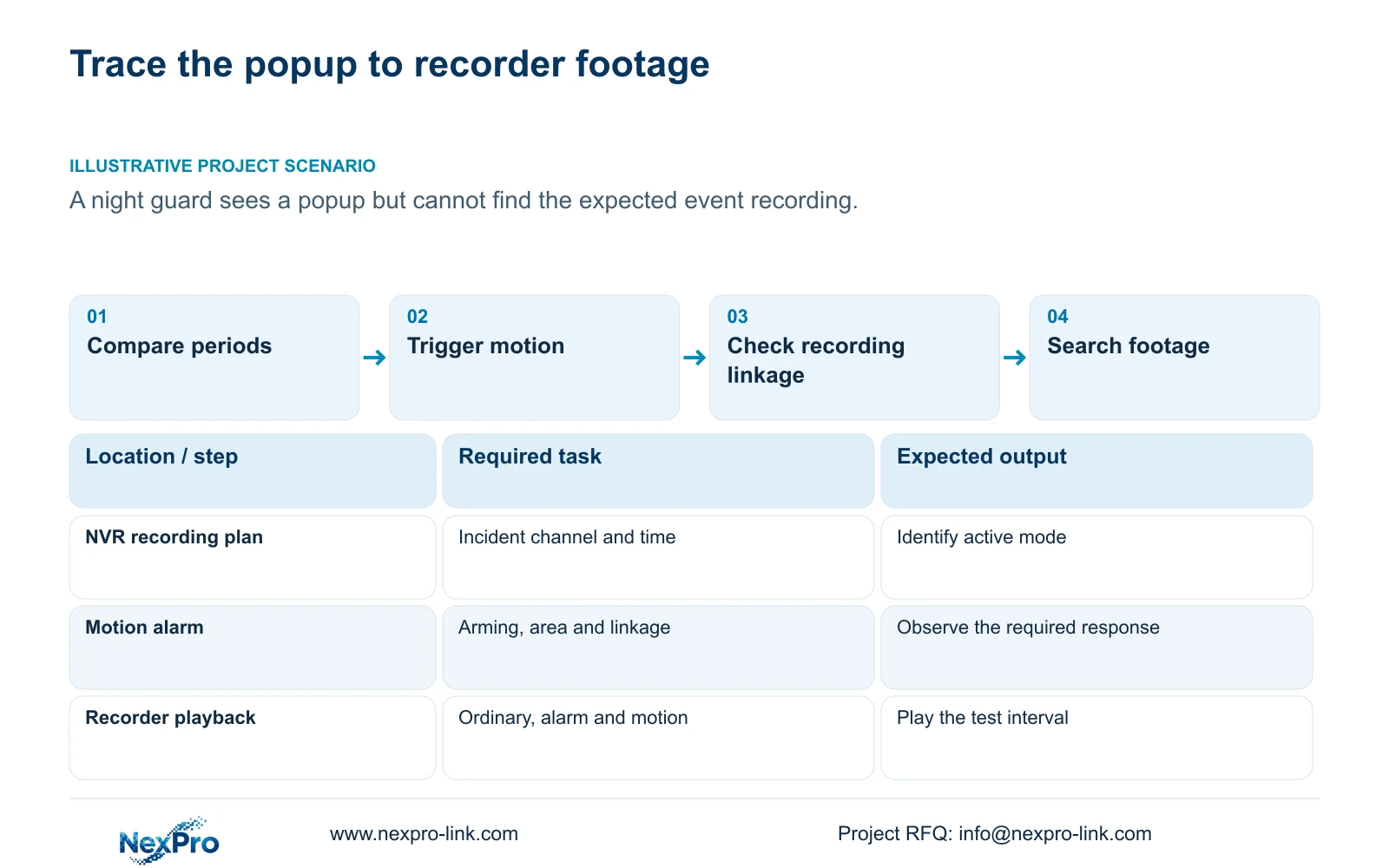
A night-shift popup can appear without the expected event-related footage because alarm response and recording depend on separately configured conditions. Start with the affected channel and the event's actual time. Compare its recording plan with alarm enablement, the arming period, detection area and selected recording linkage. Then reproduce an intended trigger and search the resulting footage using the correct recording type. A colored schedule or visible popup establishes only part of this chain. The useful outcome is an explained result for each tested period: footage present, a recording condition unmet, or a search condition hiding footage that already exists.
Write down the recording window and arming window beside the same channel reference. Include the weekday and any boundary crossed by the incident. If the two windows differ, identify what the owner expects in the unmatched period: ordinary footage, an alarm response, event-related recording, or some combination. Do not make the schedules identical before deciding which outcome is required.
The operating source is the private supplied NVR4.0 user manual CH_V2.4.doc, whose body identifies V2.2. Sections 4.11.1 and 4.12.11 describe the relevant plans and motion-alarm settings. Section references take priority over page numbers. Apply the workflow to the identified recorder and firmware; Seetong PC local recording is a separate storage and configuration object.
Section 02
Establish what the selected recording mode permits
Section 4.11.1 describes timed recording, no recording, motion recording and motion-plus-timed recording. The plan grid has a 30-minute minimum scale. Check the actual mode assigned to the incident period, since matching start and end times alone does not establish the intended recording behavior.
Motion-only records when motion detection triggers. Motion-plus-timed continues ordinary timed recording between triggers and records motion-type footage when triggered. A quiet interval is therefore expected to differ between these modes. If the owner requires coverage during quiet periods, changing alarm linkage alone does not resolve a motion-only coverage requirement.
Use the following branches to choose the next check. They are diagnostic directions, not a universal truth table for every firmware interaction.
| Observed condition | What it establishes | Next action |
|---|---|---|
| Popup appears; expected clip is absent | A visible response occurred | Check recording linkage, plan and search filters |
| Motion-only plan; quiet interval | No motion-triggered coverage is expected | Confirm whether quiet-period footage is required |
| Motion-plus-timed plan; quiet interval | Ordinary timed footage should continue | Search ordinary recordings for that channel |
| Event occurs outside the arming period | The alarm period does not cover the event | Test the approved arming boundary separately |
Section 03
Reproduce a trigger before changing its response
Check motion enablement, the arming period and the detection area in section 4.12.11. Arrange an authorized test inside the intended area and record its time. Repeat outside the relevant period if that boundary is part of the complaint. Keep the scene and selected channel consistent so a changed result can be attributed to the condition being tested.
If the expected event indication is absent, investigate detection conditions before adjusting recording actions. If it appears, proceed to the response settings. Ordinary motion detection does not establish human or vehicle classification, and a sensitivity value is not an accuracy percentage. Describe whether the test triggered under the stated conditions.
Section 04
Verify the recording action independently
The motion-alarm action list includes buzzer, popup, email, screenshot delivery, snapshot, preset call, recording, border flashing and app push. Inspect the recording action and its intended channel separately from the popup. A visible response cannot confirm that a clip was written or that a notification reached its recipient.
For the required recording action, inspect the timeline and play the test interval. For a snapshot requirement, inspect the saved output. For notifications, check the intended receiving path. Record each result independently. Action duration and footage retention describe different time objects, so a longer popup or buzzer duration does not establish a longer searchable history.
Section 05
Account for quiet-period coverage in the calculation
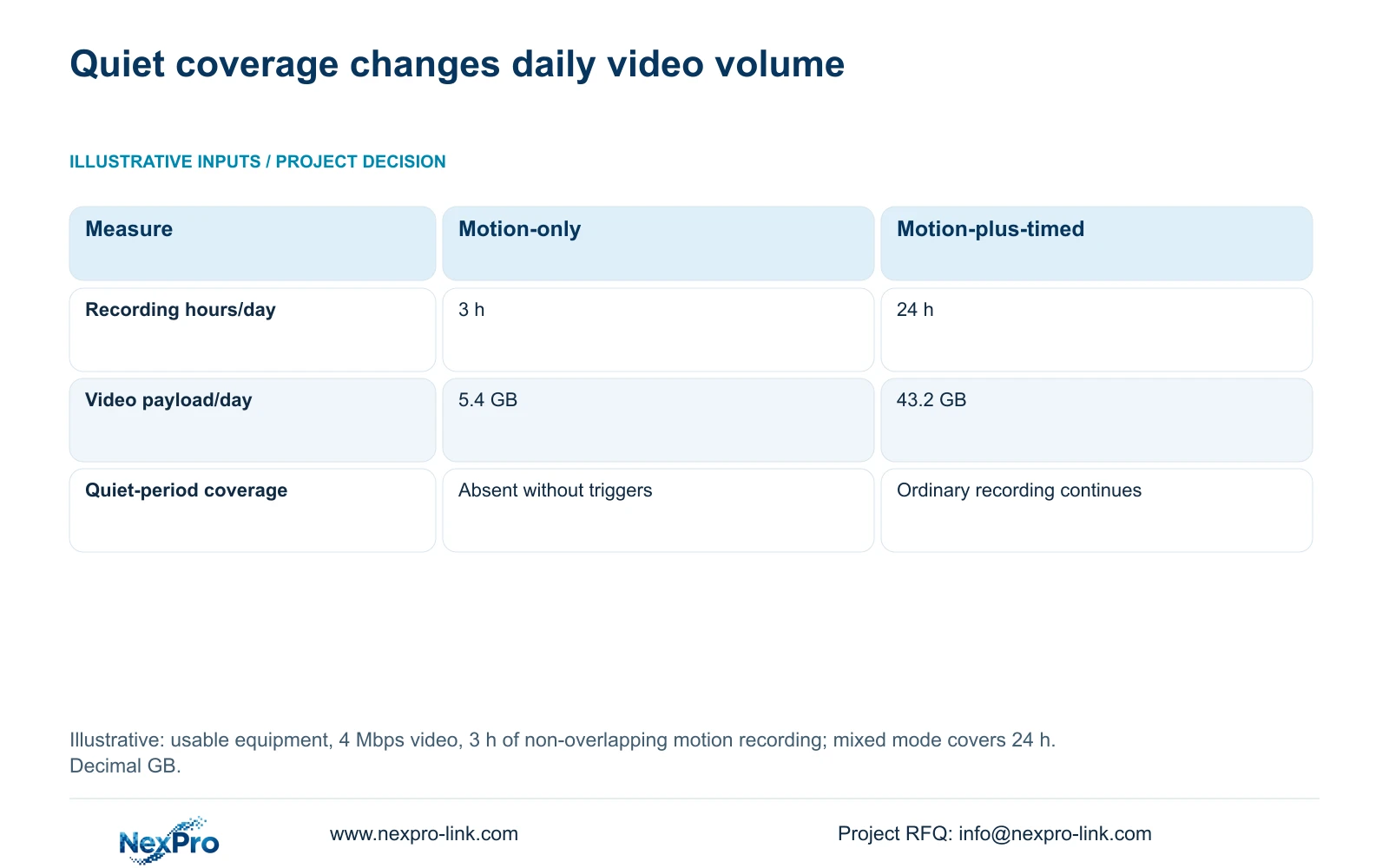
The supplied teaching comparison assumes complete, usable equipment in both options, a video bitrate of 4 Mbps and 3 hours of actual motion-triggered recording per day without overlap. Option A is motion-only. Option B is motion-plus-timed across 24 hours. These hours are illustrative inputs, not a measured detection rate.
Using decimal units, video GB = Mbps × 3600 seconds/hour × recording hours ÷ 8 bits/byte ÷ 1000. Option A gives 4 × 3600 × 3 ÷ 8 ÷ 1000 = 5.4 GB/day. Option B gives 4 × 3600 × 24 ÷ 8 ÷ 1000 = 43.2 GB/day.
Option B cannot be budgeted as 3 hours merely because motion occurs for that duration. Its ordinary recording continues between triggers. Choose motion-only only when the owner accepts the absence of quiet-period coverage. Alarm buffers, overlapping intervals and additional streams require separate actual inputs; this calculation establishes none of their settings.
Section 06
Search the incident and preserve an explainable record
Section 4.11.2 says playback entry defaults to the preview-selected channel. Confirm that selection, then choose the incident date, time and ordinary, alarm or motion filter. Orange indicates recordings exist for the date; gray indicates none in the documented workflow. An orange date does not establish complete coverage throughout the day.
If the expected motion clip is missing, inspect the relevant ordinary footage as well, particularly with motion-plus-timed recording. Then use section 4.12.17 to review logs. The default search is the current day and includes type filtering; removing the date condition permits the documented all-log query. Inspect details and export relevant text records before further changes. The export supports diagnosis without establishing unlimited retention or tamper-proof auditing.
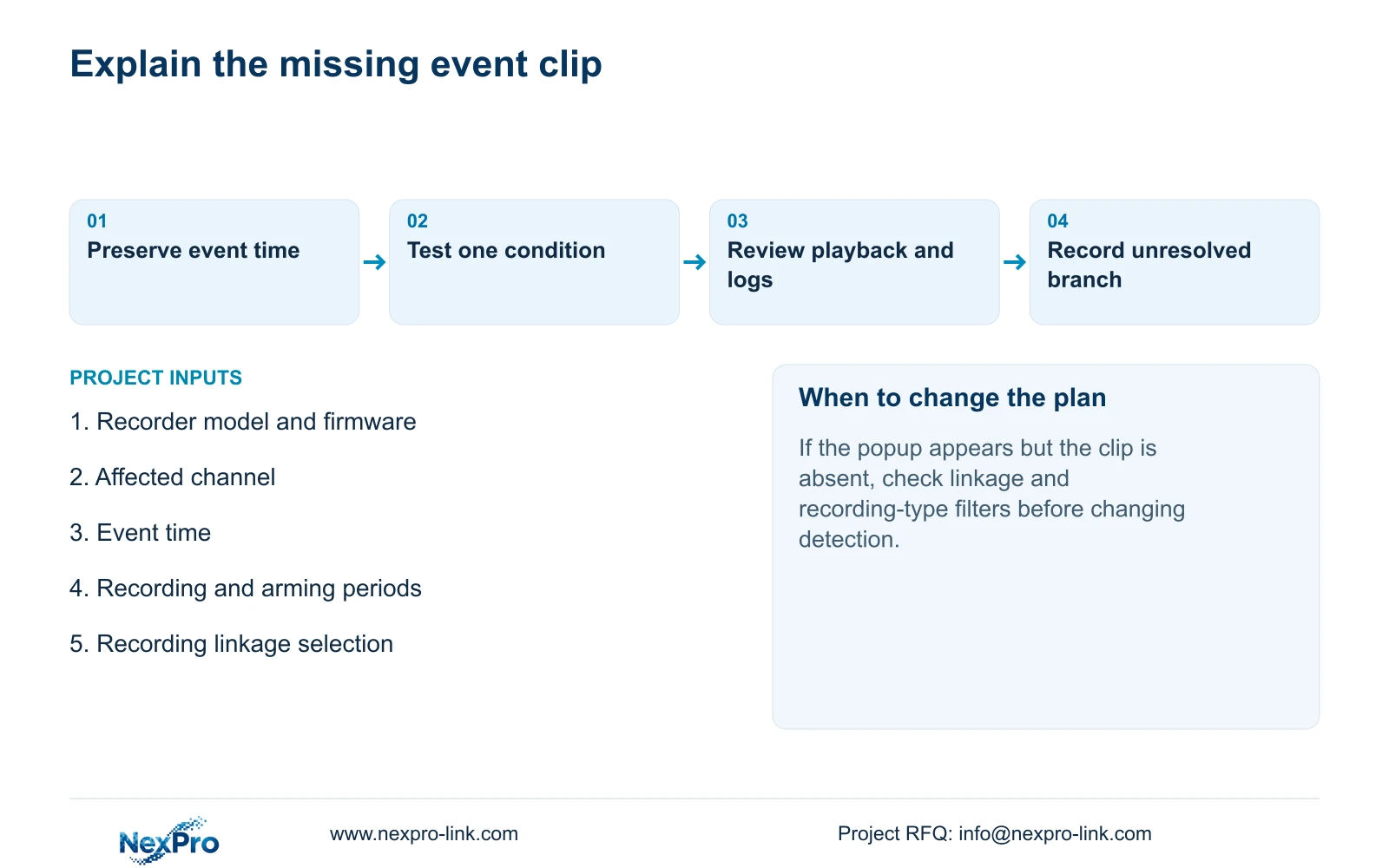
Illustrative project scenario: A night guard receives a popup but the expected event-related recording is absent. Preserve the popup time, confirm the plan mode and recording linkage, and compare playback filters. Record whether ordinary footage exists and whether a controlled trigger produces the required clip. Keep unresolved conditions visible instead of closing the issue on the popup alone.
Section 07
Can a popup be accepted as proof of event recording?
No. Accept the recording requirement through playback of the intended channel and period. The popup confirms only its own response.
Section 08
Does motion-plus-timed reduce recording to active periods?
No. Ordinary timed recording continues without a motion trigger. Include those quiet periods in the storage calculation.
Section 09
Provide the unmatched event interval
Send NexPro-Link the affected channel, event time, recorder model and firmware, plus redacted recording-plan and arming-period details at info@nexpro-link.com.
Engineering references
These sources support the general planning principles. Always use the selected product's current datasheet and applicable project standards for final design.


