

A gap near a schedule change needs a configuration timeline. Preserve logs, identify copied channels and compare the historical plan with playback filters and connection records.
Section 01
Preserve the change sequence before correcting the gap
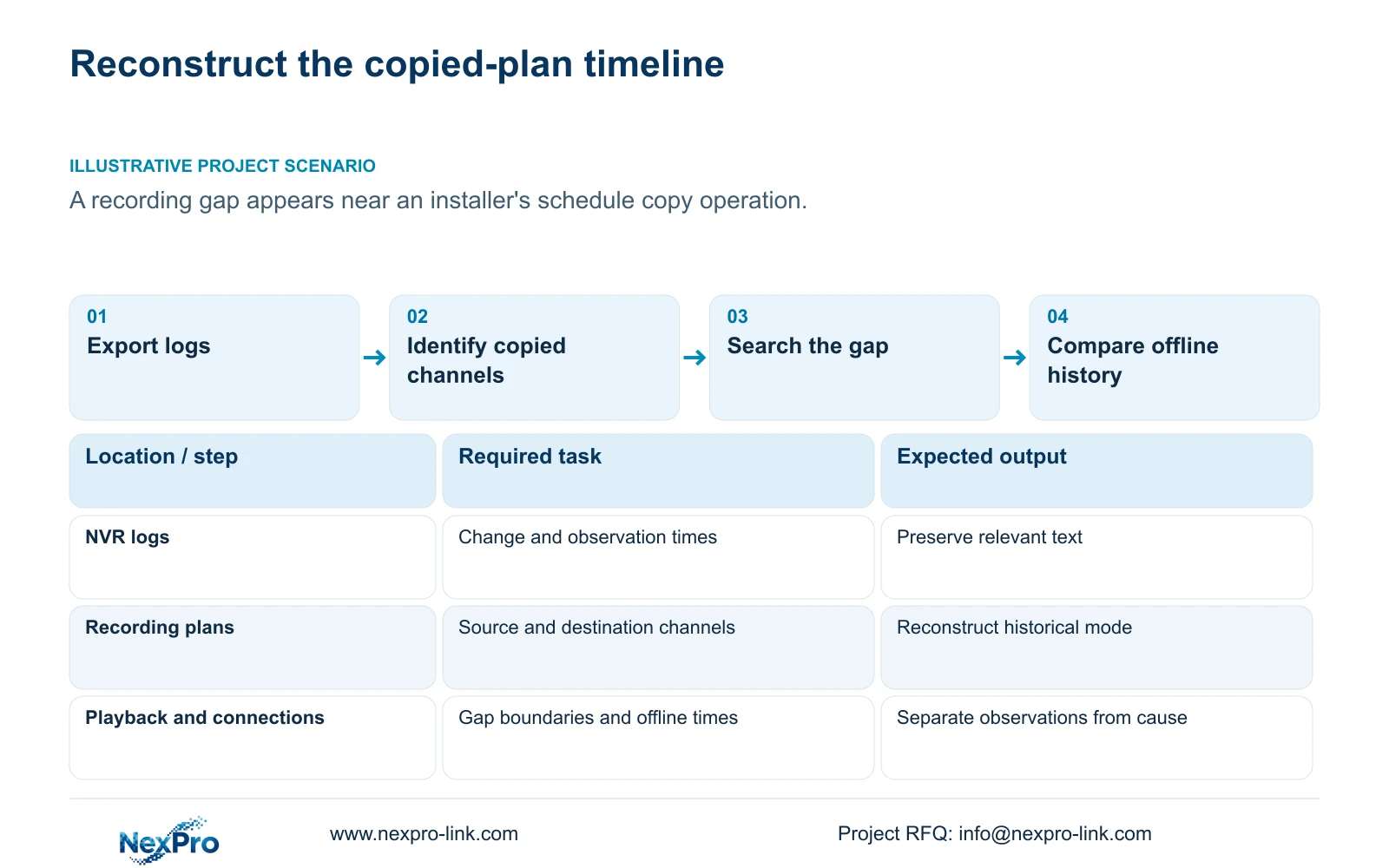
When a recording gap appears near a schedule change, preserve the sequence of configuration actions and observations before making another change. Record the affected channels, missing interval and the time the new plan was applied. Export relevant logs, identify the copy source and destinations, and reconstruct the recording mode that governed the interval. Then exclude playback-filter errors and compare connection history. A nearby change is a useful lead, but timing alone does not prove its cause or establish a failed disk. Close the investigation by explaining the historical gap separately from verifying that the corrected configuration now produces retrievable footage.
Begin with the last playable interval before the gap and the first playable interval afterward. Keep the manager's discovery time separate from the apparent start of missing footage. Attach the installer's stated change time as a reported input until an available record supports it.
The private supplied NVR4.0 user manual CH_V2.4.doc has V2.2 in its body. This workflow uses section 4.12.17 for logs, section 4.11 for recording and retrieval, and section 4.3.3.1 for connection history. Section references take priority over document pagination. Work on the recorder's storage and plan; a Seetong PC local schedule is a different object.
Section 02
Search and export the relevant log records
The documented log search defaults to the current day and has type filters. Select conditions that cover the change and suspected gap before concluding that no relevant entries exist. Section 4.12.17 also describes an all-log query when the date condition is not selected, detail viewing and text export.
Read available details and preserve the relevant text records with the incident timeline. If a record does not establish the old schedule values or destination list, obtain the change record or installer confirmation. Do not assume the log contains a complete historical configuration merely because it supports export.
Preserve records before resetting statistics or making further configuration changes. If support later proposes a restore or firmware upgrade, obtain authority, preserve required footage and configuration evidence, and arrange any interruption first. Those operations are not routine ways to prove why an earlier interval is missing.
Section 03
Identify which channels received the copied plan
Compare the source profile with the intended and actual destinations. Sections 4.11.1, 4.4.2, 4.12.6 and 4.12.7 describe relevant copy functions. Copying can apply settings efficiently, but it does not decide whether a destination has the same operating duty or supported options.
List channels that show the gap and channels that remained unaffected. If the affected set matches the copy targets, that relationship directs attention to the copied plan. If unrelated channels share the same interruption, retain a separate connection or storage branch. Neither pattern is proof by itself.
Inspect each destination's present plan and compare it with preserved records of the earlier plan. Keep exceptions such as a continuously recorded gate separate from an intermittently used area. Where the actual target list cannot be recovered, state that limit instead of treating the intended list as confirmed.
Section 04
Reconstruct the mode active during the missing interval
Section 4.11.1 describes timed recording, no recording, motion recording and motion-plus-timed recording, with a 30-minute minimum grid. Reconstruct the weekday, block boundaries and selected mode for the gap. The current plan can show the present state, but it does not prove what was active before a later correction.
A copied no-recording block can explain an intentional schedule gap if its historical application is established. A motion-only block can explain quiet periods without triggered recording. Motion-plus-timed continues ordinary recording between triggers, so it should not be interpreted as equivalent to motion-only.
Keep the reconstructed plan alongside the actual playback result. If the plan called for footage but none is found after a correct search, continue to connection and storage observations. Do not label the disk defective simply because the schedule explanation has not been established.
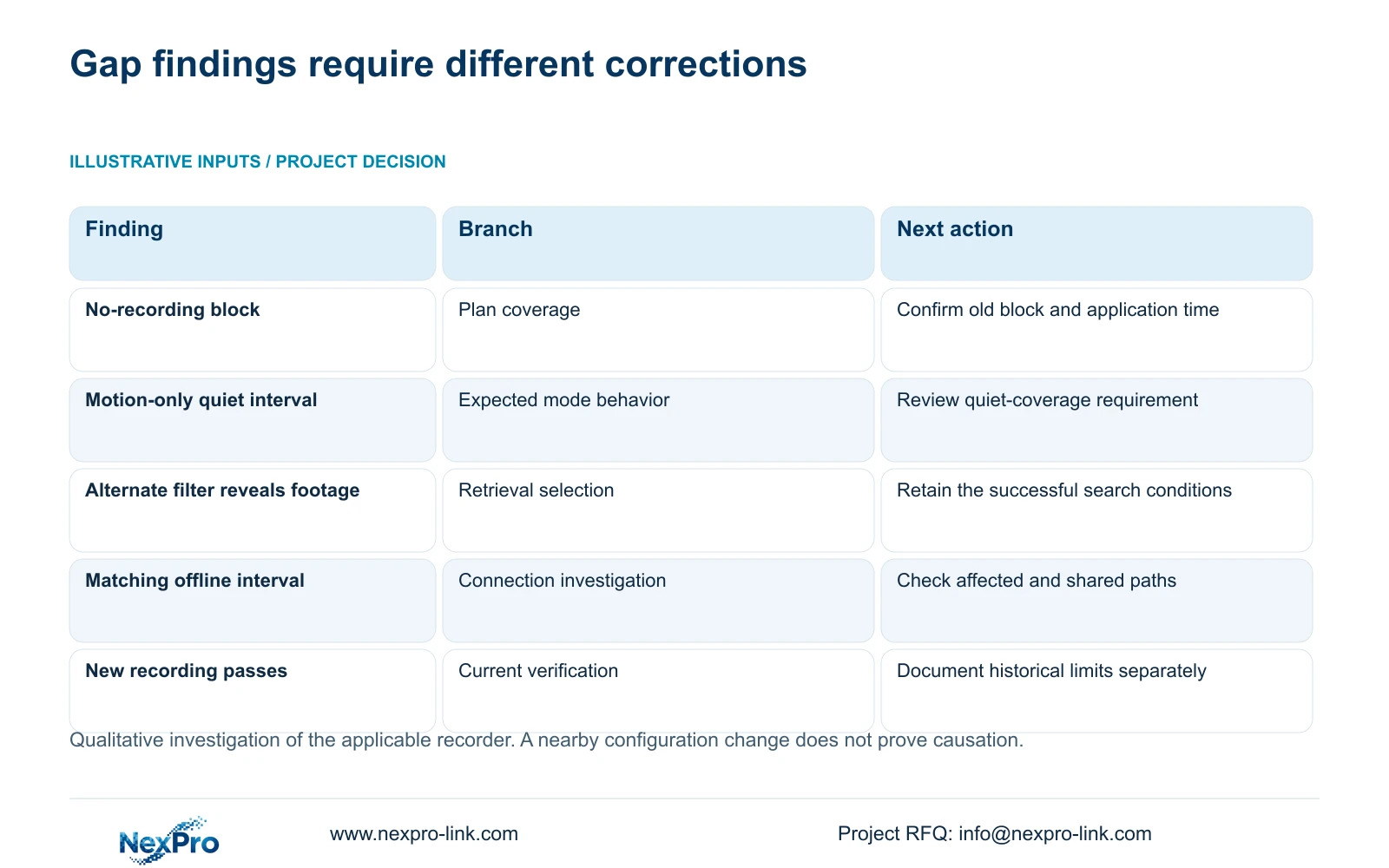
| Finding | Interpretation | Next action |
|---|---|---|
| Historical block was no recording | Schedule can explain the interval | Confirm application time and approve correction |
| Historical block was motion-only | Quiet coverage may be absent by design | Check trigger requirement and recorded events |
| Footage appears with another type filter | Search concealed available footage | Record the successful retrieval conditions |
| Offline history overlaps the gap | Connection loss is another possible cause | Compare affected channels and shared paths |
| New footage passes after correction | Current operation is verified | Keep historical cause and limits separate |
Section 05
Exclude a search error before calling footage missing
Section 4.11.2 says playback initially selects the channel used in preview. Confirm the affected channel, date and time, then inspect ordinary, alarm and motion filters. After a mode change, footage may belong to a different available type than the operator initially selected.
Orange indicates recordings exist for the date in this workflow; gray indicates none. An orange date does not establish uninterrupted coverage. Play intervals immediately around the reported gap and record the filters used for each successful or unsuccessful search.
If another filter reveals the interval, document a retrieval correction rather than a recording repair. If the gap remains, preserve its boundaries and continue the investigation. Avoid changing the plan merely to address a search selection that does not control recording.
Section 06
Compare the gap with recent connection history
Section 4.3.3.1 describes the past week's offline behavior and export of connection statistics. Preserve that record before resetting counters. Compare the affected camera references and outage times with the recording-gap timeline.
This local diagnostic history requires an attached HDD under section 4.3.3.1. Confirm disk recognition and availability of the history function on the installed firmware before interpreting its records. An empty or unavailable history does not prove uninterrupted connectivity; keep that evidence gap separate from the search for the recording interval.
An isolated interruption directs the next test toward that channel's path. Simultaneous interruptions on cameras sharing a node justify checking the shared path. Connection history records a phenomenon; it does not identify a failed cable, switch or power supply without further evidence.
If the incident lies outside the documented recent-history scope, record that limitation and use other preserved observations. Do not create a connection explanation from absent history or assume automatic reconstruction of footage after a camera reconnects.
Section 07
Verify new recording after the smallest supported correction
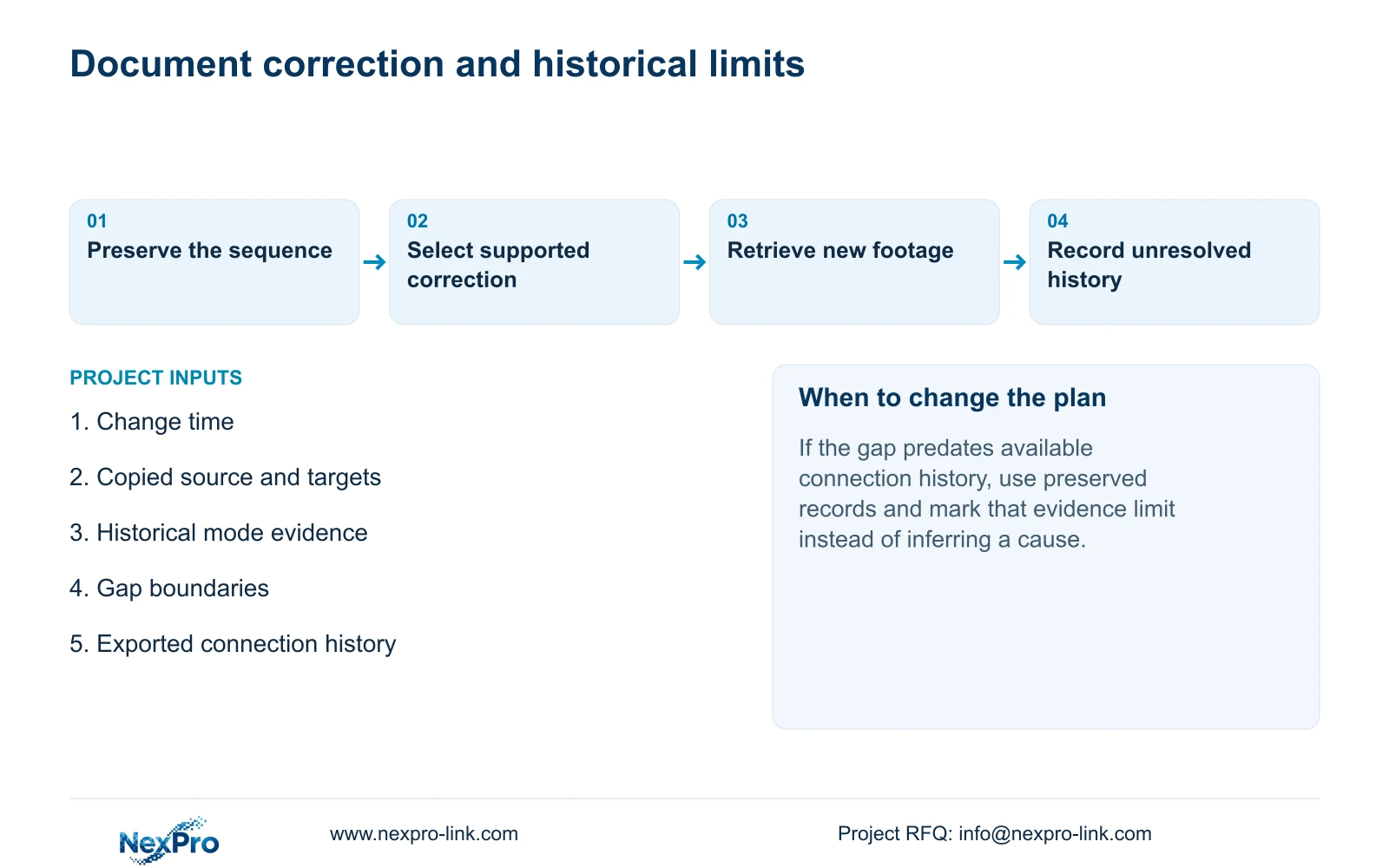
Make the authorized correction that follows the evidence, keeping other variables unchanged. Recheck live view, time, newly produced footage and a relevant older sample. Test export, the intended account and required events where they form part of the changed task.
Illustrative project scenario: A manager notices a gap around the time an installer copied a new recording schedule to several channels. Preserve logs, recover the destination list and compare the historical modes with actual playback. If a copied plan explains the gap, correct the affected group and demonstrate new footage at the relevant boundary.
Record what changed, what passed and what remains unresolved. Newly retrievable footage establishes current operation; it cannot recover footage that was never recorded. If the supported correction fails, provide the observations for the next supplier-guided action. Do not assume an automatic rollback mechanism exists.
Section 08
Does a gap at the change time prove the installer caused it?
No. Compare copied targets, historical mode, retrieval conditions and connection observations. Keep the timing relationship separate from a supported cause.
Section 09
Does correcting the plan restore earlier missing footage?
It can restore the intended future recording behavior. It does not establish recovery of an interval that was never recorded.
Section 10
Provide the preserved change timeline
Send NexPro-Link the change time, affected channels, copied source and targets, and gap boundaries with recorder model and firmware at info@nexpro-link.com.
Engineering references
These sources support the general planning principles. Always use the selected product's current datasheet and applicable project standards for final design.


