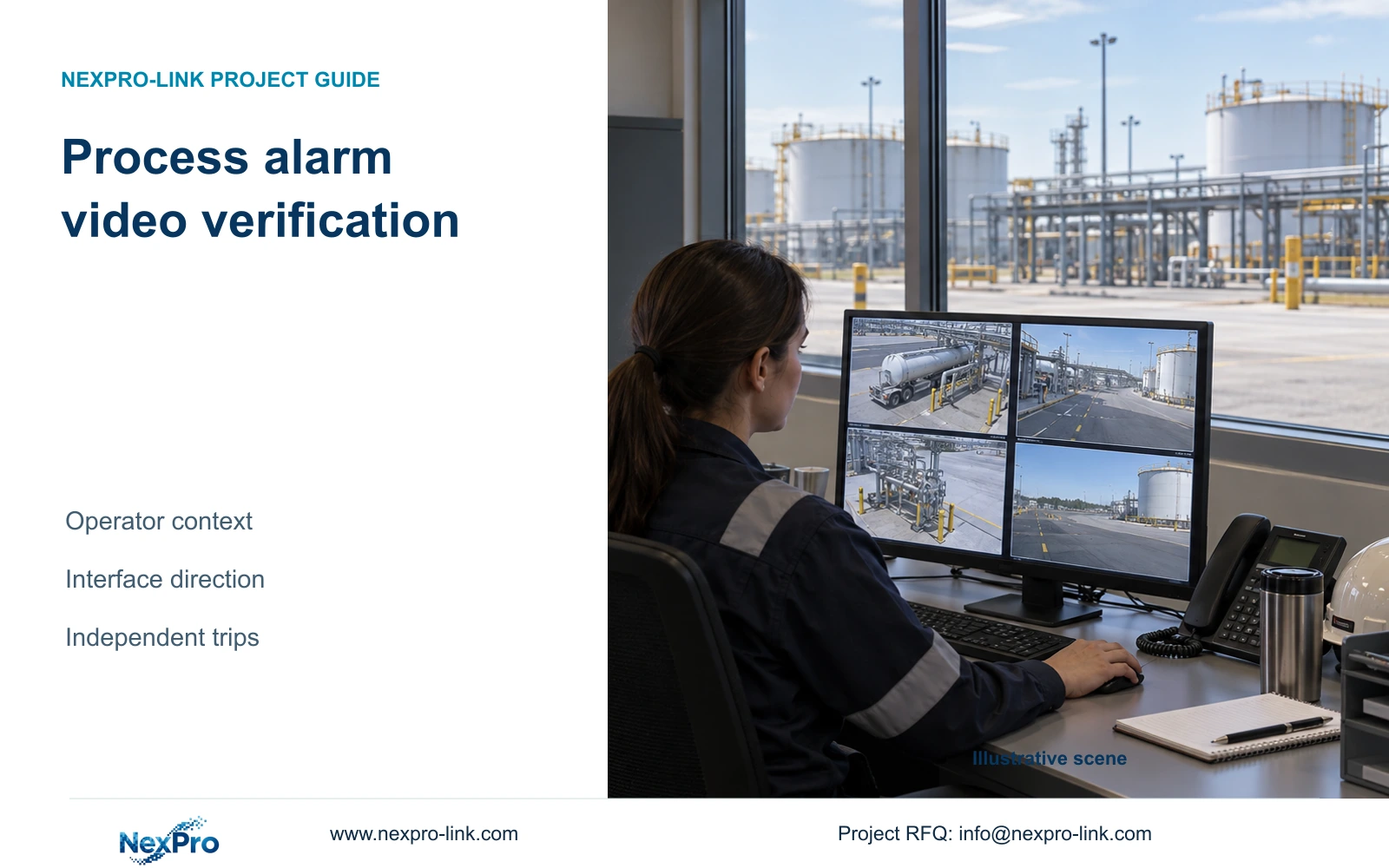
An alarm-triggered camera view can help operators understand an event. Define its interface, recording path and failure behavior without giving ordinary CCTV a safety shutdown role.
Section 01
Define what the operator must verify
Process alarm video verification should provide authorised visual context while the existing protective system retains its independent response. Specify what the operator needs to see, which alarm identifies the location, and what happens when video is unavailable. Ordinary camera analytics should not become an assumed permission to continue operating, a trip command, or a substitute for an engineered safety function.
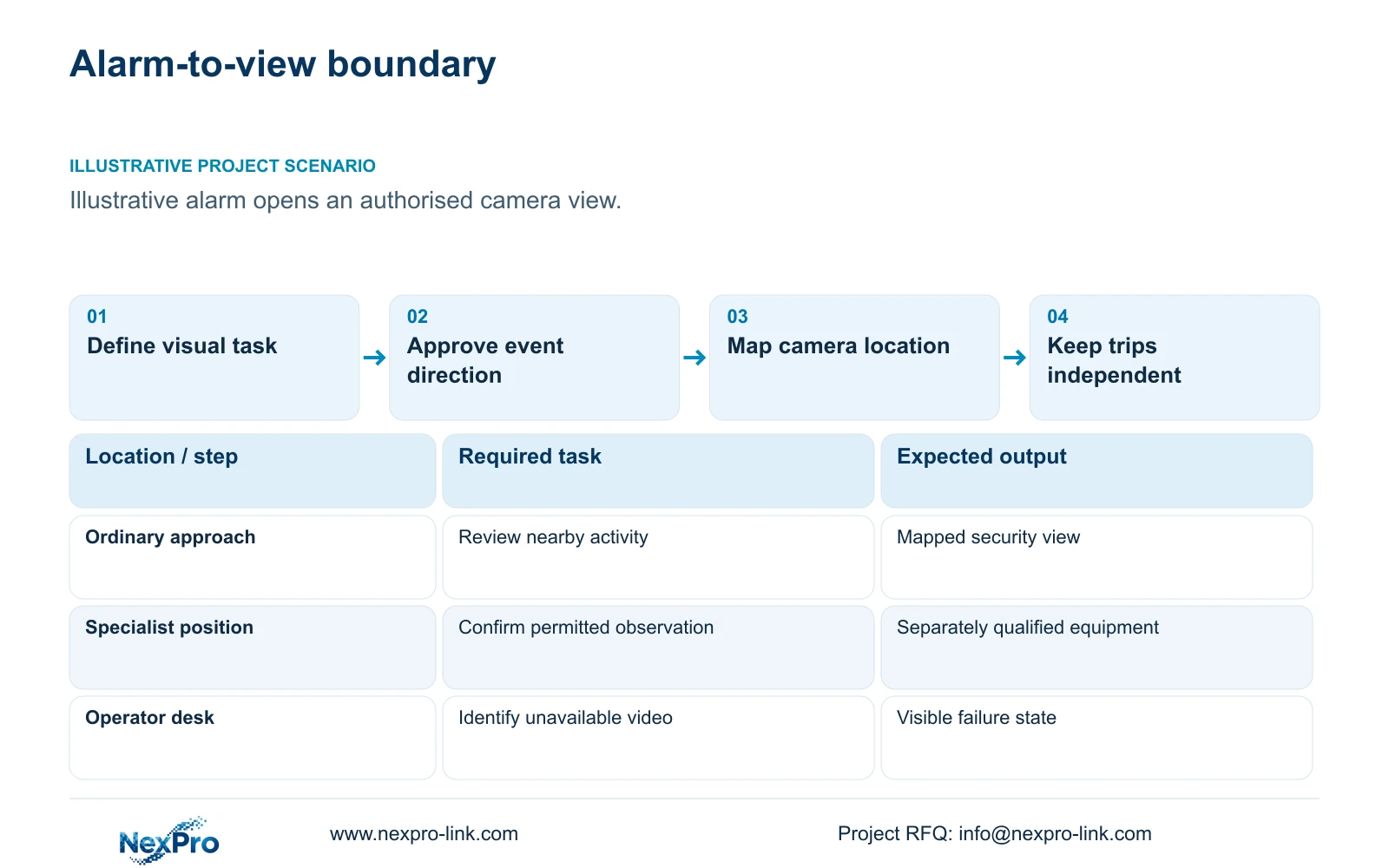
Illustrative project scenario: An operator wants a camera view to open when an existing process alarm occurs. Assume the requested picture shows an equipment approach and nearby access route, helping the operator understand activity around the alarmed location. CASE07 supplies a planning background of 32 ordinary-area cameras and eight separately specified specialist positions. Those quantities describe equipment roles; they do not classify the site or establish a completed installation.
Write the viewing task as an observable acceptance statement: the correct location opens, the operator can distinguish live video from playback, and loss of the picture is apparent. Identify required lighting, likely obstructions and permitted mounting locations. A view outside a classified area may serve an access-review task, but its usefulness for viewing equipment through structures or glazing still needs confirmation.
Section 02
Approve the alarm-to-view interface direction
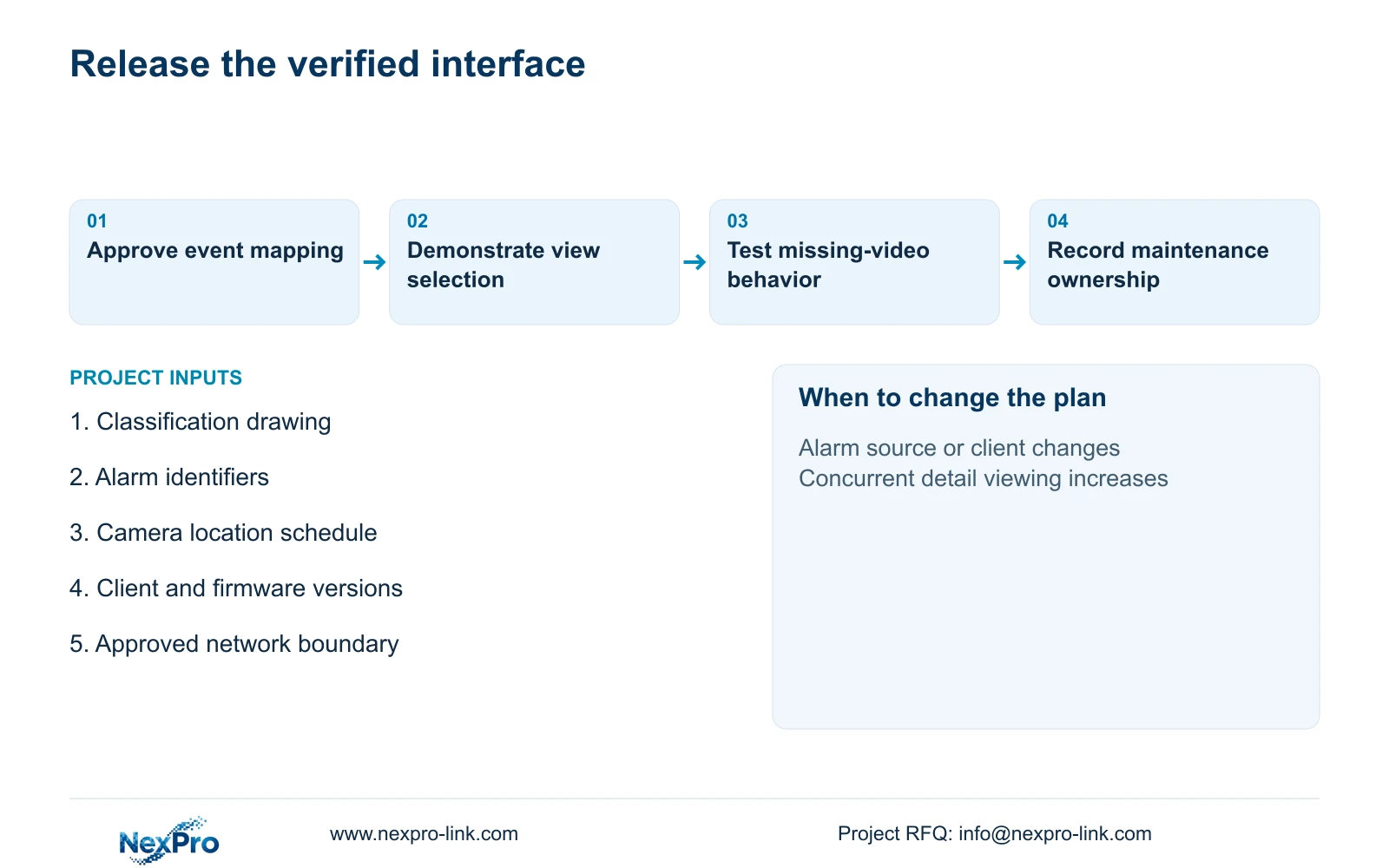
Prepare an interface schedule before selecting integration hardware or software. For each event, record the source system, alarm identifier, mapped camera, destination client and accepted transport method. The process-system owner approves the exported information and access boundary; the video integrator confirms how the receiving system selects the view. An automatic pop-up remains a proposed function until the exact systems and versions demonstrate it.
Keep the baseline direction explicit: an approved alarm notification reaches the viewing workflow without granting CCTV authority to issue process commands. Alarm acknowledgement in the process system and dismissal of a video window are separate actions. If the owner requests any reverse communication, document its purpose and obtain a separate engineering review rather than expanding the interface during commissioning.
Include duplicate events, simultaneous alarms, reconnect behavior and missing mappings in the acceptance script. A practical planning choice is to preserve the alarm list when several camera requests compete for screen space. The operator should still know which event requires attention when a camera is offline. NIST SP 800-82 Rev.3 provides relevant OT-security context for operational constraints and separation; it does not prove that a particular video connector is suitable.
Section 03
Assign ordinary and specialist equipment separately
Maintain a responsibility schedule alongside the camera map. The ordinary security supplier provides the approved cameras and recording equipment. The specialist designer determines classified-location equipment and its complete installation scope. The process team retains protective logic, while the local integrator implements accepted interfaces. Each responsibility needs a named project party before procurement, especially where one alarm points to cameras from both equipment groups.
For suitable ordinary positions, NexPro-BL2812M55-5MP-DIC-AI is a candidate with a listed 2880×1620 main output and a 2.8–12mm motorized lens. These fields help discuss framing and stream selection. They establish neither hazardous-location suitability nor visibility of the required detail at a particular distance. Select the mounting position against the classification drawing, ambient conditions and exposure information.
Keep switches, recorder, UPS and maintenance access within locations approved for those devices. A protective enclosure proposed by an installer does not by itself establish a qualified specialist assembly. Verify applicable local requirements with the responsible design team. CCTV remains outside the safety instrumented system and should not be represented as a validated process recorder merely because footage can be retrieved.
Section 04
Budget recording and viewing on their actual paths
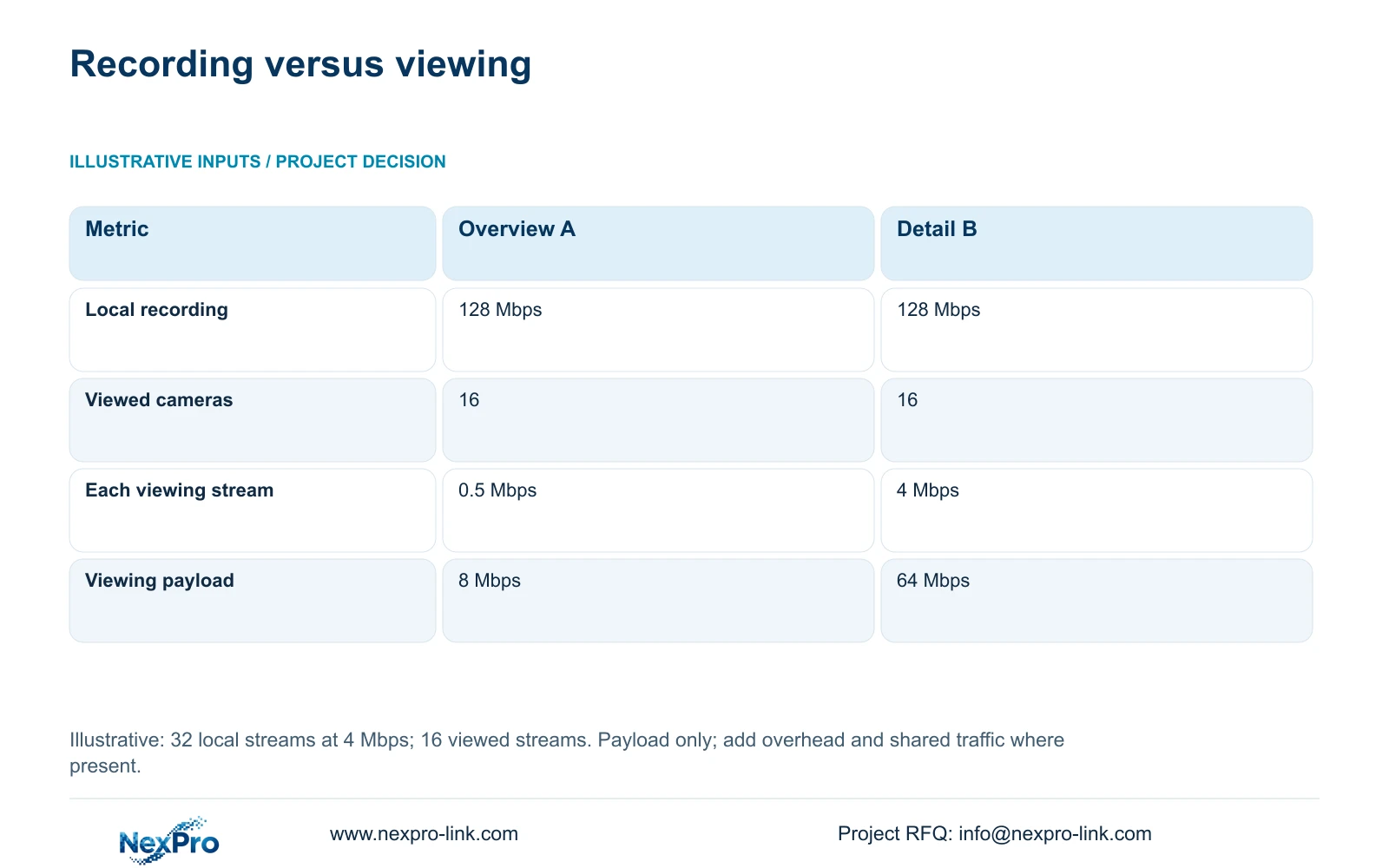
The topic calculation covers 32 local main streams at an assumed 4 Mbps each and 16 simultaneously viewed cameras. Option A uses assumed 0.5 Mbps overview streams; Option B uses 4 Mbps detail streams. The formulas are recorder_Mbps = 32 × 4 = 128 Mbps and viewing_Mbps = 16 × stream_Mbps, giving 8 Mbps or 64 Mbps. All values are illustrative video payloads before protocol overhead.
The decisive difference is the traffic sent to the operator, with local recording unchanged. Use the overview option when its picture supports orientation, then request detail for the selected event if the tested client permits that workflow. Add recording and viewing traffic together only on interfaces that actually carry both. Playback, export and other users need their own allowances; these figures guarantee neither WAN performance nor substream compatibility.
CASE07 has a different boundary: all 40 cameras produce an assumed 160 Mbps recorder input at 4 Mbps each. Its 30-day continuous video requirement is 51.84 TB. Four 18 TB drives give 72 TB raw and an illustrative recording budget of 72 × 0.95 × 0.80 = 54.72 TB, already including formatting and reserve. Do not combine that 40-camera input with the separate 32-camera calculation.
| Metric | Option A: overview | Option B: detail |
|---|---|---|
| Local recorder input | 128 Mbps | 128 Mbps |
| Concurrent viewed cameras | 16 | 16 |
| Viewing stream per camera | 0.5 Mbps | 4 Mbps |
| Remote viewing payload | 8 Mbps | 64 Mbps |
| Local recording quality | Unchanged | Unchanged |
Section 05
Choose the display workflow by alarm demand
Prefer local recording with an approved overview-and-detail workflow when operators need location context before inspecting one event. Choose concurrent detail viewing when the acceptance task requires several full-detail pictures at once, and size the viewing connection accordingly. Retain an owner-mandated platform if its required alarm integration cannot be demonstrated by the proposed alternative.
The NexPro-NVR4449-4K reference lists 49 channels, 320 Mbps input and four SATA bays up to 18 TB per drive. Its summary distinguishes 49×5MP from 9×4K. Those recording fields do not establish simultaneous display decoding, RAID or alarm integration. Test the actual operating sequence: alarm receipt, view selection, playback around the event and export under the agreed concurrent load.
Protect the dependencies required for that sequence during an outage. CASE07 distinguishes recording-priority demand of 877.1852 W from 1,457.1852 W with four assumed 120 W LCD panels and an assumed 100 W decoder added. The display addition changes the power scope, not the recording task. These are planning loads, not measured ratings or proof of UPS runtime; an ordinary operator screen may remain sufficient.
Section 06
Procure the interface evidence with the equipment
Make the supply package include the approved event-to-camera schedule, model and firmware identities, stream settings and failure-state acceptance script. Record who maintains mappings after camera replacement or process-tag changes. A replacement with a usable picture can still break the alarm workflow if the client refers to an obsolete channel or device identity.
NexPro-Link can discuss ordinary camera and recorder selection, coordinated equipment lists and technical submittals within its factory project and BOQ support scope. Price specialist equipment, interface development and local installation separately where different parties provide them. Require another demonstration when the alarm source, client version or network boundary changes, so equipment substitutions do not silently alter the agreed operator task.
Section 07
Buyer questions
Does basic ONVIF video connectivity prove alarm pop-up support? No. Confirm the exact device and client profiles, firmware and event workflow. A working live stream does not establish external process-alarm mapping, acknowledgement handling or the required client behavior.
Should the video operator wait for a picture before following the alarm procedure? Define that behavior with the process owner. Video availability should not become an undocumented condition for the existing protective response. Include missing-video behavior in operator instructions and acceptance testing.
Can we commission ordinary-area viewing before the specialist cameras arrive? A staged release can cover approved ordinary views if the owner accepts the limited scope. Mark unavailable specialist views explicitly and do not represent the partial release as complete alarm-video coverage.
Section 08
Define your alarm-video supply boundary
Send the relevant area-classification and environmental drawing, the alarm-to-camera schedule, and the proposed process-to-video interface boundary to info@nexpro-link.com to discuss ordinary equipment selection and separately assigned specialist scope.
Engineering references
These sources support the general planning principles. Always use the selected product's current datasheet and applicable project standards for final design.