

A microphone and audible live sound do not establish that an earlier recording contains audio. Compare the same incident at the recorder and receiving player to locate the silent stage.
Section 01
Locate where the incident audio becomes silent
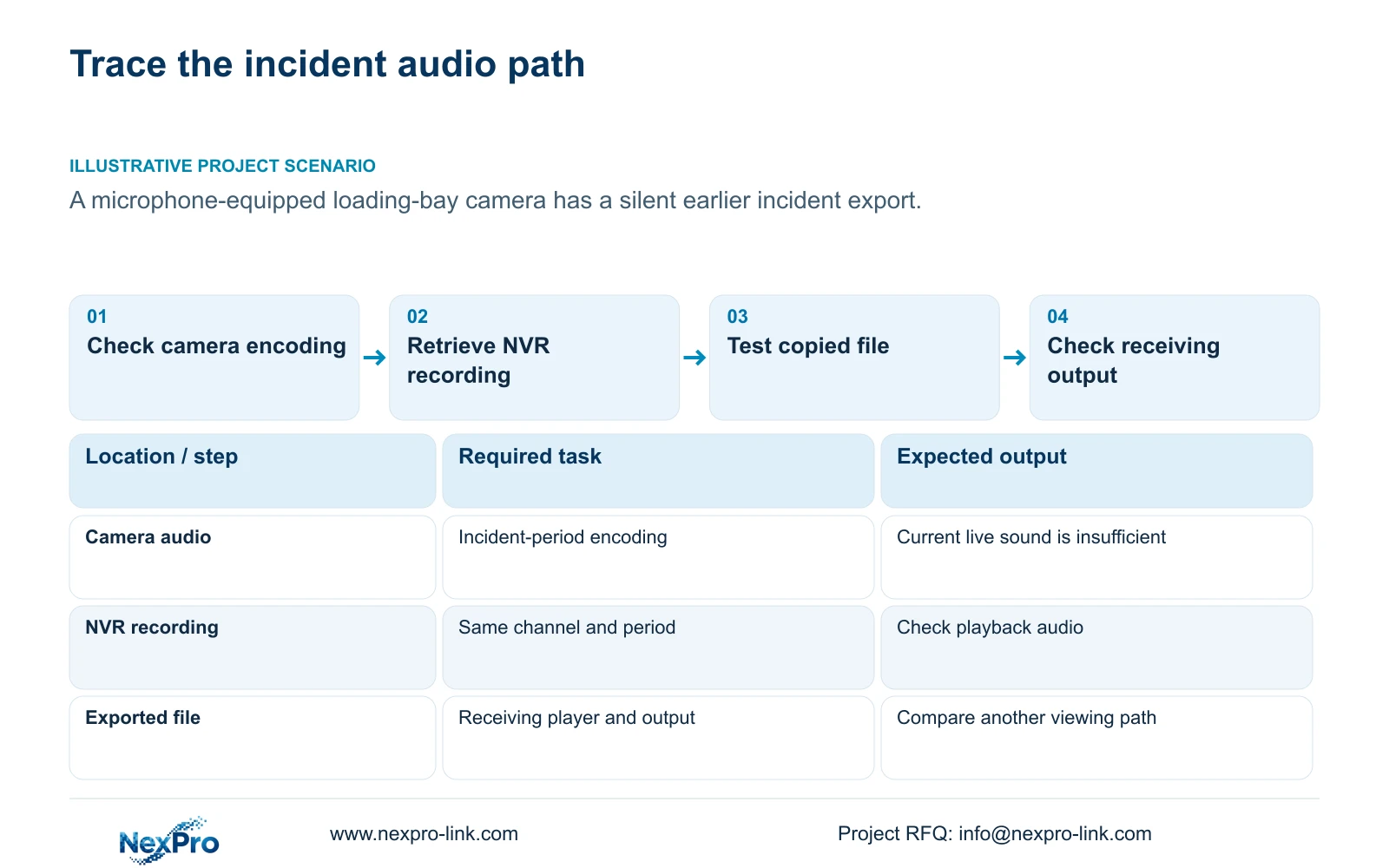
When NVR playback has no sound, check whether the relevant recording contains audio before changing speaker volume or camera settings. Follow the same incident from camera audio encoding through recorder playback and the exported file to the receiving player's output. Audible live sound today does not establish what was stored earlier, and enabling audio now cannot recreate missing historical sound. If recorder playback is audible but the copied clip is silent, concentrate on the export and receiving path. If both are silent, investigate the recorded source and playback controls. Keep talkback capability separate because it does not establish that conversations were recorded.
The source is the supplied private NVR4.0 user manual CH_V2.4.doc, with V2.2 identified in its body. Sections 4.4.6, 4.11.3 and 4.11.4 cover audio settings, playback and backup. The workflow applies to the relevant recorder and camera configuration, not automatically to Seetong PC local recordings.
Section 02
Check audio encoding for the period under review
A camera microphone identifies a possible capture source. It does not establish that audio was enabled, accepted and retained in the incident recording. Inspect the IPC audio-encoding configuration described in section 4.4.6 and any available record of the settings used during the incident.
Separate current settings from historical evidence. If audio has since been enabled, a new authorized test can assess the present path, but it cannot confirm the earlier configuration. Review the original incident through the recorder's playback audio control before attributing silence to the microphone.
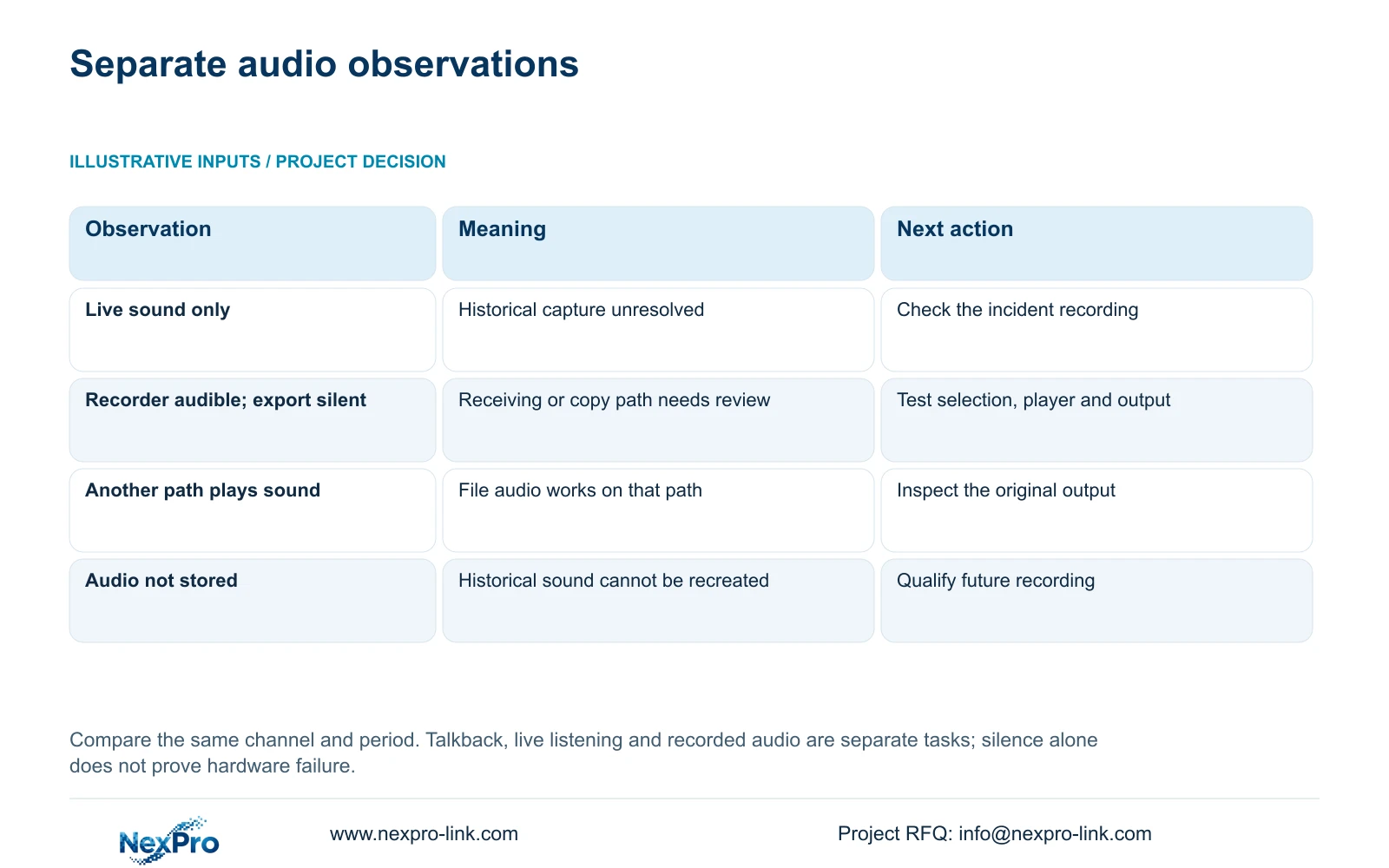
Use the observation to choose the next branch. Audible incident playback establishes a usable audio path for that source and period on the recorder. Silent playback leaves several possible stages unresolved, including the recorded source and the playback output. Record which controls and outputs were actually checked.
Before a new audio test or a change to capture settings, obtain the site's authorization for the intended location and purpose. Permission to review video does not by itself authorize recording conversations. Keep the approved future test separate from the historical incident and restrict both to the intended recipients.
| Observation | Supported conclusion | Next check |
|---|---|---|
| Live audio works; old playback is silent | Current live audio does not prove historical capture | Review incident-source audio and playback controls |
| Recorder playback has sound; export is silent | Audio is audible through the recorder path | Check copied selection, receiving player and output |
| Export is audible on another receiving path | That file contains playable audio on the tested path | Investigate the original player's output arrangement |
| Audio was not stored | Later settings cannot recreate historical sound | Record the limitation and qualify future capture |
Section 03
Keep talkback and recorded audio as separate requirements
Sections 1.2, 2.3.3 and 2.4.4 restrict the documented talkback and broadcast functions to particular 32- or 36-channel models. Section 5.2 also records model differences: TS8108D7 and TS8116D7 do not support talkback in the supplied rows, while TS8232C4 and TS8836M/TS8436M do.
The status descriptions distinguish input waiting and output states. A camera advertised with two-way audio therefore does not establish full-duplex talkback through every recorder. Confirm the recorder, IPC, audio connection and operating path for the requested communication task.
For this silence investigation, a successful talkback session is not a test of the older incident file. Specify recorded incident audio separately from live listening and operator speech. Otherwise an equipment demonstration can satisfy the communication request while leaving the recording requirement untested.
Section 04
Confirm that the camera accepts the required control
Section 4.4 notes that some IPC settings depend on camera capability, and section 4.10 states the dependency explicitly for PTZ. Apply the same careful scope check to the audio operation being requested: identify the camera model, firmware, connection protocol and authorized permissions.
A grey control or a setting that has no effect does not establish a hardware fault. Check whether the selected operating path exposes and accepts the required audio setting. Test one camera before repeating changes across the system.
For a third-party device, basic video reception does not establish complete audio-control interoperability. ONVIF profile information can help define the intended functions, but the actual device combination still needs qualification. Obtain the applicable camera instructions if the recorder interface does not provide the operation; do not invent a menu path.
Section 05
Retrieve the same camera and incident interval
Section 4.11.2 says playback begins with the channel selected in preview. Confirm that the selected recording belongs to the microphone-equipped loading-bay camera. Similar-looking views can lead to comparisons between different sources.
Choose the incident date and time and inspect the ordinary, alarm and motion type filters. An orange date indicates recordings exist in the documented workflow, without establishing complete coverage or recorded audio for the desired interval.
Illustrative project scenario: A loading-bay camera has a microphone, but an earlier incident export is silent. The useful comparison is that exact camera and period in recorder playback and in the copied file. Today's live listening, another bay's recording or a different incident cannot settle what the disputed export contains.
Section 06
Rebuild the export selection before copying again
Follow section 4.11.4 by selecting the file format, recording types, channels and start/end times, then using Update to view the capacity estimate for that selection. The manual lists MP4 as the default and permits multi-channel selection.
Confirm the incident source before inserting and detecting the external USB storage and starting backup. If several channels are copied, keep each file's camera identity and period clear. A copied file from the wrong channel can look plausible while providing no answer about the required audio.
The documented workflow does not establish that an unspecified export option can add sound absent from the recording. Repeat copying when the selection or copy result needs correction, and retain the earlier file for comparison until the replacement has been checked.
Section 07
Test the file through an independent receiving path
Open the sample export on the intended receiving system and check its player audio control and destination output. The manual mentions players such as VLC, but it does not guarantee every operating-system and codec combination.
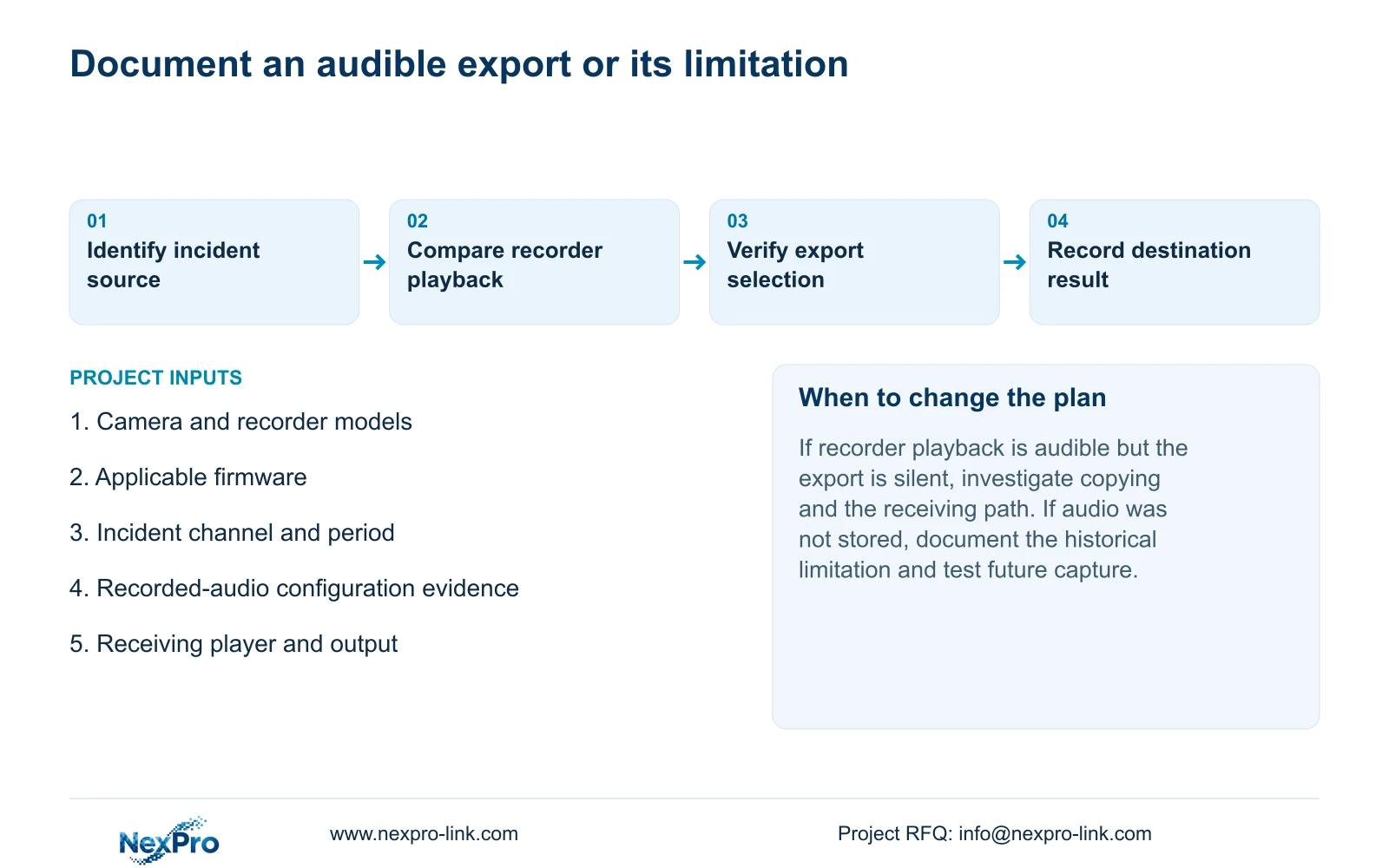
If another approved viewing path plays the same file with sound, record that result and investigate the original receiving arrangement. If neither path produces sound, retain the distinction between observed silence and a confirmed absence of stored audio. Compare with the same interval on the recorder.
Document the channel, period, player and output tested, together with the result. A completed backup indicator establishes copying progress, not an audible handover. Preserve the original footage until the required deliverable has been verified and limit access to authorized recipients.
Section 08
Can enabling audio restore sound to an old clip?
No. A later setting cannot recreate audio that was not stored. Use a new recording to qualify future capture while preserving the limitation of the historical incident.
Section 09
Should a silent export trigger camera replacement?
Not on that observation alone. Confirm the same source in recorder playback and test the receiving file path before assigning the cause to camera hardware.
Section 10
Provide the audio-path comparison
Send NexPro-Link the camera and recorder models, firmware, incident channel and interval, and the sound result at recorder playback versus the receiving player at info@nexpro-link.com.
Engineering references
These sources support the general planning principles. Always use the selected product's current datasheet and applicable project standards for final design.


