

A branded startup screen changes presentation, while channel expansion requires its own supported technical scope. Qualify the recorder's resources and preserve its identity before approving OEM supply.
Section 01
Separate startup artwork from the requested recording workload
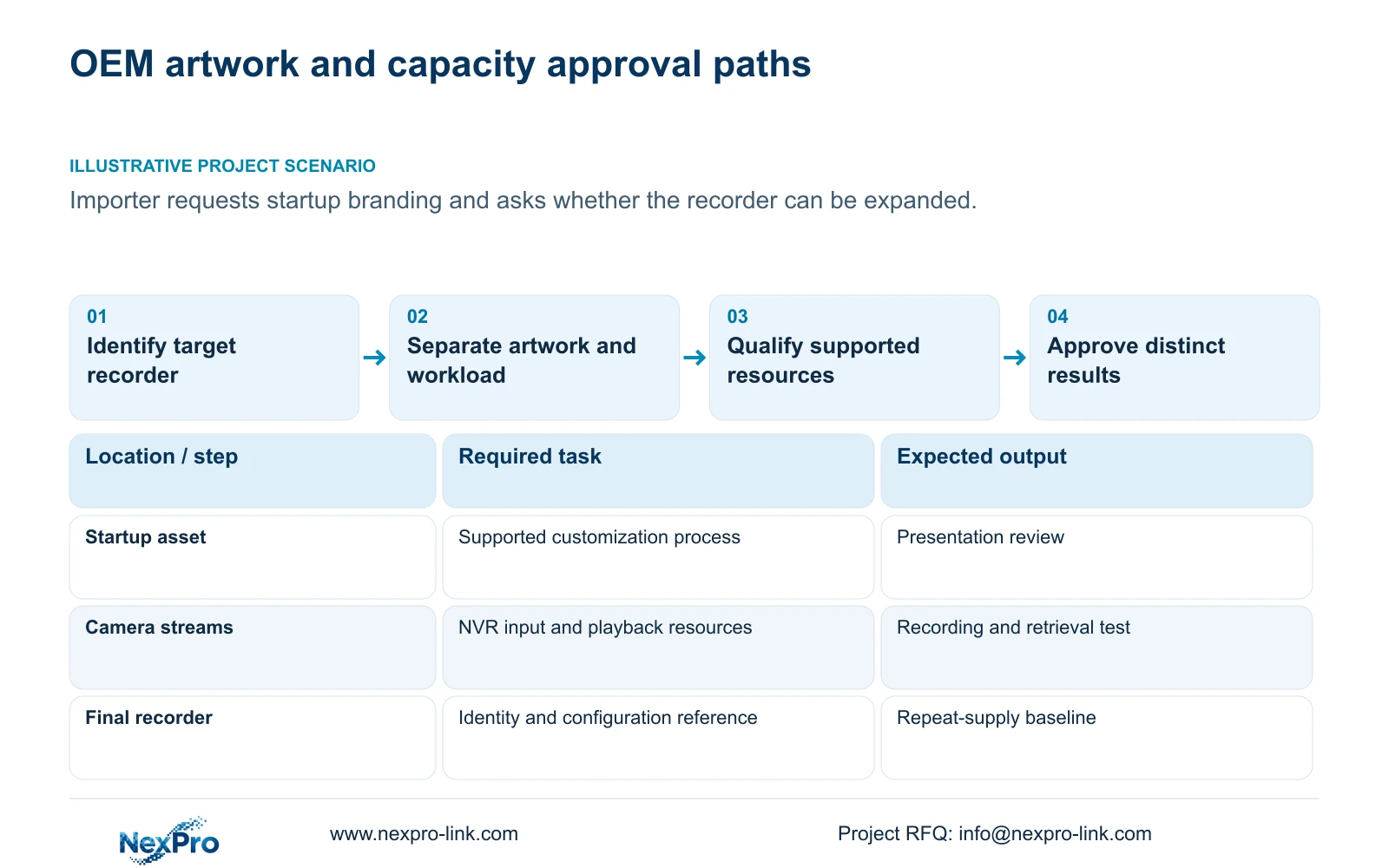
A custom NVR boot logo does not establish an increase in recording or decoding capacity. The supplied manual mentions tools for boot logos, channel backgrounds and shutdown imagery, and separately mentions channel expansion. It provides no universal tool procedure, authorization path or compatibility steps. An importer requesting a branded startup screen should therefore define the artwork separately from any expansion request, identify the actual recorder and firmware, and qualify the proposed camera workload against documented resources. Approve presentation and functional performance as distinct results. A branded sample can retain the same technical limits as the original unit, even when its appearance changes.
List each requested visual surface explicitly. Startup artwork, a channel background and a shutdown image are separate assets with separate approval conditions. Physical packaging, labels and laser marking also need their own scope. Those business options do not come from the recorder's operating manual.
Keep the required technical identity visible through the customization process. Brand presentation should not silently remove model, serial, licensing or certification information. Seetong's third-party application identity and rights are another scope; recorder artwork does not establish authority to rename the app.
Section 02
Confirm the target identity and supported customization process
Collect the product model, hardware version, software version and software date or release information from System Information under section 4.12.19. Use those values to ask which requested customization is supported for that unit. An interface screenshot alone cannot establish tool applicability.
The manual covers models including TS8104A3, TS8108A3, TS8216A3, TS8232C4, TS8108D7, TS8116D7, TS8836M and TS8436M. Its overview lists family functions, while the appendix separates model capabilities. It establishes no one-to-one mapping between these TS identities and NexPro-Link commercial SKUs.
Arrange interface customization through the supported supply process. Since the source does not supply universal tooling or authorization instructions, do not treat a mentioned tool as permission to apply an arbitrary file. If an in-service unit must undergo an approved software change, preserve required data and agree any interruption before implementation.
Section 03
Make channel expansion an independent technical request
Define what the importer means by a larger recorder. More camera inputs, higher incoming bitrate, additional simultaneous playback and longer retention are different requests. Write the desired operating task alongside the current recorder identity so the supplier can identify which resource needs evaluation.
A channel-expansion statement in a family overview does not prove extra input bandwidth, disk space or decoding resources. Ask for the applicable technical scope and supported configuration. Where it cannot be established, retain the current capability or evaluate another documented hardware configuration.
Keep the branding approval independent while the technical request is assessed. The artwork can be reviewed without describing the expanded operating task as accepted. This avoids a purchase description in which a visual sample becomes the only evidence for a functional change.
| Requested item | What approval establishes | Separate unresolved requirement |
|---|---|---|
| Boot logo | Approved startup presentation on the target configuration | Channel and stream capacity |
| Channel background or shutdown image | Approved asset and applicable display behavior | Tool applicability and other functions |
| Packaging, label or laser marking | Agreed physical branding scope | Recorder performance and software rights |
| Channel expansion | Only the confirmed supported technical scope | Bandwidth, decoding and storage suitability |
| Final functional sample | Observed recording and retrieval task | Repeat-supply identity and configuration |
Section 04
Qualify bandwidth, playback and storage separately
Compare camera count and stream modes, total incoming bitrate, required playback combination, usable storage, interfaces and remote tasks. Add environmental requirements where they affect the selected configuration. A channel label cannot answer all of these questions.
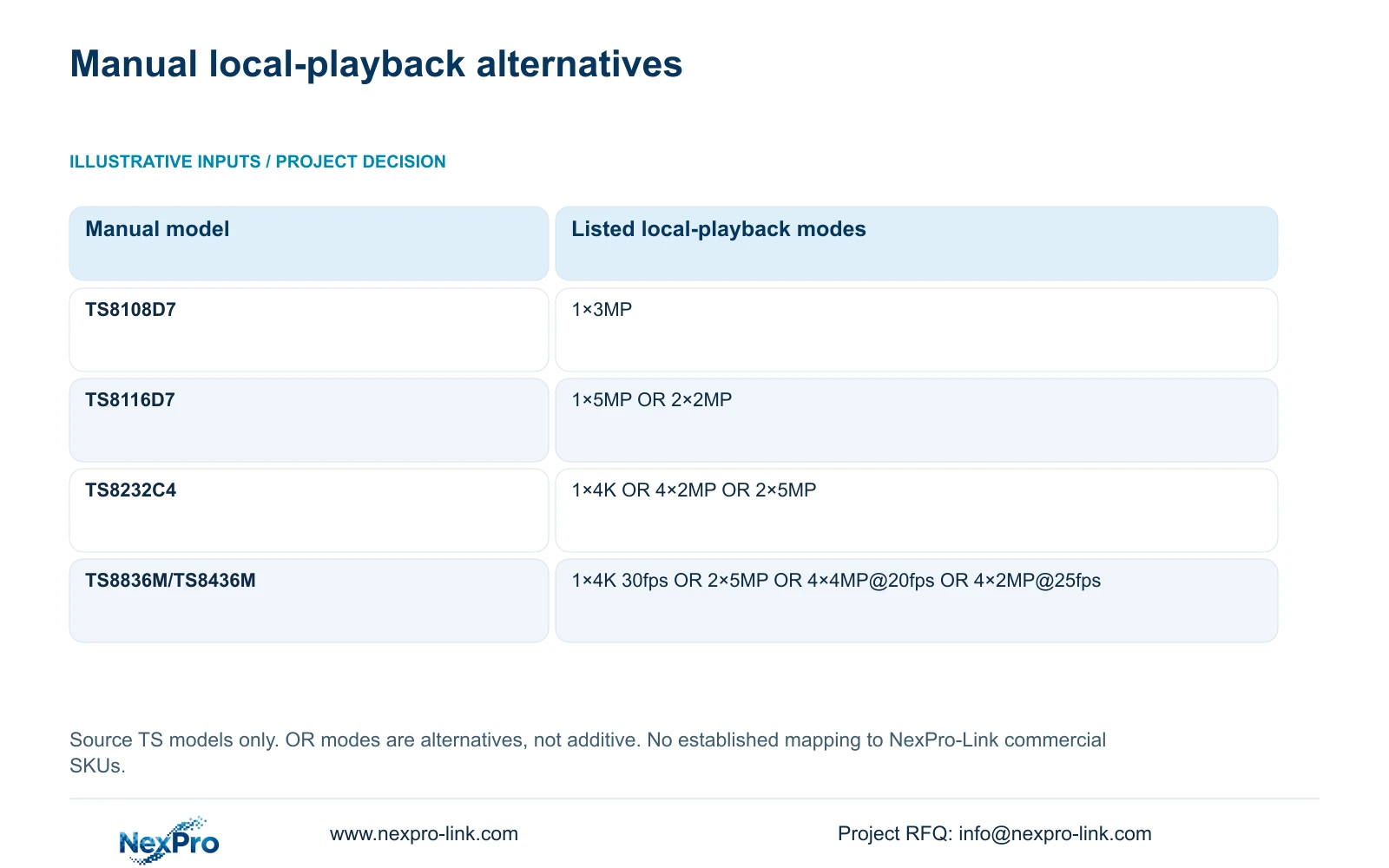
The manual's local-playback examples show why the distinction matters. TS8108D7 is listed with 1×3MP. TS8116D7 lists 1×5MP OR 2×2MP, while TS8232C4 lists 1×4K OR 4×2MP OR 2×5MP. These are alternative modes, not workloads that can be added together.
For TS8836M/TS8436M, the listed alternatives are 1×4K 30fps OR 2×5MP OR 4×4MP@20fps OR 4×2MP@25fps. Keep the resolution and frame-rate qualifications intact. These examples describe the source models; they do not prove the same playback behavior for a commercial recorder carrying customized artwork.
When a current NexPro-Link candidate is considered, use its own model documentation. Drive bays and a storage-capacity claim do not establish a redundancy mode. Qualify the required retention arrangement separately and leave unspecified RAID behavior unresolved.
Section 05
Preserve the approved configuration alongside the artwork
Create a final reference linking the selected hardware and firmware to the approved asset revisions and functional task. Save configuration export, logs and video samples as separately named objects. Sections 4.12.18 and 4.11.4 describe distinct workflows; a configuration export is not footage or a disk image.
Do not assume that a configuration file can be imported into every replacement or later batch. Confirm model and version applicability before using it. Preserve the relationship between the approved settings and the sample identity so a later change is visible.
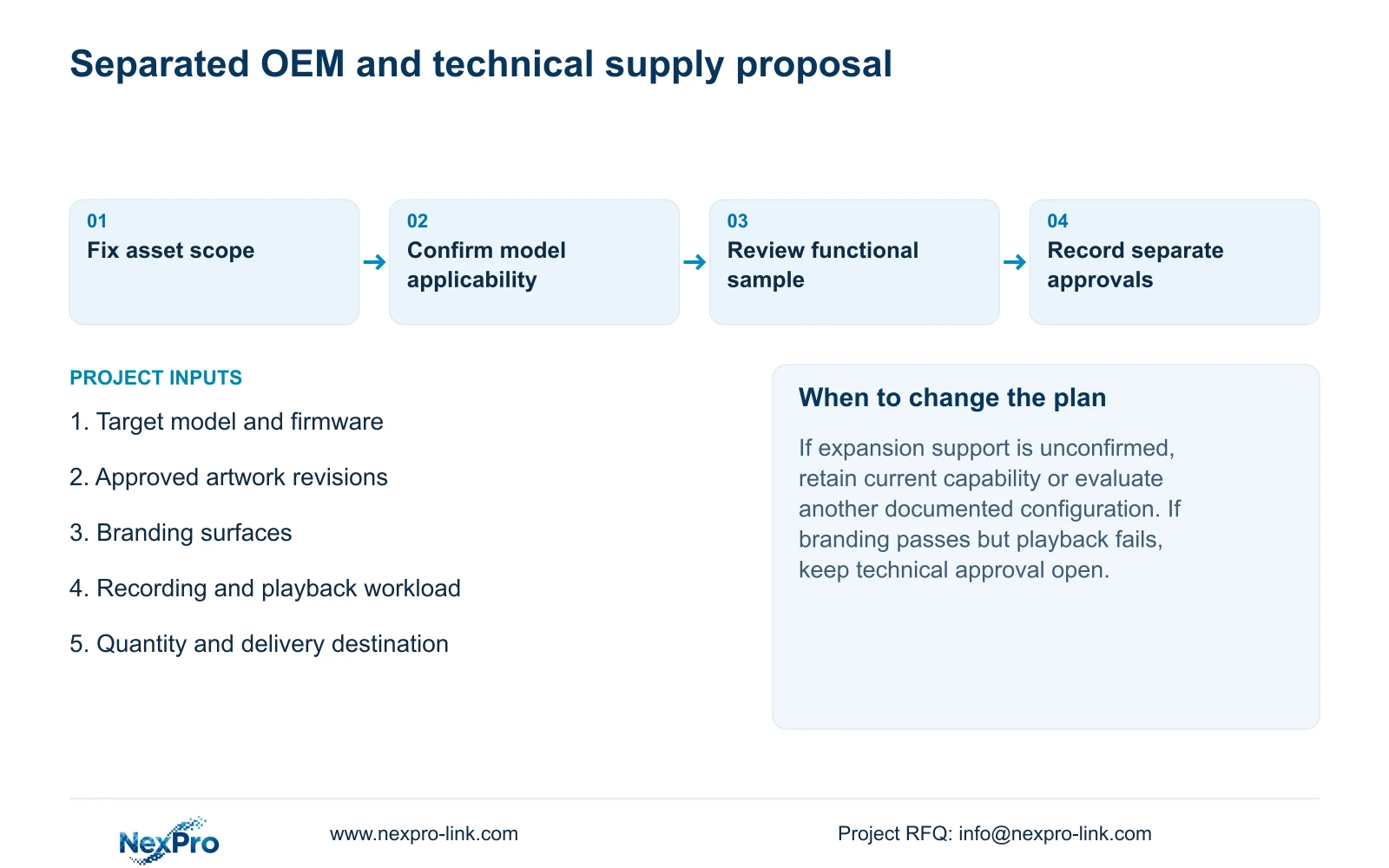
Review the actual startup presentation and the required recording, playback and export task separately. If the image is correct but the required playback combination fails, the visual result can pass while the technical request remains open. Record both outcomes rather than collapsing them into one sample-approval statement.
Section 06
Separate branding lines from the qualified hardware proposal
Organize the enquiry into physical branding, interface assets and technical configuration. Give each line its target model and approval basis. Quantity and delivery destination belong to the supply discussion, while camera schedule, recording and playback tasks, retention target and relevant network or power arrangement support technical matching.
NexPro-Link's OEM and BOQ support paths can support those scoped discussions. Do not infer a minimum order, tool license, fixed charge or software ownership from the existence of a customization request. Compare proposals only after their technical and branding inclusions are clear.
Illustrative project scenario: An importer requests a branded startup screen and asks whether the same service can turn a small recorder into a larger one. The supplier separates the startup asset from the expansion question, identifies the actual unit, and qualifies the required operating workload. The proposal then lists branding and the supported hardware configuration independently, without claiming that the scenario has already been delivered.
Section 07
Does the manual provide a universal logo-loading procedure?
No. It mentions tools without supplying universal operating, authorization or compatibility steps. Confirm the supported process for the target model and firmware.
Section 08
Can alternative playback modes be combined?
No. The listed OR combinations are alternatives. Use the exact model's supported combination for the required operator task.
Section 09
Start with a model-specific OEM scope
The operating source is NVR4.0 user manual CH_V2.4.doc, with V2.2 in its body, sections 1.2, 5.1, 5.2, 4.12.19, 4.12.18 and 4.11.4. Packaging and laser-logo directions are separate business inputs. No tool execution or expanded capacity is demonstrated here.
Send NexPro-Link the target model and requested branding surfaces, plus any separate channel-expansion requirement, at info@nexpro-link.com.
Engineering references
These sources support the general planning principles. Always use the selected product's current datasheet and applicable project standards for final design.


