

A recorder can retain a camera stream without supporting every simultaneous playback combination. Use model-specific modes, correct location mapping and comparable timestamps to complete the investigation.
Section 01
Fit the incident review to a documented playback mode
Choose the required camera group against the exact recorder's supported local-playback combinations. A stream that records successfully may still exceed the available simultaneous decoding mode when several channels are opened together. If the requested combination is unsupported, review the cameras sequentially with a common incident reference, or qualify a separate receiving workflow before relying on it. Confirm the physical locations and timestamp relationships before comparing movement across views. This preserves the investigation while separating a playback limitation from missing footage. For procurement, state the required simultaneous recorded modes explicitly; a nominal channel count alone does not answer the operator's review requirement.
This guide follows the supplied private NVR4.0 user manual CH_V2.4.doc, with V2.2 in its body. Section 5.2 provides model-specific limits. Sections 4.11.2 and 4.11.4 support retrieval and export. These TS model codes have no established mapping to NexPro-Link commercial SKUs.
Section 02
Read alternative modes as OR relationships
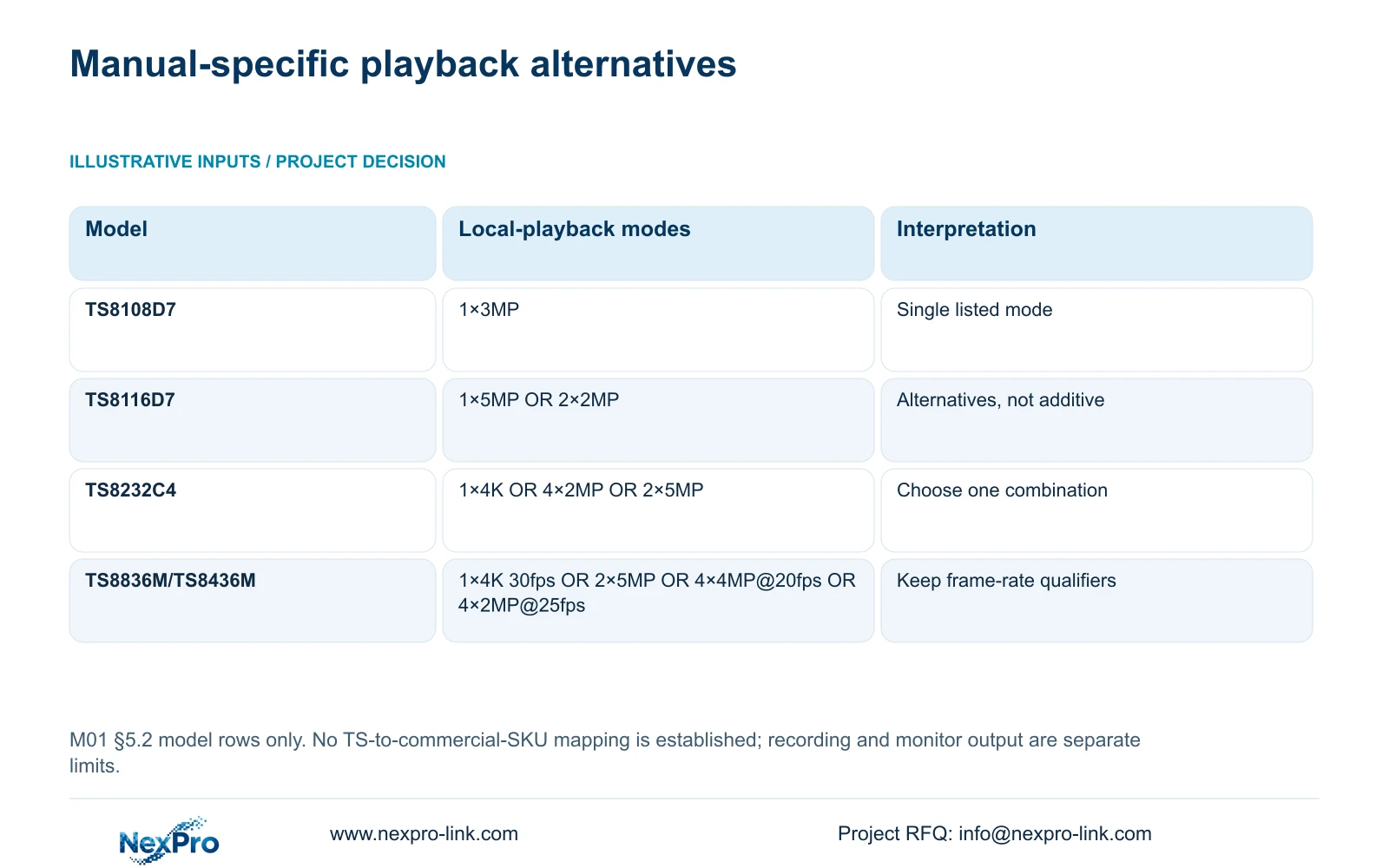
The appendix lists TS8116D7 local playback as 1×5MP OR 2×2MP. For TS8232C4, the listed alternatives are 1×4K OR 4×2MP OR 2×5MP. Selecting one documented mode does not grant the others concurrently. Adding the stream counts across alternatives produces a capability the table does not state.
The broader source table also lists TS8108D7 at 1×3MP. TS8836M/TS8436M have alternatives of 1×4K 30fps OR 2×5MP OR 4×4MP@20fps OR 4×2MP@25fps. Preserve the frame-rate qualifiers where supplied and do not fill in missing rates for other entries.
Compare the requested recorded streams with the applicable row before attempting the complete group. If the device identity or firmware scope differs, obtain its own mode information. A similar enclosure or shared menu does not resolve that mismatch.
| Manual model | Alternative local-playback modes | Decision |
|---|---|---|
| TS8108D7 | 1×3MP | Use the listed single-stream mode |
| TS8116D7 | 1×5MP OR 2×2MP | Choose one supported combination |
| TS8232C4 | 1×4K OR 4×2MP OR 2×5MP | Do not infer four high-resolution streams |
| TS8836M/TS8436M | 1×4K 30fps OR 2×5MP OR 4×4MP@20fps OR 4×2MP@25fps | Retain the stated resolution and frame-rate conditions |
Section 03
Keep recording, decoding and display requirements separate
Write separate requirements for camera enrollment, aggregate incoming bitrate, preview decoding, simultaneous playback and monitor output. These describe different operating limits. A recorder's camera count concerns the input arrangement; its playback modes concern decoding stored streams for review.
A monitor output specification cannot establish how many recorded streams the recorder can decode together. Likewise, sufficient disk capacity does not establish a larger playback combination. During investigation, use the supported mode first and test whether each required source can be retrieved individually.
For a new equipment brief, describe the actual review task beside the recording requirements. NexPro-Link's BOQ and tender support can use that task for model matching and technical-document discussions. Keep any proposed alternative conditional on its documented configuration and the required viewing workflow.
Section 04
Select locations through the camera-to-channel record
Before opening a group, identify the drawing location, physical camera identity, IP address, recorder channel and displayed name in separate fields. Sections 4.3.1, 4.4.4 and 4.12.6 provide channel and naming controls; maintaining the location relationship is a project task.
A renamed window and a replaced camera are different changes. Preserve the replacement or reordering history so an earlier recording can be attributed correctly. During a stock investigation, selecting a familiar screen position is insufficient if the channel assignment has changed.
Check each chosen recording against the location record before comparing the group. If a source belongs to the wrong area, correct the selection and repeat the same incident query. That result concerns camera identity and should remain separate from the playback-capacity assessment.
Section 05
Establish a comparable time reference
Sections 4.4.2 and 4.12.2 describe IPC time controls and separate recorder settings, including network time and an IPC synchronization interval measured in hours. Document the intended time authority and which device synchronizes which other device.
Avoid enabling overlapping PC, NVR and IPC mechanisms without understanding their direction. The network-time entry does not establish support for every possible local NTP-server arrangement. Confirm the actual implementation before specifying it.
Use an identifiable event visible in the required cameras to assess their timestamp relationship. If the times differ, record the observed offsets before drawing a movement sequence. Correcting current settings does not establish that historical recordings now share a reconciled time basis.
Section 06
Retrieve individually before diagnosing the group
Playback entry defaults to the preview-selected channel in section 4.11.2. Confirm each camera and select the incident date, time and relevant ordinary, alarm or motion filters. Orange calendar dates indicate recordings exist, without proving complete coverage of every required interval.
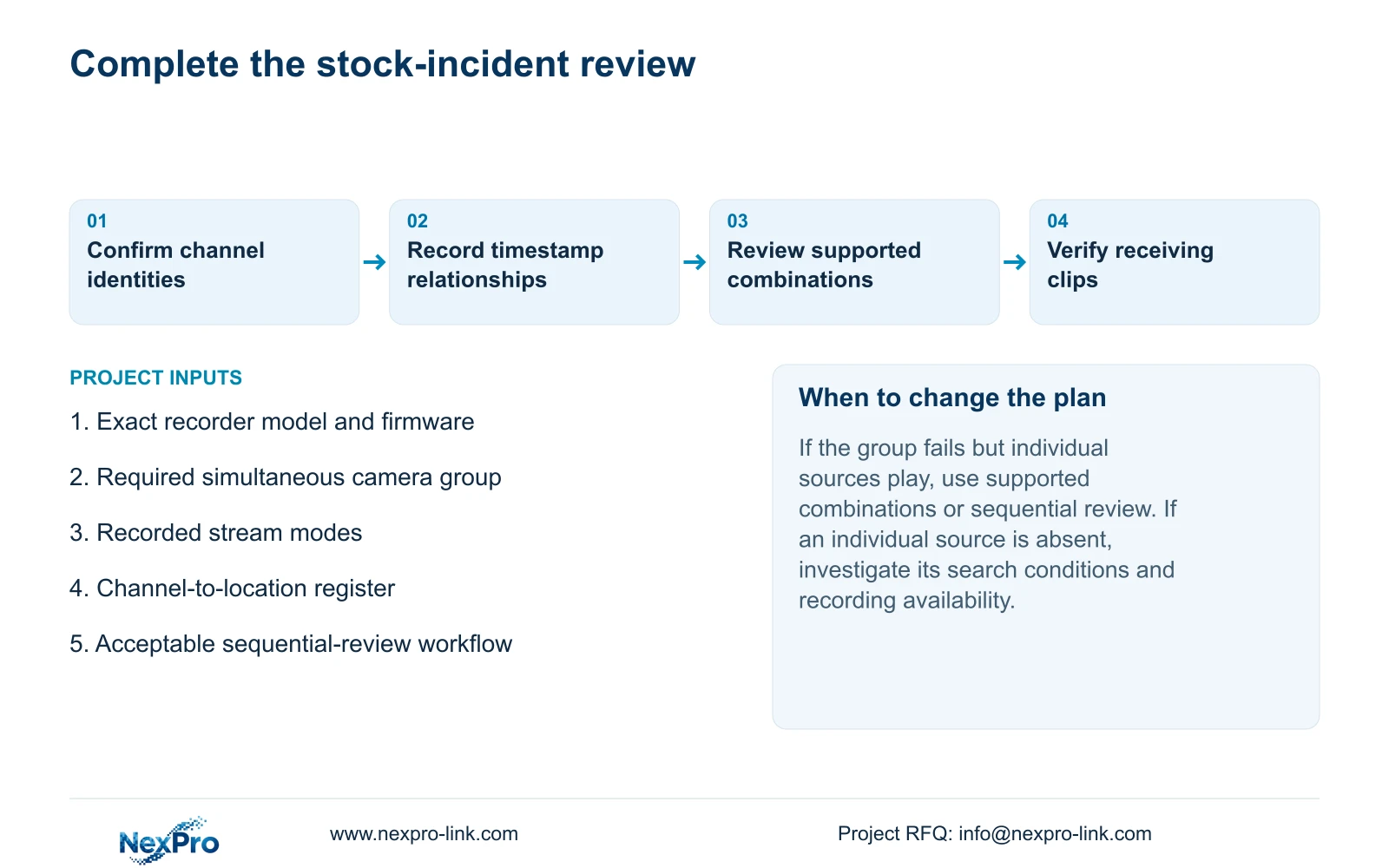
If a group cannot play but its sources play individually, retain that distinction in the investigation record. Continue through supported combinations or sequential review. If an individual source is also absent, check its search conditions and recording availability separately.
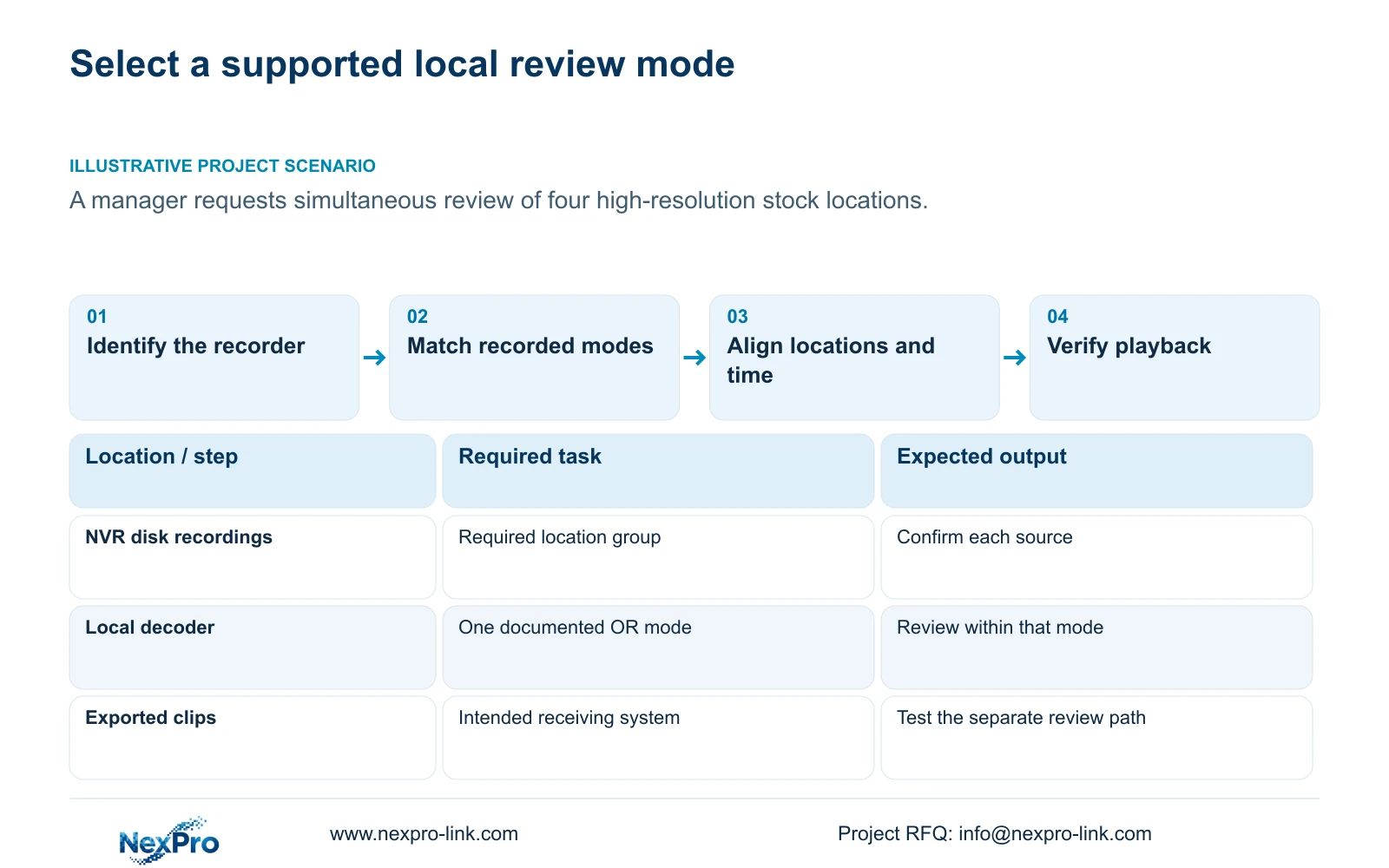
Illustrative project scenario: A manager wants to replay four high-resolution locations simultaneously during a stock investigation. On a TS8232C4, the listed 4×2MP option does not establish four streams at an unspecified higher resolution. The manager can review the required recordings sequentially while procurement evaluates whether simultaneous review is a separate requirement.
Section 07
Verify separate exports on the receiving path
Where the investigation needs review away from the recorder, select the required channels, recording types, format and time boundaries in section 4.11.4. Update the capacity estimate, detect the external USB storage and start backup. Multi-channel backup selection does not itself prove multi-channel playback on the receiving system.
Use separately identified clips when needed to keep each location and period clear. Open the exports on the intended destination and check playback, coverage and required audio. The manual mentions VLC without guaranteeing all platform and codec combinations.
Record the receiving method that actually works. Preserve the original recordings until the required copies are verified. A proposed workstation or client remains an unqualified alternative until it demonstrates the intended review task with the selected files.
Section 08
Does an unsupported group mean the recorder must be replaced?
No. Supported combinations or sequential review may complete the incident task. Replacement becomes a procurement question when the required simultaneous workflow cannot be met by an accepted alternative.
Section 09
Can a TS playback row be assigned to a commercial SKU?
Only with evidence establishing the mapping and applicable configuration. The supplied manual does not establish that relationship for NexPro-Link commercial models.
Section 10
Provide the simultaneous review requirement
Send NexPro-Link the recorder model and firmware, required camera group and recorded modes at info@nexpro-link.com, stating whether sequential review is acceptable.
Engineering references
These sources support the general planning principles. Always use the selected product's current datasheet and applicable project standards for final design.


