

A silent HDMI monitor does not prove that the recording lacks audio. Compare the same channel and period through another authorized path, then verify the exported file before diagnosing equipment.
Section 01
Anchor the sound check to one recorded segment
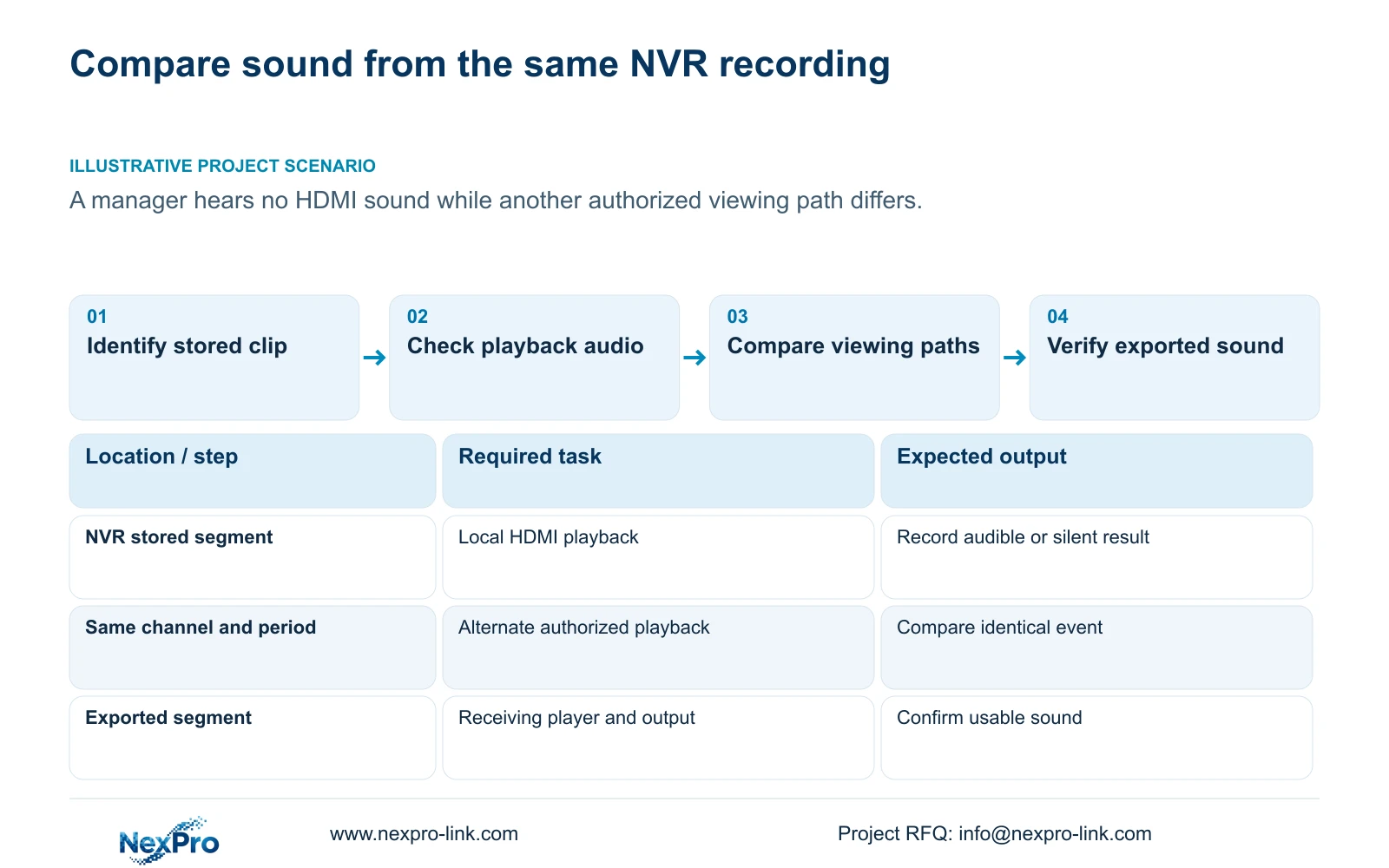
A silent HDMI playback session does not establish that the recording contains no audio. Check the camera's audio source and encoding, the selected recording, playback audio control and the physical receiving output, then compare the same channel and period through another authorized viewing path. Live sound heard now cannot prove that sound was stored during an earlier incident. If the identical recorded segment is audible elsewhere, investigate the silent playback or display path before changing camera settings or replacing the recorder. If no tested path produces sound, inspect the export and recording source before deciding whether audio was missing at capture.
Write down the channel and incident start and end times before comparing results. Keep live monitoring, recorder playback and exported-file playback as separate observations. A comparison between current live sound and yesterday's silent clip tests different source material and cannot isolate an HDMI complaint.
The private source is NVR4.0 user manual CH_V2.4.doc, with V2.2 stated in its body. Sections 4.4.6, 4.11.3 and 4.11.4 describe audio and playback functions; sections 1.2, 4.8 and 4.12.1 cover display scope. These instructions require the actual recorder and firmware, without mapping TS models to commercial SKUs.
Section 02
Check the selected display and sound output
Identify the recorder interface in use, the connected display and the intended sound destination. Check the available audio controls and the display's actual receiving arrangement using the documentation for those devices. Do not infer an enabled audio path or a particular routing menu simply because an HDMI connector is present.
The manual states that VGA and HDMI can output simultaneously. That statement does not establish independently managed canvases, different content at separate desks or every audio behavior on each output. Keep interface availability, display layout and sound delivery as separate requirements.
If another viewing path is audible, record what changed between paths: recorder output, display, playback application or receiving audio device. Hold the incident segment constant. The comparison narrows investigation but does not alone identify which component in the silent path is faulty.
| Observed result | Supported interpretation | Next action |
|---|---|---|
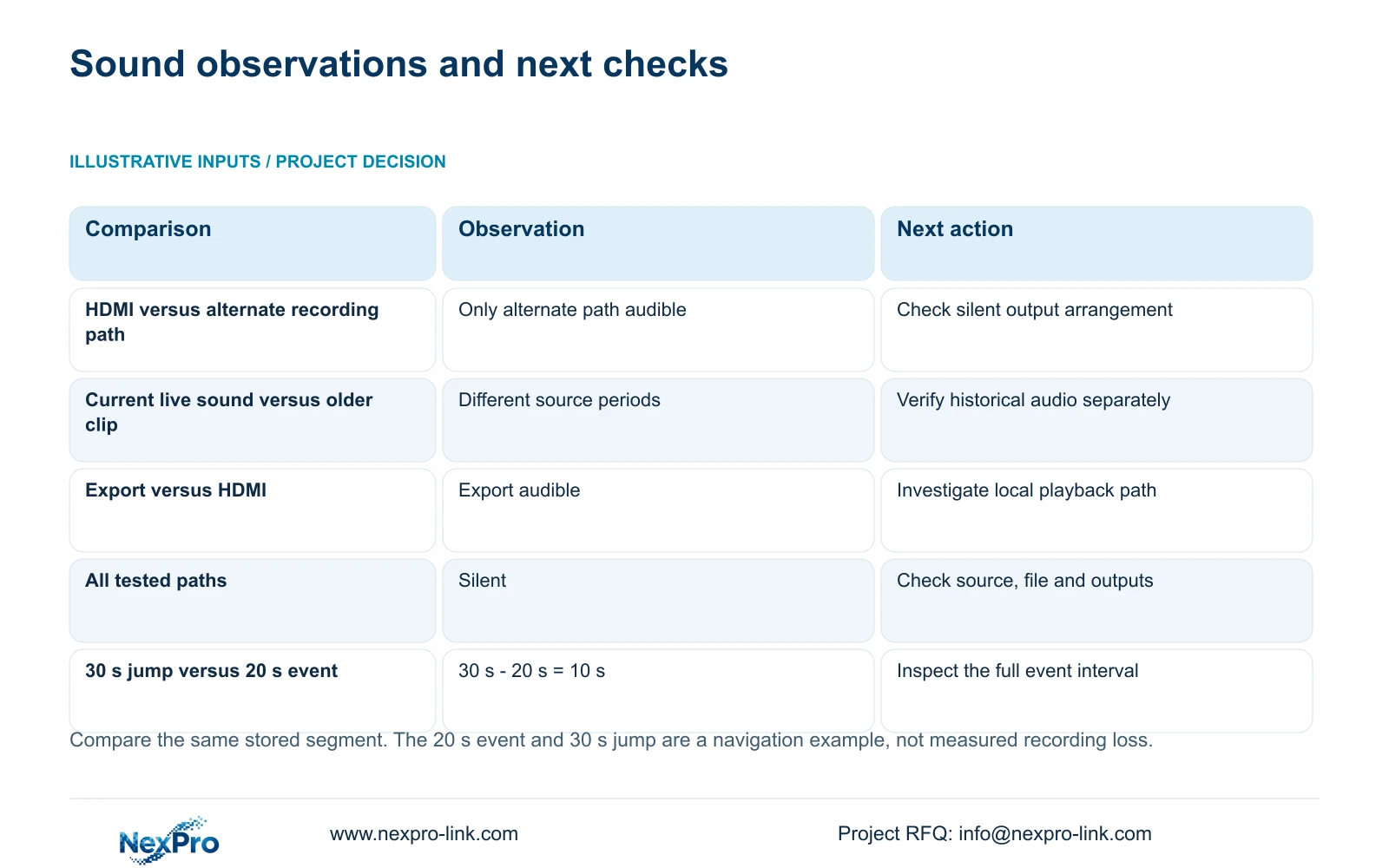
| HDMI is silent; the same recording is audible elsewhere | Sound is available through the successful recorded path | Check the silent playback control and physical output arrangement. |
| Live monitoring is audible; an older recording is silent | Present capture and historical storage are different observations | Inspect the older recording source and export. |
| Exported sound works; recorder HDMI remains silent | The exported segment has usable sound on the tested system | Investigate recorder playback and monitor-side delivery. |
| All tested paths are silent | The cause remains unconfirmed | Check file audio, receiving outputs and the relevant capture settings. |
| Backup completes but the file has not been played | Copy completion has been observed | Open the file on the intended receiving system. |
Section 03
Leave unrelated image controls unchanged
Section 4.8 describes monitor-facing output adjustment, while section 4.4.3 describes camera image capture settings. Brightness and color adjustments at those layers address different image observations. They do not establish the cause of missing playback sound.
Keep the video baseline unchanged during the audio comparison. If the event also looks different on another screen, document that as a separate display or source-image question. Improving the monitor's appearance cannot show that audio was recorded, and changing camera processing introduces another variable into the test.
Make one relevant audio-path change at a time and repeat the same segment. Record the setting or device changed and whether the outcome changed. A successful retest is more useful when the next operator can reproduce it without relying on an unexplained collection of adjustments.
Section 04
Locate the same event on every viewing path
Section 4.11.3 separates time positioning, timeline zoom, thirty-second jumps and image enlargement. Use broad navigation to reach the likely event period, then play through the relevant interval closely enough to compare the same moment. Timeline zoom changes navigation scale; electronic image enlargement changes the displayed region.
The supplied teaching example uses a 20-second event and a 30-second navigation jump. The interval difference is 30 s - 20 s = 10 s. That arithmetic explains why a coarse step can pass over the event when its timing falls between the inspected positions. It is a navigation example, not a measurement of lost recording or an audio-duration specification.
For sound comparison, choose matching start and end times and include the relevant spoken or audible moment. A missed event during coarse seeking is not evidence that storage failed. If the alternate path uses Seetong PC software, confirm that it is retrieving the NVR recording rather than a different PC-local recording.
Section 05
Verify the exported segment on the receiving system
Export the identified segment under the site's authorized process and open it on the intended receiving system. Confirm the channel, time boundaries, visible event and any required sound. A completed backup indicator establishes progress, not whether the recipient can use the file.
The manual mentions players such as VLC for backup video and audio. This is not a guarantee for every operating system, player version or codec combination. Record the tested viewing method and inspect the file's audio result using a supported player. Silence alone should not be described as proof that no audio track exists.
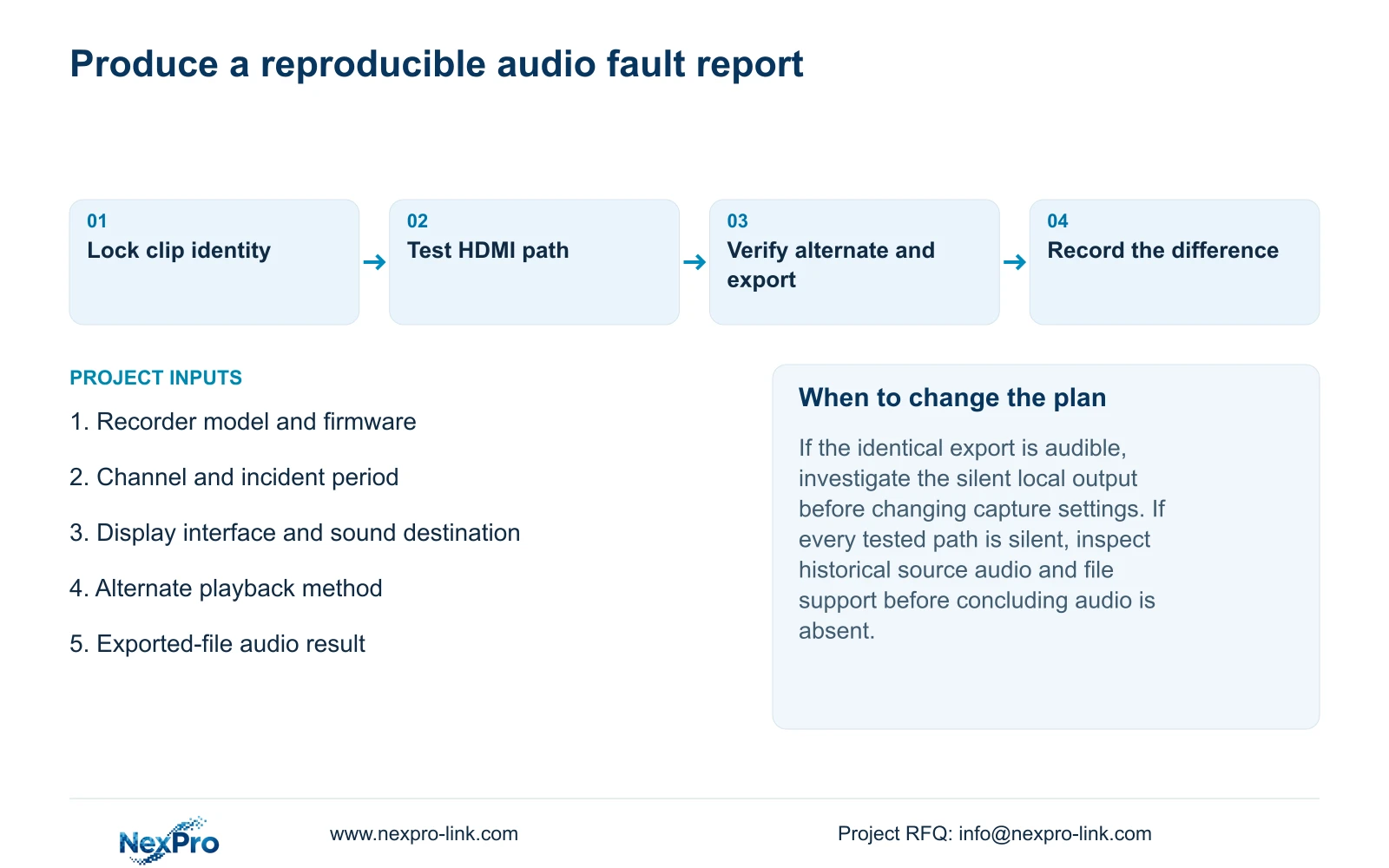
If the export is audible while HDMI playback is silent, keep the verified copy and focus on the recorder-to-display path. If the export also remains silent, investigate the relevant source and playback conditions without assuming that enabling audio now will repair older footage. Preserve the original recording until the required copy has been verified.
Section 06
Report the comparison with the recorder identity
Section 4.12.19 describes basic recorder information. Record the product model, hardware version, software version and software date alongside the channel and period tested. Add the display connection and alternate playback method. Version details identify the applicable instructions but do not prove the cause.
Illustrative project scenario: A manager plays an event through HDMI with no sound while another authorized viewing path behaves differently. The engineer compares the identical recording and checks the export. The report states where sound is heard and where it is absent, leaving component diagnosis conditional on the next controlled test.
Keep screenshots free of cloud identifiers, QR codes and identifiable customer footage. If project changes become necessary, scope the required output behavior against the selected equipment. The monitoring-workstation reference is relevant when comparing an alternate client path, but its display resources do not establish the recorder's local audio routing.
Section 07
Can enabling audio recover sound from an old incident?
No. It cannot recreate audio that was never stored. First determine whether the existing segment contains usable sound through an appropriate playback path.
Section 08
Do VGA and HDMI guarantee separate operator views?
No. Simultaneous output does not establish independent canvases. Verify separate content and sound requirements on the proposed recorder or client arrangement.
Section 09
Submit a same-segment sound comparison
Send the recorder model and firmware, clip channel and period, and the HDMI-versus-alternate-path result to info@nexpro-link.com for focused audio troubleshooting.
Engineering references
These sources support the general planning principles. Always use the selected product's current datasheet and applicable project standards for final design.


