

An encoding profile needs to work beyond the live screen. Confirm camera support, distinguish viewing from recording, and test the exported clip on the buyer's intended system.
Section 01
Qualify the profile through the receiving player
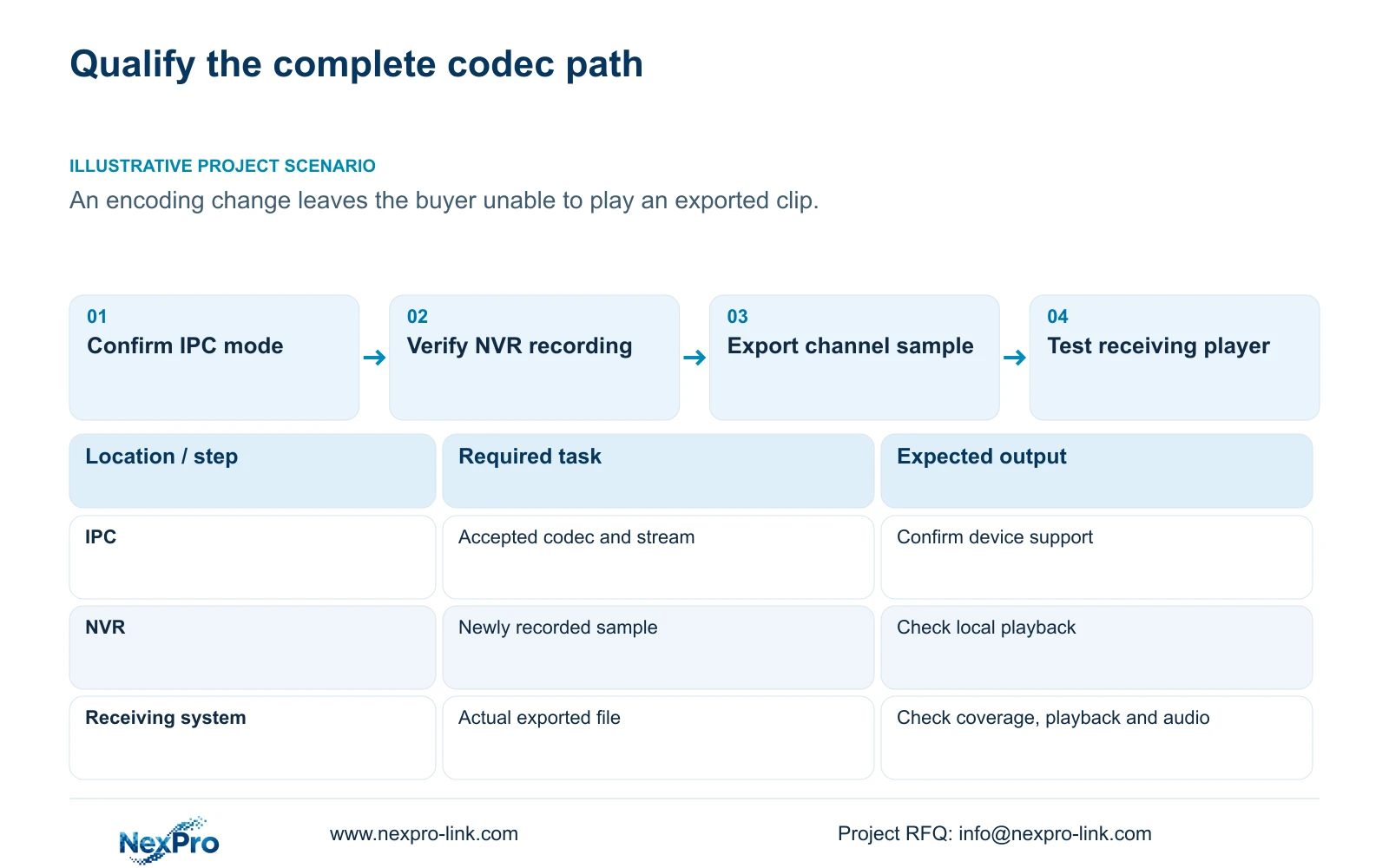
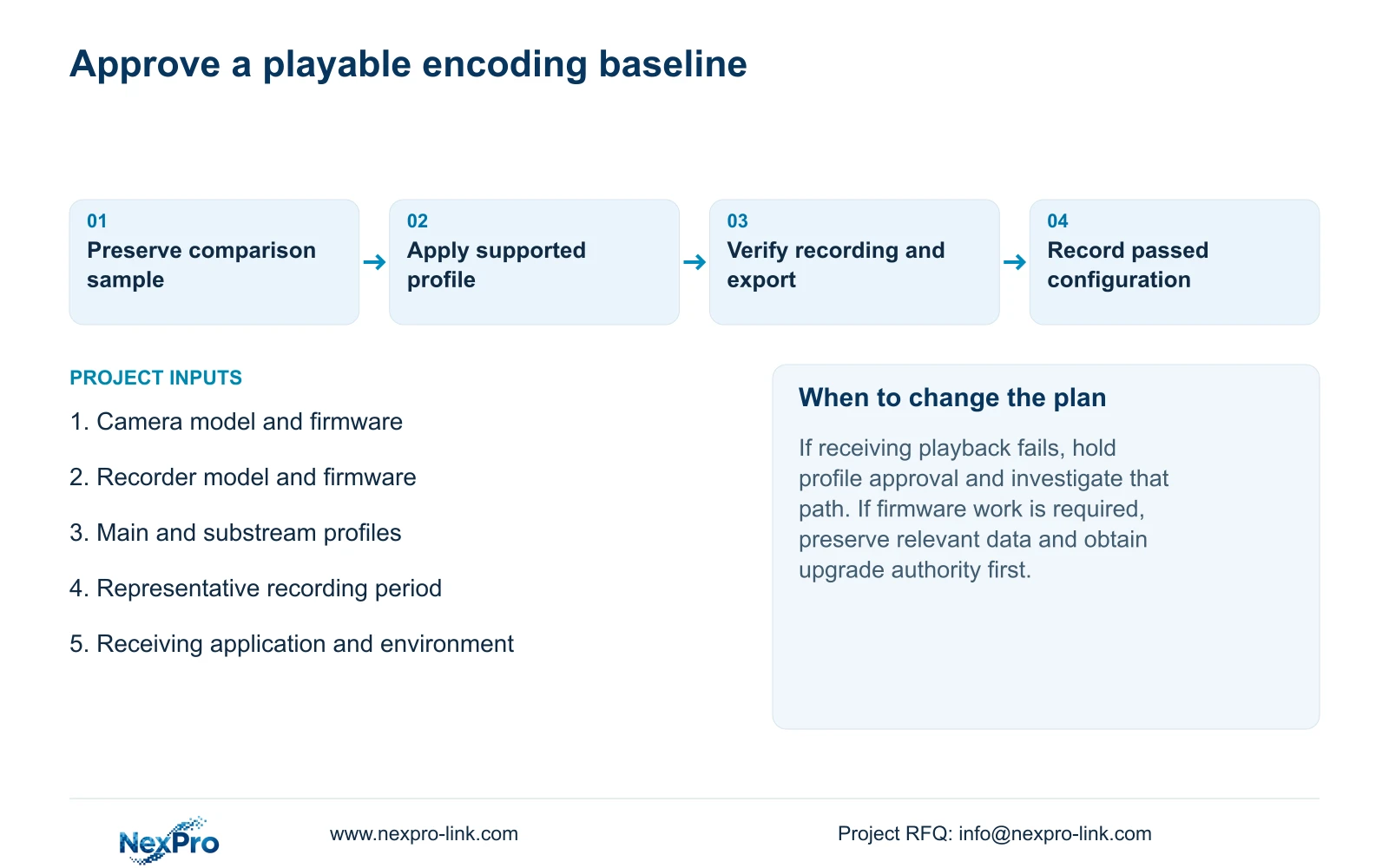
Select an encoding profile only when the camera, NVR recording path and intended receiving system can use it for the required task. The supplied manual lists H.264, H.265 and H.265+, but a menu choice does not establish support for every connected camera or exported clip. Preserve a comparable sample before changing the profile, verify the accepted source settings, and test newly recorded footage through playback and export. If local viewing succeeds while the buyer cannot play the export, keep that failure separate from camera connectivity. Storage claims should follow a qualified working profile and representative observations, without attaching a fixed saving to the codec name.
Start by identifying the camera model and firmware, recorder identity and intended playback application. Record the selected codec alongside resolution, frame rate and rate-control settings. Available resolutions depend on IPC capability, so a profile must describe an accepted combination rather than a collection of desirable menu labels.
This guide uses the private NVR4.0 user manual CH_V2.4.doc, whose body states V2.2. Sections 4.4.5 and 4.12.7 cover encoding; sections 4.4 and 4.10 establish camera-dependent controls. Sections 4.3.3.3, 4.11 and 4.12.17 through 4.12.20 support observation and post-change checks. Locate the source by section.
Section 02
Separate basic video from controllable camera settings
A connected third-party camera may provide video without exposing every configuration operation through the recorder. Check the connection method, camera firmware and relevant account permissions before treating an unavailable control as a hardware fault. Identify whether the requested setting belongs to the camera interface or an applicable recorder control.
The manual explicitly makes PTZ operation dependent on the IPC, illustrating the broader need to verify a specific requested function. That dependency does not prove a codec operation exists on every third-party interface. Test the selected camera and setting directly through the documented path.
ONVIF profile information is relevant to matching device and client scope, but the presence of ONVIF in a connection description does not prove universal interoperability. If the required operation is unconfirmed, preserve the working configuration and obtain model-specific evidence before expanding the trial.
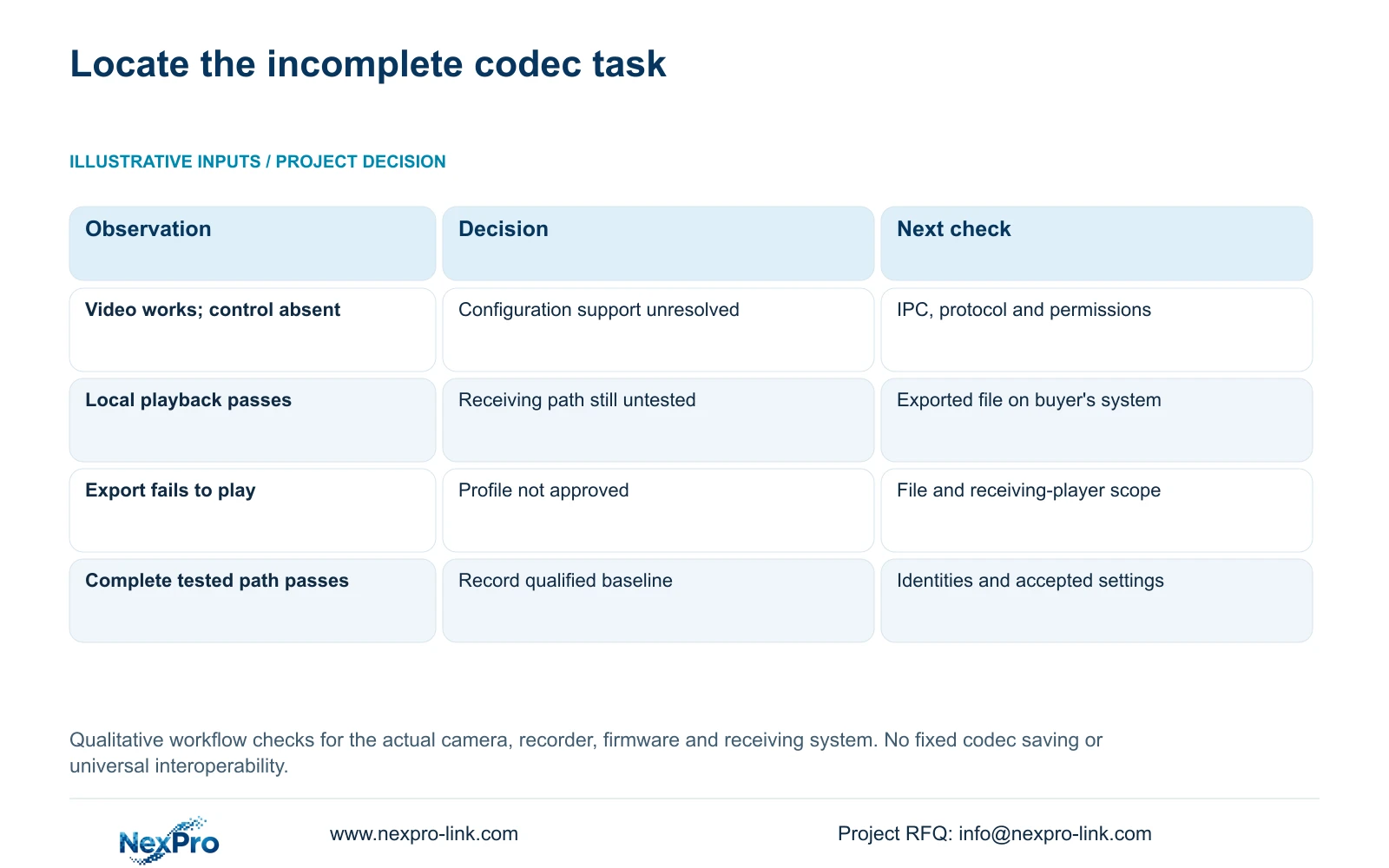
| Observation | Meaning | Next action |
|---|---|---|
| Video works; codec control unavailable | Basic video does not establish configuration support | Check IPC, protocol and permissions |
| Local playback works; receiving player fails | Export viewing path remains unqualified | Test the actual file and receiving system |
| Requested values do not persist | Accepted profile needs confirmation | Compare camera and recorder settings |
| Recording, export and receiving playback pass | Candidate profile completes those tested tasks | Record identities and operating conditions |
Section 03
Identify which stream was changed and recorded
Keep main- and substream profiles in separate records. A codec change applied to one stream cannot be inferred from the appearance of another. Identify the configured object, the actual viewing path and a saved NVR recording from the changed period.
If the live screen looks unchanged, inspect whether it uses the stream that was modified. If the saved file differs from the intended profile, compare the recorder and camera settings before attributing the result to compression behavior. Seetong PC local recording is a different storage path and cannot establish the recorder's recording default.
Check parameter ownership when settings return after reconnection. The manual describes local parameter locking that can bind NVR settings to the camera. Resolve which interface owns the approved source profile so repeated edits do not obscure the codec test.
Section 04
Compare demand under comparable scene conditions
Once stream identity is established, compare representative recordings from the old and proposed profiles. Keep the required target information and recording purpose consistent. Record lighting and scene activity, especially when movement or night conditions affect whether the footage is useful.
CBR, VBR and the entered bitrate are configuration fields. Observed traffic and stored data describe operation. Use a representative average for a retention assessment and a relevant peak or limit for interface evaluation. Section 4.3.3.3 separates interface transmit and receive information; outgoing viewing demand need not equal camera recording input.
If output becomes smaller but the required detail disappears, the profile has failed the task. If the detail passes, the measured difference can inform capacity planning within the documented sampling conditions. Avoid presenting a quiet clip as a permanent daily storage requirement or a brand-wide compression result.
Section 05
Test the buyer's exported-file workflow
Create a sample export from an identifiable channel and period, then open that file on the intended receiving system. Confirm start and end coverage, usable playback and required audio. Record the application and tested environment so the receiving workflow is reproducible.
Section 4.11.4 mentions players such as VLC. That suggestion does not guarantee all operating-system, application-version and codec combinations. A successful export progress indicator also does not prove that the buyer can review the result.
When the export fails, retain the original footage and the failure description. Establish whether the problem concerns the selected file, export coverage or receiving playback. Do not continue switching source codecs without preserving the evidence needed to compare the attempts. Any alternative supported profile needs a new recording and export check.
Section 06
Record the passed configuration and its boundaries
After the encoding change, recheck current live view and time, newly generated recording, relevant historical footage, export, intended accounts and required events. These checks establish the operating tasks affected by the change. An online icon or software label cannot replace them.
Document the changed variable, accepted values, camera and recorder firmware identities, receiving method and any failed task. Retain the earlier sample as a comparison reference. If further firmware work is proposed, obtain authority, preserve relevant footage and configuration information, and plan the interruption before upgrading.
Do not assume the unit provides automatic rollback. Arrange the next supported action with the supplier when a task remains unresolved. The approved baseline should state what passed, on which configuration, and which receiving path remains outside the demonstrated scope.
Section 07
Resolve an export problem after a codec change
Illustrative project scenario: A distributor changes an encoding mode to reduce storage and discovers an exported clip is difficult for the buyer to play. The next investigation identifies the changed stream, confirms its accepted camera settings and tests the export on the buyer's intended system. A storage comparison waits until the profile completes that workflow. The scenario describes a proposed decision process, not a delivered project or measured saving.
Section 08
Can H.265+ be approved from the recorder menu alone?
No. Confirm camera support and test the actual recording, export and receiving-player path. The label does not establish a fixed saving or support across every device.
Section 09
Should a working live view close an export fault?
No. Live viewing and exported-file playback are separate tasks. Approval requires a playable sample on the intended receiving system, with correct channel and time coverage.
Section 10
Scope the unsupported playback stage
Send NexPro-Link the camera and recorder model/firmware identities, selected codec and receiving-player failure description at info@nexpro-link.com.
Engineering references
These sources support the general planning principles. Always use the selected product's current datasheet and applicable project standards for final design.


