

Approve the specific recorder identity and its demonstrated recording task, not a familiar interface screenshot. Keep hardware, firmware, configuration and playable export evidence together so procurement can identify later differences.
Section 01
Approve an identifiable recorder and a repeatable task
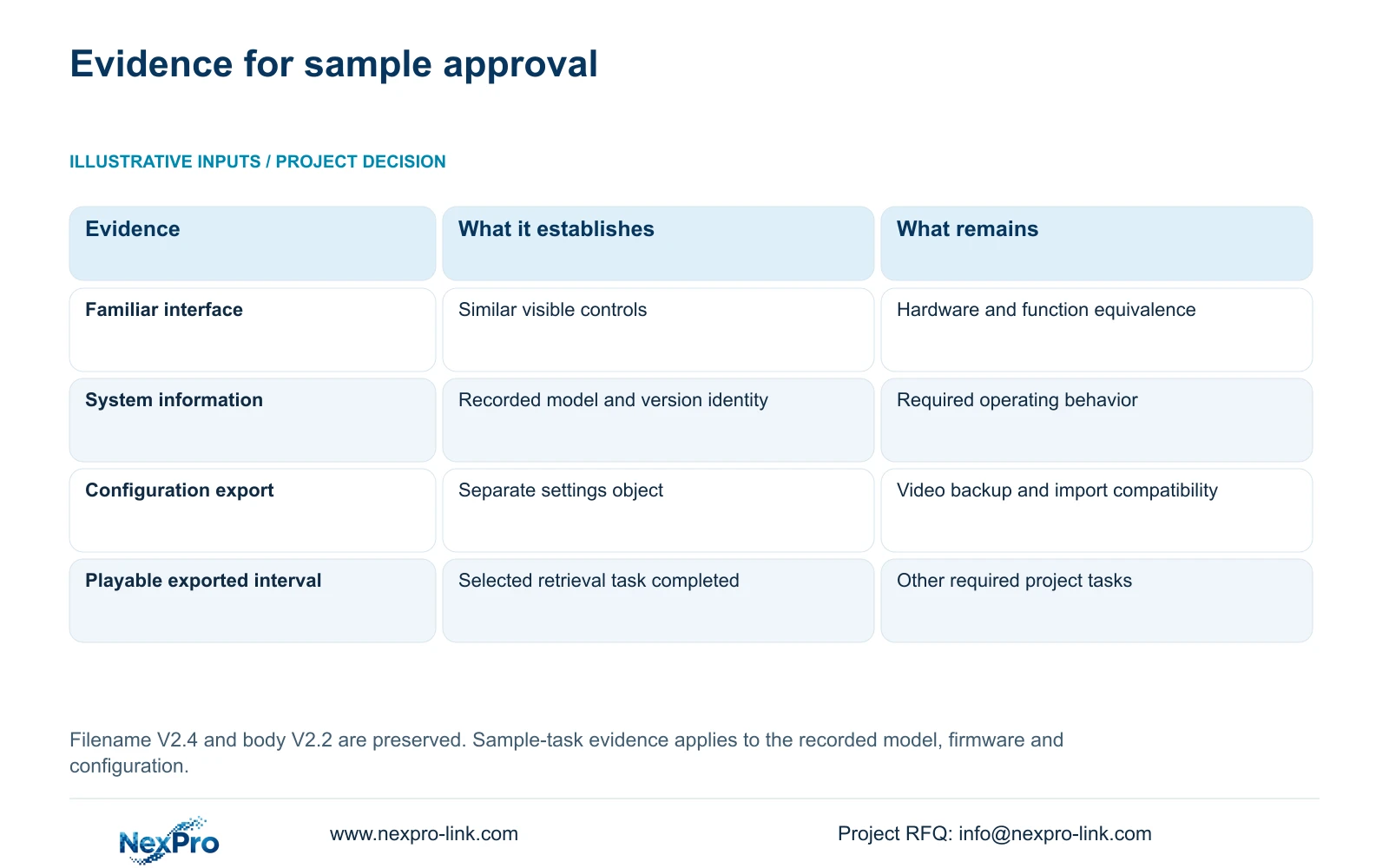
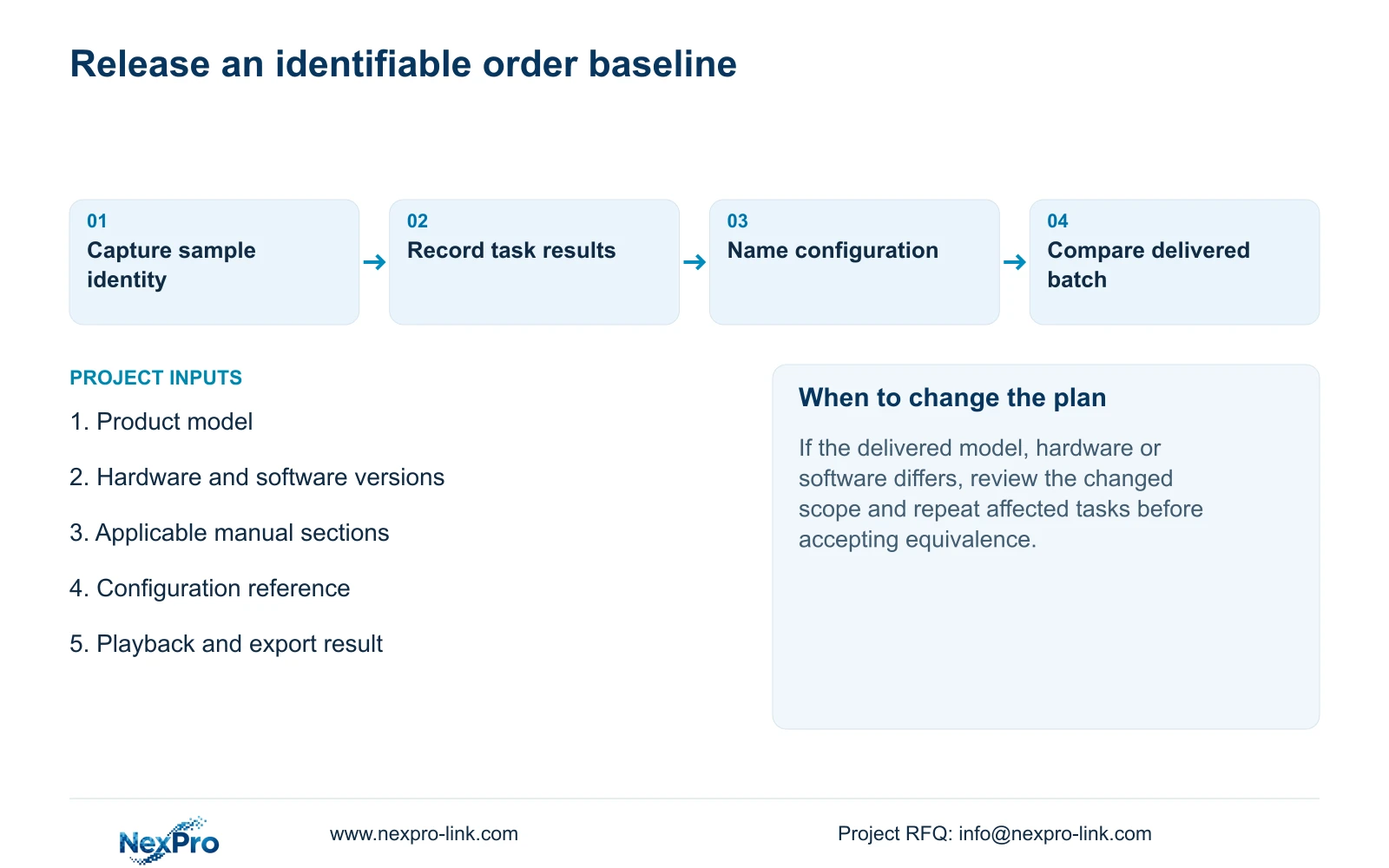
Before approving an NVR order, record the sample's product model, hardware version, software version and software release information from its system information screen. Connect those details to the recording, playback and export operations the project requires. A familiar NVR4.0 interface does not establish that two samples have the same hardware or supported functions. Keep the applicable manual identity and configuration reference with the demonstration results, then carry that baseline into the purchase description. If a later batch differs, compare the changed identity and affected task before accepting it as equivalent. This makes sample approval usable by procurement and by the team receiving the equipment.
Section 02
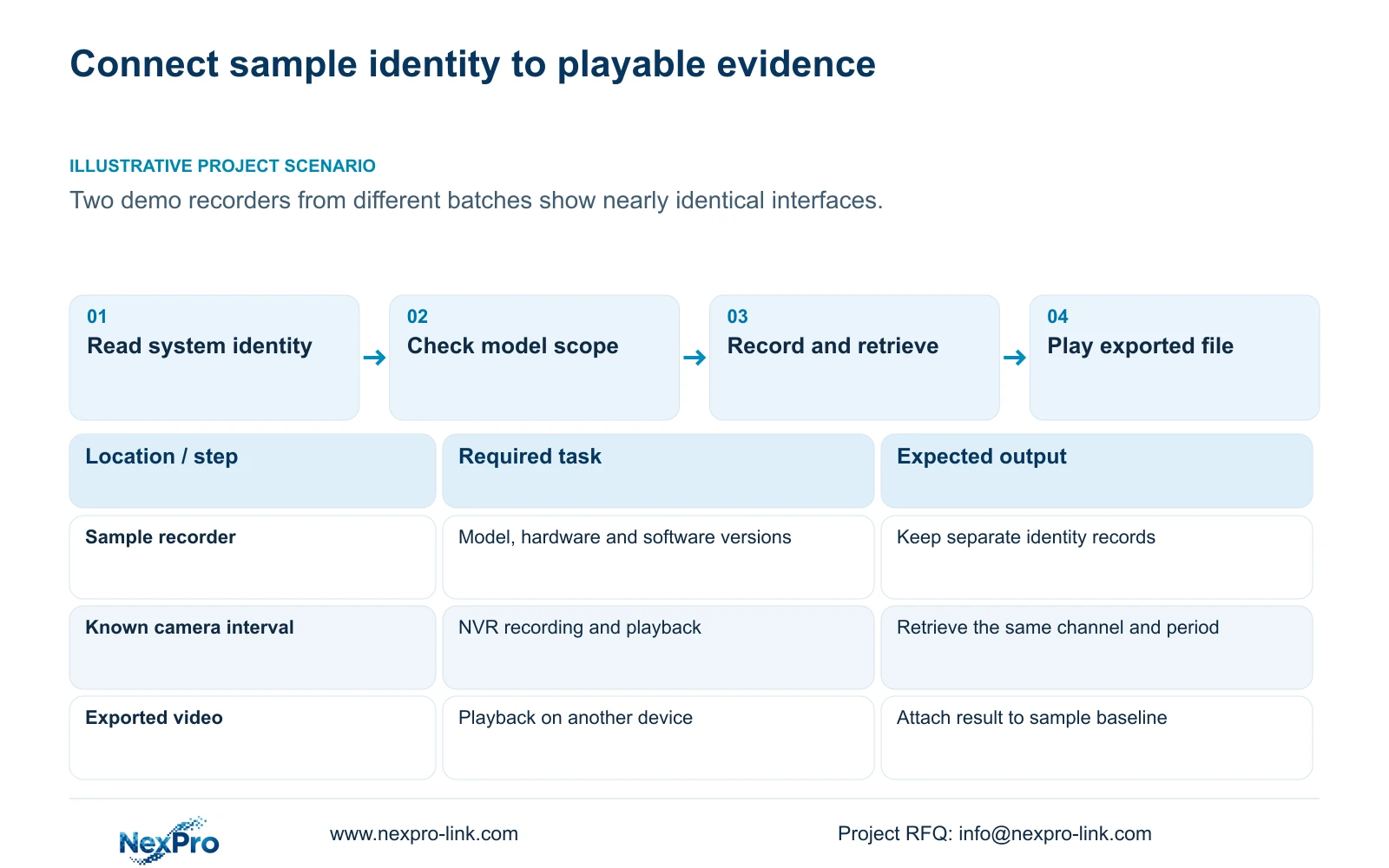
Capture the sample's hardware and software identity
Section 4.12.19 of the supplied NVR4.0 manual describes System Information or basic information under the system controls. Record the displayed product model, hardware version, software version and software date or release information. Transcribe the values exactly, including differences between samples that look alike.
For a fault found during approval, add the affected channel, operation and symptom time. The version record helps choose applicable instructions; it does not identify the fault's cause by itself. Keep the observation beside the sample identity so a later retest uses the correct unit.
Maintain any required serial information in the controlled internal record. Public screenshots should exclude cloud identifiers, QR codes and identifiable site content. The approval comparison needs readable model and version evidence, not publicly exposed access information.
Section 03
Keep the manual identity separate from firmware
The source file is NVR4.0 user manual CH_V2.4.doc, while its body headers identify V2.2. Retain both labels. Neither establishes the installed firmware version, and neither supports calling the document the latest instructions for every recorder.
Locate a feature by its section heading before relying on a page number. The supplied reading sequence and the older contents pagination differ, and another document renderer may repaginate the file. Section references provide the clearer basis for the approval record.
If the sample's controls differ from the described operation, record that difference and obtain instructions for the actual model and firmware. Keep the unresolved requirement visible. Renaming the manual or accepting a similar-looking menu would remove useful evidence without resolving applicability.
Section 04
Compare the functions that are limited by model
The manual covers a TS recorder family, including TS8104A3, TS8108A3, TS8216A3, TS8232C4, TS8108D7, TS8116D7, TS8836M and TS8436M. Its series overview in section 1.2 and its model table in section 5.2 serve different purposes. The overview cannot become a common specification for every unit.
Check the applicable row for the project's required preview, local playback, buzzer and talkback functions. For example, TS8108D7 is listed without buzzer or talkback support; TS8116D7 has buzzer support but no talkback support. TS8232C4 is listed with both. Those distinctions matter when the sample task includes local audible indication or two-way communication.
NexPro-Link commercial SKUs have no established one-to-one mapping to these TS identities. Use separate commercial model documentation when defining the order. If equivalence is proposed, record the evidence for the required functions instead of substituting a brand label into the manual's row.
| Comparison result | Meaning for approval | Next action |
|---|---|---|
| Same interface, different hardware version | Hardware equivalence remains unresolved. | Compare model-specific functions before acceptance. |
| Same model, different software version | The demonstrated baseline has changed. | Review applicable instructions and repeat affected tasks. |
| Live video works, playback fails | The recording task is incomplete. | Check policy, disk condition and retrieval settings. |
| Configuration file exported | Settings evidence exists; footage is a separate object. | Save the demonstration video through its own backup workflow. |
| Owner repeats retrieval and export | Operator task evidence is available. | Attach the result to the identified configuration. |
Section 05
Demonstrate a recording the buyer can retrieve
Define one identifiable camera channel and a clear start and end time for the demonstration. Inspect the recording policy and selected disk, then observe live video and recording state. After the defined interval, retrieve that same channel and period through playback.
Export the interval and open the resulting file on another device. Record the expected action and observed result at each step. Sections 4.3, 4.11 and 4.12.21 support the underlying operations; this acceptance sequence is an engineering workflow, not a built-in test feature.
When a step fails, preserve the failing conditions before changing settings. A live picture with no retrievable recording requires investigation of the recording and storage path. A retrieved interval with an unusable copy requires investigation of the export selection and file. Keep unresolved outcomes in the approval record instead of replacing them with a general statement that the sample works.
Section 06
Name and preserve the approved configuration
Give the approved arrangement a clear reference that connects the sample identity, recorded settings and demonstration result. Save configuration export, log export and video backup as separate objects. Sections 4.12.18 and 4.11.4 describe distinct workflows; a configuration file is neither a disk image nor incident footage.
Record where each object is stored and which model and software version it belongs to. The manual provides no universal cross-model configuration-import guarantee. Confirm target compatibility before relying on a saved configuration to rebuild another recorder.
If a proposed approval correction involves upgrading firmware, restoring settings, changing IP or stopping a running recorder, obtain authority and preserve the relevant configuration and required recordings first. Arrange the interruption and repeat the affected task afterward. Keep the before-and-after identities visible so the approved baseline remains unambiguous.
Section 07
Carry the baseline into procurement and receipt
Illustrative project scenario: A consultant receives two nearly identical demo recorders from different order batches. The consultant records each identity separately and runs the same retrieval and export task. Matching screen appearance is treated as an observation, while approval depends on the required functions and documented configuration.
Give procurement the model and revision basis, applicable software record, configuration reference and accepted task results. At receipt, compare the delivered identity with that baseline. A difference requires a scoped review of what changed and which operations need another demonstration.
The owner should also be able to identify a channel, find the required period and export a playable file. Keep the backup location and maintenance responsibility available, with credentials transferred through a controlled route. NexPro-Link's BOQ support can help connect these requirements to the equipment description; sample approval remains distinct from final site acceptance.
Section 08
Buyer questions
Does a newer firmware label prove the order is suitable? No. Suitability depends on the actual identity and the required demonstrated operations.
Can a configuration export replace a video export? No. Settings, logs and footage have separate workflows.
Must every delivered difference cause rejection? Record the difference and assess the affected requirements. Do not assume equivalence or failure from the version string alone.
Section 09
Provide the sample identities
Send NexPro-Link the samples' model, hardware and software versions plus the operation that needs approval at info@nexpro-link.com.
Engineering references
These sources support the general planning principles. Always use the selected product's current datasheet and applicable project standards for final design.


