

An earlier retention estimate cannot establish coverage after recording settings change. Rebuild its inputs, inspect full-disk behavior and retrieve the required channel and period before accepting the result.
Section 01
Check the estimate against the current recording baseline
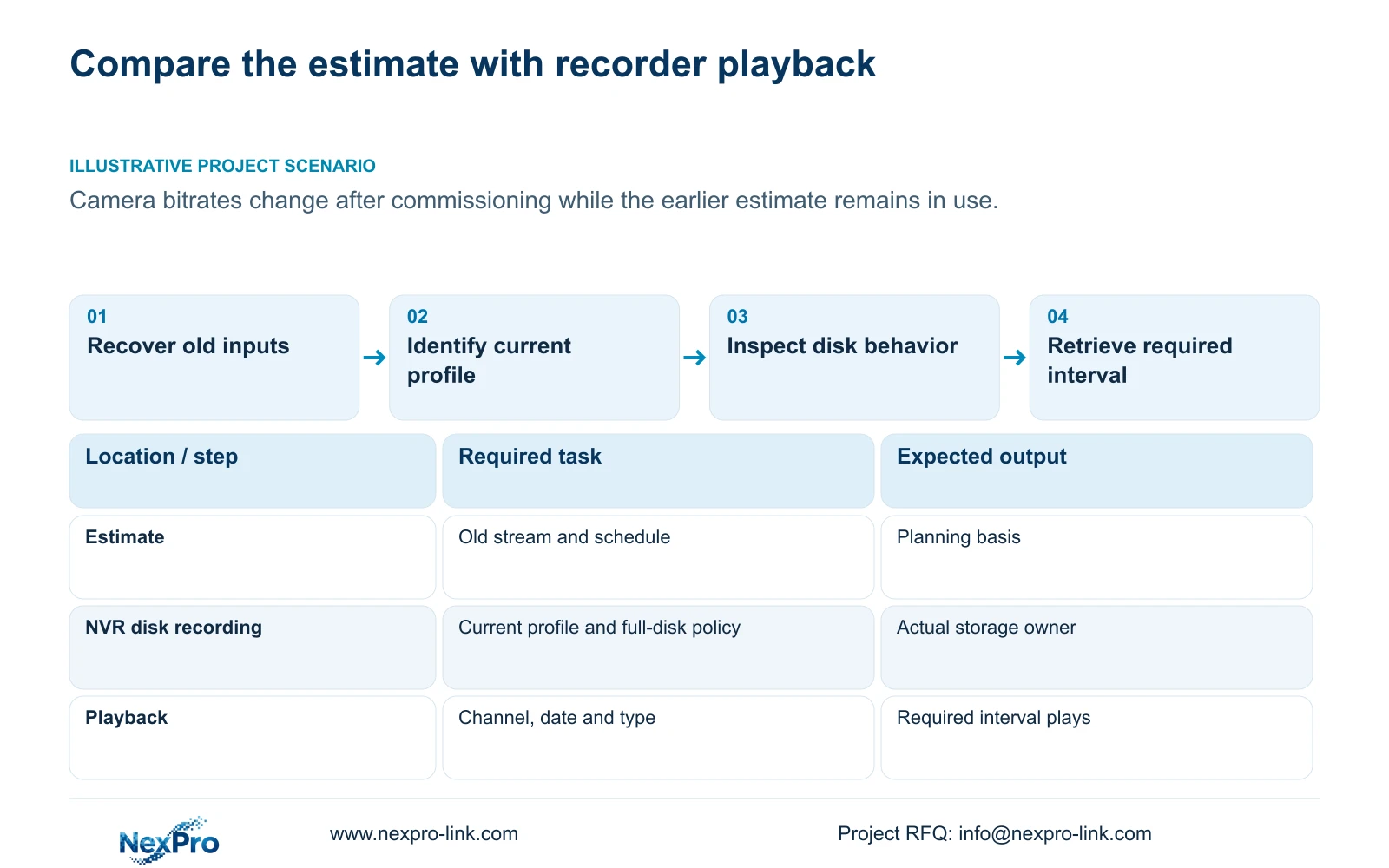
Compare an estimated-days figure with the stream and schedule that produced it, then verify the required footage through playback. If camera bitrates changed after commissioning, the earlier estimate cannot establish current retention. Record the original channel groups, average rates, recording hours and storage allowance, and identify when the new profile began. Check whether full capacity triggers overwrite or stops recording before interpreting the historical range. Acceptance should describe which channel and interval were actually retrievable. An estimate remains a planning result; a calendar marker or successful short sample does not establish uninterrupted coverage of every channel for the entire retention period.
The private supplied NVR4.0 user manual CH_V2.4.doc has V2.4 in its filename and V2.2 in its body. Sections 5.1, 4.4.5, 4.11.1, 4.11.2 and 4.12.21 provide the relevant calculation context and operating branches. This check concerns recorder storage, not Seetong PC local recordings.
Section 02
Reproduce the capacity basis before comparing days
Use decimal video TB = 0.00045 × Σ(channels × average Mbps × hours/day × days). Record whether each rate was measured or assumed. Additional audio, metadata and the actual disk arrangement need separate treatment.
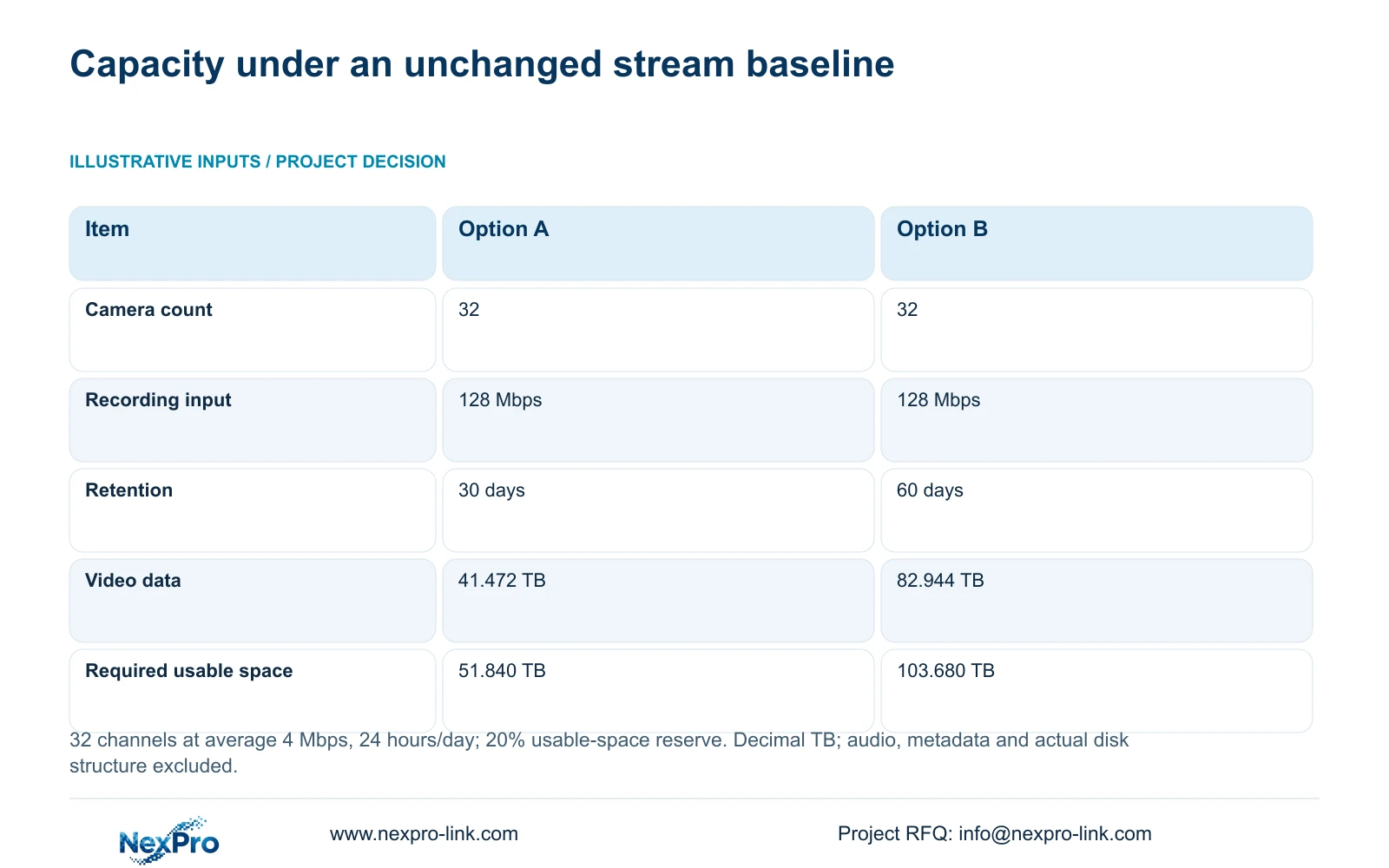
The supplied comparison holds 32 channels at an average 4 Mbps each for 24 hours/day. Option A requires 30 days; Option B requires 60 days. Both reserve 20% of usable space. Aggregate recording input is 32 × 4 = 128 Mbps in each option.
Option A video is 0.00045 × 32 × 4 × 24 × 30 = 41.472 TB. Required usable space is 41.472 ÷ (1 - 0.20) = 51.840 TB. Option B video is 0.00045 × 32 × 4 × 24 × 60 = 82.944 TB, and 82.944 ÷ 0.80 = 103.680 TB.
The comparison changes retention duration, not bitrate. It therefore illustrates capacity scaling under equal stream conditions, without assigning a numerical post-commissioning bitrate increase. These requirements are usable-space targets, not approved physical disk configurations.
| Item | Option A | Option B |
|---|---|---|
| Camera count | 32 | 32 |
| Recording input | 128 Mbps | 128 Mbps |
| Retention | 30 days | 60 days |
| Video data / decimal TB | 41.472 | 82.944 |
| Required usable space / TB | 51.840 | 103.680 |
Section 03
Identify what changed in the recorded stream
Sections 4.4.5 and 4.3.3.3 distinguish configured CBR or VBR values from traffic observations. Preserve the old profile, the revised profile and the change time. Use representative averages for retention and an appropriate peak or limit for interface evaluation.
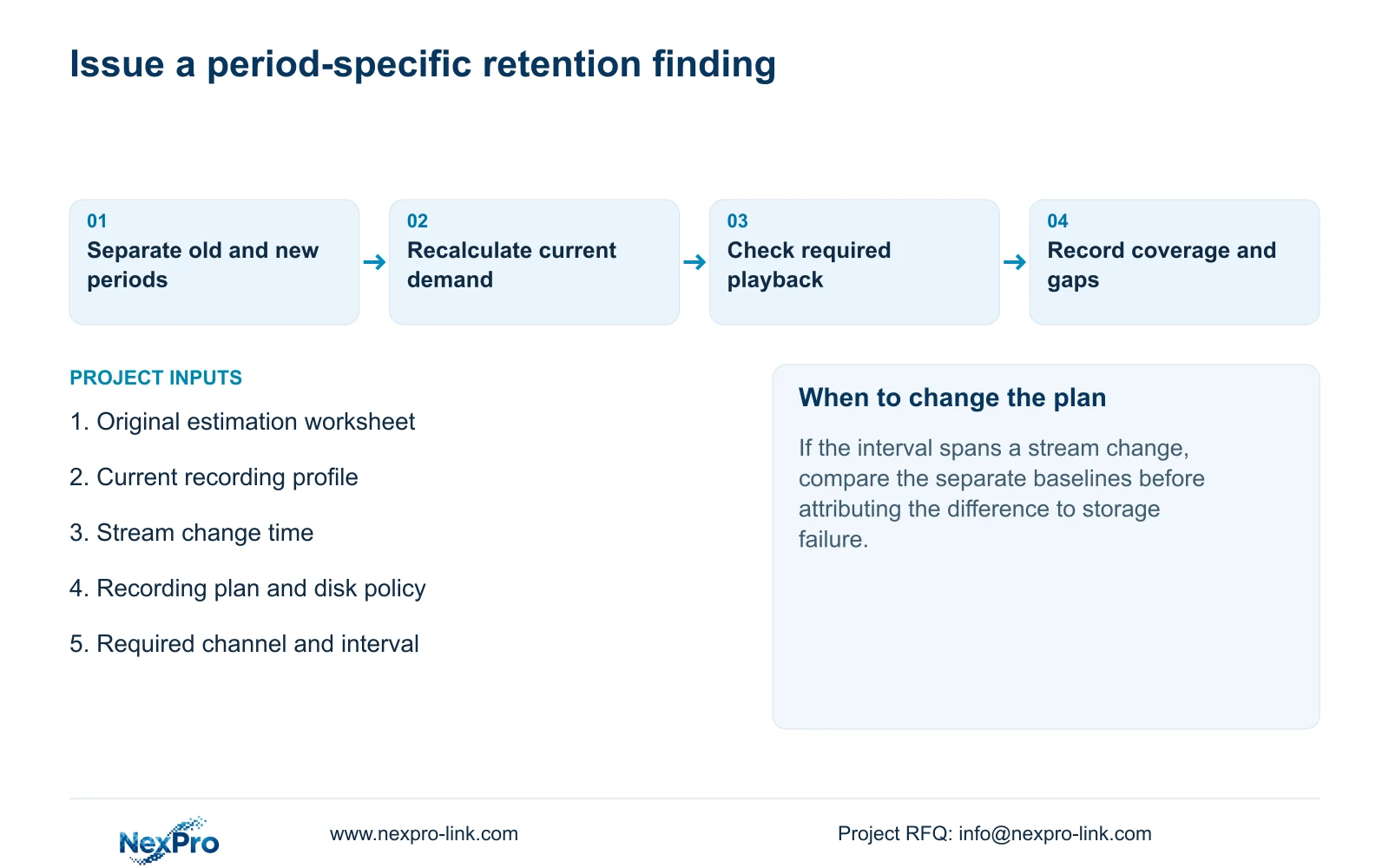
If only a configured value is available, label the revised calculation as assumed until representative evidence is obtained. If actual stored demand increased, recalculate the same retention objective. Do not compare footage accumulated under the old profile with a new-profile estimate without identifying the mixed period.
The proposed response need not be a camera downgrade. First establish whether available usable storage meets the accepted current profile. If it does not, present the capacity or requirement change for approval rather than quietly reducing useful image quality or the agreed duration.
Section 04
Read the hours and recording types together
Section 4.11.1 describes timed recording, no recording, motion recording and motion-plus-timed recording, with a 30-minute minimum plan scale. Inspect the intended channel's actual plan before assigning daily hours to the calculation.
Motion-only records when motion detection triggers. Motion-plus-timed continues ordinary timed recording when no motion triggers and uses the motion recording type when triggered. The mixed mode cannot be sized as event-only simply because motion is enabled.
For timed recording, use the active scheduled hours. For motion-only operation, obtain evidence of actual recording duration under representative activity. If a gap falls within a no-recording period, document it as a schedule result before investigating disk loss. A shorter stored history may have several different explanations.
Section 05
Determine what happens when capacity is reached
Section 4.12.21 describes overwrite and stop-recording modes. Overwrite cycles storage toward newer footage. Stop mode creates a risk of missing new recordings after full capacity. This distinction affects whether the operator should investigate the oldest available interval or a more recent stopping point.
Check the actual disk state and the selected policy without changing them merely to improve the estimate. Neither mode removes the need to verify footage. The no-disk startup prompt is a separate interface choice; hiding it does not establish usable storage.
If the owner needs selected incidents beyond the normal window, preserve them through the agreed export workflow. Do not treat a full-disk policy as an automatic incident archive.
Section 06
Retrieve the oldest required interval
Section 4.11.2 says playback entry defaults to the preview-selected channel. Confirm the camera identity, then select the required date and time and check ordinary, alarm and motion filters. Orange indicates recordings exist for the date; grey indicates none in the documented workflow.
An orange date does not prove complete daily coverage. Inspect the relevant timeline and play the required interval. When footage appears missing, recheck the channel and filters before reporting loss. Keep the recorder query separate from any PC-local recording search.
Record the earliest required interval found, the portions actually played and any gaps. A successful sample supports that sample only. Broader acceptance needs checks corresponding to the owner's defined coverage requirement.
| Observation | Interpretation to check | Next action |
|---|---|---|
| Orange date but required interval absent | A date marker establishes existence, not completeness | Check timeline and recording-type filters |
| History spans a bitrate change | Old and new recording baselines are mixed | Separate periods before comparing estimates |
| Recent footage stops near full capacity | Stop mode is a possible branch | Check policy and disk state |
Section 07
Explain the difference with evidence
Illustrative project scenario: A site increases camera bitrates after commissioning and continues relying on an earlier estimated-days figure. The engineer retrieves the old calculation, records the change time and checks current scheduling and disk behavior. Playback then establishes the available range for the required channels. The review reports that observed range separately from the revised planning estimate.
Sections 4.3.3 and 5.3 support a diagnostic approach that separates observations from suspected causes. Keep each next test narrow. If the selected model or firmware differs from the manual's scope, obtain its applicable instructions before proceeding. NexPro-Link's BOQ support is relevant if the accepted profile requires a revised storage configuration.
Section 08
Buyer questions
Can an old estimate remain valid after a stream change? Recalculate with the new representative average and identify the period being compared.
Does motion-plus-timed reduce recording to events? No. Ordinary timed recording continues between triggers.
Does an orange calendar date satisfy retention acceptance? No. Check the required channel, interval and actual playback coverage.
Section 09
Submit the estimate and the checked period
Send the old and current recording profiles, change time and required playback interval to info@nexpro-link.com for a scoped retention review.
Engineering references
These sources support the general planning principles. Always use the selected product's current datasheet and applicable project standards for final design.


