

Put the required audible event, recipient location and accepted alternative in the replacement brief. Obtain exact-model evidence and an authorized demonstration where supported.
Section 01
Establish audible hardware support before testing settings
Put the required audible event, recipient location and accepted alternative in the replacement brief. Obtain exact-model evidence and an authorized demonstration where supported. Keep missing evidence distinct from documented absence. Do not transfer the private manual's TS row to an unconfirmed commercial SKU or infer hardware from a visible menu option.
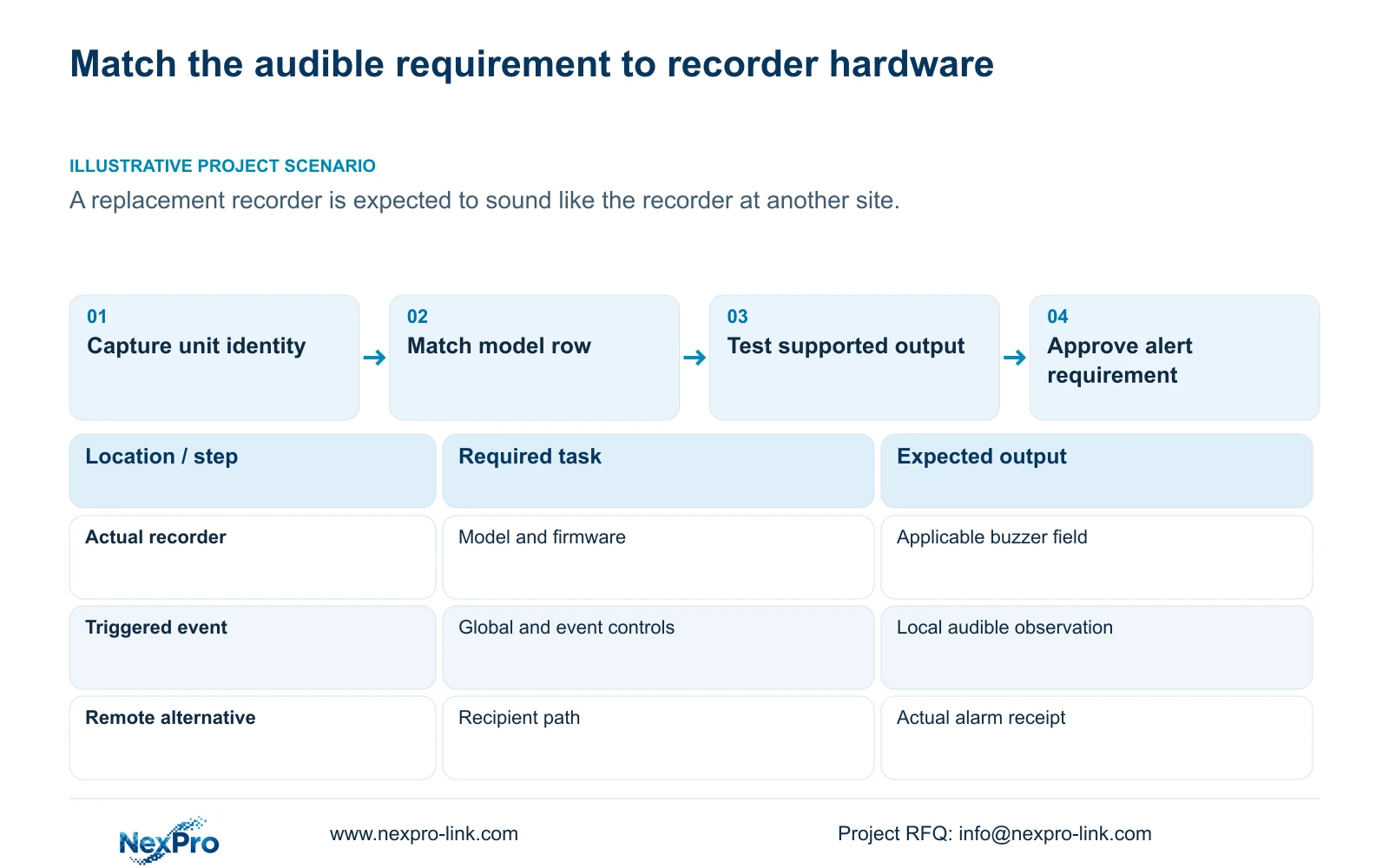
One recorder can beep while another with a similar interface remains silent because the supplied NVR4.0 model table gives them different hardware capabilities. TS8108D7 is listed without buzzer support, while several other documented rows support it. Match the actual recorder identity to the applicable specification before treating silence as a configuration fault. Where a buzzer exists, check global controls and event linkage, then demonstrate the required sound. Where it does not, agree a supported notification alternative or select equipment that meets the local audible requirement. Record that requirement explicitly before ordering a replacement, since another site's behavior is insufficient purchase evidence.
This comparison begins with the required operator action. A person beside the recorder may need sound; a remote supervisor may need a separate notification path. Decide which location must receive which event before comparing models or treating two alert methods as equivalent.
Section 02
Match the unit to a specific manual row
Sections 1.2 and 5.2 describe the recorder family and its model distinctions. The overview lists family functions, while the appendix distinguishes buzzer support, talkback and local playback. Read the exact row for the unit being considered. A shared menu layout cannot establish that the same hardware or operating modes are present.
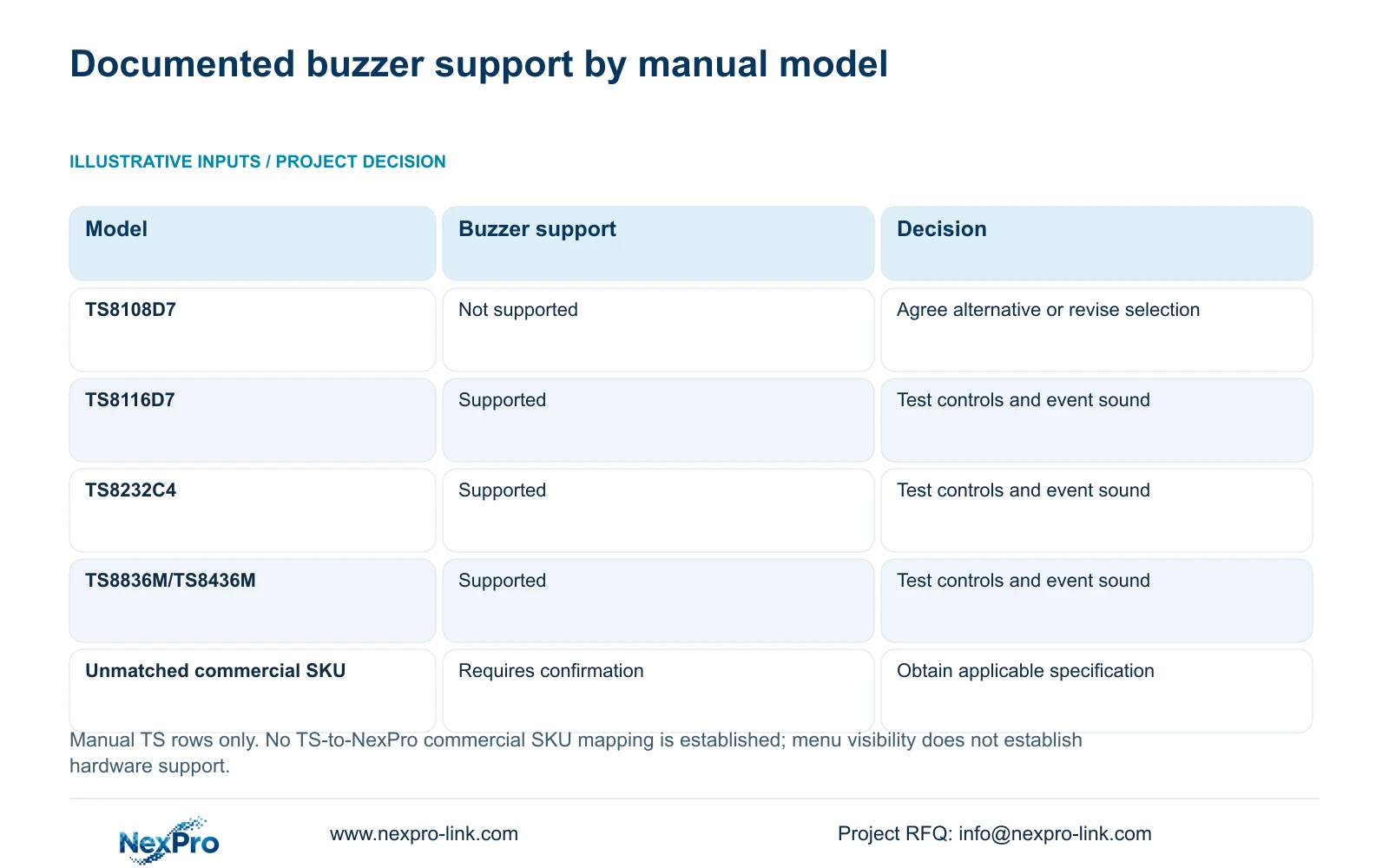
The table below retains the supplied model distinctions. The playback column illustrates why a capability row must be read as a set of separate fields. These are alternative playback modes connected by OR relationships, not combinations to add together. They do not expand or qualify the buzzer field.
| Manual model | Buzzer | Local playback alternatives |
|---|---|---|
| TS8108D7 | Not supported | 1×3MP |
| TS8116D7 | Supported | 1×5MP OR 2×2MP |
| TS8232C4 | Supported | 1×4K OR 4×2MP OR 2×5MP |
| TS8836M/TS8436M | Supported | 1×4K 30fps OR 2×5MP OR 4×4MP@20fps OR 4×2MP@25fps |
Section 03
Record hardware and firmware beside the requirement
Use System Information, described in section 4.12.19, to capture the product model, hardware version, software version and software date or release information. Transcribe them exactly and attach them to the proposed audible-alarm test. A purchase description such as 'same NVR4.0 system' leaves the capability comparison unresolved.
The private source file is NVR4.0 user manual CH_V2.4.doc, whose body identifies V2.2. Preserve both labels and locate the relevant information by section. Neither label establishes the installed firmware. The TS identifiers in this manual have no established mapping to NexPro-Link commercial SKUs, so commercial candidates require their own model-specific confirmation.
Keep serial numbers and cloud identifiers in the appropriate private support record. Redact QR codes and identifiable site information from shared screenshots. The identity record should remain usable without exposing access information.
Section 04
Check common controls only when the buzzer exists
For a model with documented buzzer support, inspect the global alarm and buzzer controls in section 4.12.16 and the selected event's linkage in section 4.12.11. Confirm that the intended event occurs under its enabled, armed and area conditions, then observe the local sound independently.
If the event appears but no sound follows, compare the common controls and the event action before changing the detection area. If the model has no buzzer, further software enabling cannot satisfy a local audible requirement. Move to the agreed alternative or a different equipment selection.
Treat an unmatched model as requiring confirmation, not automatically unsupported. Record the missing evidence and request the applicable specification. This avoids both promising absent hardware and rejecting a candidate solely because its code is not in the supplied appendix.
Section 05
Choose and verify each available notification path
The manual lists popup, border flashing, buzzer, email, snapshot, screenshot sending, preset call, recording and app push as distinct actions. Select the actions the project actually needs and identify where each result will be observed. A local popup may suit an attended display, but it does not establish that an absent operator receives a notification.
For a recording requirement, retrieve the event period from the recorder. A popup cannot prove footage exists, and the duration of an alert action is separate from the retention period. If the chosen alternative does not reach the intended person under the required conditions, keep that requirement open.
An alternative should be accepted deliberately. Replacing a required local sound with email changes the operator workflow and its dependencies. Record the owner's decision rather than describing every available action as an interchangeable substitute.
Section 06
Test the recipient route and the actual alarm separately
Section 4.12.10 describes the email test, while section 4.12.11 describes event linkage. A successful email test establishes the configured sending and receiving route for that test. An alarm message also depends on detection, arming and selection of the email action. Test the required event after testing the route.
The manual describes a one-minute default sending interval during which other emails are suppressed. Event count therefore cannot be treated as message count, and the interval statement does not guarantee delivery by the mail service. Record the interval used when explaining a notification test.
App push is another distinct path and needs its own observed recipient result. Do not use a successful mail test as evidence that app notification works, or infer cloud retention from the presence of a notification action.
Section 07
Carry the local audible task into the replacement order
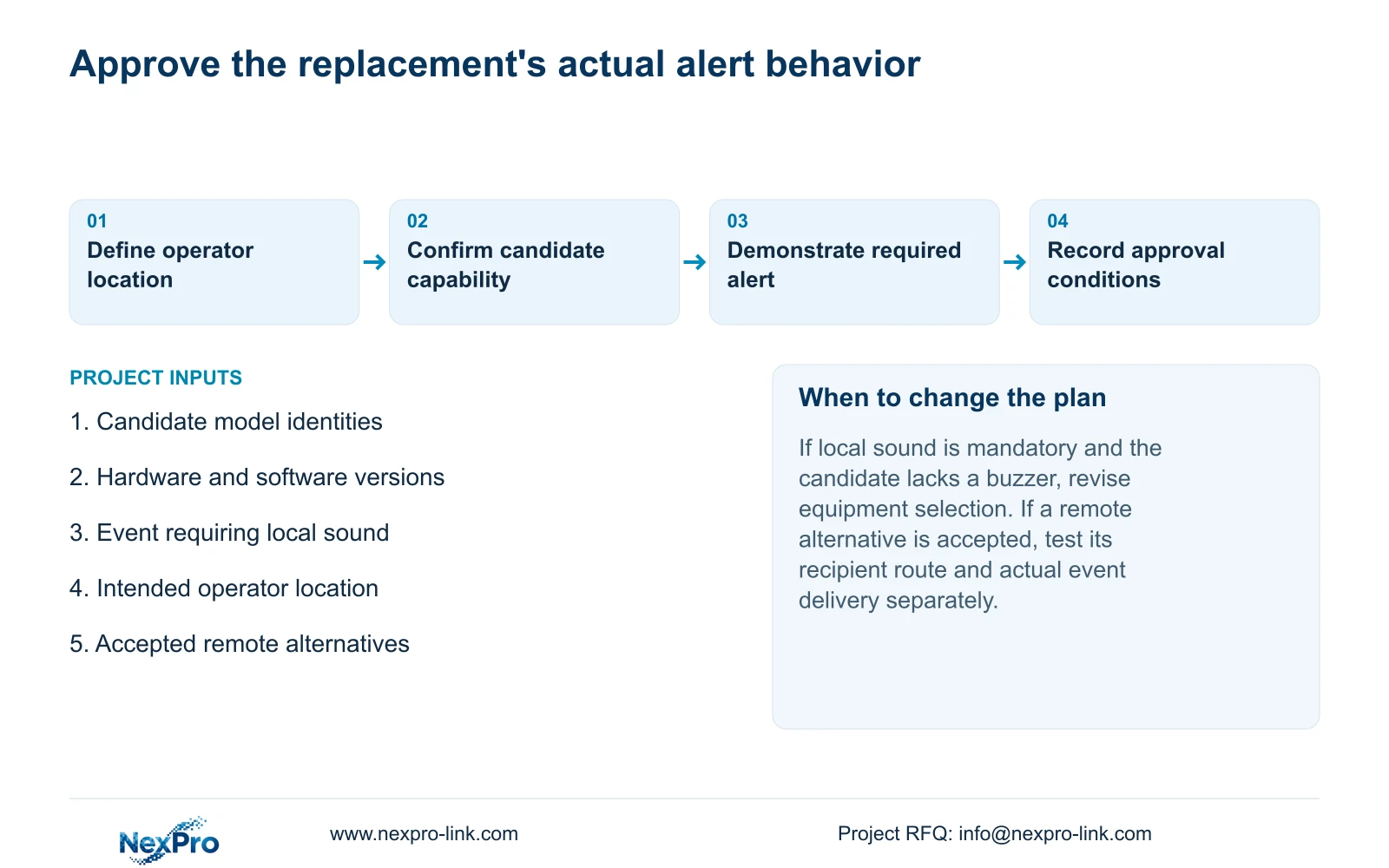
Illustrative project scenario: A contractor replaces a small recorder and expects an audible local alert because another site has one. The contractor records both identities and checks the replacement's buzzer field. If local sound is mandatory, the candidate must have applicable support and a demonstrated event-to-sound result. If the owner accepts another alert path, its recipient test becomes part of approval.
Write the purchase requirement around the event, operator location and expected response. Keep the camera schedule, recording and playback task, retention target and relevant power or network arrangement available for the wider equipment discussion, but do not bury the audible requirement inside a generic kit description.
The approval record should show the demonstrated model and firmware, the control states and any unresolved notification requirements. NexPro-Link's BOQ and tender support route can use that scope for model matching without implying that every family feature belongs to every offered recorder.
| Situation | Required record | Decision boundary |
|---|---|---|
| Replacement audible task specified | Event, listener position and response | Request exact-model evidence |
| Manual TS row has no SKU mapping | Document identity only | Do not quote it as commercial hardware proof |
| Audible evidence remains missing | Supplier clarification or accepted alternative | Keep qualification open, not an invented pass |
Section 08
Can a visible buzzer option satisfy the purchase requirement?
No. Confirm hardware support on the actual candidate and demonstrate the required event-to-sound path. A menu option alone is insufficient.
Section 09
Specify the sound the replacement must provide
Send NexPro-Link the candidate recorder identities and the event that must produce local sound at info@nexpro-link.com.
Engineering references
These sources support the general planning principles. Always use the selected product's current datasheet and applicable project standards for final design.


