

Separate a family manual, a visible menu and a supported device function before approving playback, audible alarms or talkback in an NVR purchase.
Section 01
Specify the function on the actual model
Two NVRs can show similar menus while supporting different local playback, buzzer and talkback functions. Before approving a purchase, separate three observations: the family manual describes a function, the sample displays its menu, and the identified recorder can perform the required task. The last observation needs model-specific evidence and an applicable operating path. Start with the sample's hardware and software identity, then compare the required playback combination and alarm or audio behavior against its model row. A visible control cannot supply missing hardware, and a larger channel label does not establish that every stream can be played back simultaneously at full resolution.
Section 02
Read the overview alongside the model table
The operating source is the private supplied NVR4.0 user manual CH_V2.4.doc. Its filename states V2.4 while its body states V2.2. Sections 1.2 and 5.2 provide the family scope and model distinctions. Locate information by section rather than relying on page numbering, which can change with document layout.
The manual names TS8104A3, TS8108A3, TS8216A3, TS8232C4, TS8108D7, TS8116D7, TS8836M and TS8436M, with additional appendix naming variations. Preserve the identifier relevant to the evidence. A family overview is useful for locating functions, but the applicable model row determines whether a particular capability is supported. These TS codes have no established mapping to NexPro-Link commercial SKUs.
Section 03
Keep the showroom sample identifiable
Section 4.12.19 describes the recorder's basic information. Record its product model, hardware version, software version and software date before the demonstration. Attach those details to the task being shown so the purchase discussion refers to the same configuration. A description such as 'NVR4.0 sample' is too broad to connect a successful demonstration to an offered unit.
Use a private service record for identifiers that support later assistance. Public screenshots should conceal cloud identifiers, QR codes and identifiable site material. If the offered model or firmware differs from the showroom sample, mark the demonstrated function as requiring confirmation on the offered configuration. A newer software date alone does not settle hardware support or prove that a specific operating problem has been resolved.
Section 04
Select an alternative playback mode
List recording channels, total incoming bitrate, preview decoding, simultaneous local playback and monitor output separately. Each answers a different question. Incoming channels describe enrollment and recording scope; local playback combinations describe the recorded streams the operator can review together. Monitor output does not establish either limit.
For TS8232C4, section 5.2 lists local playback as 1×4K OR 4×2MP OR 2×5MP. These are alternatives, not capacities that can be added. Ask the operator which views must be reviewed together and at which recorded modes. If the required combination is absent from the applicable evidence, seek clarification or a different candidate instead of approving it from the channel count.
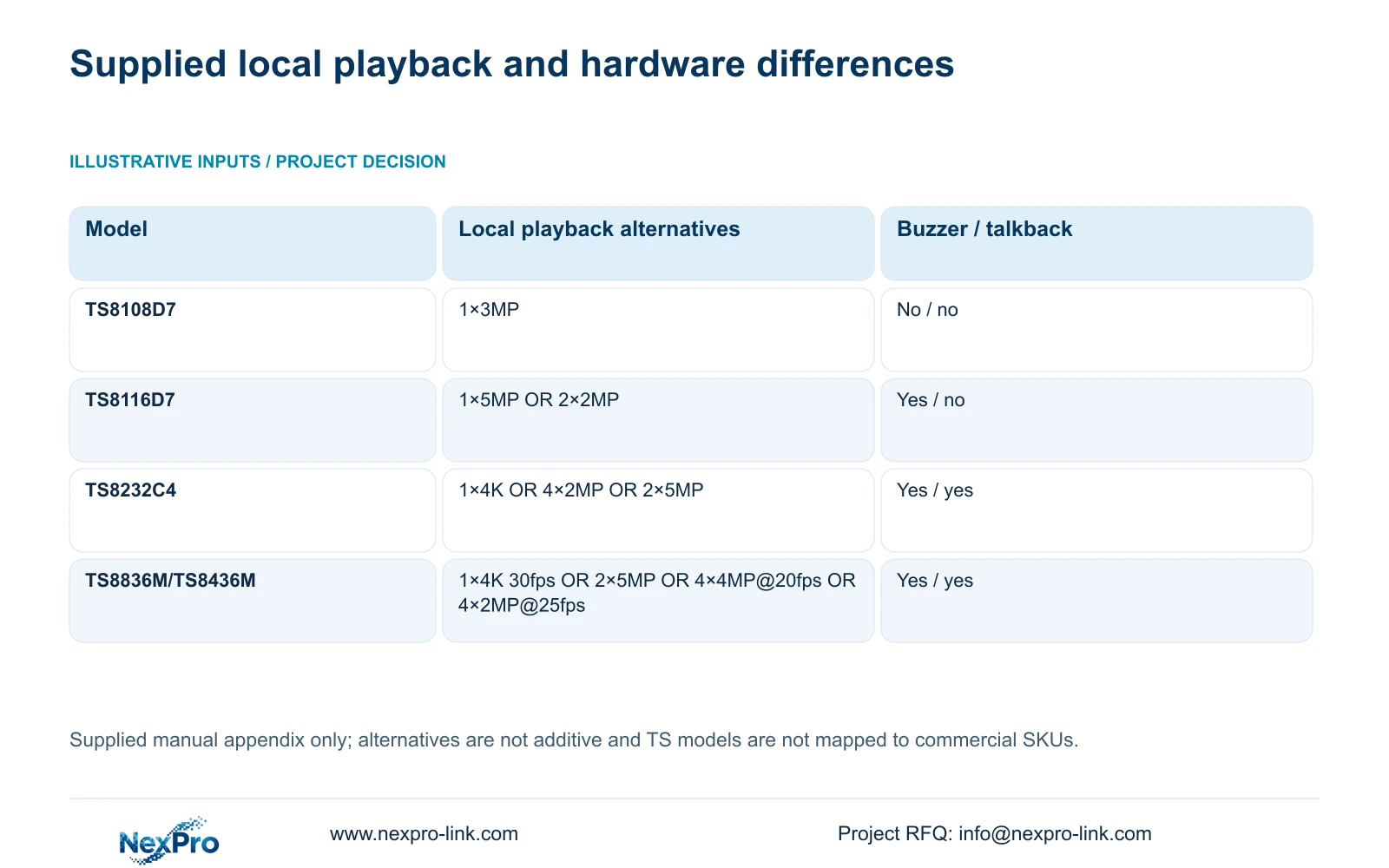
The following rows preserve the supplied appendix examples. They concern local playback and the stated hardware functions, not universal preview or recording limits.
| Manual model | Local playback alternatives | Buzzer / talkback |
|---|---|---|
| TS8108D7 | 1×3MP | Not supported / not supported |
| TS8116D7 | 1×5MP OR 2×2MP | Supported / not supported |
| TS8232C4 | 1×4K OR 4×2MP OR 2×5MP | Supported / supported |
| TS8836M/TS8436M | 1×4K 30fps OR 2×5MP OR 4×4MP@20fps OR 4×2MP@25fps | Supported / supported |
Section 05
Separate a silent alarm from absent hardware
Sections 4.12.16 and 5.2 distinguish global alarm controls, buzzer settings, channel linkage and model support. TS8108D7 is listed without buzzer support. Enabling a menu option cannot create an audible device that the model does not have.
For a supported model that remains silent, first define the observation. Was there no event, no local sound or no expected notification? Those results require different checks. Review whether global alarm suppression is active, whether the buzzer is enabled and whether the relevant channel linkage requests that action. Change one setting at a time and repeat the same event task.
If local audible indication is mandatory, a candidate without a buzzer fails that requirement unless the buyer accepts a separately defined alternative. Do not substitute an unspecified notification for the audible task or treat silence alone as proof that recording or event detection failed.
Section 06
Trace the required audio operating path
Sections 1.2, 2.3.3, 2.4.4 and 5.2 limit the documented talkback and broadcast functions by model, with several descriptions referring to 32- or 36-channel units. The appendix also distinguishes supported and unsupported rows. Preserve those restrictions when converting the manual into a purchase requirement.
Identify the recorder, IPC, audio connection and operating path involved in the buyer's task. The status description distinguishes input waiting from output states, so it does not justify a blanket full-duplex claim. A camera with two-way audio also does not establish talkback through every recorder.
Request a demonstration of the intended audio direction and use case on the selected configuration. If the sample proves a different path, record what was shown and leave the requested path unresolved. This keeps an apparently similar audio menu from becoming an unsupported contractual promise.
Section 07
Keep mandatory functions outside price scoring
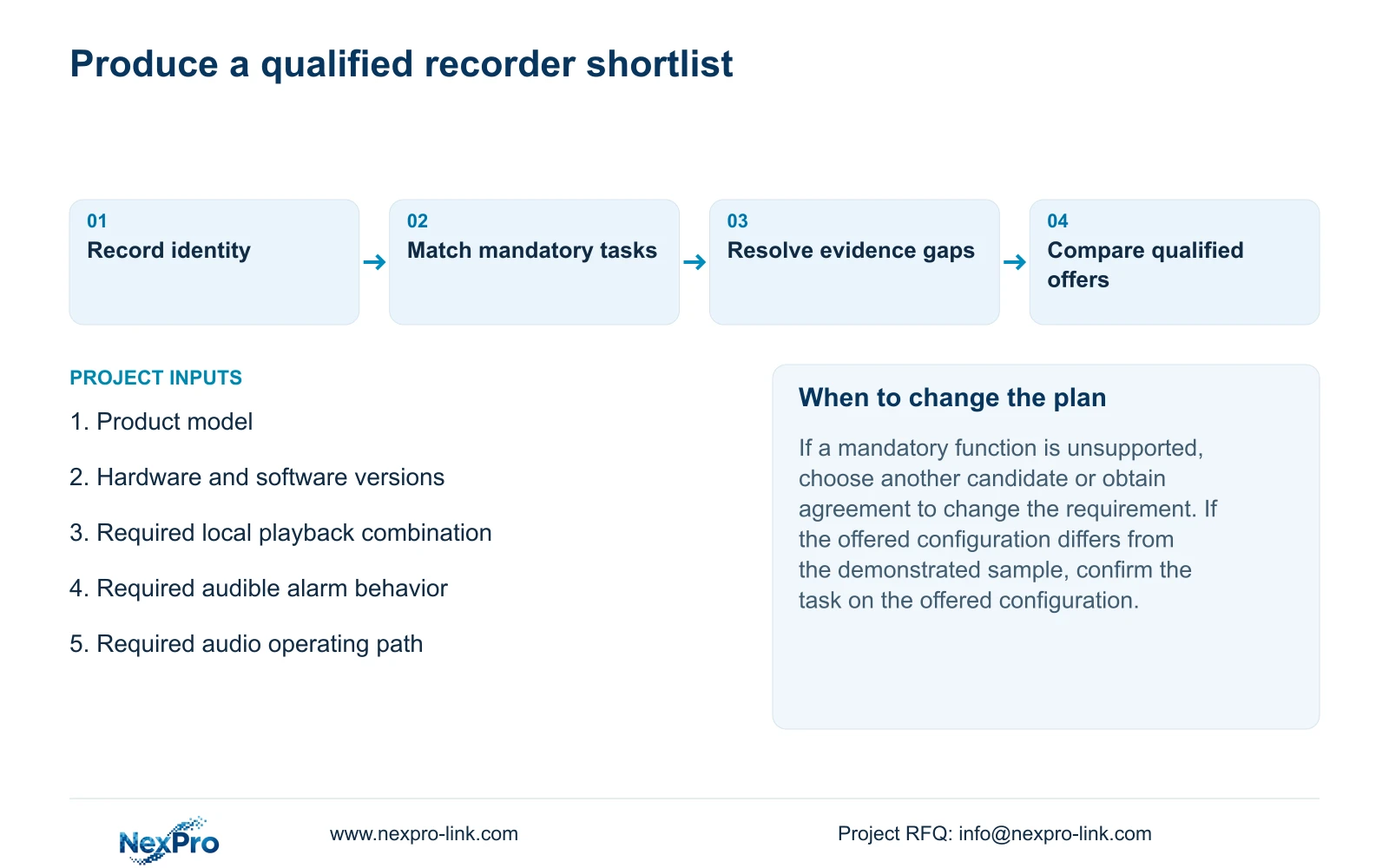
Build the selection record from the required camera and stream modes, incoming bitrate, playback combination, usable storage, interfaces, remote tasks and environment. For each candidate, distinguish supported, unsupported and requiring confirmation. An undocumented field is a request for evidence; it is not automatic proof that the function is absent.
Treat a mandatory function as a qualification condition. A favorable price cannot compensate for missing required playback or local audible indication. Where a difference is acceptable, describe the changed operating task and obtain agreement before comparing the qualified alternatives. Current NexPro-Link candidates require their own model documentation, independent of the TS examples.
Section 08
Compare the showroom candidates
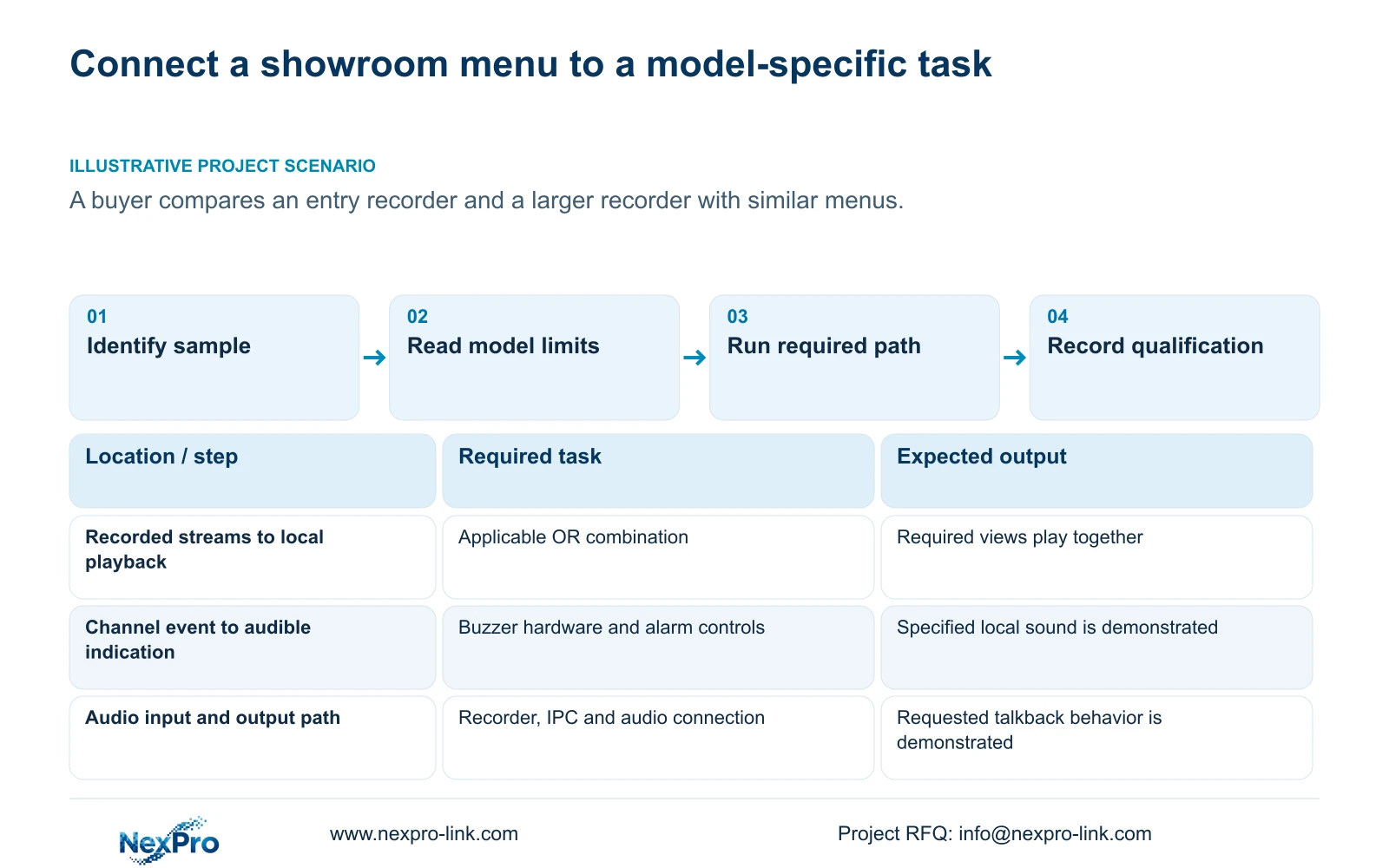
Illustrative project scenario: A buyer compares an entry recorder with a larger model after seeing similar menus in a showroom. The buyer records both sample identities and chooses the playback, audible alarm and talkback tasks that matter to the site. Each demonstrated result is then attached to its actual model.
The resulting comparison may retain the entry recorder if it meets every required task. If a mandatory function is unsupported, the buyer needs a qualified alternative or an agreed change in scope. Similar screen layouts provide no reason to erase that difference.
Section 09
Can the listed playback alternatives run together?
Do not add them. The supplied modes are OR relationships. Select the applicable combination and confirm that it matches the operator's simultaneous review task.
Section 11
Request a model-specific comparison
Send NexPro-Link the exact candidate identities and your mandatory playback, buzzer and talkback tasks at info@nexpro-link.com.
Engineering references
These sources support the general planning principles. Always use the selected product's current datasheet and applicable project standards for final design.


