Test the exact recorder, camera and client combination before expanding a firmware rollout. Keep recording continuity, supported recovery and version records visible in every batch.
Section 01
Record the working configuration before choosing a release
Use a representative pilot before extending an NVR firmware change across the hotel, and proceed only when the required recording and operator tasks remain usable. Plan a downgrade only where the manufacturer supports it for the exact model and release. If a pilot reveals an unresolved compatibility problem, stop expansion and use the supported recovery path.
Record the existing recorder identity and firmware, connected camera models, stream profiles and client versions. Include recording schedules, storage arrangement and the functions operators actually use. This baseline lets the team distinguish a release-related change from an existing limitation or a configuration difference.
Preserve configuration information through the manufacturer's supported method. A saved configuration is useful only within its supported restoration scope; it does not prove that an older firmware can be installed or that every setting can be imported into another release.
The hotel should identify the function motivating the update and the recording service that must remain available. A project closeout date or opening milestone can constrain the work, but it cannot establish compatibility. Keep the production configuration stable until the pilot and recovery arrangements are ready.
| Required task | Given information | Decision still needed |
|---|---|---|
| Maintain recording | Current streams and schedules | Supported target-release combination |
| Retrieve existing incidents | Current storage and playback workflow | Pre-update footage retrieval check |
| Recover from a failed change | Current version and settings | Manufacturer-supported recovery method |
Section 02
Select a pilot that represents the affected equipment
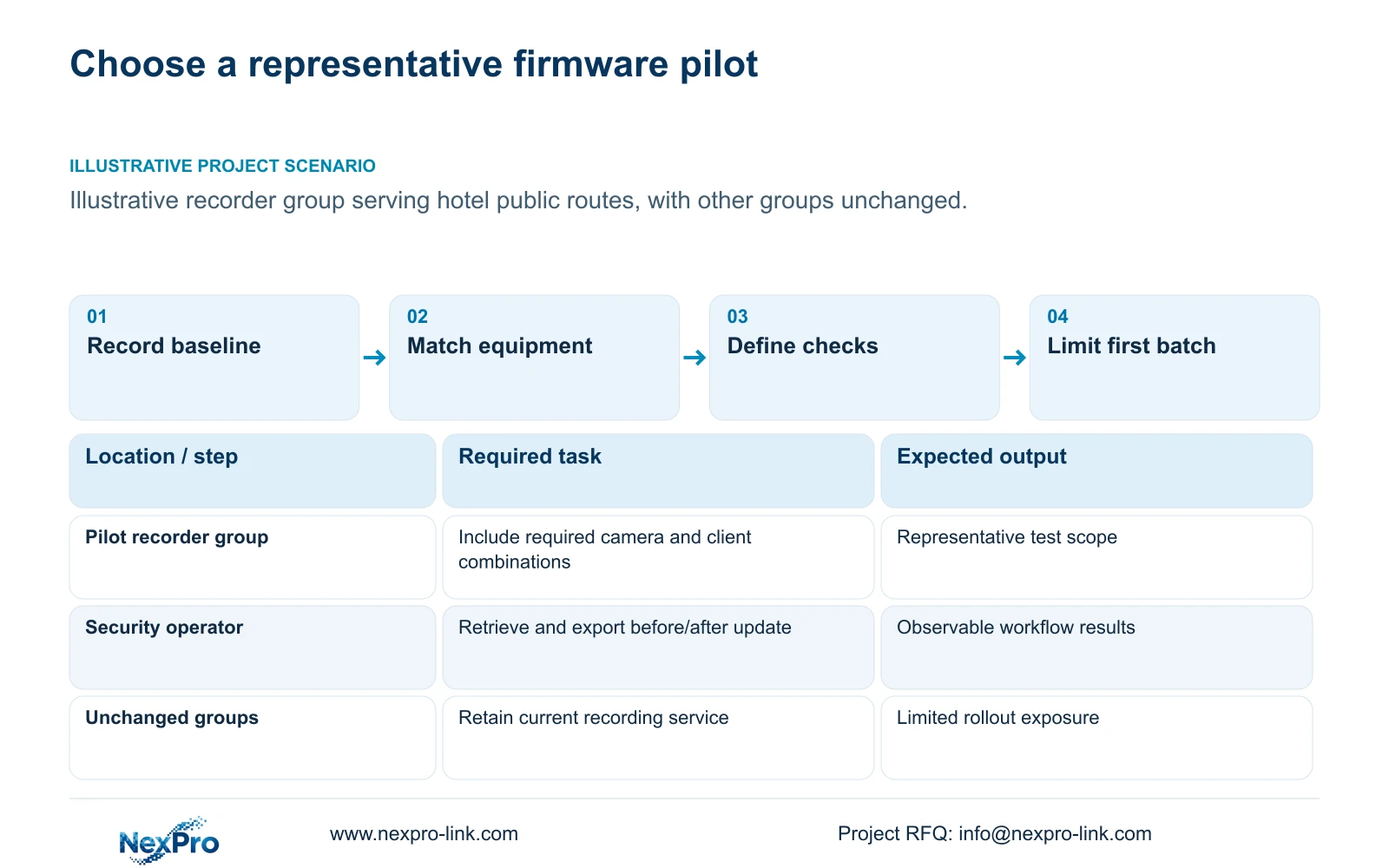
Choose a recorder group that includes the relevant camera families, recording modes and client workflows while keeping the operational impact manageable. One wing is a useful boundary only if its equipment is representative. A pilot consisting solely of an easy live-view combination leaves other required functions unexamined.
Include the actual interfaces used by the hotel. Different camera firmware or client editions can require additional checks even where model names appear similar. A shared ONVIF description does not establish every playback, event or account function across releases.
Compare the candidate pilot with the rest of the property and mark differences explicitly. A successful result supports the tested combination. It does not justify prefilled passes for recorder families or operating modes absent from the sample.
Where one recorder serves the entire property, a wing-level recording pilot may not be available. Consider a supported representative test arrangement or a controlled maintenance scope instead. Do not imply that isolating a few viewing windows isolates the recorder's firmware change from all its assigned channels.
| Pilot approach | Useful evidence | Limitation |
|---|---|---|
| Convenient live-view sample | Basic connection and preview | May omit recording and export |
| Representative recorder group | Actual camera and client tasks | Only observed combinations covered |
| Whole-property change | Broad exposure to the new release | Compatibility fault affects a larger scope |
Section 03
Define observable recording and operator checks
Check that the approved streams record, then retrieve a defined time window and export an authorized clip. Include recordings made before the change where continuity of retrieval is required. A recorder returning online supplies insufficient evidence for the whole workflow.
Observe the normal live layout and the required concurrent playback tasks. Check user permissions and any required events or audio functions in the actual configuration. Keep continuous audio recording outside scope unless separately justified and authorized by the hotel.
Record expected results before the pilot and actual observations afterward. Identify missing footage, changed stream settings or unavailable functions as unresolved outcomes. A planned test sequence is not a completed test, and no supplied record supports a numerical pass rate or saved operator time.
Use the actual network and protected-power dependencies when describing the test environment. Display operation and recording are separate functions. An optional wall returning to its normal layout does not establish that remote cameras continued recording throughout the maintenance event.
A procurement schedule can prepare replacement equipment or supported recovery resources in parallel with other independent work. It cannot substitute for these functional checks. The pilot's results remain the condition for expanding the firmware deployment.
Section 04
Separate firmware batches from any replacement-equipment preparation
Schedule firmware batches around the recorder groups and service dependencies that must remain available. Keep later groups unchanged while the pilot's required tasks are checked. Define who approves continuation and which observed problems stop the next batch.
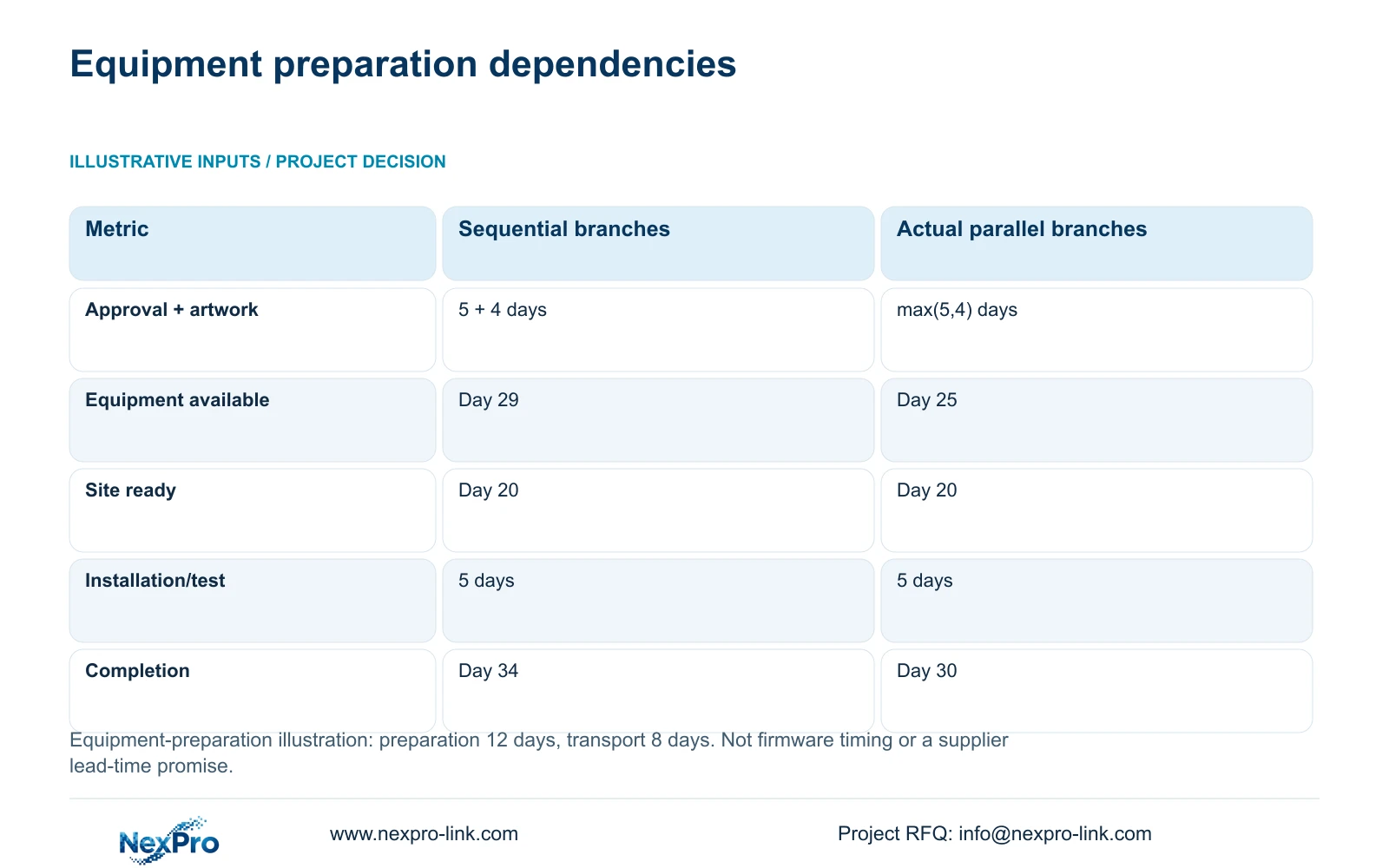
The supplied calculation is an equipment-preparation example, not a measured firmware rollout duration. It is relevant when the rollout also depends on newly supplied equipment or recovery stock. Its inputs are technical approval of 5 days and artwork of 4 days running in parallel, followed by 12 days preparation and 8 days transport. Site readiness is day 20, with 5 days installation and testing.
Ready-to-install day is the later of equipment availability and site readiness. Using the actual parallel branches, equipment is available on day max(5,4)+12+8 = 25, and completion is day max(25,20)+5 = 30. Treating the independent approval and artwork branches as sequential gives day 34.
The four-day difference comes from dependency accounting, not faster firmware testing. Artwork is irrelevant to a software-only update and should not be inserted into that schedule. Keep the source comparison intact when equipment procurement is involved, then build the actual firmware sequence from supported procedures and agreed observation periods.
Parallel preparation is appropriate where inputs are independent. Deployment of the next recorder group should still wait for the pilot decision. If a problem blocks essential recording, pause expansion even when the equipment programme remains on schedule.
| Metric / condition | All branches treated as sequential | Actual parallel branches |
|---|---|---|
| Approval + artwork treatment | 5 + 4 days | max(5,4) days |
| Equipment available day | 29 | 25 |
| Site ready day | 20 | 20 |
| Illustrative completion day | 34 | 30 |
| Actual commitment | Depends on real sequence and agreed dates | Requires actual project inputs |
Section 05
Plan recovery using the supported release procedure
Obtain the manufacturer's procedure for the exact target release before changing production equipment. Identify whether recovery uses a supported configuration restoration, a supported downgrade, replacement hardware or another documented method. Do not treat these as interchangeable.
If downgrade support is absent, describe that limitation before the maintenance window. A previously downloaded release or configuration file does not establish an authorized recovery route. The hotel needs a workable escalation and restoration plan that preserves the required recording task as far as the supported arrangement allows.
A prepared spare can reduce the wait for replacement hardware, but its configuration and recording gap still need a defined procedure. Confirm whether stored recordings remain retrievable through the supported method. Old disks are not automatically readable in a different recorder.
Assign local action and remote support separately. Staff need the correct device identity, issue description and escalation contact. Technical support does not imply unrestricted remote access or included local attendance. Any temporary support access should follow the hotel's approved authorization and revocation process.
Section 06
Keep version and outcome records for each batch
Record the prior and resulting versions, affected recorder group, maintenance interval and actual task results. Tie unresolved issues to the configuration that produced them. After correction, repeat the relevant check under comparable conditions before marking the issue resolved.
Keep training and operator instructions consistent with the deployed version. If a menu or export workflow changes, update the task guidance for authorized users. A mixed-version property also needs a clear device record so support staff do not apply one group's result to another untested combination.
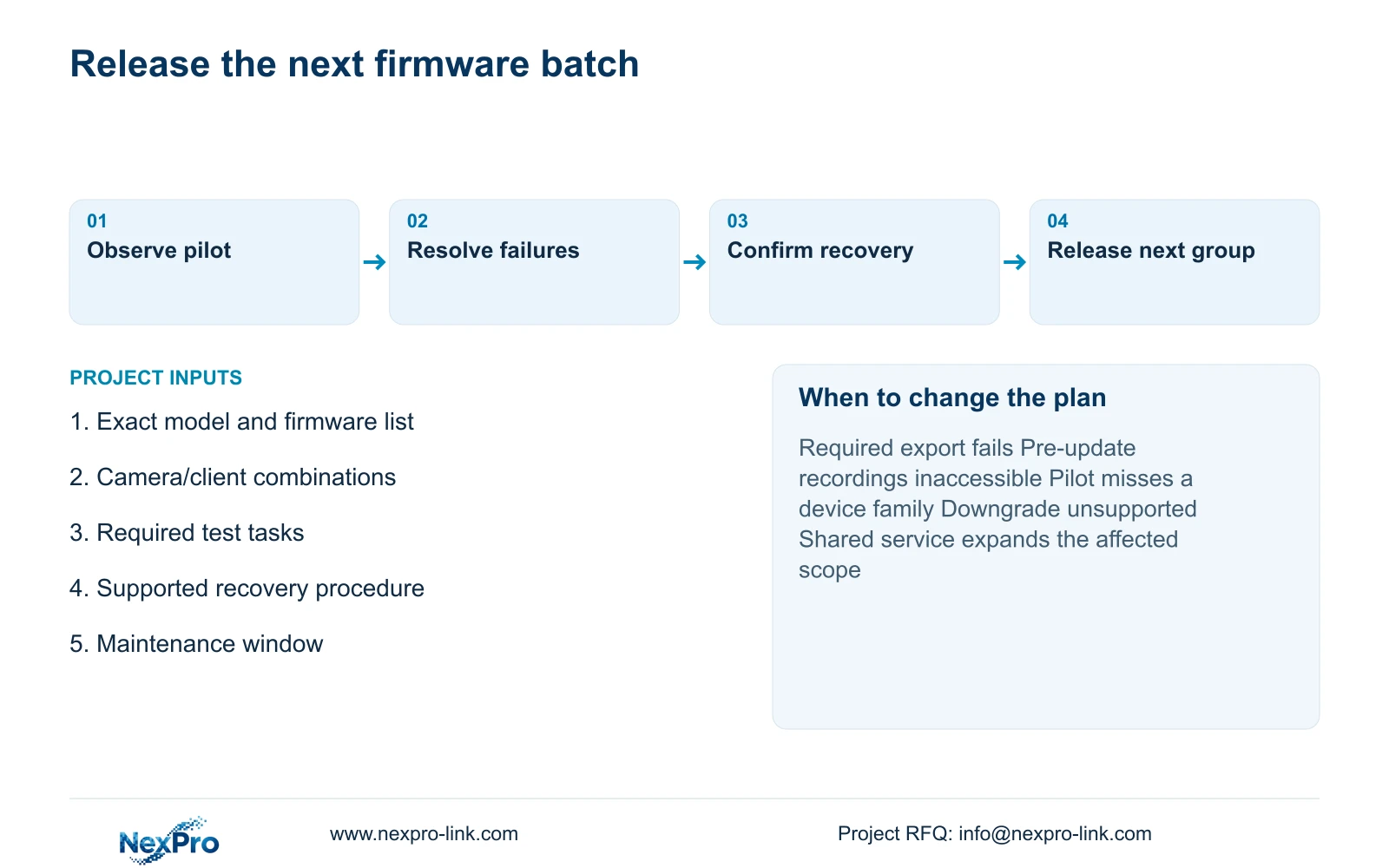
Recommend phased deployment when the representative pilot meets the defined tasks and recovery is supported. Revise the sequence if the release affects shared services, the pilot omits a required equipment family or the hotel cannot tolerate the planned recording interruption.
Send the recorder and firmware list, representative camera/client combinations and required maintenance window to info@nexpro-link.com. State the required playback and export tasks and any proposed recovery equipment. NexPro-Link can discuss relevant technical documentation and scoped equipment support without promising an unverified release outcome.
Section 07
Buyer questions
Can we assume that a firmware downgrade is available? No. Obtain support for the exact model and release pair. If downgrade is unsupported, plan a different documented recovery method before the production change.
Is one successful live-view check enough to release the next batch? No. The release decision should include the required recording, pre-update retrieval, playback, export and permission tasks. A live image covers only the observed preview function.
Does the 30-day schedule describe a firmware upgrade duration? No. It is the supplied equipment-procurement illustration. Actual firmware timing requires the supported procedure, project dependencies and agreed observation periods.
Engineering references
These sources support the general planning principles. Always use the selected product's current datasheet and applicable project standards for final design.