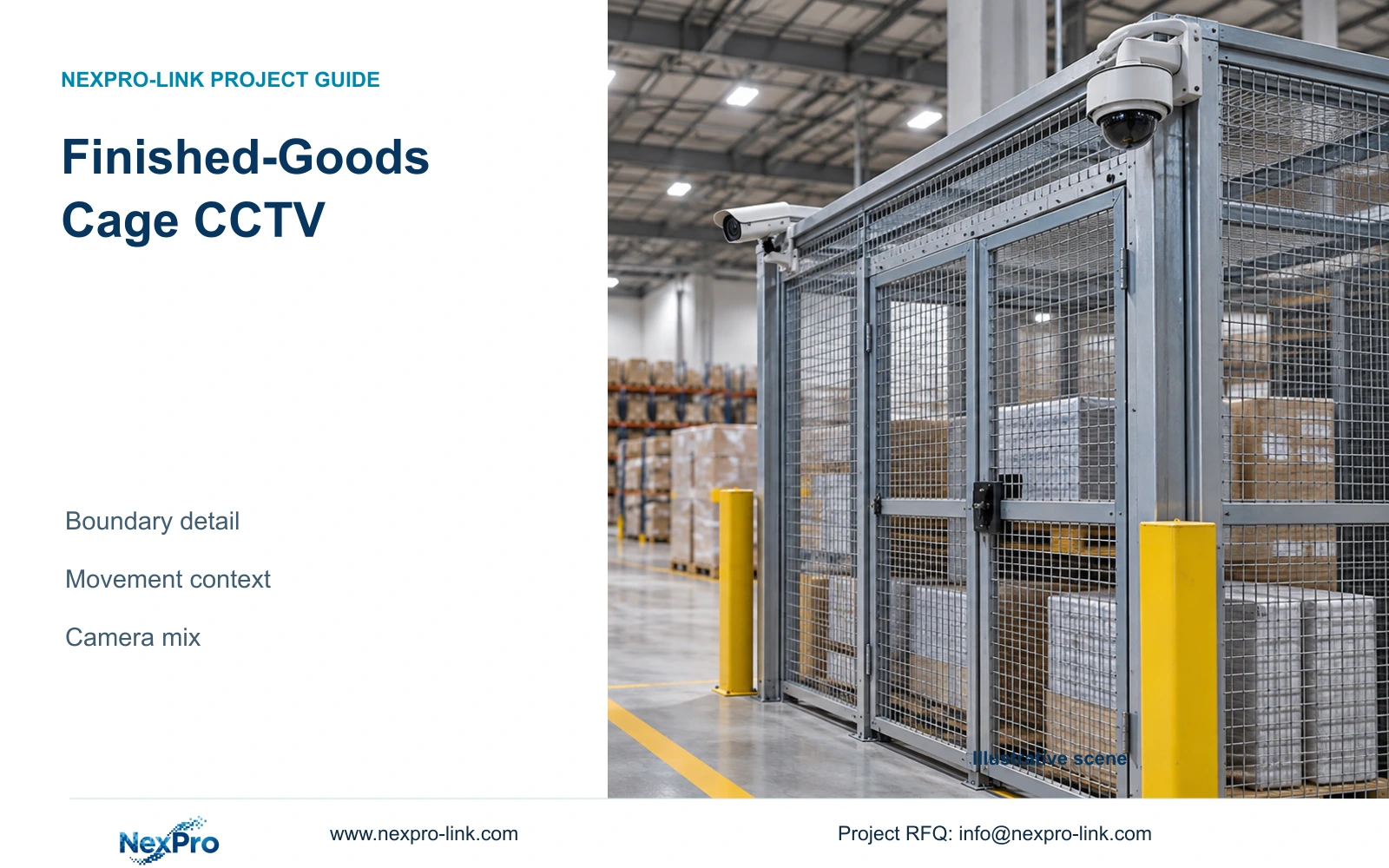
Concentrate finished-goods cage CCTV detail at controlled transfer points, then retain the wider views needed to explain movement, interruptions and custody.
Section 01
Put the clearest view where stock changes hands
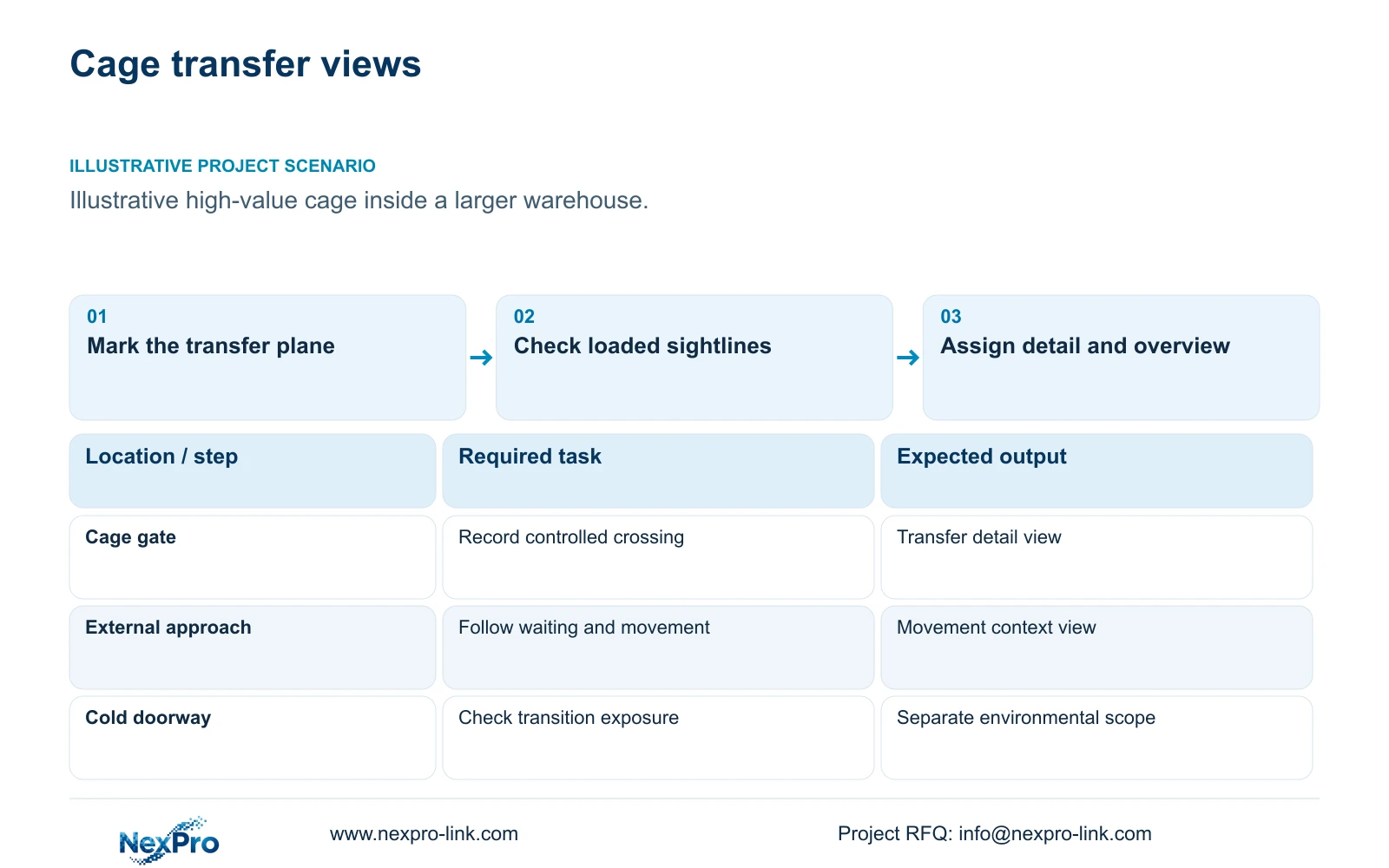
Finished goods cage CCTV should concentrate detail at the controlled entrance and transfer position, with a wider external view where movement context matters. Define what the reviewer must establish: which load crossed the boundary, its direction, who handled it, and when the transfer occurred. Close observation throughout the surrounding warehouse is justified only where another agreed task requires it.
Illustrative project scenario: A small high-value finished-stock cage sits within a much larger warehouse. Assume, for planning, that loaded pallets pass through a controlled gate and sometimes wait outside it before release. The engineer therefore separates the gate-detail task from the approach-overview task. These are hypothetical operating conditions, not a completed customer installation or a demonstrated camera result.
Walk through receiving and dispatch with the proposed loaded-rack layout. Mark the transfer plane, normal pallet height, gate swing and forklift stopping position. Ask whether staff confirm release before or after the load passes the gate. That answer determines which side needs detail and how much preceding footage the operator needs when searching an event.
Section 02
Keep close observation within the agreed stock boundary
Draw the required image footprint on the layout rather than describing a camera as covering the cage. A gate view may need the load, release position and immediate threshold, while an overview follows the approach route. Adjacent workstations or another operator's stock should not become close-observation targets simply because they fall inside an unrestricted wide-angle image.
Review the footprint with the owner and warehouse operator. Where available and verified on the selected equipment, masking can limit unrelated areas, but it must not obscure the transfer itself. Positioning and lens adjustment remain important because permissions cannot recover missing detail or remove physical obstruction. Check the view with the gate open and closed and with stock at its permitted height.
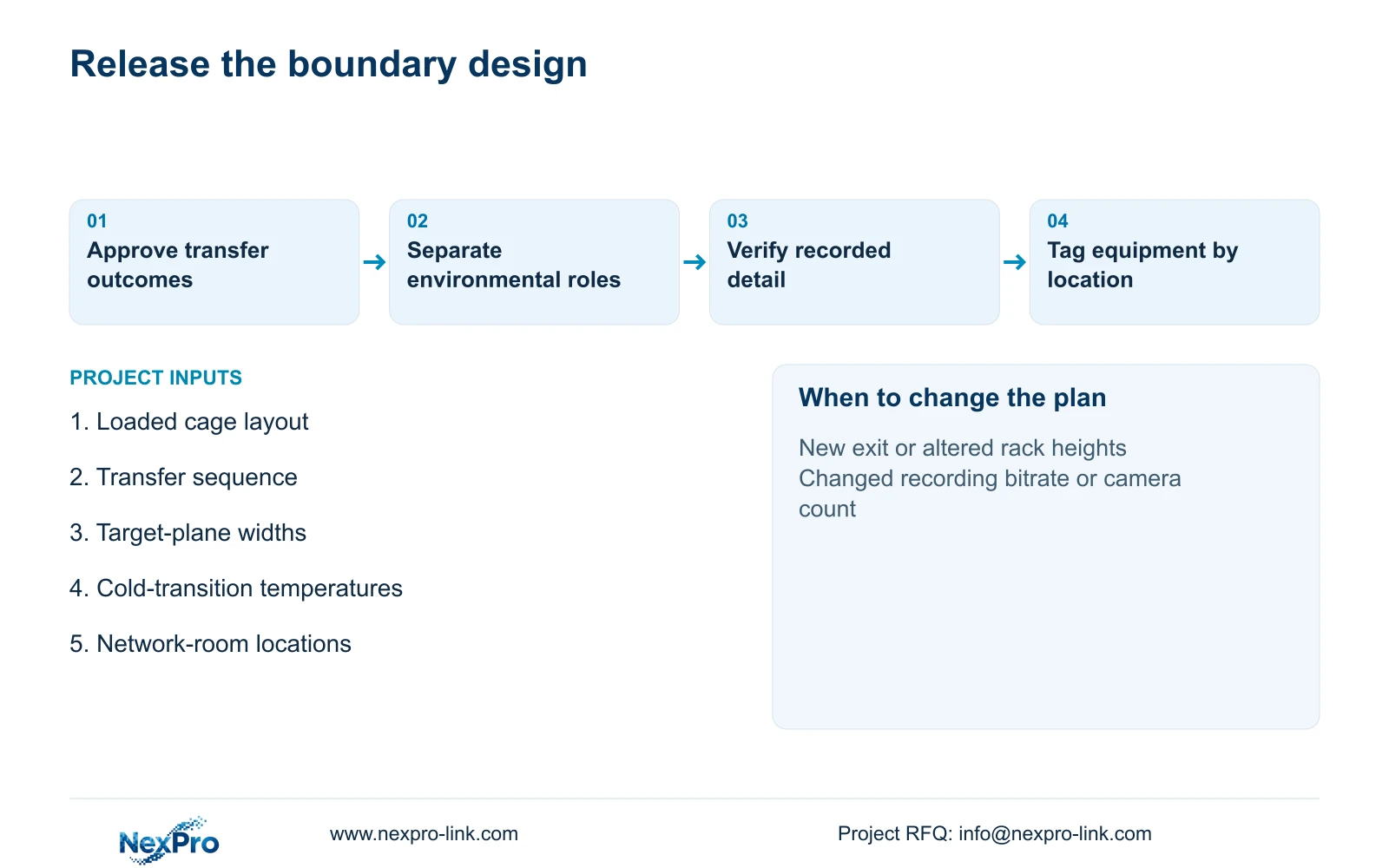
A second exit, temporary overflow position or changed rack alignment can invalidate the original boundary. Record these conditions in the camera schedule and require a coverage review when they change. If a cold-room doorway feeds the cage, document the temperature and transition exposure at the mounting position separately from the warehouse's nominal ambient conditions.
Section 03
Assign camera roles before choosing the local mix
Give each proposed camera one primary role: transfer detail, approach context or a separately qualified cold-area view. A detail camera can frame the gate tightly; an overview should preserve the route that explains where a load came from or went. Choose mounting positions that maintenance staff can reach without dismantling the cage or routinely interrupting dispatch.
For suitable ordinary-area positions, NexPro-BL2812M55-5MP-DIC-AI provides a published 5MP-family reference with listed 2880×1620 output, 25fps@5MP and a 2.8–12mm motorized lens. NexPro-DM2812M55-5MP-DIC-AI is a Dome-family alternative with the same listed output dimensions and lens range. Housing choice should follow mounting and service access; no impact rating or recognition distance is inferred from either form.
CASE06 supplies a useful environmental split: 16 ordinary-area cameras and eight separately selected specialist cold-area cameras. It does not prescribe the cage camera quantity. Keep the recorder, access switches and batteries in a suitable warm room, and identify who selects the cold-rated cameras and connections. Specialist power demand, heaters and startup conditions must replace assumptions before switch and backup selection.
Section 04
Compare target width without losing movement context
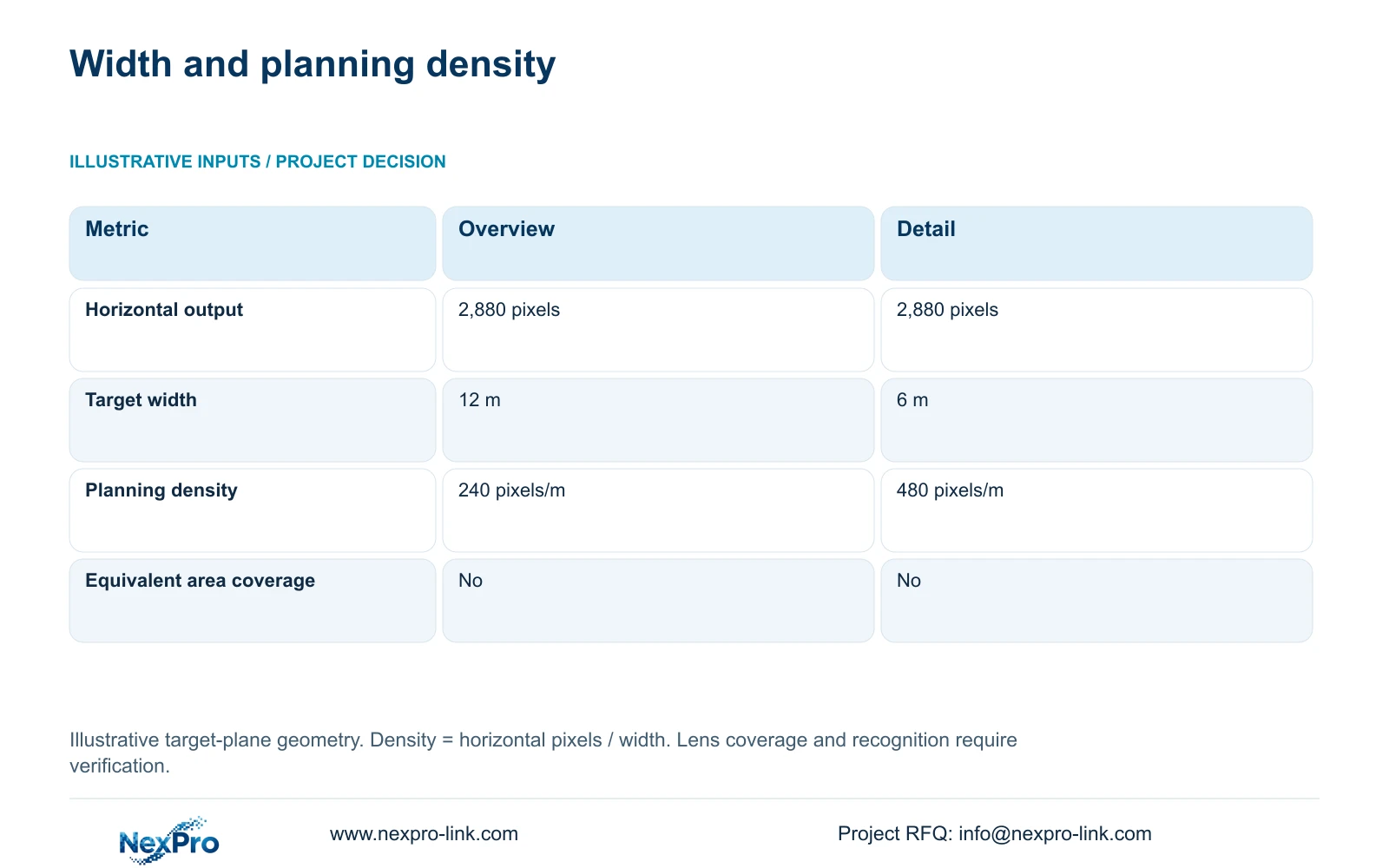
The illustrative comparison holds horizontal output at 2,880 pixels. Option A covers 12 m at the target plane; Option B covers 6 m. Use planning_pixels_per_metre = horizontal_output_pixels / target_width_m. The results are 2,880 / 12 = 240 pixels per metre and 2,880 / 6 = 480 pixels per metre. These widths are assumed geometry, not guaranteed lens fields of view.
Option B doubles the planning density while removing half the horizontal coverage at that plane. It is a useful direction for a narrower transfer position, but it cannot replace the wider view when approach movements also need recording. Neither option represents equivalent area coverage: target depth, mounting angle and obstructions still determine what remains visible.
Approve the result through representative recorded footage. Use an actual load at the transfer plane, normal movement speed and operating illumination, then inspect playback and export at the agreed settings. Pixel density alone does not guarantee readable labels or person recognition. Motion, compression, reflections from wrapping and a forklift blocking the load can defeat an otherwise promising geometric calculation.
| Metric | Option A: overview | Option B: detail |
|---|---|---|
| Horizontal output | 2,880 pixels | 2,880 pixels |
| Target-plane width | 12 m | 6 m |
| Planning density | 240 pixels per metre | 480 pixels per metre |
| Area coverage equivalent | No | No |
Section 05
Preserve the evidence task when budgeting infrastructure
Recommend dedicated boundary detail with economical external overview where the accepted tasks permit it. Compare a uniform-camera proposal against this role-based package using the same transfers, operating hours and retrieval requirement. The quantity surveyor should identify changes in cameras, brackets, cable routes, configuration and acceptance work. Without matched quotations, the design supports a scope comparison rather than a claimed saving.
Check retention separately from coverage. CASE06 assumes 24 cameras, 4 Mbps average per camera, continuous recording and 60 days. Its formula is video_TB = cameras × average_Mbps × 10^6 × 86400 × days / 8 / 10^12, giving 62.208 TB. Eight 12 TB drives provide 96 TB raw; the illustrative video budget is 96 × 0.95 × 0.80 = 72.96 TB, which exceeds 62.208 TB. That budget already includes formatting allowance and reserve.
The case uses NexPro-NVR8864-4K as an eight-bay candidate, with streams assumed inside supported 5MP-class modes. Recording capacity does not establish decoding or RAID. If tighter views change the agreed bitrate or additional cameras are needed, recalculate storage and input traffic. Protect the actual switches and recorder through their electrical circuits; do not count camera power again after including complete PoE-switch AC demand. Keep an optional display wall outside the essential recording scope unless the operator needs it.
Section 06
Release a location-based package with clear responsibilities
Prepare a schedule linking each camera tag to its location, target plane, required outcome and environmental classification. Mark equipment as new, retained or optional, and name the party responsible for each interface. The engineer owns the coverage decision; the owner approves the evidence task; the local installer confirms mounting, routes and access. A warm cabinet location should be shown on the drawing rather than left as an installation assumption.
Measure each cable route through its actual containment and termination points. CASE06's 41–76 m permanent-link assumptions are background examples, not measurements for this cage. Fluke Networks guidance distinguishes the usual 90 m permanent link from the 100 m complete channel. Select the correct test arrangement and separately account for patch cords, cold-transition connections and any route requiring a different backbone.
NexPro-Link's factory-project and BOQ support can help translate the approved schedule into model matching, equipment quantities, technical submittals and project packing. Location labels should distinguish gate detail from overview so site teams preserve the intended roles. Keep specialist cold-area selection and local construction responsibilities explicit. Before release, demonstrate the recorded transfer and its export, not merely a live image of an empty cage.
Section 07
Buyer questions
Can we ask the camera to read every carton label? Specify the label size, orientation and presentation position first. If cartons pass behind wrapping or at varying angles, use operational scan records for identity and CCTV for transfer context. Treat label readability as a trial requirement, not an assumed consequence of the megapixel rating.
Does adjusting a motorized lens change the storage requirement? Lens adjustment alone does not define bitrate. Recheck the actual recording settings and observed average demand after reframing, particularly if the accepted detail requires different compression or frame-rate settings.
When should the uniform-camera proposal be retained? Retain it where repeated locations genuinely need the same task and a trial confirms suitable coverage. A mandated platform, established spares policy or required integration may also justify keeping it, provided environmental exceptions remain separately qualified.
Section 08
Define the cage boundary package
Send your loaded-rack and cage-gate layout, receiving and dispatch sequence, cold-transition temperatures, and network-room locations to info@nexpro-link.com. NexPro-Link can discuss the camera-role schedule and coordinated equipment quotation.
Engineering references
These sources support the general planning principles. Always use the selected product's current datasheet and applicable project standards for final design.