Give each shared physical asset one quantity and procurement owner, then allocate its cost without duplicating the equipment. Preserve any later tenant or phase allocation in a separate commercial column.
Section 01
Set the operating scope before comparing prices
Give each shared physical asset one quantity and procurement owner, then allocate its cost without duplicating the equipment. Preserve any later tenant or phase allocation in a separate commercial column. Reconcile owner-supplied items with installation responsibility; a retained asset can still create testing or service work without another purchase quantity.
Build a factory security cost plan around the complete accepted service: defined camera views, recording retention, viewing access, protected power and installation. Compare equipment totals only after these outcomes have matching quantities and responsibilities. A quotation that excludes an essential link or commissioning task needs an adjustment before it can be ranked.
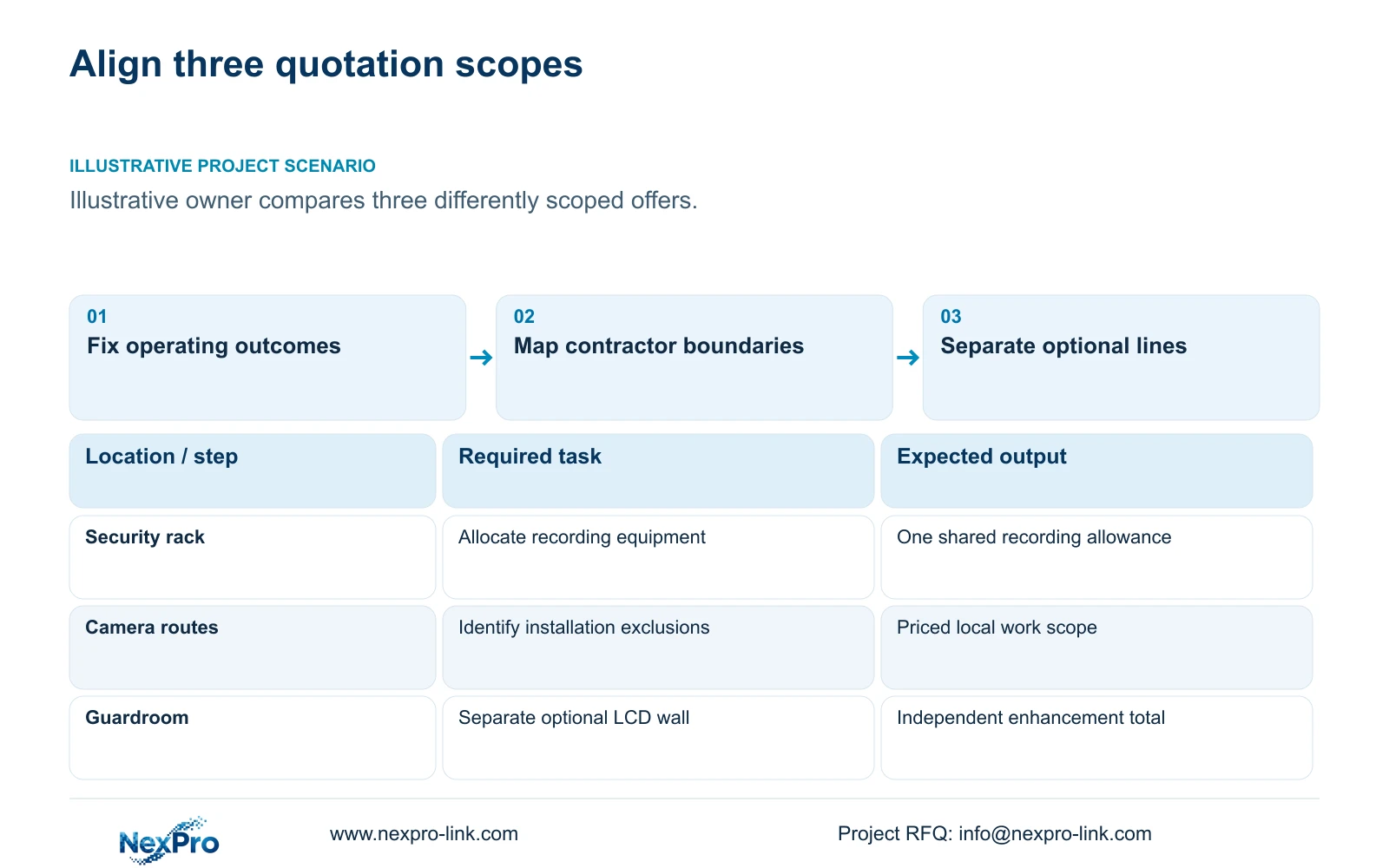
Illustrative project scenario: The owner has three quotes with different equipment and installation inclusions. Use the supplied 32-camera CNC factory reference as the common technical background. Assume the quantity surveyor receives one equipment-only offer, one equipment-and-installation offer and one offer using infrastructure supplied by another contractor. These are planning assumptions, not actual supplier quotations.
Issue a comparison cover sheet stating currency, quotation date, delivery destination, installation boundary and the period covered by support. Attach the same camera schedule to all three offers. Separate confirmed inclusions from allowances and unresolved items so an unknown cost cannot enter the comparison as zero. The owner should approve this boundary before the cost team develops a preferred option.
Section 03
Separate required services from optional equipment
Classify every line as new required supply, retained infrastructure, optional enhancement or work by another contractor. Retention and backup objectives are service requirements; particular cabinet layouts or display arrangements may be implementation choices. Removing an item is acceptable only when the remaining package still performs the approved task and another party has accepted any transferred responsibility.
In CASE01, the 30-day recording baseline uses four 16 TB disks. Its illustrative video volume is 41.472 TB, while the 64 TB raw installation provides a 48.64 TB recording budget after the stated formatting and free-space factors. This gives the cost team a defensible storage quantity to compare. The NexPro-NVR4449-4K reference has four SATA bays and a published 320 Mbps input limit; those fields do not establish RAID or unrestricted simultaneous decoding.
Keep the optional four-panel LCD wall and decoder outside the recording baseline unless an operator task requires them. The reference retains the original retrieval display when the wall is added. The optional package therefore needs its own mounts, signal path, power and commissioning lines. Calling the wall optional must not quietly remove the basic means of retrieving recorded evidence.
Section 04
Use a scope adjustment to reveal the comparable total
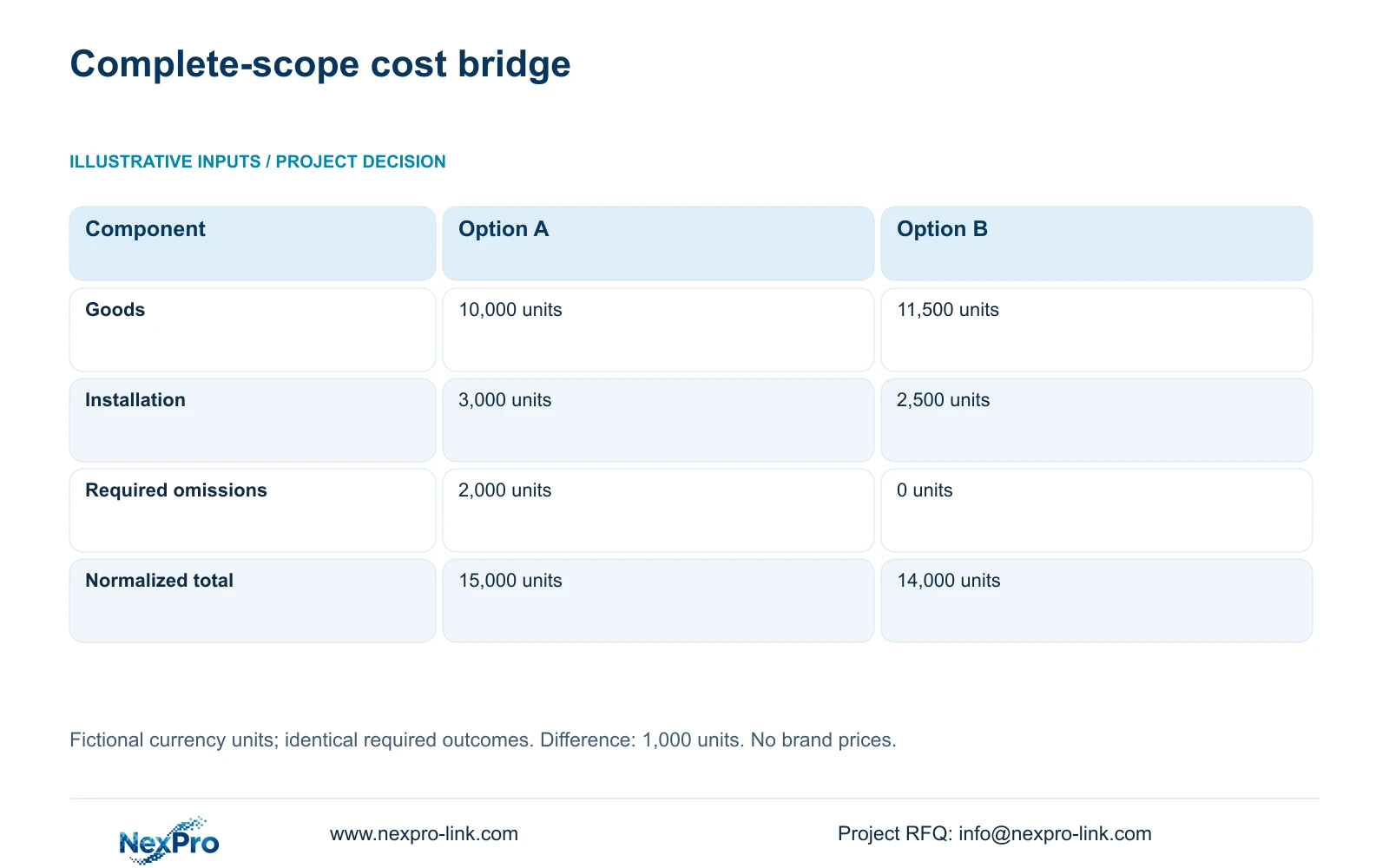
The following two-option example uses fictional currency units only. It demonstrates the method for two offers within the three-quote scenario; no third price has been supplied. Option A includes goods at 10,000 units, installation at 3,000 units and required omissions valued at 2,000 units. Option B includes goods at 11,500 units, installation at 2,500 units and no required omissions.
Use normalized_total = goods + installation + required_omitted_items. Option A becomes 10,000 + 3,000 + 2,000 = 15,000 units. Option B becomes 11,500 + 2,500 + 0 = 14,000 units. The difference, A_total minus B_total, is 1,000 units. The lower goods figure produces the higher complete total because its required omissions outweigh the initial equipment advantage.
Before applying this method commercially, identify the omitted items and obtain matching quotations for them. Check that installation allowances include the same routes, access arrangements and acceptance work. Use same-date, same-quantity, same-currency and same-delivery-scope inputs. These fictional totals demonstrate a reversal in ranking, not a NexPro-Link saving or a competitor price.
| Cost component | Option A | Option B |
|---|---|---|
| Quoted goods | 10,000 units | 11,500 units |
| Installation | 3,000 units | 2,500 units |
| Required omitted scope | 2,000 units | 0 units |
| Normalized total | 15,000 units | 14,000 units |
Section 05
Recommend the complete option with explicit conditions
For the fictional comparison, prefer Option B on complete acquisition cost, provided both options meet the same technical requirements. Explain the recommendation through the accepted outcomes and reconciled cost lines. The owner can then see why paying more for goods may still reduce the total required expenditure. Keep optional enhancements outside this ranking until their purpose is approved.
Change the recommendation if model matching exposes an unsupported recording mode, a required integration, unsuitable environmental scope or a mandatory brand condition. These are technical qualification questions that must be resolved before commercial ranking. A Hikvision, Dahua or other proposal may contain necessary services absent from an alternative; retain their functional value in the comparison.
Also distinguish order value from total project expenditure. Retained infrastructure may need testing, modification or maintenance even though it is not part of the new equipment invoice. Record the installer, network owner and electrical contractor against those tasks. A clear responsibility schedule prevents an attractive equipment price from becoming an unbudgeted site variation.
Section 06
Turn the comparison into a controlled procurement schedule
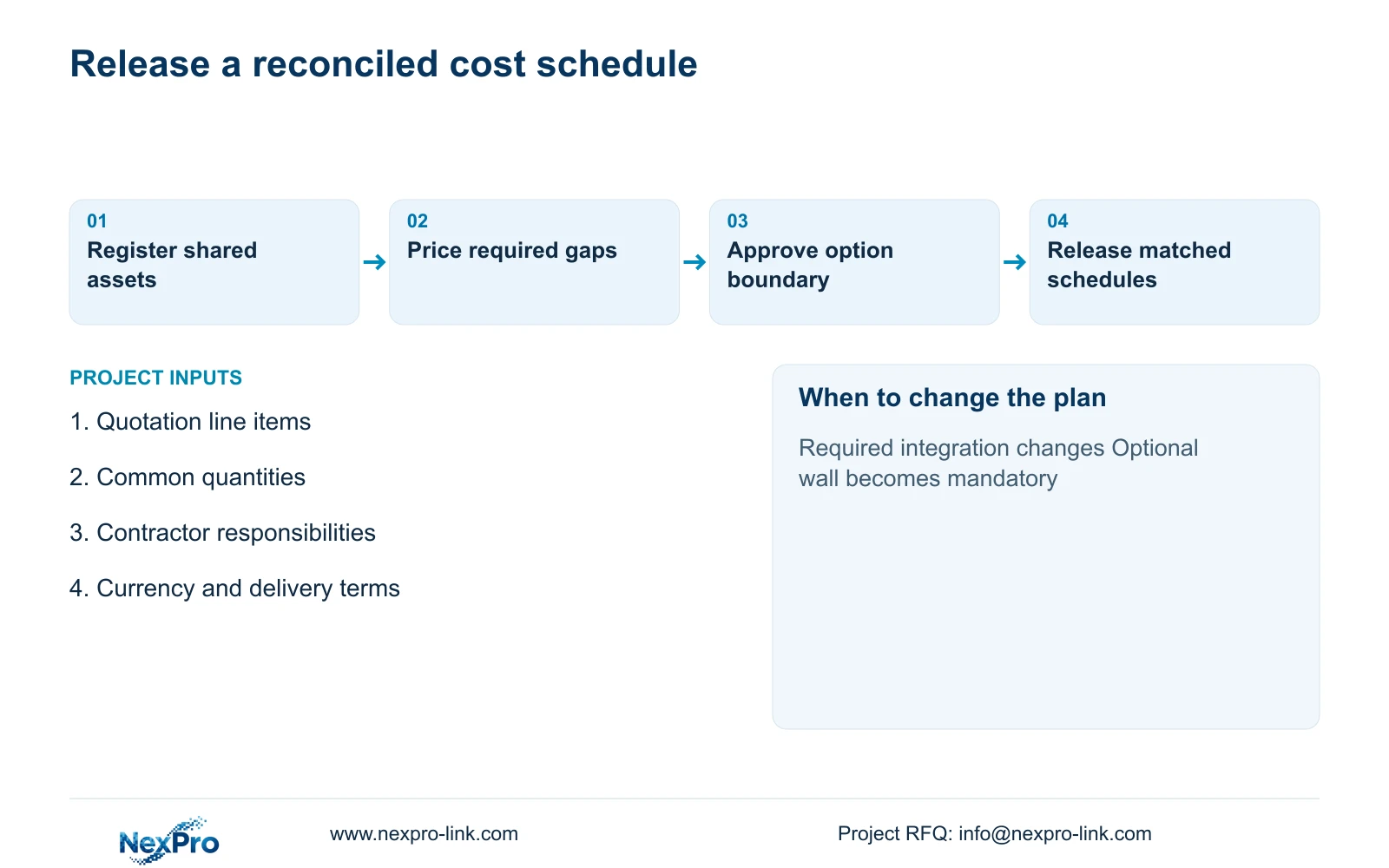
Release a reconciled schedule containing original quoted lines, required additions, accepted exclusions and separately priced options. Give each adjustment a reason and a responsible party. Preserve the quotation reference behind every unit rate. Where scope remains unresolved, carry an identified allowance and state what information will close it rather than presenting the total as final.
NexPro-Link's BOQ and tender-support scope can help match models, document deviations and coordinate a project equipment quotation. Its factory and warehouse supply scope covers relevant security equipment and project inputs. Local installation and final approval remain assigned through the buyer's project arrangements. Request equipment preparation or project packing only where those services belong in the comparison.
At order approval, ensure the purchase schedule and local work package together cover the agreed service. Any later quantity, retention or display change should produce a separate adjustment against this baseline. This gives procurement a usable record of what changed without reopening every unchanged equipment line.
Section 07
Buyer questions
Can we compare an equipment-only quotation with an installed offer? Yes, if the equipment-only offer is supplemented with a matching local installation scope and its price. Keep that adjustment visible. Do not assume another contractor's existing allowance includes configuration, testing or handover.
How should an unpriced required item appear in the cost plan? Mark it as unresolved or use an explicitly approved allowance with a named source and closure date. An empty price is not evidence of a free inclusion, and a provisional total should retain that uncertainty.
Should retained equipment be valued at its original purchase price? For a new procurement comparison, show the work needed to retain it, such as testing or modification. Historical purchase value can be reported separately for asset purposes, but should not be added again as new project expenditure.
Section 08
Request a comparable factory security scope
Send your quotation line items, common equipment quantities, shared-infrastructure responsibility schedule and currency/delivery conditions to info@nexpro-link.com for a scope-matched equipment discussion.
Engineering references
These sources support the general planning principles. Always use the selected product's current datasheet and applicable project standards for final design.