

Make the opening phase operationally complete, distinguish temporary cameras from permanent assets, and preserve a traceable configuration for later expansion.
Section 01
Define the recording scope required on opening day
A phased NVR handover should deliver a working recording service for the areas opening now, with a documented route to later expansion. Identify every required view as temporary, permanent or future, then connect its physical camera identity to the recorder channel and recording plan. Reserve later resources explicitly rather than treating empty channel numbers as proof of expansion capacity. Save the accepted configuration separately from logs and footage, and demonstrate retrieval and a playable export from the opening phase. The handover record should also name who approves temporary-camera removal and who updates the system when the next area becomes operational.
Start with the areas the owner will use immediately. For each required view, record its drawing location, physical camera identity, IP address, NVR channel and displayed name. Add its phase status and intended next action. Future positions can remain planned entries without being described as installed cameras.
The supplied NVR4.0 user manual CH_V2.4.doc carries V2.2 in its body. This guide follows §§4.3.1, 4.4.4 and 4.12.6 for identity controls, §4.11.1 for schedules, and the recording, backup and handover sections discussed below. Phase records and acceptance branches are engineering extensions.
Section 02
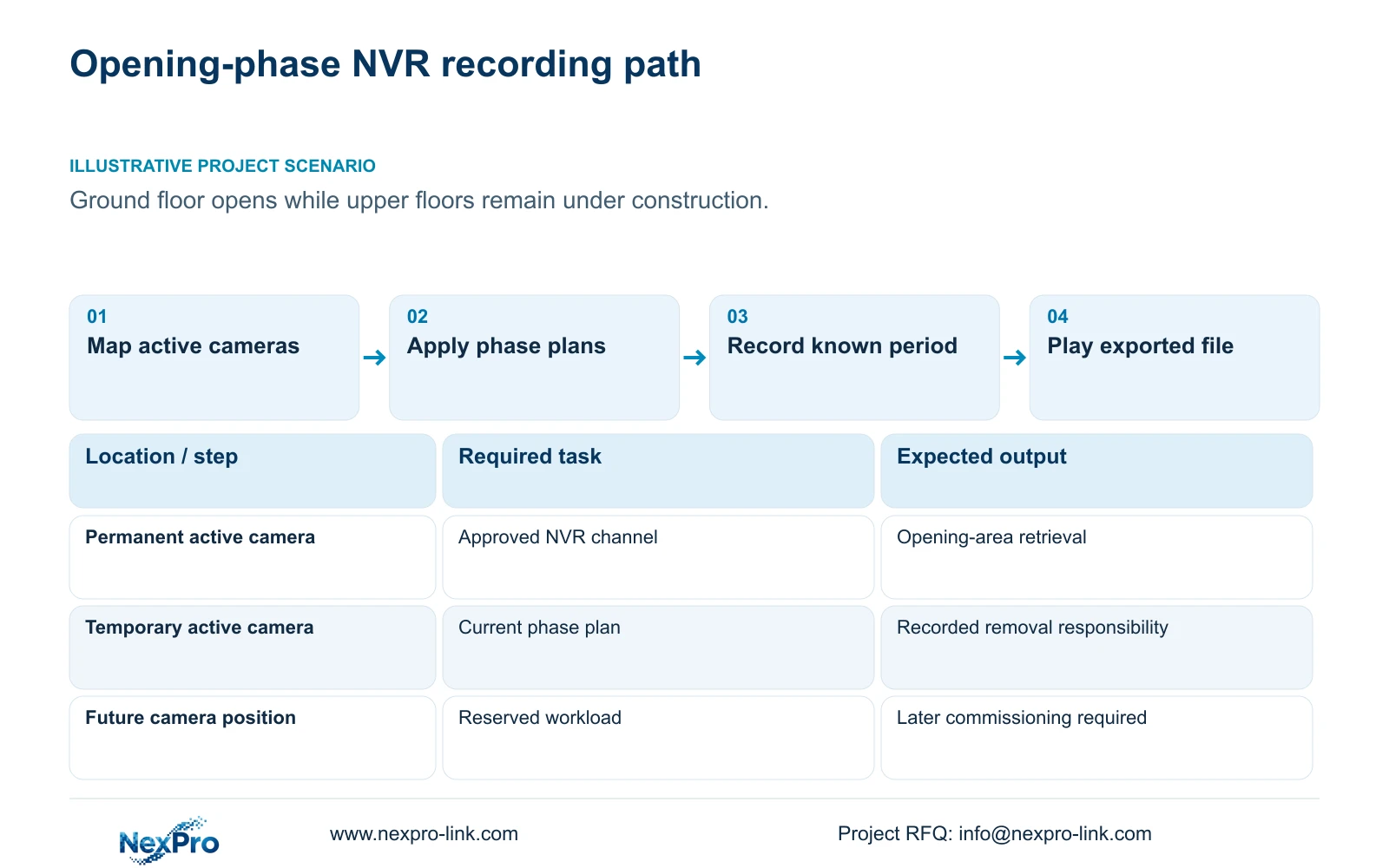
Set recording plans for the occupied areas
Once the opening-day map is agreed, assign a recording policy to each active channel. Section §4.11.1 describes timed recording, no recording, motion recording and motion-plus-timed recording. Its plan grid has a 30-minute minimum scale, which should be reflected in the approved schedule.
Motion-only recording depends on motion detection triggering. Motion-plus-timed continues ordinary timed recording when no motion occurs and records motion-type footage when triggered. Do not estimate the mixed policy as event-only storage saving. For an occupied area needing continuous context, confirm that the selected plan actually covers the required period.
An inactive future channel and an active temporary camera need different treatment. Leaving the former outside the current operating scope does not justify leaving the latter without an approved plan. If a required interval is missing from playback, inspect the affected channel's plan and recording state before revising the whole system.
Section 03
Reserve resources for the next phase
Expansion requires more than spare channel labels. Compare the future stream modes, total incoming bitrate, required playback combinations and usable storage with the chosen recorder. Include interfaces and remote tasks where the next phase needs them. A camera added later can change several constraints even when a numbered channel remains available.
Manual TS examples illustrate why playback needs a separate check. TS8116D7 lists 1×5MP OR 2×2MP local playback. TS8232C4 lists 1×4K OR 4×2MP OR 2×5MP. These are alternative modes, not simultaneous totals, and neither code has an established mapping to a NexPro-Link commercial SKU.
Keep the opening-phase configuration and future allowance in separate columns of the equipment schedule. If the later workload is still undefined, record that dependency rather than asserting that the recorder can absorb any expansion.
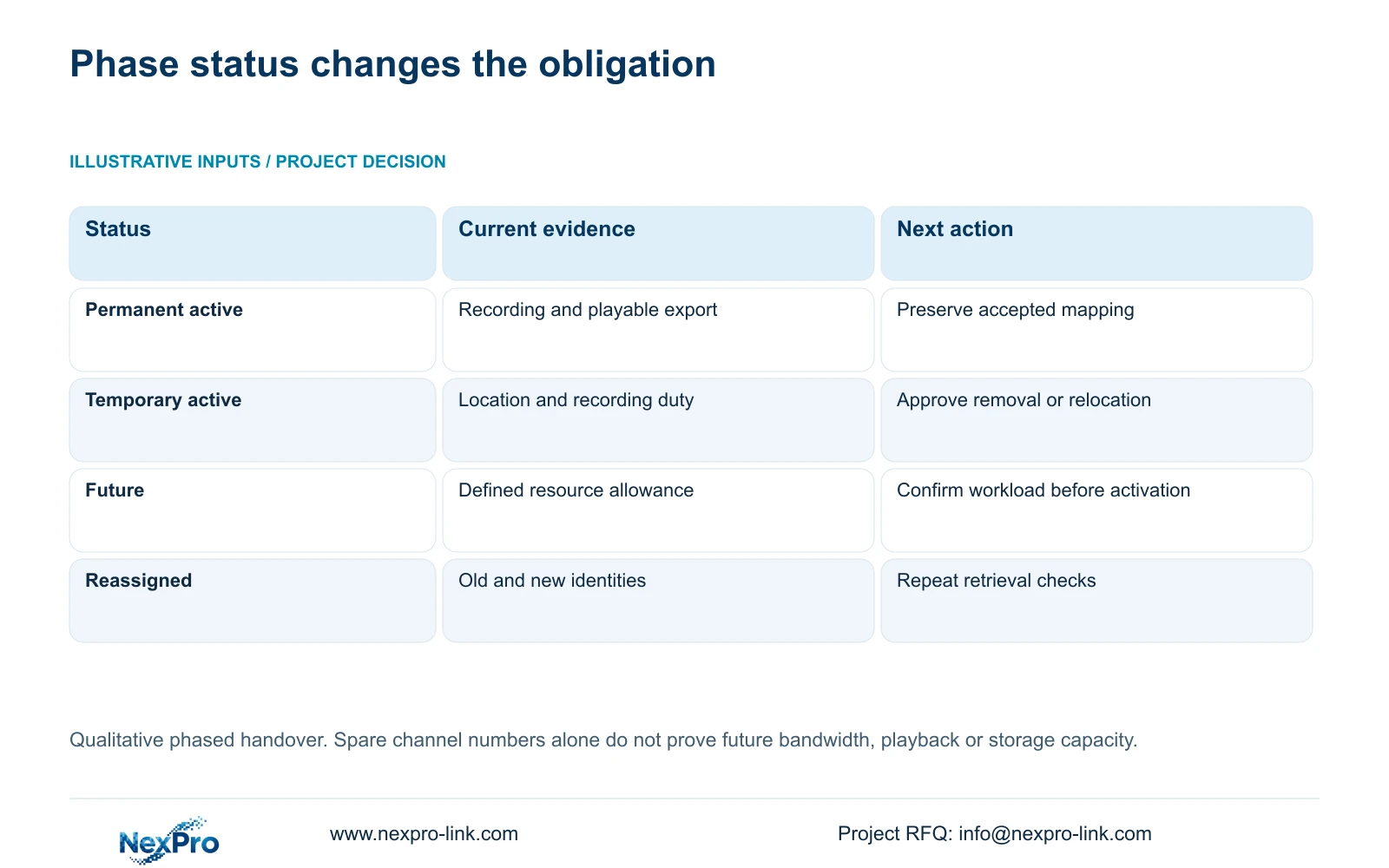
| Channel status | Current obligation | Next-phase action |
|---|---|---|
| Permanent and active | Approved identity, recording plan and retrieval check | Retain the accepted mapping unless an approved change requires revision |
| Temporary and active | Current location, recording duty and removal responsibility | Preserve required footage and document removal or relocation |
| Future position | Planned view and explicit resource allowance | Confirm actual camera and workload before commissioning |
| Reassigned channel | Old and new camera identities with change context | Repeat recording and export checks for the new assignment |
Section 04
Preserve the accepted first-phase configuration
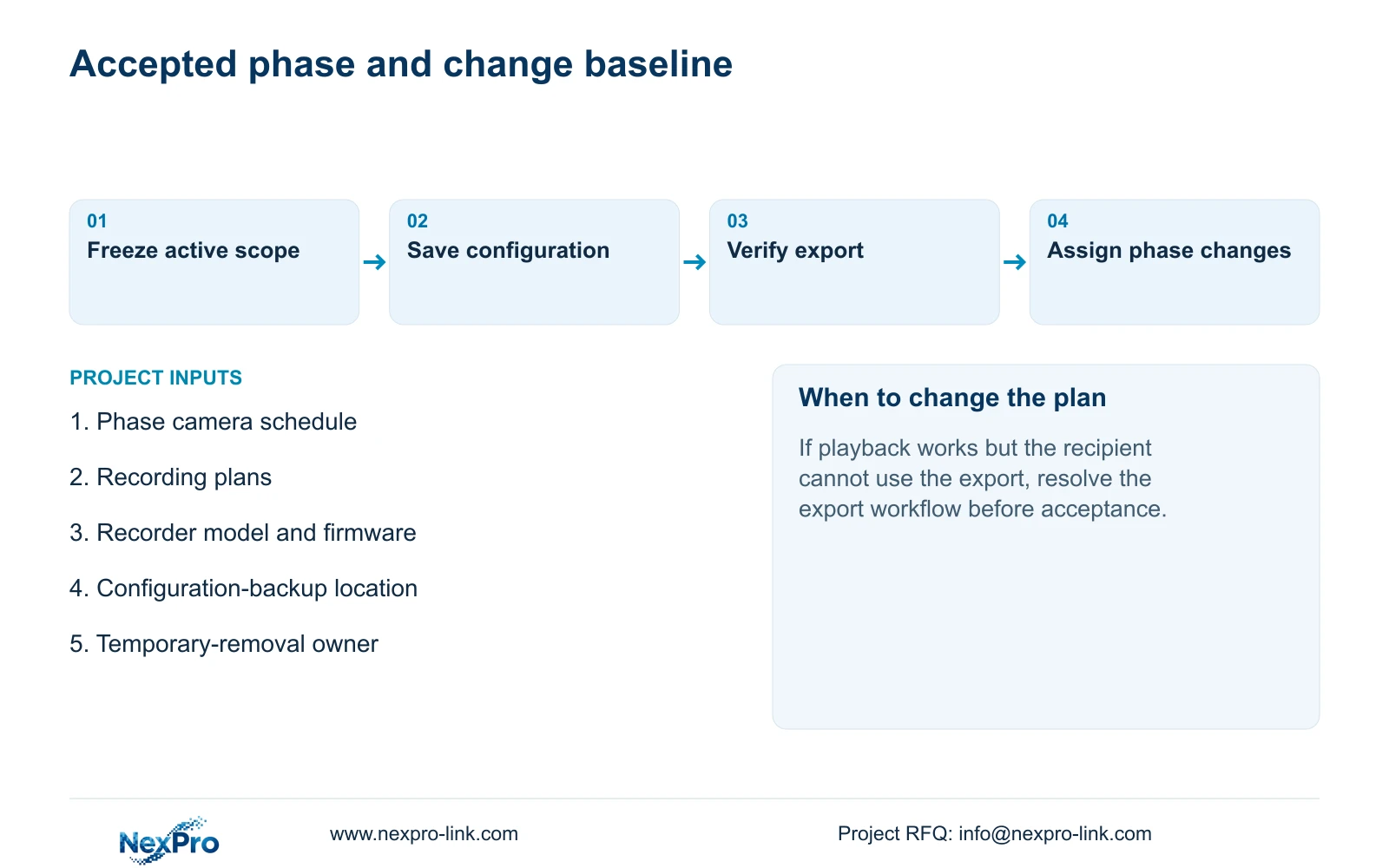
After the active scope passes its checks, export and identify the configuration using the applicable workflow in §4.12.18. Save the model, firmware and phase reference alongside its storage location. Keep logs and selected video exports in separately named records, using §4.11.4 for the video-backup workflow.
A configuration file contains settings; it is not a disk image or incident-footage backup. The manual also does not establish universal cross-model import. Before a later change, confirm that the saved file is identifiable and corresponds to the intended recorder and version.
If the configuration record is missing or ambiguous, resolve that gap before treating it as a recovery resource. Retain the current device details and export through the applicable workflow. Do not describe an unverified file as a tested replacement-recorder configuration.
Section 05
Demonstrate retrieval from the opening phase
Acceptance should follow an identifiable channel through live view, recording status, a known recording interval, playback and export. Play the exported file on another device using the intended recipient workflow. Inspect the selected disk and recording policy as part of that task.
Record the expected result and observation at each step. If live video is present but playback is absent, continue with the recording plan and disk checks rather than accepting the display as proof. If playback works but the exported file cannot be used by the recipient, resolve that export task before closing acceptance.
This sequence is an engineering acceptance method built around §§4.3, 4.11 and 4.12.21. It is not a claimed built-in diagnostic feature. A demonstration on one channel also leaves the identity and required operation of the remaining active channels to be checked against the phase schedule.
Section 06
Assign temporary removal and later change responsibilities
The owner should receive enough information to find the correct channel, retrieve a period and export a usable file. Include applicable versions, configuration-backup location and the responsible support contacts. Transfer credentials through the approved controlled route, outside public drawings and general handover prose.
Name who approves each temporary camera's removal and who updates its channel mapping. Preserve footage that must remain available before changing the assignment. If the transition requires changing IP addresses or stopping the running recorder, obtain authority, preserve relevant data and configuration, and arrange the affected service interruption.
Record document delivery and operator demonstration separately. An owner who has received a folder may still need to prove the retrieval task. Close the phase with the accepted active scope and a list of unresolved future inputs, rather than describing unfinished floors as commissioned.
Section 07
Apply the workflow to a partial opening
Illustrative project scenario: A commercial building opens its ground floor while upper floors remain under construction. The accepted first phase covers the ground-floor recording tasks and any temporary views still required by construction. Upper-floor cameras remain a separate expansion scope.
The phase record follows temporary cameras through removal or reassignment, preserves the accepted settings, and requires fresh retrieval checks when the next area opens.
Section 08
Can a settings export replace the phase's video backup?
No. Export the required footage separately and verify that it plays. Configuration, logs and video serve different purposes and should remain individually identifiable.
Section 09
Scope the first-phase package
For a phased equipment discussion, NexPro-Link needs the distinction between required opening-day service and later work. This supports a package whose recording and handover obligations are visible alongside its quantities.
Send the opening-day camera schedule, marking temporary, permanent and future positions, to info@nexpro-link.com.
Engineering references
These sources support the general planning principles. Always use the selected product's current datasheet and applicable project standards for final design.


