

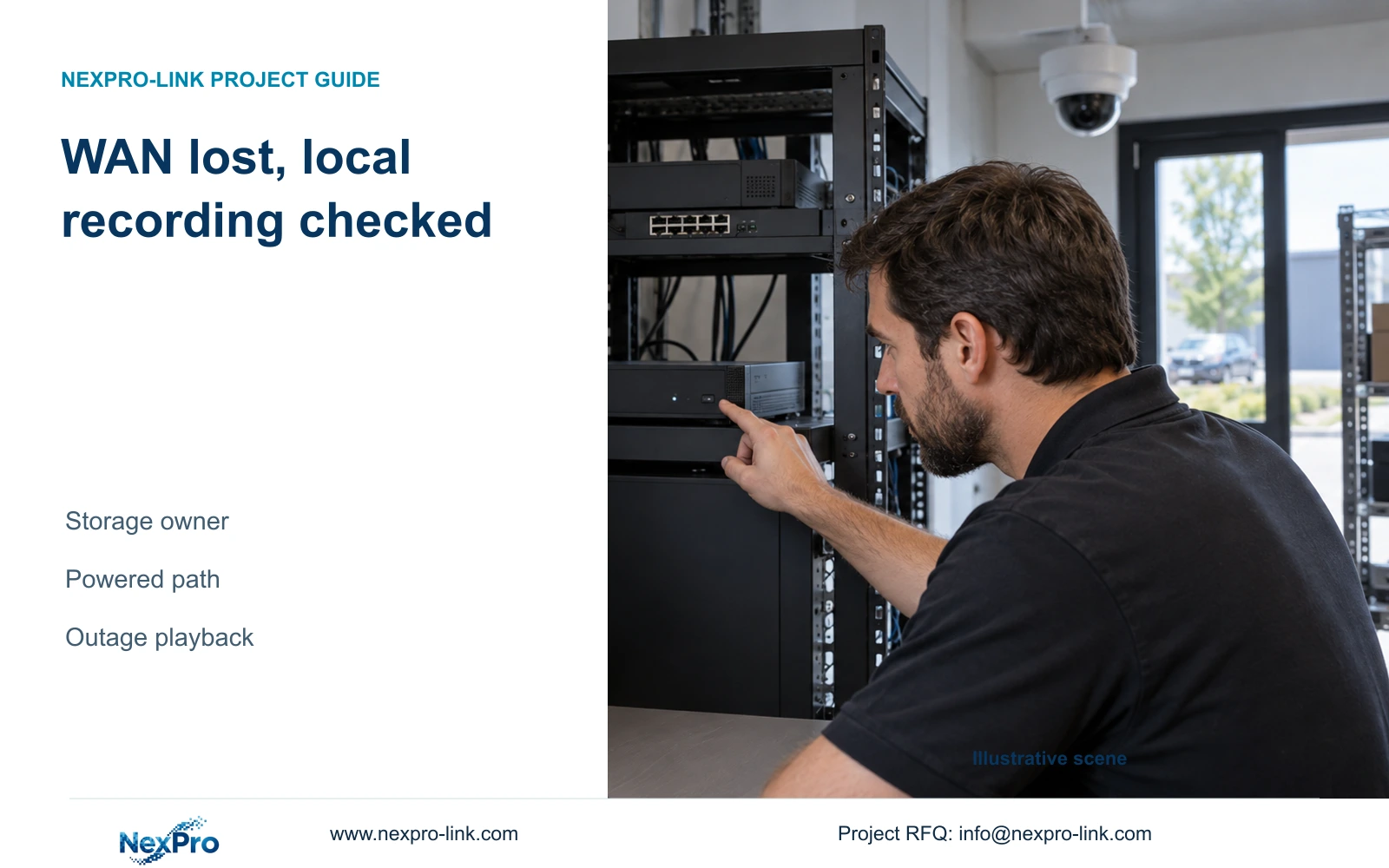
A lost internet connection and a stopped local recording path are different faults. Identify the storage owner and verify the powered camera-to-recorder chain.
Section 01
Confirm where the branch footage is recorded
A branch can continue local NVR recording during an internet outage only when its configured camera-to-recorder path, required power supplies and recording storage remain operational. Remote viewing may become unavailable even while the recorder retains footage. Begin by confirming that the branch uses NVR disk recording rather than a separate PC recording task. Then trace the local camera connections, check disk and schedule status, and verify a known outage period through local playback and a usable export. A powered recorder alone is insufficient when cameras or required switches lose power. Treat continuity as a result to test on the actual configuration, not a universal firmware guarantee.
Identify the storage owner before interpreting the remote client's message. NVR footage, Seetong PC schedule recordings and exported files occupy different locations. Closing a PC window does not establish that an independently configured NVR stopped recording.
The source is NVR4.0 user manual CH_V2.4.doc, with V2.2 in its body, particularly §§1.2, 3.3.1, 4.11, 4.12.8 and 4.12.21. The supplied Seetong Windows client manual V1.0.0, §7.1, distinguishes Remote Playback for NVR footage from Local Playback for PC schedule recordings.
Section 02
Separate the failed access path from the storage path
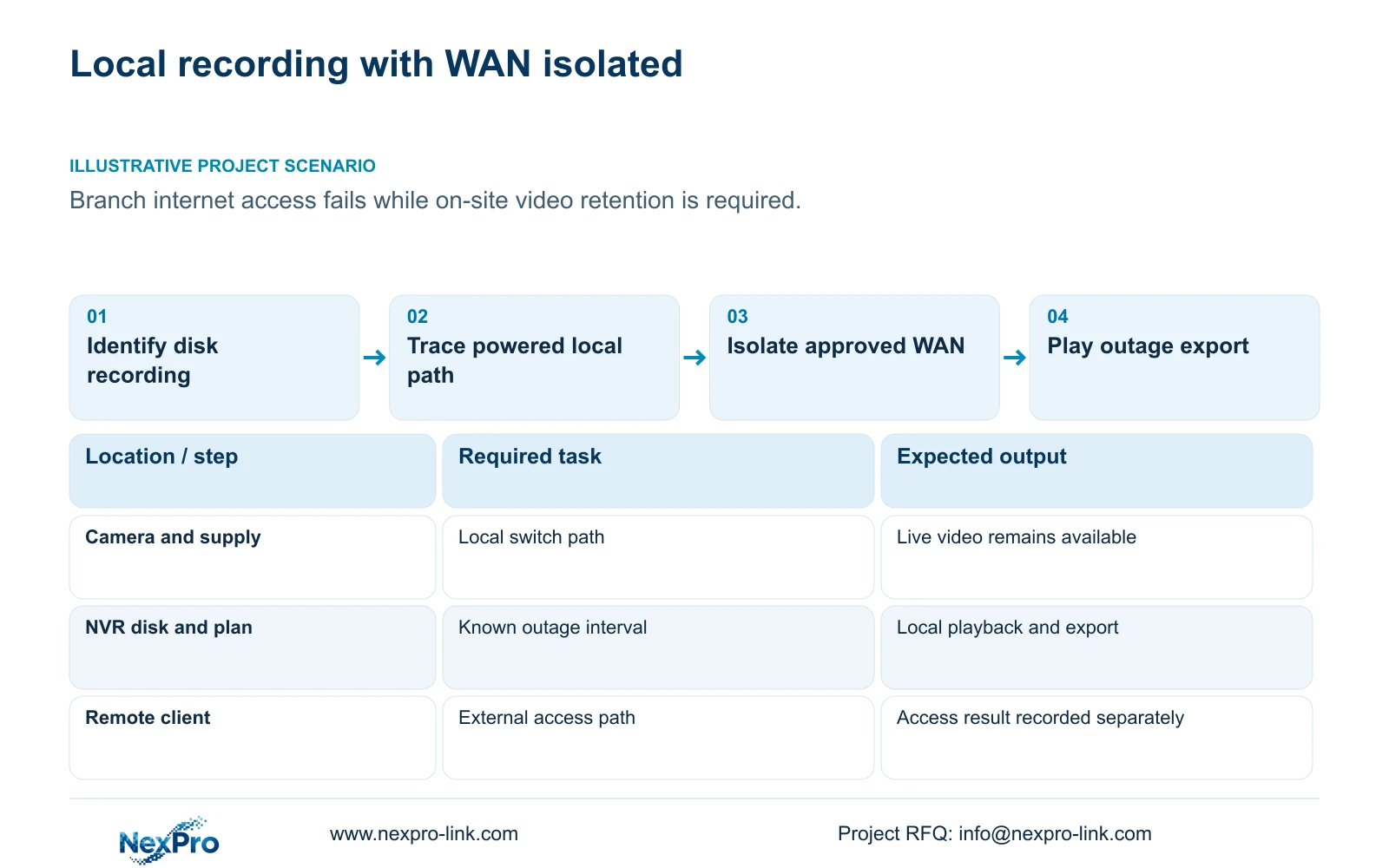
Draw the local recording route and external viewing route separately. The first carries camera video to the recorder's storage. The second lets a remote user reach video through the selected network and service arrangement. An internet interruption can affect the second without establishing the condition of the first.
The manual documents cloud access and recorder storage; it does not establish a cloud-retention subscription or automatic off-site archive. Avoid describing an inaccessible stream as lost cloud footage when no such storage service has been specified.
If a remote user cannot connect, ask an authorized on-site operator to inspect local recording and retrieval. If local footage is present, investigate the external access failure separately. If it is absent, preserve the affected time and channel information and proceed through the local dependencies below.
Section 03
Trace every required local connection
In the manual's non-PoE arrangement, cameras and NVR exchange data through a switch, while camera power is supplied separately. The recorder LAN socket is not shown as a PoE output. A PoE installation therefore needs a suitable power-sourcing device or an exact recorder specification that includes the required function.
Trace the branch's actual path rather than assuming every network box is only for internet access. A device involved in local camera transport remains a recording dependency even when it also carries external traffic. Identify which connection can be interrupted for a WAN test without removing the required local path.
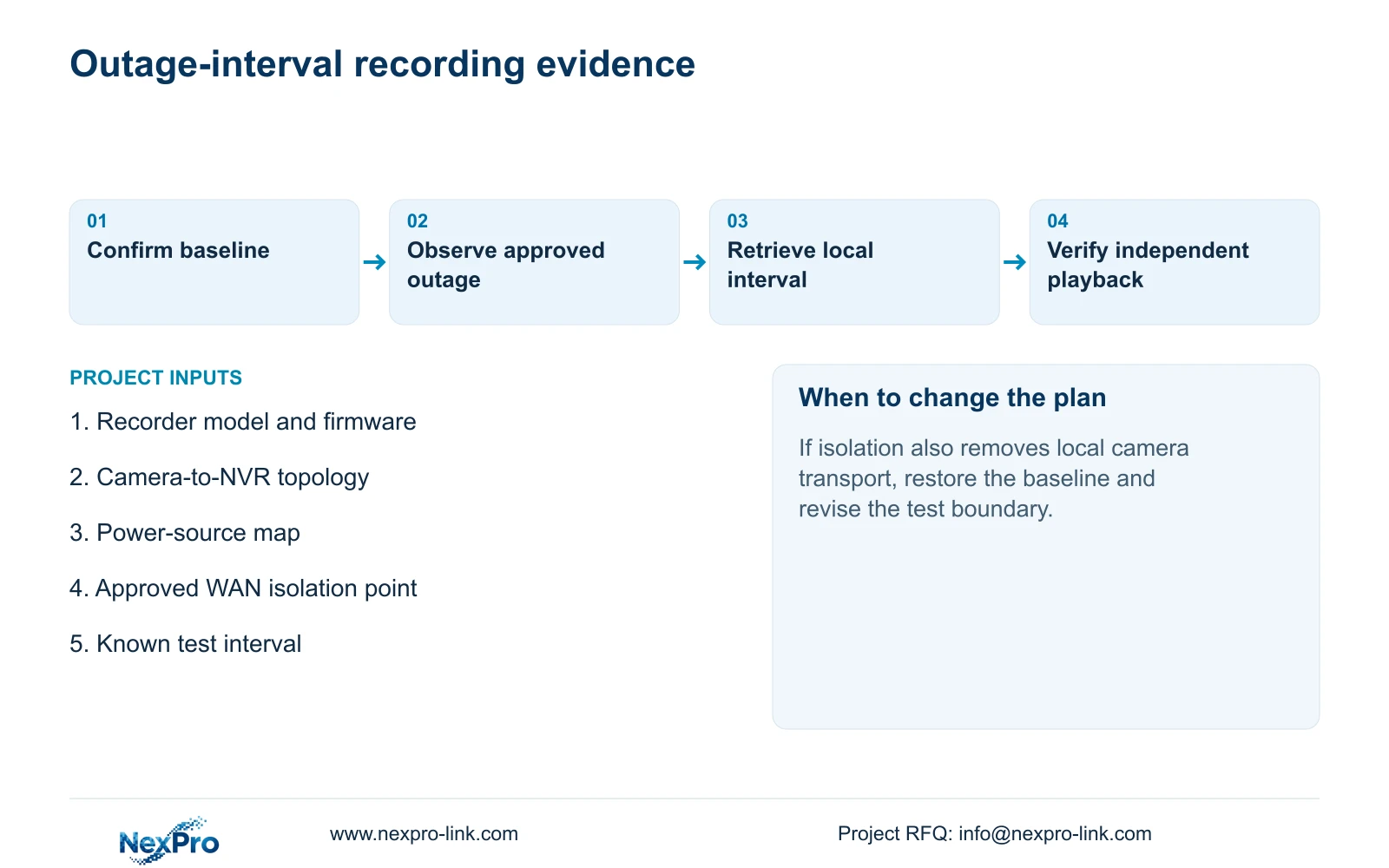
If local video disappears during the test, determine whether camera power or local transport was interrupted. That observation does not by itself show that the NVR requires internet access. Restore the approved baseline and revise the isolation point before repeating the test.
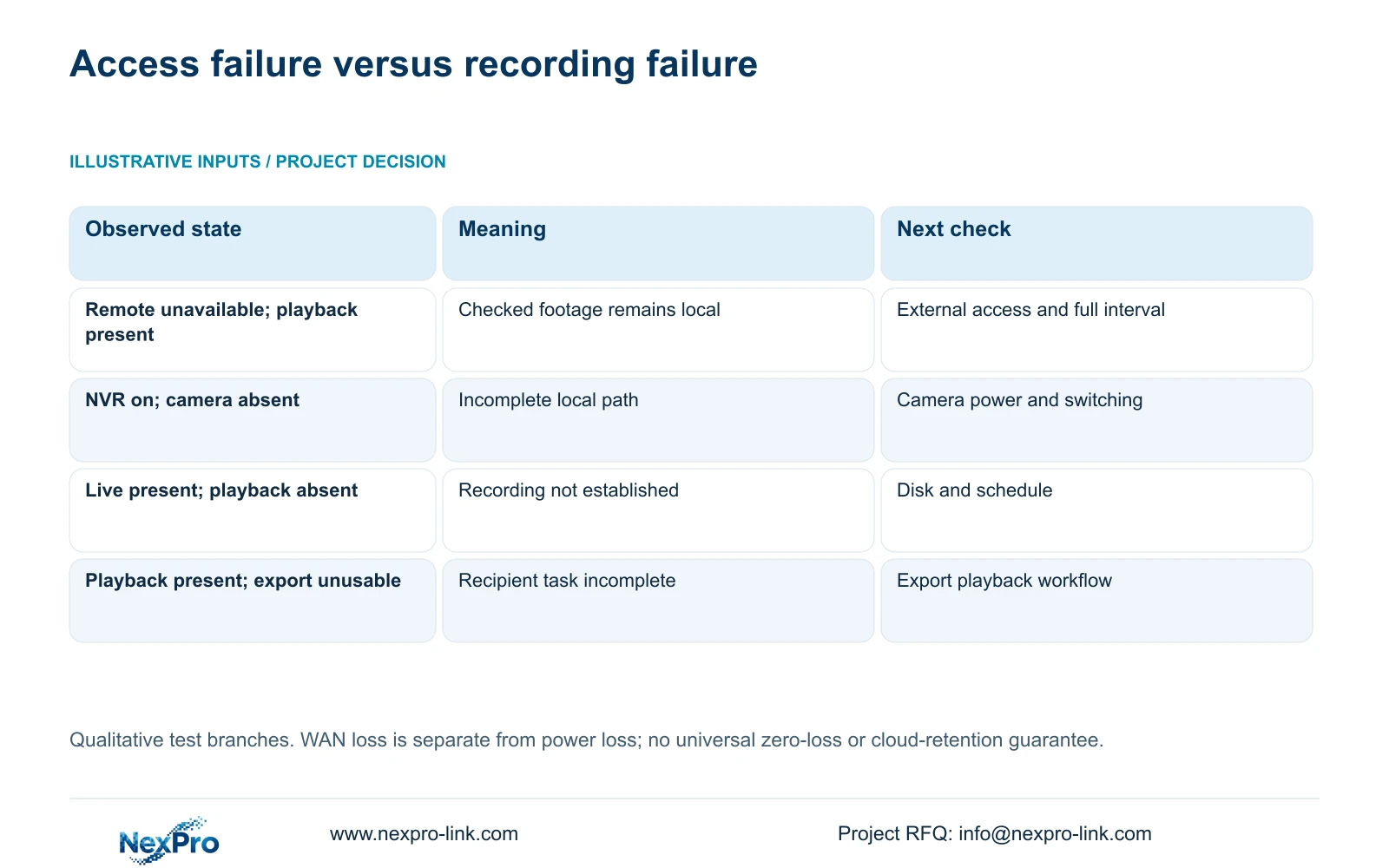
| Observation | What it establishes | Next action |
|---|---|---|
| Remote viewing unavailable; local playback present | External access failed while the checked footage is locally retrievable | Investigate access separately and inspect the required outage interval |
| NVR powered; camera video absent | Recorder power alone has not preserved the complete path | Check camera supplies and required switching |
| Live video present; playback absent | Display operation does not establish disk recording | Inspect recording plan, recording state and disk condition |
| Playback present; export unusable | Local retrieval works but the recipient workflow remains incomplete | Resolve export and independent playback before acceptance |
Section 04
Protect the equipment needed for recording
WAN loss and power loss are different test conditions. For a power-continuity requirement, include camera supplies or PoE access, required switches and the NVR. Include a display only when the agreed outage task requires it. A UPS connected solely to the NVR cannot retain video from unpowered cameras.
Count each electrical load once. A measured PoE-switch AC input may already include its powered cameras; adding those camera loads again would overstate the same demand. Keep the measurement boundary beside each entry in the power schedule.
UPS watt capacity, apparent-power capacity in VA and battery runtime are separate requirements. This topic supplies no load or battery values, and the NVR manual contains no runtime table. Obtain the actual protected-load information and required operating interval before selecting a battery configuration or promising minutes of operation.
Section 05
Inspect disk and recording policy before testing
Section §4.12.21, titled External Storage Devices, describes attached-disk information, formatting, full-disk behavior and the startup no-disk prompt. Its title does not establish NAS, NFS, iSCSI, RAID or shared-storage recording. Use the documented disk information to inspect the actual recording target.
Confirm the required channel's plan in §4.11.1 and observe its recording state. Check that the policy covers the intended test interval and that the selected disk supports the recording task. Record unexpected conditions before changing them.
Formatting is not a routine WAN-outage test step. If disk work becomes necessary, obtain authority and preserve relevant footage before any format operation. Otherwise keep this stage observational so the test does not erase the evidence needed to understand a missing recording.
Section 06
Verify the approved outage interval locally
Agree the test boundary and interruption with the owner or responsible network team. Establish a baseline by identifying a channel, observing live video and recording status, and confirming playback of a known period. Isolate only the approved WAN path while retaining the local dependencies.
During the agreed interval, record observations of local video and recorder status separately from remote-access results. Then retrieve the interval locally, export the required footage and play it on another device. Restore external connectivity and check the remote workflow as a separate result.
If the interval is incomplete, retain model, firmware, channel and time details. Investigate the first failed step before repeating the test. A successful check supports the tested configuration and conditions; it does not establish zero loss under every future outage.
Section 07
Apply the check to a branch outage
Illustrative project scenario: A branch loses its internet connection while the owner expects on-site video retention to continue. The useful evidence is local playback and a playable export from that interval. An unavailable external connection is recorded separately, with no inferred cloud archive.
The review identifies whether the failed service was access, camera transport, power or recording, and leaves the next investigation with the responsible team.
Section 08
Must the viewing PC remain open for NVR recording?
A separate Seetong PC recording task has its own dependencies. Confirm that the recorder itself has the intended disk and recording plan; the PC window's state alone does not answer that question.
Section 09
Identify the branch dependency boundary
Send the branch camera-to-NVR diagram, marking power sources and the WAN connection, to info@nexpro-link.com for a scoped continuity review.
Engineering references
These sources support the general planning principles. Always use the selected product's current datasheet and applicable project standards for final design.


