

A 4K HDMI specification describes monitor output. Qualify camera capture, accepted input, live decoding and playback separately, and base disk selection on the actual recording inputs.
Section 01
Identify which part of the system carries the 4K claim
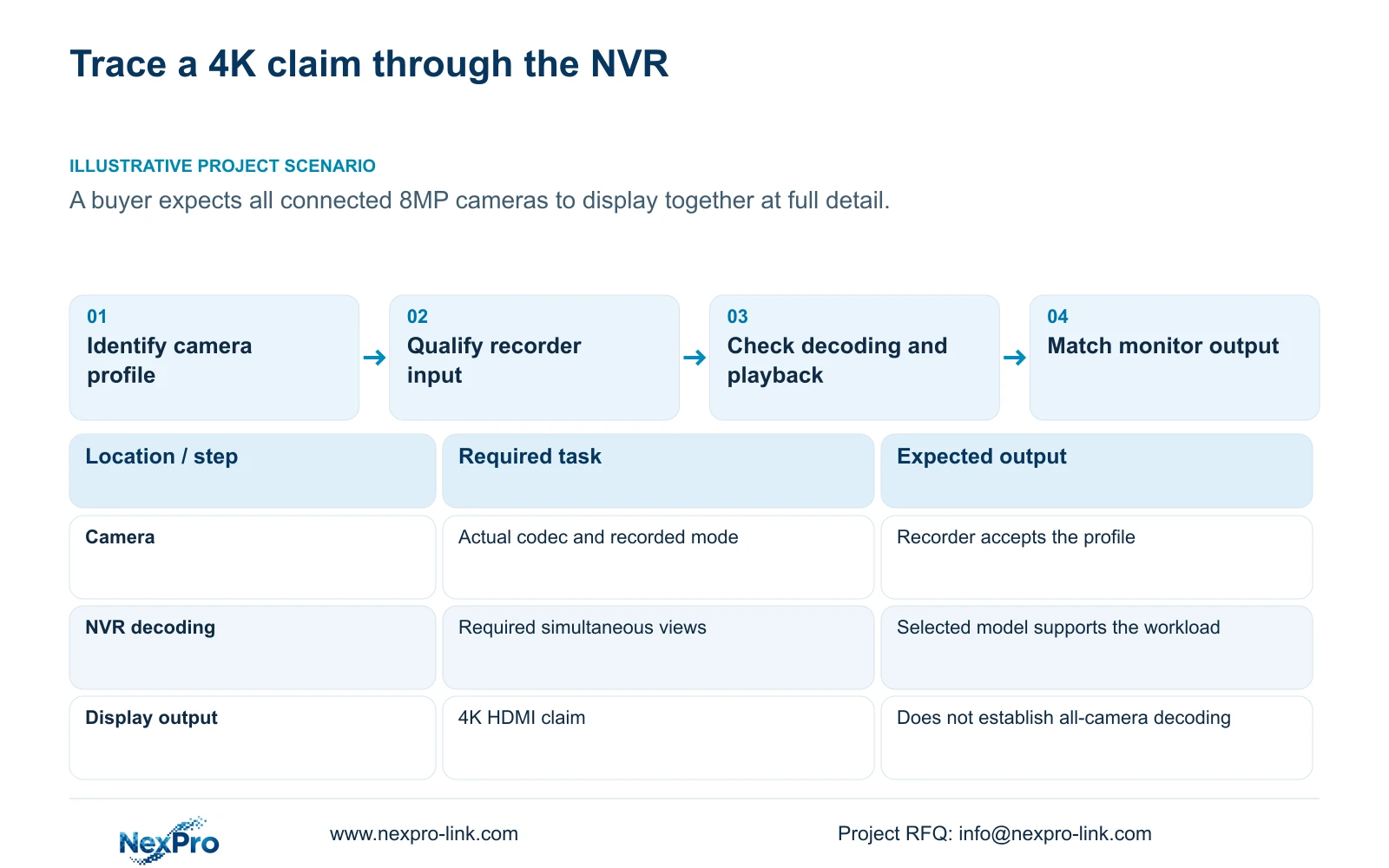
A 4K HDMI output specification describes the recorder's monitor-facing output, not the recording mode or simultaneous decoding capacity of every camera. Before accepting a 4K-labeled offer, separate camera capture and encoding, recorder input, live decoding, playback and monitor output into distinct requirements. A buyer expecting all connected 8MP cameras to appear together at full detail needs evidence for that exact viewing workload. The HDMI label alone cannot provide it. Confirm the actual camera modes and selected recorder limits, then test the required playback combination. Calculate retention from average bitrate and recording time, with usable capacity and reserve stated separately, rather than deriving disk demand from the pixel label.
Record where each claim appears: the camera profile, recorder input table, preview specification, playback table or output setting. If the offer states only '4K NVR', ask which of these functions it describes. This prevents a valid output capability from being accepted as evidence for an unqualified recording or review task.
Section 02
Confirm the camera's actual encoding profile
The manual lists H.264, H.265 and H.265+ options, while available resolutions depend on the connected IPC's capability. Identify the selected camera model and the mode it actually supplies. Record resolution, frame rate and average video bitrate, then confirm that the recorder accepts that combination.
If a codec change is proposed, preserve a comparable sample before changing the profile. Test newly recorded footage, export and the intended receiving client before making the profile the project baseline. A smart-codec name does not establish a fixed storage saving, and a visible menu option does not prove every connected camera supports it. Where third-party equipment is involved, match the actual supported functions rather than assuming universal interoperability.
Section 03
Write the simultaneous viewing workload
Camera enrollment and total incoming bandwidth describe different constraints from preview decoding. List the views that must appear together and the stream mode assigned to each window. Include any single-view inspection task separately. The recorder must support the intended live workload as well as the recording input.
Monitor output is another line. The manual states that VGA and HDMI can output simultaneously, but does not establish independently managed canvases. Changing the output resolution does not establish additional source pixels or prove that every window uses its camera's full recorded mode. If simultaneous full-detail viewing is required, qualify it on the actual model and firmware rather than substituting a screen-resolution claim.
Section 04
Choose a supported playback combination
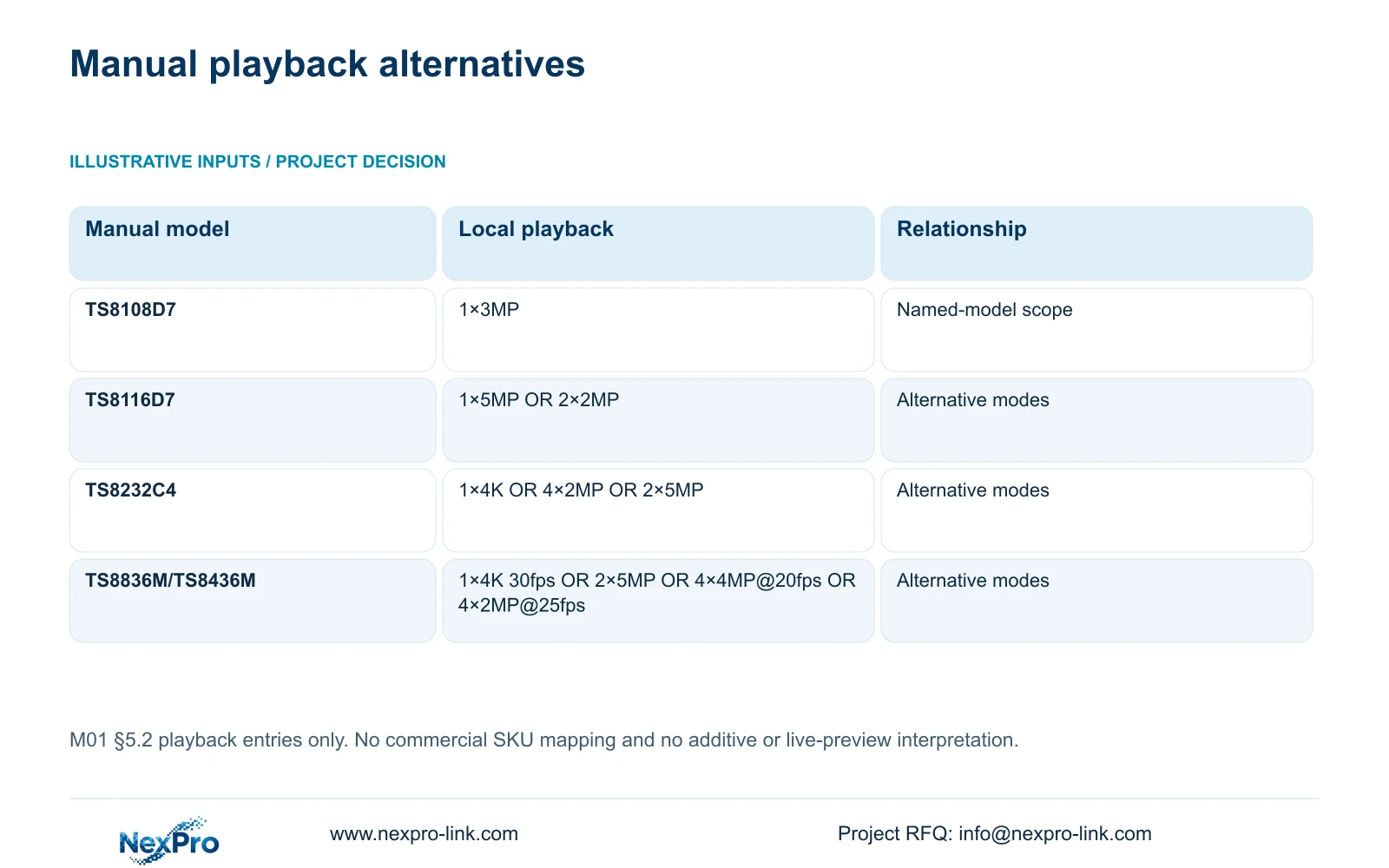
Section 5.2 lists TS8116D7 local playback as 1×5MP OR 2×2MP and TS8232C4 as 1×4K OR 4×2MP OR 2×5MP. TS8108D7 is listed with 1×3MP. These entries describe the named manual models, with no established mapping to NexPro-Link commercial SKUs.
For TS8836M/TS8436M, the listed alternatives are 1×4K 30fps OR 2×5MP OR 4×4MP@20fps OR 4×2MP@25fps. Preserve both the OR relationship and the stated rates. Adding the alternatives together would create an unsupported capacity claim. If one high-resolution stream plays but the required group does not, compare that group with the actual model's supported combination before diagnosing a recording failure.
Section 05
Calculate storage from bitrate and recorded hours
Collect each camera group's channel count, average video bitrate in Mbps, recorded hours per day and retention days. In decimal units, video TB = 0.00045 × Σ(channels × Mbps × hours/day × days). The coefficient follows from 1,000,000 bits/second × 3,600 seconds/hour ÷ 8 bits/byte ÷ 1,000,000,000,000 bytes/TB = 0.00045 TB per Mbps-hour.
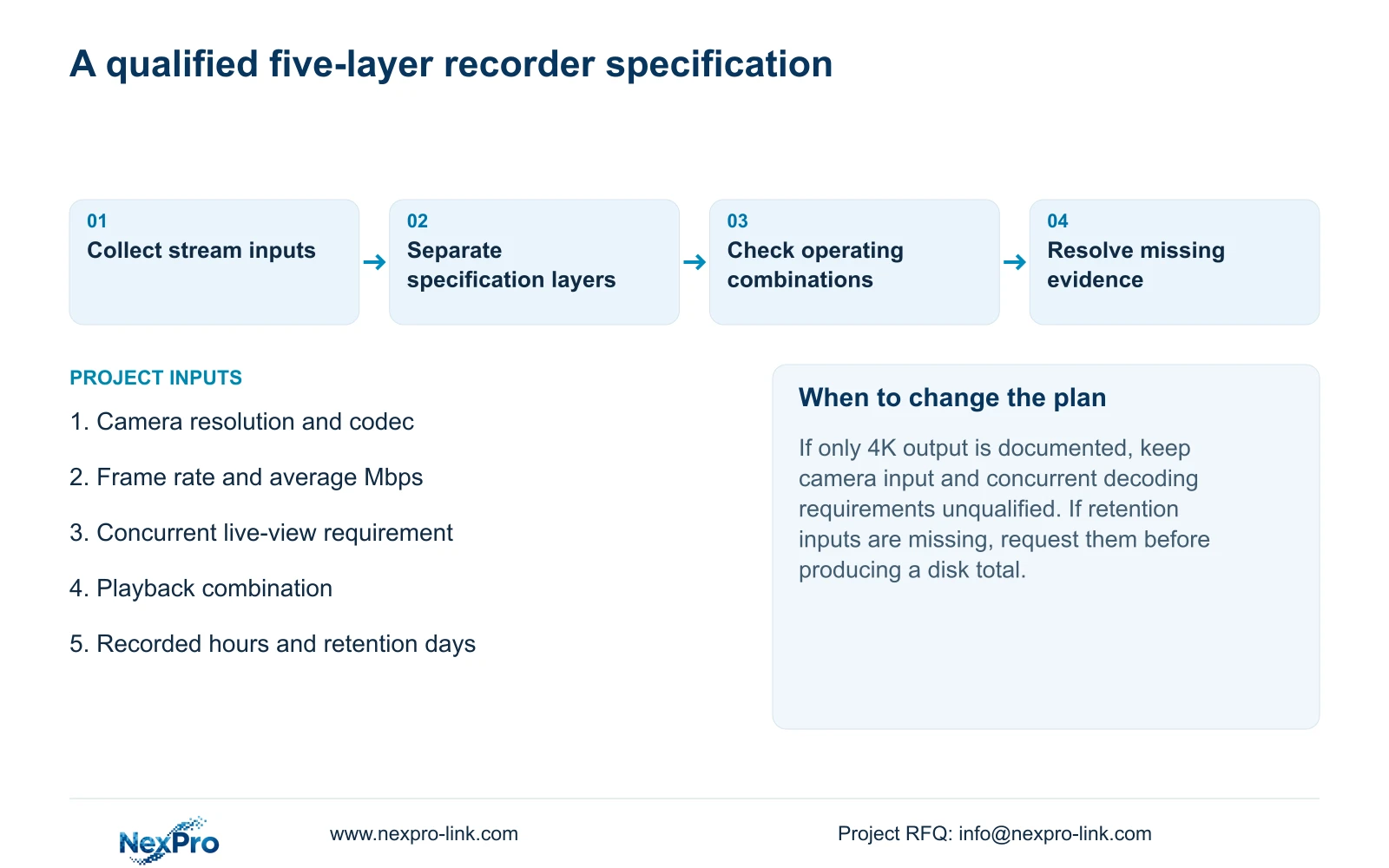
If a fraction r of usable capacity must remain reserved, first add the planned video volume, any audio volume and storage overhead. Required usable TB = that total ÷ (1 − r). Adding r to the volume is a different calculation. This scenario supplies no channel count, bitrate, daily hours or retention period, so a completed disk total would be invented.
Use measured or explicitly assumed average bitrate for planning, then verify the selected disk configuration's usable capacity and supported drive limits. More nominal capacity does not by itself prove sufficient recording throughput. Playback and export also belong in the agreed operating workload when evaluating the recording path.
Section 06
Turn the offer into a five-layer comparison
For each layer, place the project requirement beside the candidate's documented value and identify any unresolved difference. Keep retention and usable storage as an accompanying calculation rather than hiding them inside a 4K label. Compare only candidates qualified against the same task.
For a commercial example, the supplied public fields for NexPro-NVR4449-4K include 49 channels, 320Mbps incoming bandwidth and four SATA positions with a stated maximum of 18TB per disk. Those fields support specific input and disk checks. They do not demonstrate the buyer's simultaneous full-detail viewing task or establish RAID levels, redundancy or usable array capacity.
| Layer | Required evidence | Decision |
|---|---|---|
| Capture and encoding | Actual camera resolution, codec, frame rate and bitrate | Confirm the source profile |
| Recorder input | Accepted stream modes and total incoming bandwidth | Qualify the complete camera schedule |
| Live decoding | Required simultaneous windows and stream modes | Test the proposed viewing workload |
| Playback | Supported combination for the selected model | Preserve alternative modes as OR |
| Monitor output | Supported output mode and connected display | Keep this separate from recording detail |
Section 07
Resolve the full-detail viewing assumption
Illustrative project scenario: A buyer assumes that a recorder with 4K HDMI can simultaneously display all connected 8MP cameras at full detail. The engineer requests the camera profiles and concurrent viewing requirement, then checks input, preview and playback independently. A passing output check leaves those other requirements open until their own evidence is supplied.
The private NVR4.0 user manual CH_V2.4.doc identifies V2.2 in its body. Sections 1.2, 4.8, 4.12.1, 4.4.5, 4.12.7, 5.1 and 5.2 support this guide. Section references take priority over page numbers. The decimal storage formula is an engineering calculation, not a measured camera result.
Section 08
Does H.265+ guarantee a fixed retention increase?
No fixed saving is established here. Confirm device support and use a representative average bitrate, then verify recording, export and client playback.
Section 09
Can the HDMI resolution determine disk size?
No. Disk planning needs camera groups, average bitrate, recorded hours and retention days, followed by audio, overhead and reserve. HDMI output is a display specification.
Section 10
Provide the camera and review workload
Send the camera encoding schedule and required simultaneous live and playback modes to info@nexpro-link.com so NexPro-Link can compare the relevant recorder specifications.
Engineering references
These sources support the general planning principles. Always use the selected product's current datasheet and applicable project standards for final design.


