

Record the old and new aisle-camera identities and the replacement boundary, update only the affected connection, and verify historical retrieval alongside new recording.
Section 01
Preserve the boundary between old and new footage
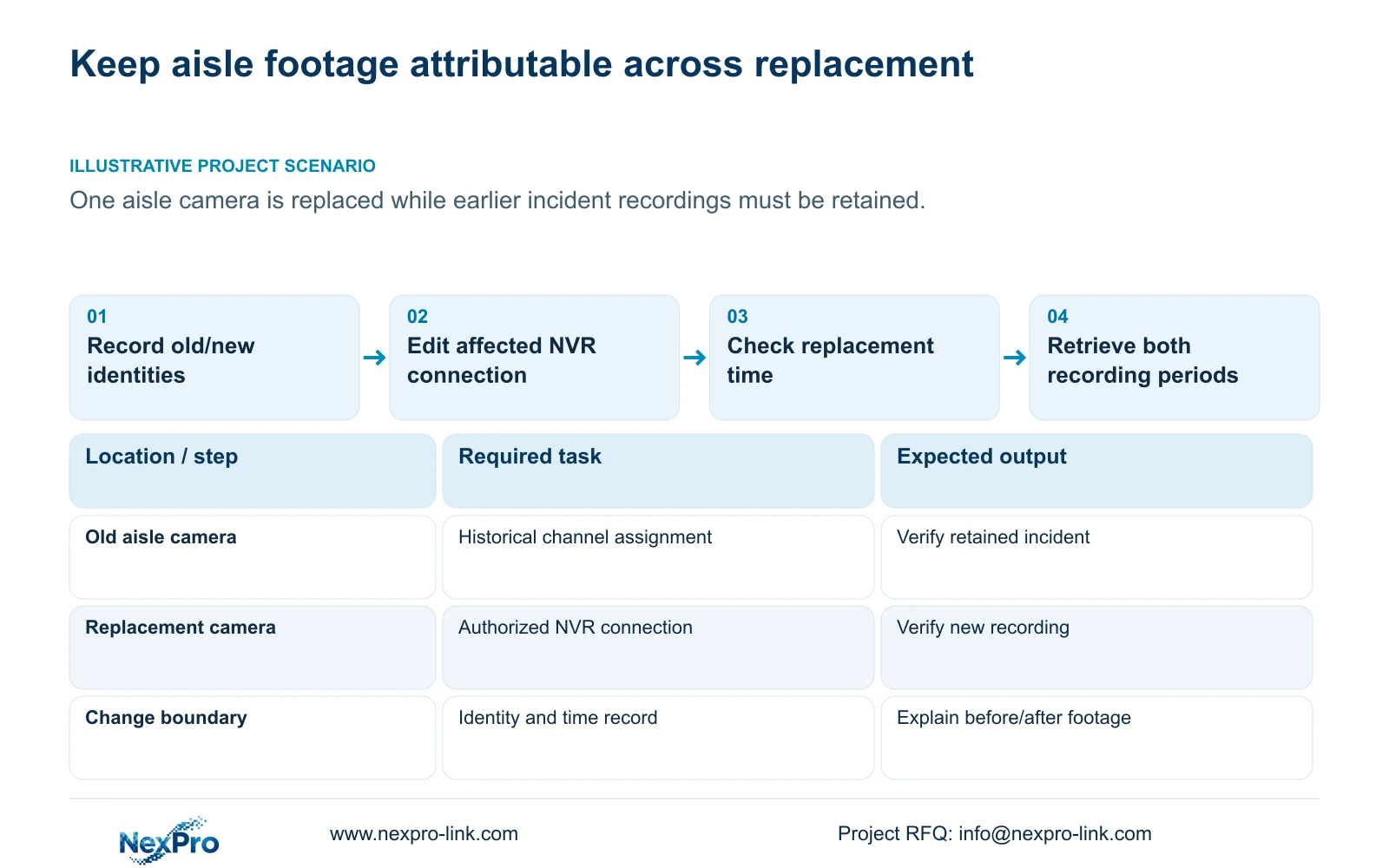
Replace a warehouse aisle camera with a dated change record that connects the old equipment, new equipment and retained recorder channel. Preserve required earlier incidents, update the affected connection and check the replacement camera's time before accepting new recording. Search footage on both sides of the change, then verify that selected older footage can still be exported and that new footage can be retrieved. Keeping the same channel number does not make both cameras the same physical device, and a new displayed name does not prove historical files were relabelled. The acceptance result should identify what was retained, what changed and which recording tasks passed.
Section 02
Record equipment identity and the change time
Collect the recorder's product model, hardware version, software version and software date from System Information as described in section 4.12.19. These details identify the instructions applicable to the installed unit. A version label alone does not explain a connection or recording problem.
In the controlled maintenance record, identify the old aisle camera and its replacement. Record the affected channel, last checked old footage and first checked new footage around the replacement. Note any observed interruption separately from the planned change time. Keep serial details in the private service record, and exclude credentials, cloud identifiers and recognizable customer footage from public support material. Preserve an existing identity entry instead of overwriting it with the replacement's details.
Section 03
Keep the aisle location stable while identity changes
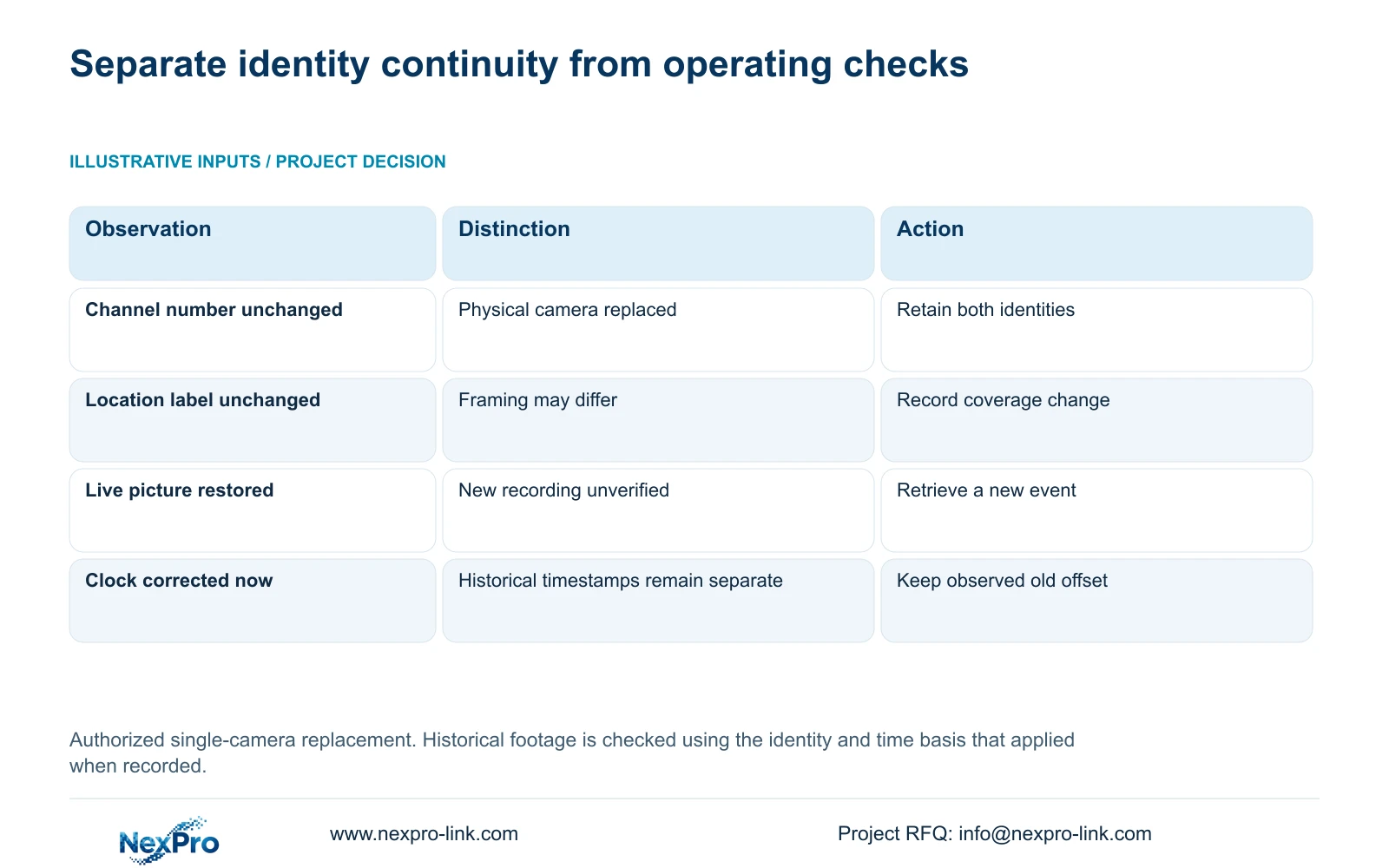
Use separate fields for drawing location, physical camera identity, IP address, NVR channel and OSD name. The manual supplies channel-name and OSD controls in sections 4.3.1, 4.4.4 and 4.12.6; the project must maintain their relationship to installed equipment. A location label can remain useful through a replacement, provided the equipment history records the change.
Check that the new live view belongs to the intended aisle and that earlier recorded scenes match the previous assignment. If the replacement uses another channel, preserve both channel references and the applicable time boundary. If the view is also reframed, record that difference because older and newer footage may show different coverage even though the warehouse location name remains unchanged.
| Observation | Meaning | Next action |
|---|---|---|
| Same channel, different physical camera | A new equipment identity starts at the change boundary | Retain old and new identity entries with their applicable periods |
| Same aisle name, changed framing | The location is stable but coverage differs | Record the view change alongside the replacement |
| New live video works, new playback is absent | Recording acceptance remains incomplete | Check the intended recording task and search period |
| Old incident is not found on the new assignment | Historical channel or time mapping needs checking | Search the recorded assignment that applied before replacement |
Section 04
Update only the affected camera connection
Confirm the replacement camera's authorized current address, selected protocol and account information before editing its NVR connection. Section 4.3.1 describes the edit-device workflow, including protocol, username and password fields. Keep actual credential values in the approved private process.
Update the affected channel and test its live picture. A whole-recorder reset is inappropriate as a routine response to one changed camera. If connection still fails, record the specific model, protocol and observed status for support instead of changing unrelated channels. ONVIF profile information can help frame a compatibility enquiry, but an ONVIF label does not establish every function for the selected devices.
If changing an actual device IP address is necessary, obtain authority, preserve the relevant connection record and required incident footage, and arrange the affected interruption before applying the change. Editing the recorder's connection reference and changing the camera's network configuration are separate actions.
Section 05
Check that the replacement has not introduced a time offset
Compare the replacement's displayed time and newly recorded footage with the recorder's intended time basis. Sections 4.4.2 and 4.12.2 provide IPC time controls and separate NVR settings, including an IPC synchronization interval in hours. Document the authority and direction before enabling several synchronization mechanisms.
Preserve any observed difference between old and new footage. Check time-zone and daylight-saving choices before relying on network synchronization. Test a recognizable new event and retrieve it by the expected time. If the current clock needs correction, record that action and verify retrieval afterwards. Do not assume that the correction rewrites previously recorded timestamps or removes uncertainty from the historical sequence.
Section 06
Search before and after replacement as separate checks
Choose an older incident that must remain available and a new reference event recorded after replacement. Search each using its applicable channel assignment and time relationship. This separates a historical retrieval problem from a failure to produce new footage.
Use time positioning and timeline zoom from section 4.11.3 to inspect the replacement boundary. Thirty-second jumps help broad navigation, but a twenty-second teaching event can fall between them. Review the finer interval continuously before declaring footage absent. If older material is found under the previous mapping, retain that retrieval instruction. If new material is missing despite a working live picture, leave the recording check open and investigate the intended task without claiming that online status proves storage.
Section 07
Verify the retained incident and the new recording task
Export the older incident that requires preservation and test its playback on the intended receiving system. Keep the source footage protected until the required copy has been verified. Select channel, recording type and explicit boundaries in the recorder backup workflow; a configuration file or a Seetong PC local recording is not a substitute for that incident export.
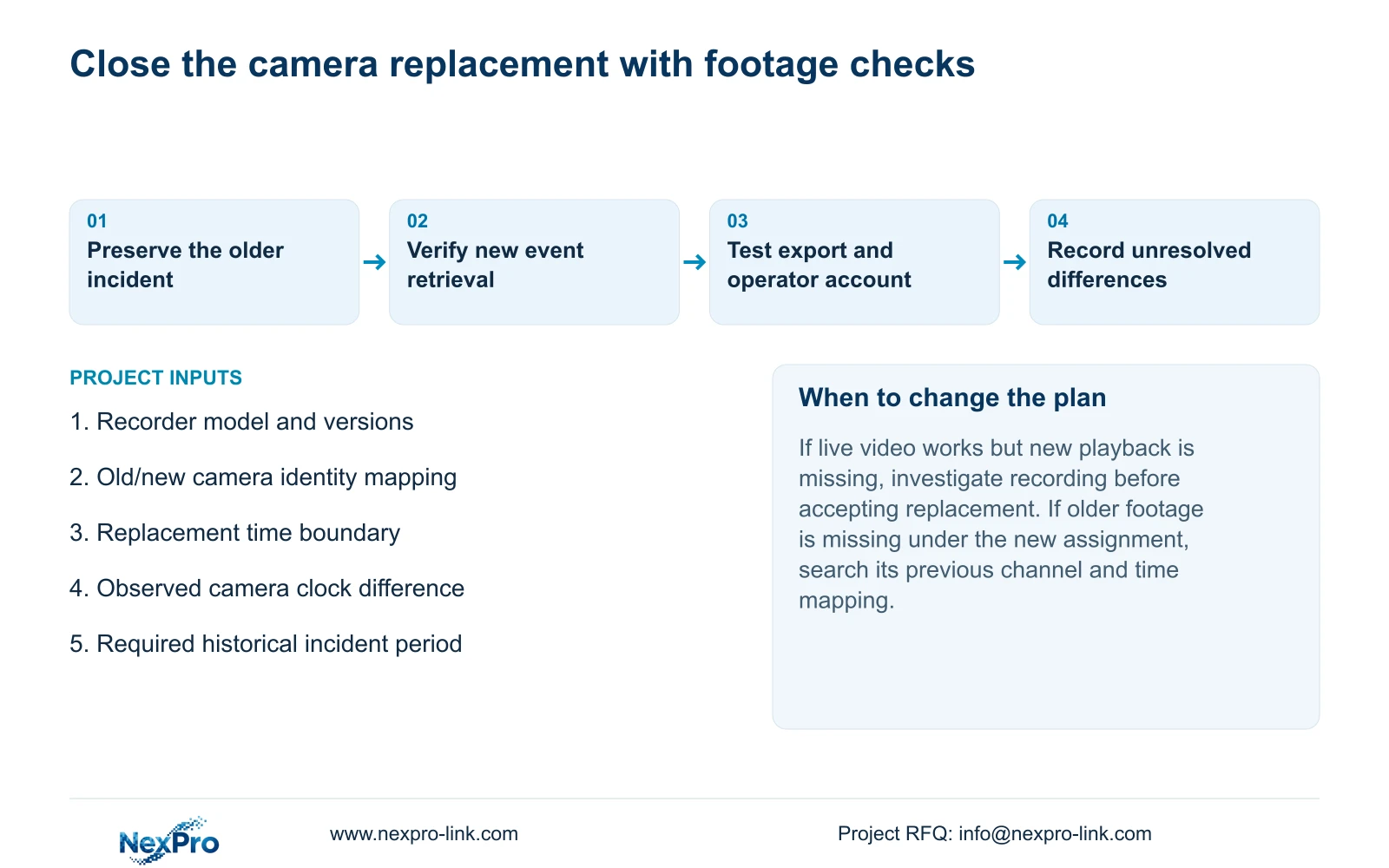
Complete the replacement check with the correct live view, current time, retrievable new footage, a relevant historical sample, export and the intended operator account. Test required events where they form part of the camera's accepted task. Record failures individually and keep the changed variables visible. If support is needed, use the recorded identities and failed operation to define the next supported action; do not assume automatic rollback exists.
For a supply enquiry, distinguish replacement equipment from configuration assistance and historical-footage preservation. NexPro-Link's BOQ and tender support can discuss those boundaries without implying that ordinary hardware supply includes data recovery.
Section 08
Apply the replacement record to an aisle camera
Illustrative project scenario: A warehouse replaces one aisle camera while earlier incident recordings still need to be retained. The maintenance record preserves the previous identity, identifies the replacement and verifies retrieval on both sides of the change.
The private supplied NVR4.0 user manual CH_V2.4.doc has V2.2 in its body. Relevant sections are 4.12.19, 4.3.1, 4.4.4, 4.12.6, 4.4.2, 4.12.2, 4.11 and 4.12.17 through 4.12.20. Apply the actual model and firmware scope; section references take priority over page numbers.
Section 09
Does keeping the channel name preserve camera identity?
No. The name identifies an operating location or label. Record the old and new physical devices separately, with the replacement boundary.
Section 10
Is a restored live picture enough to accept replacement?
No. Retrieve newly produced footage, check historical retrieval and test the relevant export and account tasks before closing the change.
Section 11
Prepare the replacement boundary record
Send the old/new camera mapping and the failed before-or-after retrieval check to info@nexpro-link.com for a focused replacement-support enquiry.
Engineering references
These sources support the general planning principles. Always use the selected product's current datasheet and applicable project standards for final design.


