Pallet manufacturing CCTV needs useful moving detail and a search path that dispatch staff understand. The worked exposure example connects framing, lighting and route-based retrieval without claiming inspection capability.
Section 01
Frame the transfer event before selecting frame rate
Pallet manufacturing CCTV should frame the transfer point, control exposure for the required moving detail and retain a common time reference. Increasing frame rate alone does not guarantee sharper recorded edges. Define whether the buyer needs the handling sequence, visible contact between objects or a close detail at release; those tasks can require different views and lighting.
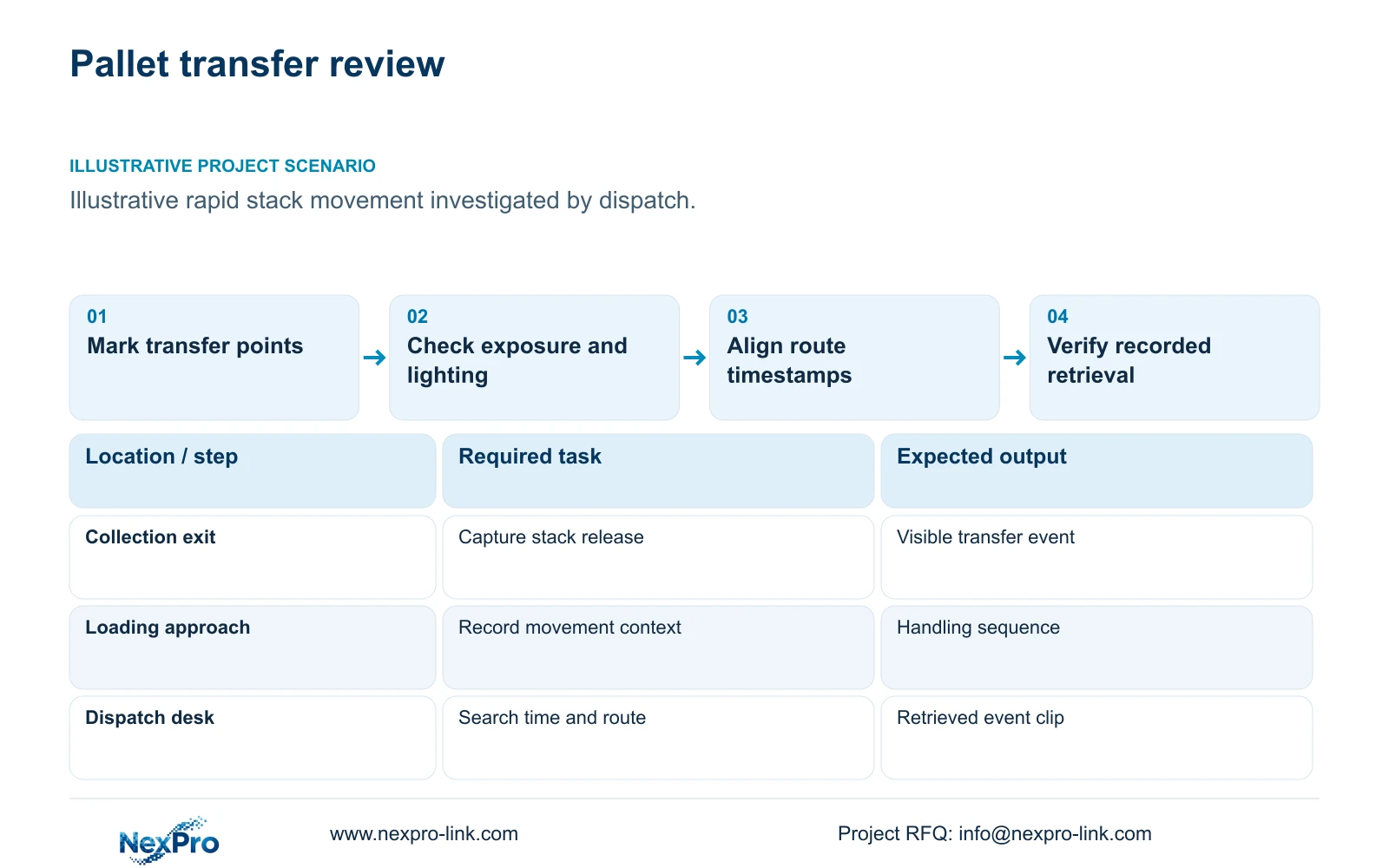
Illustrative project scenario: The dispatch team needs to resolve a handling event around rapidly moved pallet stacks. Assume, for planning, that stacks pass a collection point and then a loading position, with forklifts and staged pallets occasionally blocking the view. The useful scope follows those transfers and the dispatch record used to locate them, rather than attempting to inspect every pallet in the factory.
Mark maximum stack height, travel direction and likely fork or vehicle obstruction. Choose a viewpoint where the relevant event stays visible during normal movement. If an overview explains sequence but cannot show contact detail, retain it for context and specify a separate transfer view. Keep mounts and maintenance access away from unsuitable dust-process locations.
Section 02
Treat exposure, lighting and frame rate as separate controls
Exposure time determines how far a moving target travels during each captured image. Frame rate determines how often images are captured. A sequence can contain many blurred frames when exposure is too long for the task. Conversely, sharp individual frames do not automatically provide enough temporal samples to reconstruct a brief event.
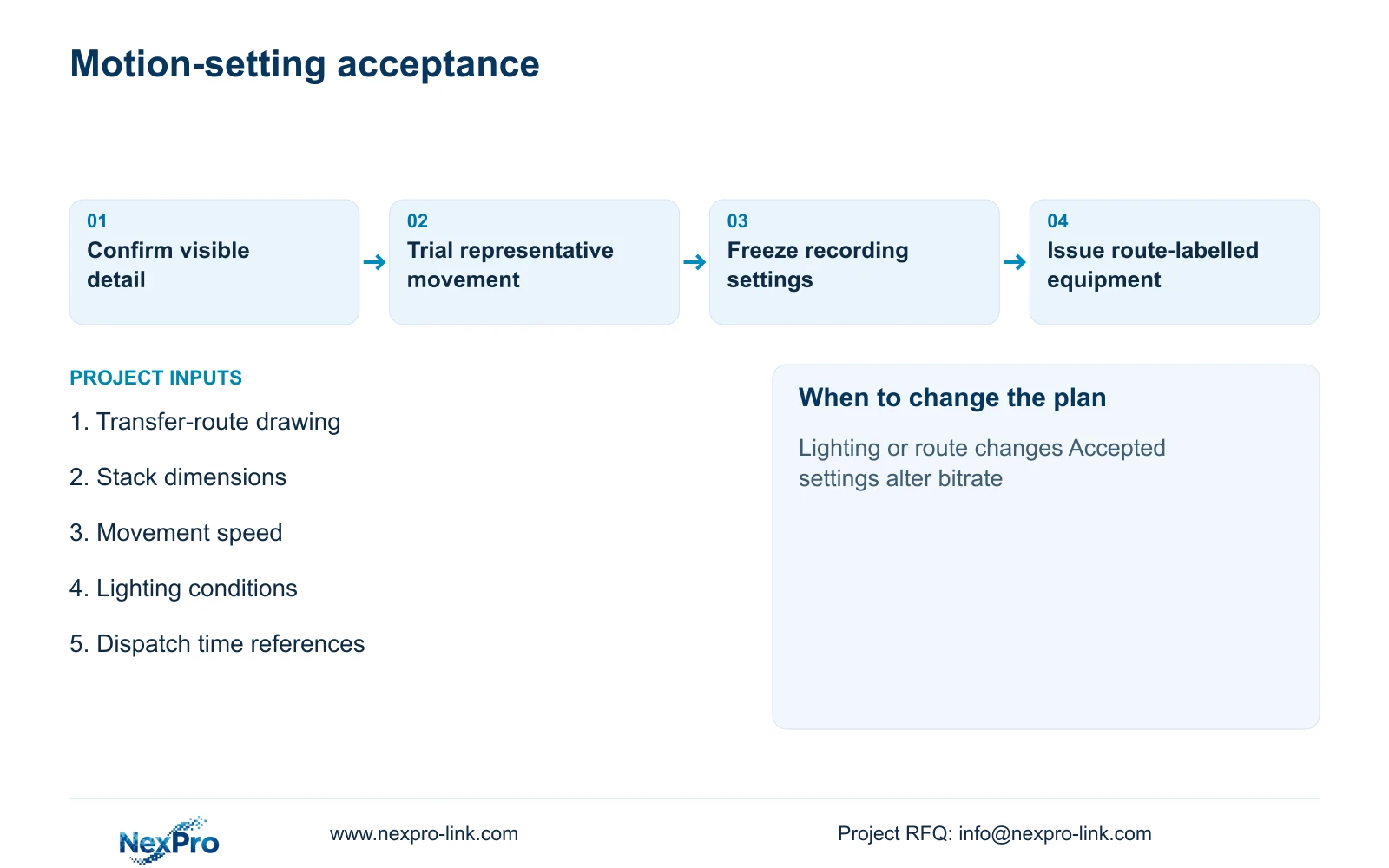
Specify an acceptance trial using representative pallet movement and the intended recording settings. Check day and relevant night conditions, the lighting angle and recorded playback. A shorter exposure reduces the available light per image, so assess whether useful detail survives without unacceptable gain or processing effects. Do not choose a shutter value solely from arithmetic and assume the site image will match.
The NexPro-BL2812M55-5MP-DIC-AI offers an ordinary-area reference with a listed 25fps field, 2880x1620 output and 2.8–12mm motorized lens. Those specifications do not prove a particular moving-detail result or establish that every desired exposure setting is available in the delivered firmware. Confirm the controls and recorded result on the proposed camera configuration before batch release.
Section 03
Name cameras after the route used by dispatch staff
Use location names that match material records, such as collection exit and loading approach, rather than leaving only numerical channel labels. Pair those names with stable asset IDs. Dispatch staff should be able to start with a time and loading reference, select the relevant views and follow the stack through its route without knowing the installer's wiring sequence.
Configure an agreed time basis across cameras, recorder and the records used for search. Check it again after restart and during handover. Where a loading record gives only an approximate time, define a sensible review window around it. Common timestamps support correlation; they do not establish automatic integration with dispatch software.
Assign responsibilities for maintaining the map when routes change. Operations owns the route names, the installer maintains the channel-location record, and the authorized reviewer follows the export procedure. Include a trial in which someone unfamiliar with installation retrieves a specified transfer. Record any confusing names or missing views before the project accepts the workflow.
Section 04
Calculate movement during one exposure
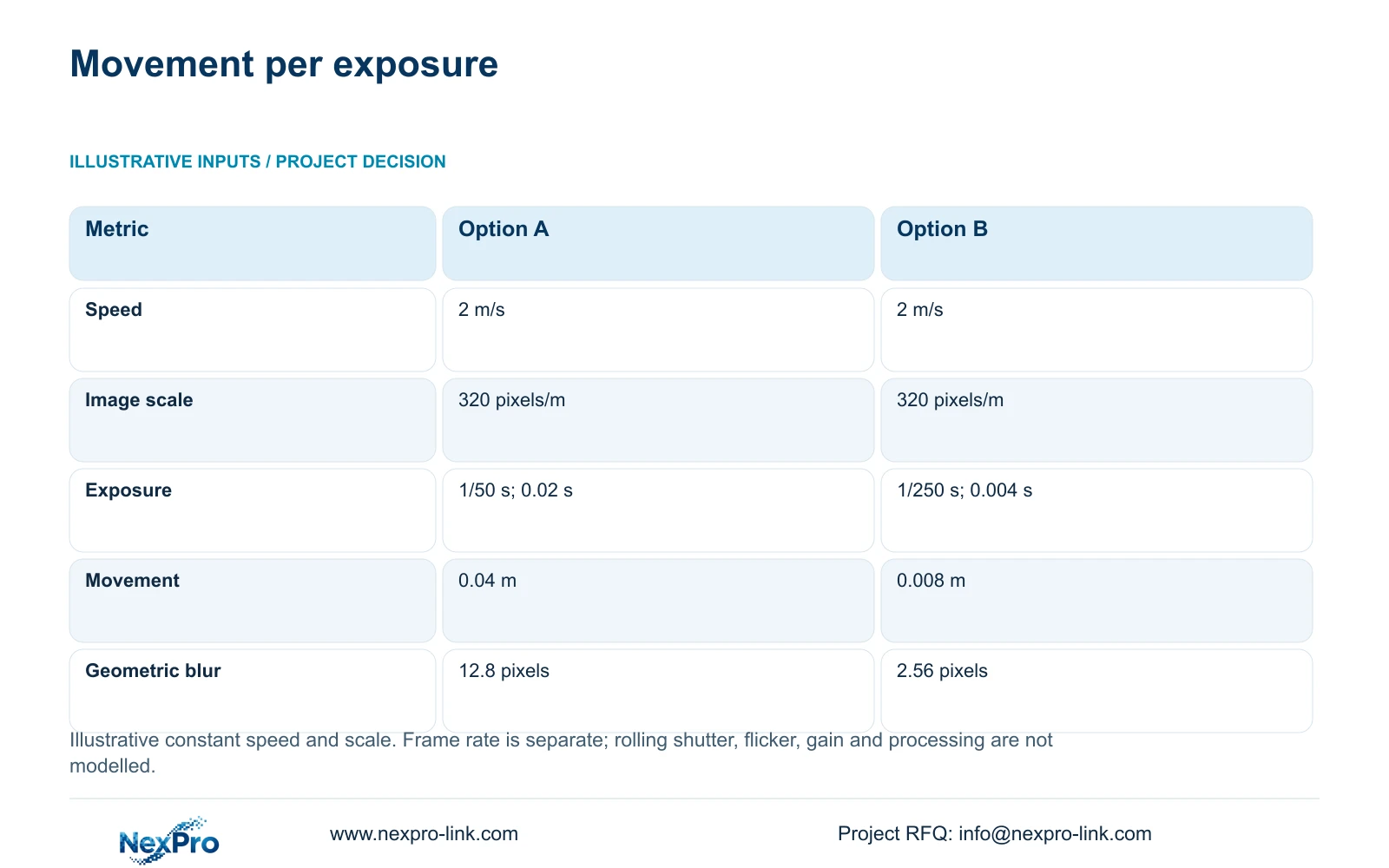
The illustrative motion example assumes target speed of 2 m/s and image scale of 320 pixels/m. Movement_m = speed_m_s × exposure_s; estimated_blur_px = movement_m × pixels_per_m. At 1/50 s, or 0.02 s, movement is 2 × 0.02 = 0.04 m, corresponding to 12.8 pixels. At 1/250 s, or 0.004 s, movement is 0.008 m, corresponding to 2.56 pixels.
The decisive change is exposure time under the same assumed speed and image scale. The geometric estimate falls from 12.8 to 2.56 pixels without changing frame rate. This explains why the engineer should investigate exposure and illumination when moving detail is unclear, rather than immediately purchasing more recording frames.
This simple estimate does not model rolling shutter, flicker, gain, processing or changes in image scale along the route. It is not an image-sensor test, inspection rating or proof of an acceptable damage detail. Use it to set up the trial, then accept or reject the recorded transfer image against the owner's actual task.
| Metric | Option A | Option B |
|---|---|---|
| Target speed | 2 m/s | 2 m/s |
| Image scale | 320 pixels/m | 320 pixels/m |
| Exposure | 1/50 s = 0.02 s | 1/250 s = 0.004 s |
| Movement during exposure | 0.04 m | 0.008 m |
| Geometric blur estimate | 12.8 pixels | 2.56 pixels |
Section 05
Recheck recording resources after the image trial
Recommend task-specific transfer framing, accepted exposure and lighting, plus an overview where sequence context is required. Change the selection if the relevant edge stays hidden, the actual speed differs materially or the lighting cannot support the chosen exposure. Where the objective becomes automated quality inspection or safety control, define a separate specialist system instead of expanding an ordinary security claim.
CASE01 provides an illustrative infrastructure reference of 32 cameras at an assumed average 4 Mbps. Video_TB = cameras × average_Mbps × 10^6 × 86400 × days / 8 / 10^12 gives 41.472 TB for 30 days. Its four 16 TB disks yield a 48.64 TB video budget after 95% formatting and 20% reserve. Actual accepted motion settings may produce a different bitrate and require recalculation.
The NexPro-NVR4449-4K lists 320 Mbps input and four SATA bays, up to 18 TB per drive. Match stream modes and playback separately; channel count does not establish simultaneous decode or RAID. Confirm PoE demand from actual equipment, including illumination where applicable. Protect the real camera-power and recording nodes if continuity is required, and keep operator displays as a separate client branch.
Section 06
Supply the accepted settings with a serviceable location plan
The supply schedule should identify each transfer task, model and firmware, accepted framing, recording settings and channel name. Include mounts, local switch allocation and actual continuous cable routes. Check dust-area information and cleaning access before ordinary cameras are assigned near production equipment. Obtain specialist requirements from the responsible team where the actual location demands them.
Separate factory preparation from site adjustment. NexPro-Link can discuss model matching, technical documents and project-labelled packing through its BOQ and project-supply scope. The installer confirms final framing and lighting against representative movements. A saved factory configuration is a starting point; it cannot account for every on-site obstruction or lighting change.
Compare other proposals using the same movement, target detail, lighting and retrieval trial. Preserve required software interfaces and installation services. Record any changed camera or illumination choice together with its network, storage and power consequences. This makes the cost comparison traceable without inventing a product performance result or a saving.
Section 07
Buyer questions
Should 1/250 second be specified for every pallet camera? No. It is one illustrative comparison value. Confirm available camera controls, actual motion, scene scale and light, then select settings that pass the required recorded-image trial.
Can a dispatch reference be searched automatically? Only if the exact integration is specified and verified. A manual workflow using route names and common timestamps is a valid starting point; do not imply transaction search from ordinary video connectivity.
What should trigger a repeat acceptance trial? Repeat the affected checks after route, lighting, stack geometry, firmware or recording-setting changes. Preserve the previous accepted configuration so the team can identify what changed.
Section 08
Specify useful pallet-transfer footage
Send the transfer-route drawing, representative movement speed and stack dimensions, lighting conditions, and dispatch search references to info@nexpro-link.com to discuss camera framing, recording settings and retrieval scope.
Engineering references
These sources support the general planning principles. Always use the selected product's current datasheet and applicable project standards for final design.