


A 20TB video requirement needs 25TB of usable capacity when recording may occupy only 80%. Adding 20% produces 24TB and does not meet that condition.
Section 01
Define what the reserve percentage applies to
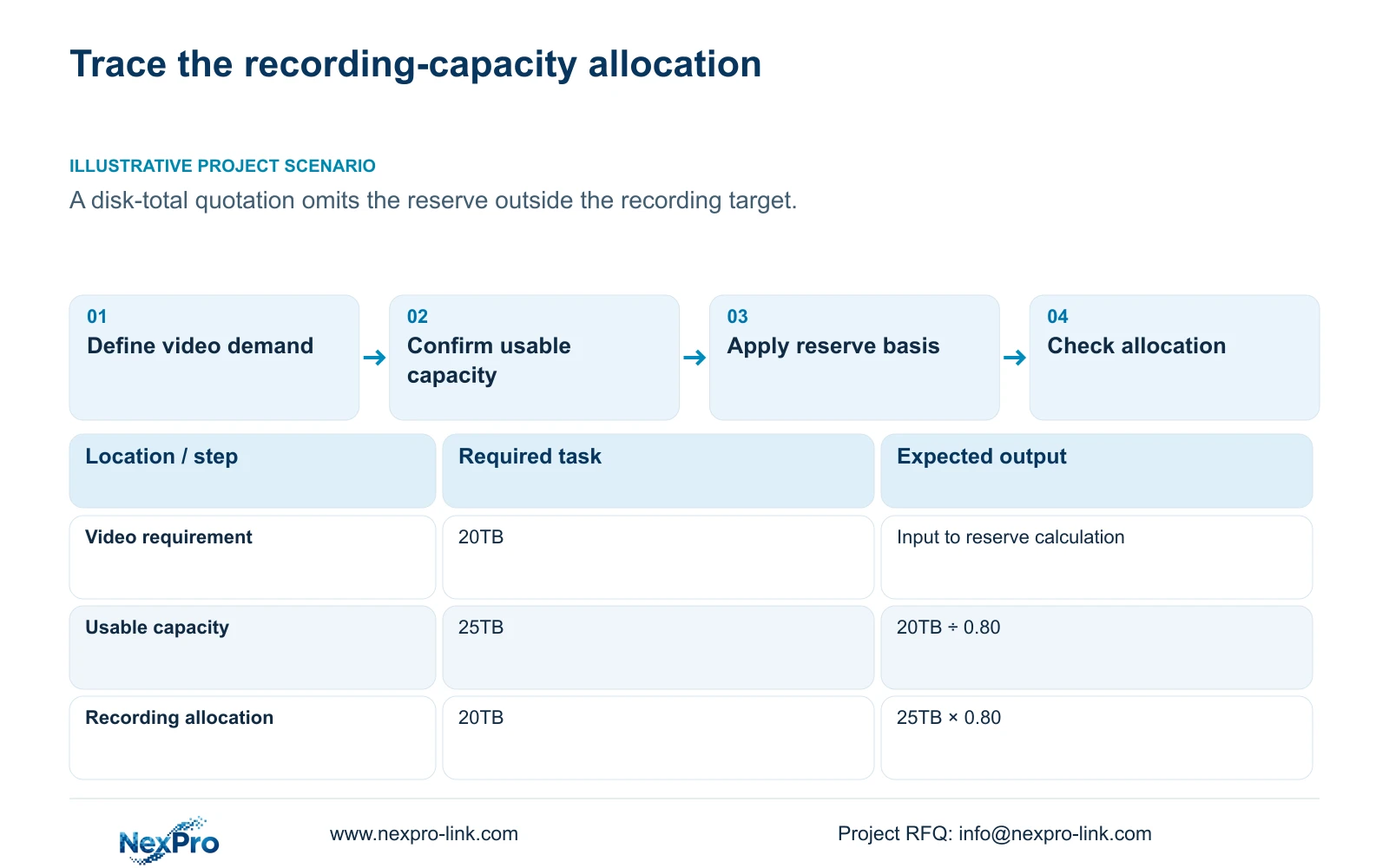
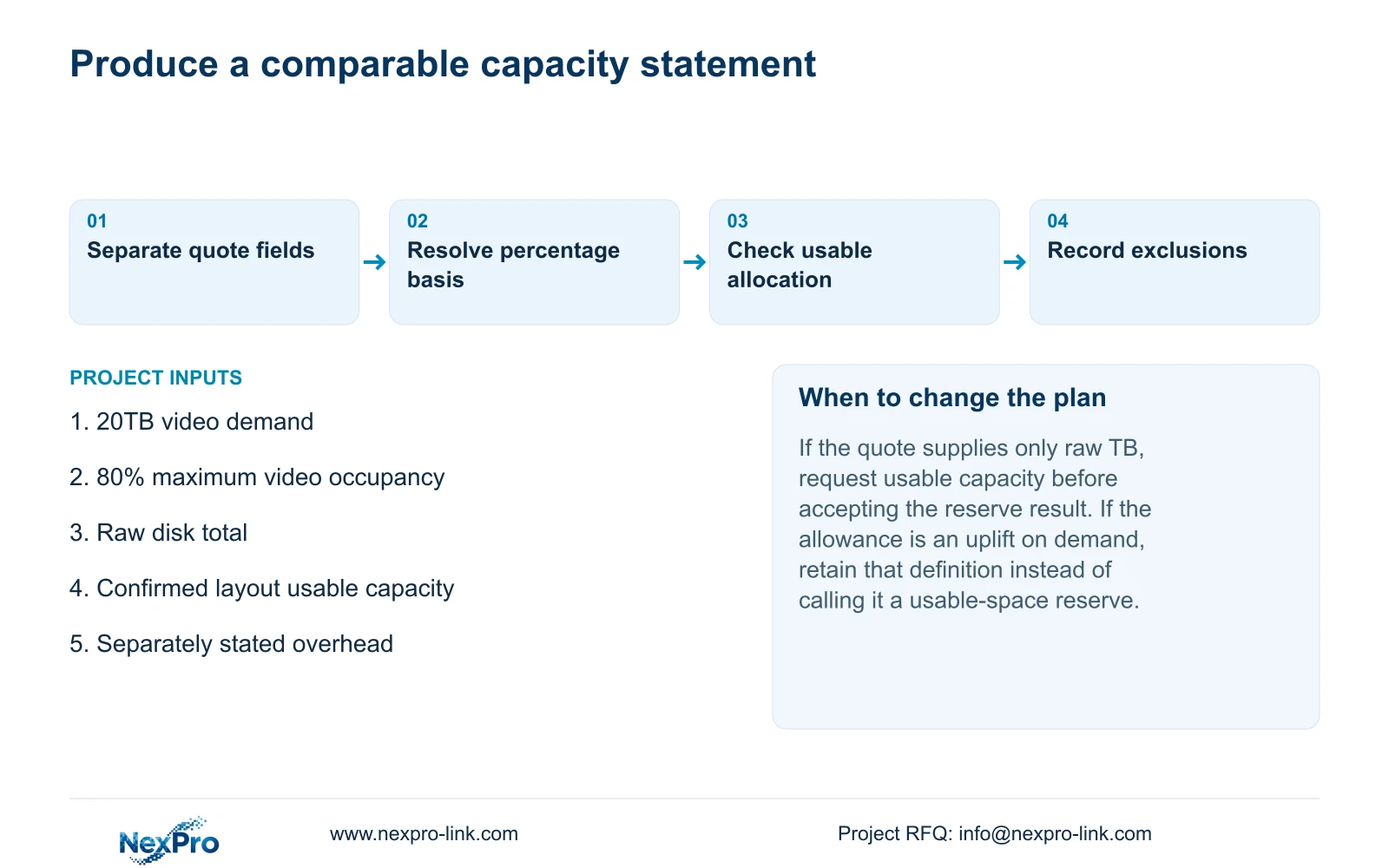
A recording requirement of 20TB needs 25TB of usable capacity when the project limits video to 80% of that capacity. The calculation is 20TB ÷ 0.8 = 25TB. Simply adding 20% gives 20TB × 1.2 = 24TB, whose permitted video budget is only 19.2TB. Keep raw installed capacity, confirmed usable capacity and the recording allocation in separate fields. State each deduction and reserve once, with its purpose and calculation basis. These figures are an illustrative decimal-unit budget, not a disk configuration or retention guarantee. Physical media, storage layout, audio and other overhead still need their own project-specific treatment before a quotation can be accepted.
Section 02
Calculate the video requirement before choosing disks
Collect the channel groups, average recording bitrate in Mbps, hours recorded per day and required retention days. When groups differ, calculate each group and add their volumes. Preserve the distinction between an assumed bitrate used for planning and a representative measured average. Audio and other storage demand belong in separate entries.
For decimal units, video TB = 0.00045 × Σ(channels × average Mbps × hours/day × days). The coefficient converts megabits per second over recording hours into decimal terabytes. This calculates video volume; it does not establish what an installed disk arrangement makes available to the recorder.
The supplied reserve example starts with an already established 20TB video requirement. It does not supply camera counts or stream settings from which to recalculate that demand. Use the 20TB input as given when comparing reserve methods, then replace it with the project's own documented total during selection.
Section 03
Establish the capacity boundary in the quotation
Ask whether a quoted total means the sum of disk labels, capacity available under the confirmed storage layout, or the portion allocated to recordings after reserve. A supplier and buyer can use the same TB figure while describing different boundaries. Resolve the meaning before applying a percentage.
Section 4.12.21 of the manual describes attached-disk information, selected formatting, full-disk behavior and a startup prompt. The External Storage Devices heading does not establish NAS, NFS, iSCSI or RAID support. Multiple disks also do not establish a redundancy layout. Obtain the actual model's storage arrangement and applicable capacity information before treating a raw total as usable.
This article does not require formatting to establish a budget. If preparation is later required, it is a separate authorized data change: identify the target and preserve required accessible recordings before proceeding. A planning shortfall should not become an instruction to erase existing media.
Section 04
Keep low-bitrate examples out of an unsupported promise
Section 5.1.1 presents H.265+ low-bitrate equipment examples, including 5MP at 6 to 12G per channel per day and 2MP at 4 to 8G per channel per day. Preserve the source's G notation and equipment scope. These ranges do not establish a universal daily volume for cameras with the same megapixel label.
If a quotation uses those examples to reduce storage, ask for the actual stream profile and recording evidence supporting that choice. Frame rate, motion and scene conditions must remain visible in the comparison. A reserve cannot compensate for a demand estimate built on an unsupported low-bitrate assumption.
Where no representative measurement exists, retain a clearly stated planning input and mark the validation still needed. Do not silently substitute the smallest appendix value for an agreed project bitrate, or describe a planning estimate as a measured result.
Section 05
Compare an uplift with a usable-space reserve
The exact example inputs are 20TB of video demand and a requirement that video occupy no more than 80% of usable capacity. The reserve fraction is r = 0.20. Required usable capacity = demand ÷ (1 - r), so 20TB ÷ (1 - 0.20) = 20TB ÷ 0.80 = 25TB.
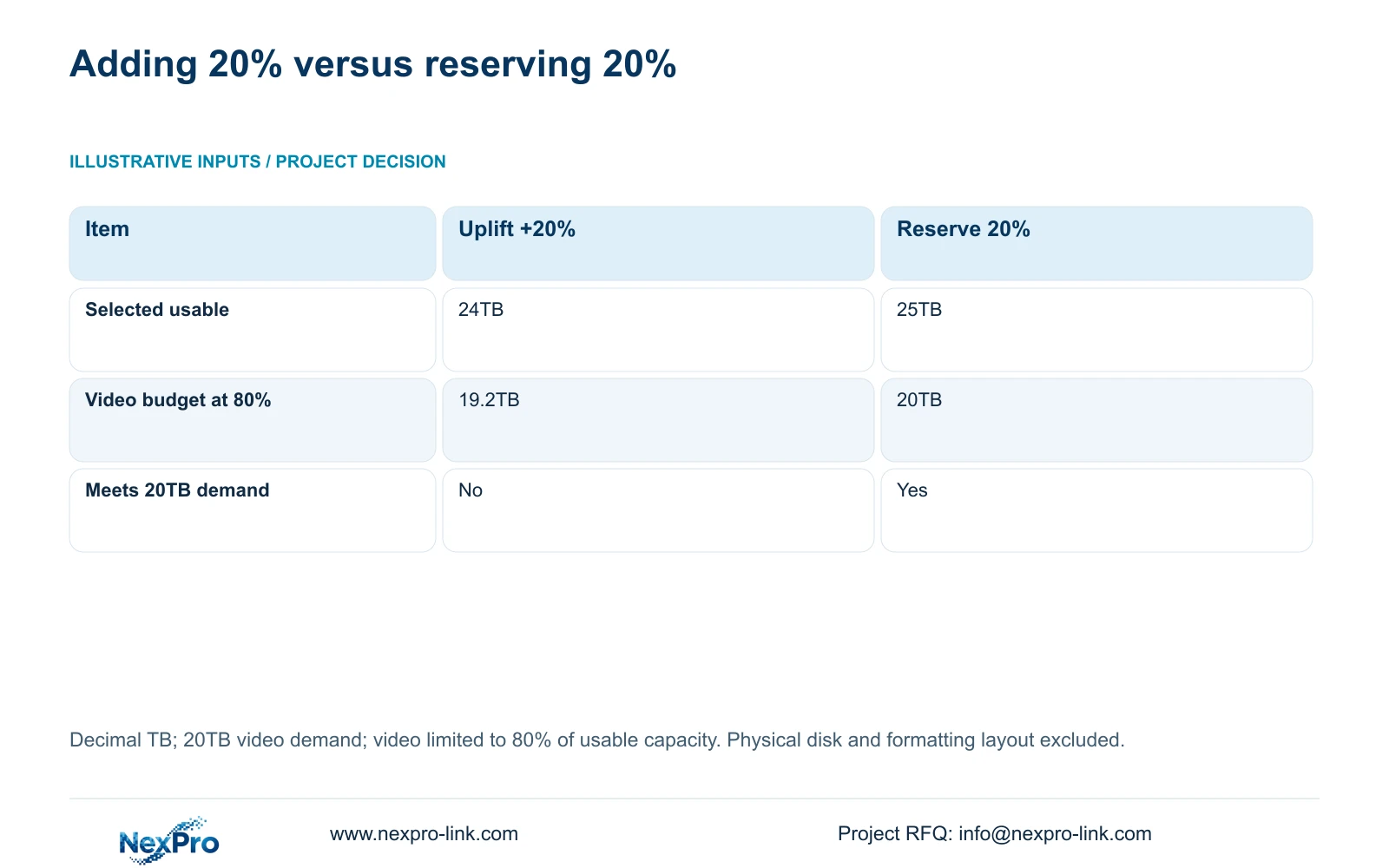
An uplift uses a different denominator: 20TB × (1 + 0.20) = 24TB. Applying the project's occupancy rule to that result gives 24TB × 0.80 = 19.2TB of video budget. The reserve-based option gives 25TB × 0.80 = 20TB. Therefore only the latter meets the supplied condition.
Use division when the requirement reserves a fraction of final usable capacity. Use an uplift only when the requirement explicitly defines an addition to demand. Keep both labels intact in a quotation comparison; changing the label without changing the formula hides the shortfall.
| Item | Demand uplift +20% | Usable-space reserve 20% |
|---|---|---|
| Selected usable capacity | 24TB | 25TB |
| Video budget at 80% | 19.2TB | 20TB |
| Meets 20TB video demand | No | Yes |
| Procurement action | Revise capacity or clarify the requirement | Check that the actual layout supplies 25TB usable |
Section 06
Document the allocation and full-disk consequence
A planning reserve is a budget condition. The supplied material does not establish a menu that automatically enforces the example's 80% allocation. Record how the project will assess the capacity requirement and check the actual retained period after operation. Avoid presenting the calculated reserve as a demonstrated firmware feature.
Separately agree overwrite or stop-recording behavior. Overwrite permits cyclic storage use, while stop-recording mode can halt new recording at full capacity. Neither proves the intended retention period or enforces a separately stated planning reserve. The owner's history requirement and incident-export process should determine the consequence.
If observed retained history is shorter than required, review the actual recording volume, available capacity and policy together. Keep the original assumptions for comparison. An apparently generous raw disk total does not explain the result unless its usable and allocated portions are known.
Section 07
Carry the same capacity basis into candidate selection
Check channels and stream modes, incoming bitrate, required playback combination, disk positions, per-disk limits, interfaces and remote tasks alongside usable storage. TS model information belongs to the manual's scope and has no established mapping to NexPro-Link commercial SKUs. Obtain separate candidate specifications.
Compare quotations against the same footage demand, reserve definition and service boundary. Label capacity deductions separately from allowances for future demand. If an allowance has already entered the demand total, do not apply it again without a distinct reason. Keep disks, accessories, software and site work explicit so a recorder-only price is not mistaken for the complete package.
Illustrative project scenario: A cost manager receives a quote that lists disk totals but does not state the space reserved outside the recording target. The next procurement action is to request raw, usable and recording-allocation fields, then apply the agreed reserve formula. No price saving follows from this example.
The private source is NVR4.0 user manual CH_V2.4.doc, whose body states V2.2. Sections 5.1, 5.1.1, 5.2 and 4.12.21 support the operating context. The reserve arithmetic and quotation method are engineering interpretation.
Section 08
Does a larger raw disk total settle the comparison?
No. Confirm the layout's usable capacity and the recording allocation. A raw total alone cannot demonstrate that the supplied 20TB demand fits within the required 80% occupancy limit.
Section 09
Clarify the quoted capacity basis
Send NexPro-Link the quote's raw and usable capacity fields with the required reserve definition at info@nexpro-link.com for a storage-scope comparison.
Engineering references
These sources support the general planning principles. Always use the selected product's current datasheet and applicable project standards for final design.


