

Read NVR traffic from the recorder's viewpoint, identify the active streams and compare receive and transmit values against the workflows that produce them.
Section 01
Read both directions from the recorder's viewpoint
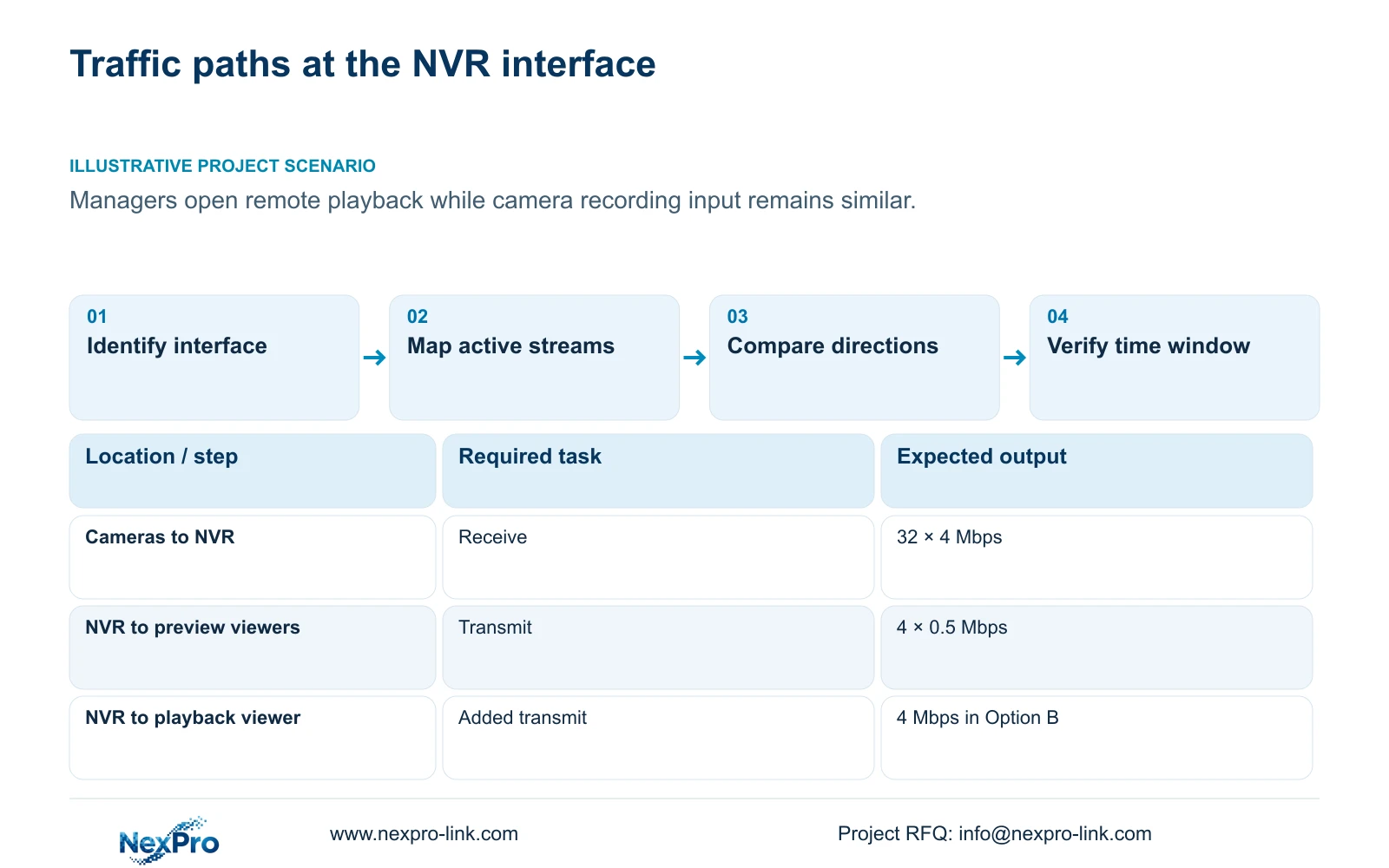
Outgoing NVR traffic does not need to equal incoming camera traffic. Cameras supply recording streams to the recorder, while live viewers, remote playback and downloads create separate outgoing work. When managers open playback, transmit traffic can rise while receive traffic remains similar. Identify the interface being observed and record the active tasks during the same interval before interpreting either value. Compare those observations with a stream calculation that covers the same paths. A difference between the two directions is therefore a starting point for investigation, not evidence that the recorder is losing video or receiving additional cameras.
The supplied private source is NVR4.0 user manual CH_V2.4.doc, whose body identifies V2.2. Section 4.3.3.3 describes interface traffic; sections 1.2, 4.4.5 and 4.12.7 support the remote-user and stream distinctions. Sections 5.1 and 5.2 provide model constraints. These instructions apply where the actual recorder and firmware match that scope.
Label receive and transmit relative to the selected NVR interface. Note where cameras connect and where viewers reach the recorder. If a task uses another interface or a different route, keep it outside this calculation until its path is established.
Section 02
List simultaneous viewing and playback work
Record what each active session requests: live preview, recorded playback or a download. Include the channels opened together and the requested stream type where known. An account that is logged in without requesting video is a different workload from an operator reviewing several recordings.
The manual supports multiple remote users without establishing unlimited concurrency. Account count, cloud reachability and usable video capacity answer different questions. Determine whether sessions reach the recorder directly or through a forwarding path, then identify the links carrying their traffic.
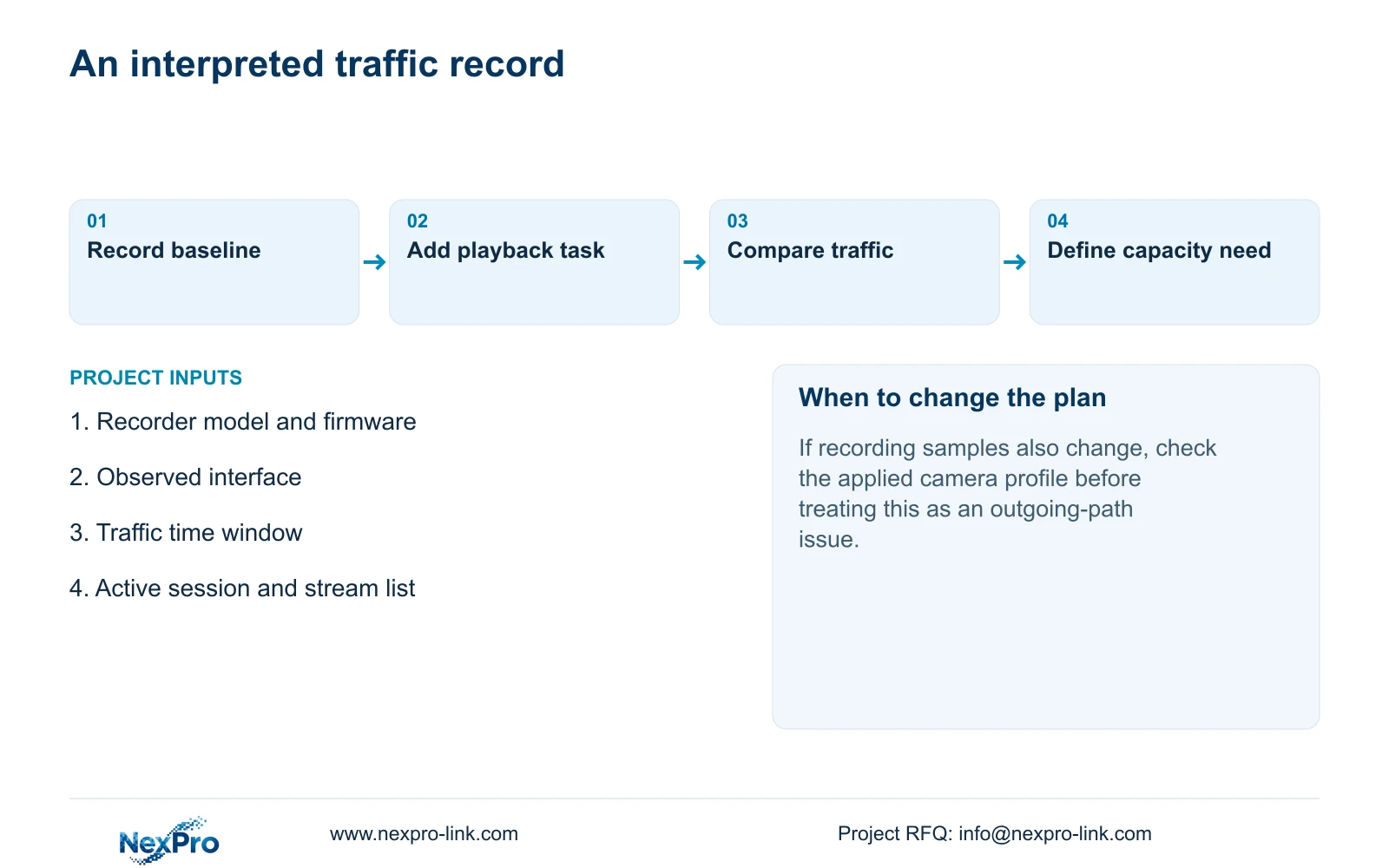
For a controlled comparison, retain normal recording and observe a period with the usual viewing workload. Next, add the playback task that accompanies the complaint. Record its start and finish alongside the traffic observation. If outgoing activity changes at those times, the relationship supports further testing of that path; it does not establish its maximum capacity.
Section 03
Separate viewing choices from recorded output
Keep the configured camera profile, requested live stream and saved recording sample in separate records. Sections 4.4.5 and 4.12.7 expose main- and substream parameters, but selecting a viewing stream does not by itself prove which stream the NVR records.
If a lower-demand viewing option resolves a remote-view complaint, inspect a newly saved recording before concluding that recorded quality changed. Conversely, if the recording itself lacks required detail, changing only the viewing layout will not establish a suitable recording profile.
Seetong PC local storage is a separate object from the recorder's disks. A client recording setting cannot establish the NVR's recording rule. Use recorder-produced footage to verify the recording task, and identify client-generated files explicitly when they are part of the investigation.
Section 04
Calculate the specified paths before comparing measurements
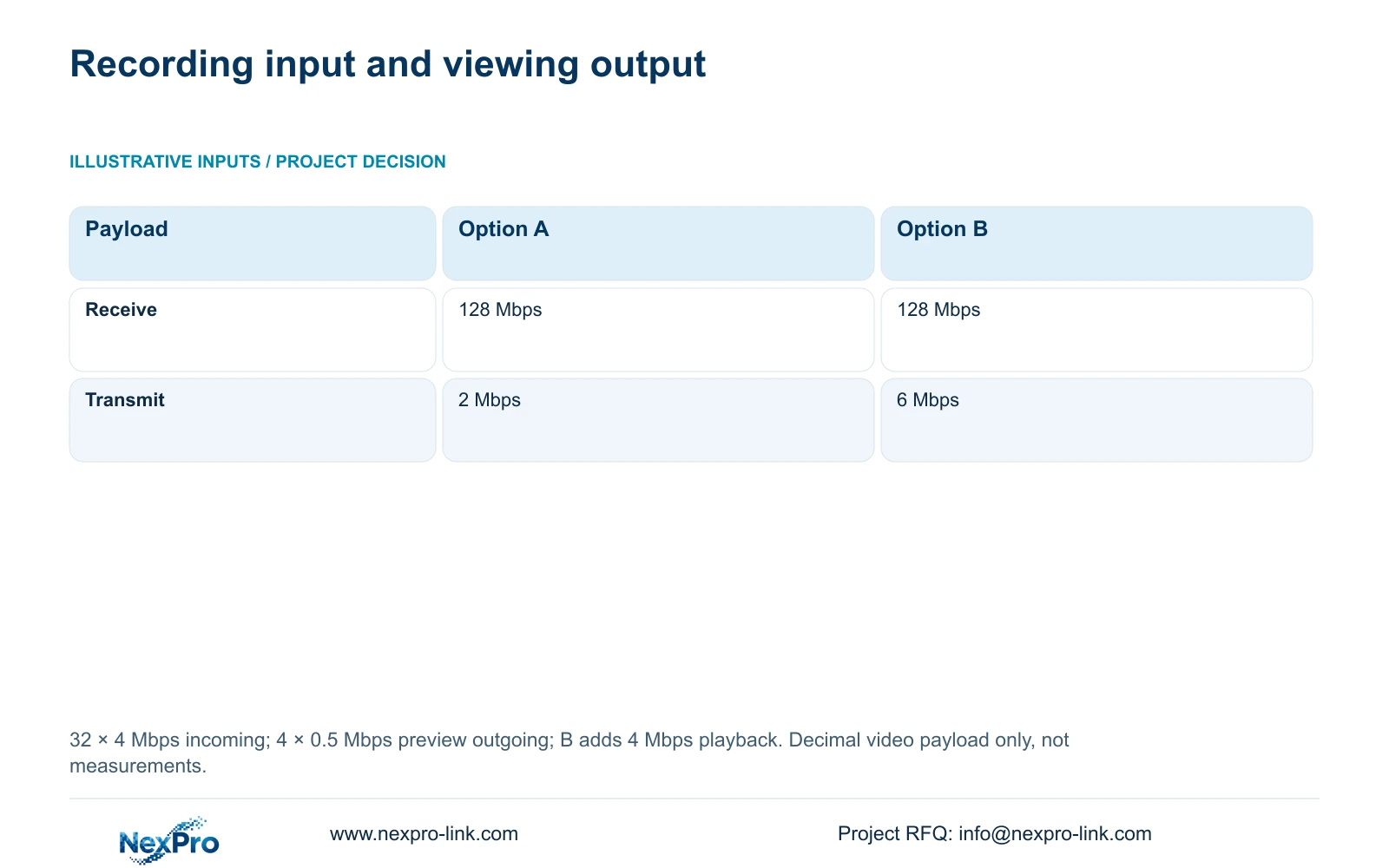
For this illustrative calculation, 32 cameras each send 4 Mbps into the NVR. The recorder sends four preview streams at 0.5 Mbps each. Option B adds one outgoing playback stream at 4 Mbps. Mbps uses decimal units, and the calculation includes only these specified video paths.
Receive payload = 32 × 4 Mbps = 128 Mbps. Option A transmit payload = 4 × 0.5 Mbps = 2 Mbps. Option B transmit payload = 4 × 0.5 Mbps + 4 Mbps = 6 Mbps. The added playback changes outgoing demand without changing the camera input.
Measured interface traffic can include protocol overhead and other activity. Compare its direction, interval and scope with the calculation before treating a difference as a fault. The traffic screen reports current operation; it does not supply the recorder's rated input capacity.
| Item | Option A | Option B |
|---|---|---|
| Incoming camera streams | 32 × 4 Mbps | 32 × 4 Mbps |
| Receive payload | 128 Mbps | 128 Mbps |
| Outgoing tasks | 4 × 0.5 Mbps preview | Preview plus 4 Mbps playback |
| Transmit payload | 2 Mbps | 6 Mbps |
Section 05
Compare bitrate settings with representative operation
CBR or VBR and an entered bitrate describe configuration. They do not establish a measured daily recording volume or every operating peak. Preserve those settings, together with lighting and motion conditions, when comparing samples.
Use a representative average when investigating retention demand. For network evaluation, examine an appropriate peak or configured limit against the relevant interface constraint. A quiet interval should not become the permanent demand assumption for a busy scene.
If traffic differs from the expected workload, check which streams are actually requested before editing encoding. Change one relevant condition and repeat the observation. This keeps a viewing-path adjustment distinguishable from a camera-profile change.
Section 06
Locate the constrained resource before reducing quality
Section 5.3, question 7, associates insufficient channel resources with total incoming IPC bandwidth and suggests reducing the affected bitrate. That branch does not explain every frozen or black display. Compare total input, individual stream requirements and local decoding separately.
Preserve the original stream mix before trying a reduction. If the revised profile restores a picture, check whether the saved footage still fulfils its assigned observation task. A visible image alone is insufficient acceptance.
| Observation | Relevant distinction | Next action |
|---|---|---|
| Transmit rises during playback | An outgoing task has changed | Check session paths and simultaneous playback demand |
| Receive rises after camera changes | Recording input may have changed | Compare applied profiles and total incoming payload |
| Local display stutters with stable input | Display and input limits differ | Check the model's decoding and playback combination |
Section 07
Turn the observation into a capacity requirement
Illustrative project scenario: A site engineer notices outgoing traffic rises when managers open remote playback while recording input remains similar. The engineer records the playback sessions and their time window, then compares them with transmit activity. The next decision concerns the outgoing workload and its path before any camera recording profile is changed.
Carry the result into a requirement sheet covering accepted channel modes, incoming bitrate, simultaneous playback, usable storage and relevant interfaces. Include the remote tasks that must coexist with recording. NexPro-Link's BOQ and tender support page provides a route for discussing that equipment scope.
A commercial candidate needs its own specification evidence. Manual TS models have no established mapping to NexPro-Link SKUs, and a 4K label cannot settle input, display and playback capacity together.
Section 08
Buyer questions about traffic readings
Does rising transmit traffic mean more cameras are recording? No. Playback, live viewing or downloads can add outgoing demand without adding incoming camera streams.
Can a substream choice reduce remote viewing demand without changing recording? It may, but verify the requested stream and a recorder-produced sample separately.
Does a calculated payload prove the interface can carry it? No. Compare the scoped calculation with actual activity, the network path and the selected recorder's limits.
Section 09
Provide the traffic window that needs interpretation
Send NexPro-Link a redacted receive/transmit observation with its interface, time window, active viewing tasks and recorder model/firmware at info@nexpro-link.com.
Engineering references
These sources support the general planning principles. Always use the selected product's current datasheet and applicable project standards for final design.


