

Test the same window movement under each documented drag mode. Preserve camera identity and confirm the recovery condition before approving a shared desk.
Section 01
Set the desk's permitted window behavior
For a shared control desk that must resist accidental reordering, evaluate disabled dragging first, then test whether it meets the operator's actual work. The supplied manual distinguishes allowed dragging, disabled dragging and dragging bound to channel numbers. Restore Layout is documented only for the bound mode. Choose among them by comparing the same movement against an approved camera map, not by judging whether the resulting screen looks tidy. Verify the intended operating account as well. A moved window can change the location an operator thinks they are watching, so approval must include channel identity and the method for returning to an accepted arrangement.
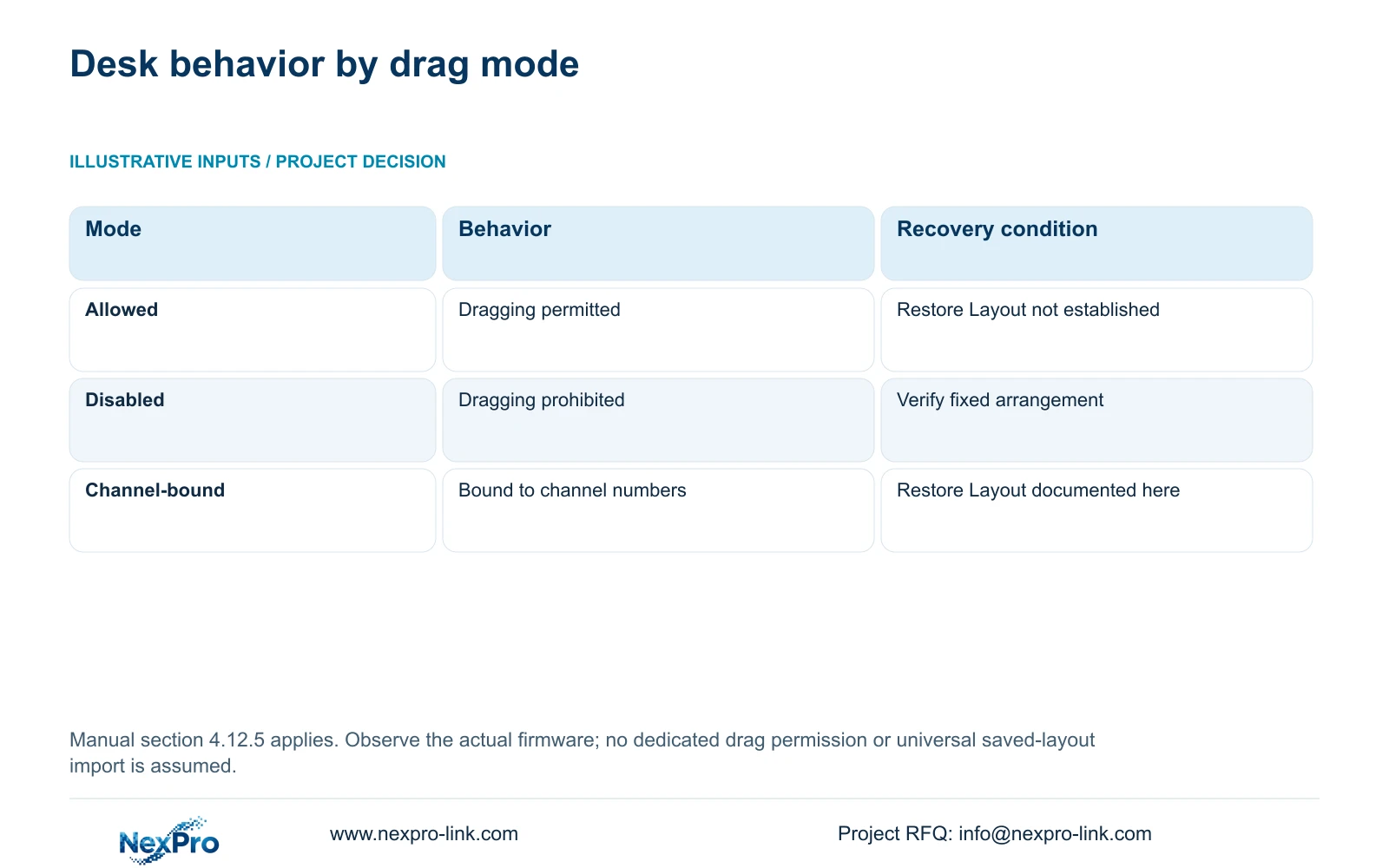
Section 4.12.5 provides the mode distinction. Allowed dragging suits a desk that intentionally permits rearrangement, provided operators can identify the resulting views. Disabled dragging addresses a fixed-order requirement. Channel-bound dragging requires explicit testing of both movement and Restore Layout. Do not promise restoration in either of the other modes.
| Mode | Documented distinction | Approval test |
|---|---|---|
| Allowed | Dragging permitted | Confirm moved views remain identifiable |
| Disabled | Dragging prohibited | Attempt the same accidental movement |
| Bound to channel numbers | Dragging bound to channel numbers; Restore Layout applies | Check movement and restored channel mapping |
Section 02
Keep camera identity outside the screen position
Prepare a private mapping record with separate fields for drawing location, physical IPC identity, IP address, NVR channel and displayed name. Add window position as a presentation field. This makes the approved screen understandable without treating a particular corner of the monitor as the camera's identity.
Sections 4.3.1, 4.4.4 and 4.12.6 support channel and naming controls. The project record must connect those controls to the installed camera. If a name changes, record the alias change. If a camera is replaced, record the physical replacement separately, even when the channel name stays familiar.
During testing, identify the camera before and after movement using the mapping record. If the displayed name conflicts with the recorded location, resolve that conflict before approving dragging. Reordering an uncertain map would make the uncertainty harder for the next operator to recognize.
Section 03
Compare the same movement under each mode
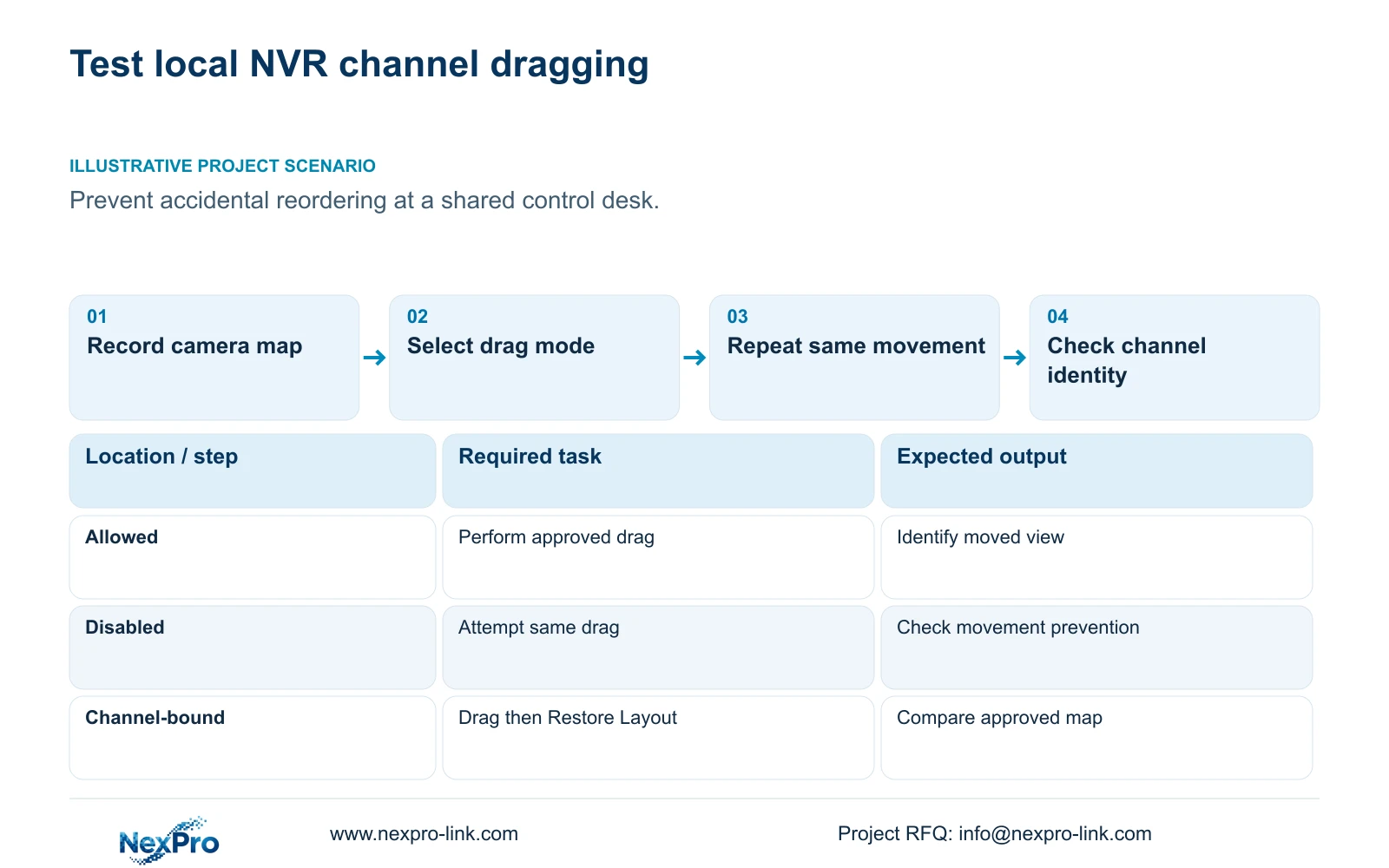
Use an authorized test session and begin each comparison from the same documented arrangement. Select an identifiable camera and destination window, record the current mode, and perform the same drag action. Observe what moves and how the channel labels relate to the new positions. Record the result before changing the next setting.
For disabled mode, the relevant question is whether the attempted movement is prevented. For allowed mode, document the resulting arrangement and the permitted way to return to the approved screen. For bound mode, test Restore Layout and compare its result with the channel map. The manual supplies the recovery condition, not proof that an undocumented custom arrangement will be recreated.
Keep the layout and stream workload consistent. Sections 4.5 and 5.2 distinguish window arrangements from decoding limits. A missing or unusable image during the comparison needs a separate stream or resource check; it should not automatically be attributed to dragging.
Section 04
Test the accounts that will use the desk
Section 4.12.3 separates local and network permissions for tasks including preview, playback, system settings and PTZ. Local recording backup is also a separate permission. Those distinctions mean an installer account cannot stand in for every operating account.
Record the account role and access path used for each drag-mode observation. Test an intended permitted task and an intended prohibited task. Confirm who can change the relevant setting on the actual firmware, without inventing a dedicated drag permission that the supplied evidence does not establish.
If a guard can view locally but cannot retrieve footage remotely, check the remote playback permission independently. Do not broaden account rights simply to make the layout test pass. The remote-upgrade permission row contains inconsistent descriptive text, so it cannot establish actual upgrade behavior from that description alone.
Section 05
Preserve the approved configuration and its evidence
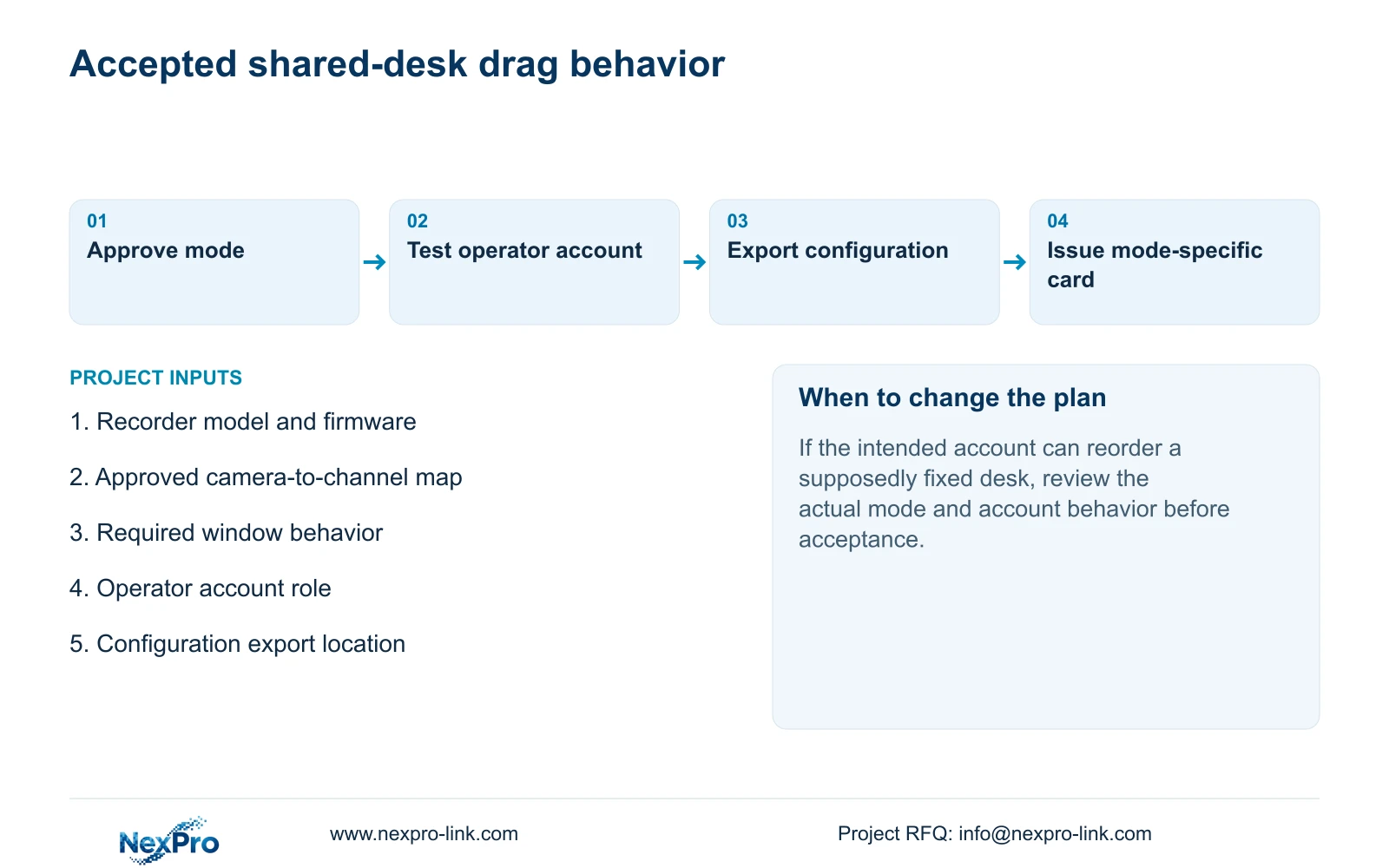
After selecting the mode, retain the approved layout record with the recorder model, firmware identity and test observations. Export the applicable configuration through section 4.12.18 and name it so the owner can distinguish the approved state from an earlier working copy.
Keep configuration export, log export and video backup in separate categories. A settings file does not contain incident footage or provide a disk image. Section 4.11.4 describes the separate video-backup workflow. Preserve any relevant footage independently when the desk test overlaps an incident review.
An export also does not prove that every screen state can be recreated through import. Confirm what the applicable device preserves and verify model and version compatibility before considering restoration. Configuration import or broader restoration requires authorization, preservation of relevant data and an assessment of affected settings; it is not a routine substitute for checking the layout map.
Section 06
Hand over the accepted behavior
Illustrative project scenario: A contractor must prevent accidental window reordering at a shared control desk. The contractor records the approved camera map, compares the documented modes using the same drag, and asks the owner's intended account to repeat the accepted behavior. Disabled mode remains the initial candidate when fixed order is the requirement.
The operating card should state the selected mode, permitted rearrangement behavior and the recovery method demonstrated on that recorder. For channel-bound mode, include the Restore Layout condition. For other modes, do not print the same recovery instruction as a universal shortcut.
Have the operator identify a camera from its location record, retrieve a requested period, and open an exported sample using the authorized workflow. Keep credentials in a controlled handover channel. Record the configuration-backup location and who maintains the camera map. This checks that the owner can work with the accepted arrangement after the contractor leaves.
Section 07
Applicable operating source
This guide uses the private supplied NVR4.0 user manual CH_V2.4.doc, with V2.2 in its body. Relevant sections are 4.12.5, 4.3.1, 4.4.4, 4.12.6, 4.5, 5.2, 4.12.3, 4.12.18, 4.11.4 and 4.12.17 through 4.12.19. Section references take priority over page numbers. The comparison concerns NVR local operation, not an assumed equivalent Seetong PC function.
Section 08
Can every drag mode use Restore Layout?
No. Section 4.12.5 limits it to dragging bound to channel numbers. Test the accepted mapping on the applicable recorder.
Section 09
Does the configuration file include footage?
No. Configuration export and video backup are separate workflows. Retain each file according to its purpose.
Section 10
Define the shared-desk rule
Send NexPro-Link the recorder model and firmware plus your required fixed or movable window behavior at info@nexpro-link.com.
Engineering references
These sources support the general planning principles. Always use the selected product's current datasheet and applicable project standards for final design.


