

Temporary supplier access needs an owner-managed work window and a verified closing action. The supplied manual does not establish automatically expiring accounts.
Section 01
Approve the maintenance task before granting access
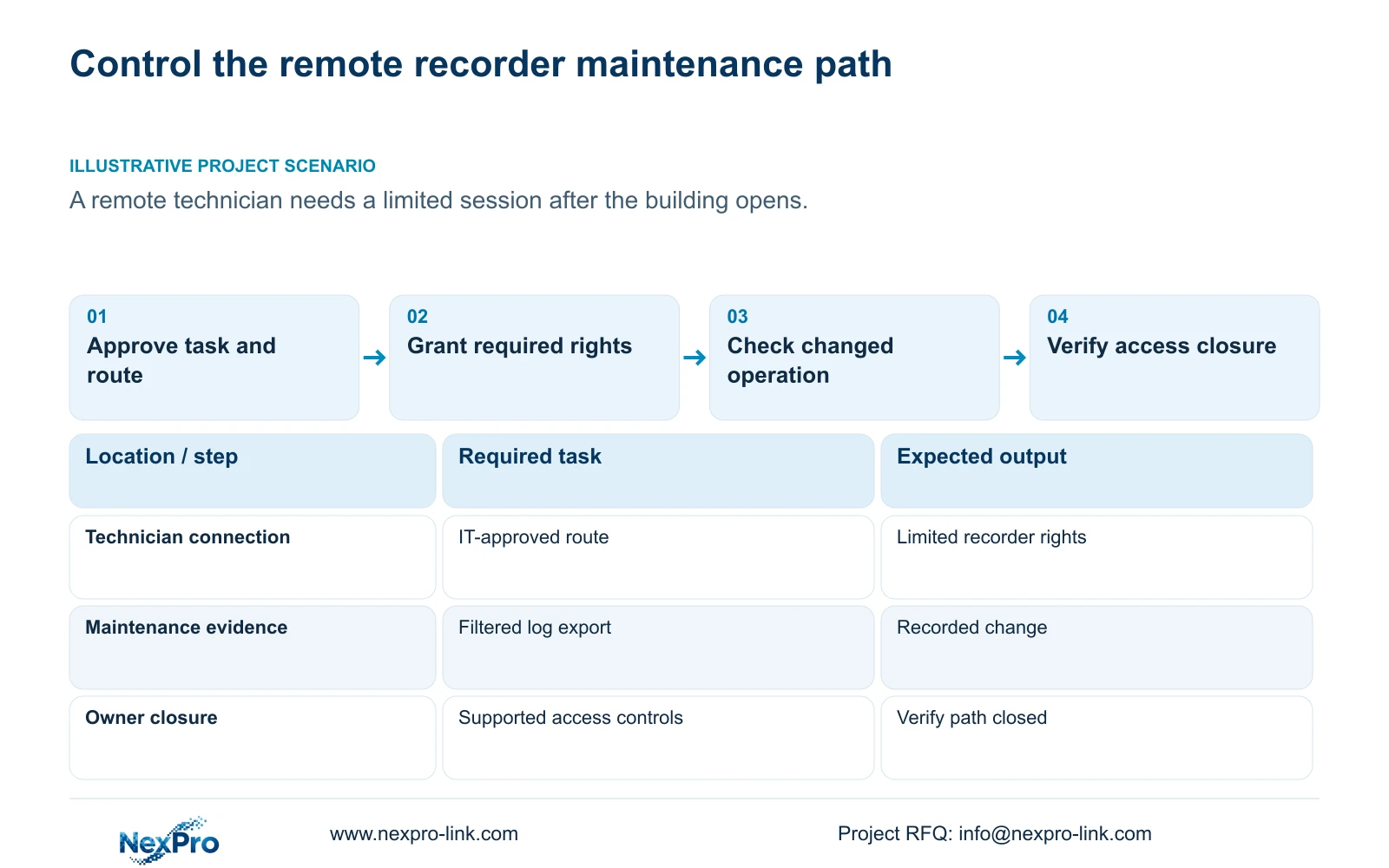
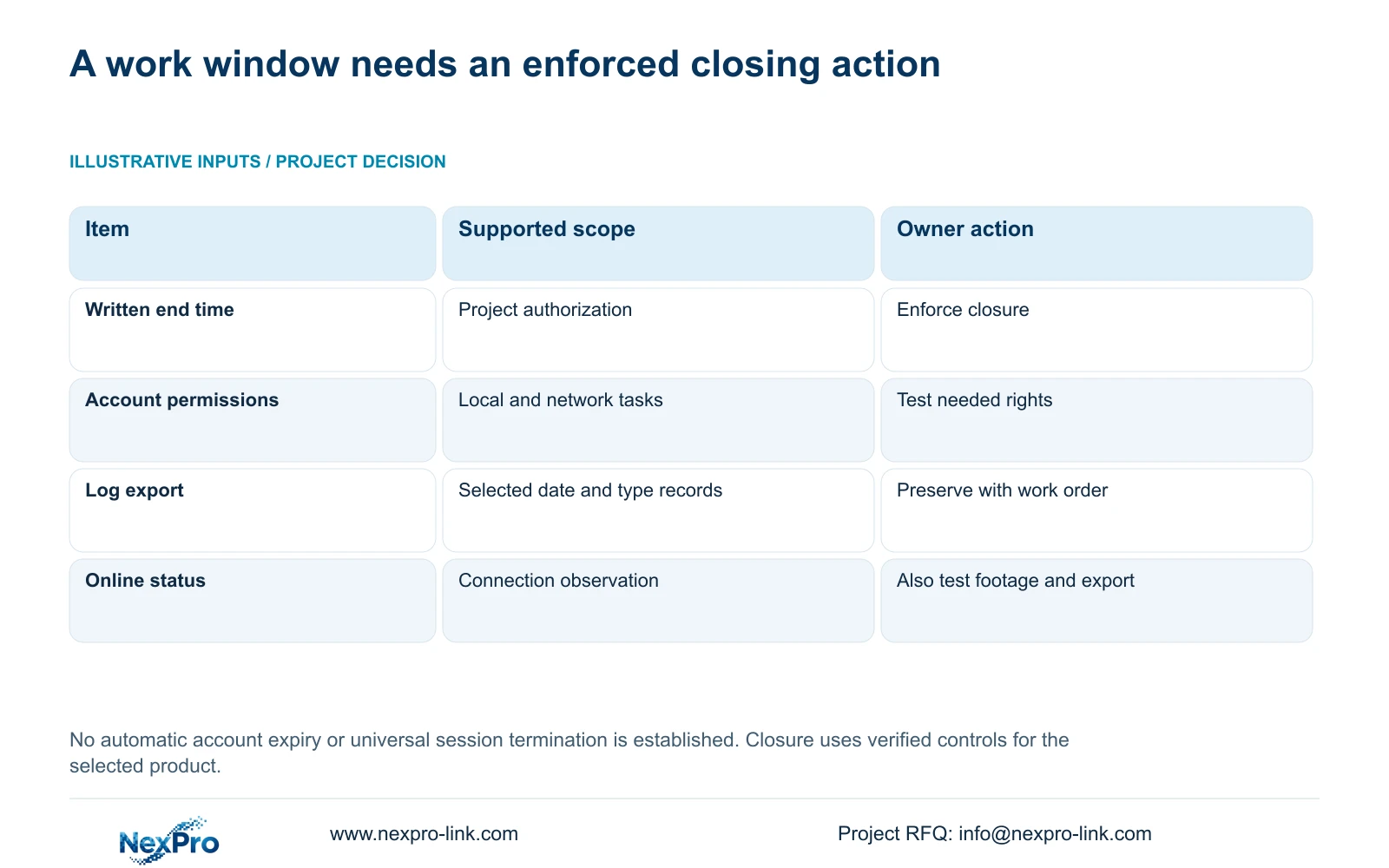
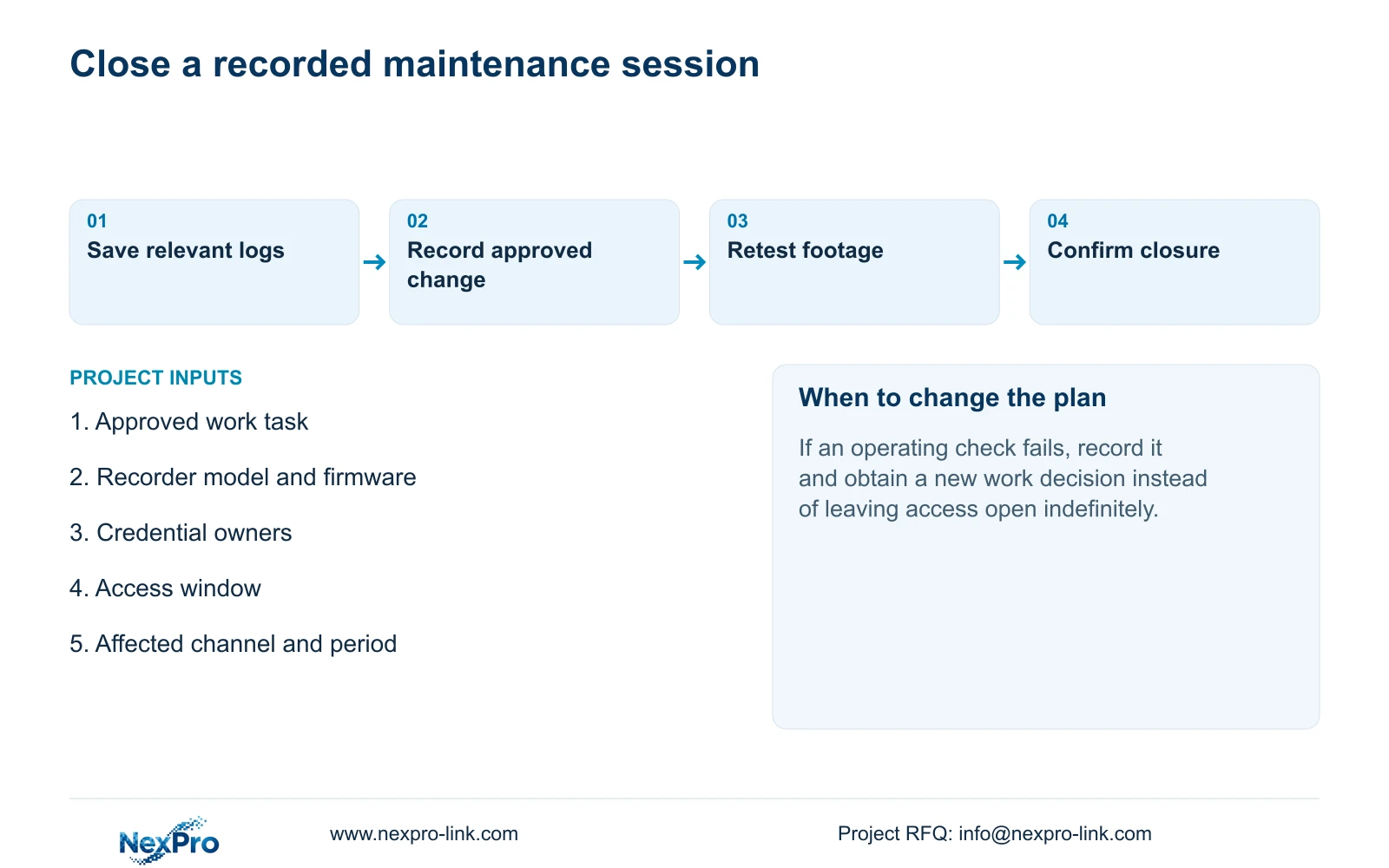
Make supplier access temporary through an approved work period, limited permissions and an explicit closing action. The supplied manual does not establish an automatically expiring account feature, so a written end time requires an owner to enforce it through the supported access controls. Define the technician's task and connection path before granting rights. Preserve relevant records, verify the changed operating task and confirm that the maintenance access is closed. If a check fails, document the failure and obtain a separate decision about further work. Keep local recorder, camera and cloud credentials under their respective owners so a short maintenance session does not become an uncontrolled continuing entitlement.
Describe the fault narrowly enough to decide what access is necessary. Viewing a reported symptom, retrieving a sample and changing system settings are different tasks. A request for general maintenance does not identify which rights the technician needs or which operation the owner should approve.
Section 4.12.3 separates local and network permissions, including preview, playback, system settings and PTZ, with local backup separately listed. Match the approved work to the actual access path. Test one allowed task and a prohibited task through normal authorized operation before starting the maintenance work.
Section 02
Identify the owner of each credential object
Record which account or connection the technician will use and who is responsible for closing it. Local recorder users, network access accounts, camera connection credentials and third-party cloud accounts are separate objects unless the exact workflow establishes otherwise.
A channel's connection username and password authenticate the camera. Editing that entry does not establish that recorder accounts or a cloud session have changed. If the approved task involves credentials, identify the dependent connection and the owner who will verify it afterward.
Keep the maintenance record limited to ownership, permitted use and change status. Transfer any necessary credentials through the approved controlled process. Do not place plaintext passwords in the BOQ, work-order circulation or a public support message.
Before granting access, also decide how closure will be verified on the selected product. Use its documented account and connection controls. The supplied evidence does not establish that one credential change terminates every active session or every access path.
Section 03
Approve the connection and the change boundary
Have IT approve the route used for the maintenance session. Sections 4.3.3 and 4.12.8 describe recorder network functions, but they do not authorize changes to the enterprise firewall policy. Diagnose local connectivity, remote routing, DNS, activation, authentication and service availability within the permitted scope.
Specify the affected recorder, channels, proposed change and expected operating result in the work order. If diagnosis reveals a different task, obtain a revised approval before extending the session. A connection failure should not automatically lead to unrestricted public port exposure.
Where the work involves restoring settings, upgrading firmware, changing IP or stopping the recorder, obtain authority, preserve the required footage and relevant configuration or logs, and agree the interruption. These actions are not interchangeable repairs. The remote-upgrade permission description is inconsistent in the supplied manual, so confirm its behavior separately.
The procedure below distinguishes an owner-managed work window from a native timer feature.
| Condition | Required response | Closing evidence |
|---|---|---|
| Task needs only symptom viewing | Grant and test the necessary viewing path | Owner confirms the maintenance path is closed |
| Task changes recorder configuration | Approve the specific change and preserve relevant records | Changed variable and operating checks are recorded |
| Work period ends with a failed check | Record the failure and request a new work decision | Access closes unless a separate extension is approved |
| An account expiry field is assumed | Obtain product-specific evidence or use managed closure | Supported closure action is verified |
Section 04
Preserve the logs that match the work period
Section 4.12.17 describes log search, detail viewing and text export. The default search concerns the current day and includes type filters. When the date condition is not selected, the manual describes an all-log query. Check those filters before interpreting an empty result as missing activity.
Select the records relevant to the reported symptom and planned maintenance period, inspect their details and export the text. Keep the export with the work order and identify the filters used. This lets a later reviewer understand what the file covers.
Record the approved change separately from the log export. Configuration export, log export and video backup are different objects. A useful maintenance record connects them without treating a settings file as incident footage or claiming that a log export is tamper-proof, unlimited or legally certified.
Section 05
Retest operation and explicitly close the access
After the approved change, inspect live view and time, then retrieve newly generated footage and a relevant older sample. Test export, the intended accounts and any events affected by the work. Online status or a displayed version label cannot substitute for these operating checks.
Record the variable changed and each failed task. If playback or another required function no longer works, preserve the result and agree the next supported action with the supplier. The supplied evidence does not establish a universal automatic rollback feature.
Once the checks are recorded, have the responsible owner close the approved maintenance path and verify the result. A technician's message that work is complete does not establish closure. If more work is necessary, use an explicit extension or a new authorization with its own boundary.
Keep closure and technical outcome as separate fields. A session can be closed while an unresolved fault remains assigned for follow-up; leaving access open is not a substitute for documenting that fault.
Section 06
Update the operating and support record
Illustrative project scenario: A remote technician needs a limited maintenance session after the building opens. The owner approves the task and connection, assigns credential responsibility and preserves relevant records. After testing, the owner closes the maintenance path and records any remaining issue.
Update the applicable versions, configuration-backup location and support contact where the work changed them. Keep the operator's channel identification, retrieval and playable-export workflow usable. Transfer revised credentials only through the controlled route.
This procedure uses the private supplied NVR4.0 user manual CH_V2.4.doc, with V2.2 in its body, particularly sections 4.12.3, 4.1, 4.3.1, 4.3.3, 4.12.8 and 4.12.17. Operating verification extends sections 4.11 and 4.12.17 through 4.12.20. Work-window approval and closure are project management measures, not claimed built-in timer functions.
Section 07
Does an approved end time automatically expire the account?
The supplied manual does not establish that feature. Assign an owner to perform and verify closure using supported controls.
Section 08
What should be checked before declaring the log empty?
Check the date condition and type filters, then inspect the relevant details. Record those search conditions with any exported text.
Section 09
Define the limited maintenance work
Send NexPro-Link the proposed maintenance task and approved access window, with the recorder model and firmware, at info@nexpro-link.com.
Engineering references
These sources support the general planning principles. Always use the selected product's current datasheet and applicable project standards for final design.


