

Build a reviewable NVR submittal by separating the offered model, applicable operating instructions and model-specific performance evidence. Preserve unresolved mappings and document version differences.
Section 01
Give the reviewer a traceable model-to-document relationship
Submit the exact offered recorder model, its applicable operating instructions and a separate model-specific performance sheet. If a NexPro-Link offer arrives with a manual containing TS-series codes, retain both identities and request a written explanation of applicability. A shared interface cannot establish matching hardware, ports or playback capacity. Keep the manual's version labels visible, qualify the required recording and retrieval modes individually, and mark unresolved relationships for clarification. The reviewer should be able to distinguish what the instructions explain, what the commercial model documentation supports and which project functions still need verification before accepting the proposed configuration.
Start with the quotation line and its exact model string. Beside it, identify the supporting document and the claim it supports. Avoid assigning a TS code simply because its channel count or chassis appears similar. That creates an unsupported relationship which can follow the order into commissioning and replacement decisions.
Section 02
Read the family scope before using a feature statement
Sections 1.2 and 5.2 of the supplied manual describe a family that includes TS8104A3, TS8108A3, TS8216A3, TS8232C4, TS8108D7, TS8116D7, TS8836M and TS8436M. The appendix also uses some different model spellings. Preserve the identity attached to the relevant row instead of silently normalizing every code.
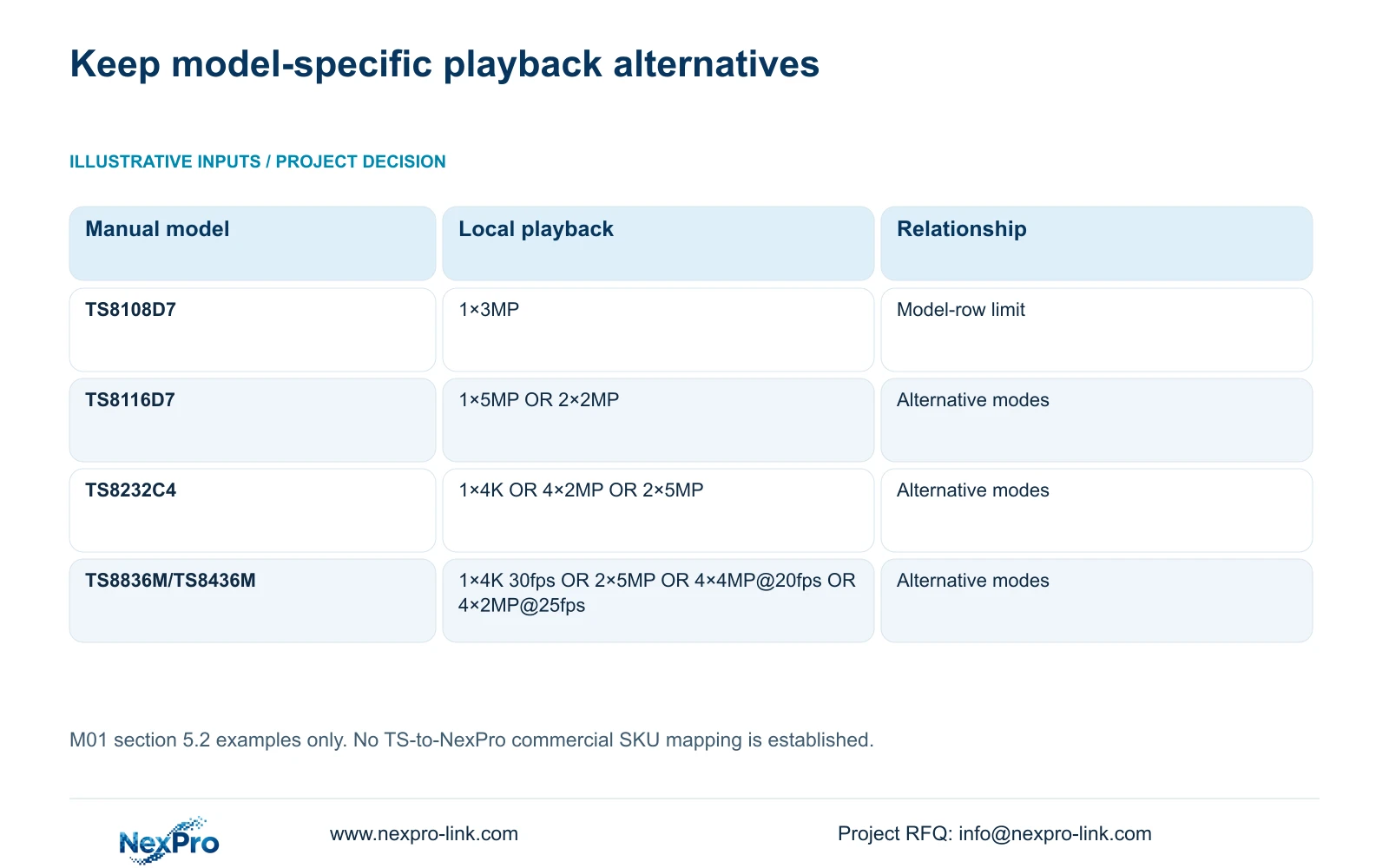
The family overview and a specific model row carry different scopes. Preview decoding, local playback, buzzer support and talkback require their own checks. For example, the supplied TS8108D7 row lists 1×3MP local playback and no buzzer or talkback support. That statement belongs to that manual row. It cannot establish the same limits for a commercial recorder merely described as NVR4.0.
Section 03
Record the supplier-confirmed applicability
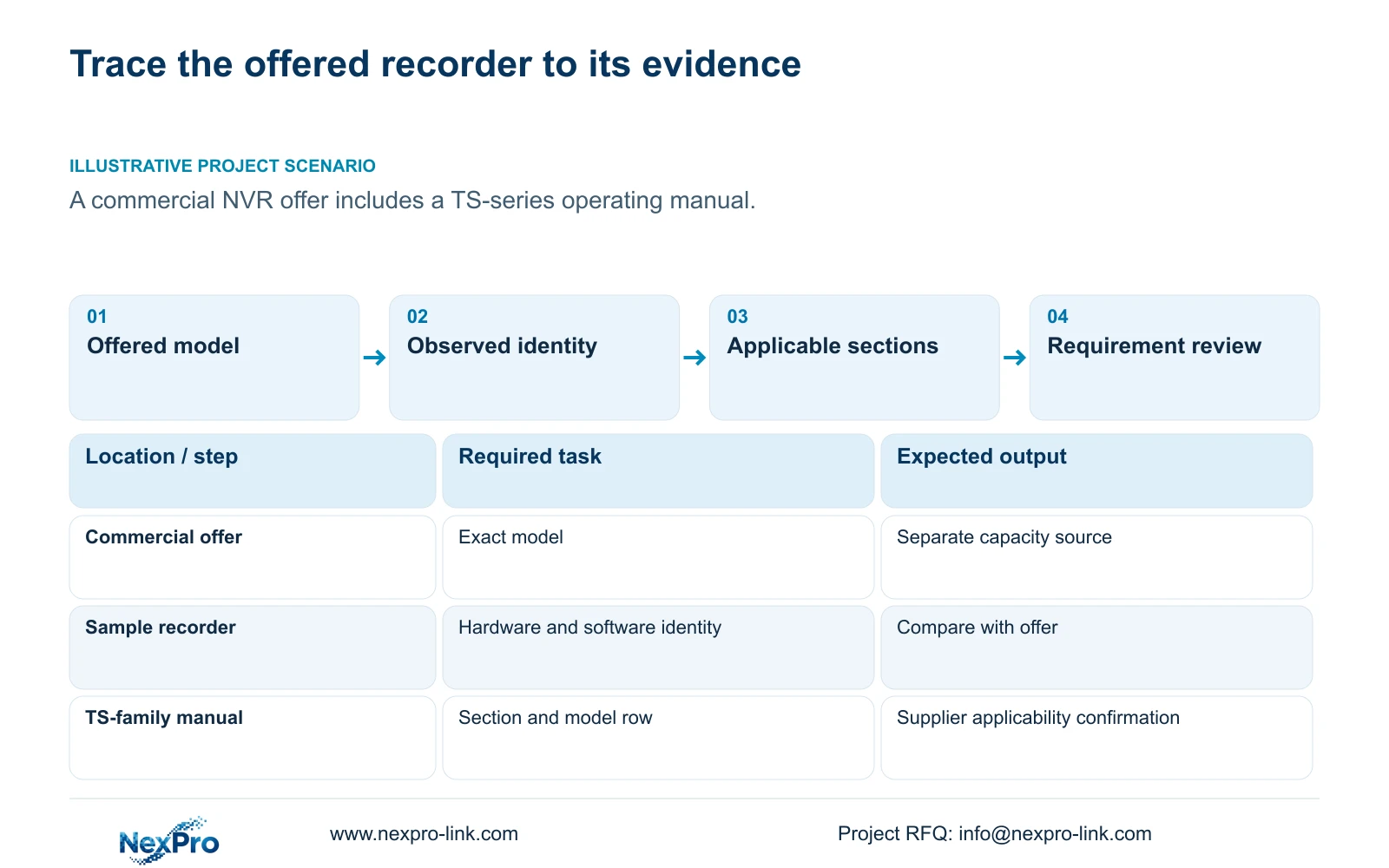
Ask the supplier to identify which operating sections apply to the offered hardware and firmware, and to state any exceptions. If a sample is available, section 4.12.19 provides the basis for recording product model, hardware version, software version and release information from System Information. Compare that record with the offered configuration.
Before a physical unit exists, keep proposed identity and observed identity separate. A supplier confirmation can explain document applicability, but it does not replace an observation of the delivered unit. Maintain serial information in the appropriate private equipment record. Redact cloud identifiers, QR codes and identifiable site content from screenshots circulated outside that controlled record.
Section 04
Preserve document labels and installed firmware independently
The private source file is NVR4.0 user manual CH_V2.4.doc, while its body identifies V2.2. Record that discrepancy as part of the source identity. Neither label establishes the firmware installed on the proposed or delivered recorder, and neither should be rewritten as a confirmed latest version.
Locate functions by section number and heading because document pagination can change between viewers. If a visible control differs from the applicable section, record the model, firmware and specific difference, then request the corresponding instructions. A familiar screen layout is useful for orientation, but the submittal needs evidence for the function being reviewed. Seetong PC instructions also remain separate from the recorder's own storage and operating controls.
Section 05
Attach performance fields to the exact offered model
For each project requirement, record the required input, the candidate's documented value and any remaining difference. Include channel and stream modes, incoming bitrate, usable storage, physical interfaces, remote tasks and applicable environmental conditions. Sections 5.1 and 5.2 help organize those questions, but commercial-model evidence must support the actual offer.
The separate NexPro-NVR4449-4K source illustrates that layer: it lists 49 channels, 320Mbps input, four SATA positions with a maximum of 18TB per disk, and dual gigabit networking. These fields support focused selection questions. They do not prove a TS-model mapping, installed usable capacity or a particular RAID level. If the proposed disk arrangement is unstated, mark usable capacity unresolved instead of inferring it from the number of bays.
| Evidence presented | Supported conclusion | Review action |
|---|---|---|
| Family manual with TS codes | Operating guidance within the stated family scope | Request applicability to the offered commercial model |
| Sample System Information record | Observed model and hardware/software identity | Compare with the offered configuration |
| V2.4 filename and V2.2 body | Document labels differ | Preserve both and cite sections |
| Model sheet lists disk bays | Physical storage allowance is documented | Confirm installed disks and usable capacity separately |
| Nominal recording channel count | Enrollment tier only | Review playback and preview modes independently |
Section 06
Keep alternative playback modes intact
Copy the entire applicable playback expression, including its OR relationships. TS8116D7 is listed with 1×5MP OR 2×2MP. TS8232C4 is listed with 1×4K OR 4×2MP OR 2×5MP. The supplied TS8836M/TS8436M modes are 1×4K 30fps OR 2×5MP OR 4×4MP@20fps OR 4×2MP@25fps. Removing the alternatives or frame-rate conditions changes the claim.
Compare the buyer's simultaneous review task with the appropriate documented mode. Keep recording channels, incoming bandwidth, preview decoding, local playback and monitor output in separate rows. If a required combination is unsupported or unstated, request clarification or show a deviation. Do not use a successful live view to close an unanswered playback requirement.
Section 07
Submit against the buyer's actual approval boundary
Company registration, purchasing-category approval, brand acceptance and acceptance of a selected equipment configuration are separate decisions. Use the buyer's requested format and identify which decision the package seeks. NexPro-Link's BOQ and tender support can support model matching and project documentation discussions, while the buyer retains its approval process.
A reviewable submission should retain the quotation reference, applicable instructions, model evidence and open questions together. If the proposed hardware changes, update the affected document relationships and performance rows. A previous review of another configuration should not remain attached to the replacement without explaining the difference.
Section 08
Resolve a TS-series manual attached to a commercial offer
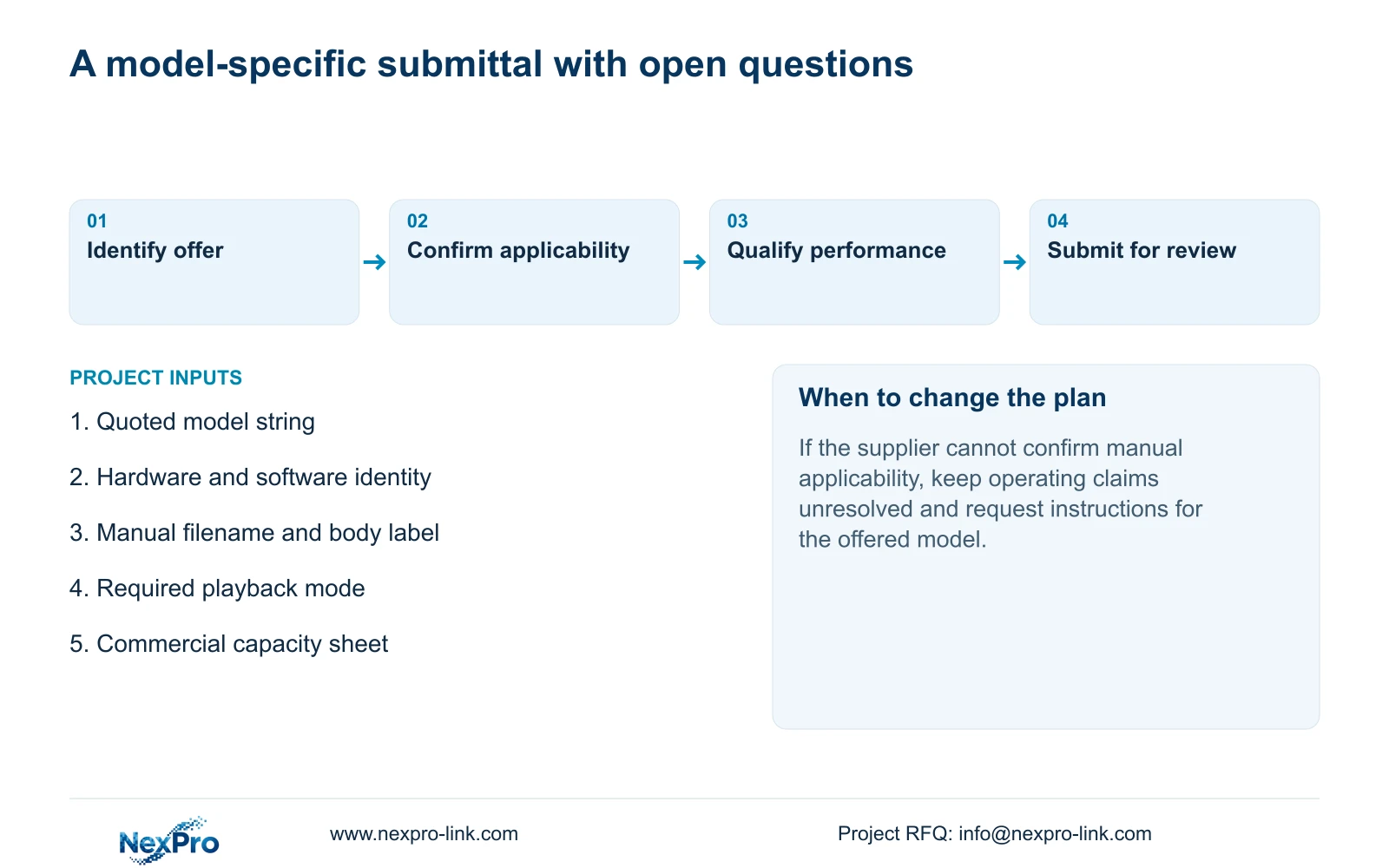
Illustrative project scenario: A consultant receives a NexPro-Link product offer accompanied by a manual listing TS-series codes. The consultant separates the quoted model from the manual family, asks for supplier-confirmed applicability and reviews capacity through the commercial model source. Playback remains an independent requirement. The resulting package can identify supported fields and unresolved questions without claiming that a common interface establishes equivalence or that submission guarantees approval.
Section 09
Does the V2.4 filename establish the recorder firmware?
No. The file label, body label and installed firmware are separate identities. Record each as observed and use the applicable section heading to locate instructions.
Section 10
Does supplier registration approve the offered recorder?
No. The buyer may review company eligibility, product category and the selected configuration separately. Record the actual decision requested and any conditions attached to it.
Section 11
Resolve the document relationship
Send NexPro-Link the quoted recorder model and the manual or requirement reference that needs an applicability explanation at info@nexpro-link.com.
Engineering references
These sources support the general planning principles. Always use the selected product's current datasheet and applicable project standards for final design.


