

Camera settings that return after reconnection may reflect recorder-side control. Assign a configuration owner, qualify copying targets and compare actual values at both ends.
Section 01
Assign the interface that owns the approved profile
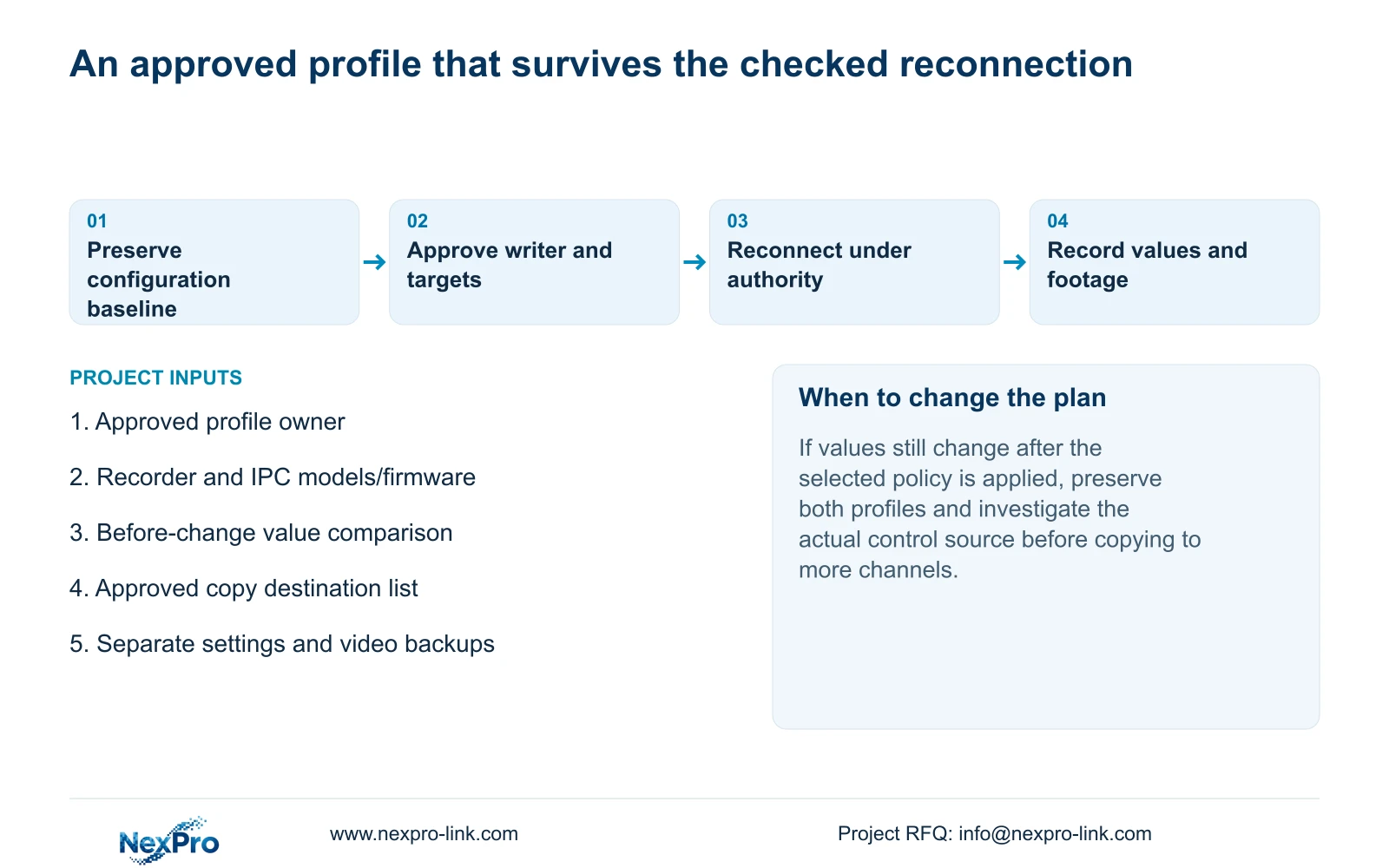
When camera stream values change after reconnection to an NVR, check recorder-side parameter locking before treating the symptom as failed camera memory. The supplied manual says locking can bind the recorder's local stream settings to the camera, including local adaptation values where parameters were not explicitly configured. Decide which interface owns the approved profile, then compare the recorder and camera values under that policy. Review address adaptation separately so a changed endpoint does not confuse the comparison. Preserve the configuration baseline, copy settings only to suitable camera groups, and test actual values and newly recorded footage after an authorized reconnection. A successful save message is insufficient evidence of a stable profile.
This article follows the private supplied NVR4.0 user manual CH_V2.4.doc, whose body identifies V2.2. Sections 4.4.5, 4.12.7 and 4.12.5 describe stream locking and related controls. Section references take priority over page numbers. Confirm the actual recorder, IPC models and firmware before applying the workflow.
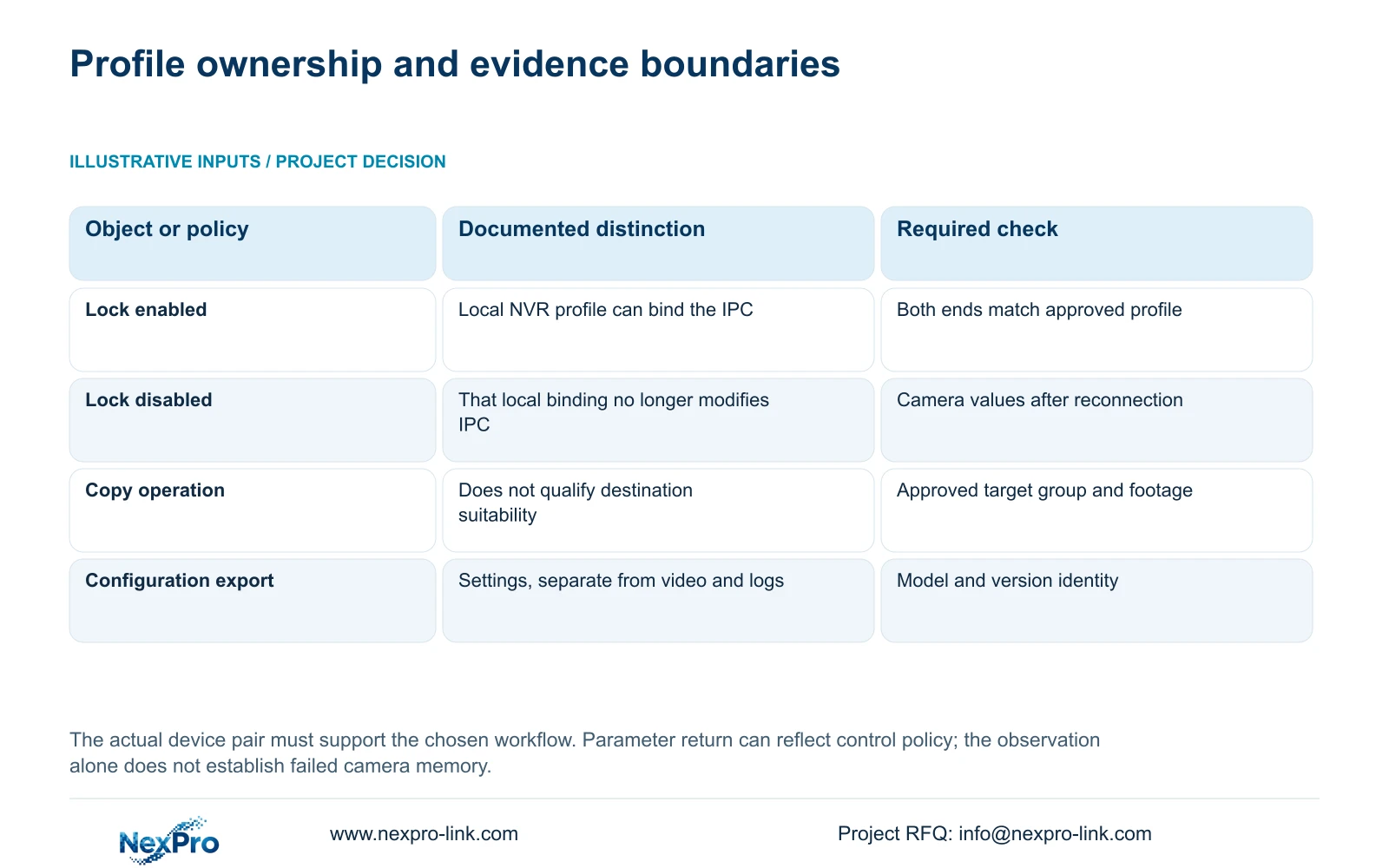
Choose recorder-managed or camera-managed stream control explicitly. For recorder-managed control, keep the approved local profile as the intended source. For camera-managed control, review whether local binding should be disabled. Document who can approve exceptions so later maintenance does not alternate between competing writers.
| Project intention | Control implication | Required verification |
|---|---|---|
| Recorder owns the approved stream | Local parameter binding may be intended | Compare approved NVR values with the connected IPC. |
| Camera-side workflow owns the stream | Review disabling local parameter binding | Compare IPC values before and after reconnection. |
| Ownership is unresolved | Several interfaces may compete | Agree the owner before copying or repeatedly saving. |
| Values differ despite the chosen policy | Cause remains unresolved | Preserve both value sets and investigate the actual control source. |
Section 02
Read the combined option before using it as a shortcut
Disable All Intelligent Changes in section 4.12.5 has four listed effects: it stops video-management automatic addition, turns off IP-conflict adaptation, disables stream-parameter locking and prohibits the recorder from changing added camera IP addresses. Applying it therefore changes more than the writer of a stream profile.
Compare each effect with the project policy. A camera-managed stream profile may fit disabled locking, while the commissioning process may still have relied on automatic addition. Record how new channels will be enrolled if that behavior changes. Likewise, establish who manages camera addresses when recorder modification is prohibited.
The option is not described as the master switch for intrusion or line-crossing analytics. Keep event requirements in a separate verification task. The configuration-owner decision should not silently change the project's accepted alarm scope.
Section 03
Keep endpoint behavior in the same baseline
Section 4.12.8 describes conflict adaptation that can change the recorder's own address after a conflict. Turning it off removes that automatic response but leaves the underlying allocation conflict unresolved. Record the selected policy and actual NVR address alongside the camera register.
Separate recorder addresses from enrolled camera addresses. If an endpoint changes during the profile comparison, first identify the actual host and channel. Comparing values on a different device can create a false impression that the original profile has reverted.
Before any planned IP change, obtain site authority, preserve the relevant configuration and footage, and arrange the interruption. If addresses already match the approved plan, retain them while investigating stream ownership. There is no need to combine renumbering with a parameter-lock test.
Section 04
Copy profiles only within approved target groups
Once ownership is clear, group destinations by their operating task and supported options. Sections 4.11.1, 4.4.2 and 4.12.6 through 4.12.7 provide copying and configuration context. The copy control does not decide whether a destination camera supports the source settings or whether its recording purpose is equivalent.
Keep a source-channel reference and an explicit destination list. Preserve cameras with approved exceptions outside the group. An entrance view should not inherit a corridor schedule merely because both appear on the same recorder. Lens tasks, supported bitrate or resolution choices and local operating requirements can differ.
Apply an approved profile to a suitable target first and inspect its actual values and footage. If the result differs, record the mismatch before extending the change. A save confirmation does not establish that every destination accepted an identical or suitable result.
Section 05
Preserve settings, logs and footage as separate objects
Sections 4.12.18 and 4.11.4 distinguish configuration export, log export and video backup. Save each with a name that identifies its purpose, recorder and applicable version. A configuration file is neither a disk image nor preservation of incident footage.
Keep the pre-change profile record with the exported settings and note the intended owner. Confirm that the backup is identifiable and corresponds to the installed version before proceeding. Store required footage through the separate video workflow, and retain relevant logs independently where they support the investigation.
The manual does not establish universal cross-model import. If restoring settings becomes necessary, obtain authority, protect relevant data and confirm the supported target model and version before importing. A saved file alone does not justify cloning a different recorder or assuming an automatic recovery route.
Section 06
Compare the actual profile after reconnection
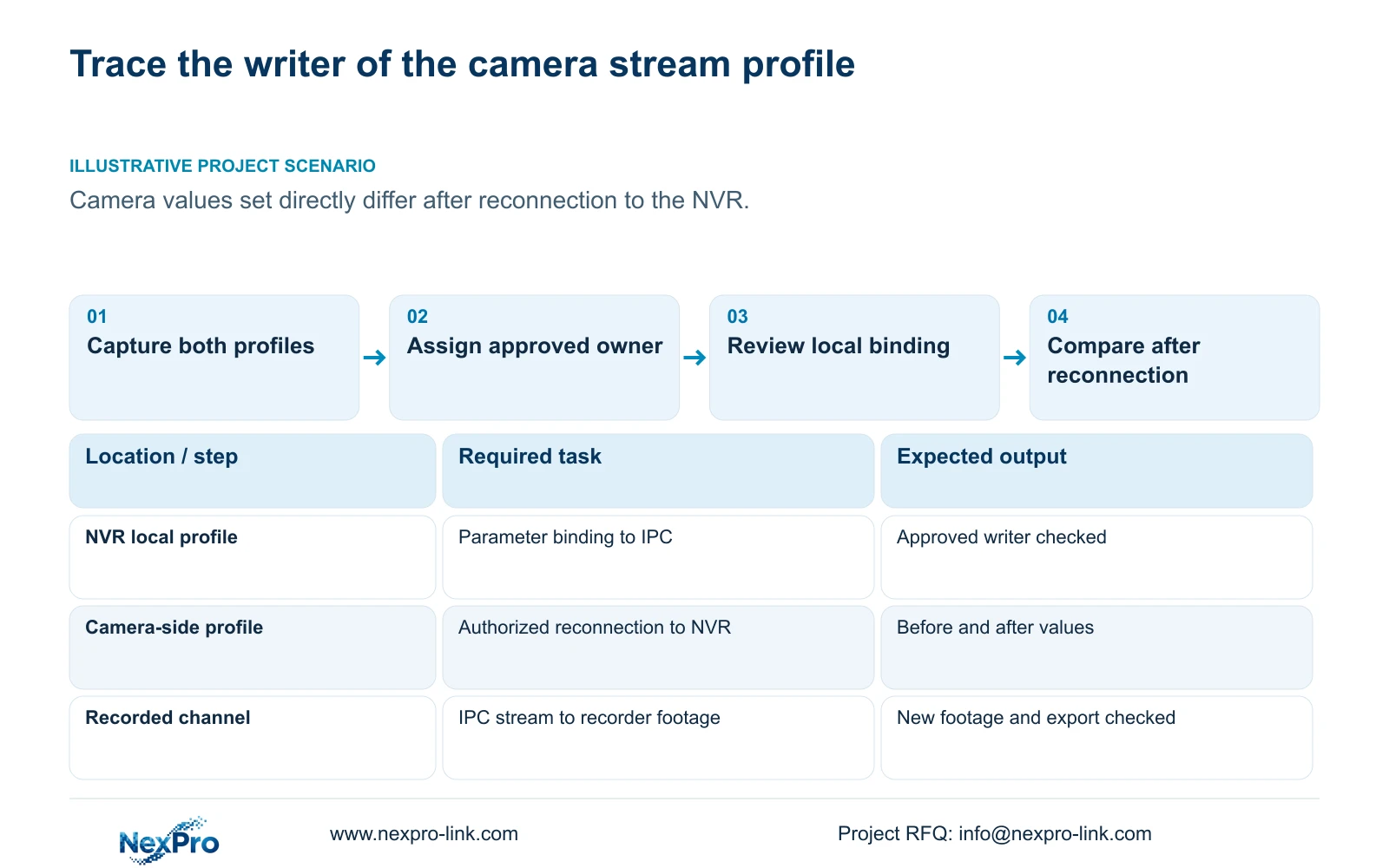
Illustrative project scenario: A commissioning engineer sets camera profiles directly, then finds different values after reconnecting them to the NVR. Capture the camera-side values and recorder-side profile before another save. Check whether locking explains the return, choose the approved owner, and repeat the comparison under an authorized reconnection plan. This is a diagnostic scenario, not evidence of a delivered repair.
Record the changed variable and any interruption, preserving relevant data before disconnecting an active camera path. Compare both interfaces after reconnection, then check live view, correct time and newly produced recorder footage. Check relevant older footage, export, intended accounts and required events as part of acceptance.
If the profile still changes under the selected policy, retain the discrepancy and seek the supported next action for the actual pair. Do not assume failed camera memory, universal protocol behavior or automatic rollback. Sections 4.11 and 4.12.17 through 4.12.20 support the operating and maintenance context; the passing result is a demonstrated task, not merely an online status.
Section 07
Should every project disable stream locking?
No. Recorder-managed profiles may depend on local binding. Choose the approved owner first, then verify that the selected behavior produces the accepted values.
Section 08
Does a configuration export preserve the recorded video?
No. Settings export and video backup are separate workflows. Preserve required footage independently and keep logs separately when they are needed for the investigation.
Section 09
Prepare a profile comparison
Send NexPro-Link the approved profile owner and a redacted recorder-versus-camera value comparison before and after reconnection at info@nexpro-link.com for a focused configuration review.
Engineering references
These sources support the general planning principles. Always use the selected product's current datasheet and applicable project standards for final design.


