

An online recorder indicator does not prove video delivery. Isolate the failed platform task with channel mapping, network, traffic and permission checks.
Section 01
Identify the failed video task behind the online indicator
When a platform lists the NVR online but cannot open video, preserve the registration result and investigate the failed service separately. Confirm the requested channel, compare the approved platform fields, check the recorder's relevant network path, and observe traffic during a defined request. Use an account authorized for that task, then test live preview and recorded playback independently. Local video and local recordings provide useful branches: if they fail too, investigate the recorder-side source; if they work, concentrate on platform delivery and access. Repeated password changes are a poor first response to a symptom that may occur after registration has already succeeded.
Record the exact operator action, channel, time and displayed error. Distinguish a channel that never opens from one that opens the wrong view or fails only during historical retrieval. These observations determine the next test more reliably than a general description such as no video.
Section 02
Use the applicable platform and network sections
This guide follows the private NVR4.0 user manual CH_V2.4.doc, with V2.2 identified in its body. Section 4.12.9 covers GB28181 live preview and playback settings. Sections 4.3.3.2 and 4.12.8 support remote-network checks, section 4.3.3.3 describes interface traffic, and section 4.12.3 separates permissions. Sections 4.3, 4.11 and 4.12.21 support recording verification.
Match the actual recorder model and firmware before applying an interface instruction. The traffic-based branches below are engineering interpretations, not an undocumented built-in platform test. A shared protocol or client name does not prove that all equipment exposes the same functions, and the manual's TS models have no established NexPro-Link commercial-SKU mapping.
Section 03
Confirm the requested channel without repeatedly changing credentials
Compare the current SIP server information, authentication identity and channel mapping with the receiving platform's approved parameter sheet. Registration success is evidence about that registration task. It does not establish that the platform request names the intended video resource.
If only a particular channel fails, compare its physical camera, local recorder channel and platform assignment. If every channel fails, retain the working registration evidence while investigating shared delivery and access dependencies. Correct a demonstrated mismatch, then repeat the same request.
The manual's registration and heartbeat settings belong to the connection configuration. Changing them does not by itself prove that media delivery has been repaired. Where registration remains established, avoid rotating credentials simply because a video window is blank. A credential change should follow an identified authentication issue and its responsible administrator's process.
Section 04
Check the approved platform path separately from local camera traffic
Confirm that the affected camera opens locally. Then check the selected default route, gateway and DNS for the recorder's platform connection. Camera traffic and remote access can follow different paths, so local viewing cannot demonstrate that the receiving platform can obtain video.
Use the remote-network diagnostic view to examine the recorder's remote-network situation and suggestions. Keep the destination explicit. Cloud reachability and cloud account authorization are separate from the owner's GB28181 platform workflow.
Review the required media path with the receiving-platform and network administrators. The supplied material does not define universal media ports or a firewall rule set, so use the approved implementation's requirements. If the path is unresolved, retain the working local result and obtain those requirements. Do not replace the investigation with blanket public exposure or disabling security controls.
Section 05
Observe transmit and receive traffic during a defined request
Section 4.3.3.3 presents interface transmit and receive information. Record the relevant interface during a quiet observation interval and while the selected platform request is active. Note other viewers, playback sessions or exports that could affect the observation.
Incoming camera traffic and outgoing viewer traffic describe different tasks. They need not be equal. A sum of configured stream bitrates is a video-payload planning value, while interface measurements can include overhead and other activity. Without a defined interval and topology, an unexplained screenshot cannot identify which request produced the traffic.
A traffic change associated with the request is useful evidence, but it does not prove that the platform decoded or displayed the intended video. If no relevant change is visible, investigate request handling, mapping and permissions. If activity appears while the platform window remains blank, retain that observation for delivery-path investigation.
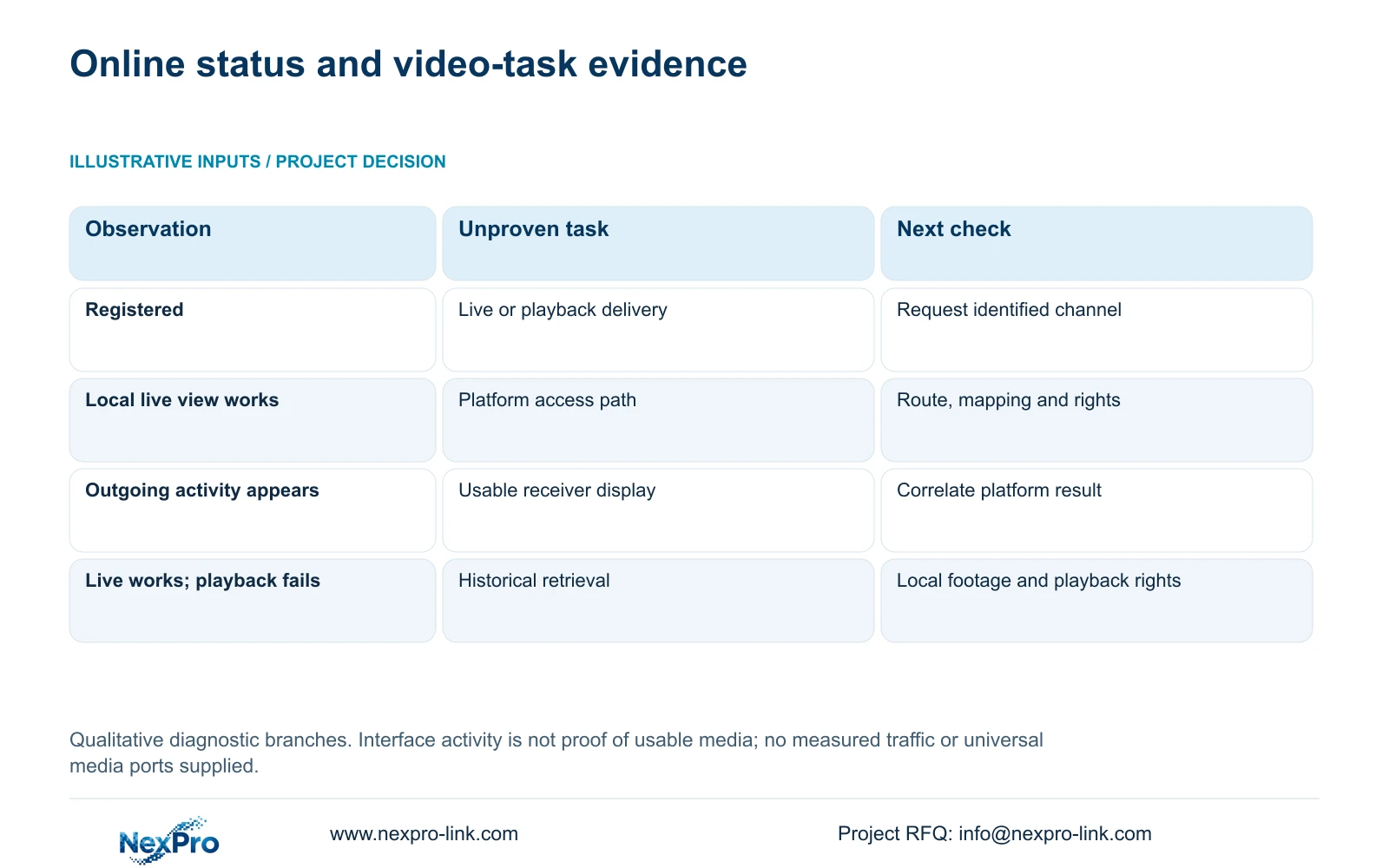
| Observation | What remains unproven | Next action |
|---|---|---|
| Local camera view also fails | The recorder has a usable source | Investigate the camera connection before platform delivery. |
| Local video works; platform video fails | The platform can receive and display that source | Check mapping, approved path and task authorization. |
| Request coincides with outgoing activity | The receiver displays the intended media | Correlate the interval with receiving-platform observations. |
| Live works; playback fails | Footage exists and playback access is authorized | Verify local footage, requested period and playback permissions. |
Section 06
Test the account on the intended access path
The manual separates local and network permissions, including preview and playback. Recording backup is also a separate local permission. An account that can view locally is not thereby authorized for remote playback.
Check the account relationship used by the failed workflow with the responsible recorder or platform administrator. Do not assume that the operator's platform login and a recorder-local user are the same object. Confirm the relevant rights at each applicable layer.
Test an allowed task and a task that should remain denied using the intended account. This verifies useful access without solving the symptom by granting unrestricted administration. If rights appear correct but video remains unavailable, retain the account test result and continue with the delivery-path evidence.
Section 07
Close live and playback faults with separate demonstrations
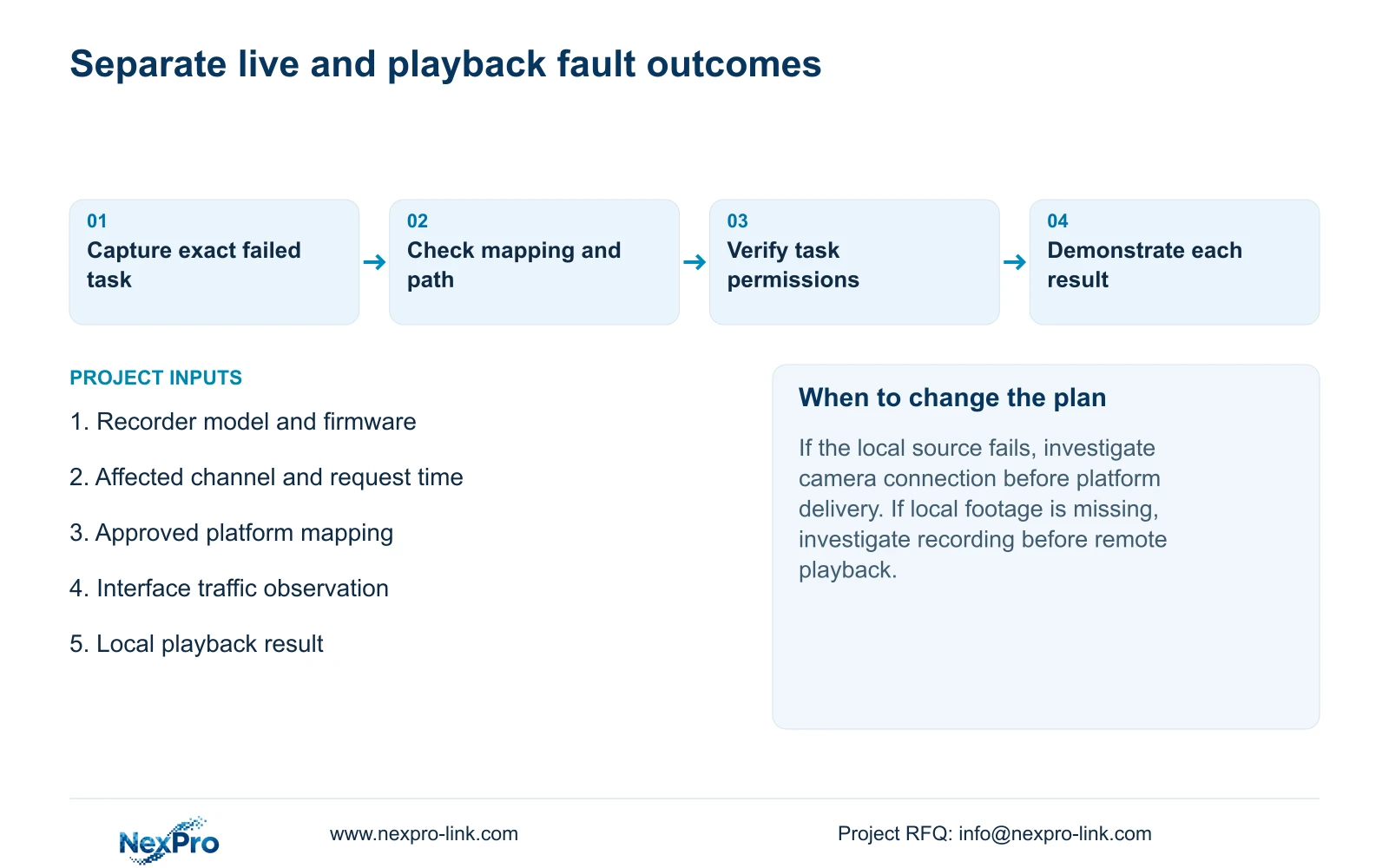
For live video, identify the physical camera and confirm the platform opens that location. For playback, specify a channel and known recorded interval. Check the recorder's selected disk and policy, retrieve that interval locally, then request it through the platform.
If local retrieval fails, investigate the recording task before treating the problem as remote playback. If local retrieval succeeds, keep that result beside the failed platform request. Verify a selected recorder-side export on another device to establish that the footage is usable.
Record the final result for each task, including anything still unresolved. A successful live window cannot close a playback fault, and registration alone cannot close either. The acceptance workflow does not establish additional alarm, talk or regulatory functions.
Section 08
Investigate an online dashboard entry with blank channels
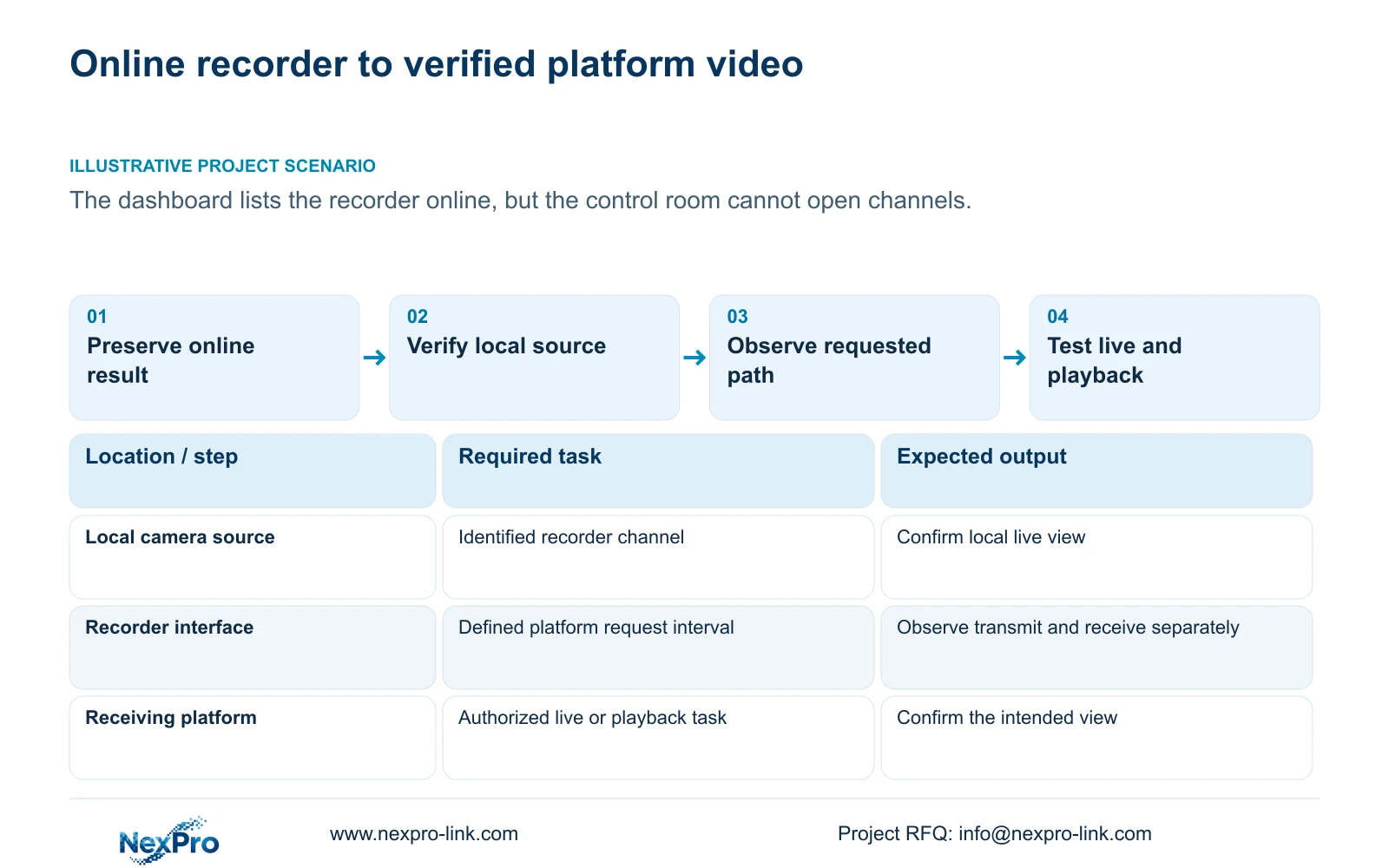
Illustrative project scenario: A project dashboard lists the recorder online but the control room cannot open its channels. The integrator preserves that status, confirms local video, checks the platform channel assignment and observes interface traffic during the same request. Account authorization and the approved media path remain separate checks. The proposed completion is an identified live view and a specified playback period, not another online screenshot. No diagnosis or delivered result is assumed.
The resulting task record can support a defined configuration discussion through NexPro-Link's BOQ and tender support service without prematurely specifying replacement hardware.
Section 09
Does outgoing traffic prove the platform received usable video?
No. It shows interface activity within the observed scope. Correlate it with the request and receiving-platform result before concluding that the intended channel was delivered and displayed.
Section 10
Submit the failed request and local result
Send NexPro-Link the recorder model and firmware, affected task and time, plus a redacted local-versus-platform result at info@nexpro-link.com.
Engineering references
These sources support the general planning principles. Always use the selected product's current datasheet and applicable project standards for final design.


