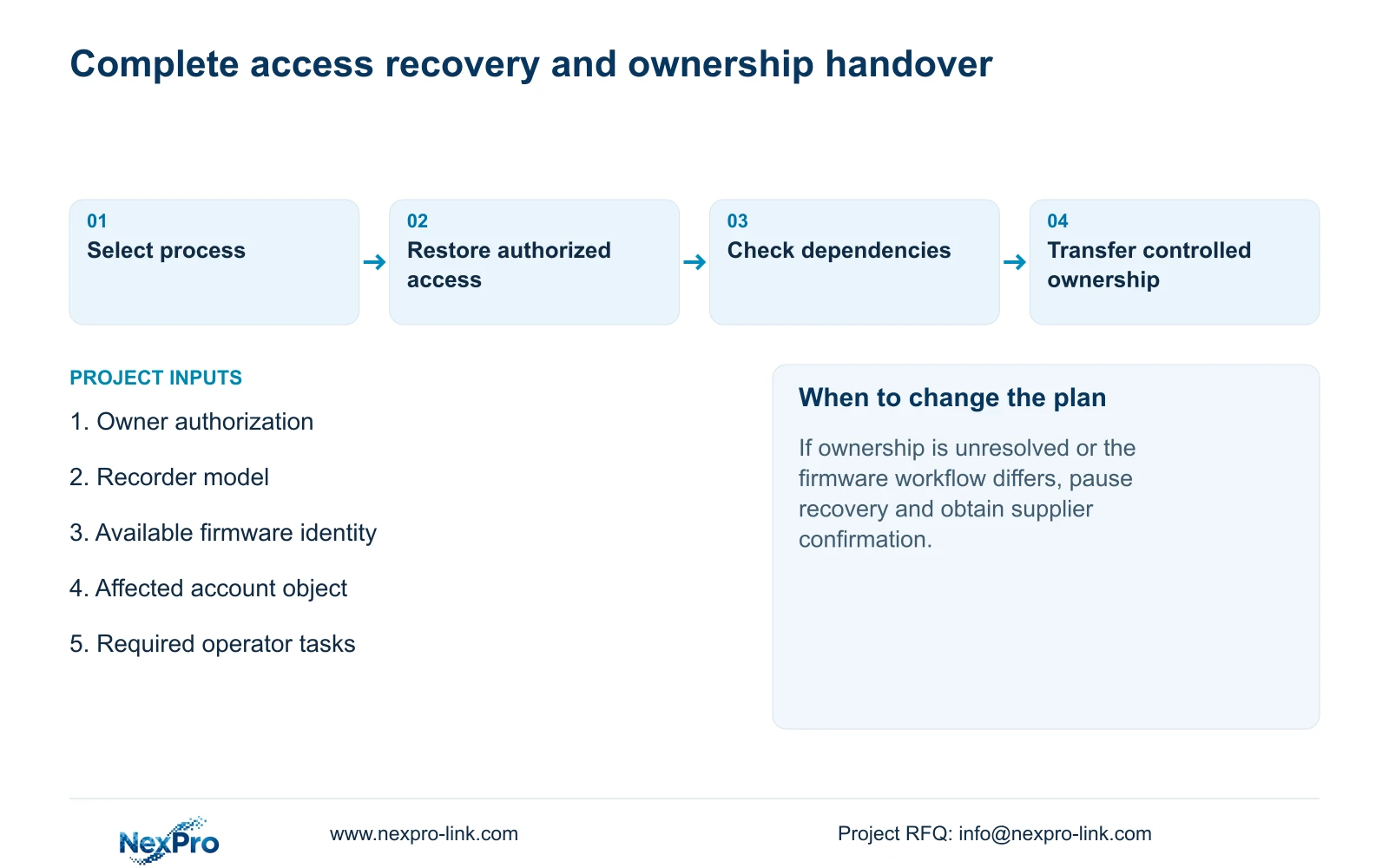
An ownership handover needs more than a recovered login. Identify the recorder, protect recovery material and verify the owner's required operating tasks.
Section 01
Restore the owner's access through the applicable process
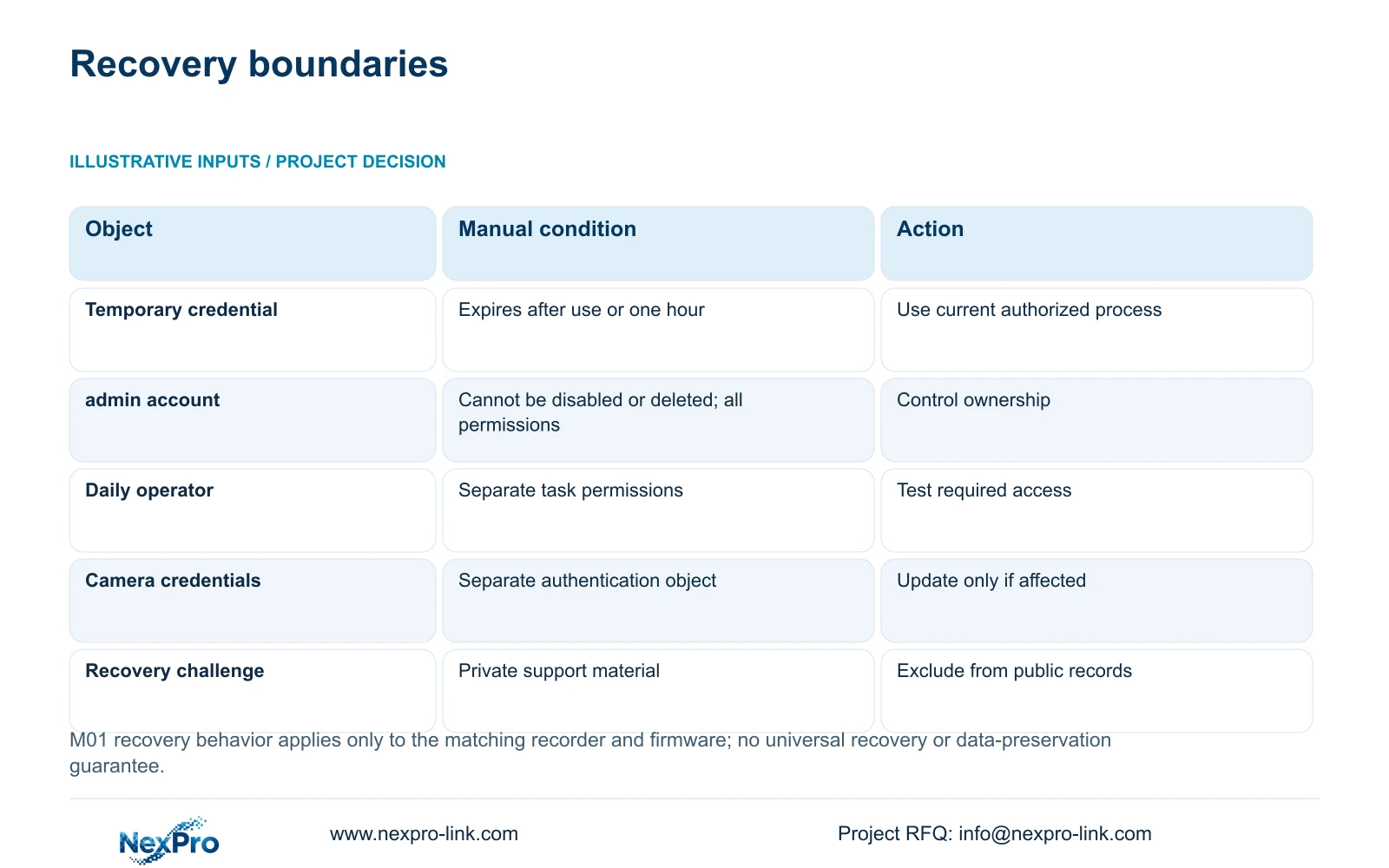
Recover a forgotten recorder password through the documented process for the identified model and firmware, with the legitimate owner's authorization. The supplied manual describes a Forgot Password workflow with a Seetong-assisted temporary credential, followed by setting a new password. It states that the temporary credential expires after use or one hour from generation. Keep recovery challenges and device identifiers private. After access is restored, check the connections that depend on the changed credential and test the owner's required permissions. Completion means controlled administrative ownership and usable daily access, with the necessary footage and configuration protected throughout the work.
The source is NVR4.0 user manual CH_V2.4.doc, whose body identifies V2.2. Section 4.1.3 and question 2 in section 5.3 describe the recovery route. These references do not establish a universal procedure for other recorders or an authentication bypass.
Confirm who authorizes the recovery and who will hold administrative access afterward. Arrange the applicable private support process before generating or sharing recovery material. If ownership cannot be established or the actual device's workflow differs, stop and obtain supplier guidance.
Section 02
Collect the recorder identity without assuming access
The manual's System Information section, 4.12.19, lists product model, hardware version, software version and software date or release information. Use those exact values where an existing authorized session permits access. Do not assume a locked-out owner can open a protected system screen.
If access is unavailable, assemble the equipment identity already held in the approved handover or purchasing record and ask the supplier what further verification is required. Mark unconfirmed firmware information as unconfirmed. A similar interface or carton description does not prove that another unit's instructions apply.
Keep serial numbers and cloud identifiers in a private service record. Redact QR codes, access-related identifiers and recognizable site images from general correspondence. The supplier needs enough identity to select the process, while the public enquiry should contain only the non-sensitive scope.
Preserve required footage and relevant configuration wherever existing authorized access allows it. Any proposal to restore settings, upgrade or stop the running recorder requires separate authority and a data-preservation and interruption plan. Password recovery should not become an unapproved wider maintenance operation.
Section 03
Identify which credential and connections need updating
A local recorder account, a network user, a camera connection credential and a third-party cloud account are separate authentication objects. Determine which one the recovery request concerns before updating dependent connections.
Sections 4.1, 4.3.1 and 4.12.3 provide the relevant account and connection distinctions. A password stored in a channel's connection settings authenticates the camera. Recovering recorder access does not establish that the camera password or cloud-account password has changed.
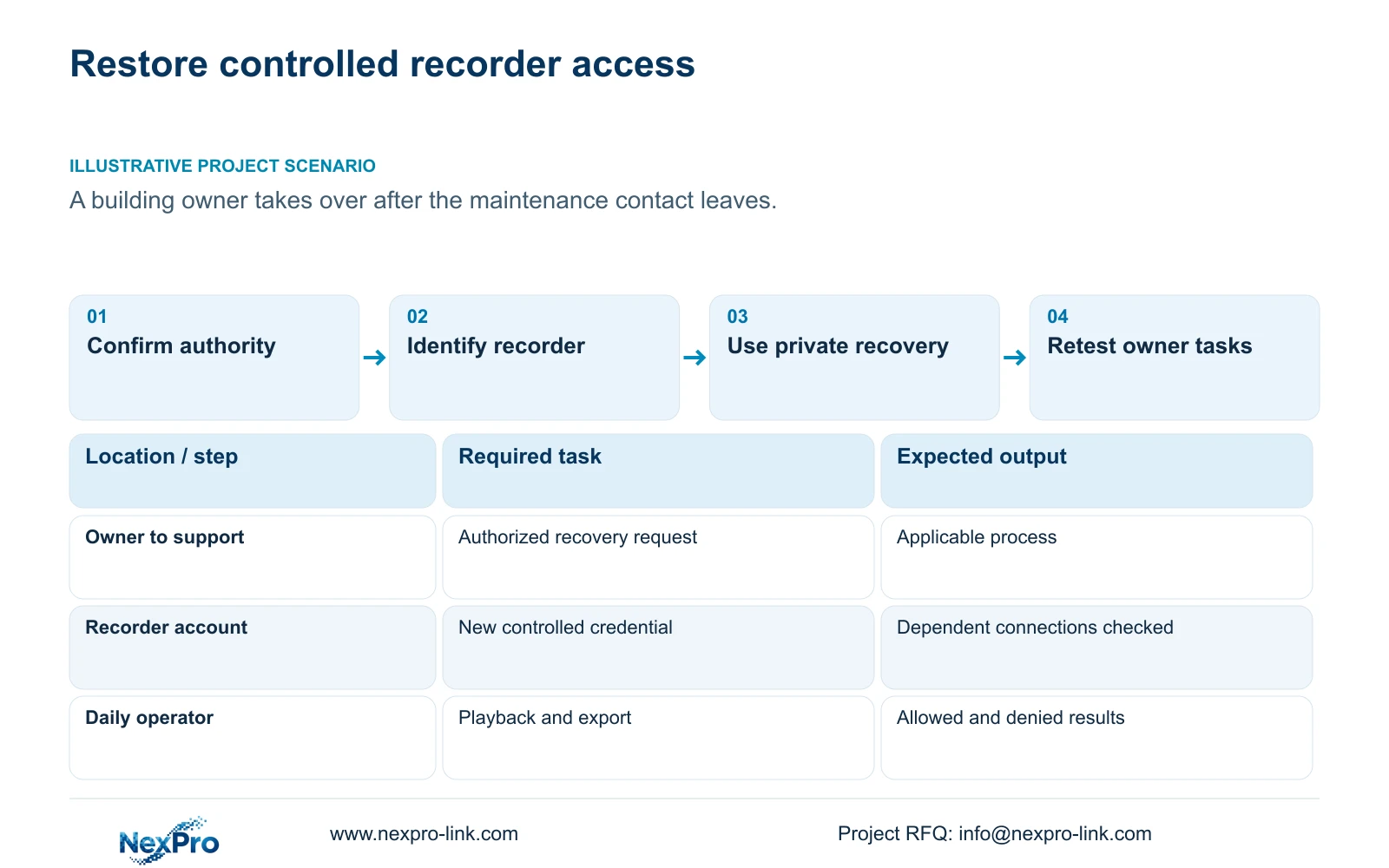
Build a dependency list naming the authorized users or clients that rely on the recovered credential. After the change, verify each required connection and update only those that actually depend on it. Record ownership, change status and test results, with secret values transferred through the controlled credential route.
| Condition | Required action | Completion evidence |
|---|---|---|
| Ownership or authority unresolved | Pause recovery and confirm the authorized owner | Accepted ownership and support route |
| Model or firmware uncertain | Obtain applicable equipment identification | Correct process selected |
| Temporary credential used or one hour elapsed | Follow the applicable process for a fresh authorized attempt | Current private recovery material |
| Recorder password changed | Check only its dependent connections | Required connections tested |
| Daily operator needs limited tasks | Use a separate appropriate account | Allowed and prohibited actions verified |
Section 04
Keep administrative ownership separate from daily use
Section 4.12.3 says the admin account cannot be disabled or deleted and retains all permissions in this manual's scope. Plan the handover around that behavior. Do not promise that removing the administrator will satisfy a customer's account policy.
Assign daily operators separate accounts with the permissions needed for their work. The owner should control the administrative credential and the process for future maintenance access. An installer retaining sole ownership of that credential leaves the building dependent on the installer for later changes.
If the owner's policy requires behavior that the documented recorder cannot provide, record the mismatch for a model-level decision. Creating an operator account is a useful control, but it does not by itself demonstrate compliance with a certification or an external access-control standard.
Section 05
Retest the permissions that the owner will use
Local and network rights are separate in section 4.12.3. Preview, playback, system settings and local backup must be treated as distinct tasks. Use the intended account and actual access path for the test.
Confirm an allowed operation and a prohibited operation. A local operator may need playback and export while remaining unable to alter system settings. Remote preview success does not establish remote playback permission. Record the result for each approved task without broadening access simply to make every test pass.
When a dependent connection fails, identify whether authentication or a task permission is unresolved. Retest the original action after the authorized adjustment. The manual's remote-upgrade permission description contains inconsistent wording, so obtain model-specific confirmation if that operation is part of the handover.
Section 06
Make access usable after the maintenance contact changes
A complete handover lets the owner identify a channel, retrieve a required interval and export a file that plays independently. Demonstrate those actions with the intended operator. Login success alone leaves the retrieval task untested.
Keep the applicable versions, configuration-backup location and maintenance responsibilities together. Sections 4.11, 4.12.3 and 4.12.17 through 4.12.19 support those operating and recordkeeping tasks. Transfer credentials separately through the owner's approved controlled channel.
Document who handles future account changes and where the owner requests applicable support. Check that the owner can locate the instructions and complete the demonstrated task without the departing contact. The public contact route can initiate an enquiry; warranty terms should not be interpreted as a promise of password recovery or data recovery.
Section 07
A building owner taking over maintenance
Illustrative project scenario: A building owner takes over a recorder after the original maintenance contact leaves. The owner establishes recovery authority, identifies the unit and uses the applicable private process. The handover remains incomplete until administrative ownership is controlled, dependent connections are checked and a daily operator can retrieve and export the required sample.
Section 08
Can the temporary recovery credential be kept for later use?
No. The supplied manual says it expires after use or one hour from generation. Follow the current authorized process when another attempt is required.
Section 09
Request the applicable recovery route
Provide NexPro-Link with the recorder model and available firmware identity through /contact to establish the appropriate authorized recovery process.
Engineering references
These sources support the general planning principles. Always use the selected product's current datasheet and applicable project standards for final design.