

A packet-loss observation needs a defined target, path and period. Correlate it with the failed viewing task before selecting a limited, authorized change.
Section 01
Define what the packet-loss observation covers
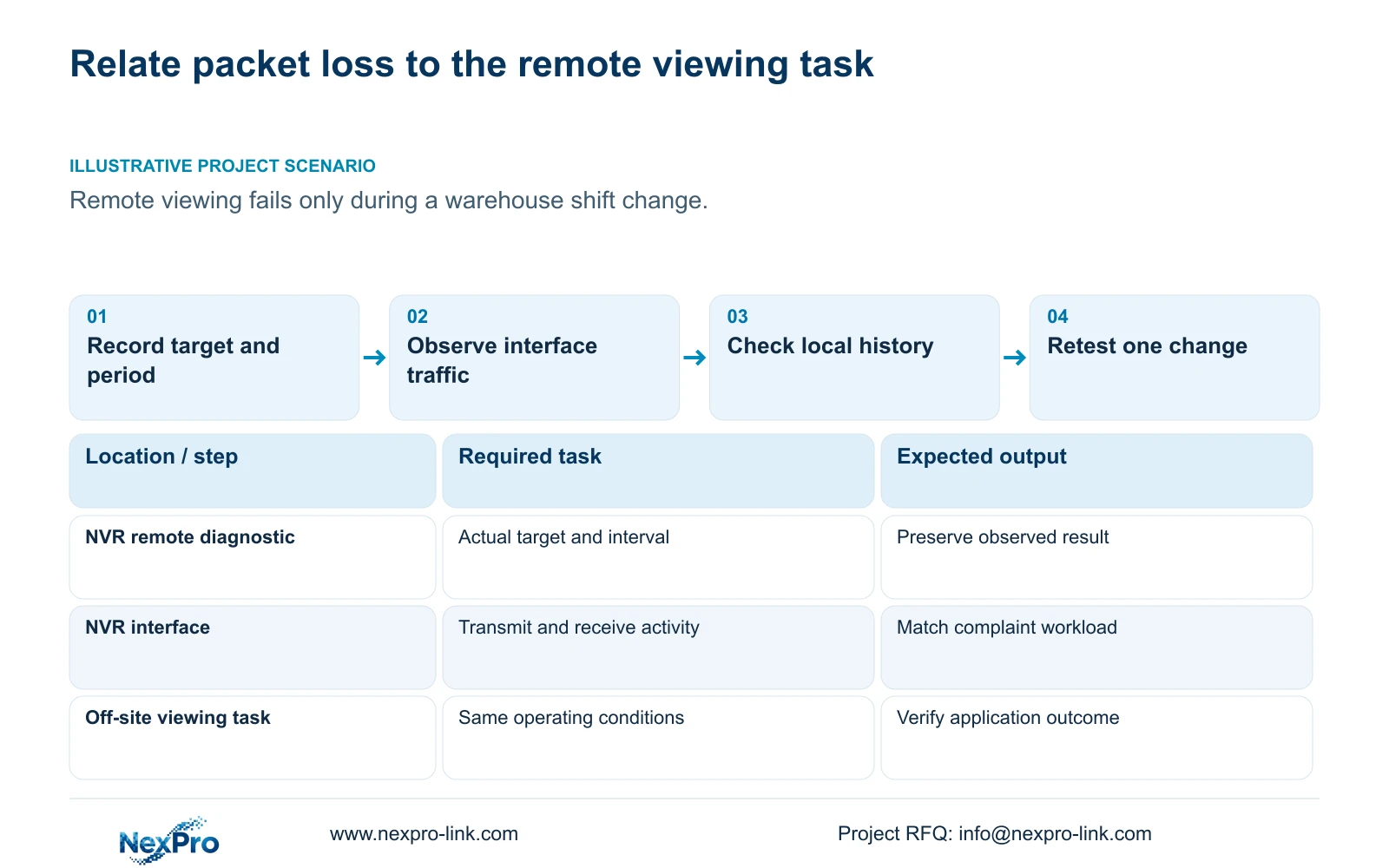
Use an NVR packet-loss check to identify a repeatable network symptom on a defined path and during a defined period. Record the tool's target and result alongside the remote viewing complaint, then compare interface traffic and available camera disconnect history from the same interval. Confirm the recorder's outbound route and DNS before proposing one authorized change. Repeat the check under matching conditions and test the viewing task again. The supplied NVR4.0 manual describes a packet-loss tool within remote-network diagnostics, but supplies no universal acceptable-loss threshold here. A loss observation alone cannot identify a defective cable, switch, recorder or service provider.
Write down the target actually used by the tool, the recorder interface or path context, and the observation start and end. If the target or interval is unclear, the result cannot support a useful before-and-after comparison. Preserve the output with those details instead of sharing an isolated screenshot.
The operating source is NVR4.0 user manual CH_V2.4.doc, whose body identifies V2.2. Section 4.3.3.2 describes remote-network results, suggestions, settings and the packet-loss tool. This guide does not invent target selection controls, probe behavior or numerical readings absent from the supplied material.
Section 02
Compare traffic while the complaint is occurring
Section 4.3.3.3 displays interface transmit and receive information. Observe both directions during the packet-loss interval and record the active workload. Remote viewing, playback and downloads can change outgoing activity, while camera streams contribute to the recorder's incoming workload.
Incoming and outgoing traffic are not required to match. Their difference can reflect different operating paths, and interface readings can include protocol overhead and other activity. A stream-bitrate sum is a planning payload calculation, not a direct substitute for an unexplained interface measurement.
Compare the complaint interval with a separately identified quiet interval using the same interface and target where possible. If the complaint appears during a workload increase, that timing makes the workload a useful test condition. It does not prove saturation or justify a higher-capacity switch without further evidence about the relevant link and task.
Section 03
Check whether cameras disconnected at the same time
Use the available local offline history to determine whether camera connections changed during the remote complaint. Section 4.3.3.1 describes past-week details and connection-statistics export, with an attached HDD required to enable local diagnostics. Confirm that prerequisite before interpreting an empty record.
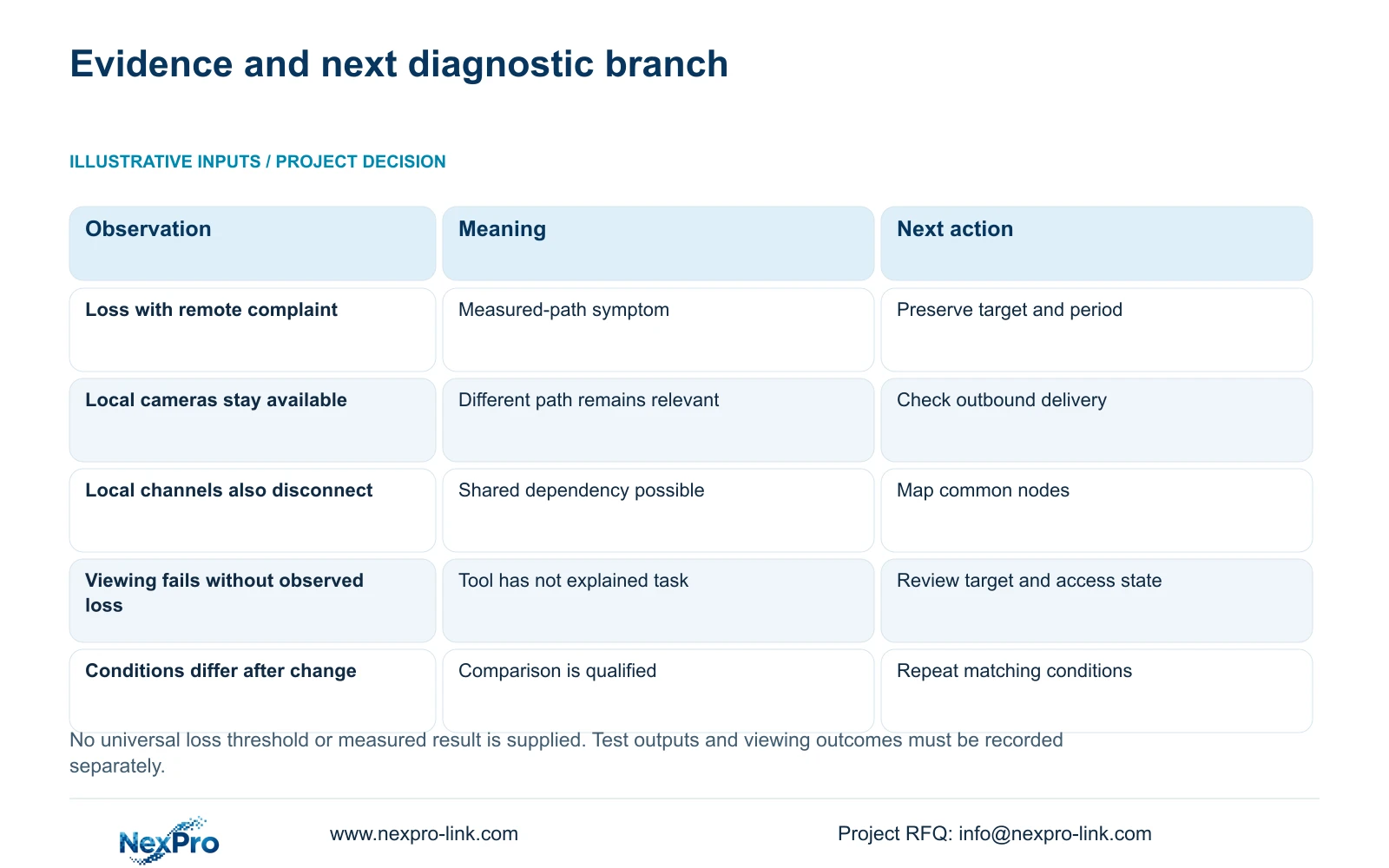
Preserve history before resetting counters and compare channel identities and times. If remote viewing fails while local camera connections remain available, keep the outbound and client paths under investigation. If several channels also disconnect, map their shared dependencies before choosing a broader test.
A lack of recorded disconnects is meaningful only within the feature's available coverage. It cannot establish that every network path was fault-free. Similarly, simultaneous disconnects and packet loss are related observations to investigate, not automatic proof of a single hardware cause.
| Observation | Useful distinction | Next action |
|---|---|---|
| Loss observed during remote complaint | The measured path and task may share a dependency. | Preserve the target, period and traffic context. |
| Local channels remain available | Camera connectivity and remote delivery differ. | Inspect the outbound path and intended client task. |
| Several local channels also disconnect | A shared local dependency may be involved. | Map affected channels to their common nodes. |
| No loss observed; viewing still fails | The tool has not explained the failed task. | Check target relevance, cloud state and authorization. |
| Retest uses a different target or workload | The comparison has changed scope. | Repeat comparable conditions or qualify the result. |
Section 04
Confirm the path being tested
Sections 4.3.3.2 and 4.12.8 distinguish the recorder's remote networking from local camera traffic. Check the configured default route, gateway and DNS against the site's intended outbound arrangement. Note any difference between that arrangement and the path relevant to the tool's target.
A successful local picture does not establish the internet or cloud path. Conversely, packet loss toward a target does not establish that the target represents every leg of the manager's viewing session. Keep the measured path and the failed application task visible in the report.
If the network observations do not explain the complaint, retain them and check activation, device identity, account authorization or service context as appropriate. Do not replace an unresolved diagnostic question with camera readdressing or blanket public port exposure.
Section 05
Approve a limited change with a stated purpose
Choose a change only after the observations identify the requirement it addresses. Recorder menu options do not override enterprise network policy. Coordinate the proposed action with IT and state which service, path or operating condition the change concerns.
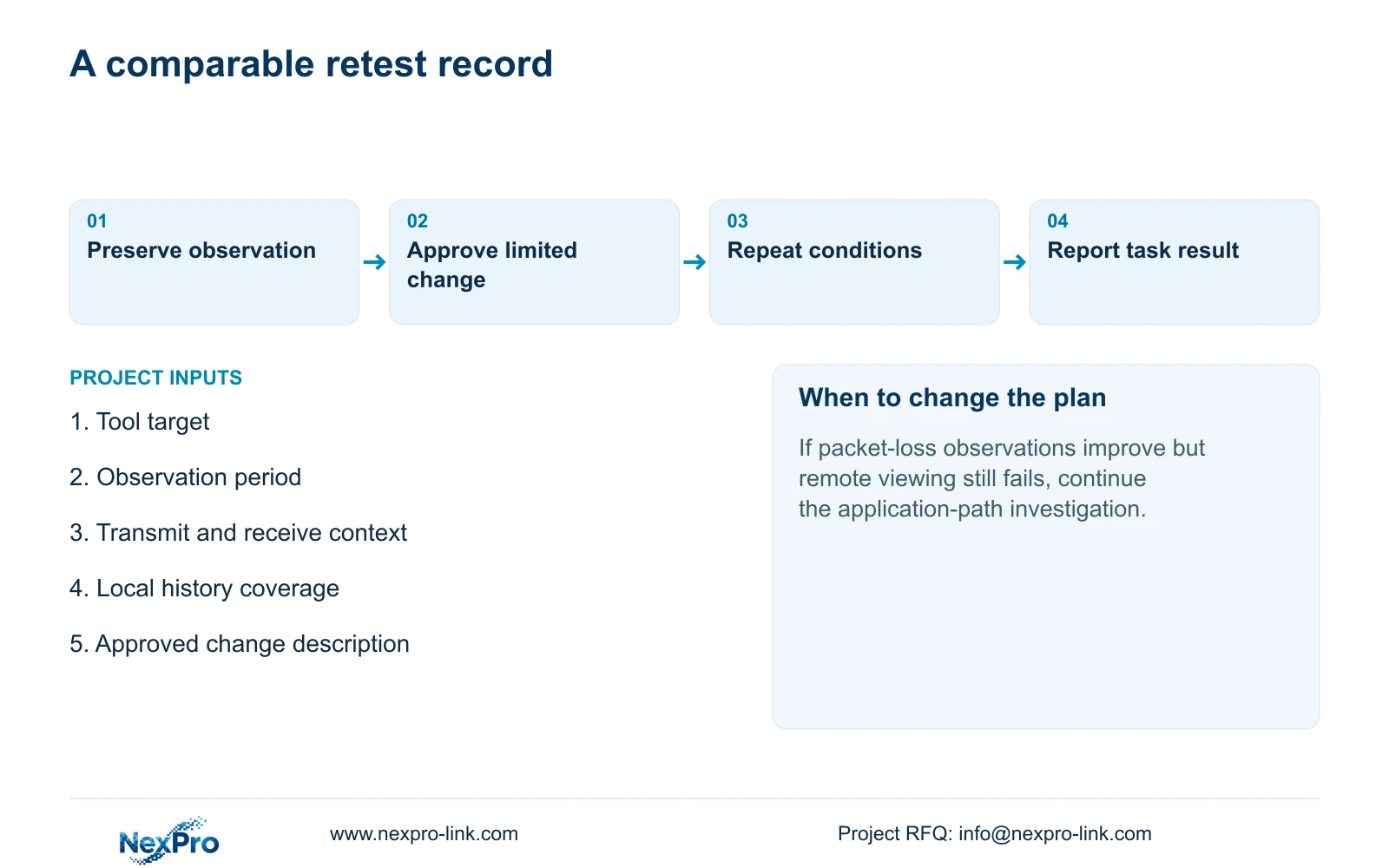
Document the previous state, intended new state and expected observation. Make one controlled change where practical so its effect can be assessed. Preserve relevant configuration and diagnostic records before proceeding. If the action changes the recorder IP or stops a running recorder, obtain authority, protect required data and agree the interruption and reconnection conditions.
If the current evidence cannot identify a suitable limited change, continue observation instead. A support request needs the symptom and relevant context, not passwords, public credentials or unrestricted remote access. Wider firewall changes should not become a substitute for confirming the failing path.
Section 06
Repeat the conditions and validate remote viewing
Repeat the packet-loss check with the same target and an identified comparable interval. Record transmit and receive activity again, along with local channel status and the intended remote viewing result. If the workload changed substantially, state that limitation before interpreting a difference.
The supplied material does not provide a universal permitted loss percentage, test duration or performance acceptance figure. Do not invent one to label the recorder good or bad. Use the project's agreed operating task and any separately established device requirements to decide what still needs verification.
If the loss observation improves but viewing remains unusable, the task remains unresolved. If viewing works but the diagnostic observation persists, document both outcomes and investigate their relationship. If the complaint does not recur during the retest, report the conditions and period tested without promising permanent elimination.
Section 07
Use shift timing as a test condition
Illustrative project scenario: A remote-viewing complaint occurs only during a warehouse shift change. Collect the packet-loss observation and traffic context during that period, then compare local connection history. Map the outbound path before proposing an IT-approved change. A successful quiet-period session is useful context, but it does not reproduce the reported condition.
The resulting report should name the measured path, viewing task, workload and next test. It should leave the cause open until the observations support a narrower conclusion.
Section 08
What loss percentage proves that hardware is defective?
This source provides no such universal threshold. Packet loss needs path, timing and operating context before it can guide a hardware investigation.
Section 09
Provide the measured path and complaint interval
Send NexPro-Link a redacted test result with its target, observation period and matching viewing symptom at info@nexpro-link.com to discuss the next check.
Engineering references
These sources support the general planning principles. Always use the selected product's current datasheet and applicable project standards for final design.


