


An orange playback date shows that recordings exist, not that every camera recorded continuously. Follow the channel, schedule, clock and file checks before accepting daily coverage.
Section 01
Establish what the colored date actually proves
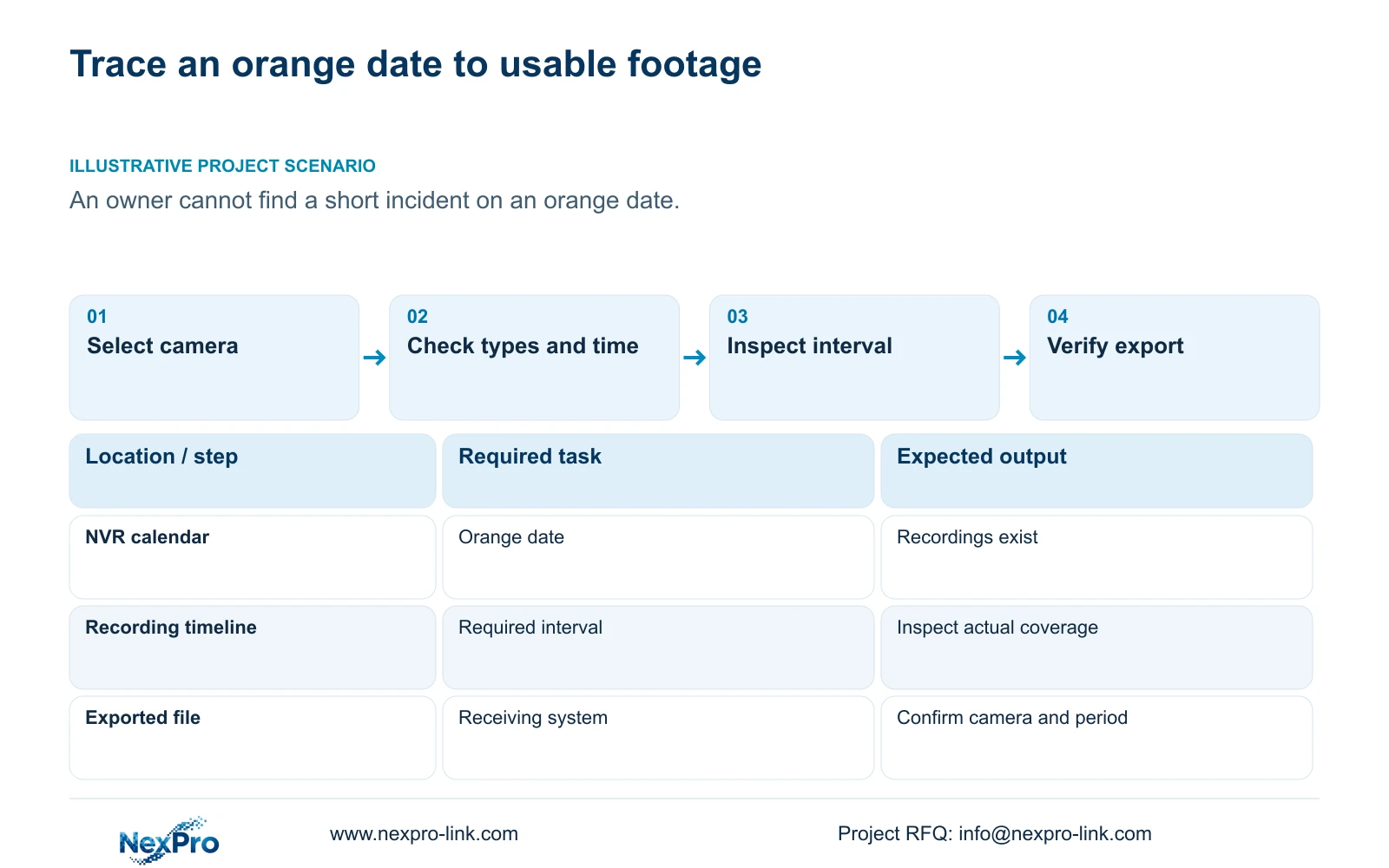
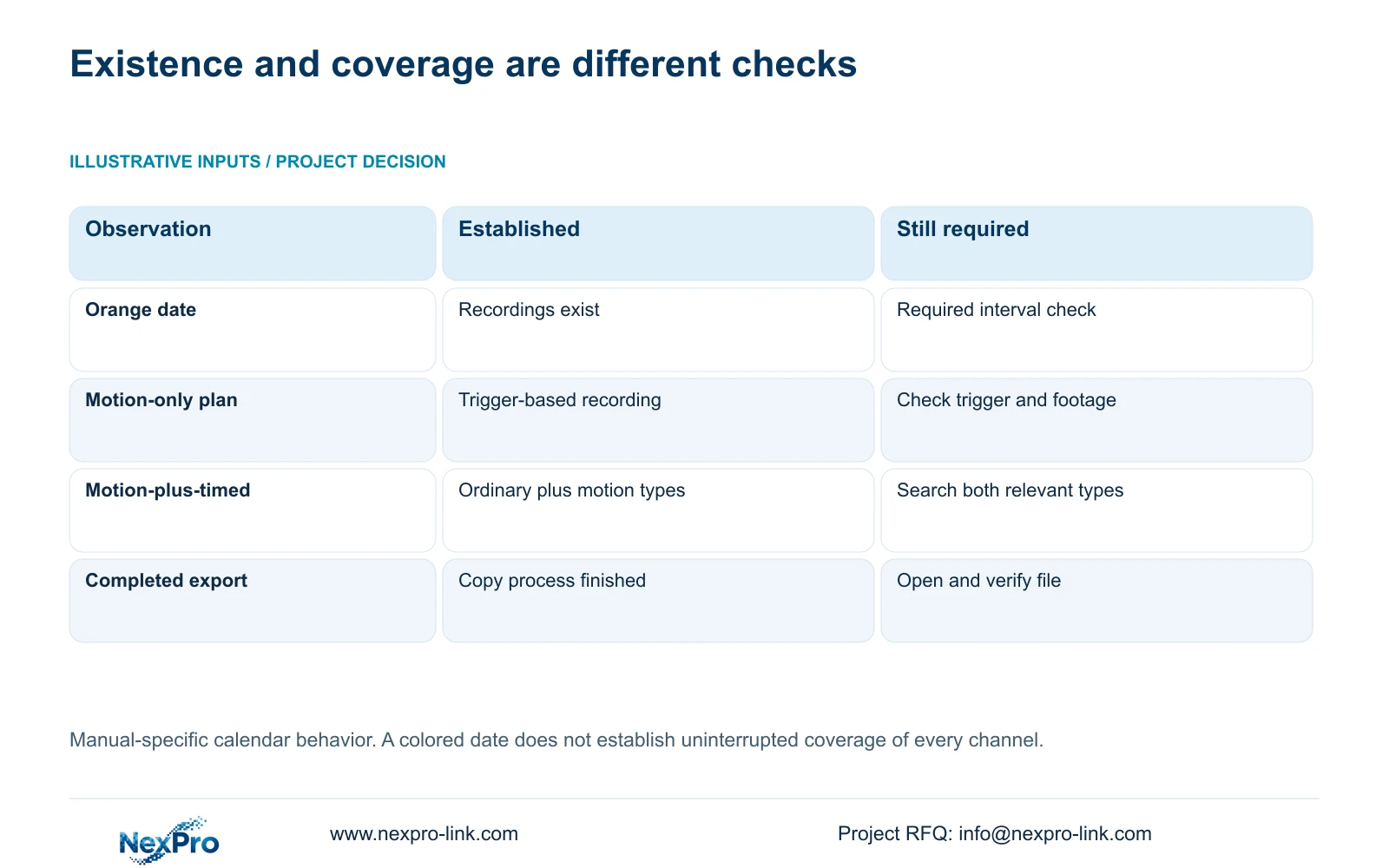
An orange date means recordings exist for that date in the documented NVR playback workflow. It does not establish uninterrupted recording across every channel or prove that a particular incident remains available. When a short event cannot be found, confirm the selected camera, date and recording-type filter before investigating a storage fault. Next, compare the recording plan with the required period, check the time reference and inspect the timeline closely. If footage is found, export the relevant interval and verify the file on the receiving system. Daily coverage should be accepted against the required camera and time range, not against calendar color alone.
Section 4.11.2 describes orange dates as having recordings and grey dates as having none. Playback initially follows the channel selected in preview. Explicitly select the incident camera even when the calendar looks familiar, then record the search date and enabled types: ordinary, alarm and motion. A grey result warrants checking those inputs before concluding that the recorder lost footage.
This guide follows the private supplied NVR4.0 user manual CH_V2.4.doc, whose body identifies V2.2. Relevant sections are 4.11.1 through 4.11.4, 4.4.2, 4.12.2 and 4.12.21. Section references take priority over page numbers. The operating object is recorder storage; Seetong PC local recordings are a separate source.
Section 02
Compare the missing interval with its recording plan
Once the source is correct, inspect the plan associated with the required interval. Section 4.11.1 describes timed recording, no recording, motion recording and motion-plus-timed recording. Its grid has a thirty-minute minimum scale. That scale describes plan configuration, not the duration of an incident or a guarantee about stored coverage.
Motion-only recording depends on a motion trigger. A quiet interval can therefore differ from the owner's expectation of continuous coverage. Motion-plus-timed recording continues ordinary timed recording without a trigger and records motion-type footage when triggered. Searching only motion footage can hide ordinary footage from the same mixed schedule. Broaden the type selection and inspect the period again.
Keep the historical question separate from any proposed schedule change. A current setting alone does not establish what was configured when the incident occurred. Where earlier configuration records exist, compare them with the present plan and report any uncertainty.
| Observation | Meaning to check | Next action |
|---|---|---|
| Orange date, wrong channel selected | Recordings belong to another search source | Select the incident camera explicitly |
| Motion-only plan, no matching trigger | Continuous coverage was not established | Inspect the plan and available event intervals |
| Mixed plan, motion filter only | Ordinary footage may be excluded | Include ordinary recordings and repeat the search |
| Correct inputs, target interval absent | Retention or recording needs investigation | Check available history and full-disk behavior |
Section 03
Reconcile the incident time with the camera clock
An incident report and a camera timestamp may use different time references. Before moving through several dates, compare the reported time with the recorder and IPC settings. Section 4.4.2 includes IPC manual time, network synchronization, timezone and daylight-saving controls. Section 4.12.2 describes separate recorder time settings and an IPC synchronization interval measured in hours.
Document the intended authority and synchronization direction. Several mechanisms acting on the same devices can obscure which clock the investigation should follow. The manual does not establish support for every possible local NTP arrangement. After an authorized configuration change, check a known event across the required cameras. For an older incident, preserve the observed timestamp discrepancy in the review record.
Section 05
Check whether the required history still exists
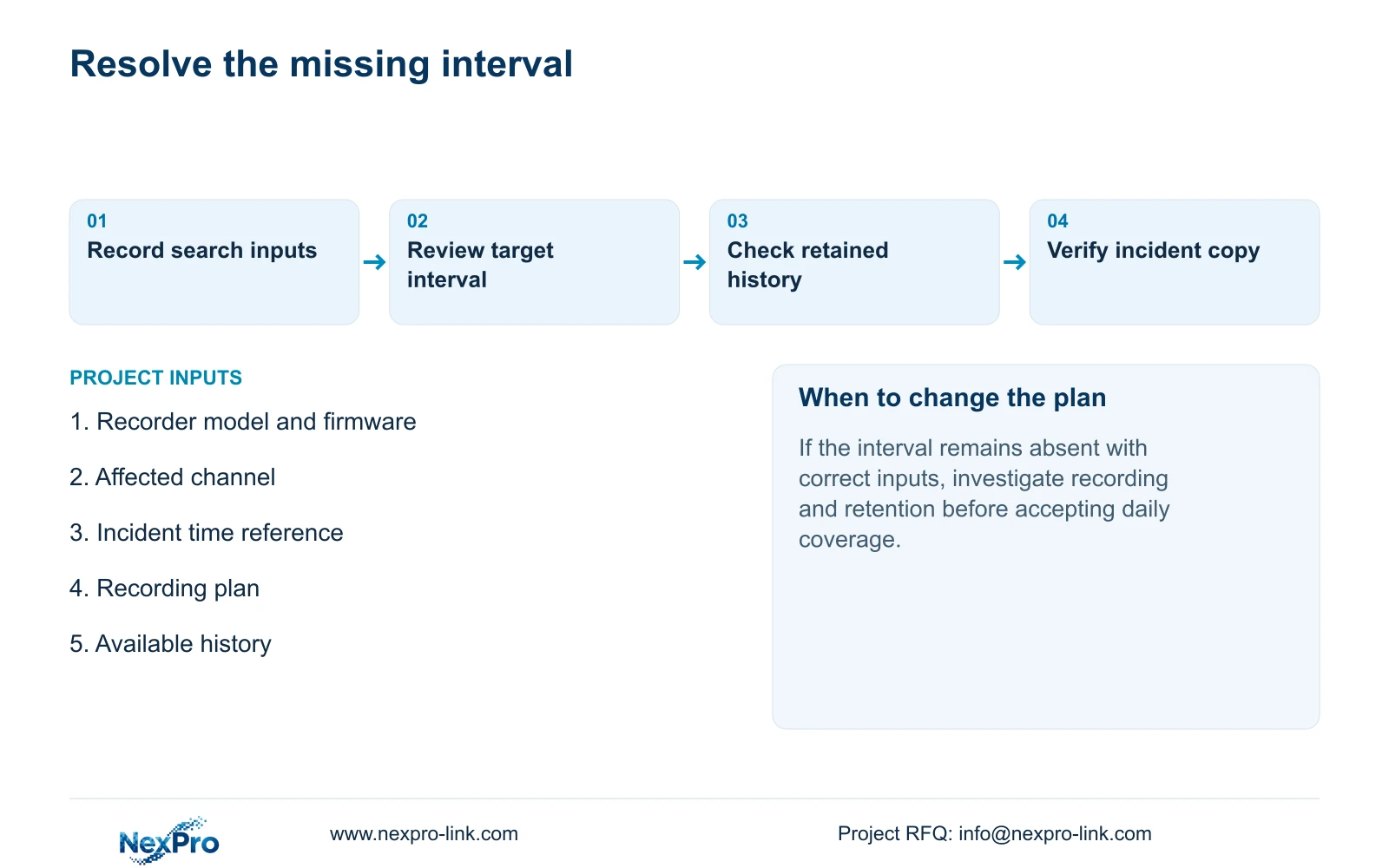
If source, time and filters are correct, compare the target period with the oldest and newest footage actually available. Section 4.12.21 distinguishes overwrite from stop-recording behavior. Overwrite permits cyclic storage use; stop-recording makes full capacity a condition that can interrupt further recording.
An orange date can remain meaningful even when the particular interval needed is unavailable. Neither full-disk choice proves daily completeness. Check the configured behavior and retained periods before assigning a cause. The no-disk startup prompt is a separate interface setting; disabling it creates neither storage nor retention. Preserve relevant available footage while the owner decides the investigation and incident-copy scope.
Section 06
Verify the incident file before accepting the result
When the interval is located, use section 4.11.4 to select the export source and period. Open the resulting file on the intended receiving system. Confirm the camera location, beginning and end, actual playback and any required audio. A completed progress indicator establishes less than a usable incident copy.
The manual mentions players such as VLC, without guaranteeing every operating-system and codec combination. Record the viewing method that worked and retain the relevant original footage until the required copy has been checked. If the file opens but omits the target, return to the selection and interval checks instead of treating successful playback as complete acceptance.
Section 07
Apply the checks to the owner's missing incident
Illustrative project scenario: A project owner sees an orange date but cannot find a short incident from that day. The reviewer first confirms the camera and broadens the recording types, then reconciles the incident time and examines a finer timeline interval. If the event appears, the next result is a verified export. If it does not, the report identifies the reviewed range and remaining retention or recording question. This is a proposed investigation sequence, not a delivered project outcome.
Section 08
Can an orange calendar screenshot sign off daily coverage?
No. Acceptance needs the agreed cameras and time ranges checked in playback. A colored date establishes recording existence within the documented workflow, without proving complete daily coverage.
Section 09
Does stop-recording mode protect all older incidents?
It changes the consequence of full capacity, but can stop new recording. Choose it against the owner's retention and incident-preservation needs, then monitor the footage actually available.
Section 10
Request help with the unresolved interval
Send NexPro-Link the recorder model and firmware, affected channel, required time range and redacted playback search state at info@nexpro-link.com.
Engineering references
These sources support the general planning principles. Always use the selected product's current datasheet and applicable project standards for final design.


