

A motion alarm does not establish human or vehicle classification. Define the target event, confirm the camera and recorder scope, and inspect useful and unwanted responses.
Section 01
Specify what should trigger an operator response
An ordinary NVR motion event does not establish that the system classified a person or vehicle. If changing light causes unwanted alerts, first define which activity should require a response and which background changes should be ignored. Then confirm the selected camera's event capability and the recorder's ability to receive and act on it. The supplied manual describes ordinary motion separately from IPC intrusion and line-crossing functions. Those named functions also need their own scope checks; they do not automatically prove classification or identity recognition. Evaluate the required event under representative lighting before buying an unspecified AI feature.
Write the requirement as an observable task. For example, distinguish movement anywhere in the view from a person entering the required area during the armed period. Describe the expected recording or notification as well. This gives the integrator something to test and the buyer something to compare.
For ordinary motion, section 4.12.11 separates enablement, detection area, arming time and linkage. Confirm these conditions before attributing unwanted or absent notifications to the detection method. A disabled output can hide a useful event, while a broad area can include activity the owner never intended to monitor.
Section 02
Locate event generation and recorder response
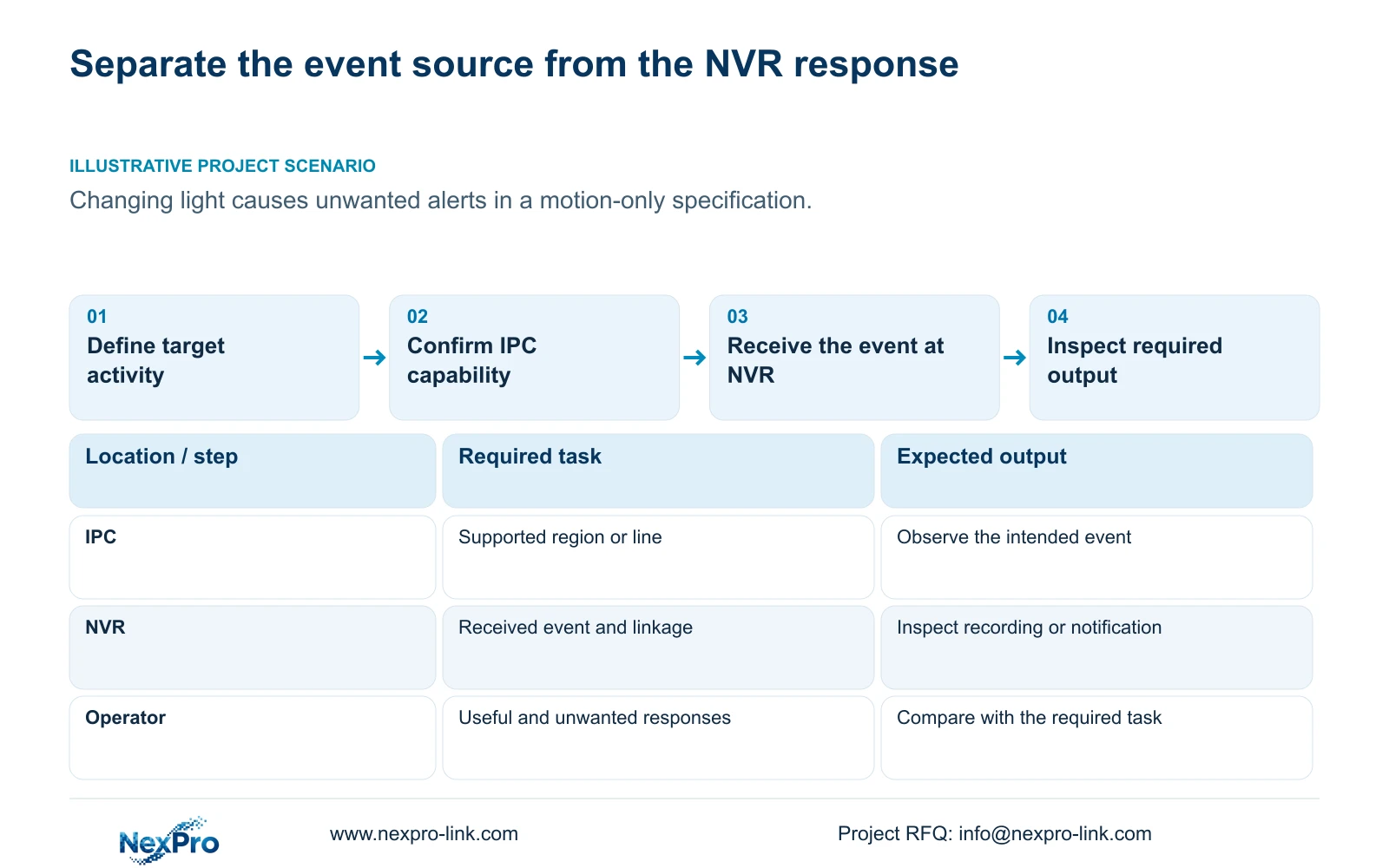
Section 4.12.15 describes enabling the NVR-side function and then opening Front-end Settings to configure the IPC region or line, direction and sensitivity. The camera provides the documented event capability; the recorder receives the event and applies the selected response.
Treat those as separate acceptance points. Check that the front-end rule represents the intended route or area, then observe whether the recorder receives the expected event. Finally, inspect the resulting action. Enabling intrusion on the recorder alone does not define the complete camera-side rule.
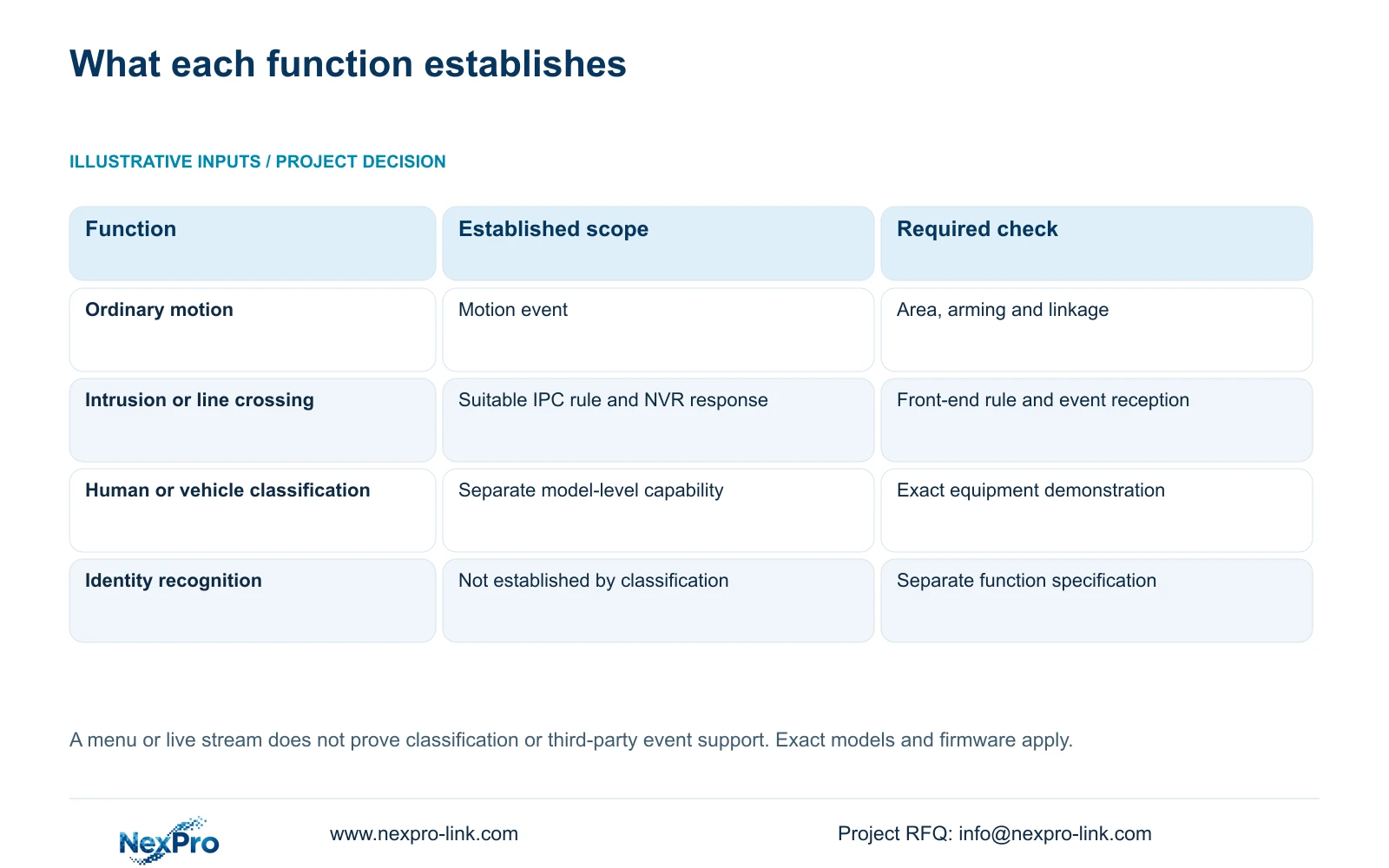
If the IPC lacks the required capability, stop trying to obtain it through the recorder checkbox. Determine whether ordinary motion meets the operating requirement or whether a different, explicitly supported camera and recorder arrangement needs evaluation. Do not describe every intrusion or line-crossing menu as human or vehicle classification.
Section 03
Build a function list for the selected equipment
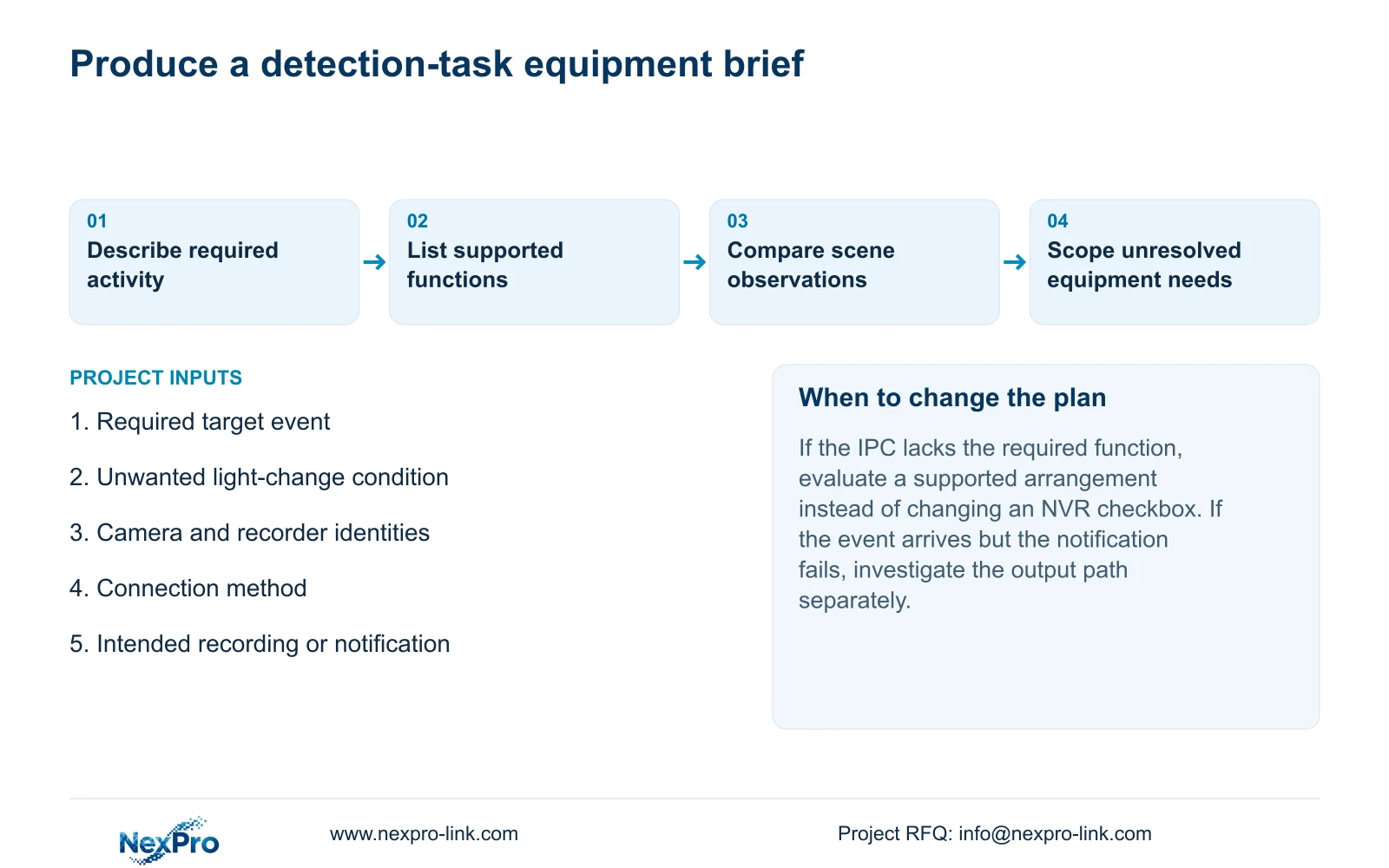
Record the camera model, camera firmware, recorder model, recorder firmware and connection method. Beside each required function, identify the device that provides it and how the recorder exposes it. Include only functions supported for that arrangement; a series menu is insufficient evidence for every connected camera.
Sections 4.4 and 4.10 make camera capability relevant to controls, with an explicit dependency in the PTZ discussion. A grey or ineffective control should lead to a check of model support, protocol, permissions and menu level before a hardware-fault conclusion.
For a third-party camera, prove the requested event independently from basic live video. ONVIF profile matching is a relevant compatibility reference, but it does not establish universal event interoperability. A working video stream alone cannot resolve whether the required event reaches the NVR in a usable form.
| Requested task | What is established | Decision |
|---|---|---|
| Respond to ordinary movement | Motion enablement, area, arming and linkage are documented. | Test the configured motion response. |
| Respond to an intrusion region or crossed line | The manual requires suitable IPC settings and NVR response. | Verify the front-end rule and received event. |
| Notify only for people or vehicles | An ordinary motion event does not prove classification. | Require exact model support and a task demonstration. |
| Identify a person or read a plate | Classification alone does not establish identity recognition. | Specify and verify the separate required function. |
Section 04
Compare the same task under relevant lighting
Use the intended view during representative light changes and during the activity that should trigger a response. Record the viewing conditions alongside the event result. A quiet demonstration cannot answer whether the buyer's nuisance condition remains acceptable.
Section 4.4.3 lists IPC brightness, saturation, sharpness, contrast, image flips, digital wide dynamic range, starlight and corridor modes. These are camera-side capture controls, separate from monitor-output adjustment. Check which controls the actual camera exposes before changing them.
Change one relevant setting at a time and repeat the same task. If nuisance notifications decrease, check that the required activity still produces a useful event. If the result worsens, return to the recorded baseline before testing another adjustment. The menu description supplies no universal preset or accuracy percentage.
Section 05
Record useful events and unwanted notifications separately
For each observation, note whether the required activity occurred, whether an event appeared and whether the selected action completed. Record background changes in the same way. This exposes the difference between a detector producing an unwanted event and a notification path failing after a useful event.
The manual lists popup, border flashing, buzzer, email, snapshot, preset call, recording and app push as distinct actions. Verify the output the buyer intends to use. A local popup does not confirm delivery to a recipient, and a notification does not prove that retrievable footage exists.
A reduction in notifications is meaningful only alongside the required-event observations. If useful activity is also missed, the configuration has not demonstrated the buyer's requirement. Keep that result in the comparison instead of describing a quieter interface as successful filtering.
Section 06
Turn the observation into a limited equipment brief
Illustrative project scenario: A buyer wants fewer nuisance alarms from changing light, but the existing specification only says motion detection. The proposed review identifies the unwanted light-change condition and the required target activity, checks the IPC capability, then tests event reception and the intended notification. No improvement is assumed before those observations.
For procurement, carry the event task and any unresolved dependency into the equipment schedule. State which cameras remain, which functions require verification and what the operator must retrieve. Include the recording and playback task, retention objective, relevant network and power arrangement, and delivery destination when they affect the package.
This guide uses NVR4.0 user manual CH_V2.4.doc, sections 4.12.11, 4.12.15, 4.4, 4.10 and 4.4.3. The body identifies V2.2. Its TS models are not mapped to NexPro-Link commercial SKUs. NexPro-Link's BOQ support page provides the project-scoping route; the manual supplies the operating basis.
Section 07
Does an intrusion menu prove human classification?
No. Verify the exact camera function and recorder response. A named intrusion rule does not automatically establish object classification.
Section 08
Does an unavailable control mean the camera is faulty?
Not necessarily. Check model capability, firmware, connection method, permissions and menu level, then test the requested operation on that camera.
Section 09
Provide the required event and nuisance condition
Send NexPro-Link the required target event, unwanted light-change condition and current camera and recorder identities at info@nexpro-link.com.
Engineering references
These sources support the general planning principles. Always use the selected product's current datasheet and applicable project standards for final design.


