

Motion-plus-timed recording continues ordinary footage between triggers. Verify both recording types and budget the full coverage period before accepting the mode.
Section 01
Verify quiet footage alongside motion periods
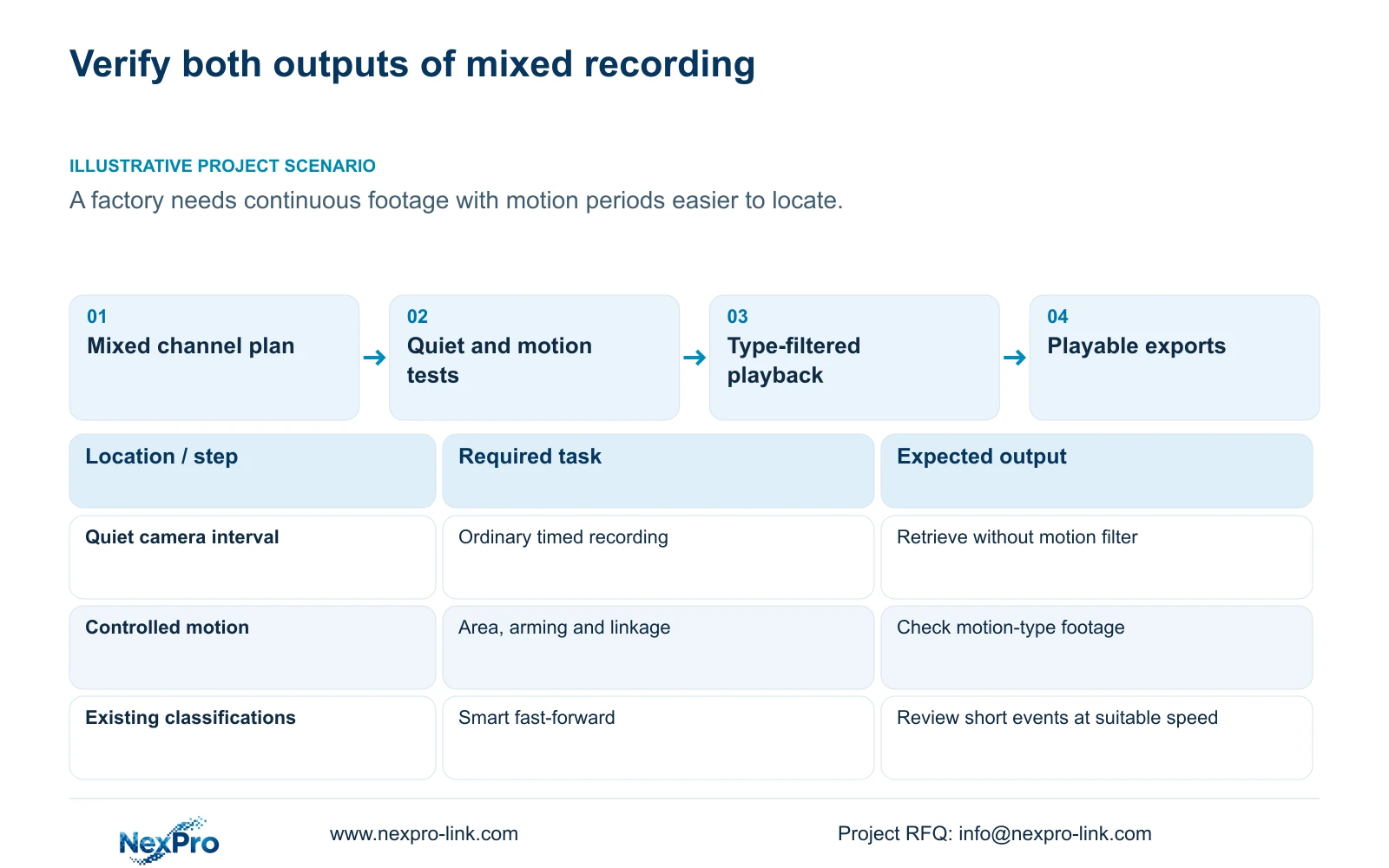
Motion-plus-timed recording keeps ordinary timed footage when no motion trigger occurs and records motion-type footage when triggered, within the configured recording periods. For a factory that wants continuing coverage with easier event review, verify both outcomes on the same identifiable channel. Check the motion conditions, retrieve a quiet interval and a triggered interval, then inspect their recording types. Plan storage for the full coverage duration, because the mixed option is not event-only recording. Smart fast-forward can help browse existing ordinary and alarm footage at different speeds, but it does not establish new detection or recover an event that was never classified.
This guide uses NVR4.0 user manual CH_V2.4.doc, whose body identifies V2.2, particularly sections 4.11.1 to 4.11.3 and 4.12.11. The calculation is an engineering example related to section 5.1. Confirm applicability to the actual recorder and firmware; Seetong PC storage remains separate.
Section 02
Select the mixed mode for the required periods
Section 4.11.1 provides timed recording, no recording, motion recording and motion-plus-timed recording. The plan grid has a 30-minute minimum scale. Inspect the required days and periods on the intended channel before deciding that the mixed option supplies continuous coverage.
Motion-only depends on triggers for recorded footage. The mixed mode preserves ordinary footage between triggers, so its benefit for this task is the combination of continuing coverage and recording-type distinctions. A gap outside its configured periods remains a schedule issue. If the factory needs all-day footage, the approved plan must cover all required periods, regardless of whether motion is expected.
Section 03
Prove that the intended motion produces the required action
Inspect enablement, arming time, detection area and linkage under section 4.12.11. Use a controlled movement within the intended area and record when it occurs. Then search for the resulting recording. A working live picture does not establish that the detector or selected action operated.
If ordinary footage exists at the event time but the expected motion type does not, investigate the event chain while preserving the continuing coverage. Check whether the movement fell inside the armed period and detection area, then inspect linkage. Change one relevant condition at a time and repeat the test. Ordinary motion detection does not establish human or vehicle classification, and its sensitivity value cannot be reported as statistical accuracy.
Section 04
Find both ordinary and motion footage on the timeline
Section 4.11.2 says playback opens with the preview-selected channel. Confirm the factory camera identity, then choose the test date and time. Inspect the ordinary, alarm and motion filters. A motion-only search can conceal the quiet footage that demonstrates the mixed mode's continuing coverage.
Orange calendar dates indicate recording existence; gray indicates no recordings in the documented workflow. Neither establishes the required type transition or a complete day. Play the known quiet interval, then the triggered interval, and compare their classifications with the test record. If either appears absent, check the query conditions before deciding whether the plan or event action failed.
| Observed result | Meaning | Next action |
|---|---|---|
| Quiet footage and motion-type event | Both required outcomes appear | Verify playback and export |
| Ordinary footage at the event; no motion type | Coverage exists; event chain needs checking | Inspect area, arming and linkage |
| Motion footage only in a filtered search | Quiet footage may be hidden | Include ordinary type in the query |
| Known quiet interval absent after query checks | Continuing coverage is not established | Inspect applied plan and disk state |
Section 05
Use playback speeds without assigning new analytics
Section 4.11.3 describes smart fast-forward as setting different playback speeds for ordinary and alarm recordings. Use the existing classifications to prioritize review, after establishing that those classifications suit the operator's task. Faster browsing of ordinary footage can help locate a relevant neighborhood in time.
Return to an appropriate speed, including original speed where needed, for short events and final interpretation. An apparently uneventful fast-forward passage is insufficient evidence that no activity occurred. The documented feature does not establish retrospective face, plate or object analysis. If motion classification is unreliable for the task, review the ordinary coverage around the incident and address the trigger conditions separately.
Section 06
Budget the continuing recording duration
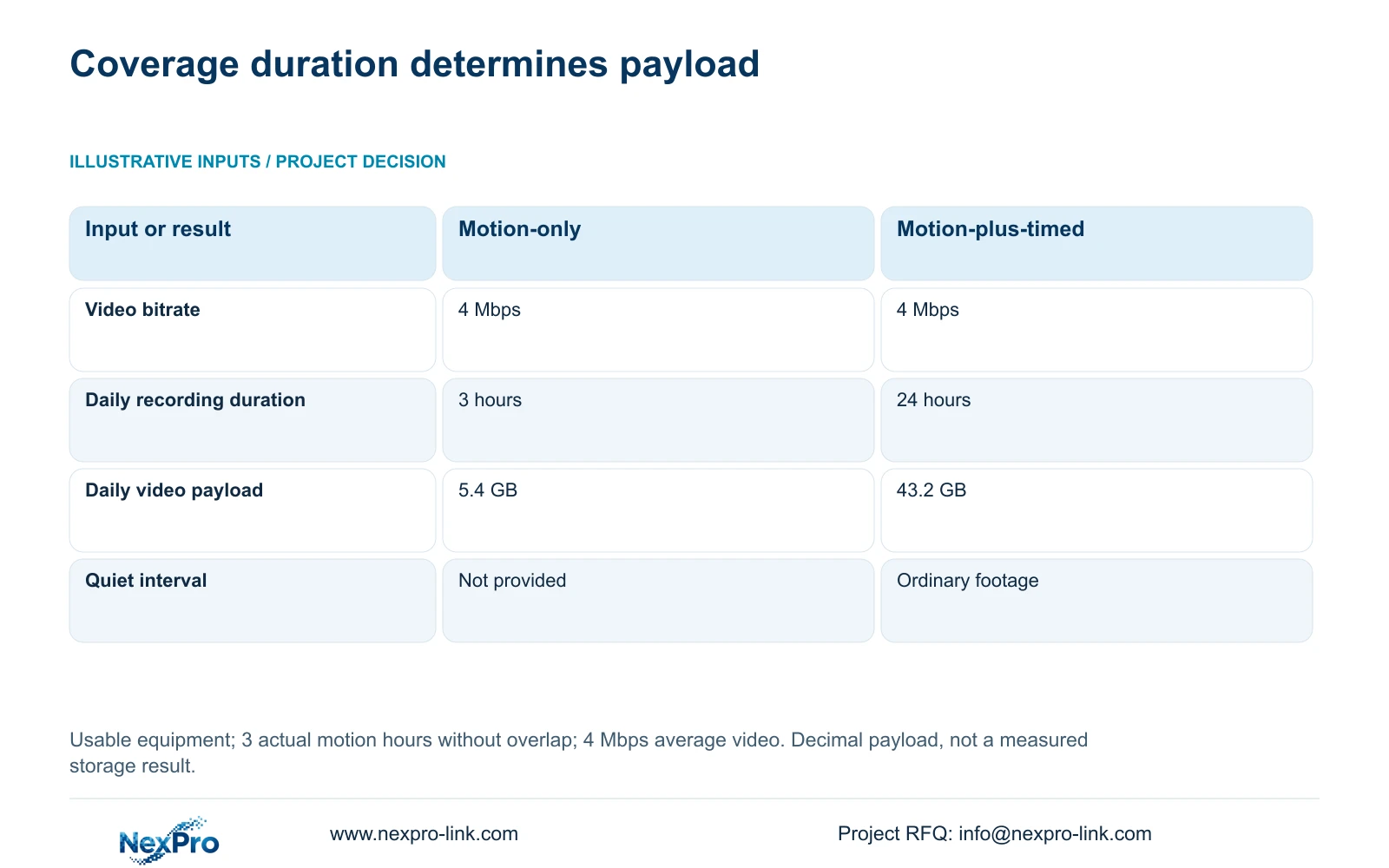
The supplied comparison assumes usable equipment, one stream averaging 4 Mbps, and 3 hours of actual motion-triggered recording per day without overlap. Motion-only option A records those 3 hours. Motion-plus-timed option B covers 24 hours, including ordinary footage between triggers. These are planning inputs, not camera specifications or measured activity.
In decimal units, video GB = Mbps × 3600 × hours ÷ 8 ÷ 1000. Option A: 4 × 3600 × 3 ÷ 8 ÷ 1000 = 5.4 GB per day. Option B: 4 × 3600 × 24 ÷ 8 ÷ 1000 = 43.2 GB per day. Dividing by 8 converts bits to bytes; dividing by 1000 converts megabytes to decimal gigabytes.
Use the 24-hour input for the mixed option in this example. Applying 3 hours to both options would omit the ordinary footage that the factory requested. For grouped retention, decimal video TB = 0.00045 × Σ(channels × Mbps × hours per day × days). Add audio and other storage requirements separately, then divide the resulting requirement by 1-r for a reserve fraction r. No retention period or reserve percentage is assumed here.
| Item | Option A: motion-only | Option B: motion-plus-timed |
|---|---|---|
| Average video bitrate | 4 Mbps | 4 Mbps |
| Recorded hours per day | 3 hours | 24 hours |
| Video payload per day | 5.4 GB | 43.2 GB |
| Without a motion trigger | Quiet footage not provided | Ordinary timed footage continues |
Section 07
Accept quiet and triggered intervals together
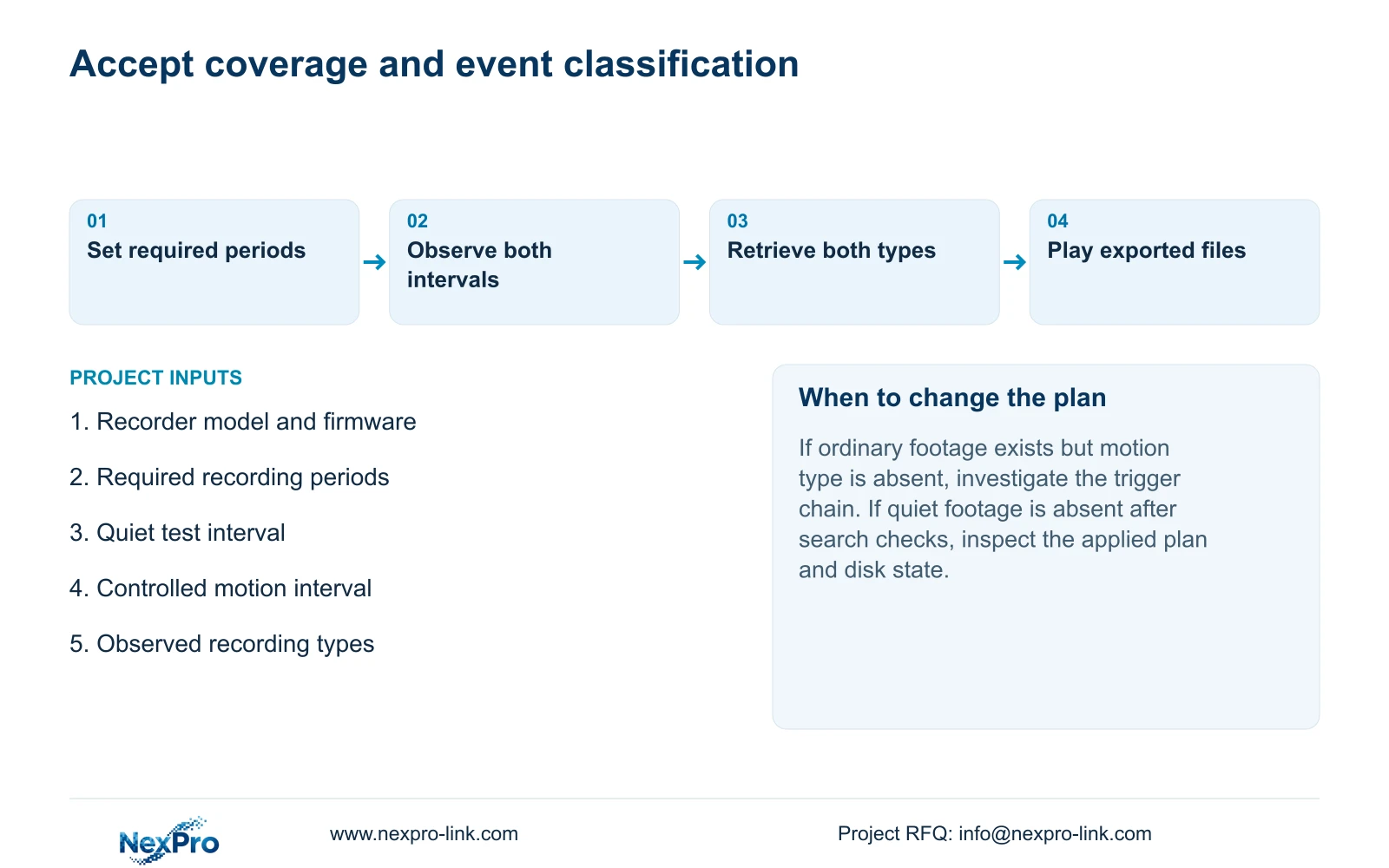
Choose an identifiable channel, confirm its live view and recording state, and observe a known quiet interval followed by a controlled motion event. Retrieve both periods from the recorder, inspect their types and export them. Play the copied files on another device to confirm that the required footage is usable outside the recorder's playback screen.
Also inspect the recognized disk and configured recording policy under section 4.12.21. Keep expected and observed results together, including any missing output. This is an engineering acceptance workflow based on sections 4.3 and 4.11, not a new automatic test feature. A successful sample establishes those sampled tasks; it does not prove the entire retention period.
Section 08
Use the factory requirement as the acceptance boundary
Illustrative project scenario: A factory wants continuous footage but also wants motion periods easier to locate. Its acceptance check therefore requires playable ordinary footage during quiet time and a retrievable motion-type interval after the controlled event. The storage estimate follows the continuing coverage duration. If only one outcome passes, document the failed branch and repeat that branch after the relevant correction; do not label the whole task complete.
Section 09
Does smart fast-forward find previously undetected motion?
The manual establishes different playback speeds for existing ordinary and alarm footage. It does not establish retrospective detection. Review the relevant ordinary interval when an expected event classification is absent.
Section 10
Should mixed recording use a motion-only disk estimate?
No. Ordinary recording continues between triggers in the configured periods. Use the full required coverage duration, with explicit bitrate and retention inputs.
Section 11
Review the mixed-mode result
Send NexPro-Link the recorder model and firmware plus the quiet and triggered test intervals and their observed recording types at info@nexpro-link.com.
Engineering references
These sources support the general planning principles. Always use the selected product's current datasheet and applicable project standards for final design.


