

Use the manual's Gigabit recommendation as a prompt to calculate each uplink's actual video workload, then define the smallest qualified network replacement scope.
Section 01
Qualify the uplink from the streams it carries
Sixteen cameras is not a universal boundary between a usable existing uplink and a required Gigabit replacement. The supplied manual recommends a Gigabit switch for installations above sixteen cameras, but a project decision needs the streams crossing each link. A smaller high-bitrate group can also require more capacity. Draw the camera-to-recorder path, add viewing traffic where it uses that same link, and compare the resulting workload with an explicit planning allowance. Keep recorder input limits and camera power separate. Reuse is reasonable only when the actual link and equipment support the required recording and viewing tasks under the intended operating conditions.
The private source is NVR4.0 user manual CH_V2.4.doc, with V2.2 in its body. Section 5.3, question 8, supplies the switch recommendation. Sections 4.3.3.3, 4.4.5 and 1.2 support traffic, encoding and remote-user checks; section 3.3.1 describes the non-PoE arrangement.
Retain the original recommendation in that scope. Camera count can prompt review, but it cannot show which camera groups share an uplink or which viewing sessions add demand there.
Section 02
Trace the streams through each shared link
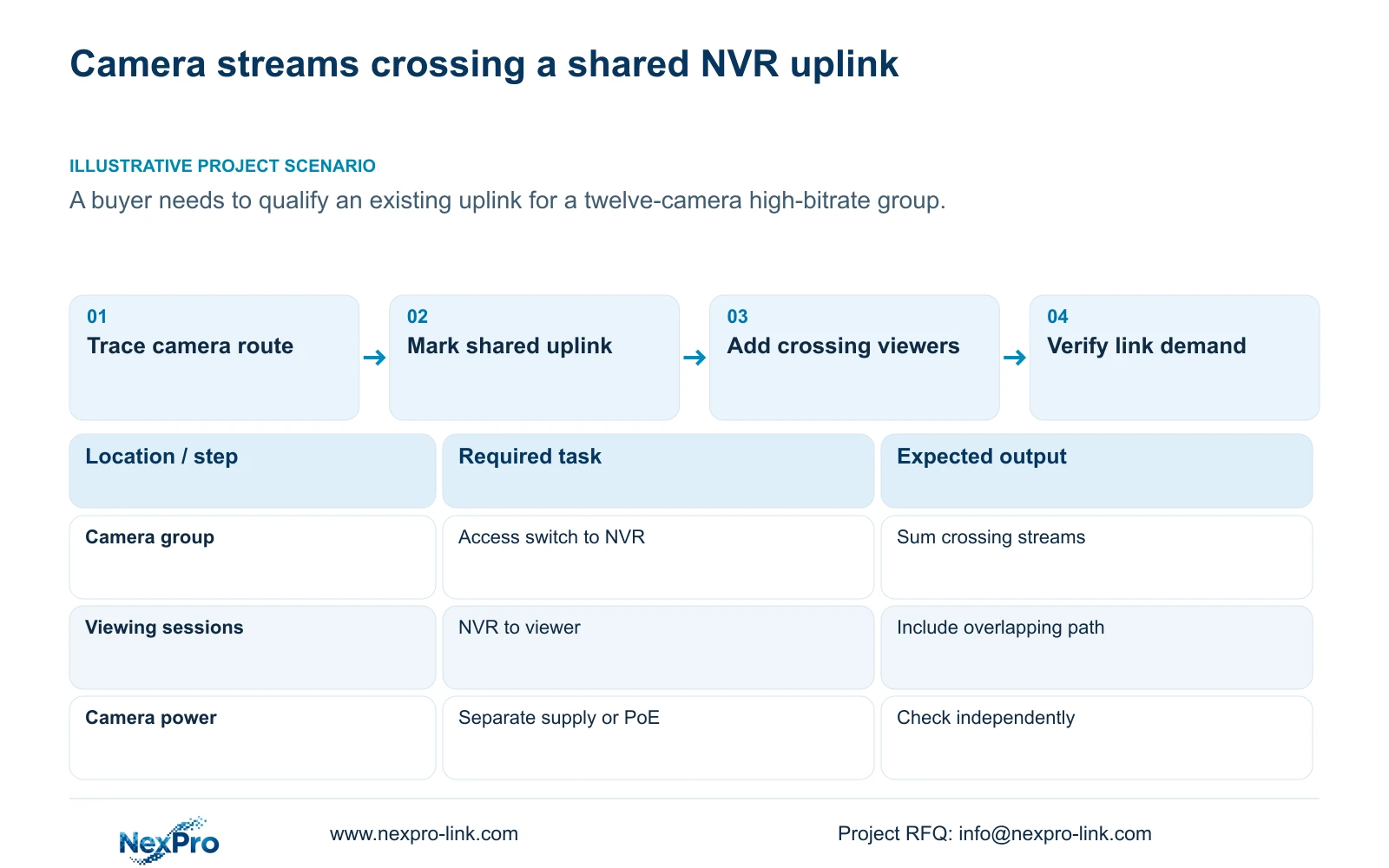
Start with the camera group and follow its data route to the recorder. Identify the access switch, shared uplink and NVR interface. Mark the point where another camera group joins. Sum only the streams that actually traverse the link under review.
Next, draw the recorder-to-viewer route. A local viewer and a remote viewer may use different segments. The NVR's receive and transmit readings describe directions at its interface; they should not be copied unchanged into every upstream link budget.
Write a separate demand line for each relevant direction and operating interval. If the route is uncertain, mark it as unresolved and obtain the network arrangement. A complete site camera count is insufficient evidence for the load on a particular cable or switch connection.
Section 03
Use a stated bitrate basis
Record the required output profile and bitrate basis for each camera group. Label values as configured settings, representative measurements or illustrative assumptions. These categories should remain visible in the equipment brief.
CBR/VBR describes encoding control, while observed interface traffic describes operation. Preserve motion and lighting conditions when comparing measurements. Use an appropriate peak or limit for network evaluation; an average that helps retention planning may not represent a demanding viewing interval.
A stream sum counts video payload. Interface measurements can include overhead and other activity. Establish that both cover the same path before comparing them. If a measured interval exceeds the planned demand, identify the added task or changed stream instead of immediately lowering every camera profile.
Section 04
Compare the supplied payload with both link options
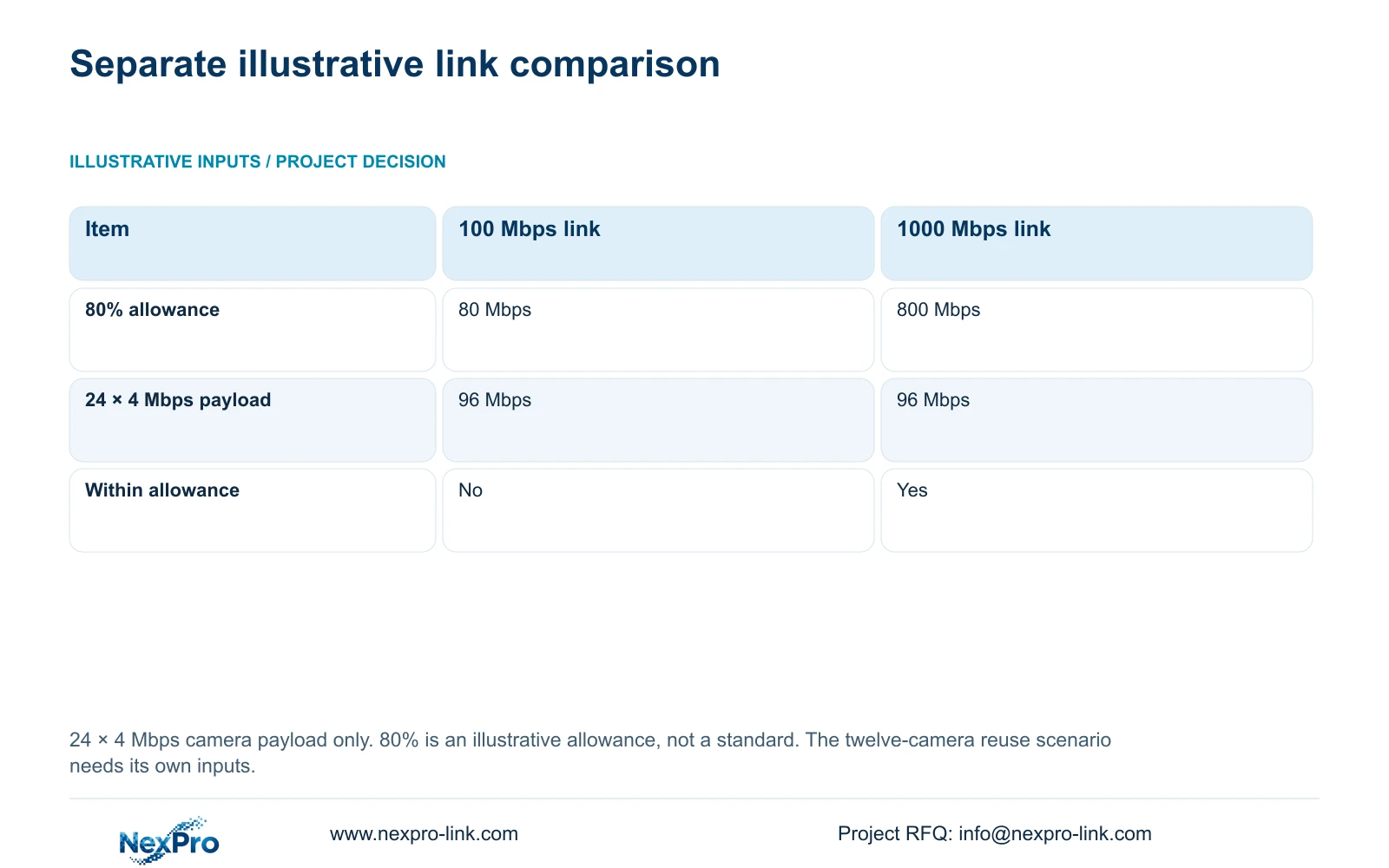
This illustrative example assumes 24 camera streams at 4 Mbps each cross the same link. Video payload = 24 × 4 Mbps = 96 Mbps. Compare nominal links of 100 Mbps and 1000 Mbps using a chosen planning utilization of 80%. All values use decimal units.
Planning threshold = nominal link rate × 0.8. For Option A, 100 Mbps × 0.8 = 80 Mbps. For Option B, 1000 Mbps × 0.8 = 800 Mbps. The 96 Mbps video payload exceeds 80 Mbps and remains below 800 Mbps.
Under these assumptions, the Gigabit link provides more planning space. The 80% allowance is an illustrative engineering choice, not an IEEE requirement or a rule stated in the manual. This comparison does not establish actual switch throughput, recorder input capacity or available PoE power.
| Item | Option A | Option B |
|---|---|---|
| Nominal link rate | 100 Mbps | 1000 Mbps |
| Chosen planning threshold | 80 Mbps | 800 Mbps |
| Video payload | 96 Mbps | 96 Mbps |
| Within chosen threshold | No | Yes |
Section 05
Add simultaneous viewing where its path overlaps
List the live, playback and download tasks that must coexist with recording. Record how many streams each session requests and which path carries them. Add a task to a link's demand only where that task crosses the link.
The manual's multiple-user support does not establish unlimited viewing bandwidth. A cloud connection also supplies no guaranteed forwarding capacity in this source. Confirm the actual access arrangement and observe the required simultaneous tasks.
The arithmetic above contains camera payload only. If overlapping viewing traffic is required, the comparison remains incomplete until that demand is included. Keep the original camera modes fixed while testing the viewing workload so that any improvement has an identifiable cause.
Section 06
Keep camera power outside the data-rate conclusion
Section 3.3.1 shows cameras and a non-PoE recorder connected through a switch, with the cameras supplied separately. The ordinary recorder LAN socket in that arrangement should not be specified as a PoE output.
Where PoE is required, identify the suitable external power-sourcing device or choose a recorder whose exact specification explicitly includes PoE. Keep its camera-power requirements separate from the uplink calculation. A 1000 Mbps port label does not establish the power available to downstream cameras.
The project drawing should distinguish data links from power connections and identify the display and recorder power separately. That distinction prevents an uplink replacement line from silently becoming an assumed complete camera-power solution.
Section 07
Quote the smallest qualified network change
Once the constrained segment is identified, compare retaining the existing arrangement with replacing the relevant link or network equipment. Keep the required camera modes, viewing tasks and recorder constraints the same. Retain equipment only where its suitability is established.
A fair quotation also states disks, accessories, software and site-work boundaries where they differ. Use NexPro-Link's BOQ and tender support route to discuss the defined scope. Without matched quotations, a scope matrix is more useful than an invented saving percentage.
If replacing a link resolves its allowance issue but the recorder input remains unsuitable, the recorder needs a separate decision. Sections 5.1 and 5.2 support comparing system constraints beyond a channel-count label.
| Finding | Decision | Remaining check |
|---|---|---|
| Actual workload fits existing link | Consider reuse | Verify required concurrent operation |
| Shared link exceeds selected allowance | Compare that network segment | Confirm connected equipment capabilities |
| Link fits but recorder input does not | Review recorder separately | Preserve required camera modes |
| PoE capability is unconfirmed | Resolve camera-power scope | Verify the actual power-sourcing device |
Section 08
Apply the method to the reuse question
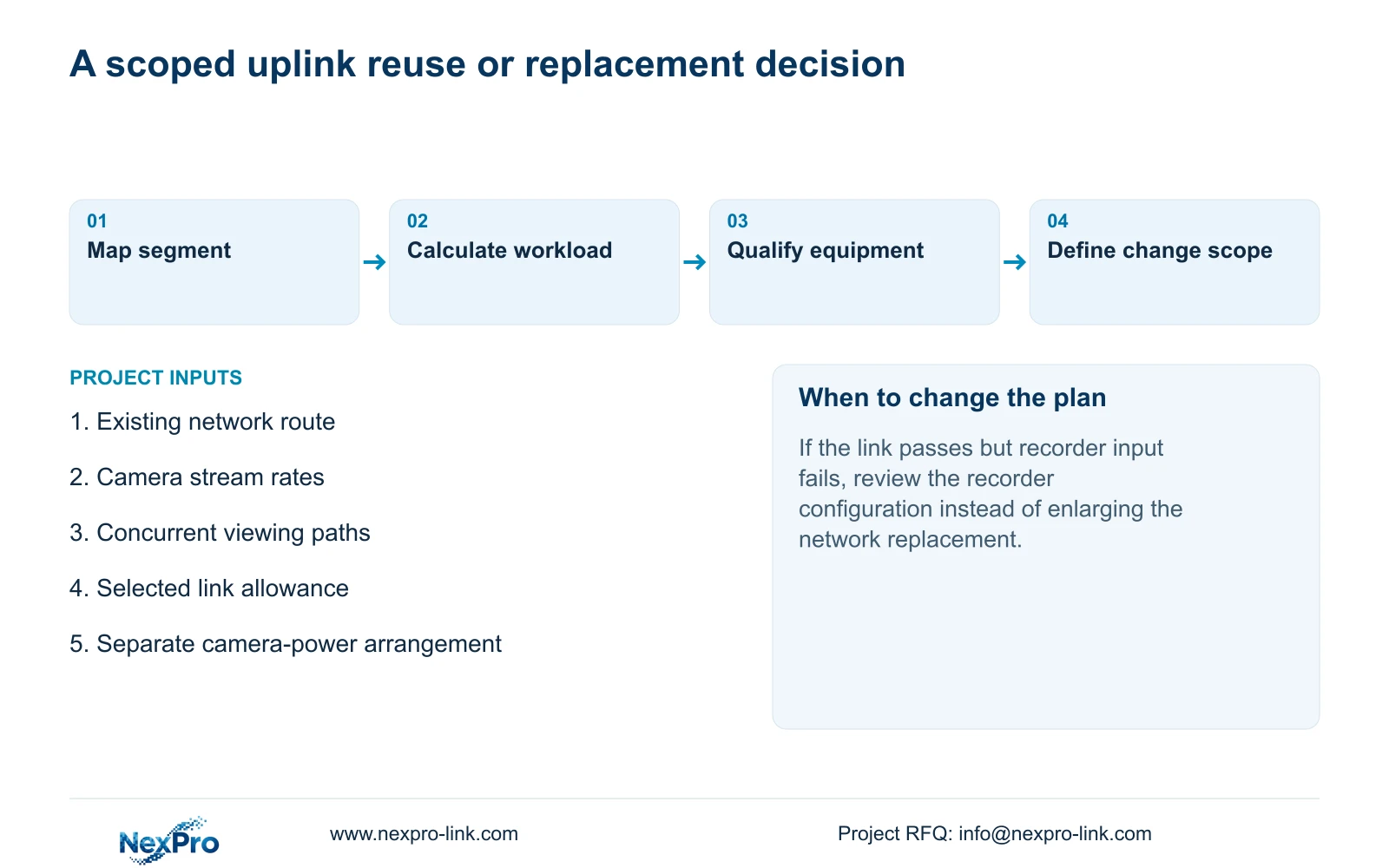
Illustrative project scenario: A buyer asks whether a twelve-camera high-bitrate group can reuse an existing uplink. Obtain that group's stream rates and network route before answering. The separate 24-camera calculation demonstrates the method and does not supply bitrate values for these twelve cameras.
If the existing link passes the qualified workload, retain it subject to the operating check. If it fails, define the affected replacement segment and any dependent equipment. The camera count alone supports neither an automatic reuse approval nor an automatic full-system replacement.
Section 09
Buyer questions about Gigabit selection
Can fewer than sixteen cameras need Gigabit? Yes. Their actual stream demand and shared viewing paths can require more capacity.
Does Gigabit prove the NVR accepts all connected streams? No. Check the recorder's incoming bandwidth and accepted modes separately.
Is 80% a mandatory utilization ceiling? No. It is the stated planning assumption for this example.
Section 10
Provide the uplink route and stream rates
Send NexPro-Link the existing uplink arrangement and camera-group stream rates, including required overlapping viewing tasks, at info@nexpro-link.com.
Engineering references
These sources support the general planning principles. Always use the selected product's current datasheet and applicable project standards for final design.


