

Define which clock controls the recorder and cameras, document the hourly synchronization setting, and verify the same event across channels before accepting timestamp alignment.
Section 01
Define the clock path before enabling synchronization
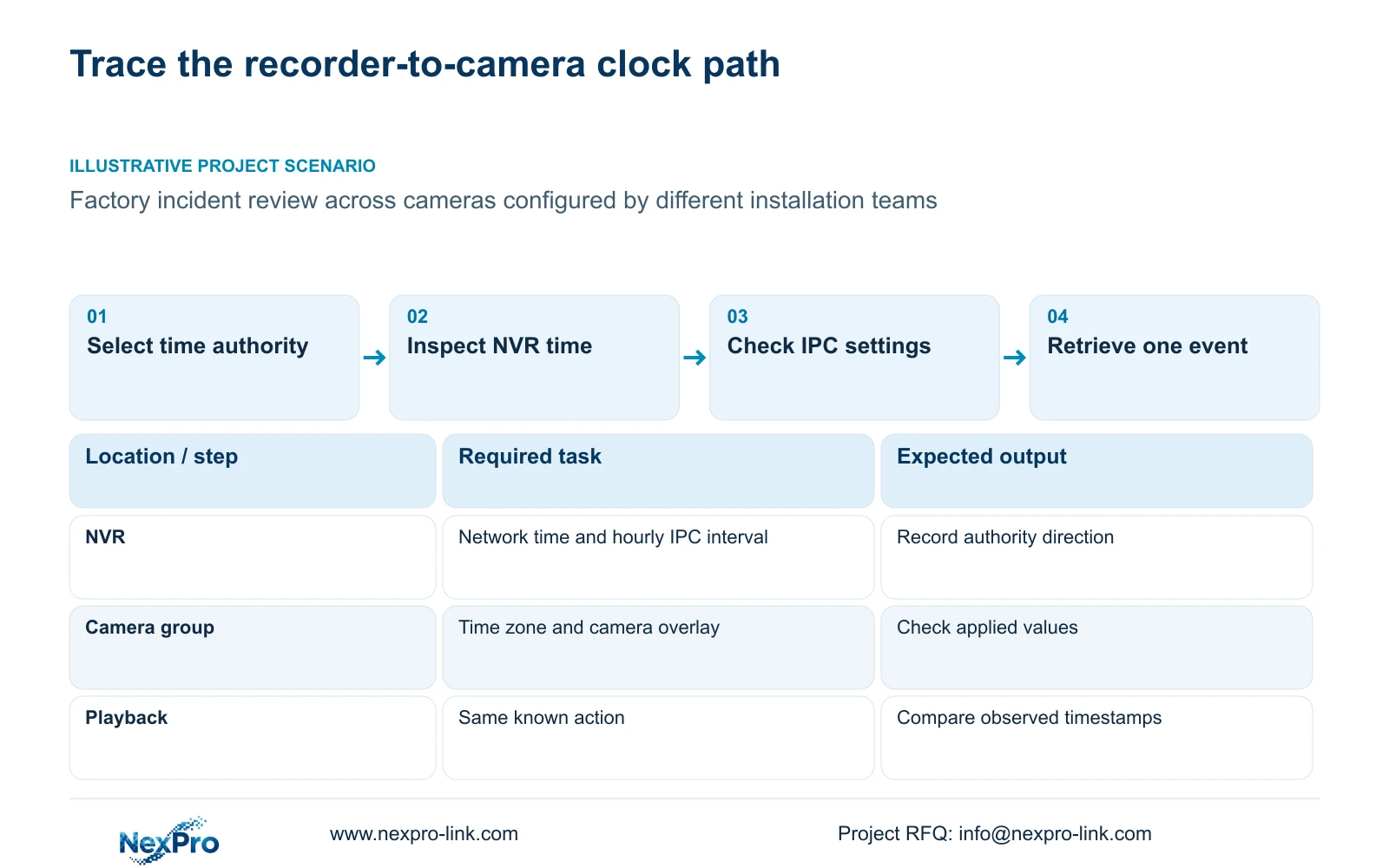
Consistent incident timestamps require an agreed reference clock and a documented synchronization direction. Identify how the NVR obtains its time, whether it synchronizes the connected cameras, and whether those cameras also use independent time controls. Select the correct site time zone before network synchronization, then record the recorder's IPC synchronization interval in hours. Verify the arrangement by retrieving the same known action from the required channels. Matching clocks on a live screen provide an initial check, but the commissioning result must also include newly recorded footage and the time settings retained after an authorized restart.
The supplied NVR4.0 user manual CH_V2.4.doc carries V2.2 in its body. Sections 4.4.2 and 4.12.2 describe separate IPC and NVR time controls. Section references take priority over page numbers. Apply these instructions to the actual recorder and camera firmware; a shared interface does not establish identical behavior across models.
Draw the intended path in words: the selected network-time source updates the recorder, and the recorder updates the applicable IPC group. If cameras instead follow an independent authority, document that arrangement explicitly. The manual's network-time controls do not establish support for every proposed local NTP server.
Section 02
Set the site time basis and record the hourly interval
Inspect the recorder and camera time-zone settings separately. The manual calls for correct time-zone selection before network synchronization and provides separate daylight-saving start and end settings. Preserve any observed offset and its reference event before making corrections. A successful synchronization operation can still leave a device displaying the wrong local time if its presentation settings differ.
Record the IPC synchronization interval and its displayed unit on the actual device. The supplied manual describes hours; if the installed interface or matching instructions differ, use their documented unit and retain that difference. There is no universal preferred interval, drift rate or guaranteed tolerance in the supplied source. Validate the selected setting against the project's investigation task.
If alignment changes between checks, record when it changed and which device differed. Examine the documented authority path before shortening the interval or changing several controls together. Repeated observations are needed to understand a recurring difference; one observed offset cannot establish a linear drift pattern.
| Observed state | Meaning to investigate | Next action |
|---|---|---|
| Recorder and cameras show the same wrong local time | A shared time-zone or daylight-saving setting may be wrong | Preserve the offset, then inspect site presentation settings |
| Recorder agrees with the reference; one camera differs | The camera's time settings or synchronization path need checking | Inspect that IPC before copying changes to other channels |
| Clocks agree initially, then differ later | Initial agreement has not established sustained alignment | Record the interval and repeat the known-event check |
| Required time controls differ from the manual | The instruction scope is unresolved | Obtain the applicable model and firmware instructions |
Section 03
Identify which device supplies each visible timestamp
A camera overlay and the recorder desktop clock are separate observations. Sections 4.4.4 and 4.12.6 list OSD enablement, channel names, title and time positions, date formatting, weekday display and optional resolution or bitrate information. Identify the timestamp inside the camera image before using it to judge that camera's clock.
Compare the camera overlay with the recorder interface and the confirmed reference. Record which one differs. Moving the text or changing its format can improve readability, but those actions do not establish synchronization.
Keep labels away from the image area needed for the operating task. Different views may need different positions even when they share a time profile. Verify that each selected camera accepts the setting; the presence of an OSD menu does not prove universal third-party camera support.
Section 04
Copy settings only within a compatible camera group
Once a source channel has the intended time basis, group destinations by relevant supported options and operating requirements. Record the source channel, selected targets and exceptions before using a copy control. Copying a profile does not decide whether every destination should share it.
For this task, keep the transfer limited to the applicable time or OSD settings. Do not expand the operation into recording schedules or stream parameters simply because other copy functions exist. Sections 4.4.2 and 4.12.6 describe relevant controls; the broader copy workflow also appears in sections 4.11.1 and 4.12.7.
Inspect the destination's actual values and resulting footage after the copy. If one camera rejects a setting or retains an offset, separate it from the group and investigate its model and firmware. A save message is insufficient evidence that every destination now follows the intended clock.
Section 05
Use a known event to explain each channel's offset
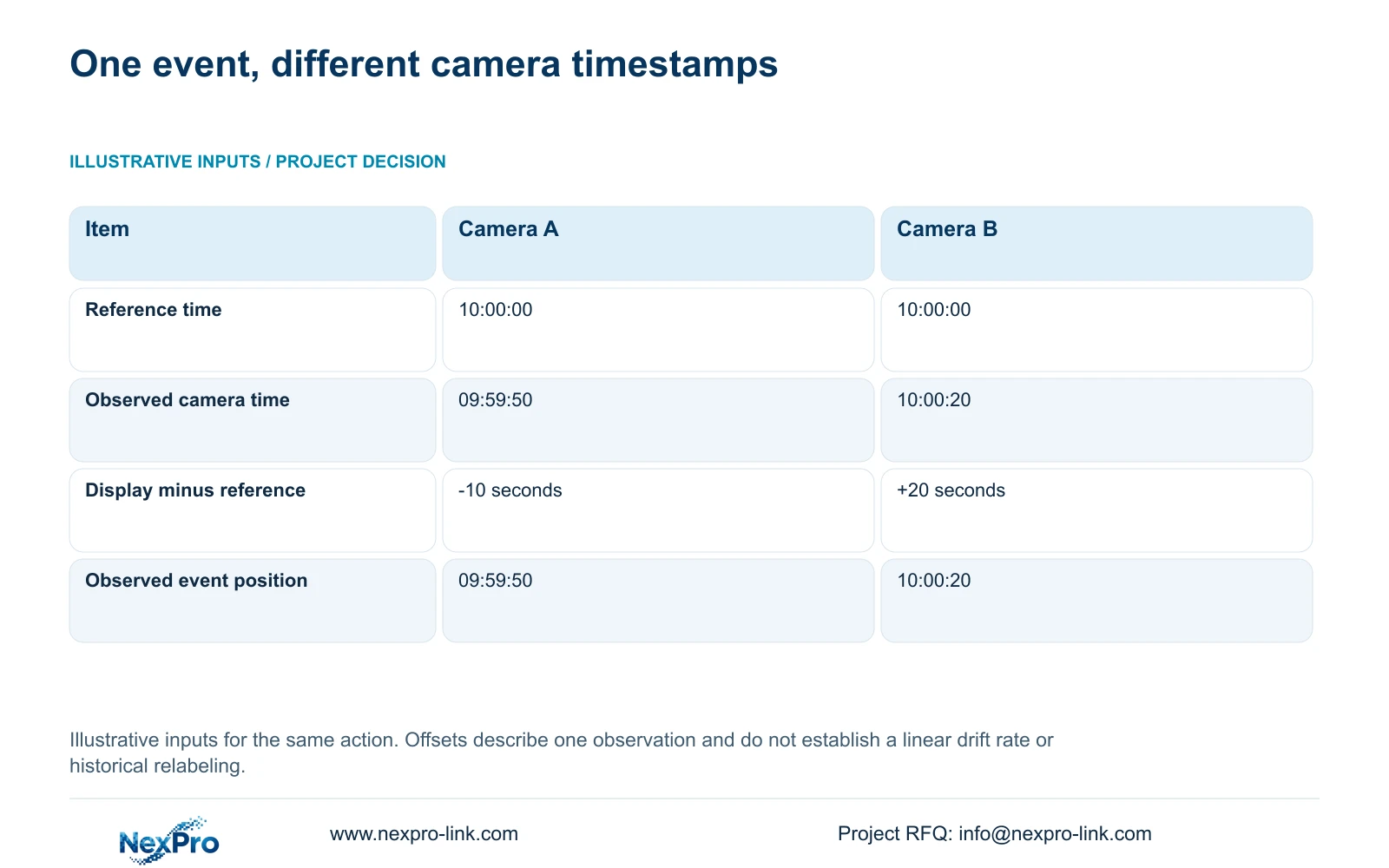
Use the supplied illustrative inputs: the confirmed business reference for one action is 10:00:00, camera A displays 09:59:50, and camera B displays 10:00:20. Device time offset = device display time minus confirmed reference time.
For camera A, 09:59:50 minus 10:00:00 = -10 seconds. For camera B, 10:00:20 minus 10:00:00 = +20 seconds. The same action therefore appears at 09:59:50 on A's observed timeline and 10:00:20 on B's. These offsets describe this observation only; they do not predict future drift or prove a recurring synchronization fault.
Use those observed positions to locate the footage before correcting time. Section 4.11.2 says playback initially selects the preview-selected channel and allows ordinary, alarm and motion filters. Orange indicates that recordings exist on the date; it does not prove complete coverage. Check the channel and filters before treating a missing search result as lost footage.
Section 06
Verify the alignment through recording and restart
Illustrative project scenario: A factory investigates an incident using cameras configured by different installation teams. The engineer records the separate time authorities, resolves incompatible site settings and tests one known action across the cameras needed for the investigation. This is a teaching scenario, with no assumed delivered result.
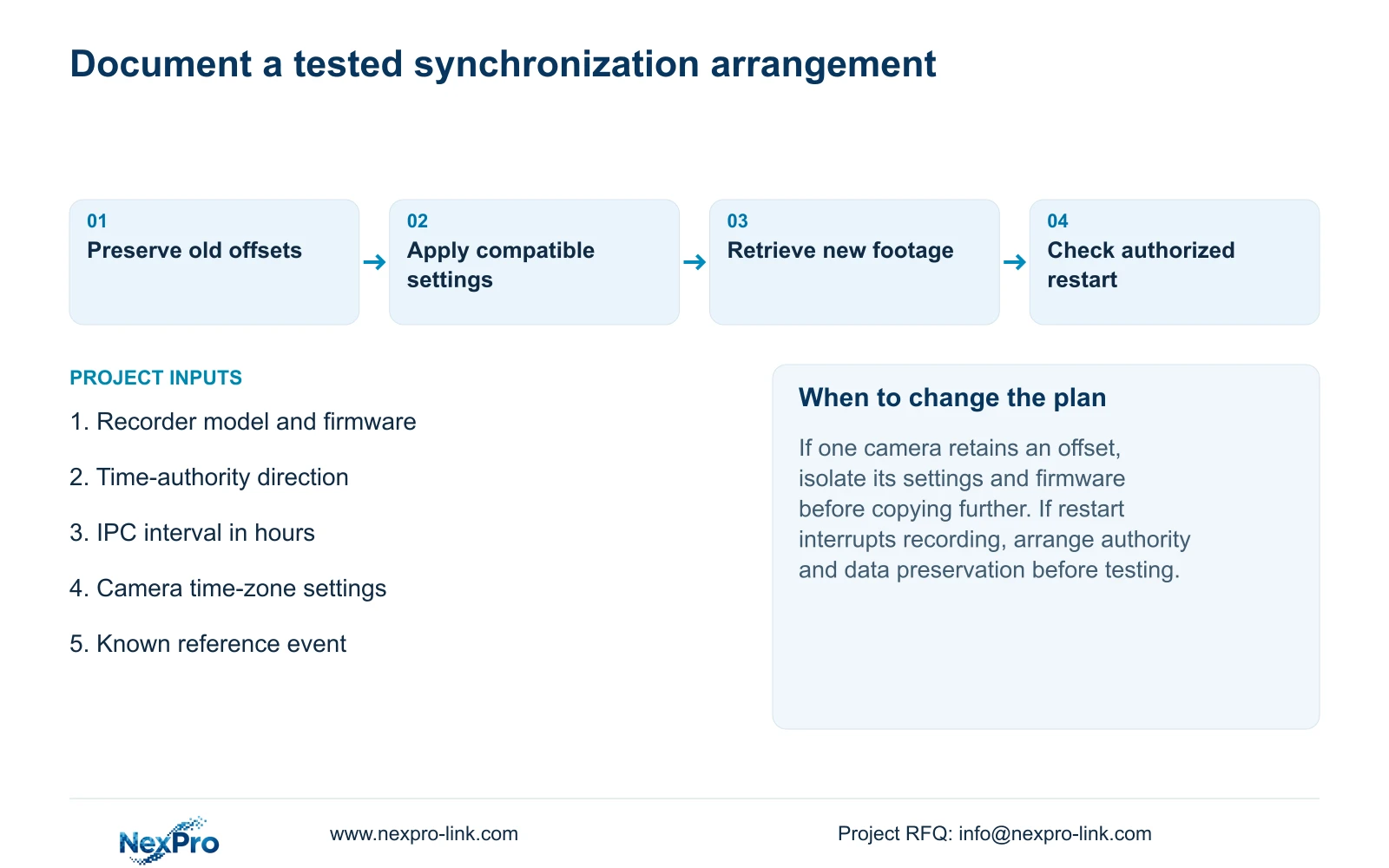
After configuration, check live view, current time, newly generated footage and a relevant historical sample. Export a sample if file delivery is part of the task. Use the intended operator account and verify any required event workflow.
If restart verification requires stopping a running recorder, obtain authority, preserve relevant data and arrange the interruption first. Record time settings and footage behavior after the restart. If alignment fails again, retain the changed variable and failed observation for support; do not assume an automatic rollback mechanism.
Section 07
Does a shorter synchronization interval guarantee alignment?
No. The manual specifies an interval measured in hours but supplies no universal tolerance or drift guarantee. Confirm the authority path and settings, then validate the chosen interval through repeated known-event observations.
Section 08
Will synchronization correct timestamps in older recordings?
The source does not establish automatic relabeling of historical footage. Preserve the old offset and verify the actual search position of the required recording separately.
Section 09
Provide the unresolved clock path
For a NexPro-Link configuration discussion, send the recorder model and firmware, current time-authority path, configured IPC interval and one redacted cross-camera reference event to info@nexpro-link.com.
Engineering references
These sources support the general planning principles. Always use the selected product's current datasheet and applicable project standards for final design.


