

An image received by email does not prove that a searchable alarm snapshot exists on the recorder. Test the mailbox and local image archive as separate destinations.
Section 01
Specify both image destinations before testing the event
Treat the alarm email attachment and the recorder-held snapshot as separate required results. The supplied manual lists sending a screenshot and saving a snapshot as distinct linkage actions, so receipt of an email image does not prove that the recorder has a searchable local copy. Define the channel and event, test the intended recipient's attachment, then search Image Management using the correct snapshot type and time range. Check the recorder's disk conditions if the local image remains absent. Finish by exporting and opening the local sample, with mailbox receipt and archive retrieval recorded independently in the acceptance result.
Write the requirement in terms of what the facility manager must do. An email preview allows the recipient to inspect a notification image. A local archive requirement means an authorized operator must later find the event image on the recorder and obtain a usable copy. Each needs its own observation.
Section 4.12.11 also separates popup, flashing, buzzer, email, preset call, recording and app push. Selecting another visible action does not establish either image destination. Keep action duration separate from any agreed image or footage retention requirement.
Section 02
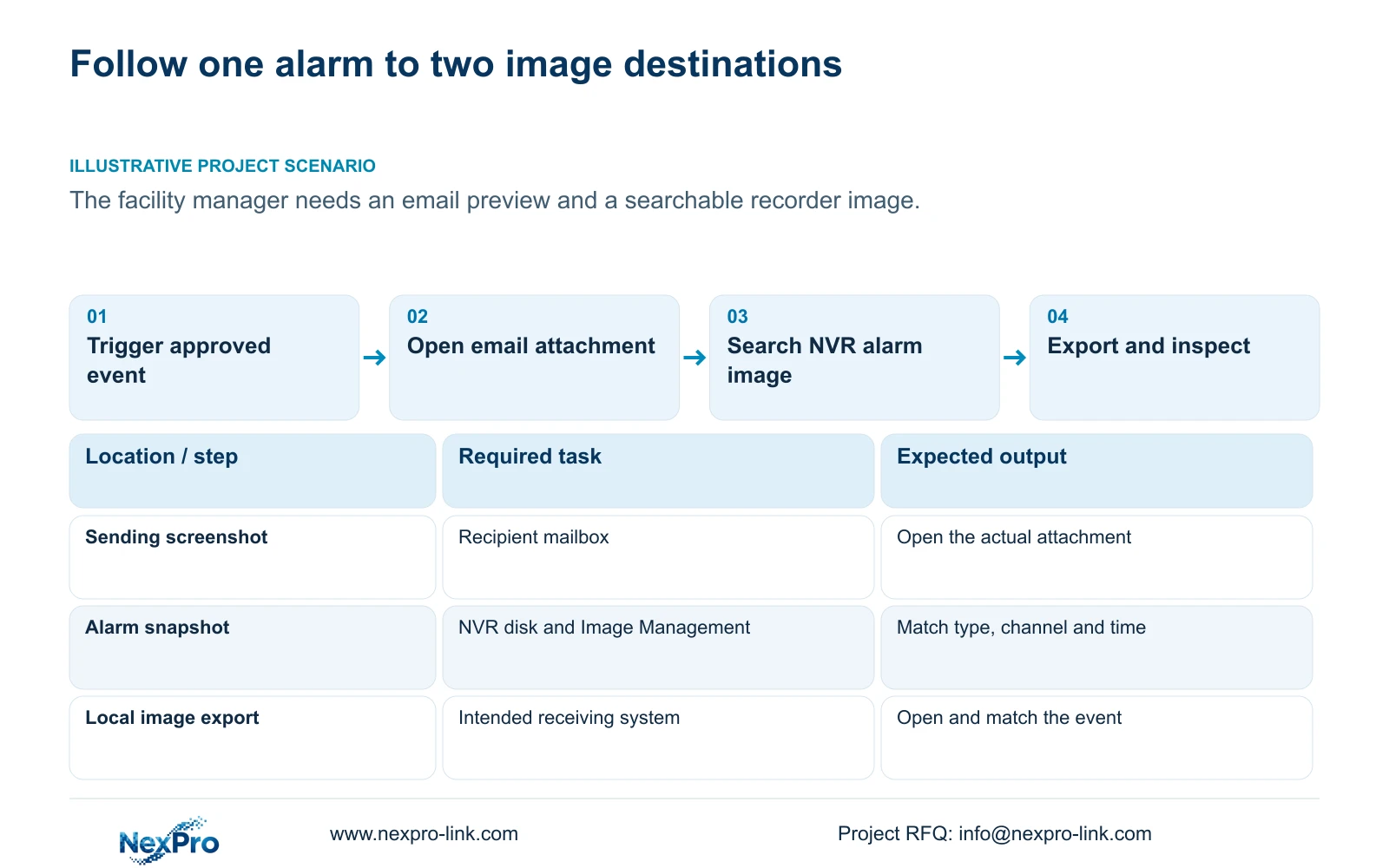
Open the actual attachment at the receiving mailbox
Use an approved event on an identifiable channel and record its time. Inspect the message at the intended receiving mailbox and open the attachment. Compare its scene with the test event and record whether that required result passed. A message without the required image is a different result from a message whose attachment can be inspected.
The sending configuration must match the mail provider's server, port, encryption and authentication requirements and the recorder's supported behavior. The source's default port 25, TLS option and provider examples are historical field guidance, not a universal configuration.
If mail does not arrive, investigate the sending path and event linkage before judging local capture. If mail arrives without the expected image, inspect the sending-screenshot action and preserve the observed result. Avoid changing the local disk merely because the recipient's attachment requirement failed.
This guide follows the private supplied NVR4.0 user manual CH_V2.4.doc, whose body states V2.2. Sections 4.12.10 and 4.12.11 support the mail checks; sections 4.9.1 through 4.9.3 and 4.12.21 support image search and disk inspection. Use section references rather than old page numbering.
Section 03
Search the recorder using the event's type and channel
Image Management distinguishes manual, alarm and playback snapshots. Select the alarm type for an alarm-capture requirement, then set the affected channel and time range. The documented defaults can point to the first channel and the recorder's current date, which may exclude the image being investigated.
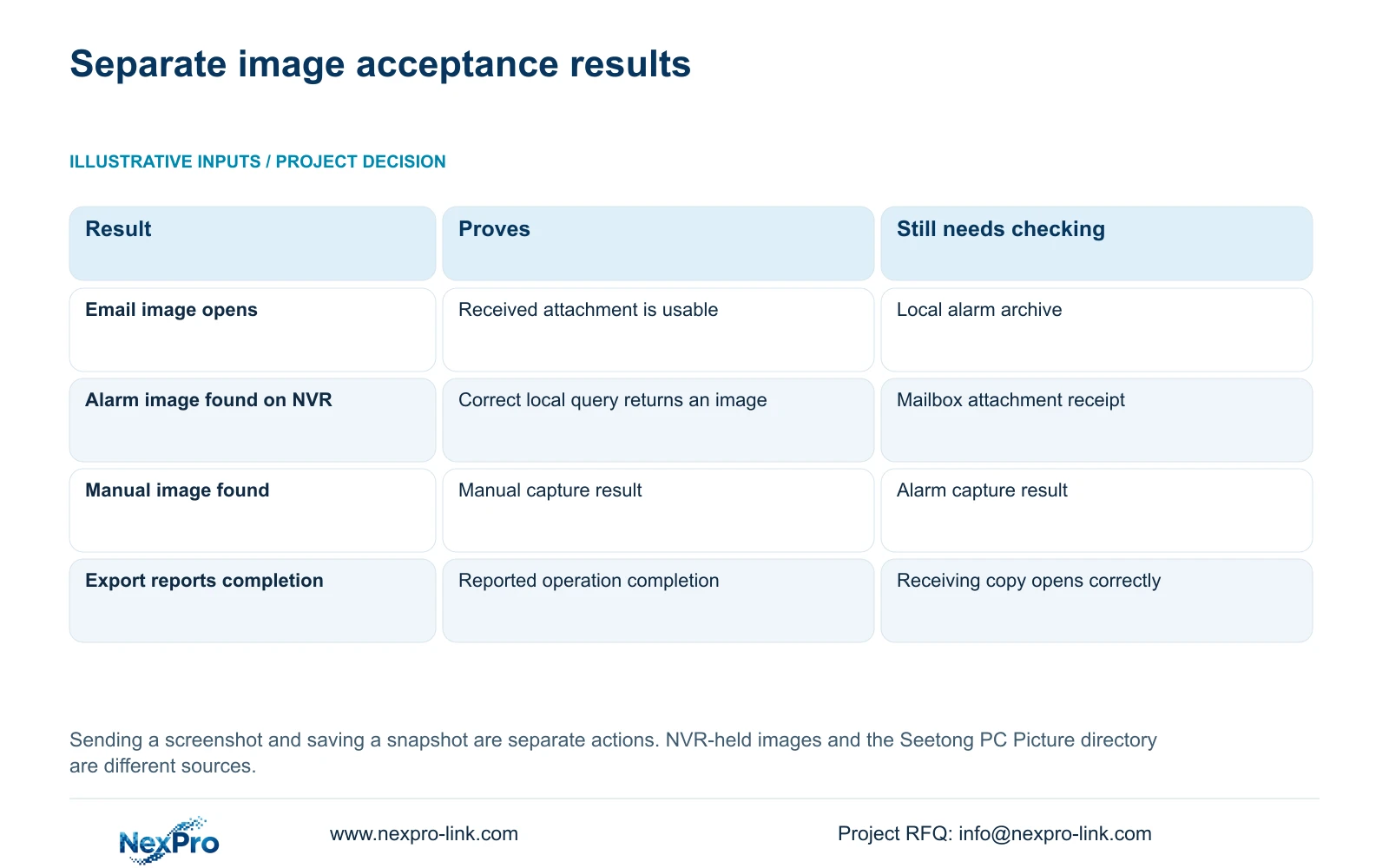
Search again after correcting those conditions. If a manual or playback snapshot appears, it confirms a different capture source. Do not use that result to accept alarm capture unless the required alarm image itself is found.
The images described here reside on the NVR disk. The Seetong PC Picture directory is a separate client-side location and cannot establish that the recorder stored an image. Record the source being searched so another operator can reproduce the query.
When the local alarm image is found, compare the selected channel, time and scene with the event record. Finding an unrelated image under a broad query does not complete the requested archive task.
| Observed result | What remains unproven | Next action |
|---|---|---|
| Email attachment opens | Searchable NVR alarm image | Query alarm type, channel and event period |
| NVR alarm image is found | Recipient attachment delivery | Inspect the intended mailbox |
| Only a manual snapshot is found | Alarm-capture result | Check alarm type and capture linkage |
| Correct local query remains empty | Local image storage | Inspect attached-disk conditions |
| Image export completes | Usable receiving copy | Open and match the exported file |
Section 04
Inspect local disk conditions without destroying evidence
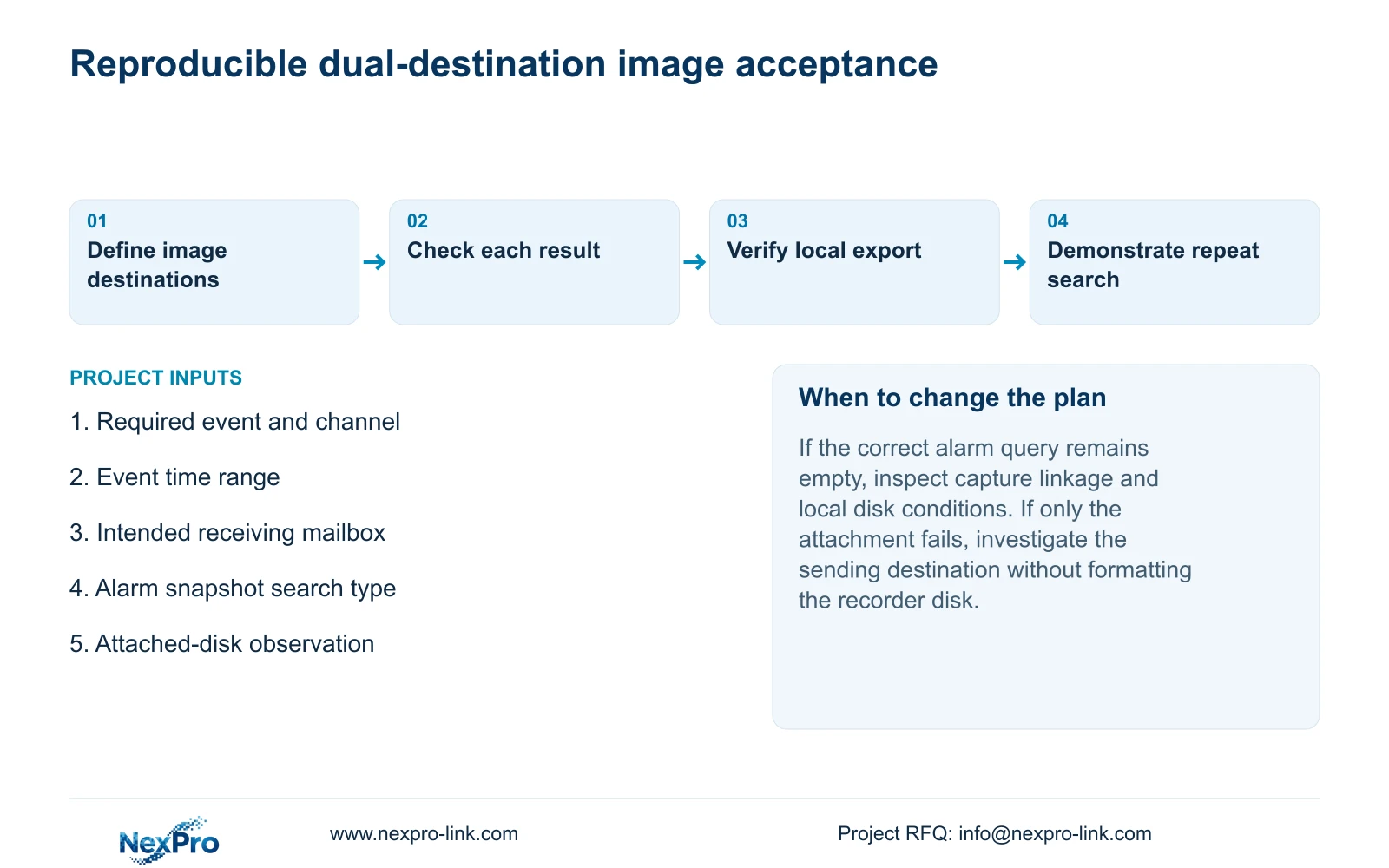
If the correct alarm query remains empty, inspect the attached-disk information and the configured full-disk behavior in section 4.12.21. Note any relevant no-disk indication. These observations help separate a search mistake from an unresolved local-storage condition.
The section titled External Storage Devices describes disk information, formatting, full-disk behavior and a startup no-disk prompt. Its heading does not establish NAS, NFS, iSCSI, RAID or shared-storage support. A request for a different archive architecture requires separate model-level evidence.
Formatting appears among the documented operations, but it is not a harmless search remedy. Any proposed format requires authority and preservation of required images, recordings and relevant records before proceeding. Keep the original evidence available while the specific disk issue is reviewed.
Section 05
Export the local image and match it to the event
Export the recorder-held alarm image through the applicable image workflow, then open the resulting file on the intended receiving system. Check the scene and its recorded channel-and-time context against the event. Record the tested viewing method and the authorized recipient.
A completed progress indicator establishes that the operation reported completion; it does not prove that the receiving person can inspect the correct file. Preserve the original local evidence until the required copy has been checked.
Section 4.11.4 mentions players such as VLC for backed-up video and audio. That advice is separate from opening an image export and does not guarantee every platform or codec combination. If footage is also required, validate that export separately rather than treating the still image as a substitute.
Section 06
Accept mailbox receipt and archive retrieval independently
Illustrative project scenario: A facility manager wants the alarm email image to remain searchable on the recorder as well. The proposed acceptance test uses the same identifiable event for both destinations. The mailbox attachment is opened first, then the alarm image is searched on the NVR and exported for inspection. No delivered result is implied.
Keep separate pass or fail entries for attachment receipt, local search and usable export. If one fails, preserve the successful configuration while investigating the affected destination. This prevents a functioning notification path from concealing an incomplete archive requirement.
Hand over the applicable versions, configuration-backup location and maintenance responsibilities, following the engineering workflow supported by sections 4.11, 4.12.3 and 4.12.17 through 4.12.19. Demonstrate the operator's query and export task. NexPro-Link's BOQ and tender support can help state these deliverables and their responsible parties in the project scope.
Section 07
Can the Seetong PC image folder prove NVR capture?
No. It is a different storage source. Verify the alarm image through the recorder's own Image Management query.
Section 08
Does a stored snapshot establish long-term archive retention?
No retention period is established by finding one image. Confirm the required archive scope and applicable disk behavior separately.
Section 09
Describe the missing image result
Send NexPro-Link the event channel and time with the failed destination, mailbox attachment or recorder image search, at info@nexpro-link.com.
Engineering references
These sources support the general planning principles. Always use the selected product's current datasheet and applicable project standards for final design.


