

Search incidents near daylight-saving transitions by preserving the reported time basis, checking the recorder's actual timeline and delivering footage with a clear time-context note.
Section 01
Establish what the reported incident time means
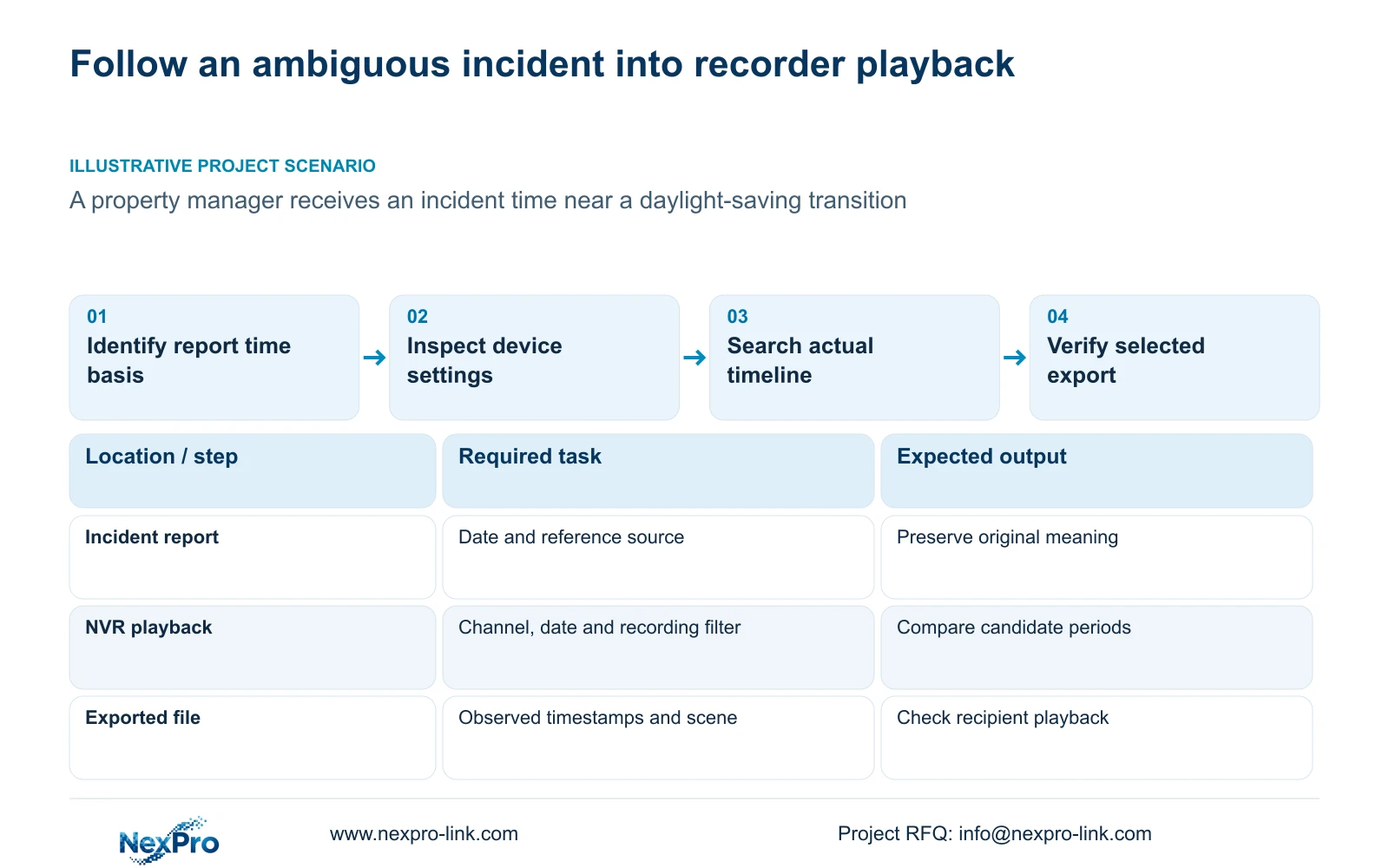
When an incident is reported close to a daylight-saving transition, preserve the time basis before narrowing the playback search. Establish whether the report uses a site clock, a camera overlay or another confirmed reference, and record the recorder and camera settings relevant to that period. Search the correct channel and neighboring periods where needed, then inspect the actual timeline at a suitable scale. The supplied manual does not establish how every firmware indexes duplicated or skipped local times. Deliver the selected footage with its observed timestamps and any unresolved ambiguity, after verifying that the recipient can play it.
Keep the incident report in its original form. Record its stated date, location and reference source without silently translating it into recorder time. If the report does not identify the time basis, obtain that clarification and preserve the uncertainty in the search record.
This guide uses NVR4.0 user manual CH_V2.4.doc, with V2.2 in its body. Sections 4.4.2 and 4.12.2 describe time-zone, synchronization and daylight-saving settings. Sections 4.11.2 through 4.11.4 cover search, navigation and backup. These descriptions do not establish a universal transition-indexing mechanism.
Section 02
Record the time configuration that applied to the footage
Inspect recorder and IPC settings separately. The manual includes camera manual time and network synchronization, plus recorder network time and an IPC synchronization interval measured in hours. Record the intended authority direction alongside the time-zone and daylight-saving choices.
Distinguish settings observed now from settings established for the incident period. A current configuration alone does not prove what was active when the footage was recorded. Use the available configuration history and relevant logs to support the historical account, and label any unresolved part.
The manual calls for the correct time zone before network synchronization and provides separate daylight-saving start and end settings. Preserve the observed time relationship before making a correction. Changing the current clock is not a documented method for rewriting old timestamps or resolving an ambiguous historical index.
Section 03
Check the channel, calendar and neighboring search periods
Section 4.11.2 says playback defaults to the channel selected in preview. Confirm the required camera before interpreting the calendar. Select the incident date and inspect the ordinary, alarm or motion filter so the search includes the recording type needed for the event.
Orange indicates that recordings exist on a date in this workflow; grey indicates no recordings for the queried scope. Neither color explains how a transition-related time ambiguity is handled. An orange date also does not establish uninterrupted coverage of every channel throughout the day.
Where the reported and device time contexts differ, inspect the neighboring periods and adjacent date when relevant. Record which ranges were checked and what recognizable actions appeared. If the same apparent local time raises more than one plausible candidate, preserve both candidates until scene content or another confirmed reference distinguishes them.
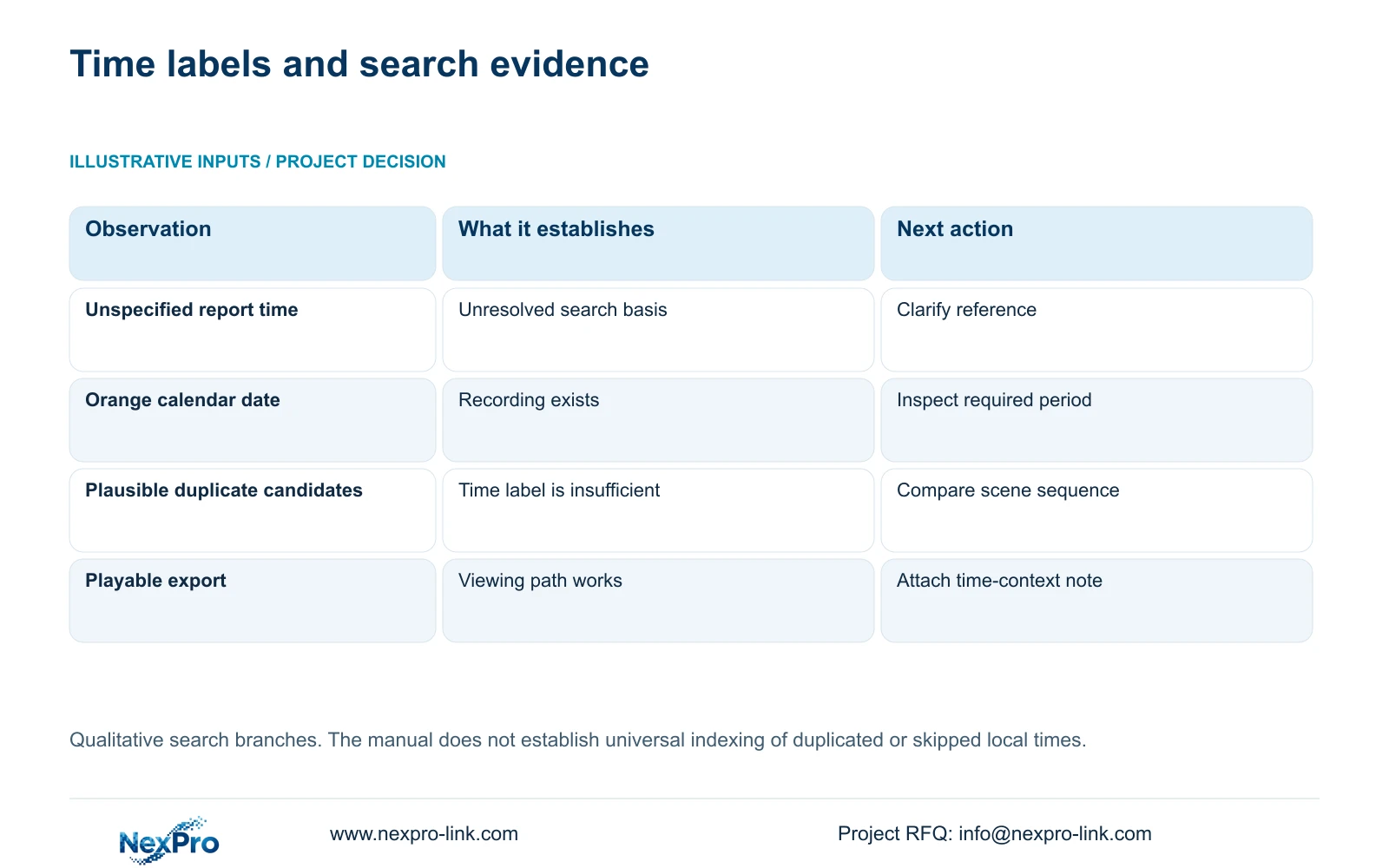
| Search observation | Interpretation | Next action |
|---|---|---|
| Incident time basis is unspecified | The search starting point remains uncertain | Confirm the report's reference and retain the ambiguity |
| Orange date, no event at the expected position | Some footage exists, but this query has not found the event | Check channel, type filter and neighboring periods |
| More than one plausible event candidate | Displayed time alone has not identified the incident | Compare scene sequence and an independent reference |
| Export plays but time meaning is unclear | The file needs an accompanying context record | State observed labels and the unresolved time basis |
Section 04
Move from broad navigation to continuous inspection
Section 4.11.3 describes thirty-second forward and backward jumps, time positioning and timeline zoom. Use those controls for different tasks. A broad jump helps locate a likely period; a finer timeline view helps inspect the interval around a recognizable action.
The source's teaching example uses a 20-second event. A 30-second navigation jump can pass over an event shorter than the jump interval. That observation concerns viewing behavior and does not demonstrate a recording gap. Once a likely candidate is found, play through the relevant sequence instead of continuing to judge it from jump endpoints.
Timeline zoom changes how the time range is displayed. Electronic image enlargement helps inspect image content. Keep those functions separate when comparing event candidates: enlarging the picture does not resolve an ambiguous clock label, while a wider time range may reveal useful scene sequence.
Section 05
Verify the file and carry its time context with it
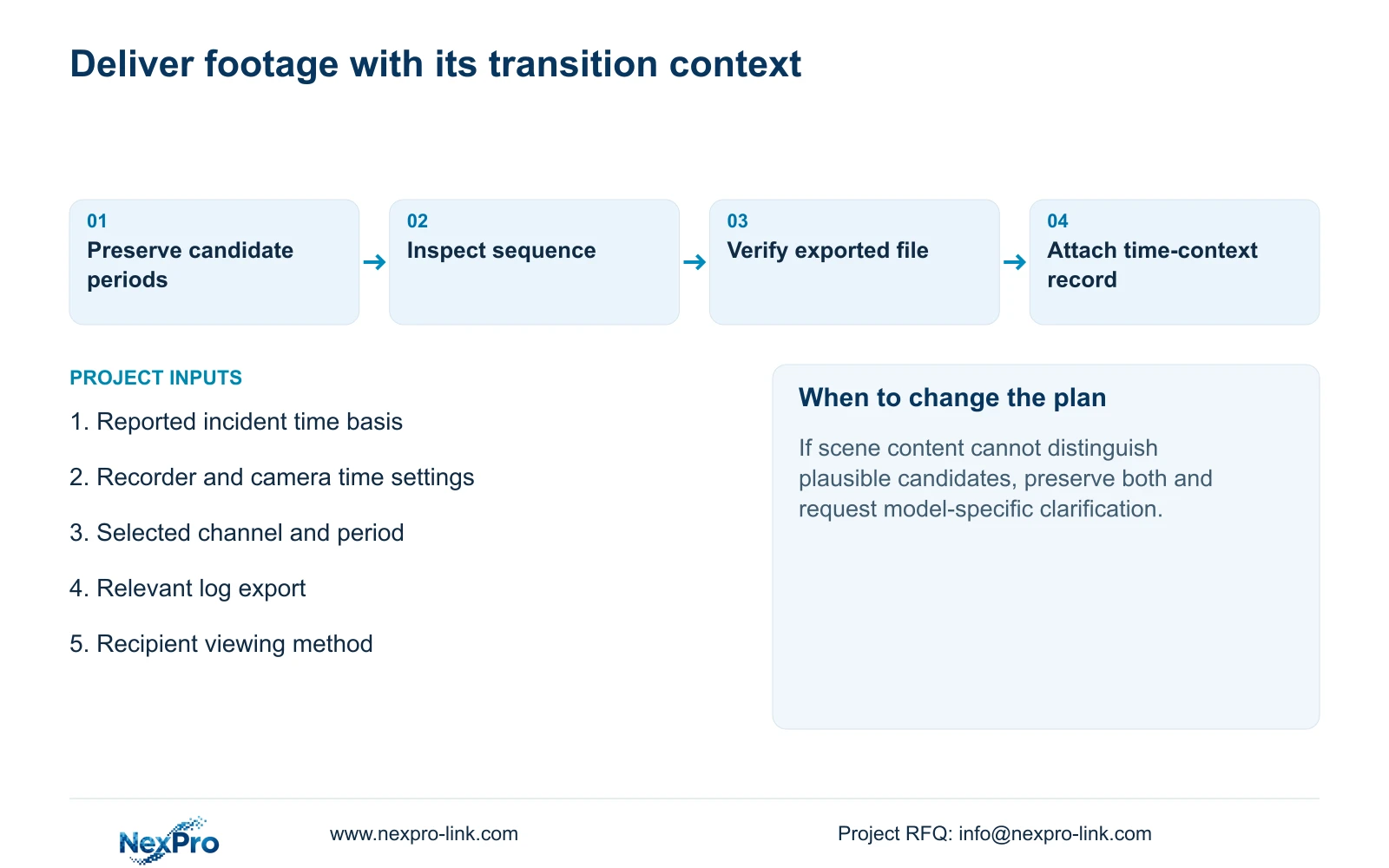
Export the selected channel and required period through the backup workflow in section 4.11.4. Include enough scene context to explain why that selection corresponds to the incident. Record the displayed start and end positions as observed, without inventing an automatic conversion to a different time basis.
Open the export on the intended receiving system and check the camera identity, period, actual playback and any required audio. The manual mentions players such as VLC, but does not guarantee every operating-system and codec combination. A completed backup indicator alone cannot establish a usable delivery.
Accompany the file with the reported incident time, its reference, the observed recording labels and the relevant time settings. State any uncertainty that remains. Protect the original footage until the required copy has been verified and transfer it only to the authorized recipient.
Section 06
Retain the configuration observations and event logs
Illustrative project scenario: A property manager receives an incident time close to a local daylight-saving transition. The investigator preserves the report's time basis, records the relevant device settings and checks the actual recorder results before selecting a clip. The scenario does not assume that the recorder exposes separate indexes for repeated local times.
Section 4.12.17 provides log detail viewing and text export. Its default query is the current day and includes type filters. Adjust the date for the incident; when the date condition is not selected, the manual describes an all-log query. Check those controls before treating an empty result as proof that no relevant logs exist.
Keep the exported records with the observed configuration and search notes. Logs may support the investigation, but their presence does not establish tamper-proof auditing or unlimited retention. If the actual firmware's transition behavior remains unresolved, preserve the candidate footage and obtain model-specific support rather than changing settings to force a preferred result.
Section 07
Does the manual explain how a repeated local hour is indexed?
No universal indexing behavior is established in the supplied scope. Inspect the actual device results and document the applicable model and firmware before making that claim.
Section 08
Does an orange transition date prove complete recording?
No. It establishes recording existence in the queried workflow. Verify the required channel and period through playback before accepting coverage.
Section 09
Provide the ambiguous search context
Send NexPro-Link the recorder model and firmware, reported incident time basis and a redacted description of the candidate playback periods at info@nexpro-link.com.
Engineering references
These sources support the general planning principles. Always use the selected product's current datasheet and applicable project standards for final design.


