

Copy recording plans by area task and approved hours. Preserve gate and weekend exceptions, verify destination footage and hand over a usable schedule matrix.
Section 01
Group channels by coverage requirement before copying
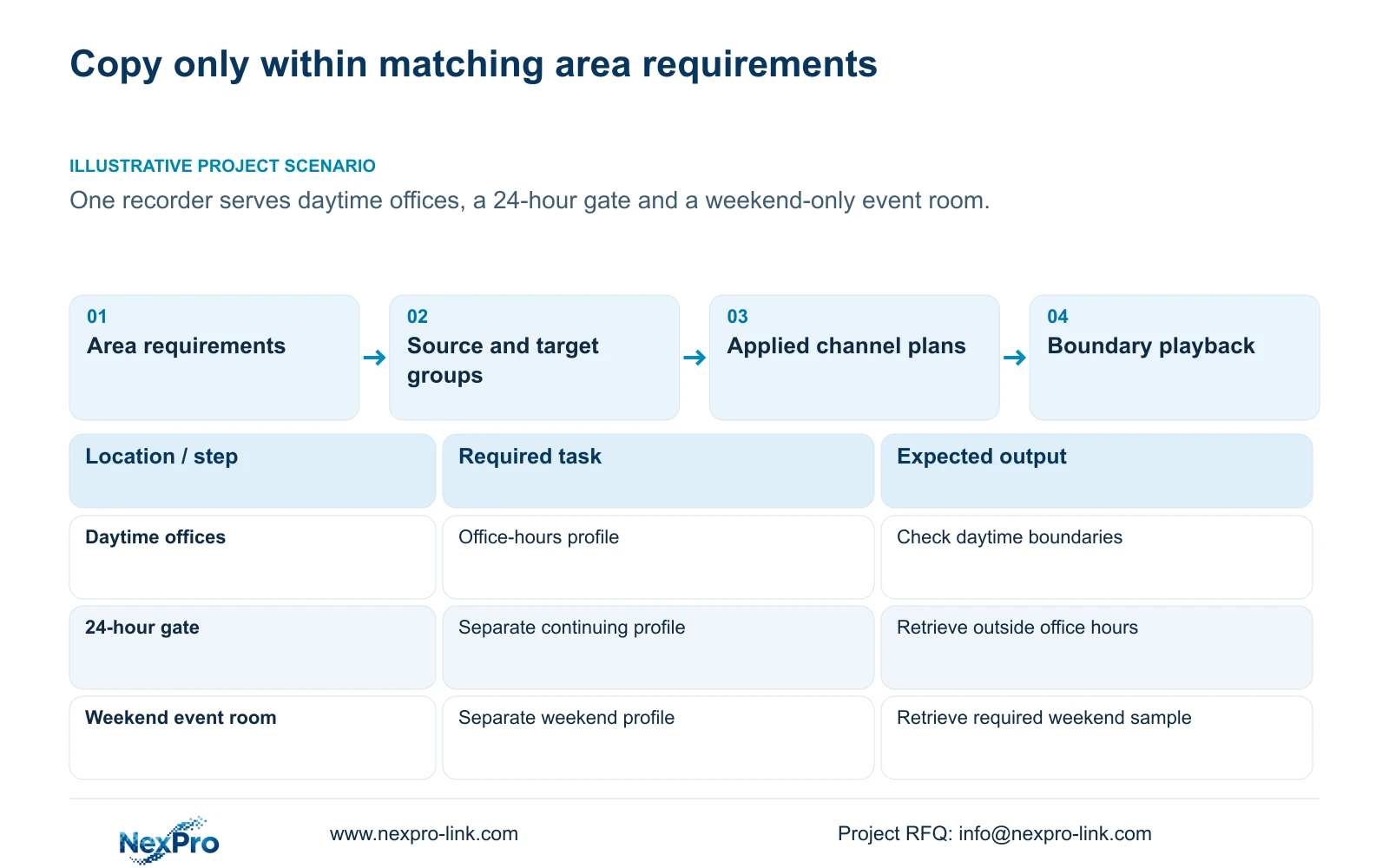
Copy a recording schedule only to channels that share the required operating days, hours and recording type. On a recorder serving daytime offices, a 24-hour gate and a weekend-only event room, one common plan can remove necessary footage or add unapproved coverage. Identify the source profile and destination list, preserve each exception, and inspect the applied plans after copying. Then retrieve boundary and weekend samples from the actual destination channels. Finish with a schedule matrix that lets the owner identify the location, expected footage and responsible maintainer. Camera model similarity and a successful save message cannot establish that the copied plan suits every area.
This guide follows NVR4.0 user manual CH_V2.4.doc, whose body identifies V2.2. Section 4.11.1 supplies the schedule controls; sections 4.3.1, 4.4.4 and 4.12.6 support channel identity. Grouping and acceptance are engineering workflows, applied within the actual recorder and firmware scope.
Section 02
Define source profiles and exclude incompatible destinations
Start with the area's operational task. Ask when footage must exist and whether quiet intervals need coverage. Build separate groups for requirements that differ, even if every camera has the same model. Resolve uncertain hours with the owner before treating them as approved copy targets.
Record each group's source channel, destinations and excluded channels. Use a copy operation only when the actual recorder's matching instructions support the selected setting scope; otherwise apply the authorized plans individually. After either route, inspect each destination against its group requirement. A difference requires an affected-channel investigation before repeating a broad copy. The copy control cannot decide whether an operational exception should be preserved.
Section 03
Choose each group's recording behavior deliberately
Section 4.11.1 describes timed recording, no recording, motion recording and motion-plus-timed recording on a grid with a 30-minute minimum scale. Select the type alongside the required days and hours. A gate that needs quiet-period review cannot be treated as adequately covered merely because motion blocks fill its schedule.
Motion-only records when motion detection triggers. Motion-plus-timed continues ordinary timed recording without a trigger and records motion-type footage when triggered. Use timed coverage where the agreed task requires ordinary scheduled footage. A no-recording period must reflect an approved requirement. For the weekend room, establish whether the requirement truly excludes other days before selecting such periods.
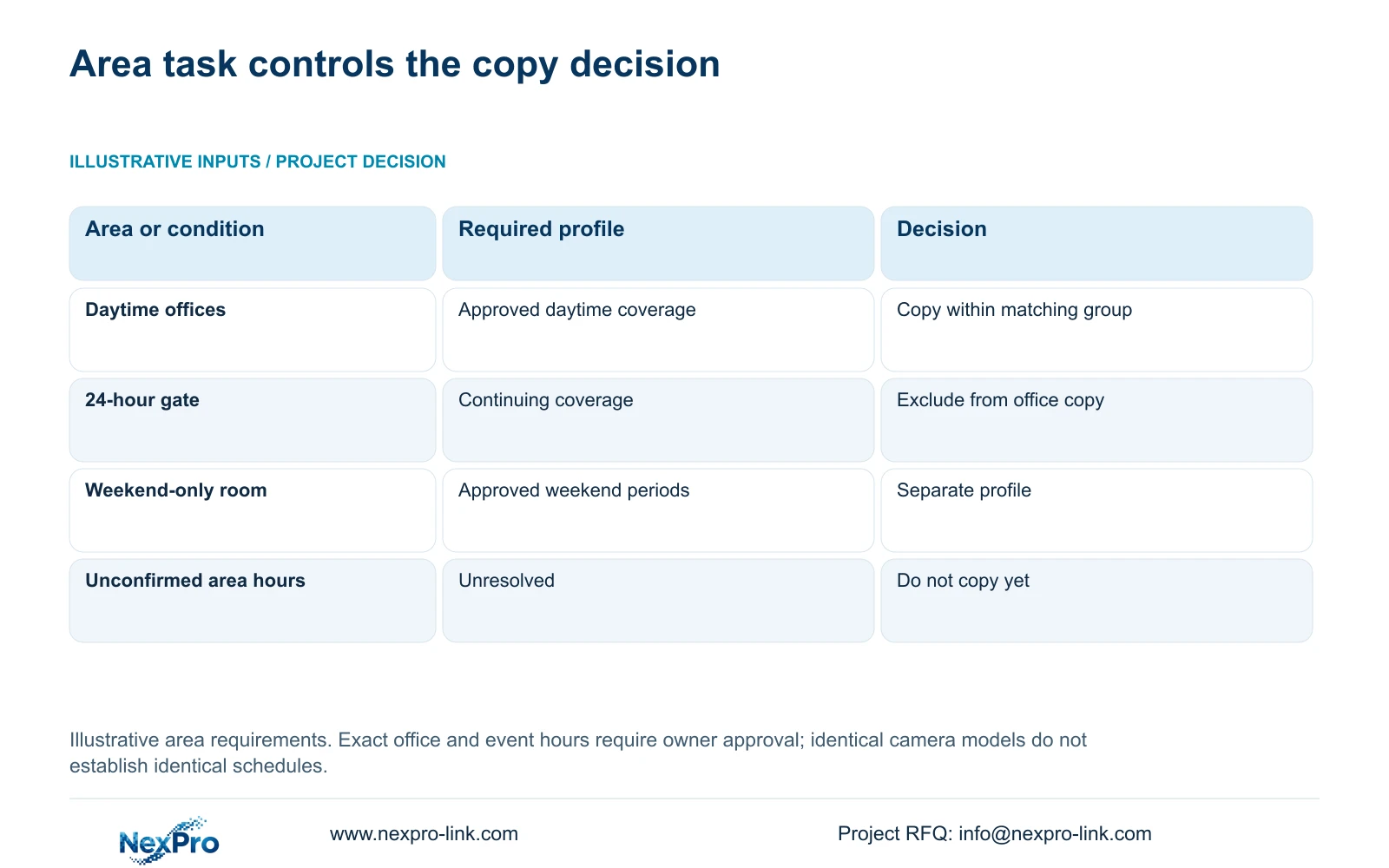
| Area | Coverage requirement | Copy decision |
|---|---|---|
| Daytime offices | Approved daytime periods | Share only within the office-hours group |
| 24-hour gate | Continuing footage throughout required days | Exclude from the daytime office copy |
| Weekend-only event room | Approved weekend event periods | Use a separate weekend profile |
| Area with unconfirmed hours | Requirement unresolved | Keep out of the copy group until agreed |
Section 04
Connect the destination channel to the physical location
Keep drawing location, physical camera identity, IP address, recorder channel and displayed OSD name in separate fields. The manual provides channel-name and OSD controls, but the project record must maintain their relationship. A familiar display window can contain a different camera after replacement or reordering.
Before selecting destinations, confirm that each channel corresponds to the intended office, gate or event room. Record a display-name change separately from a camera replacement. Update the mapping when equipment or channel order changes, and verify recording identity during retrieval. Keep the working identity record controlled; public examples do not need device identifiers, private addresses or customer footage.
Section 05
Review alarm exceptions beside the recording matrix
The recording plan and alarm arming conditions are separate. Section 4.12.11 describes motion enablement, arming period, detection area and linkage. A copied recording schedule does not establish that these alarm settings match the destination area's task.
Compare the required actions for each group. Office footage may be needed during one period while a motion action is required during another. The weekend room may have its own event conditions. Test an intended event inside and outside the relevant periods and inspect the requested output. If footage exists but an action is absent, investigate that action's conditions. Avoid changing the recording plan merely because a separate notification or motion linkage failed.
Section 06
Check boundary and weekend footage on destination channels
After inspecting the applied plans, select representative destinations from each group and test their differences. Check office coverage around its approved boundaries, gate footage outside office hours and an event-room sample during a required weekend period. Record which channels and periods remain untested.
Section 4.11.2 defaults playback entry to the preview-selected channel. Confirm the intended destination explicitly, then select the date, time and ordinary, alarm or motion filters appropriate to its plan. Orange indicates recording existence for that date; it does not prove complete coverage of the selected area.
If a sample is missing, check channel identity and search filters first. If the gap remains, compare the applied destination plan with its approved group and inspect the relevant recording conditions. Correct the affected branch and repeat its test. A weekday office sample cannot validate a weekend exception or a gate's overnight coverage.
Section 07
Deliver the final matrix with an operator retrieval task
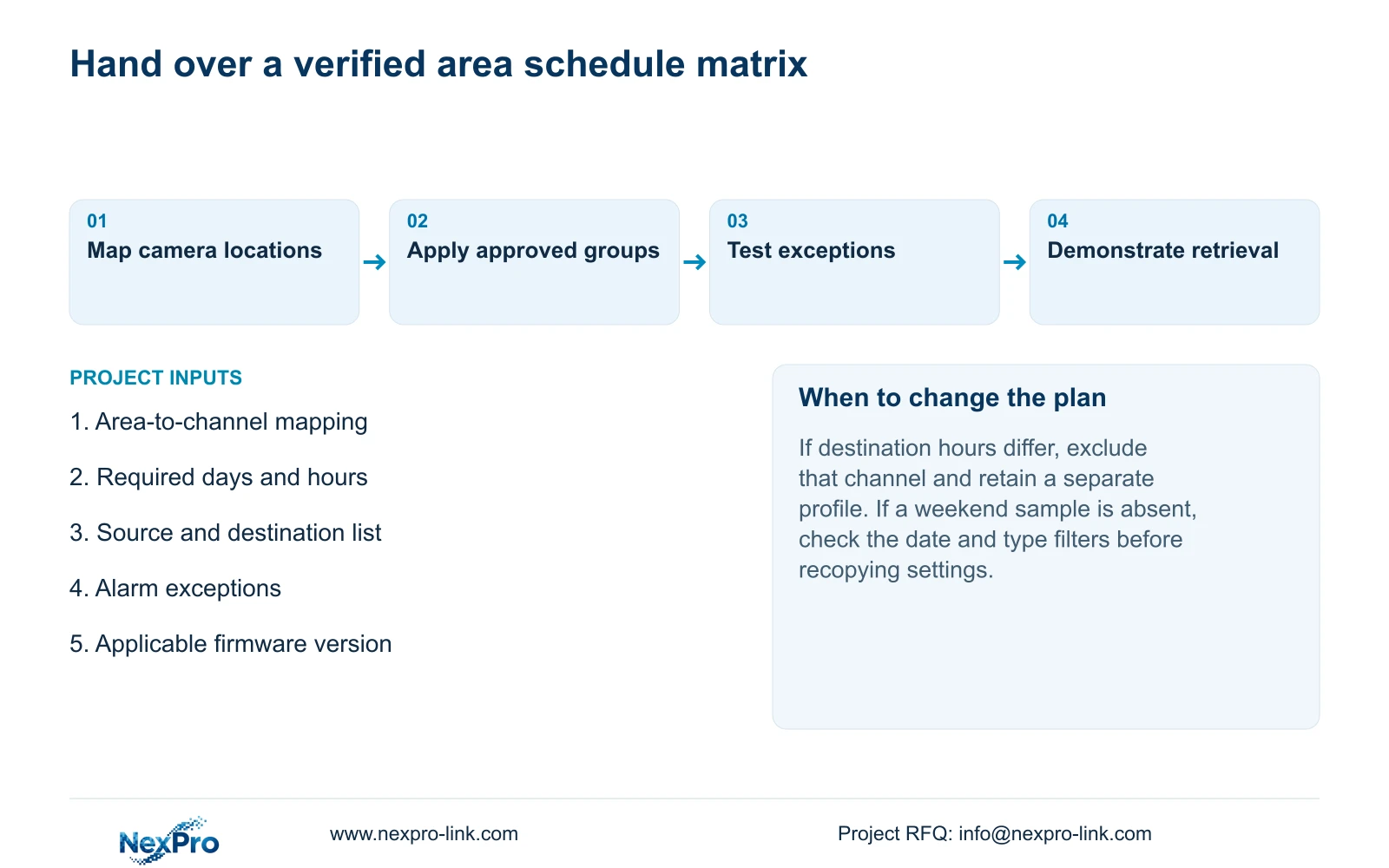
The handover matrix should identify location, channel, profile group, recording type, required days and hours, and alarm exceptions. Add the applicable recorder and firmware versions, configuration-backup location and maintenance responsibility. Sections 4.11, 4.12.3 and 4.12.17 to 4.12.19 support the operating and configuration context; the consolidated matrix is a project deliverable.
Have the owner identify a channel, retrieve a required period, export it and play the file. Keep document delivery and successful operator retrieval as separate acceptance results. Transfer credentials through a controlled route outside the public matrix. Assign responsibility for updating the plan when area hours, camera identity or event requirements change.
NexPro-Link's BOQ and tender support scope can be used to organize the equipment and technical-document discussion around this matrix. State configuration work and any site services separately so a document package is not mistaken for a completed operational check.
Section 08
Preserve the mixed site's three operating patterns
Illustrative project scenario: A site has daytime offices, a 24-hour gate and a weekend-only event room on one recorder. The engineer creates distinct profile groups and copies only within matching requirements. The gate stays outside the daytime selection, and the room retains its weekend plan. Verification uses samples that expose those differences, followed by an owner retrieval exercise. These are proposed actions and acceptance conditions, not a report of a delivered installation.
Section 09
Does using the same camera model make a common plan appropriate?
No. Shared hardware may support the same options while the areas need different hours or recording types. Group by the approved task and supported settings together.
Section 10
What should be checked when weekday footage works but a weekend sample is absent?
Confirm the intended channel, weekend date and type filters. Then compare its applied weekend plan with the approved requirement and check relevant event conditions.
Section 11
Review the copy groups
Send NexPro-Link the area-to-channel matrix with required days, hours and exceptions at info@nexpro-link.com.
Engineering references
These sources support the general planning principles. Always use the selected product's current datasheet and applicable project standards for final design.


