

For a maintenance batch, record each affected camera's authorized change, corresponding connection update and first verified new recording. Keep secrets outside the log and healthy channels outside the work scope.
Section 01
Repair the affected camera connections first
For a maintenance batch, record each affected camera's authorized change, corresponding connection update and first verified new recording. Keep secrets outside the log and healthy channels outside the work scope. Close channels individually; one reconnection does not prove the batch complete. Escalate unsupported credential procedures without resetting devices to guess the result.
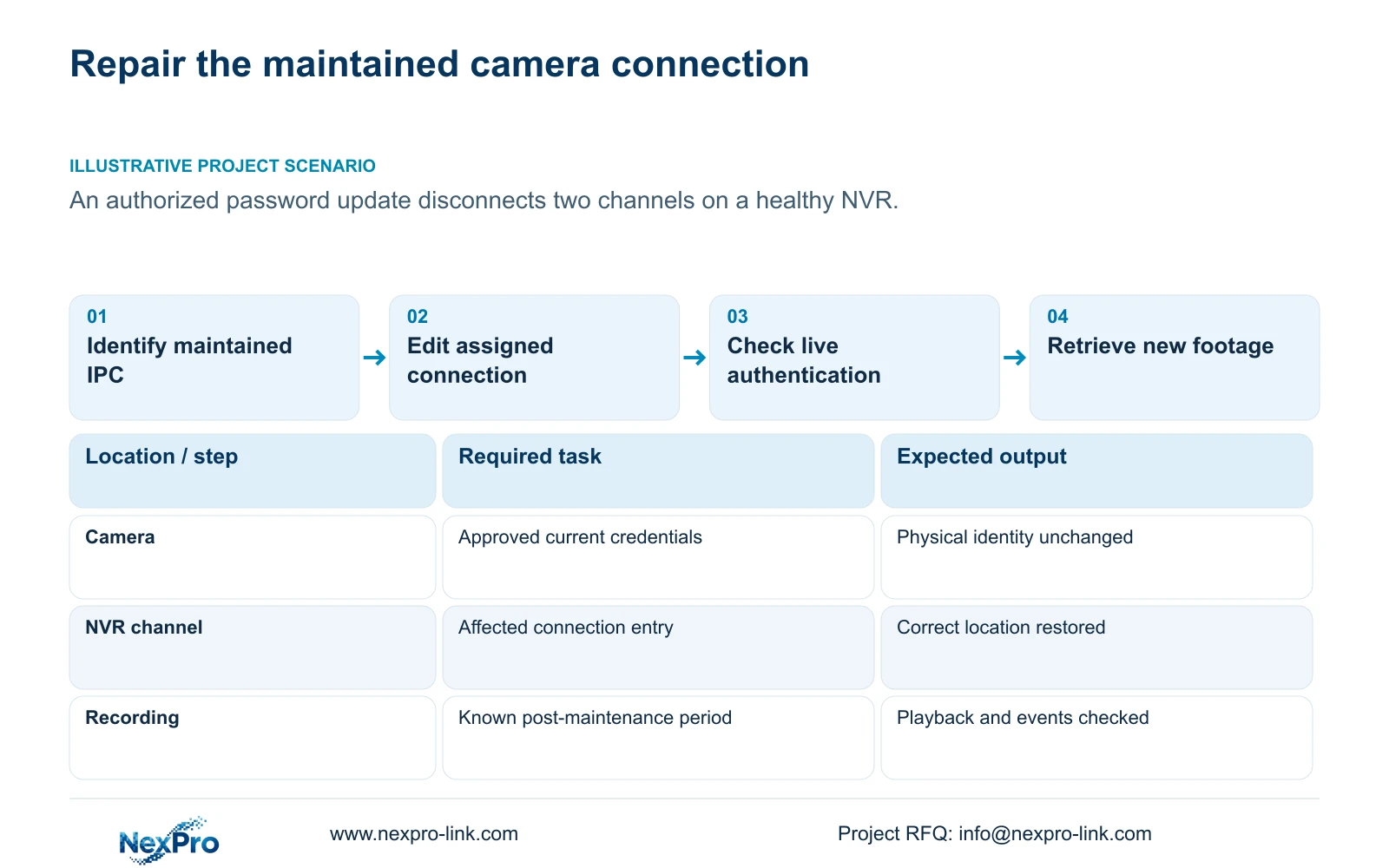
After an authorized camera password change, update the connection credentials for the affected NVR channels and leave healthy channels unchanged. Confirm which physical cameras were maintained, their current approved addresses, and the recorder channels assigned to them. Use the applicable edit-device workflow to correct the camera connection fields, then check authentication and live video before testing new recordings. Keep the existing location mapping throughout the repair. A restored picture establishes only part of the result: the maintenance check must also cover the recording policy, footage produced after reconnection, and any event functions that the owner needs.
The operating basis is the supplied private NVR4.0 user manual CH_V2.4.doc, whose body identifies V2.2. Section 4.3.1 describes device editing; sections 4.1 and 4.12.3 distinguish relevant account operations. These instructions concern the applicable recorder interface and firmware, not an interchangeable Seetong PC workflow.
Section 02
Identify what maintenance actually changed
Start with the maintenance record and compare its affected cameras with the disconnected channel entries. Establish whether the technician changed only a password, also changed the username, or altered another connection value. Keep the physical camera identity and installation location visible during this comparison. A symptom appearing after maintenance is useful evidence, but it does not establish that every disconnected channel has the same cause.
Section 4.3.1 allows editing connection information such as protocol, username and password. Correct the confirmed mismatch on the affected entry. If the approved protocol and address remain unchanged, preserve them while updating credentials. Changing several unrelated values together makes the result harder to interpret and can create another fault.
If the current camera address differs from the maintenance record, resolve that discrepancy with the authorized maintainer before editing the connection. This workflow synchronizes known current values; it does not require an additional camera address change or a reset of the recorder.
Section 03
Use the credential belonging to the camera connection
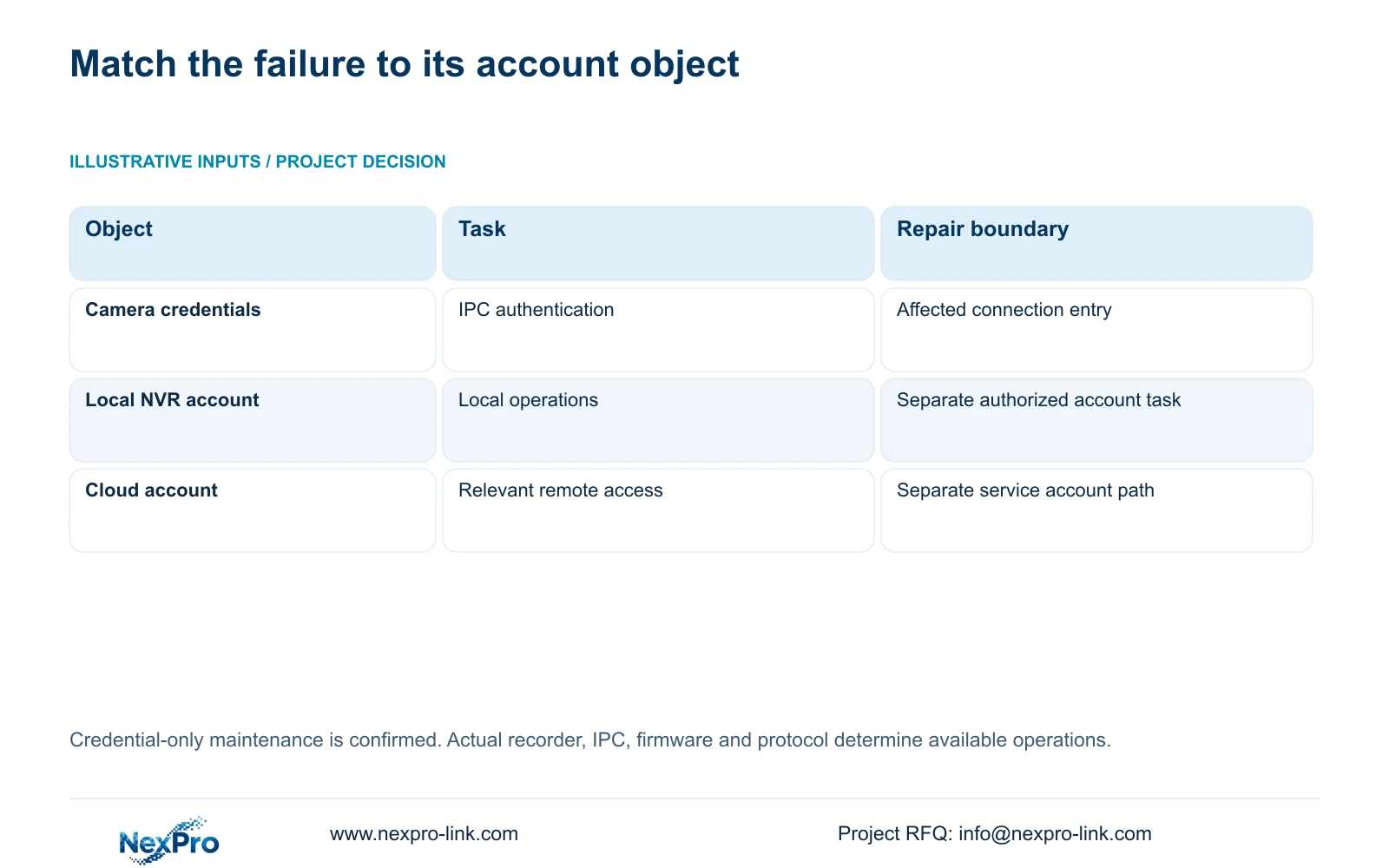
The username and password in a channel connection authenticate the IPC. A recorder local account governs local operations, while network access and a third-party cloud account have their own relevant account and permission paths. Treat these objects separately unless the exact product workflow explicitly establishes a relationship.
A working recorder login therefore does not prove that the recorder can authenticate the maintained camera. Conversely, a camera connection error does not by itself justify changing the operator's recorder account or Seetong account. Identify the object named by the failed task before asking its owner for an update.
Keep credential ownership and change status in the service record. Actual passwords belong in the buyer's approved private credential process, not the BOQ, a general support email or a screenshot shared for diagnosis.
| Observation | Relevant object | Next action |
|---|---|---|
| Recorder login works; maintained camera is disconnected | Camera connection credentials | Compare the affected entry with approved current camera values. |
| Camera appears in search but has no live video | Enrollment, protocol and authentication | Check the added entry and connection state before recording tests. |
| Live video returns; no expected new footage | Recording policy and recording task | Check the schedule and retrieve a known post-maintenance period. |
Section 04
Keep the location and channel mapping intact
Maintain separate fields for drawing location, physical camera identity, IP address, recorder channel and displayed name. The manual supplies channel-name and OSD controls in sections 4.4.4 and 4.12.6, but the project record must explain which camera occupies each channel. A familiar display position or label cannot establish physical identity on its own.
For a credential-only repair, compare the mapping before and after editing. The expected result is the same camera serving the same location through the same assigned channel. If the maintenance record reveals a physical replacement, document that separately instead of presenting it as a password-only change.
Use the mapping when choosing footage for the final check. Confirm that the retrieved scene belongs to the intended location, particularly if operators have rearranged preview windows since the maintenance visit.
Section 05
Check reconnection without confusing discovery with success
The search list, added-device list, connection state and recorded footage answer different questions. Section 4.3.1 describes supported private-protocol searches and same-subnet ONVIF discovery. Finding the maintained camera establishes discovery through that mechanism; it does not establish successful authentication or complete feature compatibility.
After editing, inspect the affected added entry and test live video. If discovery succeeds but the connection still fails, recheck the confirmed protocol and authorized credentials against that entry. If the camera cannot be found, investigate the address and applicable discovery boundary before repeatedly changing passwords.
Once video returns, test required events separately. An ONVIF camera appearing in search or supplying video does not prove that every event, audio or maintenance operation is supported by the actual camera-recorder combination.
Section 06
Retrieve new footage and check the required events
Read the existing recording plan before judging the post-maintenance sample. Section 4.11.1 describes timed recording, no recording, motion recording and motion-plus-timed recording, with a thirty-minute minimum plan scale. Motion-only recording needs a motion trigger. Motion-plus-timed continues ordinary timed recording without a trigger and records motion-type footage when triggered.
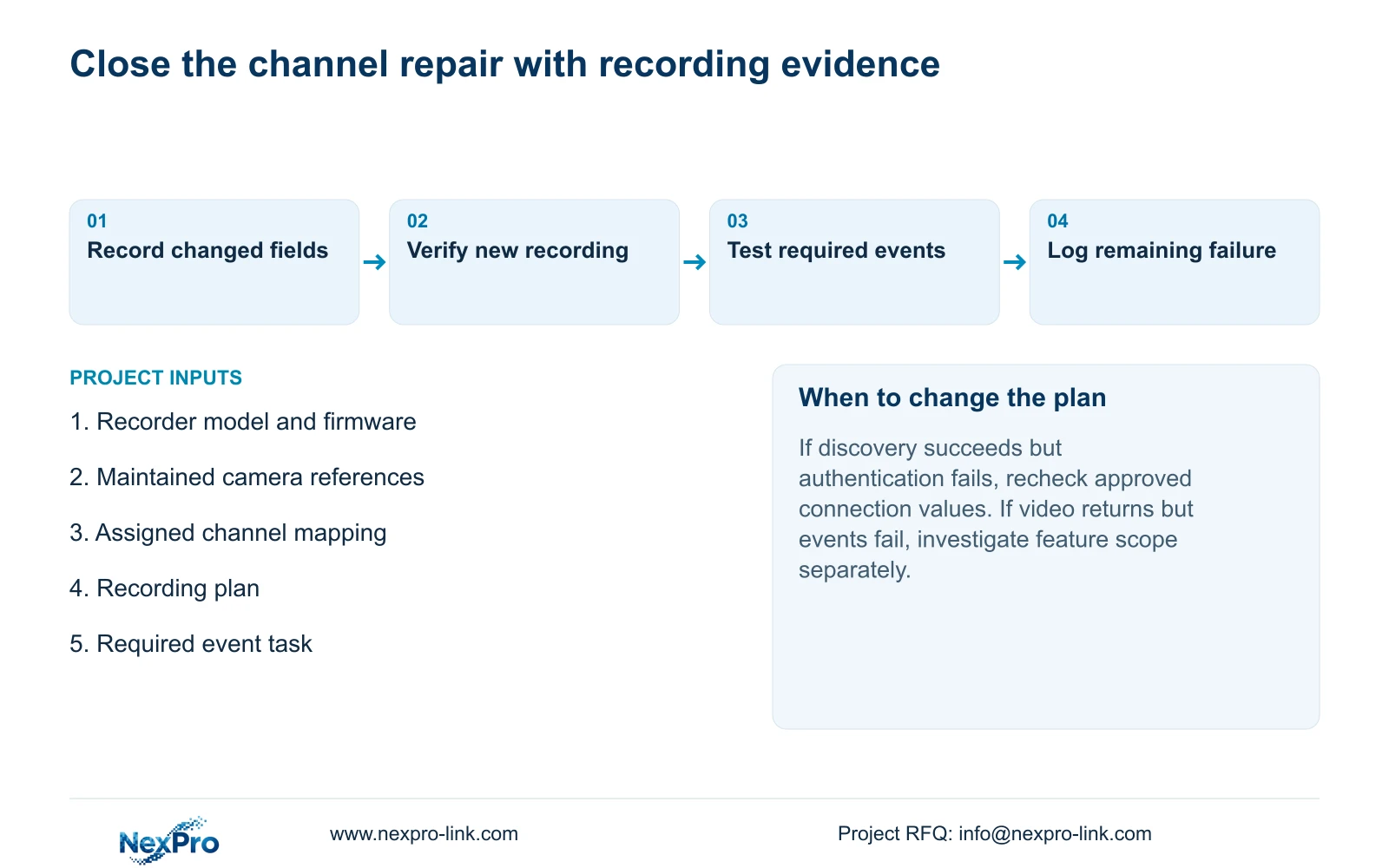
Choose a known period after reconnection that suits the configured policy, then retrieve it from the correct channel. Do not change a motion-only plan merely because a quiet interval contains no footage. Where an event is required, perform an authorized test and record whether the expected recording or linkage returns.
Complete the check with correct time, a relevant older footage sample, export and the intended operator access. Record the changed variable and any failed task. If video works but an event remains unavailable, preserve that distinction for support instead of declaring the entire channel repaired.
Section 07
Apply the repair to the maintenance window
Illustrative project scenario: An authorized camera password update leaves two channels disconnected on an otherwise healthy NVR. The integrator identifies those cameras in the maintenance record, updates their assigned connection entries and leaves other channels untouched. Each restored channel then needs a suitable new recording sample and its required event test. The record should distinguish the maintenance gap from footage generated after reconnection; no successful outcome is assumed.
| Situation | Required record | Decision boundary |
|---|---|---|
| Authorized camera change | Channel identity and approved procedure | Update its corresponding connection |
| Channel reconnects | First verified new recording | Close that channel only |
| Other channels stay healthy | Untouched baseline and batch list | Exclude secrets and unnecessary resets |
Section 08
Should the operator's NVR password change too?
Only if that account has its own authorized change requirement. Updating the camera connection credentials does not establish a need to alter recorder or cloud accounts.
Section 09
Is a restored live picture enough to close the service task?
No. Retrieve expected new footage and verify required events and access. Record any remaining failure separately from the successful live connection.
Section 10
Provide the unresolved channel evidence
Send NexPro-Link the recorder model and firmware, affected channel references and remaining connection or recording symptom at info@nexpro-link.com, without passwords.
Engineering references
These sources support the general planning principles. Always use the selected product's current datasheet and applicable project standards for final design.


