

A missing search result does not establish a faulty camera. Compare the documented discovery mechanism with the actual subnet, addressing method and approved access path.
Section 01
Identify the search mechanism before changing settings
When an NVR finds private-protocol cameras but misses a third-party ONVIF camera, compare the camera's actual network placement with the documented search scope before diagnosing hardware failure. The supplied manual describes private-protocol discovery and limits ONVIF discovery to the same subnet. A successful search through one mechanism does not prove that another mechanism reaches the same devices. Record the camera and recorder addresses, masks, selected protocol and search result first. If the camera sits in another subnet, ask the network team to review the approved access path. Keep discovery, authentication and usable video as separate test results throughout the investigation.
Section 4.3.1 provides search, add and edit operations as distinct steps. Use separate observations for whether the camera was discovered, whether it was enrolled, whether authentication succeeded and whether video or recording works. A blank search list concerns the first step; a found device with no picture concerns later steps.
The source is the private supplied NVR4.0 user manual CH_V2.4.doc, whose body says V2.2. This guide uses sections 4.3.1, 4.12.8, 4.4, 4.10, 4.3.3 and 5.3. References to sections take priority over old page numbering, and the operating behavior remains conditional on the actual device and firmware.
Section 02
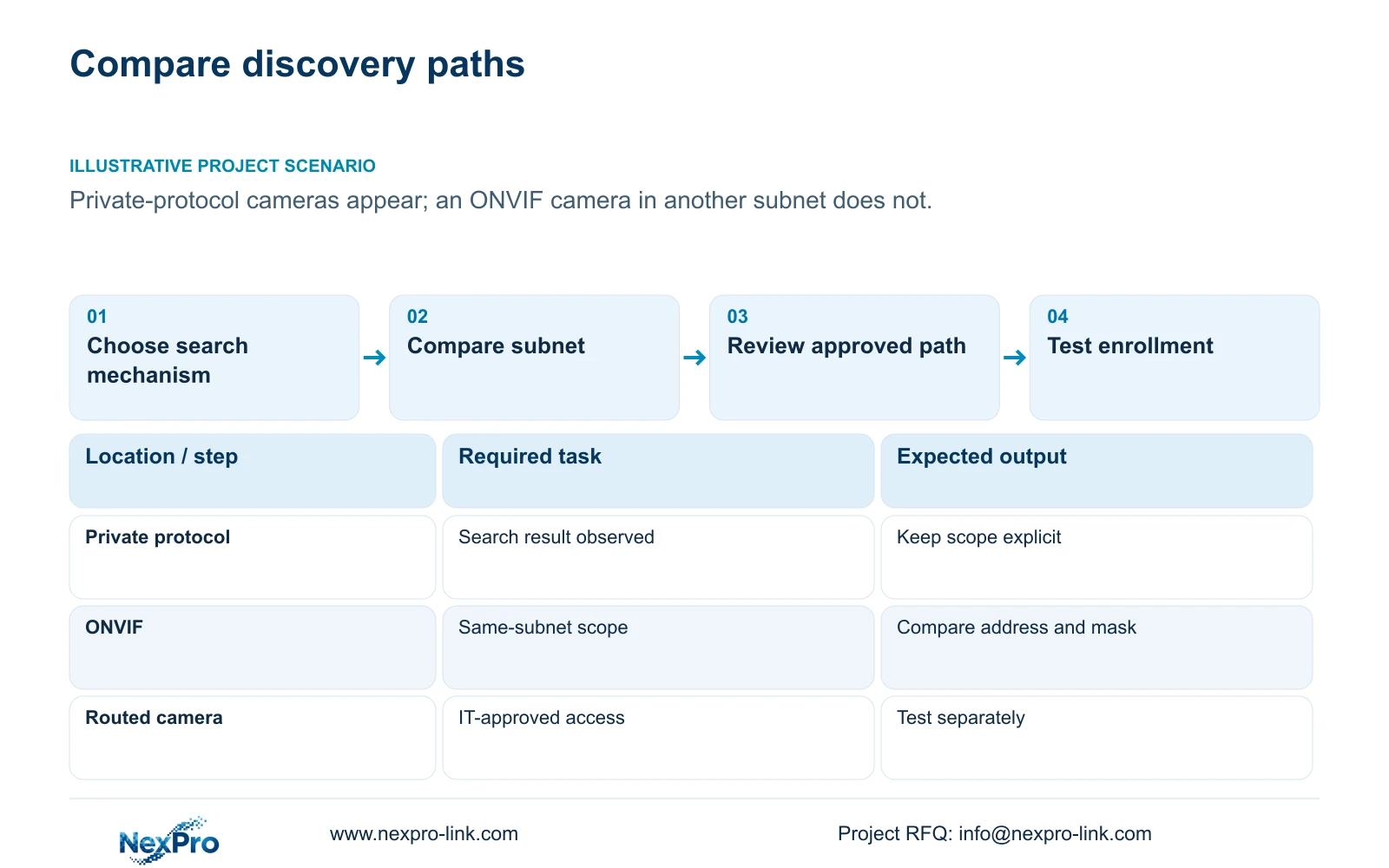
Compare the recorder and camera network placement
Read the current addresses and subnet masks for the recorder and missing camera, then compare them with the site's approved network schedule. Do not infer the discovery boundary from where a cable terminates or from the fact that other cameras appear in the list.
The manual's same-subnet ONVIF search description does not promise discovery across every routed VLAN. A missing result across subnets therefore does not establish that all communication is impossible. Discovery behavior and approved routed access need separate verification.
Section 5.3, question 6, includes the historical ONVIF 2.1-and-above requirement. Preserve that as the manual's statement, not a current universal compatibility test. Function-level qualification should use the actual camera-recorder combination and relevant ONVIF profile evidence. The private-protocol search statement also should not be expanded into an unsupported promise of unlimited cross-subnet discovery.
Section 03
Read the current address-management method
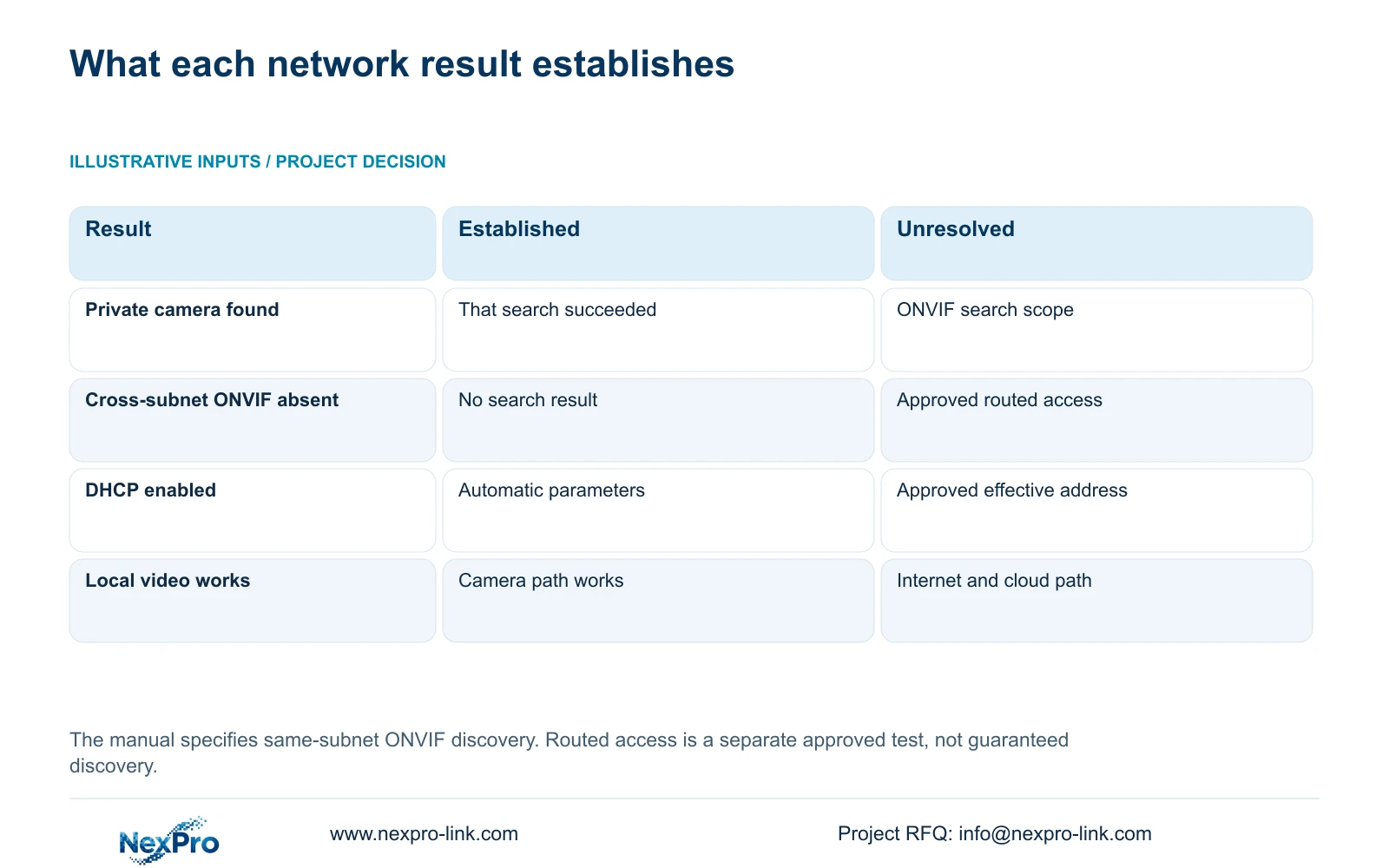
Section 4.12.8 states that DHCP obtains network parameters automatically and prevents manual editing of those fields. If the fields are unavailable, check whether DHCP is enabled before treating the interface as defective. Read the effective configuration rather than relying on an earlier installation note.
For a proposed manual configuration, obtain the approved IP address, subnet mask, gateway and DNS information from the site network owner. An address reservation can be part of network administration, but this manual does not establish a recorder-hosted DHCP reservation server.
Do not change addressing simply to make the search list look complete. An IP change requires authority, preservation of relevant configuration and data, and an agreed interruption. After an approved change, update the camera schedule and retest the local and remote paths that depend on it.
| Observation | Supported distinction | Next check |
|---|---|---|
| Private cameras found; ONVIF camera absent | Search mechanisms have different stated scope | Confirm ONVIF camera subnet |
| ONVIF camera is in another subnet | Same-subnet discovery is not established there | Request approved path review from IT |
| Manual network fields unavailable | DHCP may control those fields | Read DHCP state and effective parameters |
| Camera discovered, no usable video | Discovery succeeded; later stages remain open | Check enrollment, protocol and credentials |
| Local video works; cloud access fails | Camera and internet paths differ | Check default route, gateway and DNS |
Section 04
Verify protocol and account scope after discovery
Once a camera is found or its approved connection path is established, confirm the selected protocol and authorized credentials before evaluating video. Use the affected device entry rather than changing unrelated channels. Keep account secrets out of screenshots and public diagnostic examples.
Sections 4.4 and 4.10 explain that some controls depend on IPC capability, with explicit prerequisites for PTZ. A grey or ineffective control does not establish camera damage. Check camera identity, firmware, protocol, permissions and the actual function being requested.
Test basic video separately from events, audio, PTZ or configuration actions required by the project. If video works but a particular control does not, retain that result as a function-level limitation or unresolved test. Do not invent a third-party menu path merely because a similar private-protocol camera exposes one.
Section 05
Give IT a defined path to review
Prepare the source recorder, destination camera, current network placement and required operation for the network team. Ask whether the intended access is permitted and how it should be verified. A request to make every camera visible everywhere is too broad to resolve this specific discovery problem.
Keep the local camera path separate from the recorder's internet or cloud path. Sections 4.3.3.2 and 4.12.8 support checking the selected default route, gateway and DNS, followed by the remote-network diagnostic view. Local pictures do not prove cloud reachability, activation or account authorization.
Opening public ports or indiscriminately changing firewall rules is not a substitute for this review. If the requested route is outside the approved network scope, stop configuration changes and obtain a decision from the network owner. Record the result without calling an access-policy restriction a camera fault.
Section 06
Report the conditions behind the failed search
Illustrative project scenario: A contractor can find private-protocol cameras but not a third-party ONVIF camera placed in another subnet. The contractor records the two search results separately, compares address and mask information, then requests an approved network-path review. The scenario does not establish a completed repair or guarantee cross-subnet enrollment.
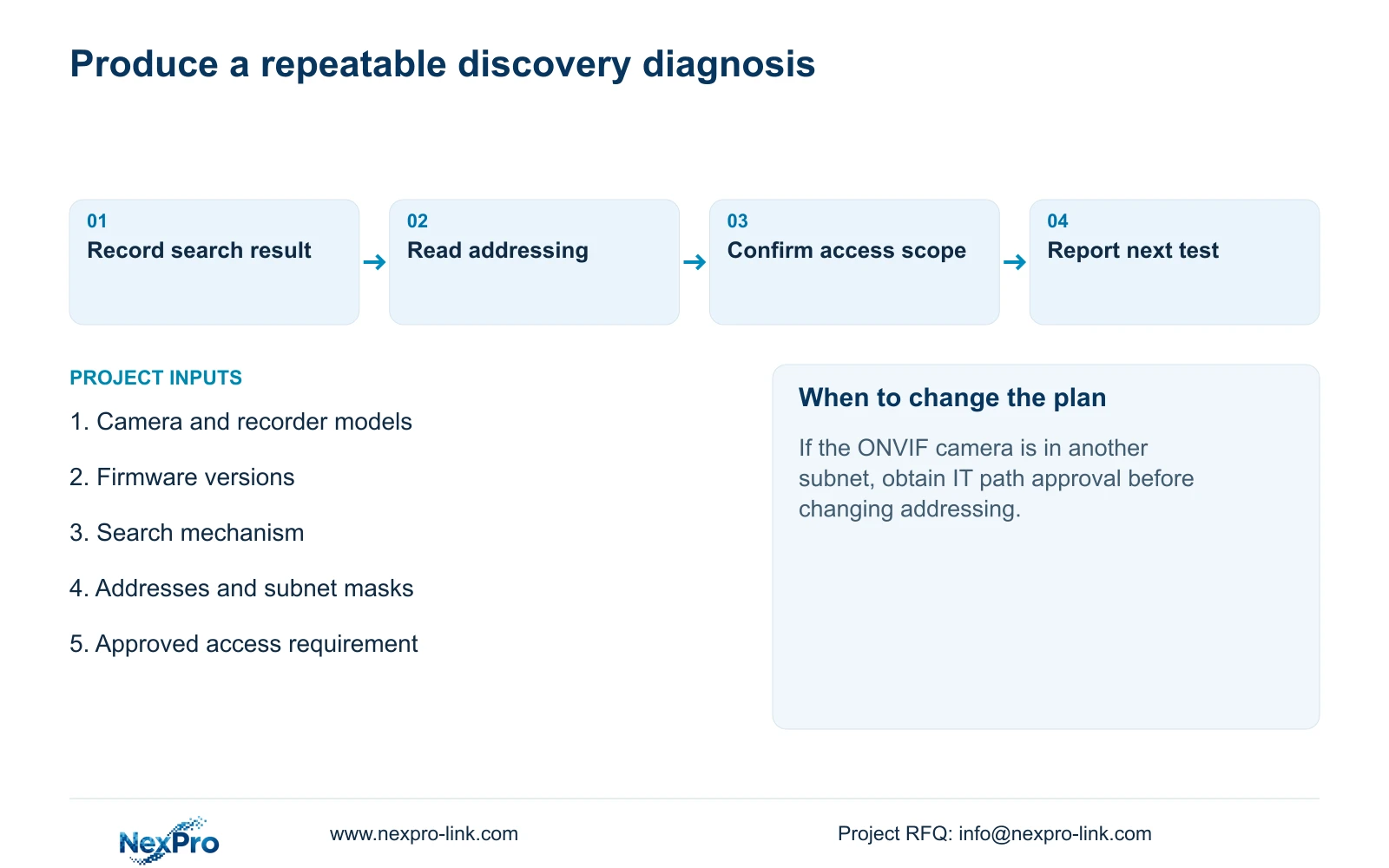
A useful diagnostic record states the observed result, applicable manual branch, next controlled test and stopping condition. Include the search mechanism, camera and recorder versions, network placement and whether enrollment or authentication was attempted. This lets the next person repeat the relevant check without repeating unrelated setup.
If the result remains unresolved under the documented same-subnet conditions, preserve that narrower observation. It supports further device or firmware investigation without claiming that the missing camera is defective or that every ONVIF function is incompatible.
Section 07
Does a routed network guarantee ONVIF discovery?
No. The supplied manual describes same-subnet ONVIF discovery. Approved routed access and the actual device combination need separate testing.
Section 08
Should DHCP be disabled whenever a camera is missing?
No. Read the effective addresses first. Change the method only under an approved addressing plan, then retest affected paths.
Section 09
Provide the failed discovery conditions
Send NexPro-Link the camera and recorder models and firmware, selected search mechanism and redacted subnet comparison at info@nexpro-link.com.
Engineering references
These sources support the general planning principles. Always use the selected product's current datasheet and applicable project standards for final design.


