

A camera missing from automatic search is not proof that every access path is blocked. Establish the discovery boundary, approved route and supported enrollment method.
Section 01
Establish what automatic search can reach
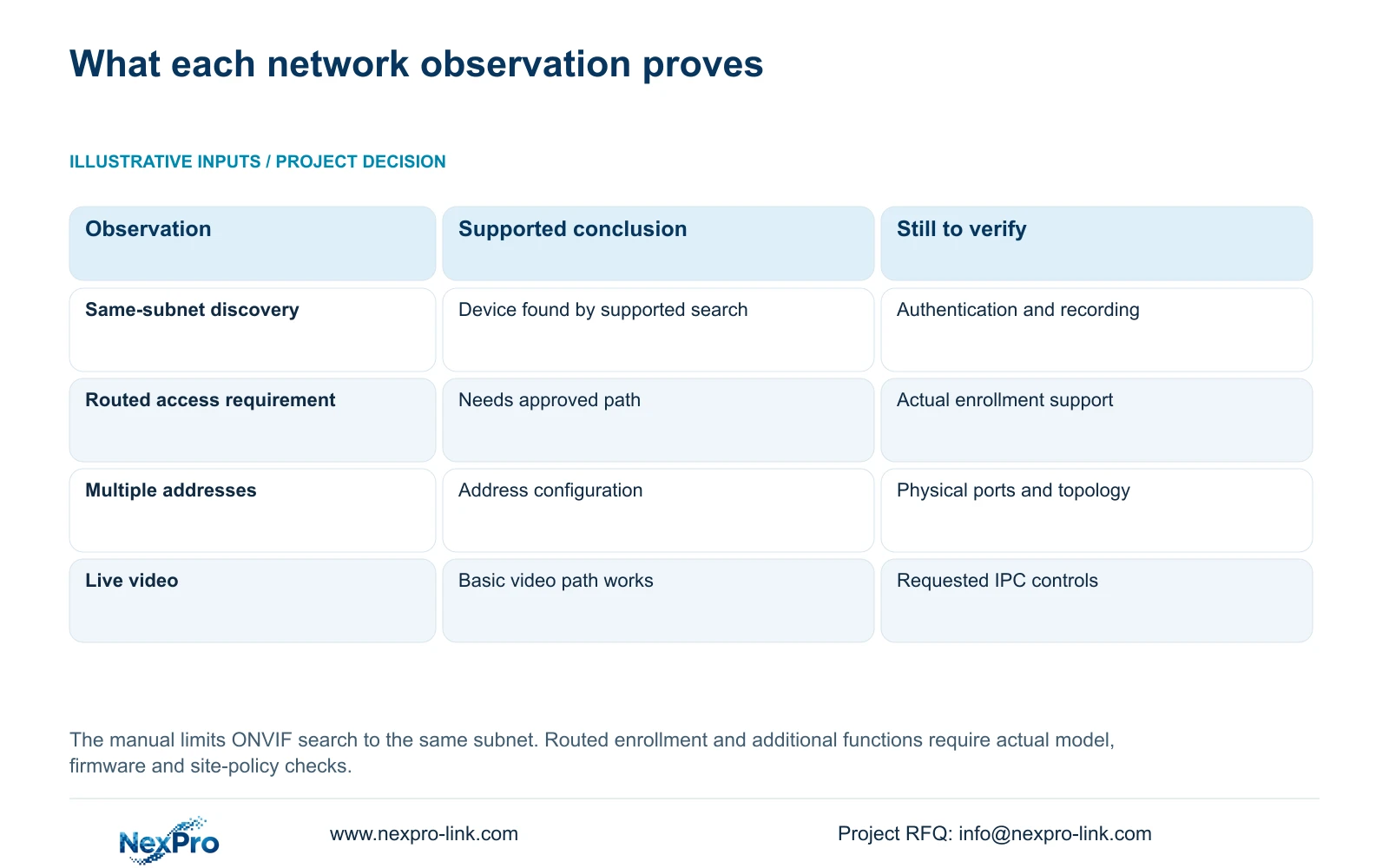
When an NVR and camera occupy different subnets, separate automatic discovery from the approved routed connection. The supplied manual limits ONVIF search to the same subnet, so an absent search result does not prove that all network access is impossible. It also does not establish that manual enrollment across any routed network will work. Confirm the actual recorder interface, camera address and supported connection method, then ask IT to define the permitted path. Test channel authentication, live video and recorder footage after enrollment. Qualify additional camera controls independently, because a working video connection cannot establish every event, audio or maintenance function.
The operating source is the private supplied NVR4.0 user manual CH_V2.4.doc, with V2.2 in its body. Section 4.3.1 defines discovery and enrollment; section 5.3, question 6, contains the historical ONVIF 2.1 and above requirement. Use section references before page numbers and match the actual model and firmware.
Keep that historical version statement in its original scope. It cannot replace a check of the actual camera-recorder combination and requested functions. The public ONVIF Profiles reference supports the need to consider feature scope; it does not prove that a specific installed pair is interoperable.
Section 02
Separate a search result from an enrolled recording channel
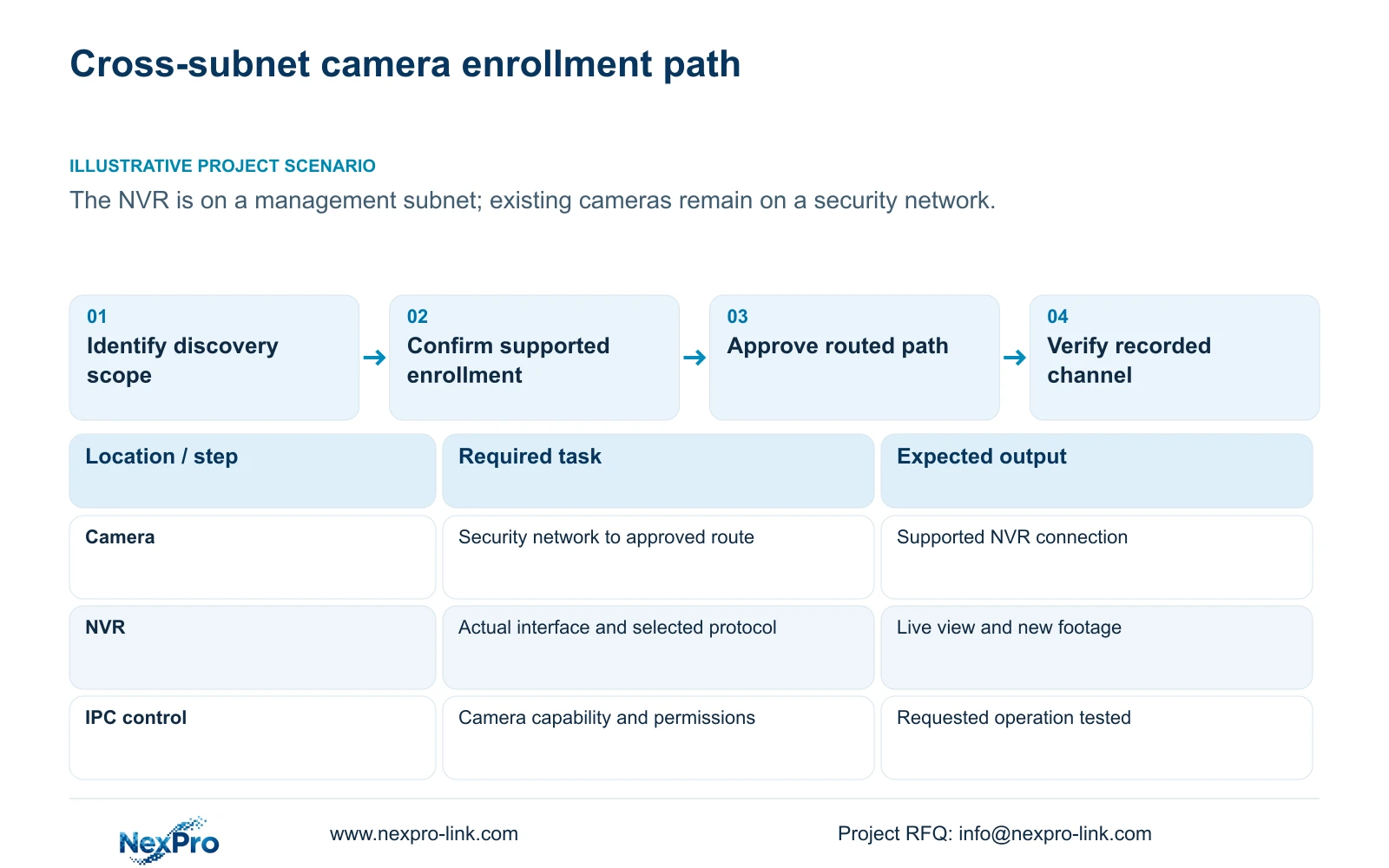
Section 4.3.1 describes supported private-protocol search and same-subnet ONVIF search, followed by separate add, edit and diagnostic operations. Treat the search list, added-device list, connection status and recording result as different observations. A camera can appear in search while its assigned channel remains unusable because the selected protocol or authorized credentials need attention.
For a cross-subnet requirement, first establish whether the actual recorder and firmware support the intended enrollment method. Obtain the camera's approved endpoint and connection details through the site process. The supplied evidence does not justify inventing a universal manual-add menu path or promising cross-subnet plug-and-play operation.
If enrollment is supported but authentication fails, keep that failure separate from discovery. If live video succeeds but no new footage is available, investigate the recording task. Recording evidence must come from the recorder's storage workflow, not a Seetong PC local recording result.
Section 03
Draw the actual interfaces before choosing a topology
Sections 1.2 and 4.12.8 describe multiple-address configuration and mention dual physical network ports on certain larger-bay models. Those statements answer different questions. List each installed physical interface, its assigned address and its intended network. Do not infer a second port from a second address field.
A procurement requirement for automatic failover, link aggregation or security isolation needs separate evidence. Multiple addresses alone establish none of those outcomes. If the proposed recorder lacks a documented interface arrangement for the design, hold the topology decision and obtain model-specific information before relocating working cameras.
Any address change requires site authorization, preservation of relevant configuration and footage, and an agreed interruption plan. Where the approved routed design can retain existing camera addresses, avoid changing them merely to make the automatic search list more convenient.
Section 04
Trace camera traffic separately from outgoing remote access
Show the recorder-to-camera path on a simple network sketch, including the real interfaces and the approved routing boundary. Show the recorder's outgoing internet or cloud path separately. A management connection to the recorder does not demonstrate its camera path, and working camera video does not demonstrate its remote service connection.
Check the configured default route, gateway and DNS under section 4.12.8. The remote-network diagnostic in section 4.3.3.2 addresses the recorder's remote-network situation. Use it for that purpose instead of treating a positive result as approval of every routed camera operation.
If only remote access fails, leave the passing camera path unchanged while checking outgoing reachability, activation and account authorization. If a camera channel alone fails, inspect that channel's route and connection evidence before altering the recorder's general internet settings.
| Observation | What it establishes | Next check |
|---|---|---|
| Camera absent from search | Discovery has not found it within the supported scope | Confirm subnet boundary and supported enrollment method. |
| Added channel fails authentication | Enrollment exists, but authorized connection is incomplete | Check selected protocol and approved credentials privately. |
| Video works; camera control fails | Basic video path passes | Qualify the specific IPC operation and protocol support. |
| Camera footage works; remote viewing fails | Recording path passes | Check outgoing route, DNS, activation and account access. |
Section 05
Let IT define the permitted access
A recorder network menu does not authorize changes to enterprise access policy. Present IT with the required source, destination and operating purpose, together with the documented service requirements for the actual devices. Keep any approved change limited to that requirement. Broad public port exposure or indiscriminate firewall removal should not be the starting response to an empty search list.
Record whether the remaining problem concerns local routing, the outgoing path, name resolution, activation, authentication or a service dependency. A redacted diagnostic and path sketch can communicate that distinction without exposing passwords or granting unrestricted remote access.
Illustrative project scenario: A new NVR is installed on a management subnet while existing cameras remain in a separate security network. Keep the existing camera network as a defined design input. Confirm supported enrollment and ask IT to approve the required path before deciding whether any device needs an address change.
Section 06
Accept video and additional functions separately
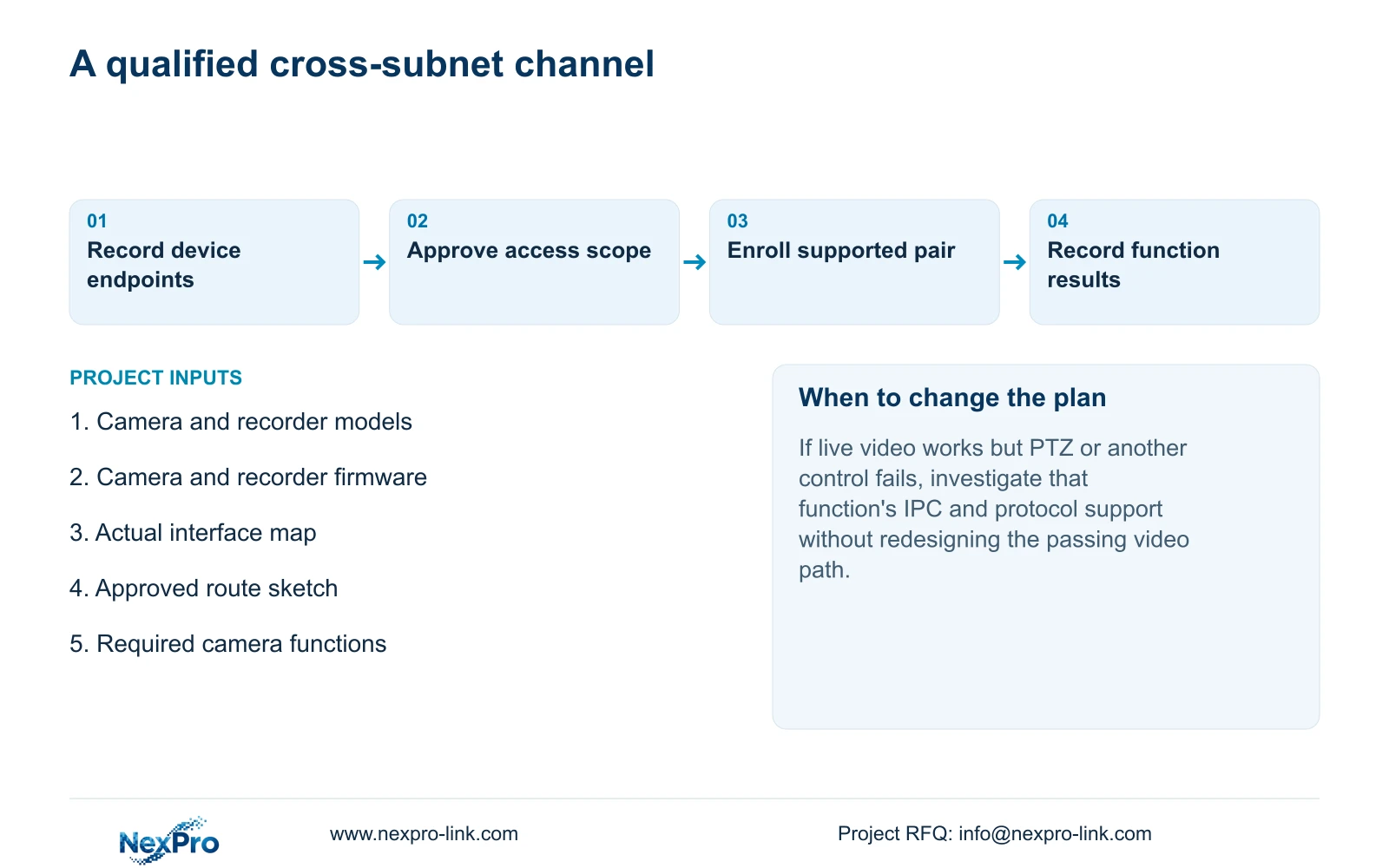
Sections 4.4 and 4.10 make some recorder controls dependent on the connected IPC; PTZ has an explicit capability prerequisite. Test the actual camera model, firmware, selected protocol and relevant account permissions. A grey control or ineffective command does not by itself establish failed hardware.
For the required channel, demonstrate live view and newly recorded footage, then test each requested additional function. Mark unsupported or unresolved operations individually. A buyer can then compare the actual integration scope without interpreting a visible ONVIF device or a successful preview as complete compatibility.
Section 07
Should cameras be renumbered just because search finds nothing?
First confirm the search boundary and supported connection method. Renumbering is a separate authorized network change, not evidence that the original routed design was impossible.
Section 08
Can dual IP settings replace the site's isolation policy?
No. Multiple-address configuration does not establish firewall isolation, bonding or automatic failover. Qualify the physical interfaces and site policy separately.
Section 09
Prepare the cross-subnet requirement
Send NexPro-Link a redacted camera-to-recorder network sketch and the exact camera and recorder model/firmware pair at info@nexpro-link.com to discuss the supported connection scope.
Engineering references
These sources support the general planning principles. Always use the selected product's current datasheet and applicable project standards for final design.


