Connect a fixed 32-camera schedule to recording volume, supported storage, local network and power dependencies, then prove retrieval and a playable export.
Section 01
Freeze the views and the owner's retrieval task
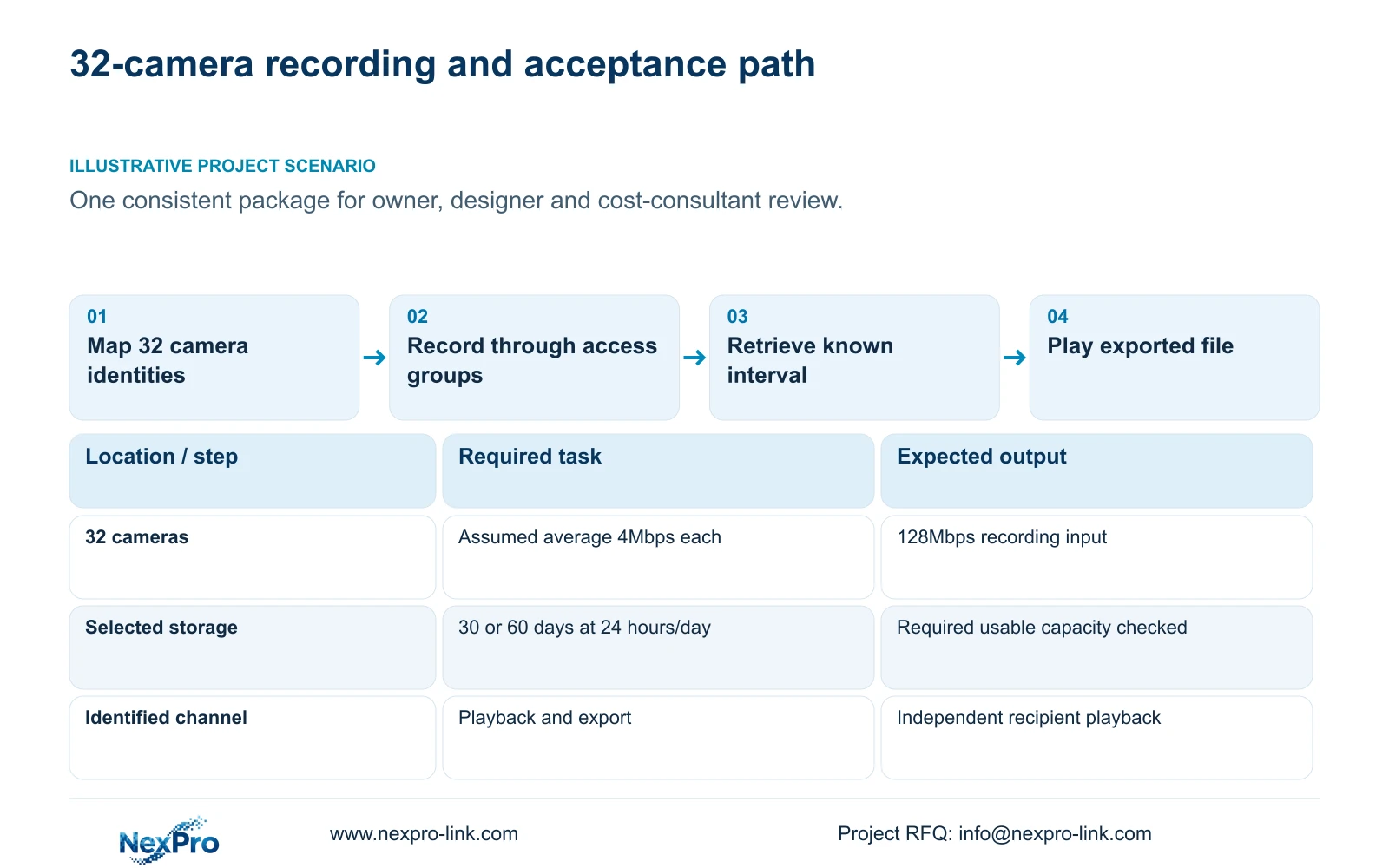
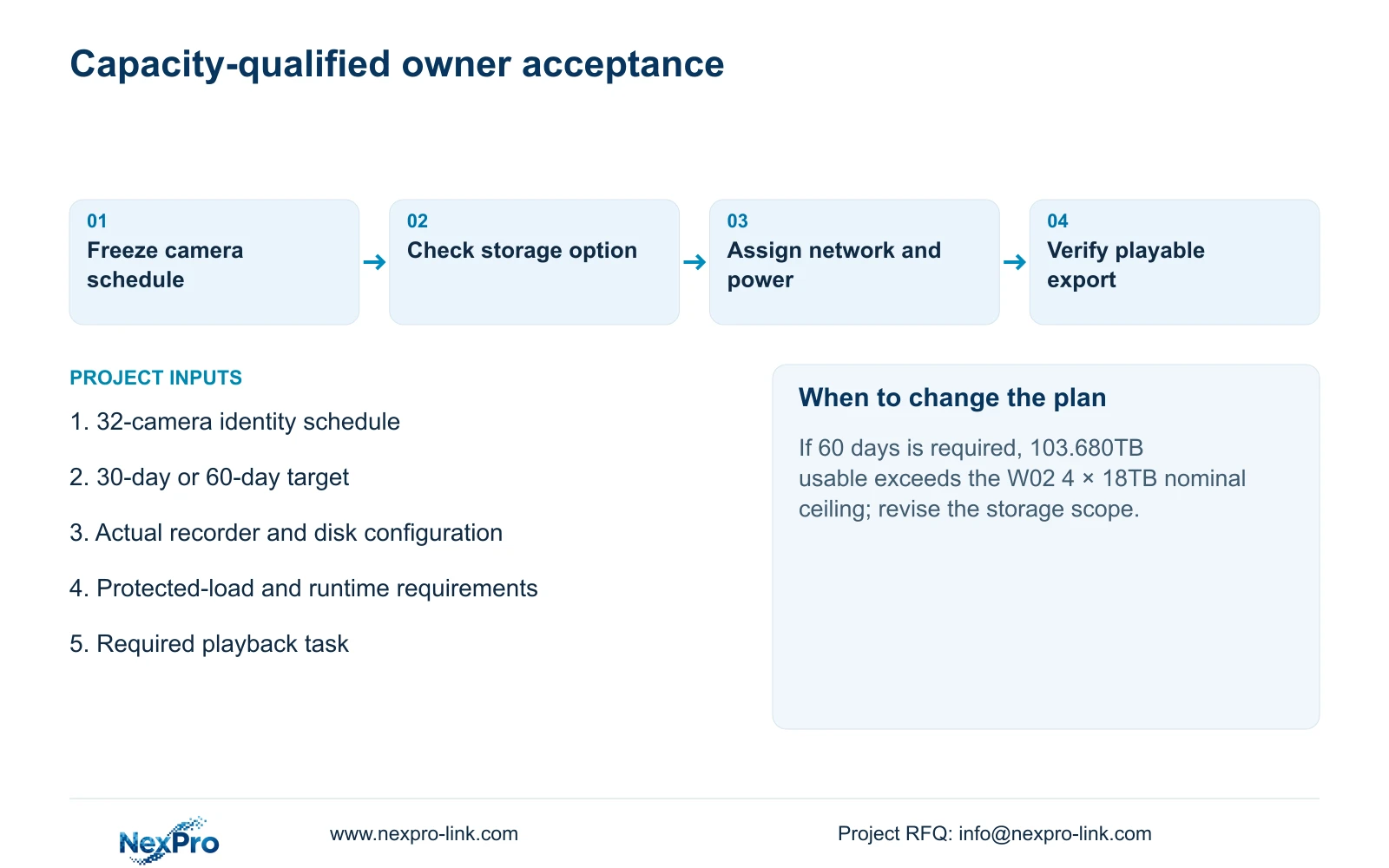
A reviewable 32-camera NVR package should connect each required view to its recording workload, supported storage, network path and power source, then demonstrate that the owner can retrieve and export footage. Camera count alone cannot establish that result. For the supplied example, 32 cameras at an assumed average 4Mbps require 128Mbps of recording input. Continuous recording for 30 or 60 days produces different storage requirements, while display expansion remains an independent option. Agree these inputs before comparing equipment quantities. Acceptance should follow an identified camera through a known recording interval, playback and an exported file that works on another device.
Freeze the point schedule before calculating capacity. Keep drawing location, physical camera identity, IP address, recorder channel and displayed name separate. Record each view's purpose and required operator task, then update the mapping after replacement or reordering.
The operating source is NVR4.0 user manual CH_V2.4.doc, whose body states V2.2. This guide uses §§4.3.1, 4.4.4, 4.12.6, 5.1, 3.3.1, 4.11 and 4.12.21. Calculations and acceptance steps are illustrative engineering work, not measured product results.
Section 02
Calculate the stated retention options
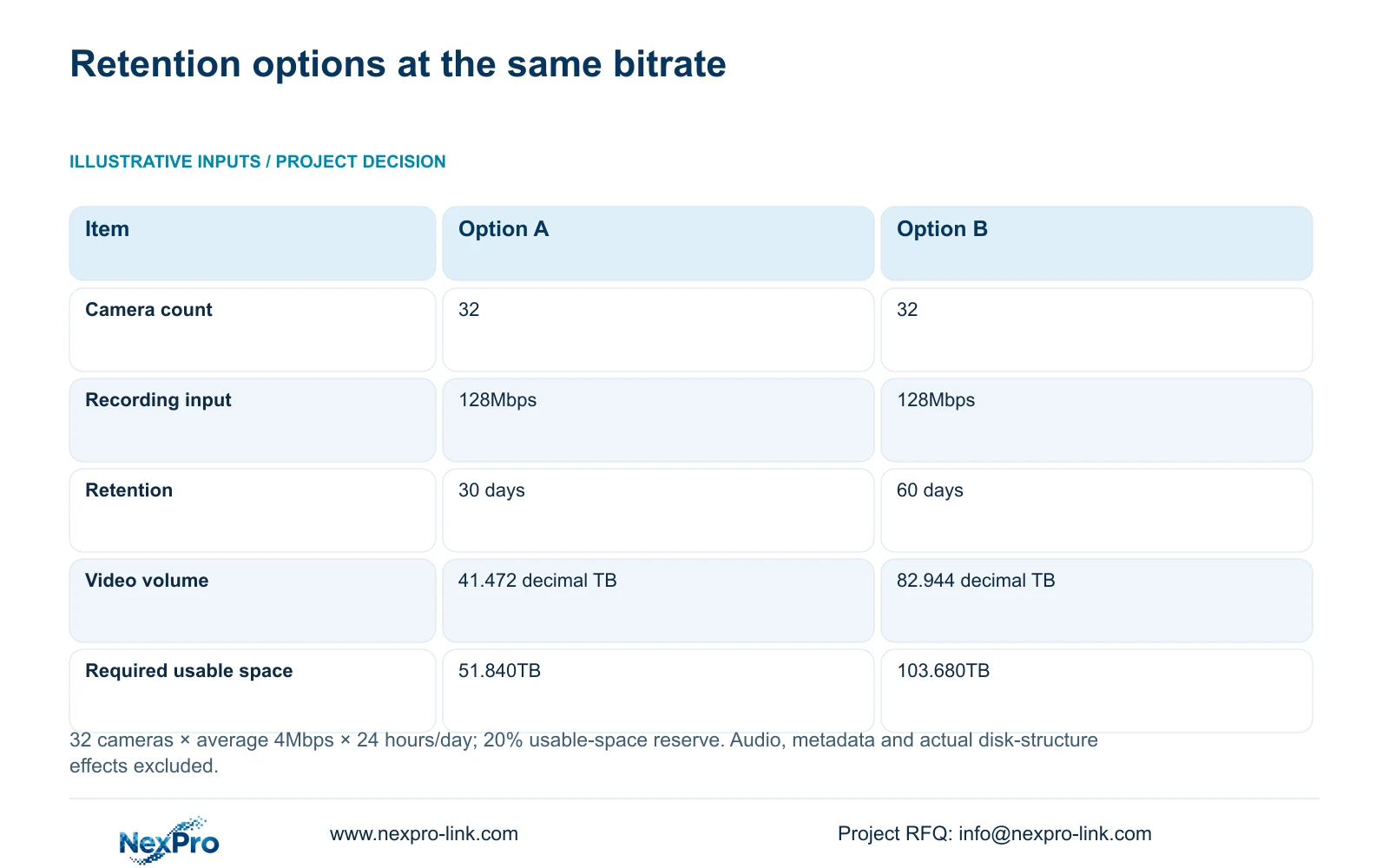
Option A uses 32 cameras × average 4Mbps × 24 hours/day × 30 days. Option B uses the same cameras, bitrate and daily hours for 60 days. Both reserve 20% of usable space. Audio, metadata and actual disk-structure effects are excluded.
Aggregate video input = 32 × 4Mbps = 128Mbps. In decimal units, video TB = 0.00045 × cameras × Mbps × hours/day × days. The factor converts megabits per second into decimal terabytes across the stated recording hours.
Option A video volume = 0.00045 × 32 × 4 × 24 × 30 = 41.472TB. Required usable space = 41.472 ÷ (1 − 0.20) = 41.472 ÷ 0.80 = 51.840TB.
Option B video volume = 0.00045 × 32 × 4 × 24 × 60 = 82.944TB. Required usable space = 82.944 ÷ 0.80 = 103.680TB. Reserving a fraction of usable capacity requires division by the remaining fraction; simply adding 20% would produce a different result.
These results support disk selection only under the stated assumptions. Confirm actual average bitrate and recording policy, then add excluded requirements. Required usable space is not the sum of physical drive labels.
| Item | Option A | Option B |
|---|---|---|
| Camera count | 32 | 32 |
| Recording input | 128Mbps | 128Mbps |
| Retention | 30 days | 60 days |
| Video volume | 41.472 decimal TB | 82.944 decimal TB |
| Required usable space | 51.840TB | 103.680TB |
Section 03
Compare the calculation with an actual recorder
The supplied public fields for NexPro-NVR4449-4K list 49 channels, 320Mbps input and four SATA positions with a maximum 18TB per disk. Those fields make it a model-level discussion candidate for the channel and input tasks, not a completed storage selection.
The stated disk ceiling totals 4 × 18TB = 72TB of nominal physical capacity. Option B's 103.680TB usable-space requirement exceeds that nominal ceiling, so this single-recorder disk scope cannot satisfy the stated calculation. Option A's 51.840TB is below the ceiling, but still requires confirmation of the supported configuration and usable capacity after relevant storage effects.
The manual's TS models have no established mapping to this commercial model. Do not import their menus or playback limits into its quotation. The supplied product summary also does not define RAID levels or usable-capacity rules; multiple disks alone do not establish redundancy.
Section 04
Show access groups and camera power responsibilities
Draw the camera groups, access switches, required uplinks and recorder connection. The 128Mbps figure is the example's aggregate video input, not a complete specification for every network link. Assign actual streams to the links that carry them and confirm those links against their required traffic.
The non-PoE diagram in §3.3.1 shows cameras powered separately and data passing through a switch to the recorder. Do not draw an ordinary NVR LAN socket as a PoE output. Where external PoE is selected, identify its supply role and supported camera group.
Keep recorder power, camera power and data connections visible as separate relationships. If an access group loses its supply, a powered NVR cannot produce the missing camera video. The equipment schedule should identify who supplies and verifies each required part of that path.
Section 05
Define UPS capacity and runtime inputs
List the camera supplies or PoE access equipment, necessary switching and NVR under the agreed continuity scope. Include displays only if the outage task requires them. Count each load once: a measured switch AC input may already include its downstream PoE cameras.
Keep W, VA and battery operating time separate. The NVR manual provides no UPS runtime table, and this example supplies no protected-load or battery values. Request the actual load boundary, operating states and required interval before selecting a UPS configuration. Channel count and storage TB cannot supply those electrical inputs.
If the power schedule omits a required camera group or network device, revise the protected scope before treating the recorder's backup supply as system continuity.
Section 06
Keep the basic display and video wall separate
Specify the owner's normal viewing and incident-review task before choosing display equipment. A basic monitor can remain the base option when it serves that task. A video wall needs its own source-stream, concurrent-decoding, output, canvas and control requirements.
Adding a wall does not increase captured detail or retention. Include its additional installation, power and maintenance scope separately so the cost consultant can compare a complete display option without confusing it with the recording requirement.
Check playback combinations on the exact selected equipment. Enough recording channels do not establish simultaneous full-resolution review of every camera, and alternative decoding modes must not be added together.
Section 07
Prove the recording-to-export path
For an identified channel, observe live video and recording status, wait through a known interval, retrieve that interval and export it. Play the result on another device through the intended recipient workflow. Check disk and recording policy alongside these observations.
If live video works but playback fails, investigate recording and storage before accepting the channel. If playback works but export fails, resolve the recipient task. Record expected and observed results, and check the remaining camera identities against the fixed schedule. This is an engineering acceptance workflow, not a built-in test feature.
Section 08
Use one brief for technical and quantity review
Illustrative project scenario: A project manager needs one consistent 32-camera package for an owner, designer and cost consultant to review. The shared brief connects the camera schedule to the selected retention option, local network groups and protected-power scope.
The owner reviews retrieval, the designer checks supported constraints, and the cost consultant separates necessary recording equipment from optional display expansion.
Section 09
Does 72TB of nominal disks prove the 30-day design?
No. It is a physical ceiling from the supplied fields. Confirm supported disks and usable capacity against 51.840TB, then account for the example's excluded requirements.
Section 10
Prepare the acceptance-based equipment request
Send the 32-camera schedule with the selected retention target and required playback task to info@nexpro-link.com for a scoped NexPro-Link equipment review.
Engineering references
These sources support the general planning principles. Always use the selected product's current datasheet and applicable project standards for final design.