Approve an upgrade when its added cost addresses a defined hotel task or capacity limit. Separate extra views, changed specifications and shared infrastructure before judging the revised total.
Section 01
Fix the deliverable that every option must retain
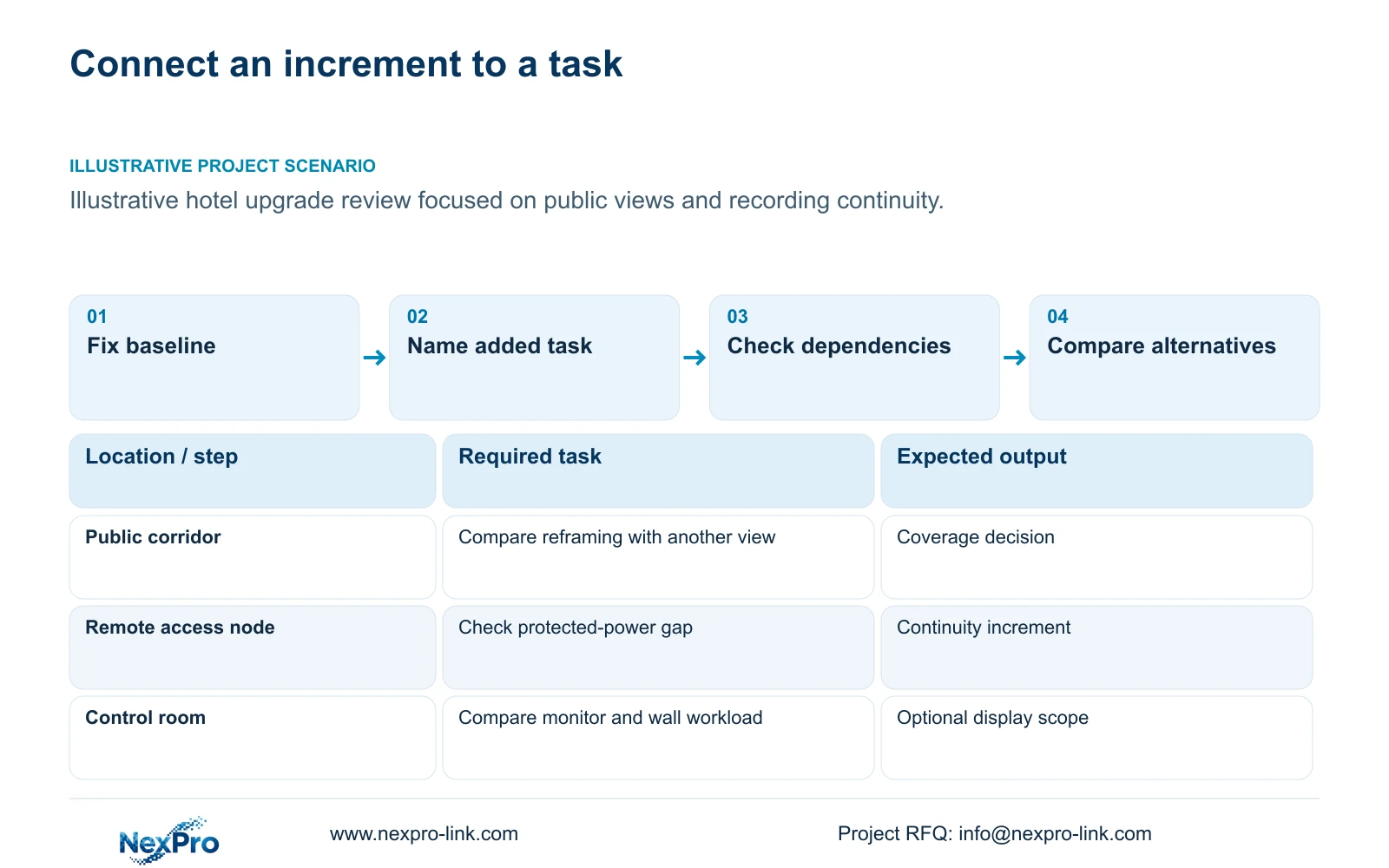
Spend the next budget on the constraint preventing an agreed hotel security task from being completed. Approve extra cameras, storage or protected power when the revised configuration addresses that constraint and its dependencies. Defer an optional display upgrade when required recording or coverage remains unresolved.
Keep a dated baseline containing the public-zone camera schedule, selected recording profiles, retention and outage requirements. Add the quoted supply and installation boundary. An upgrade comparison should identify which of these changes and which remains intact, so an owner can distinguish an improved outcome from a higher specification with no defined use.
The supplied 32-camera hotel reference separates essential recording from enhanced control-room display. Its room count is background, not a camera quantity formula. Use that distinction when defining alternatives, while keeping its engineering assumptions separate from the independent teaching cost variation below.
| Required task | Given information | Decision still needed |
|---|---|---|
| Observe public routes | Baseline camera positions | Identify any uncovered task |
| Retrieve incidents | Recording policy | Confirm capacity at selected profiles |
| Work during an outage | Protected function requested | Define every necessary power zone |
Section 02
List each incremental item and its purpose
Give each addition a reason the owner can evaluate. An extra corridor view should identify the endpoint or obstruction it addresses. A lens change should identify the target plane and framing requirement. Additional disks should relate to the approved recording policy, while switch expansion should state both port and power requirements.
Separate quantity additions from specification changes, missing accessories and delivery changes. A higher rate may include a different device, a mounting provision or a commercial adjustment. The supplier's explanation should identify the cause before the QS assigns the cost to an upgrade category.
Include credits and reuse where they are genuinely available. Repositioning an existing camera may address an observation task without adding a device, but its installation and framing still require review. A late substitution may create unused materials or revised preparation work; do not assume every cancelled item produces a full credit.
| Item | Baseline | Increment | Effect on the hotel task |
|---|---|---|---|
| Public-route view | Existing position | Added or revised position | Addresses a documented obstruction |
| Storage | Approved recording budget | Additional supported capacity | Supports a stated retention change |
| Display | Ordinary operator screen | Wall and suitable decoding | Supports a defined viewing workload |
Section 03
Calculate the cost bridge and the associated outcome
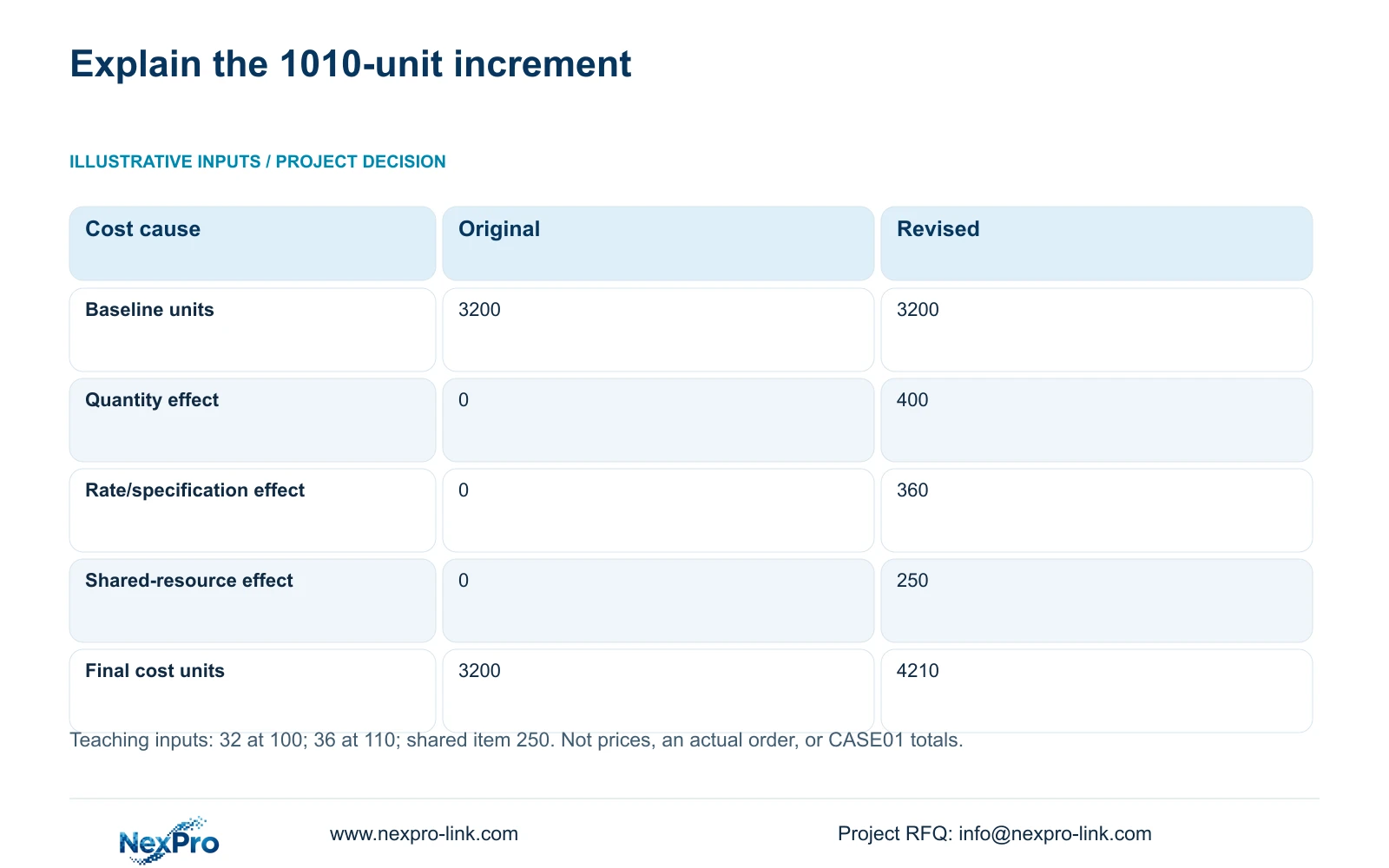
The illustrative variation starts with 32 units at 100 cost units each and changes to 36 at 110, plus a shared item of 250. These are teaching inputs, not camera prices or an actual order. Preserve the calculation order: original = 32 × 100; quantity effect = (36 − 32) × 100; rate effect = 36 × (110 − 100).
The original 3200 becomes 4210 after adding 400 for quantity, 360 for rate/specification and 250 for shared scope. The 1010-unit increase now has separate causes. Using the revised quantity for the rate effect captures the rate change on all 36 units without counting the added quantity twice.
Cost attribution does not prove technical benefit. For example, the supplied camera PDF modes provide 2880 and 3840 horizontal pixels. Across the same illustrative 12 m target width, those give 240 and 320 px/m, a 33.33% geometric increase. That calculation does not establish night performance or recognition, and the 110-unit teaching rate is not a price for either camera mode.
| Metric / condition | Original option | Revised option |
|---|---|---|
| Original total | 3200 | 3200 |
| Quantity effect | 0 | 400 |
| Rate/specification effect | 0 | 360 |
| Shared-resource change | 0 | 250 |
| Final teaching total | 3200 | 4210 |
Section 04
Compare alternative upgrades against the same problem
Compare repositioning, reframing and adding a view as alternative responses to a coverage problem. Keep the required target task constant. An added camera is justified when the existing position cannot retain both necessary views; a framing adjustment may be sufficient when the target plane and permitted coverage remain suitable.
Apply the same discipline in the control room. NX-VP-5535 is a 55-inch Full HD LCD panel with a listed 3.5 mm seam, not direct-view LED. Four Full HD panels have a theoretical 3840 × 2160 canvas when the actual signal path supports it. A single 4K monitor has the same nominal pixel canvas, though physical size and seams differ.
Those display alternatives should be assessed against viewing distance and operator tasks, with actual mounting, decoding and power scope priced. They are not automatically cumulative purchases. The cost bridge above explains a revised package, but it cannot decide which alternative achieves the hotel task most economically.
Section 05
Identify the limit that controls the upgrade
Check channel capacity, incoming bitrate, supported recording modes and usable storage separately. The NexPro-NVR4449-4K page lists 49 channels and 320 Mbps input, but its summary distinguishes 49 × 5MP from 9 × 4K. Spare channel count therefore cannot establish that a proposed higher-resolution camera group is supported.
PoE expansion also has two limits: free ports and usable output power. The supplied NexPro SW-POE1618G record has conflicting access-port speed descriptions and no stated total PoE budget. It remains an inquiry candidate; neither the number of ports nor its name proves suitability for an upgraded group.
A protected-power upgrade needs separate W and VA checks and a configured runtime curve. Greater kVA does not itself establish longer operation. If the binding problem is a remote switch losing power, increasing the central UPS without protecting that remote node does not preserve the recording path. Price the location-specific solution.
| Retained outcome | Extra scope | Worth buying when | Counter-condition |
|---|---|---|---|
| Required public-zone view | Additional camera and dependencies | Reframing cannot achieve the task | Existing position can meet it |
| Recording during outage | Protected remote power | A necessary node otherwise stops | That node is already protected |
| Operator viewing | Larger display arrangement | The viewing brief requires it | Ordinary display satisfies the task |
Section 06
Recommend where the next allocation goes
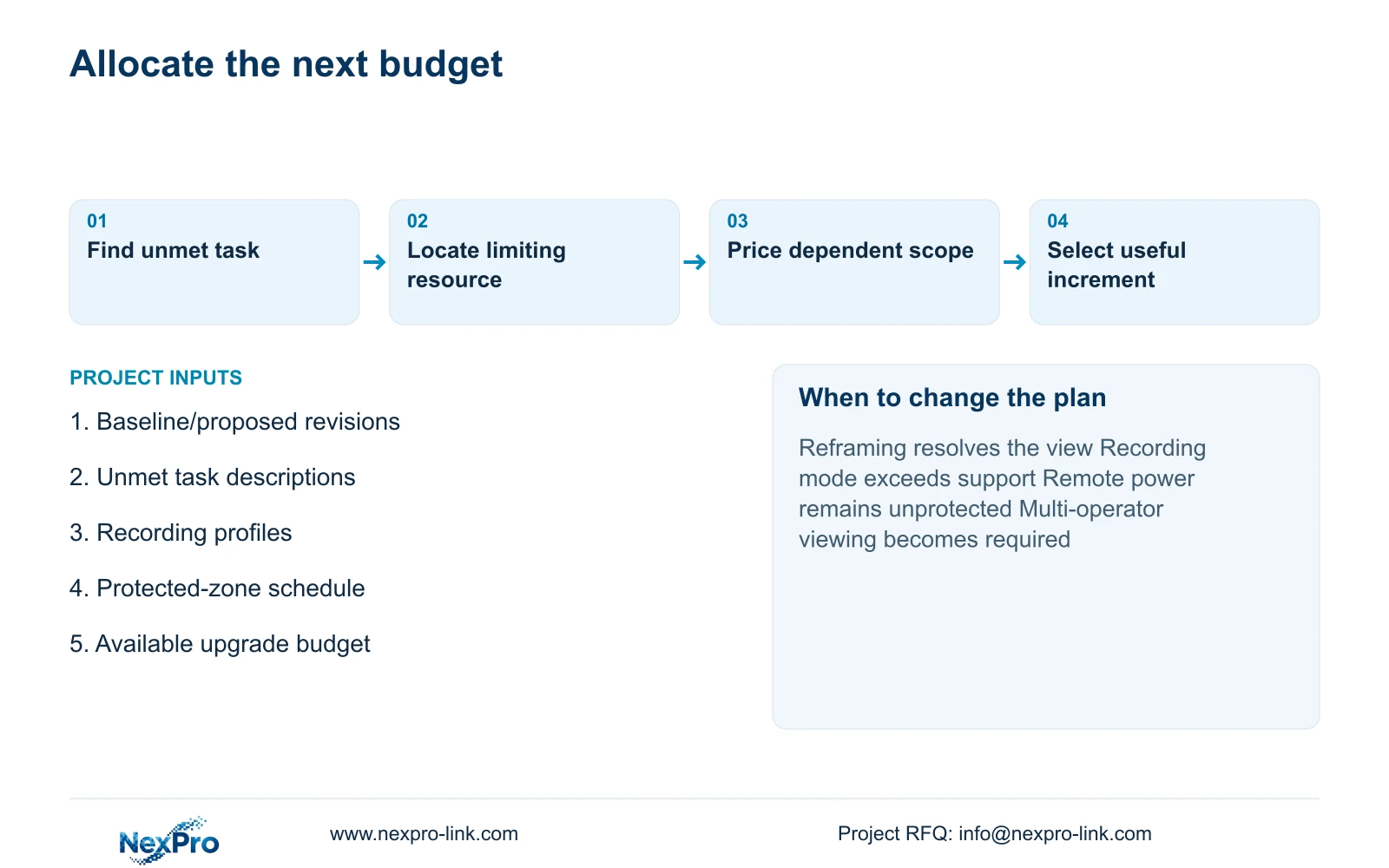
Prioritize required views, approved retention and the complete protected recording path before optional presentation equipment. Change the priority when the baseline already meets those tasks and the hotel's operating brief establishes a separate need, such as continuous multi-operator monitoring. Retain mandatory platform or brand requirements in every option unless alternatives are permitted.
Ask for an outcome beside every priced increment and a supported check beside every capacity claim. The QS should be able to reconcile the total while the engineer can identify the task gained. A higher final amount is acceptable only when its scope and effect justify the expenditure for this project.
Send info@nexpro-link.com the baseline and proposed schedule revisions, the affected task descriptions and the available upgrade budget, together with destination and delivery assumptions. NexPro-Link can discuss model matching and coordinated equipment scope through BOQ and tender support. The proposal should distinguish CCTV manufacturing from supporting equipment supply and local installation responsibilities.
Section 07
Buyer questions
Does a higher camera count always improve coverage? No. Each added view needs a defined target and suitable position. Repositioning may resolve an obstruction, while additional cameras with unsuitable framing can still miss the required task.
Can unused channels be treated as complete expansion capacity? No. Confirm recording modes, bitrate, disks, network paths and protected power. Channels describe only one part of the expansion boundary.
What should an upgrade quotation show besides the total? Request the baseline retained, incremental quantities, specification differences, shared-resource changes and available credits. Each technical addition should name its intended outcome and any unresolved dependency.
Engineering references
These sources support the general planning principles. Always use the selected product's current datasheet and applicable project standards for final design.