Require the bidder to return assigned endpoints, documented peak demand, supported port interfaces and usable chassis allocation for each cabinet. Separate unconfirmed watts from verified model data.
Section 01
Choose the peak operating load for each device
Require the bidder to return assigned endpoints, documented peak demand, supported port interfaces and usable chassis allocation for each cabinet. Separate unconfirmed watts from verified model data. If allocation changes during procurement, revise that cabinet's requirement before release. A hotel-wide total cannot answer the cabinet-specific quotation request.
Choose a switch only after its individual ports and total PoE output budget meet the peak demand of the cameras assigned to it. Calculate each floor or equipment closet separately. A low hotel-wide total cannot qualify a switch serving a concentrated entrance group, especially when those devices have different illumination or other operating loads.
Begin with a camera schedule that identifies the supplying switch, port, device model and required PoE type. Record whether the power figure describes typical operation, a stated maximum or a planning assumption. Include the intended night mode and any supported heater or other active function. High-power devices need their own entries; an average camera allowance can conceal an unsuitable port.
The supplied BL2812M and DM2812M camera PDFs identify PoE support but do not state maximum watts. The 12 W per camera used below is therefore a hypothetical powered-device input, not a specification for those products. Keep that assumption visible until model-specific information replaces it. A change in camera functions or peak demand should reopen the affected switch calculation.
| Required task | Given information | Decision still needed |
|---|---|---|
| Power the selected camera | PoE support in the camera PDF | Exact PoE type and peak PD watts |
| Maintain the intended night mode | 12 W per camera is illustrative | Model-specific maximum for that operating mode |
| Allow expansion | Current camera and port assignment | Separate spare-port and spare-power targets |
Section 02
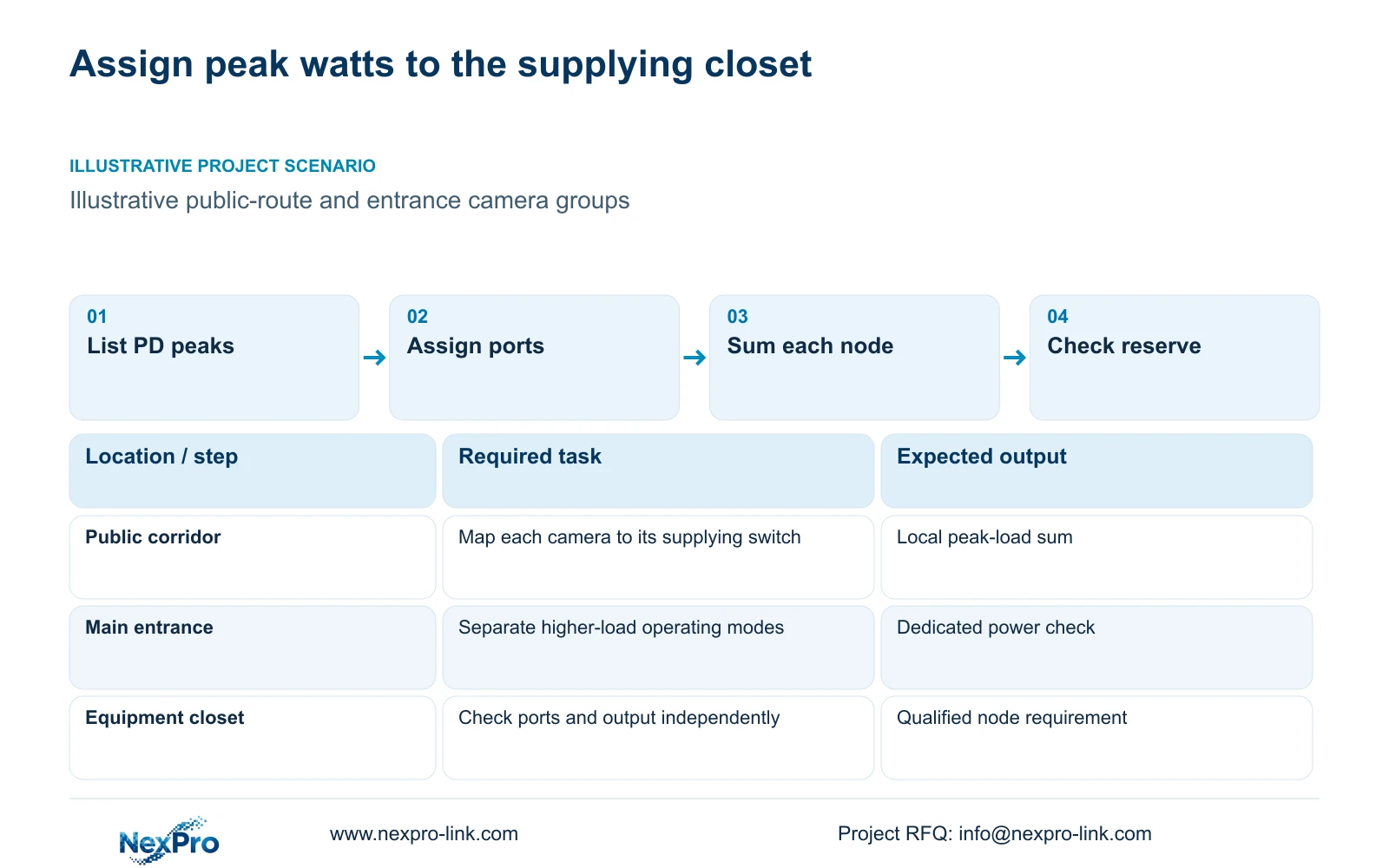
Assign cameras to the closets that actually supply them
Use physical cable routes and equipment-room locations to assign each camera to a switch. A camera on a public corridor may connect to a closet on another floor. Its power belongs to that actual supplying node. Numbering switches by floor is useful for maintenance, but the calculation must follow connections rather than architectural labels.
An illustrative group of eight equal cameras is straightforward to budget. An entrance group with higher actual peak loads needs a separate sum even if it also contains eight cameras. Do not distribute the hotel total evenly to make every switch appear acceptable. Identify the largest connected group and any group whose device types differ from the standard allowance.
CASE01 uses four access nodes with eight cameras each. That arrangement explains how local budgets can support a complete system, but it is an illustrative reference, not a mandatory hotel layout. If actual drawings put more cameras on one node, revise its port and power requirements. Spare output on a different switch is unavailable to that node unless the physical assignment changes.
Section 03
Keep device demand and switch output on separate lines
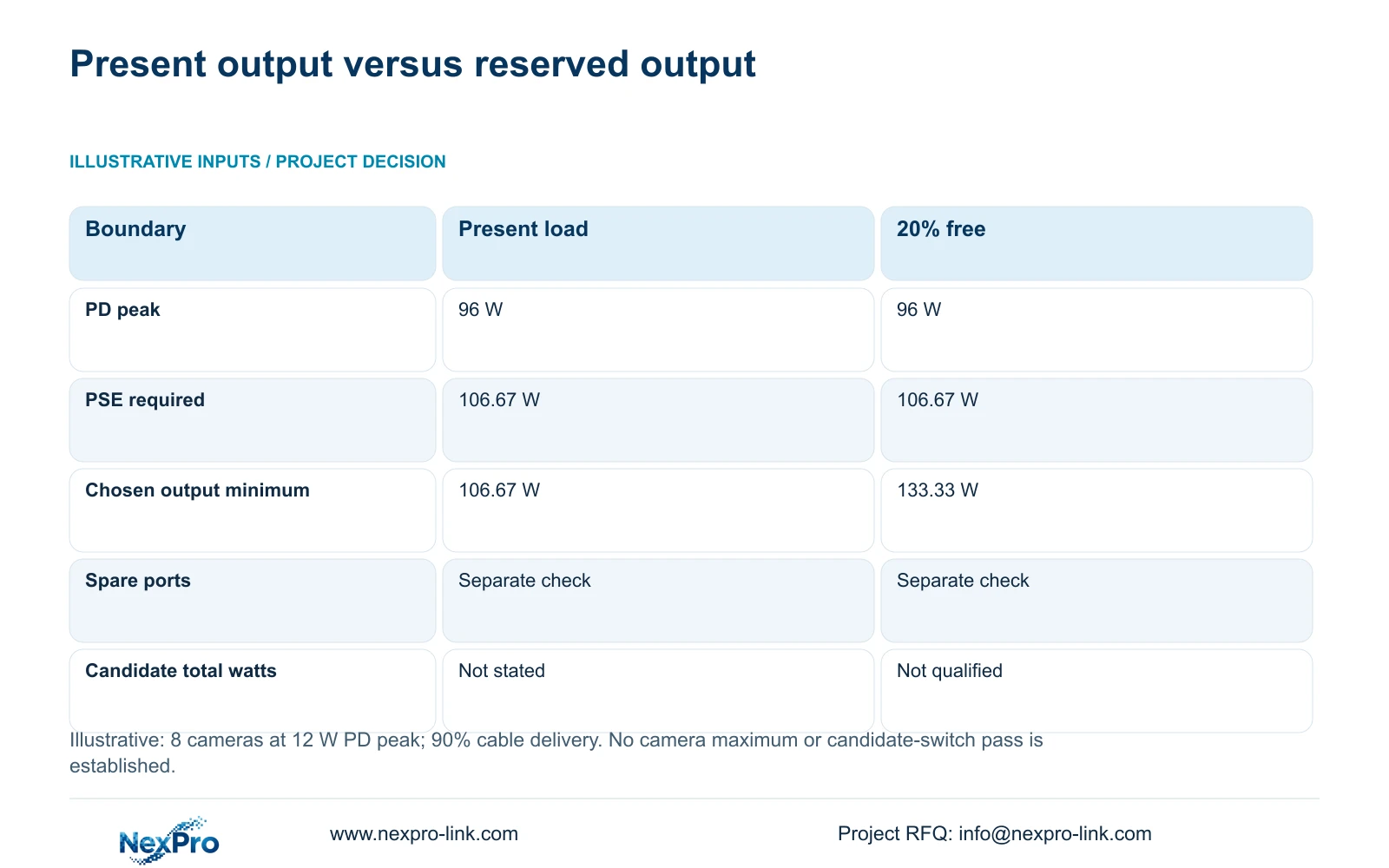
Powered-device demand is measured at the camera boundary. Power-sourcing equipment output is the power leaving the switch toward the connected devices. Cable delivery losses connect these quantities. In this illustration, eight cameras at 12 W each require 96 W at the PD boundary. With an assumed 90% delivery efficiency, the required PSE output is 96 divided by 0.90, or 106.67 W.
The 90% figure is a teaching assumption. Actual route lengths, conductor properties, terminations and the supplier's budgeting method may require a different treatment. State which boundary each supplier figure uses before comparing it with the calculation. Applying another loss allowance to a figure that already includes cable delivery can overstate demand.
Switch AC input is a further boundary. It includes conversion losses and the switch's own consumption. For UPS planning, use a consistent complete-switch AC figure or a clearly defined calculation. When measured AC input already includes the connected cameras, adding their PD watts again counts the same load twice. Keep the PoE selection worksheet separate from the protected AC-load schedule.
Section 04
Calculate the usable output budget for each switch
A reserve target must describe the unused share of the chosen budget. Here, retaining 20% free means present demand may occupy 80% of usable output. Carry the unrounded required PSE output through (96 / 0.90) / 0.80 to obtain 133.33 W when rounded for display. Multiplying demand by 1.20 does not retain the same proportion of the final budget.
The comparison below holds connected demand constant. Option A covers the calculated present output only; Option B retains the stated reserve. A hypothetical 120 W usable output budget could cover the 106.67 W present requirement, subject to port checks, but would miss this project's reserve target. The 20% figure is a design choice, not a universal requirement.
NexPro SW-POE1618G has 16 PoE access ports and two uplink ports in the supplied public record, with af/at descriptions. Its total PoE watts are not stated. The title and detailed access-port speed fields also conflict. Treat it as an inquiry candidate until the exact output budget and port revision are documented; neither the port count nor its name establishes compliance.
| Metric / condition | Present load only | 20% output free |
|---|---|---|
| PD group peak (W) | 96 | 96 |
| Required PSE output (W) | 106.67 | 106.67 |
| Minimum chosen output budget (W) | 106.67 | 133.33 |
| Free port requirement | Check separately | Check separately |
| NexPro SW-POE1618G total power | Not stated in the source record | Must not assume it passes |
Section 06
Write a minimum requirement that suppliers can answer
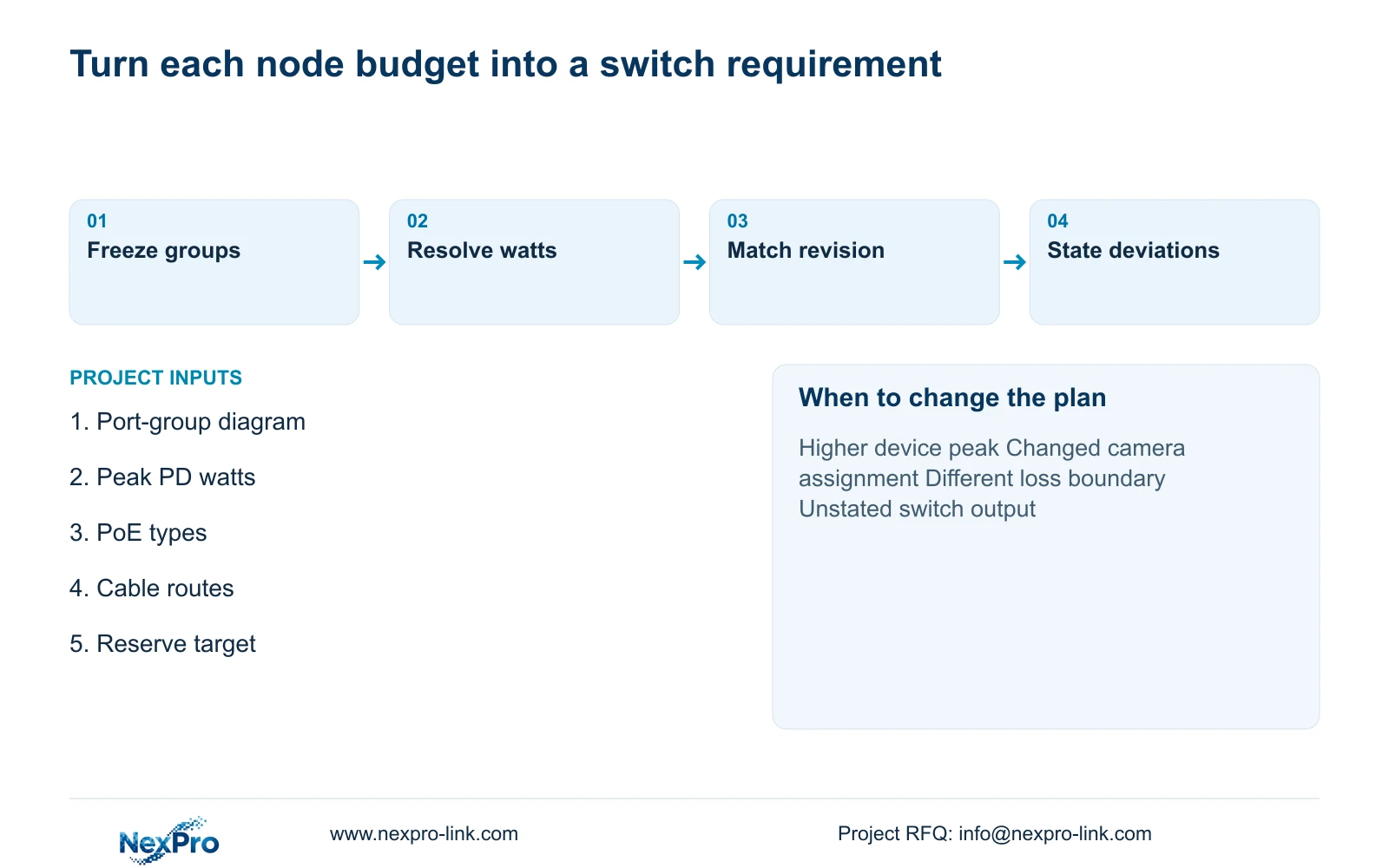
Specify the connected device count, individual PoE requirements and minimum usable PSE output for each node. State the reserve convention alongside the number. For the illustrated eight-camera group, the requirement is at least 133.33 W usable output with suitable ports, provided the 12 W peak and 90% delivery assumptions remain valid.
Include access-port rates, uplink requirements and the installation environment as separate fields. Ask the supplier to identify the exact revision and any deviations. A quotation that provides only a product family name leaves the engineer unable to connect the proposed equipment to the power calculation.
Send the network diagram, port groups and peak device power inputs to info@nexpro-link.com, adding route information where losses remain unresolved. NexPro-Link's hotel project and BOQ support can help organize model matching and coordinated supply. CCTV manufacturing and supporting equipment supply have distinct responsibilities; local electrical work and any project-specific integration belong in the agreed scope.
| Situation | Required record | Decision boundary |
|---|---|---|
| Bidder returns a cabinet schedule | Assigned endpoints and documented demand | Check each port and chassis allocation |
| Demand lacks a source | Exact model and missing peak figure | Request evidence instead of inserting zero |
| Camera moves to another cabinet | Revised endpoint assignment | Requalify the receiving cabinet's offer |
Section 07
Buyer questions
Can an unused port accept another camera? Only after checking that port's supported PoE type and the remaining total output budget. Add the new camera's peak demand at the same boundary used for the existing group, then recalculate the reserve.
What if camera maximum watts are missing? Request the exact model's power information before final selection. A marked assumption can support an initial proposal, but the order requirement should identify the unresolved input and the condition that changes the switch choice.
Does a larger UPS solve an undersized PoE budget? No. UPS capacity supports the switch's AC supply; it does not increase the switch's per-port capability or usable PoE output. Both equipment boundaries must qualify independently.
Engineering references
These sources support the general planning principles. Always use the selected product's current datasheet and applicable project standards for final design.