Daytime camera availability leaves peak night power unresolved. Check each switch group, cable route and supply boundary before replacing cameras or adding UPS capacity.
Section 01
Identify the modes that change camera power
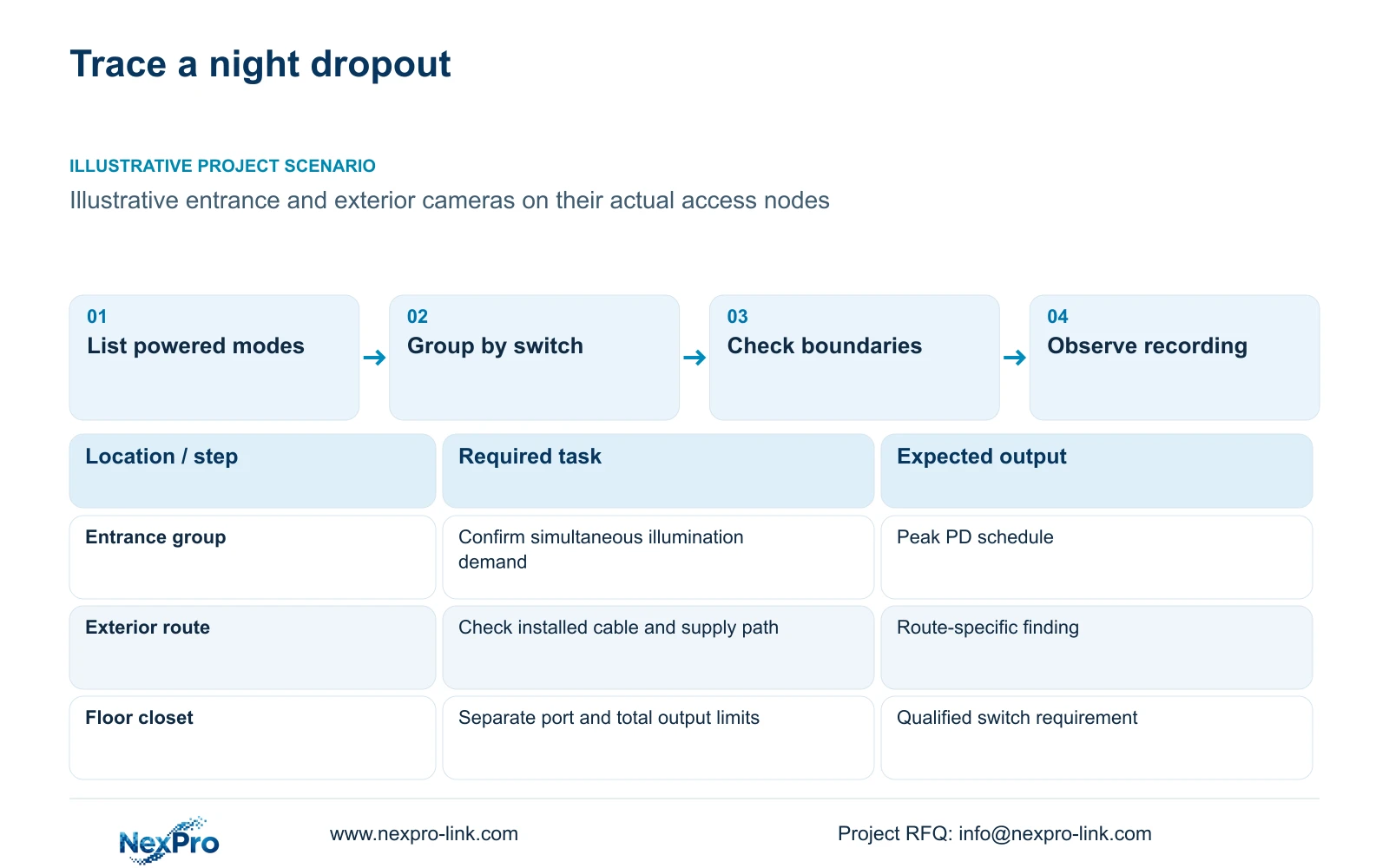
Investigate night dropouts by checking each camera's peak powered mode against its supplying port and the switch's total output budget. If simultaneous illumination exceeds that budget, revise the switch allocation or supported supply configuration. If power remains within its verified limits, investigate the cable and data path before assuming the camera needs replacement.
List the functions that can change demand at each public-zone camera. These may include IR, visible illumination or a heater where the exact equipment has one. Do not assign a heater or a maximum wattage merely because a camera is outdoors. The supplied camera PDFs do not state a verified maximum power, so the 12 W used later remains a hypothetical planning input.
Group devices by the switch that actually supplies them. A low total across the hotel can hide a heavily loaded floor or exterior node. Record the selected night mode and which devices may operate together. The objective is to preserve the approved view and recording task when the relevant powered functions become active.
| Required task | Given information | Decision still needed |
|---|---|---|
| Entrance night recording | Illumination mode affects operation | Obtain exact mode and peak PD watts |
| Exterior service recording | Camera uses an assigned access node | Confirm cable route and simultaneous group load |
Section 02
Separate PD load and switch input
A powered device, or PD, is the camera at the receiving end. Power sourcing equipment, or PSE, supplies power from the switch. Cable delivery losses mean those two boundaries can have different watt values. The complete switch AC input adds conversion losses and the switch's own consumption.
Keep these quantities in separate schedule columns. Check each port's supported PoE type and power allocation as well as the overall usable output budget. Enough total watts do not resolve an unsuitable individual port. Spare ports also do not establish spare power for future cameras.
For UPS planning, a measured complete switch AC input already includes the downstream camera contribution. Adding those cameras again would count the same load twice. If the AC value is estimated, state the conversion and switch-consumption assumptions separately. The single-group calculation below stops at PSE output and does not provide a hotel-wide UPS load.
| Item | PD boundary | PSE or AC boundary | Effect on the hotel task |
|---|---|---|---|
| Camera peak | Watts required at the device | PSE includes delivery loss | Qualifies port and cable supply |
| Switch output | Sum of connected device demand | Usable total PSE watts | Qualifies simultaneous group operation |
| UPS load | Already included downstream | Complete switch AC input | Avoids duplicate camera accounting |
Section 03
Calculate the group-level output budget
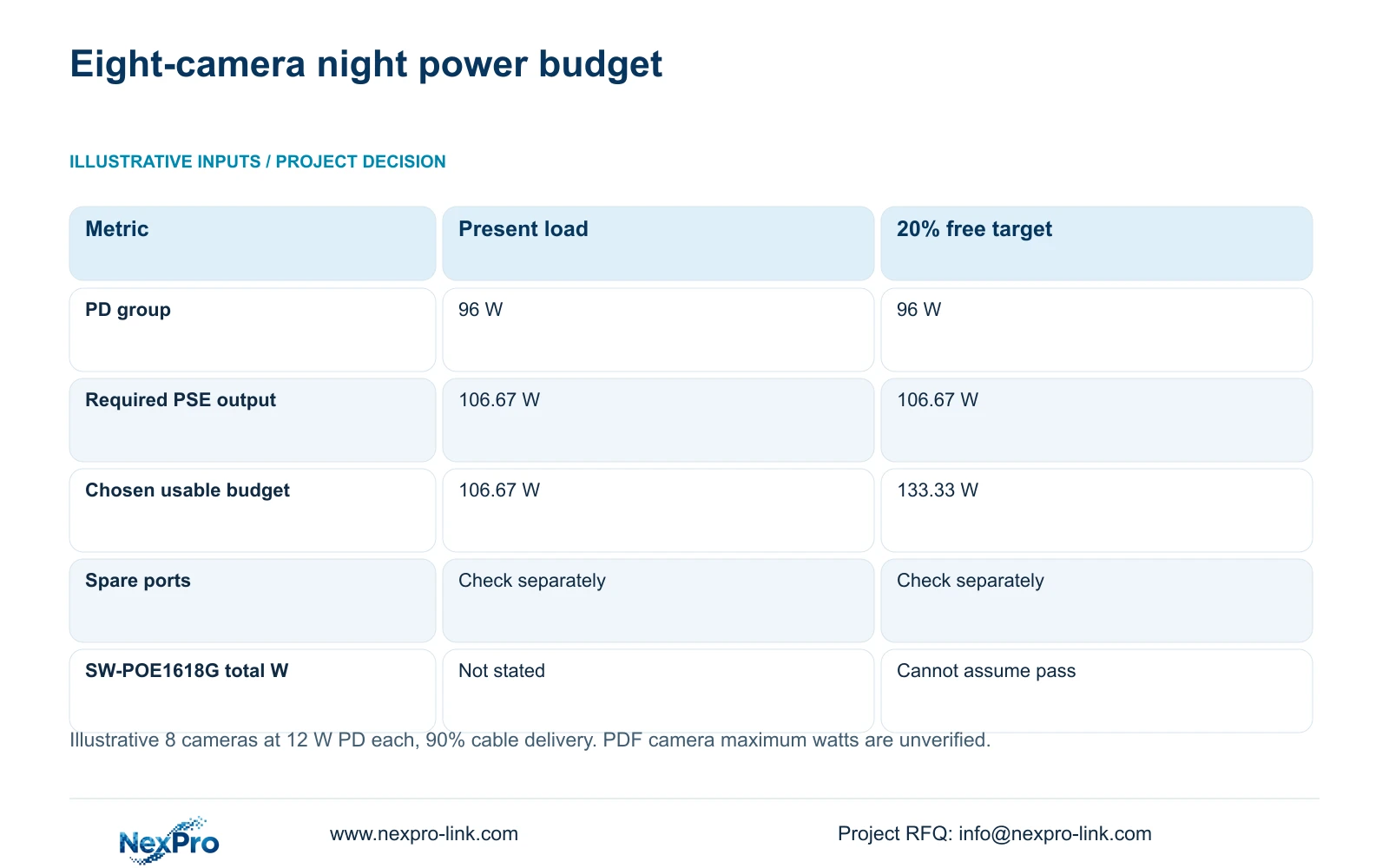
Assume one group of eight hypothetical cameras at 12 W PD peak each, with 90% cable delivery efficiency. The device-side group peak is 8 × 12 = 96 W. Required PSE output equals the sum of PD watts divided by delivery efficiency: 96 ÷ 0.90 = 106.67 W.
For an explicit target of 20% unused output capacity, divide required output by 0.80. The minimum usable budget becomes 106.67 ÷ 0.80 = 133.33 W. Multiplying by 1.20 would use a different reserve definition. The 20% target is a project assumption, not a universal requirement.
Under these inputs, select a documented output budget of at least 133.33 W when that reserve is required, then check the individual ports. NexPro SW-POE1618G lists sixteen PoE access ports, two uplinks and af/at descriptions. Its source has conflicting access-port speed fields and no numerical total PoE budget, so it remains an inquiry candidate rather than a confirmed match.
| Metric / condition | Present-load output | Budget retaining 20% free |
|---|---|---|
| PD group peak (W) | 96 | 96 |
| Required PSE output (W) | 106.67 | 106.67 |
| Minimum chosen output budget (W) | 106.67 | 133.33 |
| Free port requirement | Check separately | Check separately |
| SW-POE1618G total power | Not stated in the read source | Must not assume it passes |
Section 04
Test the configured night condition
Use the installed switch group and the selected camera modes for the night test. Confirm the relevant simultaneous condition, including illumination activation where supported. Record camera identities, switch configuration, cable routes and observed operating conditions. A bench sample with short cables does not establish behavior over the hotel's installed links.
Observe whether the required cameras remain available and whether usable recordings cover the test interval. Keep the planned criterion separate from the actual result. If a device disappears during illumination activation, record the timing and affected group so the next investigation can follow the relevant power and data boundaries.
The calculation supplies a purchasing threshold under assumptions; it does not establish a passed test. A successful observation supports the configuration and conditions recorded. It cannot demonstrate every temperature, cable arrangement or future expansion. Correct an unresolved task and repeat the same relevant night condition before closing the acceptance item.
Section 05
Compare network and power fault symptoms
An unavailable image is a symptom, not a diagnosis. Compare camera availability with the supplying port's available status information and the recorder's retained footage. Identify whether the camera itself loses operation, whether a shared node is affected, or whether the viewing path alone becomes unavailable. Use only status functions actually supported by the selected equipment.
A pattern linked to several cameras entering powered night modes warrants a group-budget check. A problem confined to one installed route warrants examination of that route and its terminations. Typical copper planning distinguishes a 90 m permanent link from a 100 m channel including patch cords; the project's category, test setup and destination requirements remain relevant.
A faster uplink cannot supply missing watts. Additional PSE budget cannot resolve an unrelated viewing-client limitation. Compare proposed remedies against the same required night recording outcome, and keep additional network, electrical or local-installation scope visible in the quotation. This prevents a broad equipment replacement from obscuring the unresolved cause.
| Retained outcome | Extra scope | When it is worth buying | Counter-condition |
|---|---|---|---|
| Night camera operation | Higher usable PSE budget | Verified group demand exceeds available allocation | Cable or data fault remains unresolved |
| Usable recording path | Cable correction or node relocation | Installed route fails its required basis | Remote active node adds power responsibility |
| Required viewing service | Network-path revision | Actual shared-link demand limits the task | Upgrade does not repair a power deficit |
Section 06
Correct the limiting part of the path
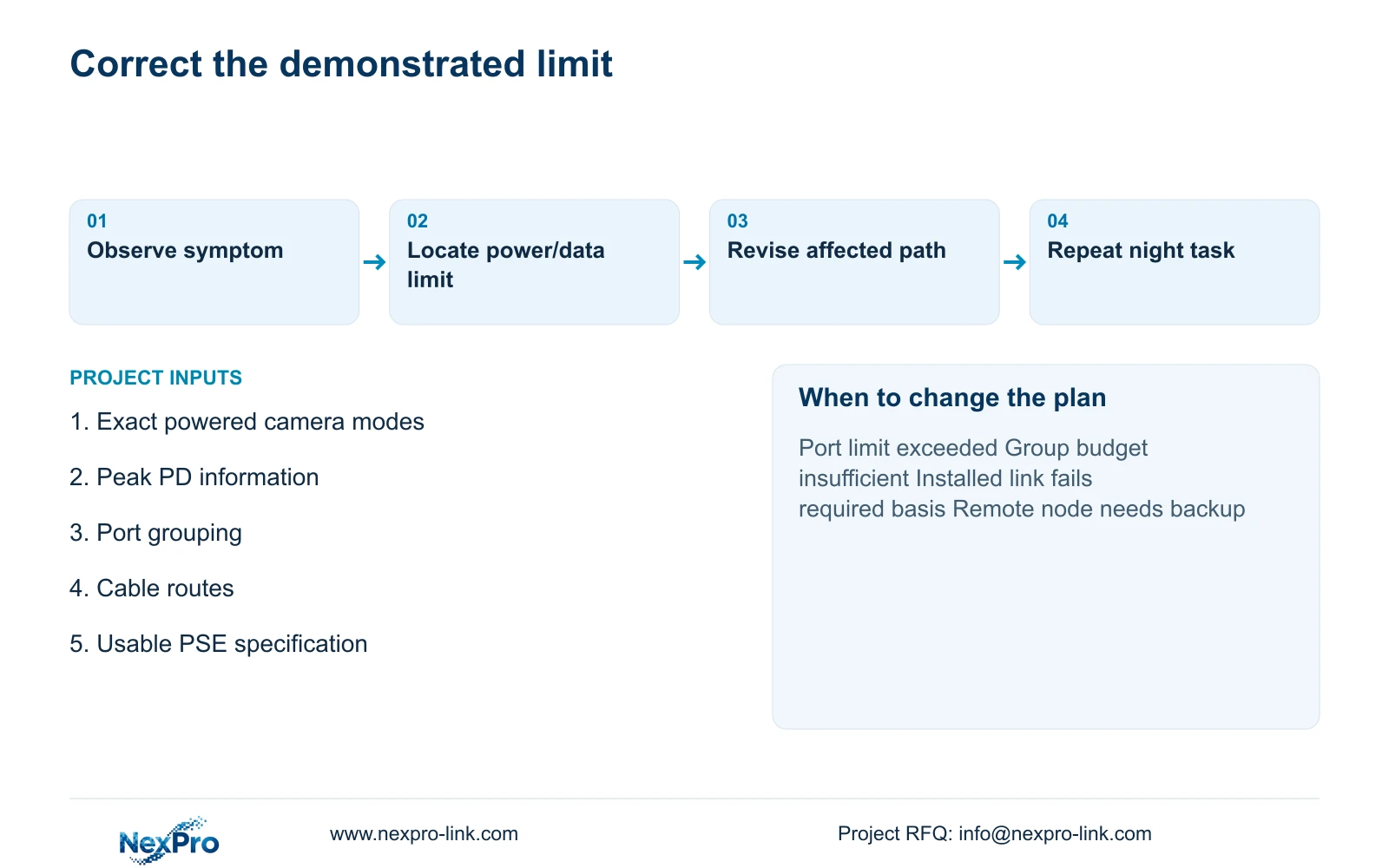
Specify the minimum port capability and usable total PSE output before selecting a replacement switch. Keep existing equipment if its documented capabilities and observed configured operation meet the task. Revise the allocation when verified peak demand exceeds a port or group limit, and recalculate each affected group after moving cameras.
If the correction adds a remote active node, include its local power and any required backup. Fibre does not supply remote camera power. Cable procurement must also retain its own specification: SP5648 is a Cat6 48-port patch panel, not a cable reel or proof that the complete installed link meets the required category.
Send the per-camera night modes and peak power information, port grouping, cable-route schedule and switch power specification to info@nexpro-link.com. NexPro-Link can discuss a scoped equipment and BOQ response. CCTV manufacturing, supporting-equipment coordination and local corrective installation remain distinct responsibilities. Missing total-power or speed data should stay unresolved until the proposed configuration answers those requirements.
Section 07
Buyer questions
Is a switch with spare ports ready for more night cameras? Only if the added devices also fit the individual port capabilities and usable total power budget. Recalculate the actual supplying group, including relevant peak modes, before treating unused ports as expansion capacity.
Can we quote the PDF cameras at 12 W maximum? No. The supplied PDFs omit verified maximum watts. Twelve watts is the teaching input for this calculation. Obtain configuration-specific power information before final switch and UPS selection.
Will a larger UPS prevent a PoE output overload? A UPS supplies the switch's AC input; it does not increase the switch's supported PoE output allocation. Resolve the PSE limit separately, then check the resulting complete AC load against the backup system.
Engineering references
These sources support the general planning principles. Always use the selected product's current datasheet and applicable project standards for final design.