A single live view does not establish concurrent recording performance. Test the hotel's actual stream profiles, replay layout and export workflow together.
Section 01
Choose the concurrent tasks to test
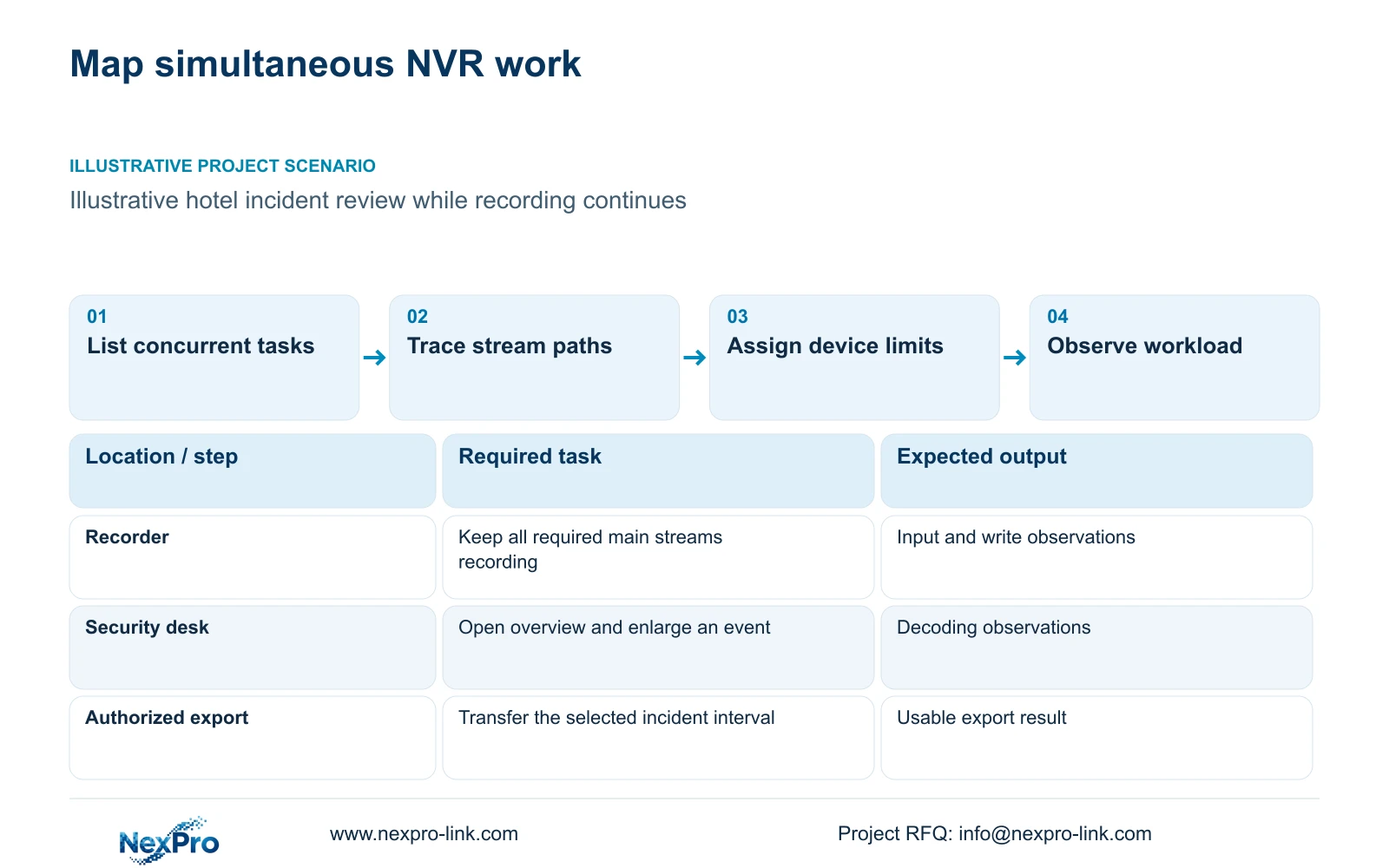
Accept an NVR configuration against the hotel's simultaneous recording and operator tasks. A successful single-camera live view leaves multichannel writing, replay and export unresolved. Start with substream overview and main-stream event enlargement when that layout satisfies the operator's task; retain full-grid main-stream viewing when the hotel genuinely requires it and the configured equipment supports it.
Define normal operation and incident operation separately. During an incident, recording may need to continue while an authorized user searches a time interval and exports selected cameras. State the concurrent replay count, viewing profile and export scope. A test that stops recording to demonstrate export does not represent an agreed simultaneous workflow.
Assign each task to the device that performs it. The NVR receives and stores streams, while a client or decoder may process the operator view. Display outputs and window layouts add further limits. Identifying those boundaries helps the engineer locate a bottleneck and prevents an unnecessary recorder replacement when the viewing client is the limiting component.
| Required task | Given information | Decision still needed |
|---|---|---|
| Continuous recording | All scheduled main streams remain active | Confirm modes, bitrates and disk layout |
| Incident review and export | Operator needs selected footage | Agree replay count and export interval |
| Routine overview | Multiple windows are required | Select overview and enlargement profiles |
Section 02
Record stream profiles and paths
For each camera group, record resolution, frame rate, codec and bitrate assumptions or measured values. Identify which stream is recorded and which stream the operator view requests. A multiview layout can use substreams while the recorder retains main streams, but that behavior must be confirmed in the selected configuration.
Draw the actual traffic routes. Recording traffic crosses the links between cameras and their recorder; viewing and export traffic cross their own paths. Add flows only where they share a link. A total assigned to every network segment can obscure the real bottleneck and produce an unjustified upgrade.
Product specifications belong alongside these workloads. NexPro-NVR4449-4K lists 49 channels and 320 Mbps input, but its summary describes 49×5MP/9×4K. Those fields do not establish arbitrary 49-channel 8MP recording or concurrent replay. NexPro-NVR2232-4K has conflicting disk and playback fields, including 2×8 TB and 2×18 TB descriptions; use an explicitly resolved configuration before making a purchase commitment.
Section 03
Calculate input and export demand
Calculate video input as the sum of the recording stream rates. The independent 32-camera reference assumes 4 Mbps per camera, giving 128 Mbps. This is a planning input, not a bitrate derived from image resolution. Compare the result with the recorder's input limit and separately verify the supported image modes and storage arrangement.
Export adds another task with a different calculation. The supplied illustrative export example contains four streams at 4 Mbps for 30 minutes. Video payload in decimal GB equals streams × Mbps × seconds ÷ 8 ÷ 1000, giving 3.6 GB. Transfer time uses effective throughput: GB × 8000 ÷ Mbps gives seconds.
At the assumed effective rates, transfer alone takes 24 minutes or 6 minutes. Recorder processing, packaging and playback validation are additional. These values cannot establish performance of a named NVR, and the export workload should not be added indiscriminately to every link or treated as the decoding calculation in the next section.
| Metric | Option A | Option B |
|---|---|---|
| Video data | 3.6 GB | 3.6 GB |
| Effective transfer | 20 Mbps | 80 Mbps |
| Ideal transfer component | 24 minutes | 6 minutes |
| Processing and playback checks | Additional | Additional |
Section 04
Compare full-grid and event-focused replay
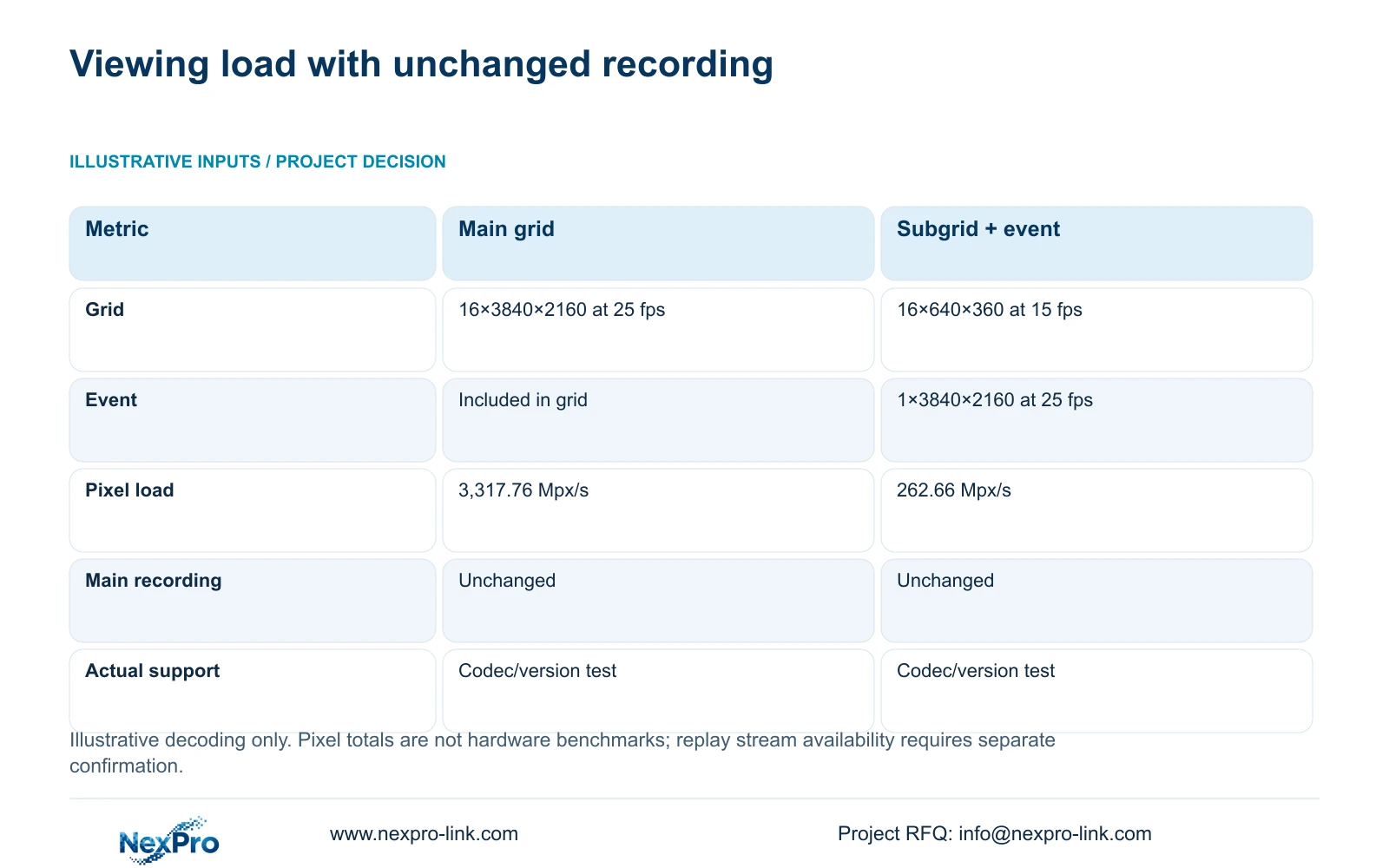
The viewing example compares sixteen 3840×2160 streams at 25 fps with sixteen 640×360 substreams at 15 fps plus one 3840×2160 event stream at 25 fps. Recording profiles remain unchanged. Decoded pixels per second equal the sum of width × height × frame rate × simultaneous stream count.
The all-main-stream grid produces 3,317.76 million pixels per second. The substream grid plus event enlargement produces 262.66 Mpx/s after rounding. These are nominal pixel workloads, not CPU, GPU or decoder benchmarks. Codec support and actual equipment behavior still require configuration-specific verification.
Use the lower viewing workload when overview plus enlargement meets the task. For replay, confirm that the required streams and layouts are actually available; live substream support does not establish recorded substream replay. If simultaneous detailed comparison across the full grid is mandatory, preserve that requirement and size the supported playback path accordingly.
| Metric / condition | Option A | Option B |
|---|---|---|
| Viewing workload | 16 main streams for grid | 16 substreams for grid + 1 main event |
| Planning pixel load (Mpx/s) | 3,317.76 | 262.66 |
| Main recording | Unaffected by viewing choice | Unaffected by viewing choice |
| Hardware performance test | Still required for actual codec/version | Still required for actual codec/version |
Section 05
Observe the actual configured system
Run the agreed workload on the selected recorder, disks, network and client configuration. Keep required recording active while observing viewing, replay and export. Record any task that becomes unavailable or fails to produce usable footage. An equipment list or bandwidth calculation cannot fill in those observations.
Treat the display chain independently. NX-VP-5535 is a 55-inch 1920×1080 LCD panel. NX-VD-4K16 is a decoder candidate, and its name does not prove sixteen simultaneous 4K decodes. A wall that displays a grid successfully under one profile leaves other codecs, replay modes and event layouts unverified.
Separate data and protected-power diagrams when testing recovery. Required access and core nodes must remain available for the selected outage service; an optional screen is not automatically a recording dependency. Buy additional decoding hardware when the agreed layout exceeds demonstrated support. If changing the operator layout retains the task, assess that option before expanding the hardware scope.
| Workload to keep active | Observe and retain | A reason to hold acceptance |
|---|---|---|
| All required recording streams | Configured modes/bitrates, disk layout and usable footage across the interval | Missing intervals or an unsupported recording mode |
| Routine grid and event view | Client/decoder identity and selected streams/layout | Required detail or transition unavailable |
| Agreed simultaneous replay | Actual recorded stream/layout support and user role | Live substream support substituted for untested replay |
| Approved export during recording | Cameras/time range, processing plus transfer time and playback result | Recording disrupted or recipient cannot use the output |
| Recovery after approved interruption | Exact configuration and tasks that return or require action | Unobserved duration or changed configuration presented as passed |
Section 06
Document operating limits and recovery
Issue an operating workload schedule with the accepted stream modes, concurrent tasks and equipment/software versions. State any limits on replay or export that affect incident handling. The schedule should explain the supported normal layout and how the operator moves to a detailed event view without silently changing recording quality.
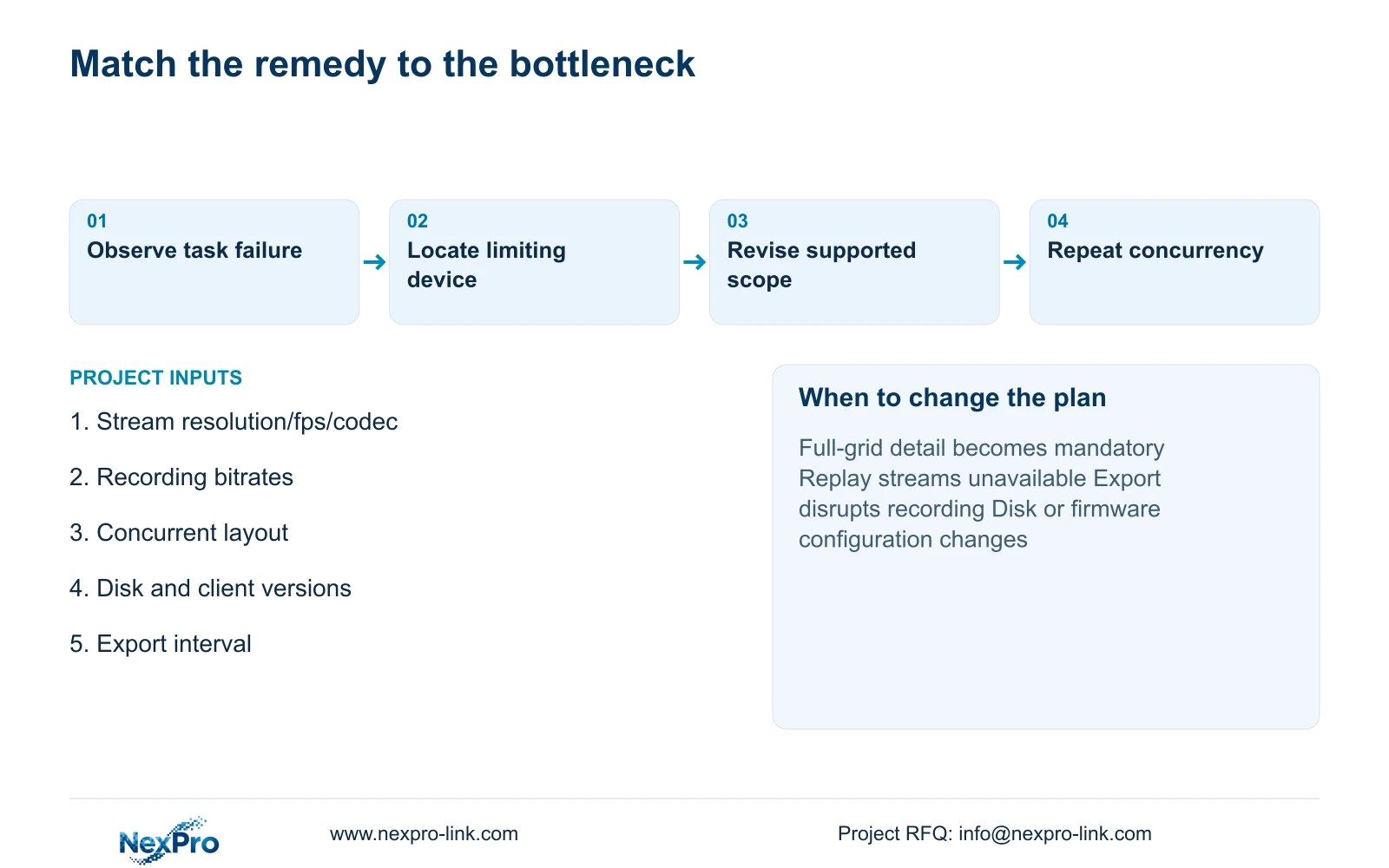
Document the recovery behavior actually observed after an approved interruption. Keep unfinished tests and configuration changes visible. If a disk, firmware version or mandatory platform changes, repeat the affected recording and operator tasks. ONVIF support alone does not establish advanced searches, audio or account behavior across every connected product.
Recommend event-focused viewing where it preserves the hotel's required review task and the actual platform supports the workflow. Change the proposal when full-grid detail, additional replay or mandatory software requires greater concurrency. Send the stream schedule, concurrent operator layout, disk configuration and export requirement to info@nexpro-link.com. NexPro-Link can discuss model matching and a scoped equipment proposal through hotel project or BOQ support.
Section 07
Buyer questions
Does switching the overview to substreams reduce recorded detail? It need not, if only the viewing selection changes and main-stream recording remains configured. Confirm that separation on the selected platform, then review retained footage after the concurrent test.
Can a 320 Mbps input rating prove export speed? No. Input bandwidth, disk operations, export processing and effective transfer throughput are separate limits. Test the required export while the agreed recording workload continues.
What should we buy if the grid struggles but recording remains usable? Identify the viewing bottleneck first. A supported substream overview may retain the task. Additional client or decoder capacity is justified when the required detailed layout cannot be achieved with the existing configuration.
Engineering references
These sources support the general planning principles. Always use the selected product's current datasheet and applicable project standards for final design.